reset JEEP GRAND CHEROKEE 2023 User Guide
[x] Cancel search | Manufacturer: JEEP, Model Year: 2023, Model line: GRAND CHEROKEE, Model: JEEP GRAND CHEROKEE 2023Pages: 424, PDF Size: 15.48 MB
Page 92 of 424
90GETTING TO KNOW YOUR VEHICLE
NOTE:
Opening or closing the Hands-Free Liftgate
requires a valid Passive Entry key fob within 5 ft
(1.5 m) of the liftgate handle. If a valid Passive
Entry key fob is not within 5 ft (1.5 m), the lift -
gate will not respond to any kicks.
The Hands-Free Liftgate feature may be turned
on or off through the Uconnect system
Ú page 204.
The Hands-Free Liftgate feature should be
turned off during jacking, tire changing, manual
car wash, and vehicle service.
The Hands-Free Liftgate feature can be acti -
vated by any metallic object making a similar
in-and-out motion under the rear fascia/
bumper, such as cleaning using a metal broom.
The Hands-Free Liftgate will only operate when
the transmission is in PARK.
If anything obstructs the Hands-Free Liftgate
while it is opening or closing, the liftgate will
automatically reverse to the closed/open posi -
tion, provided it meets sufficient resistance.
There are pinch sensors attached to the side of
the liftgate opening. Light pressure anywhere
along these strips will cause the liftgate to
return to the open position.
If the power liftgate encounters multiple
obstructions within the same cycle, the system
will automatically stop. If this occurs, the liftgate
must be operated manually.
The power liftgate will release, but not power
open, in temperatures below −12°F (−24°C).
Be sure to remove any buildup of snow or ice
from the liftgate before opening the liftgate.
If the liftgate is left open for an extended period
of time (approximately one hour), the liftgate
may need to be closed manually to reset power
liftgate functionality. Gas props support the liftgate in the open position.
However, because the gas pressure drops with
temperature, it may be necessary to assist the
props when opening the liftgate in cold weather.
NOTE:Allow the power system to open the liftgate.
Manually pushing or pulling the liftgate may
activate the liftgate obstacle detection feature and
stop the power operation or reverse its direction.
CARGO AREA FEATURES
Cargo Storage
The load floor is designed for a maximum load of
300 lb (136 kg).
If equipped, there may be a removable storage bin
located on the left side of the rear cargo area.
WARNING!
Driving with the liftgate open can allow
poisonous exhaust gases into your vehicle.
You and your passengers could be injured by
these fumes. Keep the liftgate closed when
you are operating the vehicle.
If you are required to drive with the liftgate
open, make sure that all windows are closed,
and the climate control blower switch is set at
high speed. Do not use the recirculation
mode.
WARNING!
During power operation, personal injury or cargo
damage may occur. Ensure the liftgate travel
path is clear. Make sure the liftgate is closed
and latched before driving away.
23_WL_OM_EN_USC_t.book Page 90
Page 101 of 424
GETTING TO KNOW YOUR INSTRUMENT PANEL99
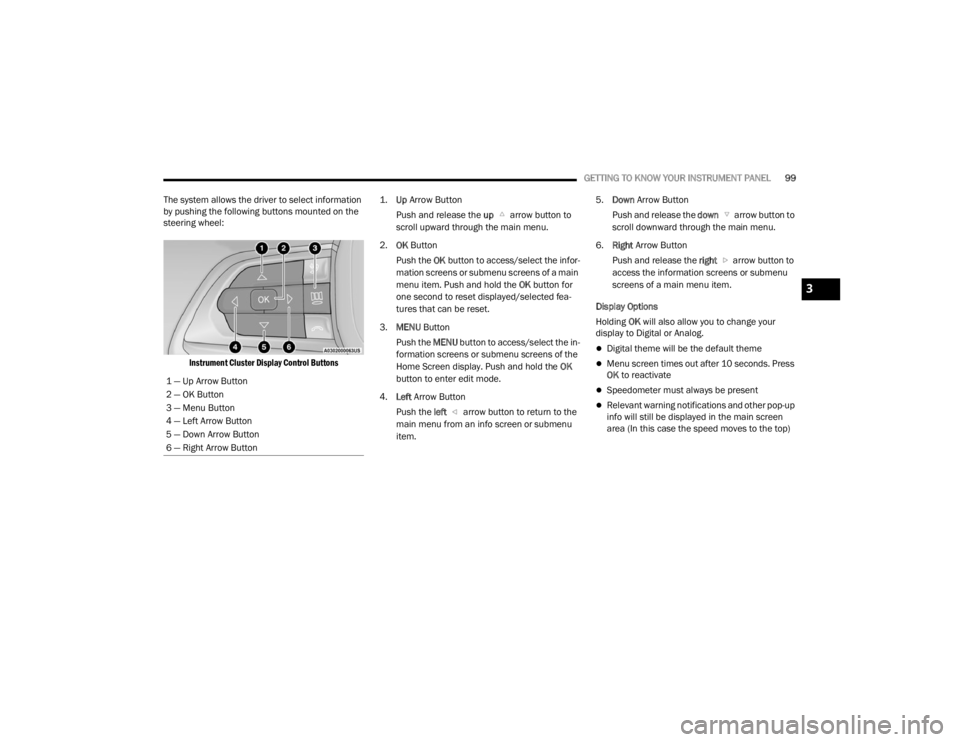
The system allows the driver to select information
by pushing the following buttons mounted on the
steering wheel:
Instrument Cluster Display Control Buttons
1.
Up
Arrow Button
Push and release the up arrow button to
scroll upward through the main menu.
2. OK Button
Push the OK button to access/select the infor -
mation screens or submenu screens of a main
menu item. Push and hold the OK button for
one second to reset displayed/selected fea -
tures that can be reset.
3. MENU Button
Push the MENU button to access/select the in -
formation screens or submenu screens of the
Home Screen display. Push and hold the OK
button to enter edit mode.
4. Left Arrow Button
Push the left arrow button to return to the
main menu from an info screen or submenu
item. 5.
Down Arrow Button
Push and release the down arrow button to
scroll downward through the main menu.
6. Right Arrow Button
Push and release the right arrow button to
access the information screens or submenu
screens of a main menu item.
Display Options
Holding OK will also allow you to change your
display to Digital or Analog.
Digital theme will be the default theme
Menu screen times out after 10 seconds. Press
OK to reactivate
Speedometer must always be present
Relevant warning notifications and other pop-up
info will still be displayed in the main screen
area (In this case the speed moves to the top)
1 — Up Arrow Button
2 — OK Button
3 — Menu Button
4 — Left Arrow Button
5 — Down Arrow Button
6 — Right Arrow Button
3
23_WL_OM_EN_USC_t.book Page 99
Page 102 of 424
100GETTING TO KNOW YOUR INSTRUMENT PANEL
Custom Tile Configuration
To customize the instrument cluster further, you
are able to select up to five tiles to display
information based on your needs.
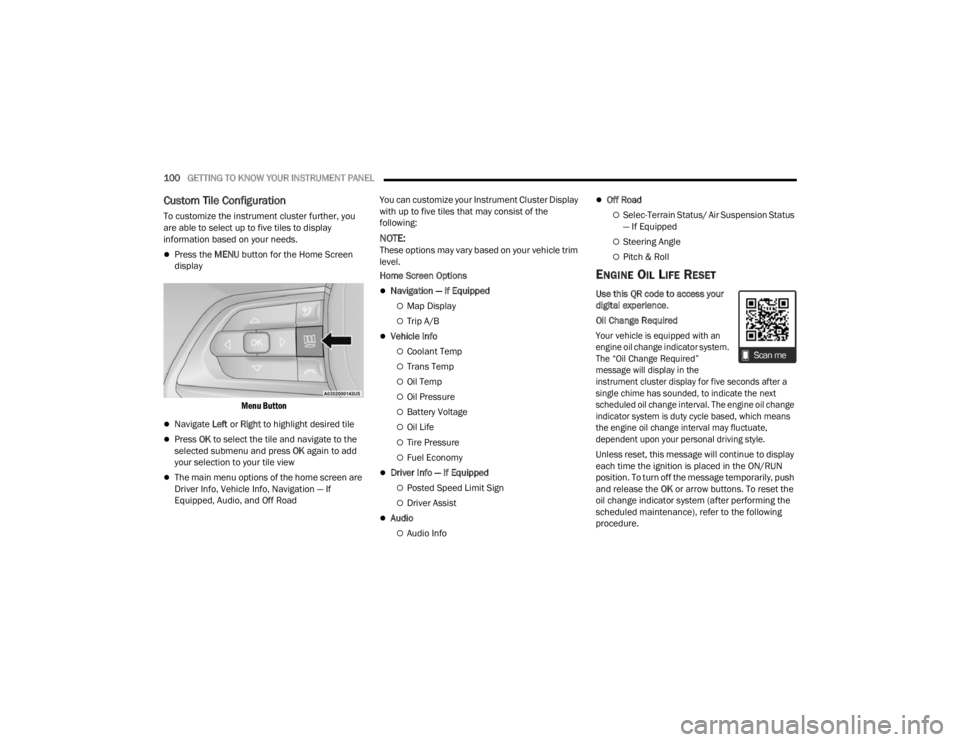
Press the MENU button for the Home Screen
display
Menu Button
Navigate Left or Right to highlight desired tile
Press OK to select the tile and navigate to the
selected submenu and press OK again to add
your selection to your tile view
The main menu options of the home screen are
Driver Info, Vehicle Info, Navigation — If
Equipped, Audio, and Off Road You can customize your Instrument Cluster Display
with up to five tiles that may consist of the
following:
NOTE:These options may vary based on your vehicle trim
level.
Home Screen Options
Navigation — If Equipped
Map Display
Trip A/B
Vehicle Info
Coolant Temp
Trans Temp
Oil Temp
Oil Pressure
Battery Voltage
Oil Life
Tire Pressure
Fuel Economy
Driver Info — If Equipped
Posted Speed Limit Sign
Driver Assist
Audio
Audio Info
Off Road
Selec-Terrain Status/ Air Suspension Status
— If Equipped
Steering Angle
Pitch & Roll
ENGINE OIL LIFE RESET
Use this QR code to access your
digital experience
.
Oil Change Required
Your vehicle is equipped with an
engine oil change indicator system.
The “Oil Change Required”
message will display in the
instrument cluster display for five seconds after a
single chime has sounded, to indicate the next
scheduled oil change interval. The engine oil change
indicator system is duty cycle based, which means
the engine oil change interval may fluctuate,
dependent upon your personal driving style.
Unless reset, this message will continue to display
each time the ignition is placed in the ON/RUN
position. To turn off the message temporarily, push
and release the OK or arrow buttons. To reset the
oil change indicator system (after performing the
scheduled maintenance), refer to the following
procedure.
23_WL_OM_EN_USC_t.book Page 100
Page 103 of 424
GETTING TO KNOW YOUR INSTRUMENT PANEL101
Vehicles Equipped With Keyless Enter ‘n Go™
Ignition
Use the steering wheel instrument cluster display
controls for the following procedure(s):
1. Without pressing the brake pedal, push the ENGINE START/STOP button and place the
ignition in the ON/RUN position (do not start
the engine).
2. Push and release the down arrow button to
scroll downward through the main menu to
“Vehicle Info”.
3. Push and release the right arrow button to access the “Oil Life” screen.
4. Push and hold the OK button to reset oil life. If
conditions are met, the gauge and numeric
display will update to show 100%. If conditions
are not met a pop-up message of “To reset oil
life engine must be off with ignition in run” will
be displayed (for five seconds), and the user
will remain at the Oil Life screen.
5. Push and release the up or down arrow
button to exit the submenu screen.
NOTE:If the indicator message illuminates when you start
the vehicle, the oil change indicator system did not
reset. If necessary, repeat this procedure. Secondary Method Of Resetting Engine Oil Life
1. Without pressing the brake pedal, push the
ENGINE START/STOP button and place the
ignition to the ON/RUN position (do not start
the engine).
2. Fully press the accelerator pedal, slowly, three times within 10 seconds.
3. Without pushing the brake pedal, push the ENGINE START/STOP button once to return the
ignition to the OFF position.
NOTE:If the indicator message illuminates when you start
the vehicle, the oil change indicator system did not
reset. If necessary, repeat this procedure.
DISPLAY AND MESSAGES
The instrument cluster display is located in the
center portion of the cluster and consist of multiple
sections:
Main Screen — The inner ring of the display will
illuminate in black under normal conditions,
yellow for non critical warnings and red for crit -
ical warnings
Submenu Dots — Whenever there are
submenus available, the position within the
submenus is shown here
Reconfigurable Telltales/Information
Gear Selector Status (PRND)
Driver Interactive Display (Compass, Temp,
Range to Empty, Trip A, Trip B, Average Fuel
Economy, Current Fuel Economy and Time)
Air Suspension Status — If Equipped
Four-Wheel Drive (4WD) Status — If Equipped
The instrument cluster display will normally display
the main menu or the screens of a selected feature
of the main menu. The main display area also
displays pop-up messages and warning or
information messages. These pop-up messages
fall into several categories:
Five Second Stored Messages
When the appropriate conditions occur, this
type of message takes control of the main
display area for five seconds and then returns to
the previous screen. Most of the messages of
this type are then stored (as long as the condi-
tion that activated it remains active) and can be
reviewed from the “Messages” main menu item.
Examples of this message type are “Right Front
Turn Signal Lamp Out” and “Low Tire Pressure”.
Unstored Messages
This message type is displayed indefinitely or
until the condition that activated the message is
cleared. Examples of this message type are
“Turn Signal On” (if a turn signal is left on) and
“Lights On” (if driver leaves the vehicle with the
lights on).
3
23_WL_OM_EN_USC_t.book Page 101
Page 104 of 424

102GETTING TO KNOW YOUR INSTRUMENT PANEL
Unstored Messages Until RUN
These messages deal primarily with the Remote
Start feature. This message type is displayed
until the ignition is in the RUN state. Examples of
this message type are “Remote Start Canceled - Door Ajar” and “Press Brake Pedal and Push
Button to Start”.
Five Second Unstored Messages
When the appropriate conditions occur, this
type of message takes control of the main display area for five seconds and then returns to
the previous screen. An example of this
message type is “Automatic High Beams On”.
Includes the following, but not limited to:
The Reconfigurable Telltales section is divided into the white or yellow telltales area on the left, and the green or red telltales area on the right. Vehicle Speed is Too High to Shift to R
Front Seat Belts UnbuckledDriver Seat Belt Unbuckled
Doors Open Passenger Seat Belt UnbuckledTraction Control Off
Vehicle Speed Too High To Shift to D Washer Fluid LowOil Pressure Low
Hood Open Oil Change DueFuel Low
Shift Not Allowed Service Anti-lock Brake SystemService Electronic Throttle Control
Service Shifter Service Power SteeringCruise Off
Vehicle Speed is Too High to Shift to P Cruise ReadyACC Override
Service Transmission Cruise Set To XXX mph or km/hClose Fuel Door
Liftgate Open Vehicle Not In ParkService Tire Pressure System
Door Open Park Brake EngagedBrake Fluid Low
Service Air Bag Warning Light Lights OnEngine Temperature Hot
Remote Start Disabled Start To Reset Right Front Turn Signal Light OutRight Rear Turn Signal Light Out
Service Air Bag System Left Front Turn Signal Light OutLeft Rear Turn Signal Light Out
Remote Start Canceled Liftgate Open Ignition OnCheck The Rear Seat
Remote Start Canceled Time Expired Remote Start Active Push Start ButtonRemote Start Canceled Fuel Low
Remote Start Canceled Hood Open Remote Start Canceled Door Open
23_WL_OM_EN_USC_t.book Page 102
Page 105 of 424
GETTING TO KNOW YOUR INSTRUMENT PANEL103
INSTRUMENT CLUSTER DISPLAY MENU
I
TEMS
The instrument cluster display can be used to view
the main menu items for several features. Use the
up and down arrow buttons to scroll through
the driver interactive display menu options until
the desired menu is reached.
NOTE:Depending on the vehicle’s options, feature
settings may vary.
Main Menu
DRIVER INFO
Push and release the up or down arrow
button until the Drive menu title is displayed in the
instrument cluster display.
Speedometer
Push and release the up or down arrow
button until the Speedometer menu title is
displayed in the instrument cluster display. Push
and release the OK button to toggle units (mph or
km/h) of the speedometer. Hold the OK button to
toggle between Analog and Digital speedometer. Night Vision — If Equipped
While viewing the Speedometer menu
title, push and release the left or
right arrow button until the Night
Vision menu title is displayed in the instrument
cluster display. Pedestrian/Animal icons will be
displayed in the top left location Ú page 177.
Driver Assist — If Equipped
While viewing the Speedometer menu title, push
and release the left or right arrow button
until the Driver Assist menu title is displayed in the
instrument cluster display. The Driver Assist
screen indicates the current status of ACC, Active
Lane Management and Active Driving Assist/
Assist+/Pilot. Push and release the OK button
again to change between Zoomed In and Zoomed
Out view (“Press OK to Zoom In” will display when
in Zoomed Out view/“Press OK to Zoom Out” will
display when in Zoomed In view).
VEHICLE INFO
Push and release the up or down arrow
button until the Vehicle Info title is highlighted in
the instrument cluster display. Push the left or
right arrow button to scroll through the
information submenus. Fuel Economy
Average Fuel Economy
Current Fuel Economy
Range To Empty
Press the OK button to reset the average fuel
economy
NOTE:The Range feature is not able to be reset through
the instrument cluster display controls.
Gauge Summary
Coolant Temperature — If Equipped
Displays the current temperature of the coolant.
Transmission Temperature
Displays the actual transmission temperature.
Oil Temperature
Displays the actual oil temperature.
Oil Pressure
Displays the actual oil pressure.
Battery Voltage
Displays the current voltage level of the battery.
Oil Life
Displays the current oil life of the vehicle.
3
23_WL_OM_EN_USC_t.book Page 103
Page 106 of 424
104GETTING TO KNOW YOUR INSTRUMENT PANEL
Tire Pressure Monitor System
If tire pressure is OK for all tires a vehicle icon is
displayed with tire pressure values in each
corner of the icon.
If one or more tires have low pressure, “Inflate
Tire To XX” is displayed with the vehicle icon and
the tire pressure values in each corner of the
icon with the pressure value of the low tire are
displayed in a different color than the other tire
pressure value.
If the Tire Pressure system requires service,
“Service Tire Pressure System” is displayed.
Tire Pressure is an information only function, and
cannot be reset Ú page 264.
Stop/Start Status — If Equipped
Display current status of Stop/Start system.
TRIP
Push and release the up or down arrow
button until the Trip menu title is displayed in the
instrument cluster display. Toggle the left or
right arrow button to select Trip A or Trip B. The
Trip information will display the following:
Distance – Shows the total distance (mi or km)
traveled for Trip A or Trip B since the last reset.
Average Fuel Economy – Shows the average
fuel economy (MPG or L/100 km or km/L) of
Trip A or Trip B since the last reset.
Elapsed Time – Shows the total elapsed time of
travel since Trip A or Trip B has been reset.
Hold the OK button to reset feature information.
NAVIGATION — IF EQUIPPED
Push and release the up or down arrow
button until the Navigation display title is
highlighted in the instrument cluster display.
OFF ROAD
Push and release the up or down arrow
button until the Off Road Menu title is highlighted.
Push the left or right arrow button to scroll
the submenus.
Terrain Status — If Equipped
Selec-Terrain Status
Air Suspension Status
Vehicle Dynamics
Wheel Articulation
Transfer Case Status — If Equipped
Steering Angle
Sway Bar Status — If Equipped
Axle Lock Status — If Equipped
Pitch And Roll
Vehicle Pitch
Vehicle Roll
AUDIO
Push and release the up or down arrow
button until the Audio Menu title is highlighted in
the instrument cluster display. This menu will
display the audio source information, including the
Song name, Artist name, and audio source with an
accompanying graphic.
STORED MESSAGES
Push and release the up or down arrow
button until the Messages Menu item is
highlighted. This feature shows the number of
stored warning messages. Pushing the left or
right arrow button will allow you to see what the
stored messages are.
SETTINGS
NOTE:
The Head Up Display (HUD) – If Equipped feature
Settings are available at any vehicle speed
Ú page 105.
23_WL_OM_EN_USC_t.book Page 104
Page 128 of 424
126STARTING AND OPERATING
(Continued)
(Continued)
Maintenance Mode has requirements that must be
met in order to be activated:
The vehicle must be at a standstill.
The parking brake must be unapplied.
The transmission must be in PARK or NEUTRAL.
While in Maintenance Mode, the EPB Warning
Light will flash continuously while the ignition is
ON.
When brake maintenance work is complete, the
following steps must be followed to reset the
parking brake system to normal operation:
Ensure the vehicle is at a standstill.
Press the brake pedal with moderate force.
Apply the EPB Switch.
AUTOMATIC TRANSMISSION
You must press and hold the brake pedal while
shifting out of PARK.
WARNING!
You can be badly injured working on or around a
motor vehicle. Do only that service work for
which you have the knowledge and the right
equipment. If you have any doubt about your
ability to perform a service job, take your vehicle
to a competent mechanic.
WARNING!
Never use the PARK (P) position as a substi -
tute for the parking brake. Always apply the
parking brake fully when exiting the vehicle to
guard against vehicle movement and possible
injury or damage.
Your vehicle could move and injure you and
others if it is not in PARK. Check by trying to
move the transmission gear selector out of
PARK with the brake pedal released. Make
sure the transmission is in PARK before
exiting the vehicle.
The transmission may not engage PARK if the
vehicle is moving. Always bring the vehicle to a
complete stop before shifting to PARK, and
verify that the transmission gear position indi -
cator solidly indicates PARK without blinking.
Ensure that the vehicle is completely stopped,
and the PARK position is properly indicated,
before exiting the vehicle.
It is dangerous to shift out of PARK or
NEUTRAL (N) if the engine speed is higher
than idle speed. If your foot is not firmly
pressing the brake pedal, the vehicle could
accelerate quickly forward or in reverse. You
could lose control of the vehicle and hit
someone or something. Only shift into gear
when the engine is idling normally and your
foot is firmly pressing the brake pedal.
Unintended movement of a vehicle could
injure those in or near the vehicle. As with all
vehicles, you should never exit a vehicle while
the engine is running. Before exiting a vehicle,
always come to a complete stop, then apply
the parking brake, shift the transmission into
PARK, and turn the ignition OFF. When the
ignition is in the OFF position, the transmis -
sion is locked in PARK, securing the vehicle
against unwanted movement.
When exiting the vehicle, always make sure
the ignition is in the OFF position, remove the
key fob from the vehicle, and lock the vehicle.
WARNING!
23_WL_OM_EN_USC_t.book Page 126
Page 131 of 424
STARTING AND OPERATING129
NEUTRAL (N)
Use this range when the vehicle is standing for
prolonged periods with the engine running. Apply
the parking brake and shift the transmission into
PARK (P) if you must exit the vehicle.
DRIVE (D)
This range should be used for most city and
highway driving. It provides the smoothest upshifts
and downshifts, and the best fuel economy. The
transmission automatically upshifts through all
forward gears. When frequent transmission shifting occurs (such
as when operating the vehicle under heavy loading
conditions, in hilly terrain, traveling into strong
head winds, or while towing a heavy trailer), use
the AutoStick shift control to select a lower gear
Ú
page 130. Under these conditions, using a lower
gear will improve performance and extend
transmission life by reducing excessive shifting
and heat buildup.
During cold temperatures, transmission operation
may be modified depending on engine and
transmission temperature as well as vehicle
speed. This feature improves warm-up time of the
engine and transmission to achieve maximum
efficiency. Engagement of the torque converter
clutch is inhibited until the transmission fluid is
warm. Normal operation will resume once the
transmission temperature has risen to a suitable
level.
Transmission Limp Home Mode
Transmission function is monitored electronically
for abnormal conditions. If a condition is detected
that could result in transmission damage,
Transmission Limp Home Mode is activated. In this
mode, the transmission may operate only in
certain gears, or may not shift at all. Vehicle
performance may be severely degraded and the
engine may stall. In some situations, the
transmission may not re-engage if the engine is
turned off and restarted. The Malfunction Indicator Light (MIL) may be illuminated. A message in the
instrument cluster will inform the driver of the
more serious conditions, and indicate what actions
may be necessary.
In the event of a momentary problem, the
transmission can be reset to regain all forward
gears by performing the following steps:
NOTE:In cases where the instrument cluster message
indicates the transmission may not re-engage after
engine shutdown, perform this procedure only in a
desired location (preferably, at an authorized
dealer).
1. Stop the vehicle.
2. Shift the transmission into PARK (P), if
possible. If not, shift the transmission to
NEUTRAL (N).
3. Push and hold the ignition switch until the engine turns off.
4. Wait approximately 30 seconds.
5. Restart the engine.
6. Shift into the desired gear range. If the problem is no longer detected, the
transmission will return to normal operation.
WARNING!
Do not coast in NEUTRAL and never turn off the
ignition to coast down a hill. These are unsafe
practices that limit your response to changing
traffic or road conditions. You might lose control
of the vehicle and have a collision.
CAUTION!
Towing the vehicle, coasting, or driving for any
other reason with the transmission in NEUTRAL
can cause severe transmission damage.
For Recreational Towing see Ú page 195.
For Towing A Disabled Vehicle see Ú page 326.
4
23_WL_OM_EN_USC_t.book Page 129
Page 132 of 424
130STARTING AND OPERATING
NOTE:Even if the transmission can be reset, we
recommend that you visit an authorized dealer at
your earliest possible convenience. An authorized
dealer has diagnostic equipment to assess the
condition of your transmission.
If the transmission cannot be reset, authorized
dealer service is required.
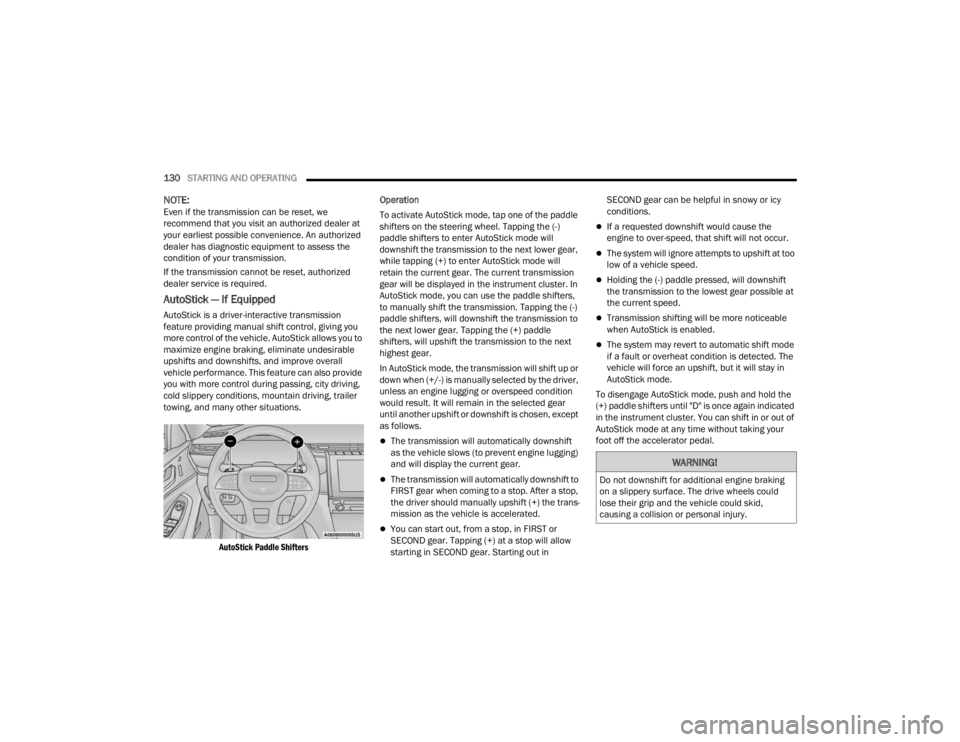
AutoStick — If Equipped
AutoStick is a driver-interactive transmission
feature providing manual shift control, giving you
more control of the vehicle. AutoStick allows you to
maximize engine braking, eliminate undesirable
upshifts and downshifts, and improve overall
vehicle performance. This feature can also provide
you with more control during passing, city driving,
cold slippery conditions, mountain driving, trailer
towing, and many other situations.
AutoStick Paddle Shifters
Operation
To activate AutoStick mode, tap one of the paddle
shifters on the steering wheel. Tapping the (-)
paddle shifters to enter AutoStick mode will
downshift the transmission to the next lower gear,
while tapping (+) to enter AutoStick mode will
retain the current gear. The current transmission
gear will be displayed in the instrument cluster. In
AutoStick mode, you can use the paddle shifters,
to manually shift the transmission. Tapping the (-)
paddle shifters, will downshift the transmission to
the next lower gear. Tapping the (+) paddle
shifters, will upshift the transmission to the next
highest gear.
In AutoStick mode, the transmission will shift up or
down when (+/-) is manually selected by the driver,
unless an engine lugging or overspeed condition
would result. It will remain in the selected gear
until another upshift or downshift is chosen, except
as follows.
The transmission will automatically downshift
as the vehicle slows (to prevent engine lugging)
and will display the current gear.
The transmission will automatically downshift to
FIRST gear when coming to a stop. After a stop,
the driver should manually upshift (+) the trans
-
mission as the vehicle is accelerated.
You can start out, from a stop, in FIRST or
SECOND gear. Tapping (+) at a stop will allow
starting in SECOND gear. Starting out in SECOND gear can be helpful in snowy or icy
conditions.
If a requested downshift would cause the
engine to over-speed, that shift will not occur.
The system will ignore attempts to upshift at too
low of a vehicle speed.
Holding the (-) paddle pressed, will downshift
the transmission to the lowest gear possible at
the current speed.
Transmission shifting will be more noticeable
when AutoStick is enabled.
The system may revert to automatic shift mode
if a fault or overheat condition is detected. The
vehicle will force an upshift, but it will stay in
AutoStick mode.
To disengage AutoStick mode, push and hold the
(+) paddle shifters until "D" is once again indicated
in the instrument cluster. You can shift in or out of
AutoStick mode at any time without taking your
foot off the accelerator pedal.
WARNING!
Do not downshift for additional engine braking
on a slippery surface. The drive wheels could
lose their grip and the vehicle could skid,
causing a collision or personal injury.
23_WL_OM_EN_USC_t.book Page 130