lights JEEP GRAND CHEROKEE 2023 Service Manual
[x] Cancel search | Manufacturer: JEEP, Model Year: 2023, Model line: GRAND CHEROKEE, Model: JEEP GRAND CHEROKEE 2023Pages: 424, PDF Size: 15.48 MB
Page 179 of 424
STARTING AND OPERATING177
Cleaning The TrailCam
Press and hold the Clean Camera button located
on the TrailCam view to wash the TrailCam. Washer
fluid will stop when the button is released. The
camera can be washed up to 20 seconds at a time
while holding the button.
NOTE:
Pressing the Clean Camera button will also
wash the Night Vision camera (if equipped).
If the front window washer feature is activated,
all of the front cameras on the vehicle will be
washed as well. The front camera washers will
not operate when the low washer fluid warning
is displayed.
When enabled, active dynamic tire lines are
projected on the ground plane of the TrailCam view
based on the steering wheel position.
FAMCAM SYSTEM — IF EQUIPPED
The FamCam system consists of an interior
monitoring camera mounted on the headliner that
allows the driver to view cargo/passengers in the
rear interior of the vehicle through the Uconnect
screen. To activate the feature, press the
FamCam button in the Controls tab of the
Vehicle menu. The FamCam feature can
also be accessed from the App Drawer, or
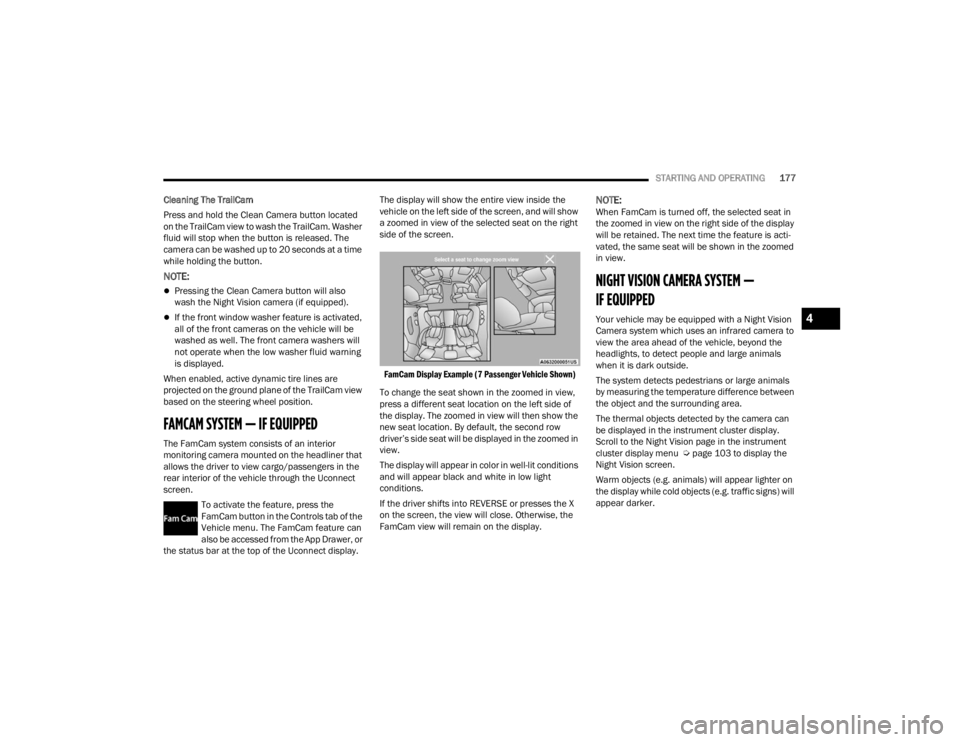
the status bar at the top of the Uconnect display. The display will show the entire view inside the
vehicle on the left side of the screen, and will show
a zoomed in view of the selected seat on the right
side of the screen.
FamCam Display Example (7 Passenger Vehicle Shown)
To change the seat shown in the zoomed in view,
press a different seat location on the left side of
the display. The zoomed in view will then show the
new seat location. By default, the second row
driver’s side seat will be displayed in the zoomed in
view.
The display will appear in color in well-lit conditions
and will appear black and white in low light
conditions.
If the driver shifts into REVERSE or presses the X
on the screen, the view will close. Otherwise, the
FamCam view will remain on the display.
NOTE:When FamCam is turned off, the selected seat in
the zoomed in view on the right side of the display
will be retained. The next time the feature is acti -
vated, the same seat will be shown in the zoomed
in view.
NIGHT VISION CAMERA SYSTEM —
IF EQUIPPED
Your vehicle may be equipped with a Night Vision
Camera system which uses an infrared camera to
view the area ahead of the vehicle, beyond the
headlights, to detect people and large animals
when it is dark outside.
The system detects pedestrians or large animals
by measuring the temperature difference between
the object and the surrounding area.
The thermal objects detected by the camera can
be displayed in the instrument cluster display.
Scroll to the Night Vision page in the instrument
cluster display menu Ú page 103 to display the
Night Vision screen.
Warm objects (e.g. animals) will appear lighter on
the display while cold objects (e.g. traffic signs) will
appear darker.4
23_WL_OM_EN_USC_t.book Page 177
Page 180 of 424
178STARTING AND OPERATING
NOTE:
Night Vision only shows objects of interest that
are warmer or colder than the surroundings.
Adjust the instrument cluster dimmer control
brightness to make the image appear brighter
or dimmer.
To exit out of the Night Vision screen, select a
different menu in the instrument cluster display.
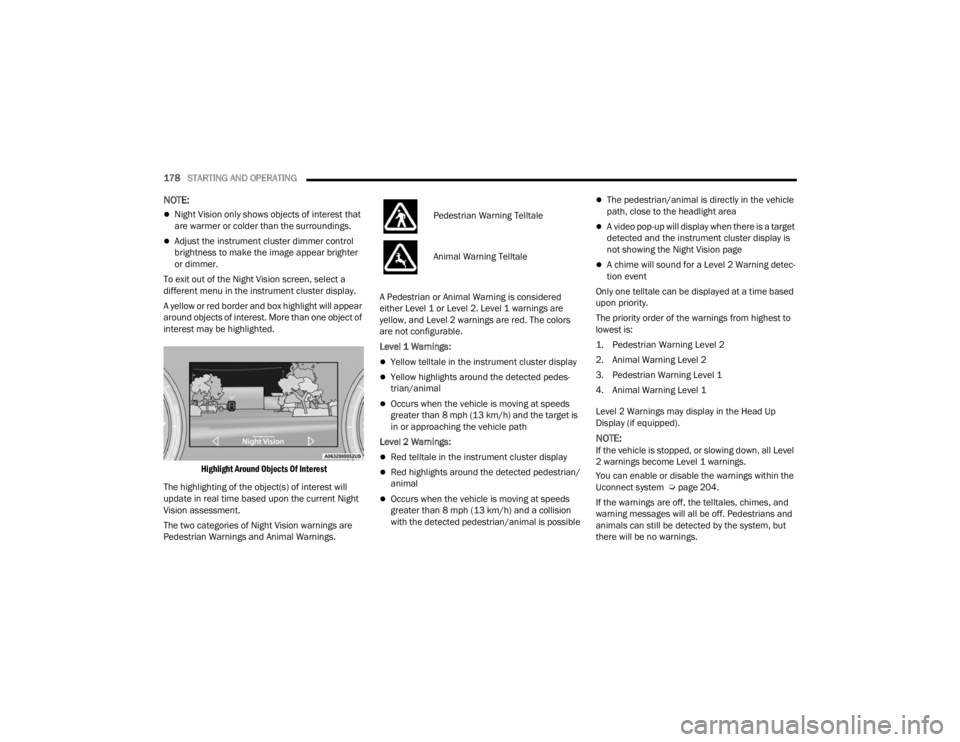
A yellow or red border and box highlight will appear
around objects of interest. More than one object of
interest may be highlighted.
Highlight Around Objects Of Interest
The highlighting of the object(s) of interest will
update in real time based upon the current Night
Vision assessment.
The two categories of Night Vision warnings are
Pedestrian Warnings and Animal Warnings. A Pedestrian or Animal Warning is considered
either Level 1 or Level 2. Level 1 warnings are
yellow, and Level 2 warnings are red. The colors
are not configurable.
Level 1 Warnings:
Yellow telltale in the instrument cluster display
Yellow highlights around the detected pedes
-
trian/animal
Occurs when the vehicle is moving at speeds
greater than 8 mph (13 km/h) and the target is
in or approaching the vehicle path
Level 2 Warnings:
Red telltale in the instrument cluster display
Red highlights around the detected pedestrian/
animal
Occurs when the vehicle is moving at speeds
greater than 8 mph (13 km/h) and a collision
with the detected pedestrian/animal is possible
The pedestrian/animal is directly in the vehicle
path, close to the headlight area
A video pop-up will display when there is a target
detected and the instrument cluster display is
not showing the Night Vision page
A chime will sound for a Level 2 Warning detec-
tion event
Only one telltale can be displayed at a time based
upon priority.
The priority order of the warnings from highest to
lowest is:
1. Pedestrian Warning Level 2
2. Animal Warning Level 2
3. Pedestrian Warning Level 1
4. Animal Warning Level 1
Level 2 Warnings may display in the Head Up
Display (if equipped).
NOTE:If the vehicle is stopped, or slowing down, all Level
2 warnings become Level 1 warnings.
You can enable or disable the warnings within the
Uconnect system Ú page 204.
If the warnings are off, the telltales, chimes, and
warning messages will all be off. Pedestrians and
animals can still be detected by the system, but
there will be no warnings.
Pedestrian Warning Telltale
Animal Warning Telltale
23_WL_OM_EN_USC_t.book Page 178
Page 182 of 424

180STARTING AND OPERATING
SERVICE THE NIGHT VISION SYSTEM
When service conditions are present, the following
fault messages may appear in the instrument
cluster display when the vehicle is placed in the ON
position.
If "Night Vision Unavailable Sensor Blocked"
appears in the instrument cluster display, make
sure the camera is clear of snow, ice, mud, dirt or
other debris. The camera is located in the upper
fascia/bumper, inside the driver side grille slot.
Clean the camera using a soft wet cloth or by
pressing the Clean Camera button in the Uconnect
system. If the message continues to appear after
cycling the ignition, see an authorized dealer.
If “Night Vision Temporarily Unavailable” or “Night
Vision Unavailable Service Required" appears in
the instrument cluster display after cycling the
ignition, see an authorized dealer.
The camera must be properly aligned to work
correctly. If the camera needs adjustment, see an
authorized dealer. Do not attempt to adjust the
camera yourself.
NOTE:Alignment and performance of the Night Vision
may be affected by aftermarket modifications.
Mopar® parts should be used to get the optimal
performance of this system.
NIGHT VISION SYSTEM LIMITATIONS
The Night Vision display is deactivated under the
following conditions:
Vehicle is shifted into REVERSE
The ignition is not in the ON/RUN position
The headlights are off and the vehicle speed is
greater than 8 mph (13 km/h)
The Night Vision display warnings are suppressed
under the following conditions:
Daylight hours
Temperatures above 86°F (30°C)
The system may not be fully functional in the
following situations:
On steep hills
On tight curves of the road
If the camera/sensor is damaged or blocked by
dirt, snow, ice, or other debris
In poor visibility conditions such as heavy fog,
rain, snow, or other weather conditions
If the vehicle has been modified with after -
market parts and/or accessories
NOTE:If any of these conditions are present, the system
does not need service.
WARNING!
Night Vision can only detect pedestrians and
animals located within the range of the
infrared camera.
Night Vision may not detect pedestrians or
animals and highlight them if:
They are not in an upright position, for
example if they are sitting or lying down, or
if the pedestrian is riding a bicycle
The figure in the display appears incom -
plete, for example because the pedes -
trian or animal is partially behind a vehicle
The pedestrian/animal is not directly
ahead in the coverage area
The pedestrian/animal is part of a group
The pedestrian is wearing certain types of
clothing
The pedestrian/animal is moving too
quickly through the field of view
The sensor is blocked by dirt, rain, snow,
or ice
23_WL_OM_EN_USC_t.book Page 180
Page 195 of 424
STARTING AND OPERATING193
Towing Requirements — Trailer Brakes
Do not interconnect the hydraulic brake system
or vacuum system of your vehicle with that of
the trailer. This could cause inadequate braking
and possible personal injury.
An electronically actuated trailer brake
controller is required when towing a trailer with
electronically actuated brakes. When towing a
trailer equipped with a hydraulic surge actuated
brake system, an electronic brake controller is
not required.
Trailer brakes are recommended for trailers
over 1,000 lb (453 kg) and required for trailers
in excess of 2,000 lb (907 kg).
Towing Requirements — Trailer Lights And
Wiring
Whenever pulling a trailer, regardless of the trailer
size, stop lights and turn signals on the trailer are
required for motoring safety.
The Trailer Tow Package may include a four- and
seven-pin wiring harness. Use a factory approved
trailer harness and connector.
NOTE:Do not cut or splice wiring into the vehicle’s wiring
harness.
The electrical connections are all complete to the
vehicle but you must mate the harness to a trailer
connector. Refer to the following illustrations.
NOTE:
Disconnect the trailer wiring connector from the
vehicle (or any other device plugged into
vehicle’s electrical connectors) before
launching a boat into water.
Be sure to reconnect once clear from water
area.
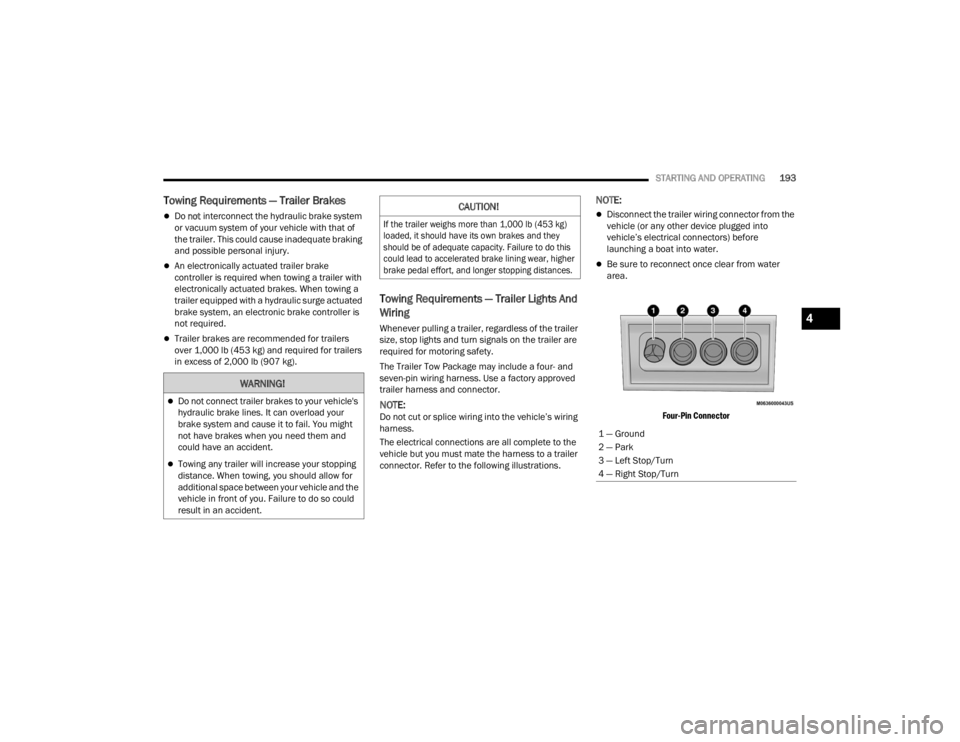
Four-Pin Connector
WARNING!
Do not connect trailer brakes to your vehicle's
hydraulic brake lines. It can overload your
brake system and cause it to fail. You might
not have brakes when you need them and
could have an accident.
Towing any trailer will increase your stopping
distance. When towing, you should allow for
additional space between your vehicle and the
vehicle in front of you. Failure to do so could
result in an accident.
CAUTION!
If the trailer weighs more than 1,000 lb (453 kg)
loaded, it should have its own brakes and they
should be of adequate capacity. Failure to do this
could lead to accelerated brake lining wear, higher
brake pedal effort, and longer stopping distances.
1 — Ground
2 — Park
3 — Left Stop/Turn
4 — Right Stop/Turn
4
23_WL_OM_EN_USC_t.book Page 193
Page 199 of 424
STARTING AND OPERATING197
Shifting Into Transfer Case N (NEUTRAL)
Use the following procedure to prepare your
vehicle for recreational towing:
1. Bring the vehicle to a complete stop on level
ground, with the engine running.
2. Press and hold the brake pedal.
3. Shift the transmission into NEUTRAL. 4. If vehicle is equipped with Quadra-Lift air
suspension, ensure the vehicle is set to
Normal Ride Height with the Auto Entry/Exit
setting deselected.
NOTE:
Steps 1 through 4 are requirements that
must be met before pushing the N
(NEUTRAL) button, and must continue to be
met until the shift has been completed. If
any of these requirements are not met
before pushing the N (NEUTRAL) button or
are no longer met during the shift, then the
N (NEUTRAL) indicator light will flash contin -
uously until all requirements are met or until
the N (NEUTRAL) button is released.
The ignition must be in the ON/RUN position
for a shift to take place and for the position
indicator lights to be operable. If the ignition
is not in the ON/RUN position, the shift will
not take place and no position indicator
lights will be on or flashing.
A flashing N (NEUTRAL) position indicator
light indicates that shift requirements have
not been met.
CAUTION!
DO NOT dolly tow any 4WD vehicle. Towing
with only one set of wheels on the ground
(front or rear) will cause severe transmission
and/or transfer case damage. Tow with all
four wheels either ON the ground, or OFF the
ground (using a vehicle trailer).
Tow only in a forward direction. Towing this
vehicle backwards can cause severe damage
to the transfer case.
The transmission must be in PARK for recre -
ational towing.
Before recreational towing, perform the proce -
dure outlined under “Shifting into N
(NEUTRAL)” to be certain that the transfer
case is fully in N (NEUTRAL). Otherwise,
internal damage will result.
Towing this vehicle in violation of the above
requirements can cause severe transmission
and/or transfer case damage. Damage from
improper towing is not covered under the New
Vehicle Limited Warranty.
Do not use a bumper-mounted clamp-on tow
bar on your vehicle. The bumper face bar will
be damaged.
WARNING!
You or others could be injured or killed if you
leave the vehicle unattended with the transfer
case in the N (NEUTRAL) position without first
fully engaging the Electric Park Brake. The
transfer case N (NEUTRAL) position disengages
both the front and rear driveshafts from the
powertrain and will allow the vehicle to roll, even
if the transmission is in PARK. The Electric Park
Brake should always be applied when the driver
is not in the vehicle.
CAUTION!
It is necessary to follow these steps to be certain
that the transfer case is fully in N (NEUTRAL)
before recreational towing to prevent damage to
internal parts.
4
23_WL_OM_EN_USC_t.book Page 197
Page 201 of 424
STARTING AND OPERATING199
NOTE:
Steps 1 through 5 are requirements that
must be met before pushing the N
(NEUTRAL) button, and must continue to be
met until the shift has been completed. If
any of these requirements are not met
before pushing the N (NEUTRAL) button or
are no longer met during the shift, the N
(NEUTRAL) indicator light will flash continu -
ously until all requirements are met or until
the N (NEUTRAL) button is released.
The ignition must be in the ON/RUN position
for a shift to take place and for the position
indicator lights to be operable. If the ignition
is not in the ON/RUN position, the shift will
not take place and no position indicator
lights will be on or flashing.
A flashing N (NEUTRAL) position indicator
light indicates that shift requirements have
not been met.
4. Press and hold the brake pedal.
5. Shift the transmission into NEUTRAL.
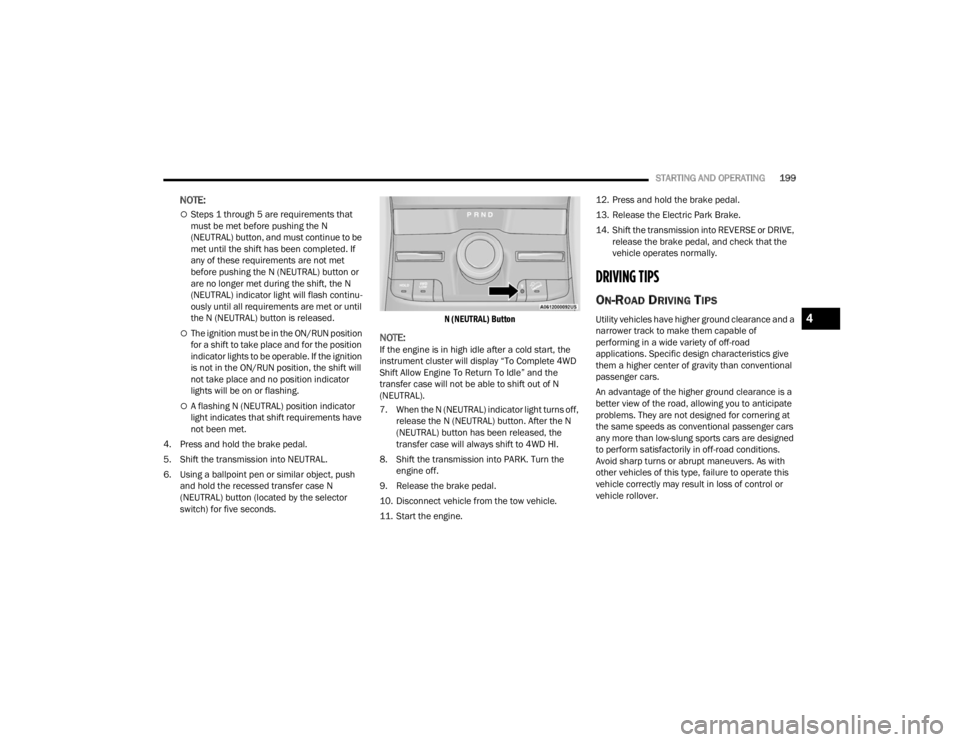
6. Using a ballpoint pen or similar object, push and hold the recessed transfer case N
(NEUTRAL) button (located by the selector
switch) for five seconds.
N (NEUTRAL) Button
NOTE:If the engine is in high idle after a cold start, the
instrument cluster will display “To Complete 4WD
Shift Allow Engine To Return To Idle” and the
transfer case will not be able to shift out of N
(NEUTRAL).
7. When the N (NEUTRAL) indicator light turns off,
release the N (NEUTRAL) button. After the N
(NEUTRAL) button has been released, the
transfer case will always shift to 4WD HI.
8. Shift the transmission into PARK. Turn the engine off.
9. Release the brake pedal.
10. Disconnect vehicle from the tow vehicle.
11. Start the engine. 12. Press and hold the brake pedal.
13. Release the Electric Park Brake.
14. Shift the transmission into REVERSE or DRIVE,
release the brake pedal, and check that the
vehicle operates normally.
DRIVING TIPS
ON-ROAD DRIVING TIPS
Utility vehicles have higher ground clearance and a
narrower track to make them capable of
performing in a wide variety of off-road
applications. Specific design characteristics give
them a higher center of gravity than conventional
passenger cars.
An advantage of the higher ground clearance is a
better view of the road, allowing you to anticipate
problems. They are not designed for cornering at
the same speeds as conventional passenger cars
any more than low-slung sports cars are designed
to perform satisfactorily in off-road conditions.
Avoid sharp turns or abrupt maneuvers. As with
other vehicles of this type, failure to operate this
vehicle correctly may result in loss of control or
vehicle rollover.4
23_WL_OM_EN_USC_t.book Page 199
Page 207 of 424

MULTIMEDIA205
Display
When the Display button is pressed on the touchscreen, the system will display the options related to the theme (if equipped), brightness, and color of the
touchscreen. The available settings are:
NOTE:Depending on the vehicle’s options, feature settings may vary.
Setting Name Description
Language This setting will change the language of the Uconnect system. The available
languages are English, French, Spanish, and Italian.
Display Mode This setting will allow you to set the brightness manually or have the system
set it automatically. The “Auto” setting has the system automatically adjust
the display brightness. The “Manual” setting will allow the user to adjust the
brightness of the display.
Display Brightness With Headlights ON This setting will allow you to set the brightness when the headlights are on. To
access this setting, Display Mode must be set to Manual. The “+” setting will
increase the brightness; the “-” will decrease the brightness.
Display Brightness With Headlights OFF This setting will allow you to set the brightness when the headlights are off. To
access this setting, Display Mode must be set to Manual. The “+” setting will
increase the brightness; the “-” will decrease the brightness.
Set Theme This setting will allow you to change the display theme.
Units This setting will allow you to change the units. The available options are
“Speed” (MPH or km/h), “Distance” (mi or km), “Current Consumption” (MPG
[US], MPG [UK], L/100 km, or km/L), “Pressure” (psi, kPa, or bar), and
“Temperature” (°C or °F) units of measurement independently.
5
23_WL_OM_EN_USC_t.book Page 205
Page 208 of 424

206MULTIMEDIA
Entertainment Screens
Theme Mode This setting will allow you to adjust the brightness of your theme. Setting
options are “Light”, “Dark” and “Auto”. Select to show themes in Light or Dark
mode. “Auto” changes the theme with the headlights.
Touchscreen Beep This setting will allow you to turn the touchscreen beep on or off.
Show Main Category Bar Labels
This setting will allow you to turn the bottom main category bar labels on or off.
Navigation Turn-by-Turn Displayed In Cluster This setting will display Navigation prompts in the Instrument Cluster Display.
Phone Pop-ups Displayed In Cluster This setting will display smartphone notifications and messages in the
Instrument Cluster Display.
Ready To Drive Pop-ups This setting will enable the Ready To Drive pop-ups in the Instrument Cluster
Display.
Massage Pop-Up Displayed With Button Press This setting will activate or deactivate the massage feature pop-ups.
Setting NameDescription
When the Entertainment Screens button is pressed on the touchscreen, the system displays the different options related to the vehicle’s Entertainment.
NOTE:Depending on the vehicle’s options, feature settings may vary.
Setting NameDescription
Passenger Screen Permissions This setting will enable or disable Passenger Screen Permissions. Options
within this setting are “Navigation”, “Device Manager”, and “Uconnect
Theater”, and each have “On” and “Off” options.
Rear Seat Screen Permissions This setting will enable or disable your Rear Seat Screen Permissions. “On”
and “Off” options are found within “Navigation”.
23_WL_OM_EN_USC_t.book Page 206
Page 209 of 424

MULTIMEDIA207
My Profile
When the My Profile button is pressed on the touchscreen, the system displays options related to the vehicle’s profiles.
NOTE:Depending on the vehicle’s options, feature settings may vary.
Setting Name Description
Language This setting will change the language of the Uconnect system. The available
languages are English, French, Spanish, and Italian.
Display Mode This setting will allow you to set the brightness manually or have the system
set it automatically. The “Auto” setting has the system automatically adjust
the display brightness. The “Manual” setting will allow the user to adjust the
brightness of the display.
Display Brightness Headlights On This setting will allow you to set the brightness when the headlights are on. To
access this setting, Display Mode must be set to “Manual”. The “+” setting will
increase the brightness; the “-” will decrease the brightness.
Display Brightness Headlights Off This setting will allow you to set the brightness when the headlights are off. To
access this setting, Display Mode must be set to “Manual”. The “+” setting will
increase the brightness; the “-” will decrease the brightness.
Theme Mode This setting will allow you to adjust the brightness of your theme. Setting
options are “Light”, “Dark” and “Auto”. Select to show themes in Light or Dark
mode. “Auto” changes the theme with the headlights.
Units This setting will allow you to change the units. The available options are
“Speed” (MPH or km/h), “Distance” (mi or km), “Current Consumption” (MPG
[US], MPG [UK], L/100 km, or km/L), “Pressure” (psi, kPa, or bar), and
“Temperature” (°C or °F) units of measurement independently.
Touchscreen Beep This setting will allow you to turn the touchscreen beep on or off.
5
23_WL_OM_EN_USC_t.book Page 207
Page 214 of 424

212MULTIMEDIA
Night Vision Video Warning This setting will turn the Night Vision Video Warning and green/gray cluster
indicator light on or off.
ParkSense This setting will change the type of ParkSense alert when a close object is
detected and can provide both an audible chime and a visual display.
Front ParkSense Volume This setting adjusts the volume of the Front ParkSense system. The available
settings are “Low”, “Medium”, and “High”.
Rear ParkSense Volume This setting adjusts the volume of the Rear ParkSense system. The available
settings are “Low”, “Medium”, and “High”.
Rear ParkSense Braking Assist This setting will turn the Rear ParkSense Braking Assist on or off.
Side Distance Warning This setting will turn the Side Distance Warning on or off.
Drowsy Driver Detection This setting will monitor the driver’s driving habits and warn you of any
changes, indicating that the driver may be drowsy. The available options are
“On” and “Off”.
Blind Spot Alert This setting will change the type of alert provided when an object is detected
in a vehicle’s blind spot. The “Off” setting will turn off Blind Spot Alert. The
“Lights” setting will activate the Blind Spot Alert lights on the outside mirrors.
The “Lights & Chime” setting will activate the lights on the outside mirrors and
an audible chime.
Electric Power Steering Default This setting will change the Electric Power Steering Default. The available
options are “Comfort” for a lower effort steering experience, “Normal” for the
standard effort steering experience, and “Sport” for a higher effort steering
experience.
Hill Start Assist This setting will turn the Hill Start Assist system on or off.
Tire Fill Assist This setting will turn Tire Fill Assist on or off.
Setting NameDescription
23_WL_OM_EN_USC_t.book Page 212