ESP JEEP GRAND CHEROKEE 2023 Owners Manual
[x] Cancel search | Manufacturer: JEEP, Model Year: 2023, Model line: GRAND CHEROKEE, Model: JEEP GRAND CHEROKEE 2023Pages: 424, PDF Size: 15.48 MB
Page 2 of 424
WARNING: Operating, servicing and maintaining a passenger vehicle or off-highway
motor vehicle can expose you to chemicals including engine exhaust, carbon monoxide,
phthalates, and lead, which are known to the State of California to cause cancer and
birth defects or other reproductive harm. To minimize exposure, avoid breathing exhaust,
do not idle the engine except as necessary, service your vehicle in a well-ventilated area
and wear gloves or wash your hands frequently when servicing your vehicle. For more
information go to www.P65Warnings.ca.gov/passenger-vehicle.
The driver’s primary responsibility is the safe operation of the vehicle. Driving while distracted can result in loss of vehicle control, resulting in an accident
and personal injury. FCA US LLC strongly recommends that the driver use extreme caution when using any device or feature that may take their attention
off the road. Use of any electrical devices, such as cellular telephones, computers, portable radios, vehicle navigation or other devices by the driver while
the vehicle is moving is dangerous and could lead to a serious accident. Texting while driving is also dangerous and should never be done while the vehicle
is moving. If you find yourself unable to devote your full attention to vehicle operation, pull off the road to a safe location and stop your vehicle. Some states
or provinces prohibit the use of cellular telephones or texting while driving. It is always the driver’s responsibility to comply with all local laws.
This Owner’s Manual has been prepared to help you get acquainted with your new Jeep
® brand vehicle and to provide a convenient reference source for
common questions.
Not all features shown in this manual may apply to your vehicle. For additional information, visit mopar.com/om (USA), owners.mopar.ca (Canada) or your
local Jeep
® brand dealer.
U.S. Residents: If you are the first registered retail owner of your vehicle, you may obtain a complimentary printed copy of the Warranty Booklet by calling
1-877-426-5337 or by contacting your dealer. Replacement kits can be purchased by visiting www.techauthority.com.
Canadian Residents: If you are the first registered retail owner of your vehicle, you may obtain a complimentary printed copy of the Warranty Booklet or
purchase a replacement kit by calling 1-800-387-1143 or by contacting your dealer.
DRIVING AND ALCOHOL
Drunk driving is one of the most frequent causes of accidents. Your driving ability can be seriously impaired with blood alcohol levels far below the legal
minimum. If you are drinking, don’t drive. Ride with a designated non-drinking driver, call a cab, a rideshare, a friend or use public transportation.
WARNING
Driving after drinking can lead to an accident. Your perceptions are less sharp, your reflexes are slower and your judgment is impaired when you have been
drinking. Never drink and then drive.
This Owner’s Manual illustrates and describes the operation of features and equipment that are either standard or optional on this vehicle. This manual may
also include a description of features and equipment that are no longer available or were not ordered on this vehicle. Please disregard any features and
equipment described in this manual that are not on this vehicle.
FCA US LLC reserves the right to make changes in design and specifications, and/or make
additions to or improvements to its products without imposing any obligation upon itself to install them on products previously manufactured.
With respect to any vehicles sold in Canada, the name FCA US LLC shall be deemed to be deleted and the name FCA Canada Inc. used in substitution
therefore.
This Owner’s Manual is intended to familiarize you with the important features of your vehicle. Your most up-to-date Owner’s Manual, Navigation/Uconnect
manuals and Warranty Booklet can be found by visiting the website on the back cover.
ROADSIDE ASSISTANCE
24 HOURS, 7 DAYS A WEEK AT YOUR SERVICE. CALL 1-800-521-2779 OR VISIT CHRYSLER.RSAHELP.COM (USA)
CALL 1-800-363-4869 OR VISIT FCA.ROADSIDEAID.COM (CANADA) SERVICES: Flat Tire Service, Out Of Gas/Fuel Delivery, Battery Jump Assistance, Lockout Service and Towing Service
Please see the Customer Assistance chapter in this Owner’s Manual for further information.
FCA US LLC reserves the right to modify the terms or discontinue the Roadside Assistance Program at any time. The Roadside Assistance Program is subject to restrictions and
conditions of use, that are determined solely by FCA US LLC.
Page 10 of 424
8
IN CASE OF EMERGENCY
HAZARD WARNING FLASHERS ......................... 307
ASSIST AND SOS SYSTEM — IF EQUIPPED ...... 307
JACKING AND TIRE CHANGING ........................ 310 Preparations For Jacking .............................. 311Jack Location ................................................. 311
Spare Tire Stowage ...................................... 313Spare Tire Removal ....................................... 313
Jacking Instructions ...................................... 315
JUMP STARTING................................................... 319
Preparations For Jump Start......................... 320Jump Starting Procedure .............................. 320
REFUELING IN EMERGENCY .............................. 321
IF YOUR ENGINE OVERHEATS ............................ 322
MANUAL PARK RELEASE .................................. 323
FREEING A STUCK VEHICLE .............................. 325
TOWING A DISABLED VEHICLE .......................... 326
Rear-Wheel Drive Models ............................. 327
Four-Wheel Drive Models.............................. 328Emergency Tow Hooks — If Equipped .......... 328 ENHANCED ACCIDENT RESPONSE SYSTEM
(EARS) .................................................................. 329
EVENT DATA RECORDER (EDR) ........................ 329
SERVICING AND MAINTENANCE
SCHEDULED SERVICING ................................... 330
Maintenance Plan ......................................... 331
ENGINE COMPARTMENT .................................... 334
2.0L Engine .................................................. 334
3.6L Engine ................................................... 335
5.7L Engine ................................................... 336
Checking Oil Level ........................................ 337Adding Washer Fluid ..................................... 337
Maintenance-Free Battery ........................... 338Pressure Washing ......................................... 338
VEHICLE MAINTENANCE..................................... 338
Engine Oil ....................................................... 338
Engine Oil Filter ............................................. 339Engine Air Cleaner Filter ............................... 339
Air Conditioner Maintenance ....................... 340
Accessory Drive Belt Inspection ................... 342Body Lubrication ........................................... 343 Windshield Wiper Blades.............................. 343
Exhaust System ............................................ 345
Cooling System.............................................. 346
Brake System ............................................... 350
Automatic Transmission ............................... 351
Front/Rear Axle Fluid ................................... 351
Transfer Case ............................................... 352Fuses.............................................................. 352
Bulb Replacement ........................................ 374
TIRES ..................................................................... 374
Tire Safety Information ................................ 374Tires — General Information ......................... 382
Tire Types....................................................... 385Spare Tires — If Equipped ............................ 386
Wheel And Wheel Trim Care ........................ 388Snow Traction Devices ................................. 389
Tire Rotation Recommendations ................ 391
DEPARTMENT OF TRANSPORTATION UNIFORM
TIRE QUALITY GRADES ...................................... 391
Treadwear...................................................... 391
Traction Grades ............................................. 392Temperature Grades..................................... 392
23_WL_OM_EN_USC_t.book Page 8
Page 31 of 424
GETTING TO KNOW YOUR VEHICLE29
Rear Passenger Power Door Locks
Power door lock buttons are located on each rear
door trim panel. Push the lock button to lock the
rear door or push the unlock button to unlock the
rear door.
KEYLESS ENTER ‘N GO™ — PASSIVE
E
NTRY
The Passive Entry system is an enhancement to
the vehicle’s Remote Keyless Entry (RKE) system
and a feature of Keyless Enter ‘n Go™. This feature
allows you to lock and unlock the vehicle’s door(s)
without having to push the key fob lock or unlock
buttons.
If equipped, the rear doors will also have Passive
Entry capabilities.
NOTE:
Passive Entry may be programmed on/off
through Uconnect Settings Ú page 204.
The key fob may not be detected by the vehicle
Passive Entry system if it is located next to a
mobile phone, laptop or other electronic device;
these devices may block the key fob's wireless
signal and prevent the Passive Entry handle
from locking/unlocking the vehicle.
Passive Entry unlock initiates illuminated
approach (low beams, license plate lamp,
parking lights, door handle pocket lights [if equipped]) for a preset duration of 0, 30, 60 or
90 seconds. Passive Entry unlock also initiates
two flashes of the turn signal lights.
If wearing gloves, if it has been raining/snowing,
or there is salt/dirt covering the Passive Entry
door handle, the unlock and lock sensitivity can
be affected, resulting in a slower response time.
The doors may lock and unlock when water is
sprayed on the Passive Entry door handles, if
the key fob is located outside of the vehicle
within 5 ft (1.5 m) of the handle.
Passive Entry lock initiates one horn chirp and
one flash of turn signal lights. These settings
can be programmed on/off within Uconnect
Settings Ú
page 204.
If the vehicle is unlocked by Passive Entry and
no door is opened within 60 seconds, the
vehicle will relock and will rearm the Vehicle
Security system (if equipped).
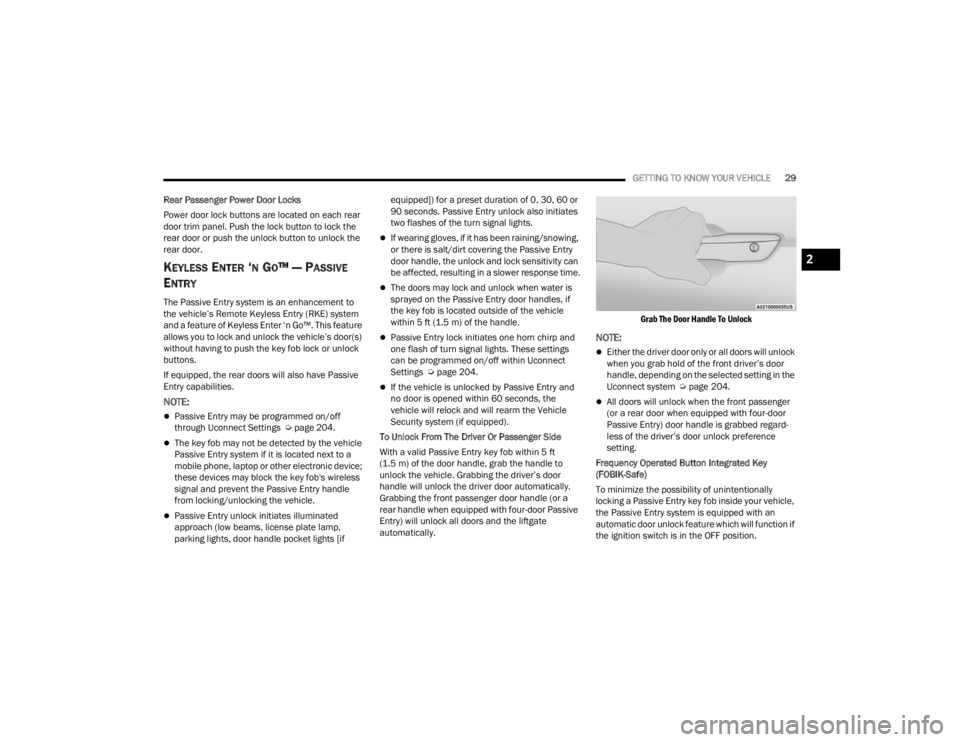
To Unlock From The Driver Or Passenger Side
With a valid Passive Entry key fob within 5 ft
(1.5 m) of the door handle, grab the handle to
unlock the vehicle. Grabbing the driver’s door
handle will unlock the driver door automatically.
Grabbing the front passenger door handle (or a
rear handle when equipped with four-door Passive
Entry) will unlock all doors and the liftgate
automatically.
Grab The Door Handle To Unlock
NOTE:
Either the driver door only or all doors will unlock
when you grab hold of the front driver’s door
handle, depending on the selected setting in the
Uconnect system Ú
page 204.
All doors will unlock when the front passenger
(or a rear door when equipped with four-door
Passive Entry) door handle is grabbed regard -
less of the driver’s door unlock preference
setting.
Frequency Operated Button Integrated Key
(FOBIK-Safe)
To minimize the possibility of unintentionally
locking a Passive Entry key fob inside your vehicle,
the Passive Entry system is equipped with an
automatic door unlock feature which will function if
the ignition switch is in the OFF position.
2
23_WL_OM_EN_USC_t.book Page 29
Page 35 of 424
GETTING TO KNOW YOUR VEHICLE33
Use the four-way control to adjust the steering
column.
NOTE:For vehicles equipped with Driver Memory
Settings, use the key fob or the memory switch on
the driver's door trim panel to return the tilt/tele -
scopic steering column to saved positions
Ú page 34.
HEATED STEERING WHEEL —
I
F EQUIPPED
The steering wheel contains a heating
element that helps warm your hands in
cold weather. The heated steering wheel
has only one temperature setting. Once
the heated steering wheel has been turned on, it
will stay on until the operator turns it off. The
heated steering wheel may not turn on when it is
already warm. The heated steering wheel button is located on the
center of the instrument panel below the radio
screen, and within the Comfort screen of the
touchscreen.
Press the heated steering wheel button once to
turn the heating element on.
Press the heated steering wheel button a
second time to turn the heating element off.
NOTE:The engine must be running for the heated
steering wheel to operate.
For information on use with the Remote Start
system, see Ú
page 25.
UCONNECT VOICE RECOGNITION QUICK
TIPS — IF EQUIPPED
INTRODUCING VOICE RECOGNITION
Start using Uconnect Voice Recognition with these
helpful quick tips. It provides the key Voice
Commands and tips you need to know to control
your vehicle’s Voice Recognition (VR) system.
BASIC VOICE COMMANDS
The following basic Voice Commands can be given
at any point while using your Uconnect system.
Push the VR button on the steering wheel or say
the vehicle’s Wake Up word, “Hey Uconnect” or
“Hey Jeep®”. The factory default Wake Up word is
set to “Hey Uconnect” and can be reprogrammed
through the Uconnect Settings. After the beep, say:
“Cancel ” to stop a current voice session.
“Help ” to hear a list of suggested Voice
Commands.
“ Repeat ” to listen to the system prompts again.
Notice the visual cues that inform you of your Voice
Recognition system’s status.
WARNING!
Do not adjust the steering column while driving.
Adjusting the steering column while driving or
driving with the steering column unlocked, could
cause the driver to lose control of the vehicle.
Failure to follow this warning may result in
serious injury or death.
WARNING!
Persons who are unable to feel pain to the
skin because of advanced age, chronic illness,
diabetes, spinal cord injury, medication,
alcohol use, exhaustion, or other physical
conditions must exercise care when using the
steering wheel heater. It may cause burns
even at low temperatures, especially if used
for long periods.
Do not place anything on the steering wheel
that insulates against heat, such as a blanket
or steering wheel covers of any type and mate -
rial. This may cause the steering wheel heater
to overheat.
2
23_WL_OM_EN_USC_t.book Page 33
Page 47 of 424

GETTING TO KNOW YOUR VEHICLE45
(Continued)
Door Panel Massage Button
Once activated by either method, the massage
controls will display on the radio screen, and
“Massage Type” and “Intensity Level” can be
selected for the activated seat.
There are four intensity levels and five massage
types that can be selected.
Intensity Levels:
High
Med
Low
Off
Massage Types:
Waterfall
Lower Back
Extend
Low Extend
Rock Climb
The selected settings will save in the system’s
memory when turned off, and will resume the next
time the system is turned on.
NOTE:
The engine must be running for the power seat -
back massage to operate.
The massage feature will turn off after
20 minutes of use. However, if the massage
type or intensity level is changed, the timer then
resets.
HEATED SEATS — IF EQUIPPED
Front Heated Seats
The front heated seats control buttons
are located on the center stack below the
radio screen or within the Uconnect
system. You can gain access to the
control buttons through the Comfort screen.
Press the heated seat switch once to turn the HI
setting on.
Press the heated seat switch a second time to
turn the MED setting on.
Press the heated seat switch a third time to turn
the LO setting on.
Press the heated seat switch a fourth time to
turn the heating elements off.
WARNING!
Persons who are unable to feel pain to the
skin because of advanced age, chronic illness,
diabetes, spinal cord injury, medication,
alcohol use, exhaustion or other physical
condition must exercise care when using the
seat heater. It may cause burns even at low
temperatures, especially if used for long
periods of time.
Do not place anything on the seat or seatback
that insulates against heat, such as a blanket
or cushion. This may cause the seat heater to
overheat. Sitting in a seat that has been over -
heated could cause serious burns due to the
increased surface temperature of the seat.
WARNING!
2
23_WL_OM_EN_USC_t.book Page 45
Page 53 of 424

GETTING TO KNOW YOUR VEHICLE51
Lift Cover On Vanity Mirror
Sun Visor Slide-On-Rod Feature —
If Equipped
The sun visor Slide-On-Rod feature allows for
additional flexibility in positioning the sun visor to
block out the sun.
1. Fold down the sun visor.
2. Unclip the visor from the center clip.
3. Pivot the sun visor toward the side window.
4. Extend the sun visor blade for additional sun blockage.
NOTE:The sun visor blade can also be extended while the
sun visor is against the windshield for additional
sun blockage through the front of the vehicle.
OUTSIDE MIRRORS
To receive maximum benefit, adjust the outside
mirror(s) to center on the adjacent lane of traffic
with a slight overlap of the view obtained on the
inside mirror.
Outside Mirrors Folding Feature
All outside mirrors are hinged and may be moved
either forward or rearward to resist damage. The
hinges have three detent positions:
Full forward position
Full rearward position
Normal position
Outside Mirrors With Turn Signal And
Approach Lighting — If Equipped
Driver and passenger outside mirrors with turn
signal and approach lighting contain four LEDs,
which are located in the upper outer corner of each
mirror.
Three of the LEDs are turn signal indicators, which
flash with the corresponding turn signal lights in
the front and rear of the vehicle. Turning on the
Hazard Warning flashers will also activate these
LEDs.
The fourth LED supplies illuminated entry lighting,
which turns on in both mirrors when you use the
key fob or open any door. This LED shines outward
to illuminate the front and rear door handles. It
also shines downward to illuminate the area in
front of the doors.
The illuminated entry lighting fades to off after
about 30 seconds or it will fade to off immediately
once the ignition is placed into the ON/RUN
position.
NOTE:The approach lighting will not function when the
gear selector is moved out of the PARK position.
WARNING!
Vehicles and other objects seen in an outside
convex mirror will look smaller and farther away
than they really are. Relying too much on side
convex mirrors could cause you to collide with
another vehicle or other object. Use your inside
mirror when judging the size or distance of a
vehicle seen in a side convex mirror.
2
23_WL_OM_EN_USC_t.book Page 51
Page 64 of 424
62GETTING TO KNOW YOUR VEHICLE
BATTERY SAVER
To protect the life of your vehicle’s battery, load
shedding is provided for both the interior and
exterior lights.
If the ignition is placed in the OFF position and any
door is left ajar for 10 minutes or the overhead
console Dome On switch is left on for 10 minutes,
the interior lights will automatically turn off.
NOTE:Battery saver mode is canceled if the ignition is in
the ON/RUN position.
If the headlights remain on while the ignition is
placed in the OFF position, the exterior lights will
automatically turn off after eight minutes. If the
headlights are turned on and left on for eight
minutes while the ignition is in the OFF position,
the exterior lights will automatically turn off.
INTERIOR LIGHTS
COURTESY LIGHTS
Courtesy and dome lights are turned on when the
front doors are opened or the Dome ON button is
pushed on the overhead console. If your vehicle is
equipped with Remote Keyless Entry and the
unlock button is pushed on the key fob, the
courtesy and dome lights will turn on. When a door
is open and the interior lights are on, pressing the Dome Defeat button on the overhead console will
cause all of the interior lights to turn off.
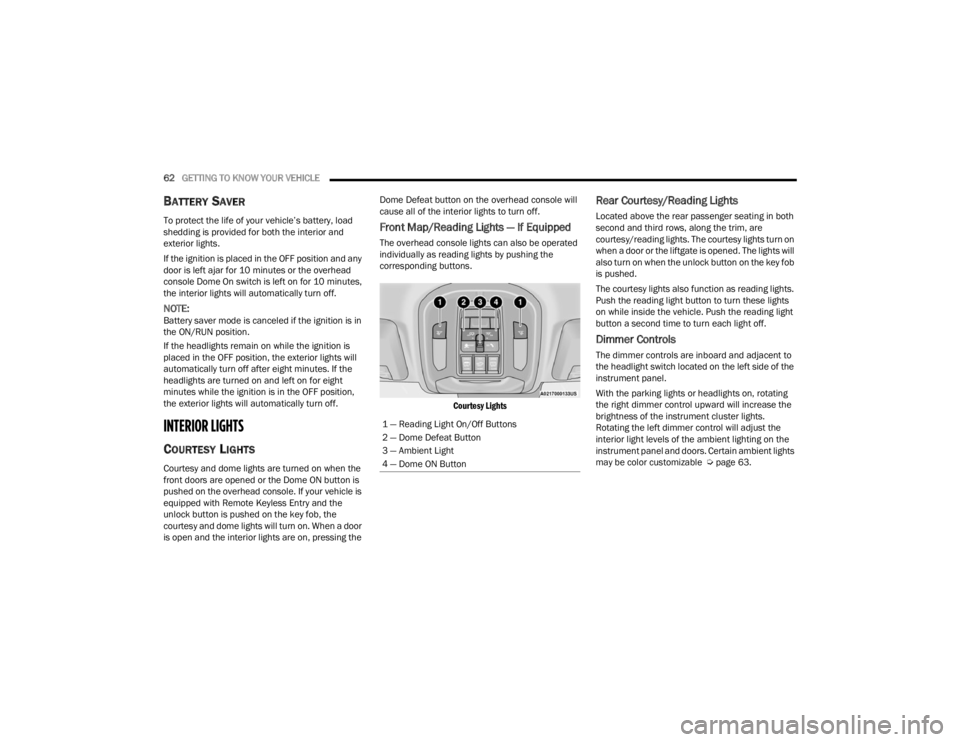
Front Map/Reading Lights — If Equipped
The overhead console lights can also be operated
individually as reading lights by pushing the
corresponding buttons.
Courtesy Lights
Rear Courtesy/Reading Lights
Located above the rear passenger seating in both
second and third rows, along the trim, are
courtesy/reading lights. The courtesy lights turn on
when a door or the liftgate is opened. The lights will
also turn on when the unlock button on the key fob
is pushed.
The courtesy lights also function as reading lights.
Push the reading light button to turn these lights
on while inside the vehicle. Push the reading light
button a second time to turn each light off.
Dimmer Controls
The dimmer controls are inboard and adjacent to
the headlight switch located on the left side of the
instrument panel.
With the parking lights or headlights on, rotating
the right dimmer control upward will increase the
brightness of the instrument cluster lights.
Rotating the left dimmer control will adjust the
interior light levels of the ambient lighting on the
instrument panel and doors. Certain ambient lights
may be color customizable Ú page 63.
1 — Reading Light On/Off Buttons
2 — Dome Defeat Button
3 — Ambient Light
4 — Dome ON Button
23_WL_OM_EN_USC_t.book Page 62
Page 92 of 424

90GETTING TO KNOW YOUR VEHICLE
NOTE:
Opening or closing the Hands-Free Liftgate
requires a valid Passive Entry key fob within 5 ft
(1.5 m) of the liftgate handle. If a valid Passive
Entry key fob is not within 5 ft (1.5 m), the lift -
gate will not respond to any kicks.
The Hands-Free Liftgate feature may be turned
on or off through the Uconnect system
Ú page 204.
The Hands-Free Liftgate feature should be
turned off during jacking, tire changing, manual
car wash, and vehicle service.
The Hands-Free Liftgate feature can be acti -
vated by any metallic object making a similar
in-and-out motion under the rear fascia/
bumper, such as cleaning using a metal broom.
The Hands-Free Liftgate will only operate when
the transmission is in PARK.
If anything obstructs the Hands-Free Liftgate
while it is opening or closing, the liftgate will
automatically reverse to the closed/open posi -
tion, provided it meets sufficient resistance.
There are pinch sensors attached to the side of
the liftgate opening. Light pressure anywhere
along these strips will cause the liftgate to
return to the open position.
If the power liftgate encounters multiple
obstructions within the same cycle, the system
will automatically stop. If this occurs, the liftgate
must be operated manually.
The power liftgate will release, but not power
open, in temperatures below −12°F (−24°C).
Be sure to remove any buildup of snow or ice
from the liftgate before opening the liftgate.
If the liftgate is left open for an extended period
of time (approximately one hour), the liftgate
may need to be closed manually to reset power
liftgate functionality. Gas props support the liftgate in the open position.
However, because the gas pressure drops with
temperature, it may be necessary to assist the
props when opening the liftgate in cold weather.
NOTE:Allow the power system to open the liftgate.
Manually pushing or pulling the liftgate may
activate the liftgate obstacle detection feature and
stop the power operation or reverse its direction.
CARGO AREA FEATURES
Cargo Storage
The load floor is designed for a maximum load of
300 lb (136 kg).
If equipped, there may be a removable storage bin
located on the left side of the rear cargo area.
WARNING!
Driving with the liftgate open can allow
poisonous exhaust gases into your vehicle.
You and your passengers could be injured by
these fumes. Keep the liftgate closed when
you are operating the vehicle.
If you are required to drive with the liftgate
open, make sure that all windows are closed,
and the climate control blower switch is set at
high speed. Do not use the recirculation
mode.
WARNING!
During power operation, personal injury or cargo
damage may occur. Ensure the liftgate travel
path is clear. Make sure the liftgate is closed
and latched before driving away.
23_WL_OM_EN_USC_t.book Page 90
Page 96 of 424
94GETTING TO KNOW YOUR VEHICLE
(Continued)
To move the crossbars, loosen the attachments,
located at the upper edge of each crossbar,
approximately eight turns using the anti-theft
wrench provided with the Mopar® crossbars.
Then, move the crossbar to the desired position,
keeping the crossbars parallel to the rack frame.
Once the crossbar is in the desired position,
retighten with the wrench to lock the crossbar into
position.
NOTE:If any cargo (or any metallic object) is placed over
the satellite radio antenna (if equipped), you may
experience interruption of satellite radio reception.
For improved satellite radio reception, place the
rear crossbar in the forward of the two rear
crossbar positions.
WARNING!
Cargo must be securely tied down before driving
your vehicle. Improperly secured loads can fly off
the vehicle, particularly at high speeds, resulting
in personal injury or property damage. Follow
the roof rack cautions when carrying cargo on
your roof rack.
CAUTION!
To prevent damage to the roof of your vehicle,
do not carry any loads on the roof rack without
the crossbars installed. The load should be
secured and placed on top of the crossbars,
not directly on the roof. If it is necessary to
place the load on the roof, place a blanket or
some other protection between the load and
the roof surface.
To avoid damage to the roof rack and vehicle,
do not exceed the maximum roof rack load
capacity of 150 lb (68 kg). Always distribute
heavy loads as evenly as possible and secure
the load appropriately.
Long loads which extend over the windshield,
such as wood panels or surfboards, or loads
with large frontal area should be secured to
both the front and rear of the vehicle.
Travel at reduced speeds and turn corners
carefully when carrying large or heavy loads
on the roof rack. Wind forces, due to natural
causes or nearby truck traffic, can add sudden
upward lift to a load. This is especially true on
large flat loads and may result in damage to
the cargo or your vehicle.
The use of vehicle systems that would adjust
the ride heights (such as Selec-Terrain modes
Rock or Sand/Mud) is not recommended
when using the Roof Luggage Rack to carry a
load.
CAUTION!
23_WL_OM_EN_USC_t.book Page 94
Page 112 of 424
110GETTING TO KNOW YOUR INSTRUMENT PANEL
Hood Open Warning Light
This warning light will illuminate when the
hood is left open and not fully closed.
NOTE:If the vehicle is moving, there will also be a single
chime.
Liftgate Open Warning Light
This warning light will illuminate when the
liftgate is open.
NOTE:If the vehicle is moving, there will also be a single
chime.
Night Vision Animal Warning Light
The Night Vision Animal Warning Light
will illuminate in red when an animal is
detected directly in the vehicle’s path,
near the headlights, and a collision is
possible Ú page 177.
If enabled, a chime will sound and a video pop-up
may display when a detection occurs.
Night Vision Pedestrian Warning Light
The Night Vision Pedestrian Warning
Light will illuminate in red when a
pedestrian is detected directly in the
vehicle’s path, near the headlights, and a
collision is possible Ú page 177. If enabled, a chime will sound and a video pop-up
may display when a detection occurs.
Oil Pressure Warning Light
This warning light will illuminate to
indicate low engine oil pressure. If the
light turns on while driving, stop the
vehicle, shut off the engine as soon as
possible, and contact an authorized dealer. A
chime will sound when this light turns on.
Do not operate the vehicle until the cause is
corrected. This light does not indicate how much oil
is in the engine. The engine oil level must be
checked under the hood.
Oil Temperature Warning Light
This warning light will illuminate to
indicate the engine oil temperature is
high. If the light turns on while driving,
stop the vehicle and shut off the engine
as soon as possible. Wait for oil temperature to
return to normal levels.
Rear Seat Belt Reminder Warning Light —
If Equipped
This light indicates when a rear seat belt
is unbuckled in the second row. When
the ignition is first placed in the ON/RUN
position, and if a seat belt in the second
row is unbuckled, a light corresponding to the
specific seat will turn on in the upper right portion of the instrument cluster display, momentarily
replacing the configurable corner information. If a
second row seat belt that was buckled at the start
of the trip is unbuckled, the Rear Seat Belt
Reminder Light will change from the buckled to the
unbuckled symbol, and a chime will sound
Ú
page 269.
Seat Belt Reminder Warning Light
This warning light indicates when the
driver or passenger seat belt is
unbuckled. When the ignition is first
placed in the ON/RUN position and if the
driver’s seat belt is unbuckled, a chime will sound
and the light will turn on. When driving, if the driver
or front passenger seat belt remains unbuckled,
the Seat Belt Reminder Light will flash or remain on
continuously and a chime will sound Ú page 269.
Transmission Temperature Warning Light —
If Equipped
This warning light will illuminate to warn
of a high transmission fluid temperature.
This may occur with strenuous usage
such as trailer towing. If this light turns
on, stop the vehicle and run the engine at idle or
slightly faster, with the transmission in PARK (P) or
NEUTRAL (N), until the light turns off. Once the light
turns off, you may continue to drive normally.
23_WL_OM_EN_USC_t.book Page 110