torque JEEP LIBERTY 2002 KJ / 1.G Workshop Manual
[x] Cancel search | Manufacturer: JEEP, Model Year: 2002, Model line: LIBERTY, Model: JEEP LIBERTY 2002 KJ / 1.GPages: 1803, PDF Size: 62.3 MB
Page 619 of 1803
DIAGNOSIS AND TESTING - SEAT TRACK
(1) Remove the power seat switch from the seat
(Refer to 8 - ELECTRICAL/POWER SEATS/DRIVER
SEAT SWITCH - REMOVAL).
(2) Checking the body harness side of the power
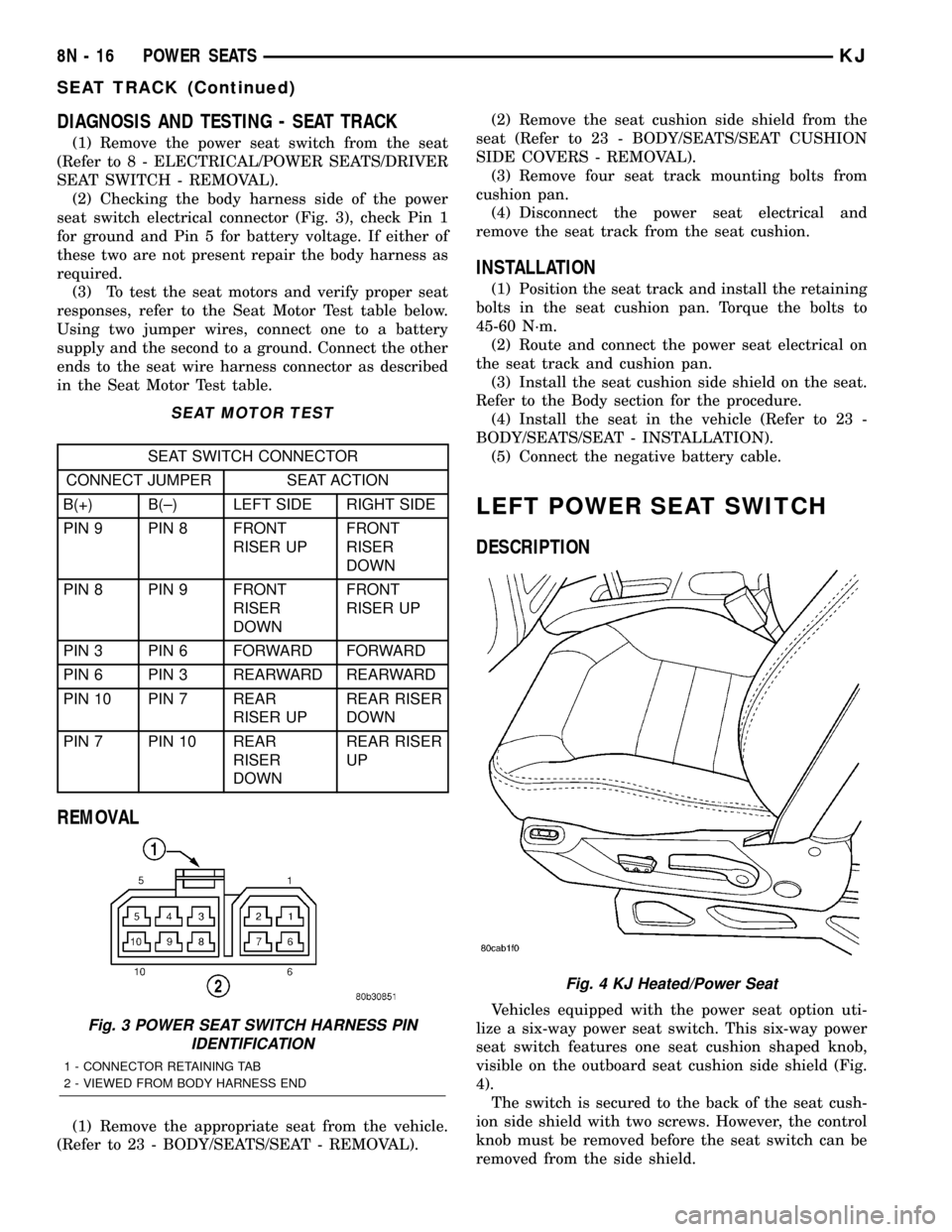
seat switch electrical connector (Fig. 3), check Pin 1
for ground and Pin 5 for battery voltage. If either of
these two are not present repair the body harness as
required.
(3) To test the seat motors and verify proper seat
responses, refer to the Seat Motor Test table below.
Using two jumper wires, connect one to a battery
supply and the second to a ground. Connect the other
ends to the seat wire harness connector as described
in the Seat Motor Test table.
SEAT MOTOR TEST
SEAT SWITCH CONNECTOR
CONNECT JUMPER SEAT ACTION
B(+) B(±) LEFT SIDE RIGHT SIDE
PIN 9 PIN 8 FRONT
RISER UPFRONT
RISER
DOWN
PIN 8 PIN 9 FRONT
RISER
DOWNFRONT
RISER UP
PIN 3 PIN 6 FORWARD FORWARD
PIN 6 PIN 3 REARWARD REARWARD
PIN 10 PIN 7 REAR
RISER UPREAR RISER
DOWN
PIN 7 PIN 10 REAR
RISER
DOWNREAR RISER
UP
REMOVAL
(1) Remove the appropriate seat from the vehicle.
(Refer to 23 - BODY/SEATS/SEAT - REMOVAL).(2) Remove the seat cushion side shield from the
seat (Refer to 23 - BODY/SEATS/SEAT CUSHION
SIDE COVERS - REMOVAL).
(3) Remove four seat track mounting bolts from
cushion pan.
(4) Disconnect the power seat electrical and
remove the seat track from the seat cushion.
INSTALLATION
(1) Position the seat track and install the retaining
bolts in the seat cushion pan. Torque the bolts to
45-60 N´m.
(2) Route and connect the power seat electrical on
the seat track and cushion pan.
(3) Install the seat cushion side shield on the seat.
Refer to the Body section for the procedure.
(4) Install the seat in the vehicle (Refer to 23 -
BODY/SEATS/SEAT - INSTALLATION).
(5) Connect the negative battery cable.
LEFT POWER SEAT SWITCH
DESCRIPTION
Vehicles equipped with the power seat option uti-
lize a six-way power seat switch. This six-way power
seat switch features one seat cushion shaped knob,
visible on the outboard seat cushion side shield (Fig.
4).
The switch is secured to the back of the seat cush-
ion side shield with two screws. However, the control
knob must be removed before the seat switch can be
removed from the side shield.
Fig. 3 POWER SEAT SWITCH HARNESS PIN
IDENTIFICATION
1 - CONNECTOR RETAINING TAB
2 - VIEWED FROM BODY HARNESS END
Fig. 4 KJ Heated/Power Seat
8N - 16 POWER SEATSKJ
SEAT TRACK (Continued)
Page 642 of 1803

designed to rotate the same number of turns (about
five complete rotations) as the steering wheel can be
turned from stop to stop. Centering the clockspring
indexes the clockspring tape to other steering compo-
nents so that it can operate within its designed
travel limits. The rotor of a centered clockspring can
be rotated two and one-half turns in either direction
from the centered position, without damaging the
clockspring tape.
However, if the clockspring is removed for service
or if the steering column is disconnected from the
steering gear, the clockspring tape can change posi-
tion relative to the other steering components. The
clockspring must then be re-centered following com-
pletion of such service or the clockspring tape may be
damaged. Service replacement clocksprings are
shipped pre-centered, with the release button
engaged (raised) and a molded plastic shield installed
over the release button. This release button should
not be disengaged and the shield should not be
removed until the clockspring has been installed on
the steering column. If the release button is disen-
gaged before the clockspring is installed on a steering
column, the clockspring centering procedure must be
performed.
WARNING: ON VEHICLES EQUIPPED WITH AIR-
BAGS, DISABLE THE SUPPLEMENTAL RESTRAINT
SYSTEM BEFORE ATTEMPTING ANY STEERING
WHEEL, STEERING COLUMN, DRIVER AIRBAG,
PASSENGER AIRBAG, SEAT BELT TENSIONER,
FRONT IMPACT SENSORS, SIDE CURTAIN AIRBAG,
OR INSTRUMENT PANEL COMPONENT DIAGNOSIS
OR SERVICE. DISCONNECT AND ISOLATE THE
BATTERY NEGATIVE (GROUND) CABLE, THEN
WAIT TWO MINUTES FOR THE SYSTEM CAPACI-
TOR TO DISCHARGE BEFORE PERFORMING FUR-
THER DIAGNOSIS OR SERVICE. THIS IS THE ONLY
SURE WAY TO DISABLE THE SUPPLEMENTAL
RESTRAINT SYSTEM. FAILURE TO TAKE THE
PROPER PRECAUTIONS COULD RESULT IN ACCI-
DENTAL AIRBAG DEPLOYMENT AND POSSIBLE
PERSONAL INJURY.
NOTE: Before starting this procedure, be certain to
turn the steering wheel until the front wheels are in
the straight-ahead position.
(1) Place the front wheels in the straight-ahead
position.
(2) Remove the clockspring from the steering col-
umn. (Refer to 8 - ELECTRICAL/RESTRAINTS/
CLOCKSPRING - REMOVAL).
(3) Depress the release button (Fig. 12).(4) Keeping the release button depressed, rotate
the clockspring rotor clockwise to the end of its
travel.Do not apply excessive torque.
(5) From the end of the clockwise travel, rotate the
rotor about two and one-half turns counterclockwise,
then release the release button. The clockspring
tower formation with the pigtail wires for the driver
airbag and the connector receptacle for the steering
wheel wire harness should end up at the top, the
blue roller should be visible through the inspection
window, and the printed arrow on the label of the
clockspring rotor should be aligned with the arrow
molded into the clockspring case. The clockspring is
now centered.
(6) The front wheels should still be in the straight-
ahead position. Reinstall the clockspring onto the
steering column. (Refer to 8 - ELECTRICAL/RE-
STRAINTS/CLOCKSPRING - INSTALLATION).
REMOVAL
The clockspring cannot be repaired. It must be
replaced if faulty or damaged, or if the driver airbag
has been deployed.
Fig. 12 Clockspring Centering
1 - ROTOR LABEL
2 - RELEASE BUTTON
3 - ALIGNMENT ARROWS
4 - INSPECTION WINDOW
KJRESTRAINTS 8O - 15
CLOCKSPRING (Continued)
Page 644 of 1803

TERING). Service replacement clocksprings are
shipped pre-centered, with the release button
engaged (raised) and a molded plastic shield installed
over the release button. This release button should
not be disengaged and the shield should not be
removed until the clockspring has been installed on
the steering column. If the release button is disen-
gaged before the clockspring is installed on a steering
column, the clockspring centering procedure must be
performed.
WARNING: ON VEHICLES EQUIPPED WITH AIR-
BAGS, DISABLE THE SUPPLEMENTAL RESTRAINT
SYSTEM BEFORE ATTEMPTING ANY STEERING
WHEEL, STEERING COLUMN, DRIVER AIRBAG,
PASSENGER AIRBAG, SEAT BELT TENSIONER,
FRONT IMPACT SENSORS, SIDE CURTAIN AIRBAG,
OR INSTRUMENT PANEL COMPONENT DIAGNOSIS
OR SERVICE. DISCONNECT AND ISOLATE THE
BATTERY NEGATIVE (GROUND) CABLE, THEN
WAIT TWO MINUTES FOR THE SYSTEM CAPACI-
TOR TO DISCHARGE BEFORE PERFORMING FUR-
THER DIAGNOSIS OR SERVICE. THIS IS THE ONLY
SURE WAY TO DISABLE THE SUPPLEMENTAL
RESTRAINT SYSTEM. FAILURE TO TAKE THE
PROPER PRECAUTIONS COULD RESULT IN ACCI-
DENTAL AIRBAG DEPLOYMENT AND POSSIBLE
PERSONAL INJURY.
NOTE: Before starting this procedure, be certain to
turn the steering wheel until the front wheels are in
the straight-ahead position.
(1) Carefully slide the centered clockspring down
over the steering column upper shaft until the two
integral plastic latches on the back of the clockspring
housing are fully engaged through their openings in
the steering column lock housing (Fig. 13).
(2) Reconnect the two instrument panel wire har-
ness connectors for the clockspring to the two connec-
tor receptacles below the steering column on the back
of the clockspring housing.
(3) Position the upper and lower shrouds onto the
steering column.
(4) Align the snap features on the lower shroud
with the receptacles on the upper shroud and apply
hand pressure to snap them together.
(5) From below the steering column, install and
tighten the two screws that secure the lower shroud
to the upper shroud. Tighten the screws to 2 N´m (18
in. lbs.).
(6) If the vehicle is equipped with the optional tilt
steering column, move the tilt steering column back
to the fully raised position and move the tilt release
lever back to the locked (up) position.(7) Reinstall the steering wheel onto the steering
column. (Refer to 19 - STEERING/COLUMN/STEER-
ING WHEEL - INSTALLATION).
NOTE: Be certain that the steering wheel mounting
screw is tightened to the proper torque specifica-
tion to ensure proper clockspring operation.
(8) Reconnect the steering wheel wire harness con-
nector to the upper clockspring connector receptacle.
(9) Reinstall the driver airbag onto the steering
wheel. (Refer to 8 - ELECTRICAL/RESTRAINTS/
DRIVER AIRBAG - INSTALLATION).
DRIVER AIRBAG
DESCRIPTION
The black, injection molded, thermoplastic driver
airbag protective trim cover is the most visible part
of the driver airbag (Fig. 14). The driver airbag is
located in the center of the steering wheel, where it
is secured with two screws to the two horizontal
spokes of the four-spoke steering wheel armature.
Base models have a Jeeptlogo embossed in the cen-
ter of the trim cover, while premium models feature a
stamped, satin polished emblem with the Jeeptlogo
applied to the center of the trim cover. Concealed
beneath the driver airbag trim cover are the horn
switch, the folded airbag cushion, the airbag retainer
or housing, the airbag inflator, and the retainers that
secure the inflator to the airbag housing. The airbag
cushion, housing, and inflator are secured within an
integral receptacle molded into the back of the trim
cover.
Fig. 14 Driver Airbag Trim Cover
1 - STEERING WHEEL
2 - TRIM COVER
KJRESTRAINTS 8O - 17
CLOCKSPRING (Continued)
Page 674 of 1803

SPEED CONTROL
TABLE OF CONTENTS
page page
SPEED CONTROL
DESCRIPTION..........................1
OPERATION............................1
DIAGNOSIS AND TESTING - ROAD TEST.....2
SPECIFICATIONS
TORQUE - SPEED CONTROL.............2
CABLE
DESCRIPTION..........................3
OPERATION............................3
REMOVAL - 3.7L.........................3
INSTALLATION - 3.7L.....................4
SERVO
DESCRIPTION..........................4
OPERATION............................4REMOVAL.............................4
INSTALLATION..........................5
SWITCH
DESCRIPTION..........................5
OPERATION............................5
REMOVAL.............................6
INSTALLATION..........................6
VACUUM RESERVOIR
DESCRIPTION..........................7
OPERATION............................7
DIAGNOSIS AND TESTING - VACUUM
RESERVOIR..........................7
REMOVAL.............................7
INSTALLATION..........................8
SPEED CONTROL
DESCRIPTION
The speed control system is electronically con-
trolled and vacuum operated. Electronic control of
the speed control system is integrated into the Pow-
ertrain Control Module (PCM). The controls consist
of two steering wheel mounted switches. The
switches are labeled: ON/OFF, RES/ACCEL, SET,
COAST, and CANCEL.
The system is designed to operate at speeds above
30 mph (50 km/h).
WARNING: THE USE OF SPEED CONTROL IS NOT
RECOMMENDED WHEN DRIVING CONDITIONS DO
NOT PERMIT MAINTAINING A CONSTANT SPEED,
SUCH AS IN HEAVY TRAFFIC OR ON ROADS THAT
ARE WINDING, ICY, SNOW COVERED, OR SLIP-
PERY.
OPERATION
When speed control is selected by depressing the
ON switch, the PCM allows a set speed to be stored
in PCM RAM for speed control. To store a set speed,
depress the SET switch while the vehicle is moving
at a speed between 35 and 85 mph. In order for the
speed control to engage, the brakes cannot be
applied, nor can the gear selector be indicating the
transmission is in Park or Neutral.
The speed control can be disengaged manually by:
²Stepping on the brake pedal
²Depressing the OFF switch²Depressing the CANCEL switch.
²Depressing the clutch pedal (if equipped).
NOTE: Depressing the OFF switch or turning off the
ignition switch will erase the set speed stored in
the PCM.
For added safety, the speed control system is pro-
grammed to disengage for any of the following condi-
tions:
²An indication of Park or Neutral
²A rapid increase rpm (indicates that the clutch
has been disengaged)
²Excessive engine rpm (indicates that the trans-
mission may be in a low gear)
²The speed signal increases at a rate of 10 mph
per second (indicates that the coefficient of friction
between the road surface and tires is extremely low)
²The speed signal decreases at a rate of 10 mph
per second (indicates that the vehicle may have
decelerated at an extremely high rate)
Once the speed control has been disengaged,
depressing the RES/ACCEL switch (when speed is
greater than 30 mph) restores the vehicle to the tar-
get speed that was stored in the PCM.
While the speed control is engaged, the driver can
increase the vehicle speed by depressing the RES/AC-
CEL switch. The new target speed is stored in the
PCM when the RES/ACCEL is released. The PCM
also has a9tap-up9feature in which vehicle speed
increases at a rate of approximately 2 mph for each
momentary switch activation of the RES/ACCEL
switch.
KJSPEED CONTROL 8P - 1
Page 675 of 1803
A ªtap downº feature is used to decelerate without
disengaging the speed control system. To decelerate
from an existing recorded target speed, momentarily
depress the COAST switch. For each switch activa-
tion, speed will be lowered approximately 1 mph.
OVERSHOOT/UNDERSHOOT
If the vehicle operator repeatedly presses and
releases the SET button with their foot off of the
accelerator (referred to as a ªlift foot setº), the vehicle
may accelerate and exceed the desired set speed by
up to 5 mph (8 km/h). It may also decelerate to less
than the desired set speed, before finally achieving
the desired set speed.
The Speed Control System has an adaptive strat-
egy that compensates for vehicle-to-vehicle variations
in speed control cable lengths. When the speed con-
trol is set with the vehicle operators foot off of the
accelerator pedal, the speed control thinks there is
excessive speed control cable slack and adapts
accordingly. If the ªlift foot setsº are continually used,
a speed control overshoot/undershoot condition will
develop.
To ªunlearnº the overshoot/undershoot condition,
the vehicle operator has to press and release the set
button while maintaining the desired set speed using
the accelerator pedal (not decelerating or accelerat-
ing), and then turning the cruise control switch to
the OFF position (or press the CANCEL button if
equipped) after waiting 10 seconds. This procedure
must be performed approximately 10±15 times to
completely unlearn the overshoot/undershoot condi-
tion.
DIAGNOSIS AND TESTING - ROAD TEST
Perform a vehicle road test to verify reports of
speed control system malfunction. The road testshould include attention to the speedometer. Speed-
ometer operation should be smooth and without flut-
ter at all speeds.
Flutter in the speedometer indicates a problem
which might cause surging in the speed control sys-
tem. The cause of any speedometer problems should
be corrected before proceeding. Refer to Group 8J,
Instrument Cluster for speedometer diagnosis.
If a road test verifies a system problem and the
speedometer operates properly, check for:
²A Diagnostic Trouble Code (DTC). If a DTC
exists, conduct tests per the Powertrain Diagnostic
Procedures service manual.
²A misadjusted brake (stop) lamp switch. This
could also cause an intermittent problem.
²Loose, damaged or corroded electrical connec-
tions at the servo. Corrosion should be removed from
electrical terminals and a light coating of Mopar
MultiPurpose Grease, or equivalent, applied.
²Leaking vacuum reservoir.
²Loose or leaking vacuum hoses or connections.
²Defective one-way vacuum check valve.
²Secure attachment of both ends of the speed con-
trol servo cable.
²Smooth operation of throttle linkage and throttle
body air valve.
²Failed speed control servo. Do the servo vacuum
test.
CAUTION: When test probing for voltage or conti-
nuity at electrical connectors, care must be taken
not to damage connector, terminals or seals. If
these components are damaged, intermittent or
complete system failure may occur.
SPECIFICATIONS
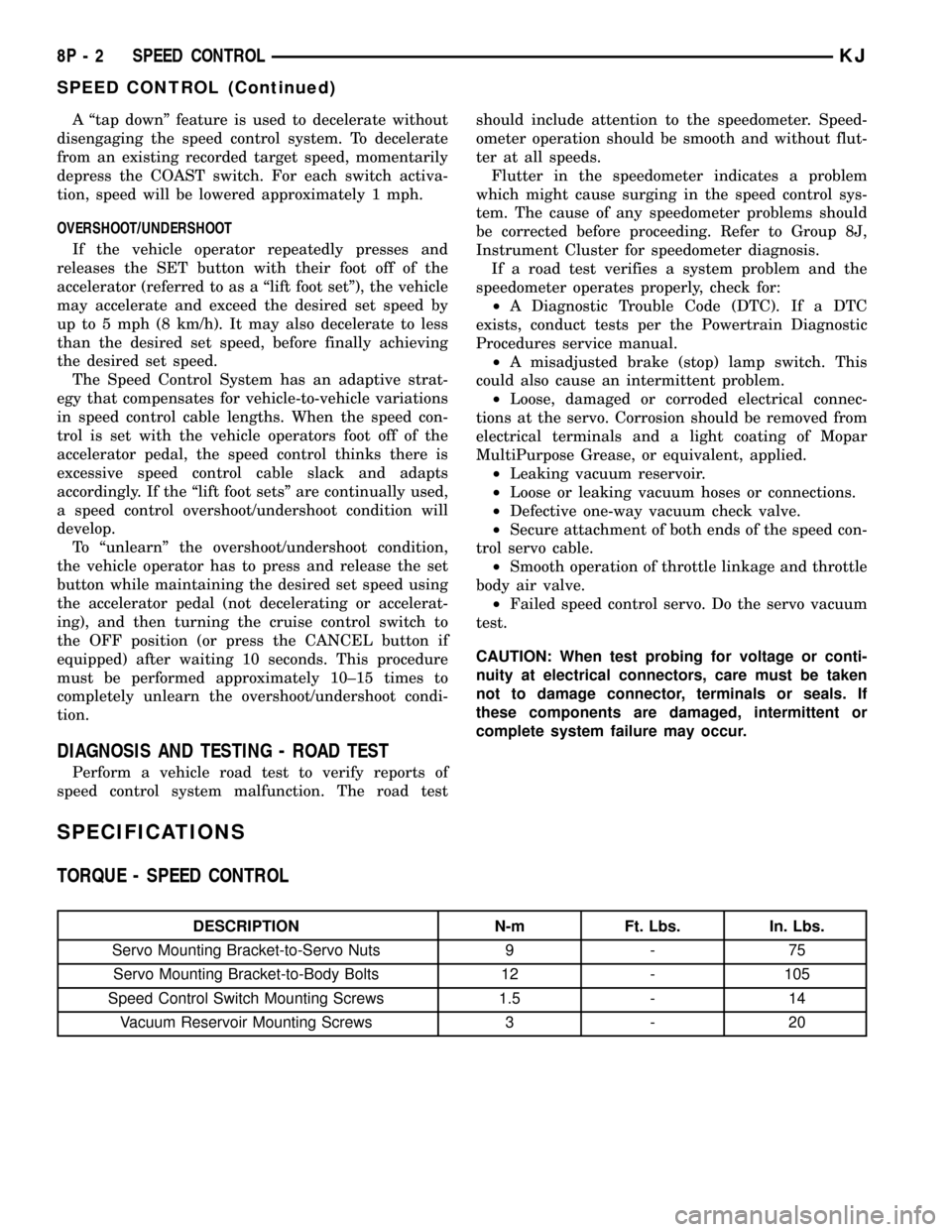
TORQUE - SPEED CONTROL
DESCRIPTION N-m Ft. Lbs. In. Lbs.
Servo Mounting Bracket-to-Servo Nuts 9 - 75
Servo Mounting Bracket-to-Body Bolts 12 - 105
Speed Control Switch Mounting Screws 1.5 - 14
Vacuum Reservoir Mounting Screws 3 - 20
8P - 2 SPEED CONTROLKJ
SPEED CONTROL (Continued)
Page 678 of 1803

mounting bracket displayed in (Fig. 6) is a typical
bracket and may/may not be applicable to this model
vehicle.
(9) Remove servo from mounting bracket. While
removing, note orientation of servo to bracket.INSTALLATION
(1) Position servo to mounting bracket.
(2) Align hole in cable connector with hole in servo
pin. Install cable-to-servo retaining clip.
(3) Insert servo mounting studs through holes in
servo mounting bracket.
(4) Install servo-to-mounting bracket nuts and
tighten. Refer to torque specifications.
(5) Install servo mounting bracket-to-body nuts
and tighten. Refer to torque specifications.
(6) Connect vacuum line at servo.
(7) Connect electrical connector at servo.
(8) Connect servo cable to throttle body. Refer to
servo Cable Removal/Installation.
(9) Install coolant bottle.
(10) Connect negative battery cable to battery.
(11) Before starting engine, operate accelerator
pedal to check for any binding.
SWITCH
DESCRIPTION
There are two separate switch pods that operate
the speed control system. The steering-wheel-
mounted switches use multiplexed circuits to provide
inputs to the PCM for ON, OFF, RESUME, ACCEL-
ERATE, SET, DECEL and CANCEL modes. Refer to
the owner's manual for more information on speed
control switch functions and setting procedures.
The individual switches cannot be repaired. If one
switch fails, the entire switch module must be
replaced.
OPERATION
When speed control is selected by depressing the
ON, OFF switch, the PCM allows a set speed to be
stored in its RAM for speed control. To store a set
speed, depress the SET switch while the vehicle is
moving at a speed between approximately 35 and 85
mph. In order for the speed control to engage, the
brakes cannot be applied, nor can the gear selector
be indicating the transmission is in Park or Neutral.
The speed control can be disengaged manually by:
²Stepping on the brake pedal
²Depressing the OFF switch
²Depressing the CANCEL switch.
The speed control can be disengaged also by any of
the following conditions:
²An indication of Park or Neutral
²The VSS signal increases at a rate of 10 mph
per second (indicates that the co-efficient of friction
between the road surface and tires is extremely low)
²Depressing the clutch pedal.
²Excessive engine rpm (indicates that the trans-
mission may be in a low gear)
Fig. 5 SPEED CONTROL SERVO
1-9T9FITTING
2 - VACUUM LINE
3 - SERVO BRACKET MOUNTING NUTS
4 - SERVO MOUNTING BRACKET
5 - SERVO
6 - SERVO ELECTRICAL CONNECTOR
Fig. 6 SERVO CABLE CLIP REMOVE/INSTALL
TYPICAL
1 - SERVO MOUNTING NUTS (2)
2 - SERVO
3 - CABLE RETAINING CLIP
4 - SERVO CABLE AND SLEEVE
KJSPEED CONTROL 8P - 5
SERVO (Continued)
Page 679 of 1803

²The VSS signal decreases at a rate of 10 mph
per second (indicates that the vehicle may have
decelerated at an extremely high rate)
²If the actual speed is not within 20 mph of the
set speed
The previous disengagement conditions are pro-
grammed for added safety.
Once the speed control has been disengaged,
depressing the ACCEL switch restores the vehicle to
the target speed that was stored in the PCM's RAM.
NOTE: Depressing the OFF switch will erase the set
speed stored in the PCM's RAM.
If, while the speed control is engaged, the driver
wishes to increase vehicle speed, the PCM is pro-
grammed for an acceleration feature. With the
ACCEL switch held closed, the vehicle accelerates
slowly to the desired speed. The new target speed is
stored in the PCM's RAM when the ACCEL switch is
released. The PCM also has a9tap-up9feature in
which vehicle speed increases at a rate of approxi-
mately 2 mph for each momentary switch activation
of the ACCEL switch.
The PCM also provides a means to decelerate with-
out disengaging speed control. To decelerate from an
existing recorded target speed, depress and hold the
COAST switch until the desired speed is reached.
Then release the switch. The ON, OFF switch oper-
ates two components: the PCM's ON, OFF input, and
the battery voltage to the brake switch, which powers
the speed control servo.
Multiplexing
The PCM sends out 5 volts through a fixed resistor
and monitors the voltage change between the fixed
resistor and the switches. If none of the switches are
depressed, the PCM will measure 5 volts at the sen-
sor point (open circuit). If a switch with no resistor is
closed, the PCM will measure 0 volts (grounded cir-
cuit). Now, if a resistor is added to a switch, then the
PCM will measure some voltage proportional to the
size of the resistor. By adding a different resistor to
each switch, the PCM will see a different voltage
depending on which switch is pushed.
Another resistor has been added to the 'at rest cir-
cuit' causing the PCM to never see 5 volts. This was
done for diagnostic purposes. If the switch circuit
should open (bad connection), then the PCM will see
the 5 volts and know the circuit is bad. The PCM will
then set an open circuit fault.
REMOVAL
WARNING: BEFORE ATTEMPTING TO DIAGNOSE,
REMOVE OR INSTALL ANY AIRBAG SYSTEM OR
RELATED STEERING WHEEL AND STEERING COL-
UMN COMPONENTS YOU MUST FIRST DISCON-
NECT AND ISOLATE THE NEGATIVE (GROUND)
BATTERY CABLE. WAIT 2 MINUTES FOR SYSTEM
CAPACITOR TO DISCHARGE BEFORE FURTHER
SYSTEM SERVICE. FAILURE TO DO SO COULD
RESULT IN ACCIDENTAL DEPLOYMENT AND POS-
SIBLE PERSONAL INJURY.
(1) Disconnect and isolate negative battery cable
from battery.
(2) Remove airbag module. Refer to Restraint Sys-
tems.
(3) Unplug electrical connector (Fig. 7).
(4) Remove speed control switch mounting screw
(Fig. 7) and remove switch from steering wheel.
INSTALLATION
(1) Position switch to steering wheel.
(2) Install switch mounting screw and tighten.
Refer to torque specifications.
(3) Plug electrical connector into switch.
(4) Install airbag module. Refer to Restraint Sys-
tems.
(5) Connect negative battery cable to battery.
Fig. 7 SPEED CONTROL SWITCH
1 - SWITCH
2 - SCREW
3 - ELECTRICAL CONNECTOR
8P - 6 SPEED CONTROLKJ
SWITCH (Continued)
Page 681 of 1803

INSTALLATION
The vacuum reservoir is located behind, and at the
outer end of the instrument panel. To gain access for
testing or removal, remove glovebox assembly. Also
remove fuse box access cover panel at end of instru-
ment panel. On vehicles equipped with LHD (Left
Hand Drive), this fuse access panel is located at right
end of instrument panel. On vehicles equipped with
RHD (Right Hand Drive), this access panel is located
at left end of instrument panel.
(1) Position reservoir to instrument panel.
(2) Install 3 mounting screws and tighten. Refer to
torque specifications.
(3) Connect vacuum line to reservoir fitting.
(4) Install glovebox assembly.
(5) Install fuse box access cover panel.
Fig. 9 VACUUM RESERVOIR REMOVE/INSTALL
1 - VACUUM RESERVOIR
2 - HORIZONTAL MOUNTING SCREWS (2)
3 - VERTICAL MOUNTING SCREW (1)
8P - 8 SPEED CONTROLKJ
VACUUM RESERVOIR (Continued)
Page 1138 of 1803
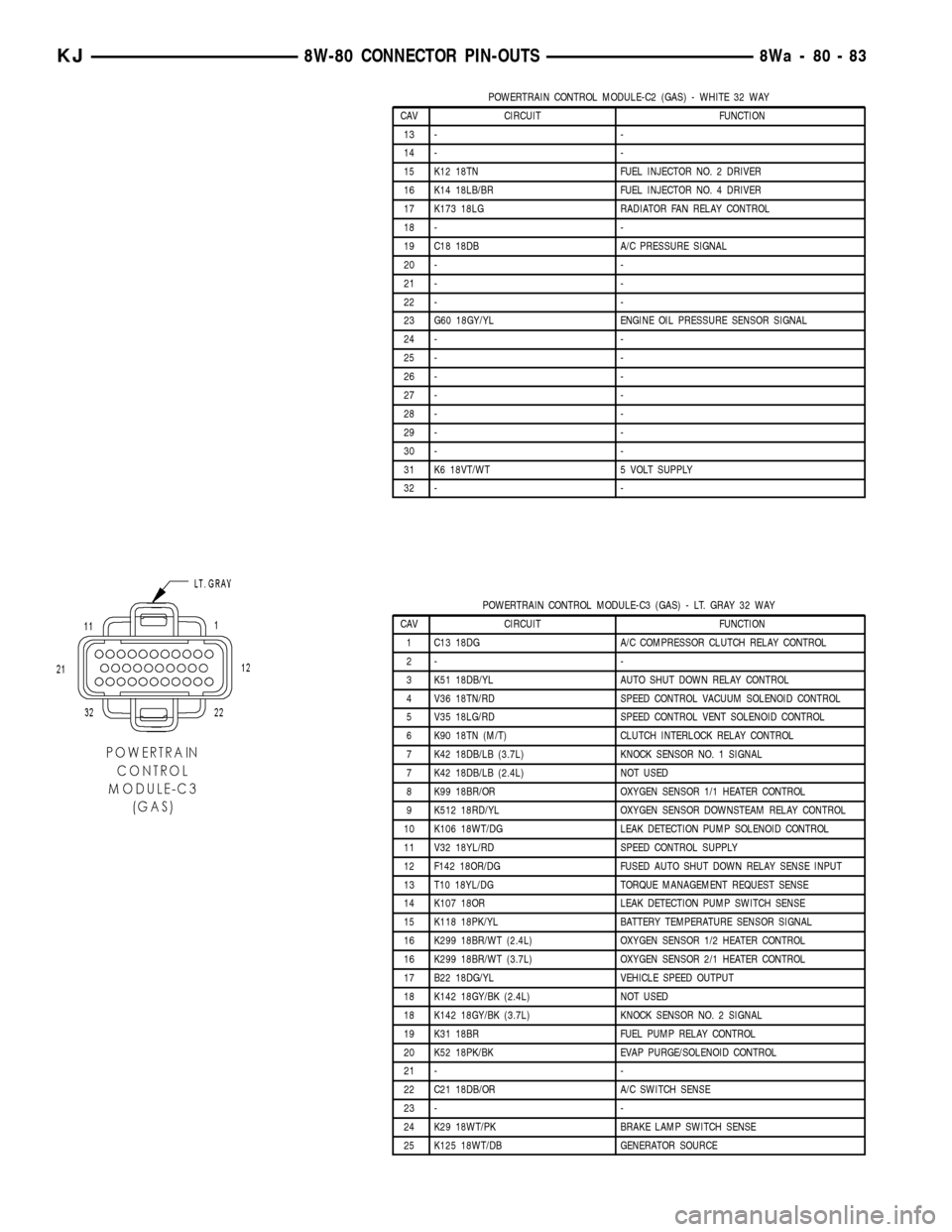
POWERTRAIN CONTROL MODULE-C2 (GAS) - WHITE 32 WAY
CAV CIRCUIT FUNCTION
13 - -
14 - -
15 K12 18TN FUEL INJECTOR NO. 2 DRIVER
16 K14 18LB/BR FUEL INJECTOR NO. 4 DRIVER
17 K173 18LG RADIATOR FAN RELAY CONTROL
18 - -
19 C18 18DB A/C PRESSURE SIGNAL
20 - -
21 - -
22 - -
23 G60 18GY/YL ENGINE OIL PRESSURE SENSOR SIGNAL
24 - -
25 - -
26 - -
27 - -
28 - -
29 - -
30 - -
31 K6 18VT/WT 5 VOLT SUPPLY
32 - -
POWERTRAIN CONTROL MODULE-C3 (GAS) - LT. GRAY 32 WAY
CAV CIRCUIT FUNCTION
1 C13 18DG A/C COMPRESSOR CLUTCH RELAY CONTROL
2- -
3 K51 18DB/YL AUTO SHUT DOWN RELAY CONTROL
4 V36 18TN/RD SPEED CONTROL VACUUM SOLENOID CONTROL
5 V35 18LG/RD SPEED CONTROL VENT SOLENOID CONTROL
6 K90 18TN (M/T) CLUTCH INTERLOCK RELAY CONTROL
7 K42 18DB/LB (3.7L) KNOCK SENSOR NO. 1 SIGNAL
7 K42 18DB/LB (2.4L) NOT USED
8 K99 18BR/OR OXYGEN SENSOR 1/1 HEATER CONTROL
9 K512 18RD/YL OXYGEN SENSOR DOWNSTEAM RELAY CONTROL
10 K106 18WT/DG LEAK DETECTION PUMP SOLENOID CONTROL
11 V32 18YL/RD SPEED CONTROL SUPPLY
12 F142 18OR/DG FUSED AUTO SHUT DOWN RELAY SENSE INPUT
13 T10 18YL/DG TORQUE MANAGEMENT REQUEST SENSE
14 K107 18OR LEAK DETECTION PUMP SWITCH SENSE
15 K118 18PK/YL BATTERY TEMPERATURE SENSOR SIGNAL
16 K299 18BR/WT (2.4L) OXYGEN SENSOR 1/2 HEATER CONTROL
16 K299 18BR/WT (3.7L) OXYGEN SENSOR 2/1 HEATER CONTROL
17 B22 18DG/YL VEHICLE SPEED OUTPUT
18 K142 18GY/BK (2.4L) NOT USED
18 K142 18GY/BK (3.7L) KNOCK SENSOR NO. 2 SIGNAL
19 K31 18BR FUEL PUMP RELAY CONTROL
20 K52 18PK/BK EVAP PURGE/SOLENOID CONTROL
21 - -
22 C21 18DB/OR A/C SWITCH SENSE
23 - -
24 K29 18WT/PK BRAKE LAMP SWITCH SENSE
25 K125 18WT/DB GENERATOR SOURCE
KJ8W-80 CONNECTOR PIN-OUTS8Wa-80-83
Page 1153 of 1803
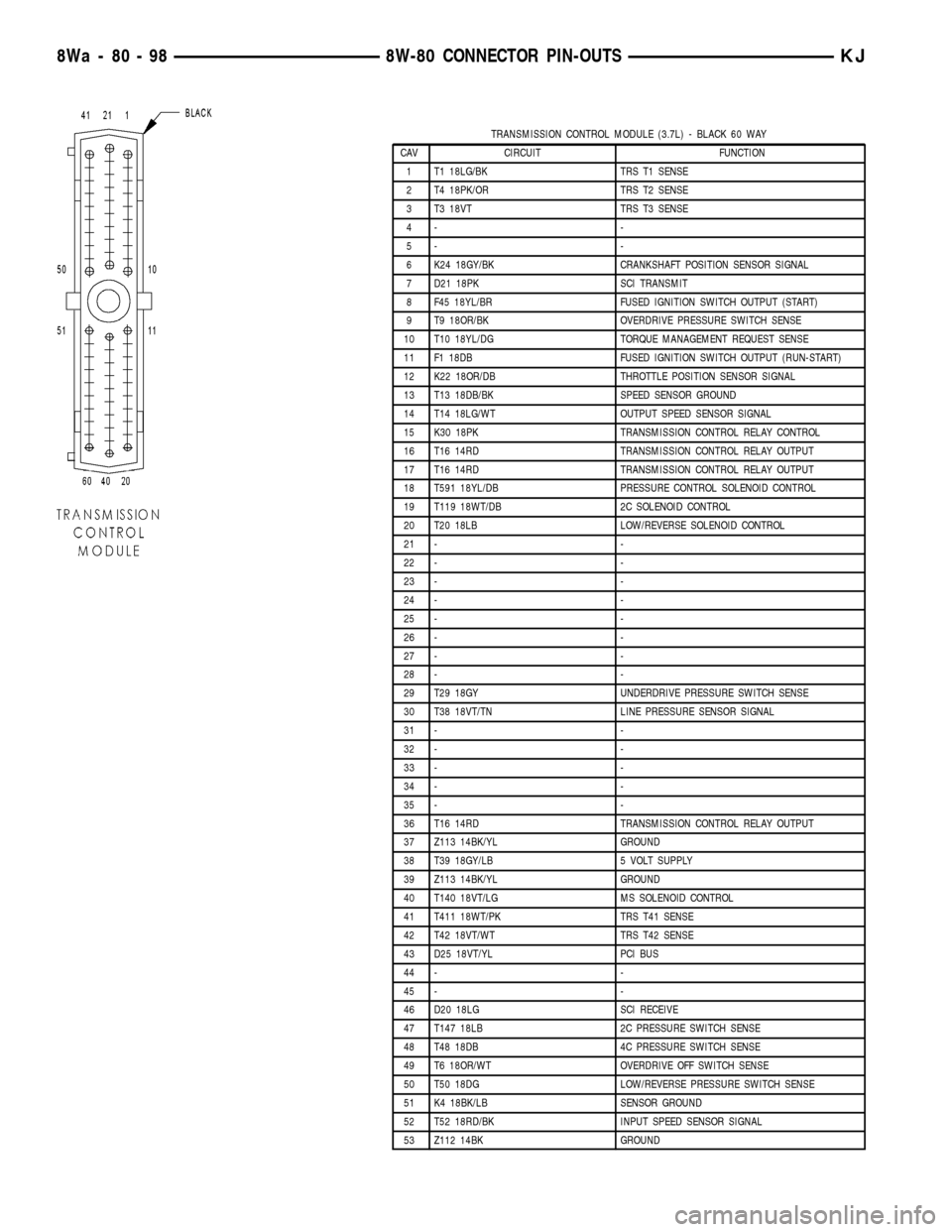
TRANSMISSION CONTROL MODULE (3.7L) - BLACK 60 WAY
CAV CIRCUIT FUNCTION
1 T1 18LG/BK TRS T1 SENSE
2 T4 18PK/OR TRS T2 SENSE
3 T3 18VT TRS T3 SENSE
4- -
5- -
6 K24 18GY/BK CRANKSHAFT POSITION SENSOR SIGNAL
7 D21 18PK SCI TRANSMIT
8 F45 18YL/BR FUSED IGNITION SWITCH OUTPUT (START)
9 T9 18OR/BK OVERDRIVE PRESSURE SWITCH SENSE
10 T10 18YL/DG TORQUE MANAGEMENT REQUEST SENSE
11 F1 18DB FUSED IGNITION SWITCH OUTPUT (RUN-START)
12 K22 18OR/DB THROTTLE POSITION SENSOR SIGNAL
13 T13 18DB/BK SPEED SENSOR GROUND
14 T14 18LG/WT OUTPUT SPEED SENSOR SIGNAL
15 K30 18PK TRANSMISSION CONTROL RELAY CONTROL
16 T16 14RD TRANSMISSION CONTROL RELAY OUTPUT
17 T16 14RD TRANSMISSION CONTROL RELAY OUTPUT
18 T591 18YL/DB PRESSURE CONTROL SOLENOID CONTROL
19 T119 18WT/DB 2C SOLENOID CONTROL
20 T20 18LB LOW/REVERSE SOLENOID CONTROL
21 - -
22 - -
23 - -
24 - -
25 - -
26 - -
27 - -
28 - -
29 T29 18GY UNDERDRIVE PRESSURE SWITCH SENSE
30 T38 18VT/TN LINE PRESSURE SENSOR SIGNAL
31 - -
32 - -
33 - -
34 - -
35 - -
36 T16 14RD TRANSMISSION CONTROL RELAY OUTPUT
37 Z113 14BK/YL GROUND
38 T39 18GY/LB 5 VOLT SUPPLY
39 Z113 14BK/YL GROUND
40 T140 18VT/LG MS SOLENOID CONTROL
41 T411 18WT/PK TRS T41 SENSE
42 T42 18VT/WT TRS T42 SENSE
43 D25 18VT/YL PCI BUS
44 - -
45 - -
46 D20 18LG SCI RECEIVE
47 T147 18LB 2C PRESSURE SWITCH SENSE
48 T48 18DB 4C PRESSURE SWITCH SENSE
49 T6 18OR/WT OVERDRIVE OFF SWITCH SENSE
50 T50 18DG LOW/REVERSE PRESSURE SWITCH SENSE
51 K4 18BK/LB SENSOR GROUND
52 T52 18RD/BK INPUT SPEED SENSOR SIGNAL
53 Z112 14BK GROUND
8Wa - 80 - 98 8W-80 CONNECTOR PIN-OUTSKJ