removal JEEP LIBERTY 2002 KJ / 1.G Workshop Manual
[x] Cancel search | Manufacturer: JEEP, Model Year: 2002, Model line: LIBERTY, Model: JEEP LIBERTY 2002 KJ / 1.GPages: 1803, PDF Size: 62.3 MB
Page 287 of 1803

OPERATION
There are two common strategies that can be used
to suppress Radio Frequency Interference (RFI) and
ElectroMagnetic Interference (EMI) radio noise. The
first suppression strategy involves preventing the
production of RFI and EMI electromagnetic signals
at their sources. The second suppression strategy
involves preventing the reception of RFI and EMI
electromagnetic signals by the audio system compo-
nents.
The use of braided ground straps in key locations
is part of the RFI and EMI prevention strategy.
These ground straps ensure adequate ground paths,
particularly for high current components such as
many of those found in the starting, charging, igni-
tion, engine control and transmission control sys-
tems. An insufficient ground path for any of these
high current components may result in radio noise
caused by induced voltages created as the high cur-
rent seeks alternative ground paths through compo-
nents or circuits intended for use by, or in close
proximity to the audio system components or circuits.
Preventing the reception of RFI and EMI is accom-
plished by ensuring that the audio system compo-
nents are correctly installed in the vehicle. Loose,
corroded or improperly soldered wire harness connec-
tions, improperly routed wiring and inadequate audio
system component grounding can all contribute to
the reception of RFI and EMI. A properly grounded
antenna body and radio chassis, as well as a shielded
antenna coaxial cable with clean and tight connec-
tions will each help reduce the potential for reception
of RFI and EMI.
REMOVAL
2.4L ENGINE
(1) Disconnect and isolate the battery negative
cable.
(2) Remove the retaining bolt from the engine cyl-
inder head (Fig. 9).
(3) Remove the retaining nut from the plenum
(Fig. 10).
Fig. 9 GROUND STRAP TO ENGINE - 2.4L
1 - GROUND STRAP
2 - BOLT
Fig. 10 GROUND STRAP TO PLENUM - 2.4L
1 - PLENUM
2 - RETAINING NUT
3 - GROUND STRAP
8A - 10 AUDIOKJ
RADIO NOISE SUPPRESSION GROUND STRAP (Continued)
Page 289 of 1803
OPERATION
The six switches in the two remote radio switch units
are normally open, resistor multiplexed momentary
switches that are hard wired to the Body Control Mod-
ule (BCM) through the clockspring. The BCM sends a
five volt reference signal to both switch units on one
circuit, and senses the status of all of the switches by
reading the voltage drop on a second circuit.
When the BCM senses an input (voltage drop) from
any one of the remote radio switches, it sends the
proper switch status messages on the Programmable
Communication Interface (PCI) data bus network to
the radio receiver. The electronic circuitry within the
radio receiver is programmed to respond to these
remote radio switch status messages by adjusting the
radio settings as requested. For diagnosis of the
BCM or the PCI data bus, the use of a DRB scan tool
and the proper Diagnostic Procedures manual are
recommended.
For more information on the features and control
functions for each of the remote radio switches, refer
to the owner's manual.
DIAGNOSIS AND TESTING - REMOTE
SWITCHES
Any diagnosis of the Audio system should
begin with the use of the DRB diagnostic tool.
For information on the use of the DRB, refer to
the appropriate Diagnostic Service Manual.
For complete circuit diagrams, refer to the appro-
priate wiring information. The wiring information
includes wiring diagrams, proper wire and connector
repair procedures, details of wire harness routing
and retention, connector pin-out information and
location views for the various wire harness connec-
tors, splices and grounds.
WARNING: DISABLE THE AIRBAG SYSTEM
BEFORE ATTEMPTING ANY STEERING WHEEL,
STEERING COLUMN, SEAT BELT TENSIONER, SIDE
AIRBAG, OR INSTRUMENT PANEL COMPONENT
DIAGNOSIS OR SERVICE. DISCONNECT AND ISO-
LATE THE BATTERY NEGATIVE (GROUND) CABLE,
THEN WAIT TWO MINUTES FOR THE AIRBAG SYS-
TEM CAPACITOR TO DISCHARGE BEFORE PER-
FORMING FURTHER DIAGNOSIS OR SERVICE. THIS
IS THE ONLY SURE WAY TO DISABLE THE AIRBAG
SYSTEM. FAILURE TO TAKE THE PROPER PRE-
CAUTIONS COULD RESULT IN ACCIDENTAL AIR-
BAG DEPLOYMENT AND POSSIBLE PERSONAL
INJURY.
(1) Disconnect and isolate the battery negative
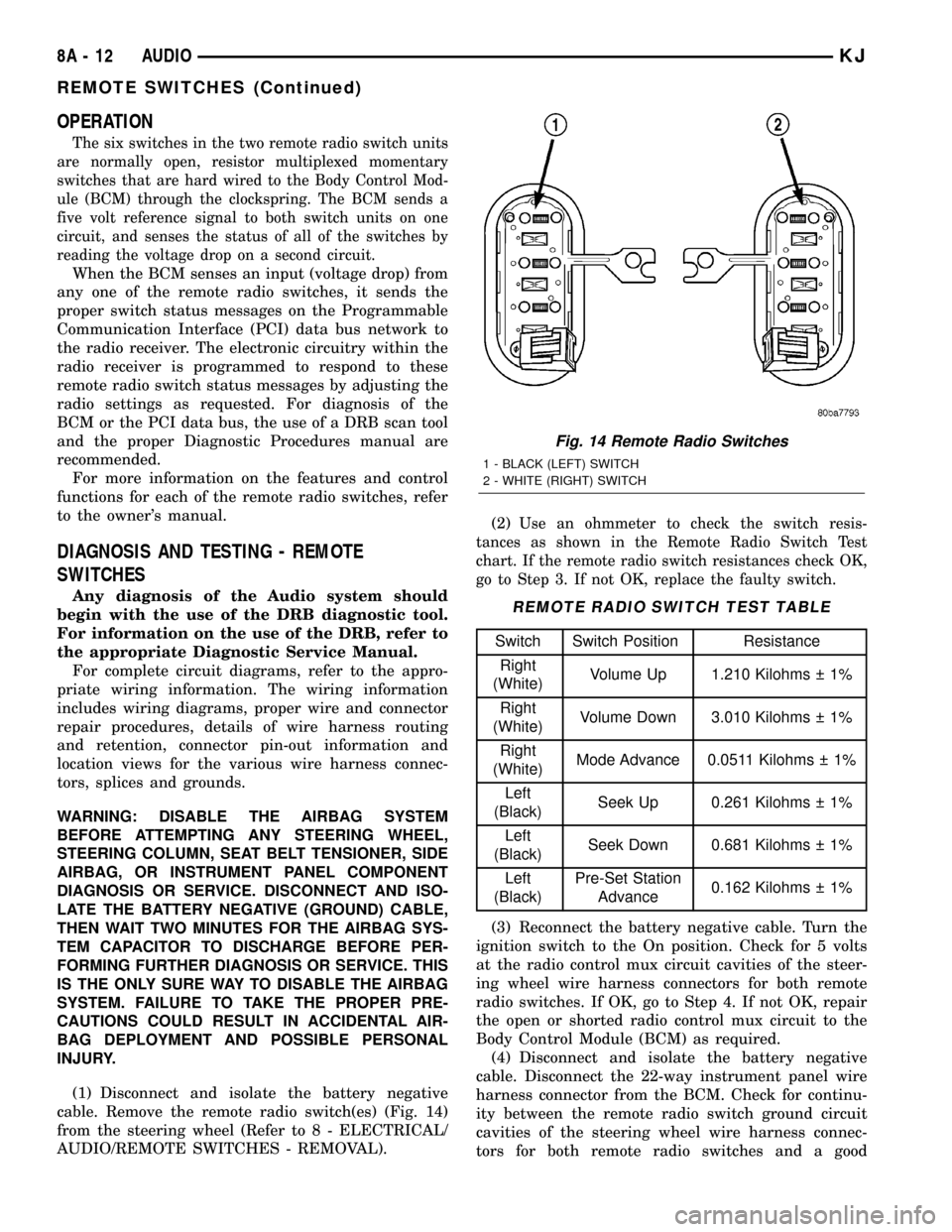
cable. Remove the remote radio switch(es) (Fig. 14)
from the steering wheel (Refer to 8 - ELECTRICAL/
AUDIO/REMOTE SWITCHES - REMOVAL).(2)
Use an ohmmeter to check the switch resis-
tances as shown in the Remote Radio Switch Test
chart. If the remote radio switch resistances check OK,
go to Step 3. If not OK, replace the faulty switch.
REMOTE RADIO SWITCH TEST TABLE
Switch Switch Position Resistance
Right
(White)Volume Up 1.210 Kilohms 1%
Right
(White)Volume Down 3.010 Kilohms 1%
Right
(White)Mode Advance 0.0511 Kilohms 1%
Left
(Black)Seek Up 0.261 Kilohms 1%
Left
(Black)Seek Down 0.681 Kilohms 1%
Left
(Black)Pre-Set Station
Advance0.162 Kilohms 1%
(3) Reconnect the battery negative cable. Turn the
ignition switch to the On position. Check for 5 volts
at the radio control mux circuit cavities of the steer-
ing wheel wire harness connectors for both remote
radio switches. If OK, go to Step 4. If not OK, repair
the open or shorted radio control mux circuit to the
Body Control Module (BCM) as required.
(4) Disconnect and isolate the battery negative
cable. Disconnect the 22-way instrument panel wire
harness connector from the BCM. Check for continu-
ity between the remote radio switch ground circuit
cavities of the steering wheel wire harness connec-
tors for both remote radio switches and a good
Fig. 14 Remote Radio Switches
1 - BLACK (LEFT) SWITCH
2 - WHITE (RIGHT) SWITCH
8A - 12 AUDIOKJ
REMOTE SWITCHES (Continued)
Page 290 of 1803

ground. There should be no continuity. If OK, go to
Step 5. If not OK, repair the shorted remote radio
switch ground circuit to the BCM as required.
(5) Check for continuity between the remote radio
switch ground circuit cavities of the steering wheel
wire harness connectors for both remote radio
switches and the 22-way instrument panel wire har-
ness connector for the BCM. There should be conti-
nuity. If OK, refer to the proper Diagnostic
Procedures manual to test the BCM and the PCI
data bus. If not OK, repair the open remote radio
switch ground circuit as required.
REMOVAL
WARNING:DISABLE THE AIRBAG SYSTEM BEFORE
ATTEMPTING ANY STEERING WHEEL, STEERING
COLUMN, SEAT BELT TENSIONER, SIDE AIRBAG,
OR INSTRUMENT PANEL COMPONENT DIAGNOSIS
OR SERVICE. DISCONNECT AND ISOLATE THE BAT-
TERY NEGATIVE (GROUND) CABLE, THEN WAIT
TWO MINUTES FOR THE AIRBAG SYSTEM CAPACI-
TOR TO DISCHARGE BEFORE PERFORMING FUR-
THER DIAGNOSIS OR SERVICE. THIS IS THE ONLY
SURE WAY TO DISABLE THE AIRBAG SYSTEM.
FAILURE TO TAKE THE PROPER PRECAUTIONS
COULD RESULT IN ACCIDENTAL AIRBAG DEPLOY-
MENT AND POSSIBLE PERSONAL INJURY.
(1) Disconnect and isolate the battery negative
cable.
(2) Remove the driver side airbag module from the
vehicle (Refer to 8 - ELECTRICAL/RESTRAINTS/
DRIVER AIRBAG - REMOVAL).
(3) Remove the cruise control switches (Fig. 15).
(4) Unplug the wire harness connector from the
remote radio switch(es).
(5)
Depress the tabs on each side of each switch and
push the switch through the rear steering wheel cover.
INSTALLATION
WARNING:DISABLE THE AIRBAG SYSTEM BEFORE
ATTEMPTING ANY STEERING WHEEL, STEERING
COLUMN, SEAT BELT TENSIONER, SIDE AIRBAG,
OR INSTRUMENT PANEL COMPONENT DIAGNOSIS
OR SERVICE. DISCONNECT AND ISOLATE THE BAT-
TERY NEGATIVE (GROUND) CABLE, THEN WAIT
TWO MINUTES FOR THE AIRBAG SYSTEM CAPACI-
TOR TO DISCHARGE BEFORE PERFORMING FUR-
THER DIAGNOSIS OR SERVICE. THIS IS THE ONLY
SURE WAY TO DISABLE THE AIRBAG SYSTEM.
FAILURE TO TAKE THE PROPER PRECAUTIONS
COULD RESULT IN ACCIDENTAL AIRBAG DEPLOY-
MENT AND POSSIBLE PERSONAL INJURY.
(1) Install remote radio switch to the steering
wheel.(2) Connect the wire harness to the remote radio
switch.
(3) Install the cruise control switches.
(4) Install the driver side airbag module (Refer to
8 - ELECTRICAL/RESTRAINTS/DRIVER AIRBAG -
INSTALLATION).
(5) Connect the battery negative cable.
SPEAKER
DESCRIPTION
STANDARD
The standard equipment speaker system includes
speakers in six locations. One 6.4 centimeter (2.50
inch) diameter speaker is installed on each end of the
instrument panel top pad. One 16.5 centimeter (6.5
inch) full-range speaker is located in each front door.
There is also one full-range 16.5 centimeter (6.5 inch)
diameter full-range speaker located in each rear door.
PREMIUM
The optional premium speaker system features six
Premium model speakers in six locations. Each of the
standard speakers is replaced with Premium model
speakers. One 6.4 centimeter (2.50 inch) diameter
Fig. 15 REMOTE SWITCH
1 - STEERING WHEEL
2 - SPEED CONTROL SWITCH
3 - SCREW
4 - DRIVER SIDE AIRBAG MODULE
5 - REMOTE RADIO SWITCH
6 - REAR TRIM COVER
KJAUDIO 8A - 13
REMOTE SWITCHES (Continued)
Page 291 of 1803

speaker is installed on each end of the instrument
panel top pad. One 16.5 centimeter (6.5 inch) Pre-
mium woofer is located in each front door. There is
also one full-range 16.5 centimeter (6.5 inch) diame-
ter Premium full-range speaker located in each rear
door. The premium speaker system also includes a
power amplifier mounted to each front door speaker.
The total available power of the premium speaker
system is about 160 watts.
OPERATION
Two wires connected to each speaker, one feed cir-
cuit (+) and one return circuit (±), allow the audio
output signal electrical current to flow through the
voice coil. For complete circuit diagrams, refer to the
appropriate wiring information. The wiring informa-
tion includes wiring diagrams, proper wire and con-
nector repair procedures, details of wire harness
routing and retention, connector pin-out information
and location views for the various wire harness con-
nectors, splices and grounds.
REMOVAL
FRONT DOOR
(1) Disconnect and isolate the battery negative
cable.
(2) Remove the front door trim panel (Refer to 23 -
BODY/DOOR - FRONT/TRIM PANEL - REMOVAL).
(3) Remove the speaker mounting screws (Fig. 16).
(4) Remove the speaker from the door and discon-
nect the wire harness connector.
INSTRUMENT PANEL
(1) Disconnect and isolate the battery negative
cable.
(2) Remove the A-pillar trim (Refer to 23 - BODY/
INTERIOR/A-PILLAR TRIM - REMOVAL).
(3) Remove instrument panel top cover (Refer to
23 - BODY/INSTRUMENT PANEL/INSTRUMENT
PANEL TOP COVER - REMOVAL).
(4) Remove speaker mounting screws (Fig. 17).
(5) Remove speaker and disconnect the wire har-
ness connector.
Fig. 16 FRONT DOOR SPEAKER
1 - FRONT DOOR SPEAKER
2 - MOUNTING SCREW
3 - WIRE HARNESS CONNECTOR
Fig. 17 INSTRUMENT PANEL SPEAKER
1 - INSTRUMENT PANEL SPEAKER
2 - INSTRUMENT PANEL
8A - 14 AUDIOKJ
SPEAKER (Continued)
Page 292 of 1803

REAR DOOR
(1) Disconnect and isolate the battery negative
cable.
(2) Remove the rear door trim panel (Refer to 23 -
BODY/DOORS - REAR/TRIM PANEL - REMOVAL).
(3) Remove the speaker mounting screws (Fig. 18).
(4) Remove the speaker from the door and discon-
nect the wire harness connector.
INSTALLATION
FRONT DOOR
(1) Connect the wire harness connector and install
the speaker to the door.
(2) Install the speaker mounting screws. Tighten
to 2 N´m (20 in. lbs.).
(3) Install the front door trim panel (Refer to 23 -
BODY/DOOR - FRONT/TRIM PANEL - INSTALLA-
TION).
(4) Connect the battery negative cable.
INSTRUMENT PANEL
(1) Connect wire harness connector and install
speaker.
(2) Install speaker mounting screws. Tighten to 2
N´m (20 in. lbs.).
(3) Install instrument panel top cover (Refer to 23
- BODY/INSTRUMENT PANEL/INSTRUMENT
PANEL TOP COVER - INSTALLATION).
(4) Install the A-pillar trim (Refer to 23 - BODY/
INTERIOR/A-PILLAR TRIM - INSTALLATION).
(5) Connect the battery negative cable.
REAR DOOR
(1) Connect the wire harness connector and install
the speaker to the door.
(2) Install the speaker mounting screws. Tighten
to 2 N´m (20 in. lbs.).
(3) Install the rear door trim panel (Refer to 23 -
BODY/DOORS - REAR/TRIM PANEL - INSTALLA-
TION).
(4) Connect the battery negative cable.
Fig. 18 REAR DOOR SPEAKER
1 - REAR DOOR SPEAKER
2 - MOUNTING SCREW
3 - WIRE HARNESS CONNECTOR
KJAUDIO 8A - 15
SPEAKER (Continued)
Page 300 of 1803

ELECTRONIC CONTROL MODULES
TABLE OF CONTENTS
page page
ELECTRONIC CONTROL MODULES
STANDARD PROCEDURE - PCM/SKIM
PROGRAMMING.......................1
BODY CONTROL MODULE
DESCRIPTION..........................2
OPERATION............................5
DIAGNOSIS AND TESTING - BODY CONTROL
MODULE.............................7
REMOVAL.............................7
INSTALLATION..........................7
COMMUNICATION
DESCRIPTION..........................8
OPERATION............................8
CONTROLLER ANTILOCK BRAKE
REMOVAL.............................10
INSTALLATION.........................10
DATA LINK CONNECTOR
DESCRIPTION - DATA LINK CONNECTOR....10
OPERATION - DATA LINK CONNECTOR......10
POWERTRAIN CONTROL MODULE
DESCRIPTION
DESCRIPTION - PCM..................11
DESCRIPTION - MODES OF OPERATION . . . 11
DESCRIPTION - 5 VOLT SUPPLIES.......13
DESCRIPTION - IGNITION CIRCUIT SENSE . 13DESCRIPTION - POWER GROUNDS......13
DESCRIPTION - SENSOR RETURN.......14
OPERATION
OPERATION - PCM....................14
OPERATION - 5 VOLT SUPPLIES.........15
OPERATION - IGNITION CIRCUIT SENSE . . . 15
REMOVAL.............................15
INSTALLATION.........................15
SENTRY KEY IMMOBILIZER MODULE
DESCRIPTION.........................15
OPERATION...........................16
REMOVAL.............................17
INSTALLATION.........................18
TRANSMISSION CONTROL MODULE
DESCRIPTION.........................18
OPERATION...........................18
STANDARD PROCEDURE - TCM QUICK
LEARN..............................21
HEATED SEAT MODULE
DESCRIPTION.........................21
OPERATION...........................21
DIAGNOSIS AND TESTING - HEATED SEAT
MODULE............................22
REMOVAL.............................24
INSTALLATION.........................24
ELECTRONIC CONTROL
MODULES
STANDARD PROCEDURE - PCM/SKIM
PROGRAMMING
NOTE: Before replacing the PCM for a failed driver,
control circuit, or ground circuit, be sure to check
the related component/circuit integrity for failures
not detected due to a double fault in the circuit.
Most PCM driver/control circuit failures are caused
by internal component failures (i.e. relays and sole-
noids) and shorted circuits (i.e. pull-ups, drivers,
and switched circuits). These failures are difficult to
detect when a double fault has occurred and only
one DTC has been set.
When a PCM (JTEC) and the SKIM are replaced
at the same time, perform the following steps in
order:
(1) Program the new PCM (JTEC).(2) Program the new SKIM.
(3) Replace all ignition keys and program them to
the new SKIM.
PROGRAMMING THE PCM (JTEC)
The SKIS Secret Key is an ID code that is unique
to each SKIM. This code is programmed and stored
in the SKIM, the PCM, and the ignition key tran-
sponder chip(s). When replacing the PCM, it is nec-
essary to program the secret key into the new PCM
using the DRBIIItscan tool. Perform the following
steps to program the secret key into the PCM.
(1) Turn the ignition switch to the On position
(transmission in Park/Neutral).
(2) Use the DRBIIItand select THEFT ALARM,
SKIM, then MISCELLANEOUS.
(3) Select PCM REPLACED (GAS ENGINE).
(4) Enter secured access mode by entering the
vehicle four-digit PIN.
(5) Select ENTER to update PCM VIN.
KJELECTRONIC CONTROL MODULES 8E - 1
Page 306 of 1803

²Vacuum Fluorescent Display Synchroniza-
tion (CMTC, EMIC, Radio)
²Vehicle Theft Security System Status (PCM,
ITM) - premium only
Refer to the appropriate diagnostic information for
additional details.
DIAGNOSIS AND TESTING - BODY CONTROL
MODULE
The hard wired inputs to and outputs from the
Body Control Module (BCM), as well as other hard
wired circuits for this module may be diagnosed and
tested using conventional diagnostic tools and proce-
dures. However, conventional diagnostic methods
may not prove conclusive in the diagnosis of the
BCM, the Programmable Communications Interface
(PCI) data bus network, or the electronic messages
received and transmitted by the BCM over the PCI
data bus. The most reliable, efficient, and accurate
means to diagnose the BCM and the PCI data bus
network inputs to and outputs from this module
requires the use of a DRBIIItscan tool. Refer to the
appropriate diagnostic information.
Refer to the appropriate wiring information. The
wiring information includes wiring diagrams, proper
wire and connector repair procedures, further details
on wire harness routing and retention, as well as
pin-out and location views for the various wire har-
ness connectors, splices and grounds.
WARNING: ON VEHICLES EQUIPPED WITH AIR-
BAGS, DISABLE THE SUPPLEMENTAL RESTRAINT
SYSTEM BEFORE ATTEMPTING ANY STEERING
WHEEL, STEERING COLUMN, DRIVER AIRBAG,
PASSENGER AIRBAG, SEAT BELT TENSIONER,
FRONT IMPACT SENSORS, SIDE CURTAIN AIRBAG,
OR INSTRUMENT PANEL COMPONENT DIAGNOSIS
OR SERVICE. DISCONNECT AND ISOLATE THE
BATTERY NEGATIVE (GROUND) CABLE, THEN
WAIT TWO MINUTES FOR THE SYSTEM CAPACI-
TOR TO DISCHARGE BEFORE PERFORMING FUR-
THER DIAGNOSIS OR SERVICE. THIS IS THE ONLY
SURE WAY TO DISABLE THE SUPPLEMENTAL
RESTRAINT SYSTEM. FAILURE TO TAKE THE
PROPER PRECAUTIONS COULD RESULT IN ACCI-
DENTAL AIRBAG DEPLOYMENT AND POSSIBLE
PERSONAL INJURY.
REMOVAL
WARNING: ON VEHICLES EQUIPPED WITH AIR-
BAGS, DISABLE THE SUPPLEMENTAL RESTRAINT
SYSTEM BEFORE ATTEMPTING ANY STEERING
WHEEL, STEERING COLUMN, DRIVER AIRBAG,
PASSENGER AIRBAG, SEAT BELT TENSIONER,FRONT IMPACT SENSORS, SIDE CURTAIN AIRBAG,
OR INSTRUMENT PANEL COMPONENT DIAGNOSIS
OR SERVICE. DISCONNECT AND ISOLATE THE
BATTERY NEGATIVE (GROUND) CABLE, THEN
WAIT TWO MINUTES FOR THE SYSTEM CAPACI-
TOR TO DISCHARGE BEFORE PERFORMING FUR-
THER DIAGNOSIS OR SERVICE. THIS IS THE ONLY
SURE WAY TO DISABLE THE SUPPLEMENTAL
RESTRAINT SYSTEM. FAILURE TO TAKE THE
PROPER PRECAUTIONS COULD RESULT IN ACCI-
DENTAL AIRBAG DEPLOYMENT AND POSSIBLE
PERSONAL INJURY.
NOTE: Before replacing a Body Control Module
(BCM), use a DRBIIITscan tool to retrieve the cur-
rent settings for the BCM programmable features
and the axle ratio/tire size (electronic pinion factor).
Refer to the appropriate diagnostic information.
These settings should be duplicated in the replace-
ment BCM using the DRBIIITscan tool before
returning the vehicle to service.
(1) Disconnect and isolate the battery negative
cable.
(2) Remove the Junction Block Module (JBM) from
the instrument panel end bracket on the driver side
of the vehicle. (Refer to 8 - ELECTRICAL/POWER
DISTRIBUTION/JUNCTION BLOCK - REMOVAL).
(3) Remove the four screws that secure the BCM
to the Junction Block (JB) (Fig. 3).
(4) Remove the BCM from the JB.
(5) If the vehicle is equipped with the optional
Remote Keyless Entry (RKE) system, remove the
RKE module from the receptacle on the BCM. (Refer
to 8 - ELECTRICAL/POWER LOCKS/REMOTE KEY-
LESS ENTRY MODULE - REMOVAL).
INSTALLATION
WARNING: ON VEHICLES EQUIPPED WITH AIR-
BAGS, DISABLE THE SUPPLEMENTAL RESTRAINT
SYSTEM BEFORE ATTEMPTING ANY STEERING
WHEEL, STEERING COLUMN, DRIVER AIRBAG,
PASSENGER AIRBAG, SEAT BELT TENSIONER,
FRONT IMPACT SENSORS, SIDE CURTAIN AIRBAG,
OR INSTRUMENT PANEL COMPONENT DIAGNOSIS
OR SERVICE. DISCONNECT AND ISOLATE THE
BATTERY NEGATIVE (GROUND) CABLE, THEN
WAIT TWO MINUTES FOR THE SYSTEM CAPACI-
TOR TO DISCHARGE BEFORE PERFORMING FUR-
THER DIAGNOSIS OR SERVICE. THIS IS THE ONLY
SURE WAY TO DISABLE THE SUPPLEMENTAL
RESTRAINT SYSTEM. FAILURE TO TAKE THE
PROPER PRECAUTIONS COULD RESULT IN ACCI-
DENTAL AIRBAG DEPLOYMENT AND POSSIBLE
PERSONAL INJURY.
KJELECTRONIC CONTROL MODULES 8E - 7
BODY CONTROL MODULE (Continued)
Page 309 of 1803

CONTROLLER ANTILOCK
BRAKE
REMOVAL
(1) Install the prop rod on the brake pedal to keep
pressure on the brake system.
(2) Remove the negative battery cable from the
battery.
(3) Pull up on the CAB harness connector release
(Fig. 4)and remove connector.
(4) Remove the pump connector from the CAB.
(5) Remove the CAB mounting bolts (Fig. 5).
(6) Remove the CAB from the HCU (Fig. 6).
INSTALLATION
(1) Install CAB to the HCU (Fig. 6).
(2) Install mounting bolts. Tighten to 2 N´m (16 in.
lbs.).
(3) Install the pump electircal connector to the
CAB (Fig. 6).
(4) Install the wiring harness connector to the
CAB and push down on the release to secure the con-
nector.
(5) Install negative battery cable to the battery.
(6) Remove the pushrod from the vehicle.
DATA LINK CONNECTOR
DESCRIPTION - DATA LINK CONNECTOR
The data link connector is located at the lower
edge of the instrument panel near the steering col-
umn (Fig. 7).
OPERATION - DATA LINK CONNECTOR
The 16±way data link connector (diagnostic scan
tool connector) links the Diagnostic Readout Box
(DRB) scan tool or the Mopar Diagnostic System
(MDS) with the Powertrain Control Module (PCM).
Fig. 4 CAB HARNESS CONNECTOR RELEASE
1 - ABS MODULE
2 - ELECTRICAL CONNECTOR
Fig. 5 HCU/CAB MOUNTING
1 - HCU
2 - CAB
3 - HCU/CAB BRACKET
4 - MOUNTING NUTS AND STUDS
5 - MOTOR
Fig. 6 CONTROLLER AND HCU
1 - CONTROLLER ANTILOCK BRAKE MODULE
2 - HYDRAULIC CONTROL UNIT (H.C.U)
3 - ELECTRICAL CONNECTOR
8E - 10 ELECTRONIC CONTROL MODULESKJ
Page 314 of 1803

²Transmission convertor clutch circuit. Driven
through J1850 circuits.
OPERATION - 5 VOLT SUPPLIES
Primary 5±volt supply:
²supplies the required 5 volt power source to the
Crankshaft Position (CKP) sensor.
²supplies the required 5 volt power source to the
Camshaft Position (CMP) sensor.
²supplies a reference voltage for the Manifold
Absolute Pressure (MAP) sensor.
²supplies a reference voltage for the Throttle
Position Sensor (TPS) sensor.
Secondary 5±volt supply:
²supplies the required 5 volt power source to the
oil pressure sensor.
²supplies the required 5 volt power source for the
Vehicle Speed Sensor (VSS) (if equipped).
²supplies the 5 volt power source to the transmis-
sion pressure sensor (certain automatic transmis-
sions).
OPERATION - IGNITION CIRCUIT SENSE
The ignition circuit sense input tells the PCM the
ignition switch has energized the ignition circuit.
Battery voltage is also supplied to the PCM
through the ignition switch when the ignition is in
the RUN or START position. This is referred to as
the9ignition sense9circuit and is used to9wake up9
the PCM. Voltage on the ignition input can be as low
as 6 volts and the PCM will still function. Voltage is
supplied to this circuit to power the PCM's 8-volt reg-
ulator and to allow the PCM to perform fuel, ignition
and emissions control functions.
REMOVAL
USE THE DRB SCAN TOOL TO REPROGRAM
THE NEW POWERTRAIN CONTROL MODULE
(PCM) WITH THE VEHICLES ORIGINAL IDEN-
TIFICATION NUMBER (VIN) AND THE VEHI-
CLES ORIGINAL MILEAGE. IF THIS STEP IS
NOT DONE, A DIAGNOSTIC TROUBLE CODE
(DTC) MAY BE SET.
The PCM is located in the engine compartment
near the battery (Fig. 9).
To avoid possible voltage spike damage to the
PCM, ignition key must be off, and negative battery
cable must be disconnected before unplugging PCM
connectors.
(1) Disconnect negative battery cable at battery.
(2) Remove cover over electrical connectors. Cover
snaps onto PCM.
(3) Carefully unplug the three 32±way connectors
from PCM.
(4) Remove three PCM mounting bolts and remove
PCM from vehicle.
INSTALLATION
USE THE DRB SCAN TOOL TO REPROGRAM
THE NEW POWERTRAIN CONTROL MODULE
(PCM) WITH THE VEHICLES ORIGINAL IDEN-
TIFICATION NUMBER (VIN) AND THE VEHI-
CLES ORIGINAL MILEAGE. IF THIS STEP IS
NOT DONE, A DIAGNOSTIC TROUBLE CODE
(DTC) MAY BE SET.
(1) Install PCM and 3 mounting bolts to vehicle.
(2) Tighten bolts. Refer to torque specifications.
(3) Check pin connectors in the PCM and the three
32±way connectors for corrosion or damage. Also, the
pin heights in connectors should all be same. Repair
as necessary before installing connectors.
(4) Install three 32±way connectors.
(5) Install cover over electrical connectors. Cover
snaps onto PCM.
(6) Install battery cable.
(7) Use the DRB scan tool to reprogram new PCM
with vehicles original Identification Number (VIN)
and original vehicle mileage.
SENTRY KEY IMMOBILIZER
MODULE
DESCRIPTION
The Sentry Key Immobilizer Module (SKIM) is the
primary component of the Sentry Key Immobilizer
System (SKIS) (Fig. 10). The SKIM is located on the
right side of the steering column, below the ignition
Fig. 9 PCM REMOVE/INSTALL
1 - PCM
2 - MOUNTING BOLTS (3)
3 - 32-WAY CONNECTORS
KJELECTRONIC CONTROL MODULES 8E - 15
POWERTRAIN CONTROL MODULE (Continued)
Page 316 of 1803

indicator on and off. If the SKIS indicator flashes
upon ignition On or stays on solid after the bulb test,
it signifies a SKIS fault. If the SKIM detects a sys-
tem malfunction and/or the SKIS has become inoper-
ative, the SKIS indicator will stay on solid. If the
SKIM detects an invalid key or if a key transponder-
related fault exists, the SKIS indicator will flash. If
the vehicle is equipped with the Customer Learn
transponder programming feature, the SKIM will
also send messages to the EMIC to flash the SKIS
indicator and to generate a single audible chime tone
whenever the Customer Learn programming mode is
being utilized. (Refer to 8 - ELECTRICAL/VEHICLE
THEFT SECURITY - STANDARD PROCEDURE -
SENTRY KEY TRANSPONDER PROGRAMMING).
The SKIS performs a self-test each time the igni-
tion switch is turned to the On position, and will
store fault information in the form of Diagnostic
Trouble Codes (DTC's) in SKIM memory if a system
malfunction is detected. The SKIM can be diagnosed,
and any stored DTC's can be retrieved using a
DRBIIItscan tool. Refer to the appropriate diagnos-
tic information.
REMOVAL
WARNING: ON VEHICLES EQUIPPED WITH AIR-
BAGS, DISABLE THE SUPPLEMENTAL RESTRAINT
SYSTEM BEFORE ATTEMPTING ANY STEERING
WHEEL, STEERING COLUMN, DRIVER AIRBAG,
PASSENGER AIRBAG, SEAT BELT TENSIONER,
FRONT IMPACT SENSORS, SIDE CURTAIN AIRBAG,
OR INSTRUMENT PANEL COMPONENT DIAGNOSIS
OR SERVICE. DISCONNECT AND ISOLATE THE
BATTERY NEGATIVE (GROUND) CABLE, THEN
WAIT TWO MINUTES FOR THE SYSTEM CAPACI-
TOR TO DISCHARGE BEFORE PERFORMING FUR-
THER DIAGNOSIS OR SERVICE. THIS IS THE ONLY
SURE WAY TO DISABLE THE SUPPLEMENTAL
RESTRAINT SYSTEM. FAILURE TO TAKE THE
PROPER PRECAUTIONS COULD RESULT IN ACCI-
DENTAL AIRBAG DEPLOYMENT AND POSSIBLE
PERSONAL INJURY.
(1) Disconnect and isolate the battery negative
cable.
(2) If the vehicle is equipped with the optional tilt
steering column, move the tilt steering column to the
fully lowered position and leave the tilt release lever
in the released (down) position.
(3) From below the steering column, remove the
two screws that secure the lower shroud to the upper
shroud (Fig. 11).
(4) Using hand pressure, push gently inward on
both sides of the upper shroud near the parting line
between the upper and lower shrouds to release thesnap features that secure the two halves to each
other.
(5) Remove both the upper and lower shrouds from
the steering column.
(6) Disconnect the instrument panel wire harness
connector for the SKIM from the module connector
receptacle.
(7) The SKIM mounting bracket features a clip for-
mation that secures the SKIM to the right lower
flange of the steering column jacket. Pull downward
on the connector end of the SKIM mounting bracket
to release this clip from the steering column jacket.
(8) Rotate the SKIM and its mounting bracket
downwards and then to the side away from the steer-
ing column to slide the SKIM antenna ring from
around the ignition switch lock cylinder housing. Lift
the multi-function switch upward off of the upper
steering column housing far enough to remove the
SKIM antenna ring formation from between the igni-
tion key release button and the multi-function switch
housing.
(9) Remove the SKIM from the steering column.
Fig. 11 Sentry Key Immobilizer Module Remove/
Install
1 - UPPER SHROUD
2 - STEERING COLUMN
3 - WIRE HARNESS CONNECTOR
4 - SENTRY KEY IMMOBILIZER MODULE
5 - LOWER SHROUD
6 - SCREW (2)
7 - IGNITION LOCK CYLINDER HOUSING
KJELECTRONIC CONTROL MODULES 8E - 17
SENTRY KEY IMMOBILIZER MODULE (Continued)