window JEEP LIBERTY 2002 KJ / 1.G User Guide
[x] Cancel search | Manufacturer: JEEP, Model Year: 2002, Model line: LIBERTY, Model: JEEP LIBERTY 2002 KJ / 1.GPages: 1803, PDF Size: 62.3 MB
Page 372 of 1803

(2) Follow the instructions in the repair kit for
preparing the damaged area.
(3) Remove the package separator clamp and mix
the two conductive epoxy components thoroughly
within the packaging. Fold the package in half and
cut the center corner to dispense the epoxy.
(4) For grid line repairs, mask the area to be
repaired with masking tape or a template.
(5) Apply the epoxy through the slit in the mask-
ing tape or template. Overlap both ends of the break
by at least 19 millimeters (0.75 inch).
(6) For a terminal or pigtail wire replacement,
mask the adjacent areas so the epoxy can be
extended onto the adjacent grid line as well as the
bus bar. Apply a thin layer of epoxy to the area
where the terminal or pigtail wire was fastened and
onto the adjacent grid line.
(7) Apply a thin layer of conductive epoxy to the
terminal or bare wire end of the pigtail and place it
in the proper location on the bus bar. To prevent the
terminal or pigtail wire from moving while the epoxy
is curing, it must be wedged or clamped.
(8)
Carefully remove the masking tape or template.
CAUTION: Do not allow the glass surface to exceed
204É C (400É F) or the glass may fracture.
(9) Allow the epoxy to cure 24 hours at room tem-
perature, or use a heat gun that will not over heat
the glass. Hold the heat gun approximately 25.4 cen-
timeters (10 inches) from the repair.
(10) After the conductive epoxy is properly cured,
remove the wedge or clamp from the terminal or pig-
tail wire. Do not attach the wire harness connectors
until the curing process is complete.
(11) Check the operation of the rear window defog-
ger glass heating grid.
REAR WINDOW DEFOGGER
GRID
DESCRIPTION
The heated rear window glass has two electrically
conductive vertical bus bars and a series of 11 hori-
zontal grid lines made of a silver-ceramic material,
which is baked on and bonded to the inside surface of
the glass. The grid lines and bus bars comprise a
parallel electrical circuit.
OPERATION
When the rear window defogger switch is placed in
the On position, electrical current is directed to the
rear window grid lines through the bus bars. The
grid lines heat the rear window to clear the surface
of fog or snow. Protection for the heated grid circuit
is provided by a fuse in the Power Distribution Cen-
ter (PDC).
The grid lines and bus bars are highly resistant to
abrasion. However, it is possible for an open circuit
to occur in an individual grid line, resulting in no
current flow through the line.
The grid lines can be damaged or scraped off with
sharp instruments. Care should be taken when clean-
ing the glass or removing foreign materials, decals,
or stickers from the glass. Normal glass cleaning sol-
vents or hot water used with rags or toweling is rec-
ommended.
A repair kit is available to repair the grid lines and
bus bars, or to reinstall the heated glass pigtail
wires.
DIAGNOSIS AND TESTING - REAR WINDOW
DEFOGGER GRID
For circuit descriptions and diagrams, (Refer to
Appropriate Wiring Information). To detect breaks in
the grid lines, the following procedure is required:
(1) Turn the ignition switch to the run position.
Set the defogger switch in the On position. The indi-
cator lamp should light. If OK, go to Step 2. If not
OK, (Refer to 8 - ELECTRICAL/HEATED GLASS/
REAR WINDOW DEFOGGER RELAY - DIAGNOSIS
AND TESTING)
(2) Using a 12-volt DC voltmeter, contact the ver-
tical bus bar on the right side of the vehicle with the
negative lead. With the positive lead, contact the ver-
tical bus bar on the left side of the vehicle. The volt-
meter should read battery voltage. If OK, go to Step
3. If not OK, repair the open circuit to the defogger
relay as required.
(3) With the negative lead of the voltmeter, contact
a good body ground point. The voltage reading should
not change. If OK, go to Step 4. If not OK, repair the
circuit to ground as required.
Fig. 2 GRID LINE REPAIR
1 - BREAK
2 - GRID LINE
3 - MASKING TAPE
KJWINDOW DEFOGGER 8G - 5
WINDOW DEFOGGER (Continued)
Page 373 of 1803

(4) Connect the negative lead of the voltmeter to
the right side bus bar and touch each grid line at its
midpoint with the positive lead (Fig. 3). A reading of
approximately six volts indicates a line is good. A
reading of zero volts indicates a break in the grid
line between the midpoint of the grid line and the
left side bus bar. A reading of ten to fourteen volts
indicates a break between the midpoint of the grid
line and the right side bus bar. Move the positive
lead on the grid line towards the break and the volt-
age reading will change as soon as the break is
crossed.
REAR WINDOW DEFOGGER
RELAY
DESCRIPTION
The rear window defogger relay is a International
Standards Organization (ISO)-type relay. The rear
window defogger relay is a electromechanical device
that switches fused battery current to the rear glass
and outside mirror heating grids, and the indicator
lamp of the defogger switch, when the HVAC control
head rear window defogger timer and logic circuitrygrounds the relay coil. (Refer to 8 - ELECTRICAL/
HEATED GLASS/REAR WINDOW DEFOGGER
RELAY - DIAGNOSIS AND TESTING)
The rear window defogger relay is located in the
junction block, on the left side of the instrument
panel inboard to the center of the vehicle (just to the
left and above the brake pedal or behind the knee
blocker). The rear window defogger relay cannot be
repaired and, if faulty or damaged, it must be
replaced.
OPERATION
The ISO relay consists of an electromagnetic coil, a
resistor or diode, and three (two fixed and one mov-
able) electrical contacts. The movable (common feed)
relay contact is held against one of the fixed contacts
(normally closed) by spring pressure. When the elec-
tromagnetic coil is energized, it draws the movable
contact away from the normally closed fixed contact,
and holds it against the other (normally open) fixed
contact.
When the electromagnetic coil is de-energized,
spring pressure returns the movable contact to the
normally closed position. The resistor is connected in
parallel with the electromagnetic coil in the relay,
and helps to dissipate voltage spikes that are pro-
duced when the coil is de-energized.
DIAGNOSIS AND TESTING - REAR WINDOW
DEFOGGER RELAY
WARNING: ON VEHICLES EQUIPPED WITH AIR-
BAGS, DISABLE THE AIRBAG SYSTEM BEFORE
ATTEMPTING ANY STEERING WHEEL, STEERING
COLUMN, OR INSTRUMENT PANEL COMPONENT
DIAGNOSIS OR SERVICE. DISCONNECT AND ISO-
LATE THE BATTERY NEGATIVE (GROUND) CABLE,
THEN WAIT TWO MINUTES FOR THE AIRBAG SYS-
TEM CAPACITOR TO DISCHARGE BEFORE PER-
FORMING FURTHER DIAGNOSIS OR SERVICE. THIS
IS THE ONLY SURE WAY TO DISABLE THE AIRBAG
SYSTEM. FAILURE TO TAKE THE PROPER PRE-
CAUTIONS COULD RESULT IN AN ACCIDENTAL
AIRBAG DEPLOYMENT AND POSSIBLE PERSONAL
INJURY.
RELAY TEST
The defogger relay (Fig. 4) is located in the junc-
tion block, on the left side of the instrument panel
inboard to the center of the vehicle (just to the right
and above the brake pedal or behind the knee
blocker). Remove the defogger relay from the junction
block to perform the following tests:
(1) A relay in the de-energized position should
have continuity between terminals 87A and 30, and
Fig. 3 REAR WINDOW DEFOGGER
1 - DEFOGGER BACKGLASS
2 - HEATED GLASS CONNECTOR9A9
3 - HINDGE MOUNTING SCREWS (2)
4 - HINDGE (LEFT SIDE)
5 - HINDGE MOUNTING SCREWS (2)
6 - HINDGE (RIGHT SIDE)
7 - HEATED GLASS CONNECTOR9B9
8 - BACKGLASS DEFOGGER GRID
8G - 6 WINDOW DEFOGGERKJ
REAR WINDOW DEFOGGER GRID (Continued)
Page 374 of 1803

no continuity between terminals 87 and 30. If OK, go
to Step 2. If not OK, replace the faulty relay.
(2) Resistance between terminals 85 and 86 (elec-
tromagnet) should be 60.7 to 80.3 ohms. If OK, go to
Step 3. If not OK, replace the faulty relay.
(3) Connect a battery to terminals 85 and 86.
There should now be continuity between terminals
30 and 87, and no continuity between terminals 87A
and 30. If OK, see the Relay Circuit Test in this
group. If not OK, replace the faulty relay.
30 - COMMON FEED
85 - COIL GROUND
86 - COIL BATTERY
87 - NORMALLY OPEN
87A - NORMALLY CLOSED
RELAY CIRCUIT TEST
(1) The relay common feed terminal cavity (30) is
connected to battery voltage and should be hot at all
times. If OK, go to Step 2. If not OK, repair the open
circuit to the PDC fuse as required.
(2) The relay normally closed terminal (87A) is
connected to terminal 30 in the de-energized position,
but is not used for this application. Go to Step 3.
(3) The relay normally open terminal (87) is con-
nected to the common feed terminal (30) in the ener-
gized position. This terminal supplies battery voltage
to the rear glass and outside rear view mirror heat-
ing grids and the defogger switch indicator lamp.
There should be continuity between the cavity for
relay terminal 87 and the rear window defogger relay
output circuit cavities of the rear glass heating grid
connector, both outside rear view mirror heating grid
connectors, and the defogger switch connector at all
times. If OK, go to Step 4. If not OK, repair the open
circuit(s) as required.(4) The coil ground terminal (85) is connected to
the electromagnet in the relay. This terminal is pro-
vided with ground by the instrument cluster rear
window defogger timer and logic circuitry to energize
the defogger relay. There should be continuity to
ground at the cavity for relay terminal 85 when the
defogger switch is turned On. However, with the
defogger relay removed, the defogger switch indicator
lamp will not light to show that the defogger system
is turned On. Be certain that you depress the defog-
ger switch at least twice to confirm that the system
is turned on during this test. If OK, go to Step 5. If
not OK, repair the open circuit to the HVAC control
head as required.
(5) The coil battery terminal (86) is connected to
the electromagnet in the relay. It is connected to
fused ignition switch output voltage and should be
hot when the ignition switch is in the run position.
Check for battery voltage at the cavity for relay ter-
minal 86 with the ignition switch in the run position.
If OK, see the diagnosis for Instrument Cluster in
this group. If not OK, repair the open circuit to the
fuse in the junction block as required.
REMOVAL
WARNING: ON VEHICLES EQUIPPED WITH AIR-
BAGS, DISABLE THE AIRBAG SYSTEM BEFORE
ATTEMPTING ANY STEERING WHEEL, STEERING
COLUMN, OR INSTRUMENT PANEL COMPONENT
DIAGNOSIS OR SERVICE. DISCONNECT AND ISO-
LATE THE BATTERY NEGATIVE (GROUND) CABLE,
THEN WAIT TWO MINUTES FOR THE AIRBAG SYS-
TEM CAPACITOR TO DISCHARGE BEFORE PER-
FORMING FURTHER DIAGNOSIS OR SERVICE. THIS
IS THE ONLY SURE WAY TO DISABLE THE AIRBAG
SYSTEM. FAILURE TO TAKE THE PROPER PRE-
CAUTIONS COULD RESULT IN AN ACCIDENTAL
AIRBAG DEPLOYMENT AND POSSIBLE PERSONAL
INJURY.
(1) Disconnect and isolate the battery negative
cable.
(2) Unplug the rear window defogger relay from
the junction block.
INSTALLATION
(1) Install the rear window defogger relay by align-
ing the relay terminals with the cavities in the junc-
tion block and pushing the relay firmly into place.
(2) Connect the battery negative cable.
(3) Test the relay operation.
Fig. 4 DEFOGGER RELAY- TERMINAL LEGEND
KJWINDOW DEFOGGER 8G - 7
REAR WINDOW DEFOGGER RELAY (Continued)
Page 375 of 1803

REAR WINDOW DEFOGGER
SWITCH
DESCRIPTION
The rear window defogger switch is installed in the
instrument panel HVAC contol head assembly. The
momentary-type switch provides a hard-wired ground
signal to the HVAC control head each time it is
depressed. The instrument cluster rear window
defogger timer and logic circuitry responds by ener-
gizing or de-energizing the rear window defogger
relay.
OPERATION
Energizing the rear window defogger relay pro-
vides electrical current to the rear window defogger
grid and, if the vehicle is so equipped, the outside
rear view mirror heating grids. An amber indicator
lamp in the defogger switch, which lights to indicate
when the defogger system is turned On, is also pow-
ered by the defogger relay output.
The defogger switch illumination lamp and indica-
tor lamp bulbs are serviceable. The defogger switch
cannot be repaired and, if faulty or damaged the
entire HVAC control head assembly must be
replaced.
DIAGNOSIS AND TESTING
DIAGNOSIS AND TESTING - REAR WINDOW
DEFOGGER SWITCH
For circuit descriptions and diagrams, (Refer to
Appropriate Wiring Information).
WARNING: ON VEHICLES EQUIPPED WITH AIR-
BAGS, DISABLE THE AIRBAG SYSTEM BEFORE
ATTEMPTING ANY STEERING WHEEL, STEERING
COLUMN, OR INSTRUMENT PANEL COMPONENT
DIAGNOSIS OR SERVICE. DISCONNECT AND ISO-
LATE THE BATTERY NEGATIVE (GROUND) CABLE,
THEN WAIT TWO MINUTES FOR THE AIRBAG SYS-
TEM CAPACITOR TO DISCHARGE BEFORE PER-
FORMING FURTHER DIAGNOSIS OR SERVICE. THIS
IS THE ONLY SURE WAY TO DISABLE THE AIRBAG
SYSTEM. FAILURE TO TAKE THE PROPER PRE-
CAUTIONS COULD RESULT IN AN ACCIDENTAL
AIRBAG DEPLOYMENT AND POSSIBLE PERSONAL
INJURY.
(1) Disconnect and isolate the battery negative
cable. Remove the HVAC control head assembly from
the instrument panel and unplug the defogger switch
wire harness connector-B.
(2) Check for continuity between the ground cir-
cuit cavity of the defogger switch wire harness con-nector and a good ground. There should be
continuity. If OK, go to Step 3. If not OK, repair the
open circuit as required.
(3) Check for continuity between the ground cir-
cuit terminal and the rear window defogger switch
sense circuit terminal on the back of the defogger
switch housing (Fig. 5). There should be momentary
continuity as the defogger switch button is depressed,
and then no continuity. If OK, (Refer to 8 - ELEC-
TRICAL/HEATED GLASS/REAR WINDOW DEFOG-
GER SWITCH - DIAGNOSIS AND TESTING -
INSTRUMENT CLUSTER REAR WINDOW DEFOG-
GER FUNCTION) If not OK, replace the faulty
switch (Fig. 5).
(4) Check switch position continuity between:
CONTACT PINS
1 - OFF LAMPS A-1 - A-7
2 - ON MOMENTARY B-6 - B-8
3 - ILLUMINATION LAMP A-7 - A-1
4 - INDICATOR LAMP B-12 - B-7
Fig. 5 A/C HEATER CONTROL HEAD (Rear View)
1 - A/C HEATER CONTROL HEAD
2 - A/C HEATER CONTROL HEAD LIGHT
3 - REAR WINDOW DEFOGGER SWITCH AND TEMPERATURE
BLEND DOOR- CONNECTOR B (12 PIN)
4 - A/C HEATER CONTROL HEAD LIGHT
5 - MODE SELECT CONTROL
6 - BLOWER SPEED CONTROL- CONNECTOR A (7 PIN)
7 - MOUNTING SCREWS (4)
8G - 8 WINDOW DEFOGGERKJ
Page 376 of 1803

DIAGNOSIS AND TESTING - REAR HVAC
CONTROL ASSEMBLY WINDOW DEFOGGER
FUNCTION
Before performing this test, complete the Defogger
Switch and Defogger Relay tests as described in this
group. For circuit descriptions and diagrams, (Refer
to Appropriate Wiring Information).
WARNING: ON VEHICLES EQUIPPED WITH AIR-
BAGS, DISABLE THE AIRBAG SYSTEM BEFORE
ATTEMPTING ANY STEERING WHEEL, STEERING
COLUMN, OR INSTRUMENT PANEL COMPONENT
DIAGNOSIS OR SERVICE. DISCONNECT AND ISO-
LATE THE BATTERY NEGATIVE (GROUND) CABLE,
THEN WAIT TWO MINUTES FOR THE AIRBAG SYS-
TEM CAPACITOR TO DISCHARGE BEFORE PER-
FORMING FURTHER DIAGNOSIS OR SERVICE. THIS
IS THE ONLY SURE WAY TO DISABLE THE AIRBAG
SYSTEM. FAILURE TO TAKE THE PROPER PRE-
CAUTIONS COULD RESULT IN AN ACCIDENTAL
AIRBAG DEPLOYMENT AND POSSIBLE PERSONAL
INJURY.
(1) Disconnect and isolate the battery negative
cable. Remove the defogger relay from the junction
block and unplug the defogger switch wire harness
connector.
(2) Remove the HVAC control head from the
instrument panel. This is accomplished by removing
the ashtray and the screw behind the ashtray and
uncliping the center bezel.
(3) Check for continuity between the rear window
defogger switch sense circuit cavity of the cluster
wire harness connector (connector B) and a good
ground. There should be no continuity. If OK, go to
Step 4. If not OK, repair the short circuit as
required.
(4) Check for continuity between the rear window
defogger switch sense circuit cavity of the right
instrument cluster wire harness connector (connector
B) and the defogger switch wire harness connector.
There should be continuity. If OK, go to Step 5. If not
OK, repair the open circuit as required.
(5) Check for continuity between the rear window
defogger relay control circuit cavity of the right
instrument cluster wire harness connector (connectorB) and a good ground. There should be no continuity.
If OK, go to Step 6. If not OK, repair the short circuit
as required.
(6) Check for continuity between the rear window
defogger relay control circuit cavities of the right
instrument cluster wire harness connector (connector
B) and the defogger relay receptacle (the cavity for
ISO relay terminal 85) in the junction block. There
should be continuity. If OK, replace the faulty HVAC
control head. If not OK, repair the open circuit as
required.
REMOVAL
WARNING: ON VEHICLES EQUIPPED WITH AIR-
BAGS, DISABLE THE AIRBAG SYSTEM BEFORE
ATTEMPTING ANY STEERING WHEEL, STEERING
COLUMN, OR INSTRUMENT PANEL COMPONENT
DIAGNOSIS OR SERVICE. DISCONNECT AND ISO-
LATE THE BATTERY NEGATIVE (GROUND) CABLE,
THEN WAIT TWO MINUTES FOR THE AIRBAG SYS-
TEM CAPACITOR TO DISCHARGE BEFORE PER-
FORMING FURTHER DIAGNOSIS OR SERVICE. THIS
IS THE ONLY SURE WAY TO DISABLE THE AIRBAG
SYSTEM. FAILURE TO TAKE THE PROPER PRE-
CAUTIONS COULD RESULT IN AN ACCIDENTAL
AIRBAG DEPLOYMENT AND POSSIBLE PERSONAL
INJURY.
(1) Disconnect and isolate the battery negative
cable.
(2) The Rear Window Defogger switch is part of
the HVAC assembly and if damaged or inoperative
the entire HVAC control assembly must be replace-
d(Refer to 24 - HEATING & AIR CONDITIONING/
CONTROLS/A/C HEATER CONTROL - REMOVAL).
INSTALLATION
(1) The Rear Window Defogger switch is part of
the HVAC control assembly and if damaged or inop-
erative you must replace the entire HVEAC control
head assembly(Refer to 24 - HEATING & AIR CON-
DITIONING/CONTROLS/A/C HEATER CONTROL -
INSTALLATION).
(2) Connect the battery negative cable.
KJWINDOW DEFOGGER 8G - 9
REAR WINDOW DEFOGGER SWITCH (Continued)
Page 428 of 1803

dition. The PCM then sends the proper malfunction
indicator lamp-on or lamp-off messages to the instru-
ment cluster. For further diagnosis of the MIL or the
instrument cluster circuitry that controls the LED,
(Refer to 8 - ELECTRICAL/INSTRUMENT CLUS-
TER - DIAGNOSIS AND TESTING). If the instru-
ment cluster turns on the MIL after the bulb test, it
may indicate that a malfunction has occurred and
that the fuel and emissions system may require ser-
vice. For proper diagnosis of the fuel and emissions
systems, the PCM, the PCI data bus, or the elec-
tronic message inputs to the instrument cluster that
control the MIL, a DRBIIItscan tool is required.
Refer to the appropriate diagnostic information.
ODOMETER
DESCRIPTION
An odometer and trip odometer are standard
equipment in all instrument clusters. The odometer
and trip odometer information are displayed in a
common electronic, blue-green Vacuum Fluorescent
Display (VFD), which is located in the lower edge of
the speedometer dial face in the instrument cluster
and, when illuminated, is visible through a small
window cutout in the cluster overlay. However, the
odometer and trip odometer information are not dis-
played simultaneously. The trip odometer reset
switch on the instrument cluster electronic circuit
board toggles the display between odometer and trip
odometer modes by depressing the odometer/trip
odometer switch knob that extends through the lower
edge of the cluster lens, just right of the odometer
VFD. Both the odometer and trip odometer informa-
tion is stored in the instrument cluster memory.
All odometer and trip odometer distance informa-
tion is stored in the instrument cluster. This distance
information can be increased when the proper inputs
are provided to the instrument cluster, but the dis-
tance information cannot be decreased. The odometer
can display values up to 864,004 kilometers (536,870
miles). The odometer will not roll over, but will latch
at the maximum value. The trip odometer can dis-
play values up to 9999.9 kilometers (9999.9 miles)
before it rolls over to zero. The odometer display does
not have a decimal point and will not show values
less than a full unit (kilometer or mile), the trip
odometer display does have a decimal point and will
show tenths of a unit (kilometer or mile). When the
trip odometer is active, the word ªTRIPº will also
illuminate near the bottom of the VFD. The unit of
measure for the odometer and trip odometer display
is not shown in the VFD. If the instrument cluster
has a kilometers-per-hour primary speedometer
scale, the odometer/trip odometer registers kilome-ters; and if the cluster features a miles-per-hour pri-
mary speedometer scale, the odometer/trip odometer
registers miles. In this instrument cluster, the odom-
eter/trip odometer VFD is also used to display certain
warning messages and diagnostic information.
The odometer/trip odometer has a ªRental Carº
mode, which will illuminate the odometer informa-
tion in the VFD whenever the driver side front door
is opened with the ignition switch in the Off or
Accessory positions. During daylight hours (exterior
lamps Off) the VFD is illuminated at full brightness
for clear visibility. At night (exterior lamps are On)
the instrument cluster converts an electronic dim-
ming level message received from the Body Control
Module (BCM) over the Programmable Communica-
tions Interface (PCI) data bus to a digital dimming
level signal for controlling the lighting level of the
VFD. However, a ªParadeº mode position of the panel
lamps dimmer control ring on the multi-function
switch left control stalk allows the VFD to be illumi-
nated at full brightness if the exterior lamps are
turned On during daylight hours.
The VFD, the trip odometer switch, and the trip
odometer switch button are serviced as a unit with
the instrument cluster.
OPERATION
The odometer and trip odometer give an indication
to the vehicle operator of the distance the vehicle has
traveled. This gauge is controlled by the instrument
cluster electronic circuitry based upon cluster pro-
gramming and electronic messages received by the
cluster from the Powertrain Control Module (PCM)
over the Programmable Communications Interface
(PCI) data bus. The odometer and trip odometer
information is displayed by the instrument cluster
Vacuum Fluorescent Display (VFD). The VFD will
display the odometer information whenever the
driver side front door is opened with the ignition
switch in the Off or Accessory positions, and will dis-
play the last previously selected odometer or trip
odometer information when the ignition switch is in
the On or Start positions. The instrument cluster cir-
cuitry controls the VFD and provides the following
features:
²Odometer/Trip Odometer Display Toggling-
Actuating the trip odometer reset switch momen-
tarily with the VFD illuminated will toggle the dis-
play between the odometer and trip odometer
information. Each time the VFD is illuminated with
the ignition switch in the On or Start positions, the
display will automatically return to the last mode
previously selected (odometer or trip odometer).
²Trip Odometer Reset- When the trip odome-
ter reset switch is pressed and held for longer than
about two seconds with the ignitions switch in the
KJINSTRUMENT CLUSTER 8J - 25
MALFUNCTION INDICATOR LAMP (MIL) (Continued)
Page 604 of 1803

POWER SYSTEMS
TABLE OF CONTENTS
page page
POWER LOCKS............................ 1
POWER MIRRORS........................ 11POWER SEATS........................... 14
POWER WINDOWS........................ 21
POWER LOCKS
TABLE OF CONTENTS
page page
POWER LOCKS
DESCRIPTION..........................1
OPERATION............................3
DIAGNOSIS AND TESTING - POWER LOCKS . . 3
DOOR LOCK / UNLOCK SWITCH
DIAGNOSIS AND TESTING - DOOR LOCK/
UNLOCK SWITCH......................4
REMOVAL.............................4
INSTALLATION..........................5
DOOR LOCK MOTOR
DESCRIPTION..........................5
OPERATION............................5
DIAGNOSIS AND TESTING - DOOR LOCK
MOTOR ..............................5
FLIP-UP GLASS RELEASE SWITCH
DIAGNOSIS AND TESTING - FLIP-UP GLASS
RELEASE SWITCH.....................5
DOOR LOCK RELAY
DESCRIPTION..........................6
OPERATION............................6
DIAGNOSIS AND TESTING - DOOR LOCK
RELAY...............................6
REMOVAL.............................6
INSTALLATION..........................7
REMOTE KEYLESS ENTRY MODULE
DESCRIPTION..........................7OPERATION............................7
DIAGNOSIS AND TESTING - REMOTE
KEYLESS ENTRY MODULE...............7
REMOVAL.............................7
INSTALLATION..........................7
REMOTE KEYLESS ENTRY TRANSMITTER
DIAGNOSIS AND TESTING - REMOTE
KEYLESS ENTRY TRANSMITTER..........8
STANDARD PROCEDURE
STANDARD PROCEDURE - RKE
TRANSMITTER BATTERIES..............8
STANDARD PROCEDURE - RKE
TRANSMITTER CUSTOMER
PREFERENCES.......................8
STANDARD PROCEDURE - RKE
TRANSMITTER PROGRAMING............9
SPECIFICATIONS - REMOTE KEYLESS
ENTRY TRANSMITTER..................9
TAILGATE CYLINDER LOCK SWITCH
DESCRIPTION..........................9
OPERATION............................9
DIAGNOSIS AND TESTING - TAILGATE
CYLINDER LOCK SWITCH...............9
REMOVAL.............................10
INSTALLATION.........................10
POWER LOCKS
DESCRIPTION
POWER LOCKS
A power operated door and tailgate lock system is
available factory-installed equipment on this model.
The power lock system allows all of the doors and thetailgate to be locked or unlocked electrically by oper-
ating a switch on either front door trim panel. The
power lock system receives non-switched battery cur-
rent through a fuse in the Junction Block (JB), so
that the power locks remain operational, regardless
of the ignition switch position.
The Body Control Module (BCM) locks the doors
and tailgate automatically when the vehicle is driven
beyond the speed of 25.7 Km/h (15 mph), all doors
KJPOWER SYSTEMS 8N - 1
Page 624 of 1803

POWER WINDOWS
TABLE OF CONTENTS
page page
POWER WINDOWS
DESCRIPTION.........................21
OPERATION...........................21
DIAGNOSIS AND TESTING - POWER
WINDOWS...........................21
WINDOW MOTOR
REMOVAL.............................22WINDOW SWITCH
DIAGNOSIS AND TESTING - WINDOW
SWITCH............................22
REMOVAL.............................23
INSTALLATION.........................23
POWER WINDOWS
DESCRIPTION
The power window system allows each of the door
windows to be raised and lowered electrically by
actuating a switch on the center console. A master
switch on the front of the center console allows the
driver to raise or lower each of the passenger door
windows and to lock out the individual switches on
the rear of the center console from operation. The
power window system receives battery feed through
fuse 13 in the Power Distribution Center (PDC), only
when the ignition switch is in the RUN or ACCES-
SORY position.
OPERATION
WINDOW SWITCH
The power window switches control the battery
and ground feeds to the power window motors. Both
of the rear door power window switches receive their
battery and ground feeds through the circuitry of the
front window switch. When the power window lock-
out switch is in the Lock position, the battery feed
for the rear door window switches is interrupted.
WINDOW MOTOR
Front door window lift motors use permanent type
magnets. The B+ and ground applied at the motor
terminal pins will cause the motor to rotate in one
direction. Reversing current through the motor ter-
minals will cause the motor to rotate in the opposite
direction.
Refer to the appropriate wiring information. The
wiring information includes wiring diagrams, proper
wire and connector repair procedures, details of wire
harness routing and retention, connector pin-out
information and location views for the various wire
harness connectors, splices and grounds.
DIAGNOSIS AND TESTING - POWER
WINDOWS
WIRING VOLTAGE TEST
The following wiring test determines whether or
not voltage is continuous through the body harness
to the front switch.
(1) Remove the power window switch and bezel
(Refer to 8 - ELECTRICAL/POWER WINDOWS/
POWER WINDOW SWITCH - REMOVAL).
(2) Disconnect wire connector from back of power
window switch.
(3) Switch ignition to the ON position.
(4) Connect the clip end of a 12 volt test light to
Pin 14 of the window switch harness connector.
Touch the test light probe to Pin 10.
²If the test light illuminates, the wiring circuit
between the battery and switch is OK.
²If the lamp does not illuminate, first check fuse
13 in the Power Distribution Center (PDC). If fuse 13
is OK, then check for a broken wire.
Refer to the appropriate wiring information. The
wiring information includes wiring diagrams, proper
wire and connector repair procedures, details of wire
harness routing and retention, connector pin-out
information and location views for the various wire
harness connectors, splices and grounds.
POWER WINDOW MOTOR TEST
If the power window motor is receiving proper cur-
rent and ground and does not operate, proceed with
motor test. Refer to the appropriate wiring informa-
tion. The wiring information includes wiring dia-
grams, proper wire and connector repair procedures,
details of wire harness routing and retention, connec-
tor pin-out information and location views for the
various wire harness connectors, splices and grounds.
(1) Remove front door trim panel as necessary to
gain access to power window motor wire connector
KJPOWER WINDOWS 8N - 21
Page 625 of 1803
(Refer to 23 - BODY/DOOR - FRONT/TRIM PANEL -
REMOVAL).
(2) Disconnect power window motor wire connector
from door harness.
(3) Using two jumper wires, connect one to a bat-
tery (+) source and the other to a good ground (-).
(4) Connect the Negative (-) jumper probe to one of
the motor connector terminals.
(5) Momentarily touch the Positive (+) jumper
probe to the other motor connector terminal.
When positive probe is connected the motor should
rotate in one direction to either move window up or
down. If window is all the way up or down the motor
will grunt and the inner door panel will flex when
actuated in that one direction.
(6) Reverse jumper probes at the motor connector
terminals and window should now move in opposite
direction. If window does not move or grunt, replace
the motor.
If window moved completely up or down, reverse
the jumper probes and cycle window to the opposite
position to verify full operation.
If motor grunts and does not move, verify that reg-
ulator is not binding.
WINDOW MOTOR
REMOVAL
The window motor is incorporated into the window
regulator assembly. If the window motor requires
replacement, the window regulator must be replaced.
(Refer to 23 - BODY/DOOR - FRONT/WINDOW
REGULATOR - REMOVAL) or (Refer to 23 - BODY/
DOORS - REAR/WINDOW REGULATOR - REMOV-
AL).
WINDOW SWITCH
DIAGNOSIS AND TESTING - WINDOW SWITCH
(1) Remove the switch to be tested (Refer to 8 -
ELECTRICAL/POWER WINDOWS/POWER WIN-
DOW SWITCH - REMOVAL).
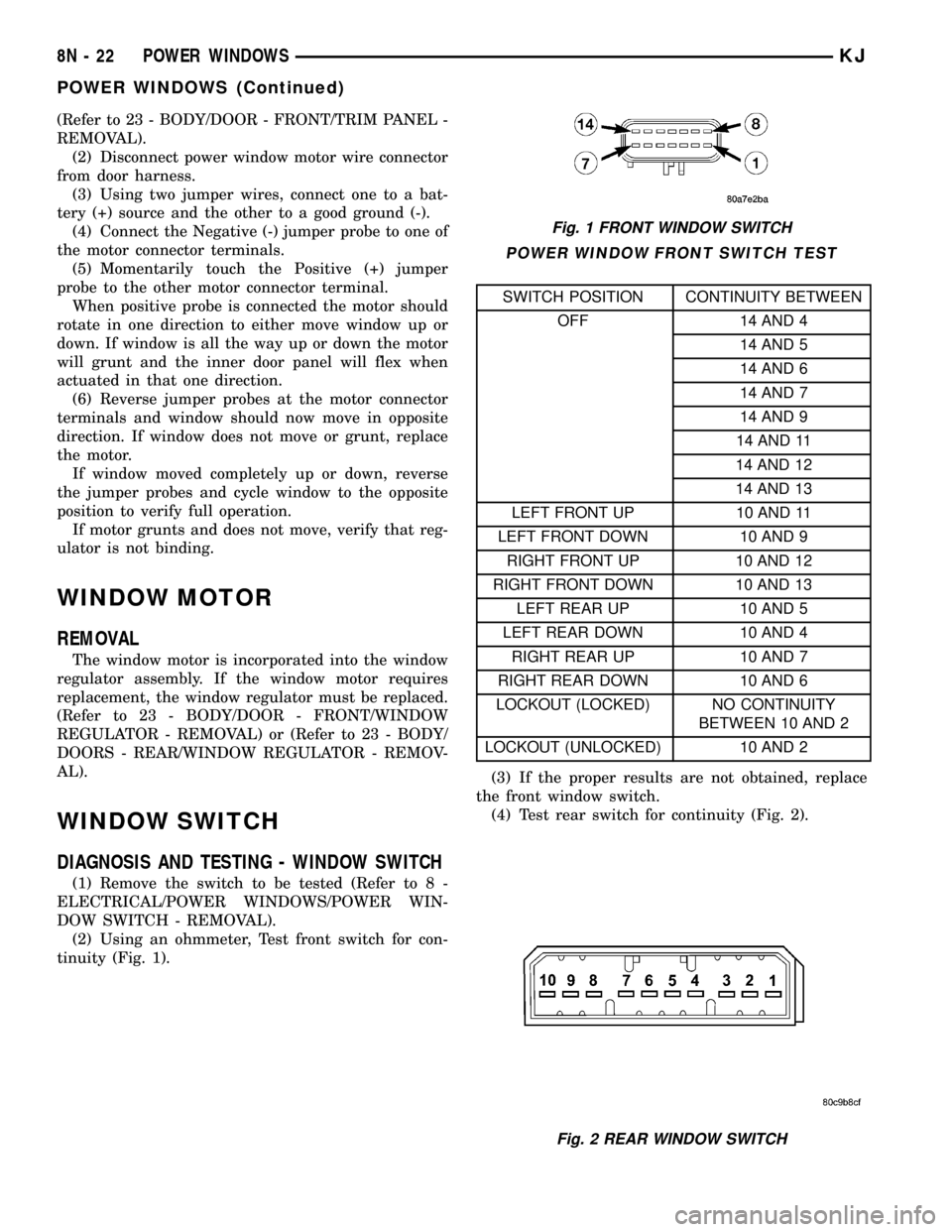
(2) Using an ohmmeter, Test front switch for con-
tinuity (Fig. 1).
POWER WINDOW FRONT SWITCH TEST
SWITCH POSITION CONTINUITY BETWEEN
OFF 14 AND 4
14 AND 5
14 AND 6
14 AND 7
14 AND 9
14 AND 11
14 AND 12
14 AND 13
LEFT FRONT UP 10 AND 11
LEFT FRONT DOWN 10 AND 9
RIGHT FRONT UP 10 AND 12
RIGHT FRONT DOWN 10 AND 13
LEFT REAR UP 10 AND 5
LEFT REAR DOWN 10 AND 4
RIGHT REAR UP 10 AND 7
RIGHT REAR DOWN 10 AND 6
LOCKOUT (LOCKED) NO CONTINUITY
BETWEEN 10 AND 2
LOCKOUT (UNLOCKED) 10 AND 2
(3) If the proper results are not obtained, replace
the front window switch.
(4) Test rear switch for continuity (Fig. 2).
Fig. 1 FRONT WINDOW SWITCH
Fig. 2 REAR WINDOW SWITCH
8N - 22 POWER WINDOWSKJ
POWER WINDOWS (Continued)
Page 626 of 1803
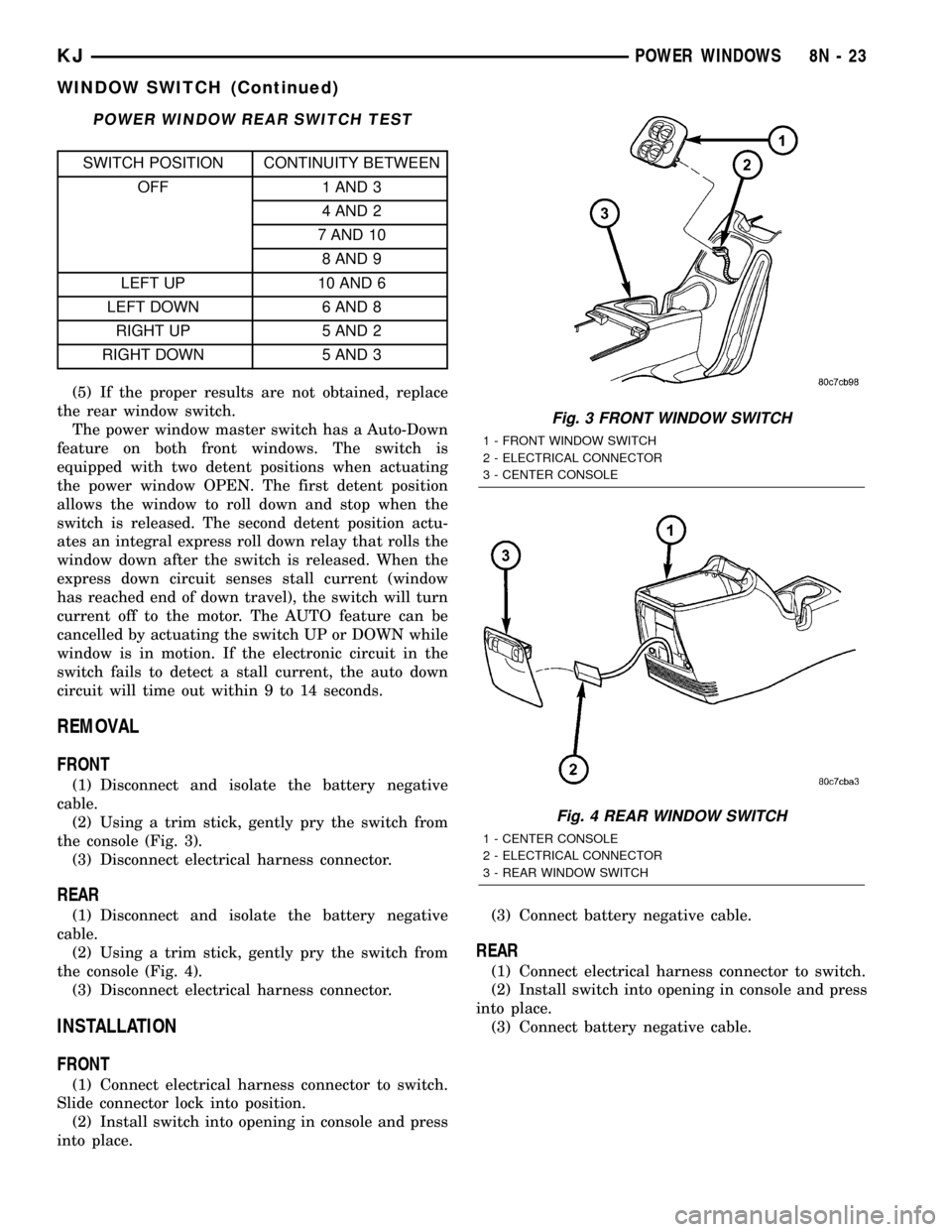
POWER WINDOW REAR SWITCH TEST
SWITCH POSITION CONTINUITY BETWEEN
OFF 1 AND 3
4 AND 2
7 AND 10
8 AND 9
LEFT UP 10 AND 6
LEFT DOWN 6 AND 8
RIGHT UP 5 AND 2
RIGHT DOWN 5 AND 3
(5) If the proper results are not obtained, replace
the rear window switch.
The power window master switch has a Auto-Down
feature on both front windows. The switch is
equipped with two detent positions when actuating
the power window OPEN. The first detent position
allows the window to roll down and stop when the
switch is released. The second detent position actu-
ates an integral express roll down relay that rolls the
window down after the switch is released. When the
express down circuit senses stall current (window
has reached end of down travel), the switch will turn
current off to the motor. The AUTO feature can be
cancelled by actuating the switch UP or DOWN while
window is in motion. If the electronic circuit in the
switch fails to detect a stall current, the auto down
circuit will time out within 9 to 14 seconds.
REMOVAL
FRONT
(1) Disconnect and isolate the battery negative
cable.
(2) Using a trim stick, gently pry the switch from
the console (Fig. 3).
(3) Disconnect electrical harness connector.
REAR
(1) Disconnect and isolate the battery negative
cable.
(2) Using a trim stick, gently pry the switch from
the console (Fig. 4).
(3) Disconnect electrical harness connector.
INSTALLATION
FRONT
(1) Connect electrical harness connector to switch.
Slide connector lock into position.
(2) Install switch into opening in console and press
into place.(3) Connect battery negative cable.
REAR
(1) Connect electrical harness connector to switch.
(2) Install switch into opening in console and press
into place.
(3) Connect battery negative cable.
Fig. 3 FRONT WINDOW SWITCH
1 - FRONT WINDOW SWITCH
2 - ELECTRICAL CONNECTOR
3 - CENTER CONSOLE
Fig. 4 REAR WINDOW SWITCH
1 - CENTER CONSOLE
2 - ELECTRICAL CONNECTOR
3 - REAR WINDOW SWITCH
KJPOWER WINDOWS 8N - 23
WINDOW SWITCH (Continued)