Section 2 JEEP LIBERTY 2004 KJ / 1.G User Guide
[x] Cancel search | Manufacturer: JEEP, Model Year: 2004, Model line: LIBERTY, Model: JEEP LIBERTY 2004 KJ / 1.GPages: 374, PDF Size: 5.71 MB
Page 61 of 374

Here are some tips for getting the most out of your child
restraint:
²Before buying any restraint system, make sure that it
has a label certifying that it meets all applicable Safety
Standards. The manufacturer recommends that you
try a child restraint in the vehicle seats where you will
use it before you buy it.
²The restraint must be appropriate for your child's
weight and height. Check the label on the restraint for
weight and height limits.
²Carefully follow the instructions that come with the
restraint. If you install the restraint improperly, it may
not work when you need it.
²The passenger seat belts are equipped with either
cinching latch plates or automatic locking retractors,
which are designed to keep the lap portion tight
around the child restraint so that it is not necessary touse a locking clip. If the seat belt has a cinching latch
plate, pulling up on the shoulder portion of the
lap/shoulder belt will tighten the belt. The cinching
latch plate will keep the belt tight, however, any seat
belt system will loosen with time, so check the belt
occasionally and pull it tight if necessary.
If the seat belt has a automatic locking retractor, it will
have a distinctive label. Pull the belt from the retractor
until there is enough to allow you to pass through the
child restraint and slide the latch plate into the buckle.
Then, pull the belt until it is all extracted from the
retractor. Allow the belt to return to the retractor,
pulling on the excess webbing to tighten the lap
portion about the child restraint. Refer to ªAutomatic
Locking Modeº earlier in this section.
²Buckle the child into the restraint exactly as the
manufacturer's instructions tell you.
THINGS TO KNOW BEFORE STARTING YOUR VEHICLE 61
2
Page 63 of 374

Installing the LATCH-Compatible Child Restraint
System
We urge that you carefully follow the directions of the
manufacturer when installing your child restraint. Not all
child restraint systems will be installed as described here.
Again, carefully follow the installation instructions that
were provided with the child restraint system.
The rear seat lower anchorages are round bars, located at
the rear of the seat cushion where it meets the seat back,
and are just visible when you lean into the rear seat to
install the child restraint. You will easily feel them if you
run your finger along the intersection of the seatback and
seat cushion surfaces.
THINGS TO KNOW BEFORE STARTING YOUR VEHICLE 63
2
Page 65 of 374
the seat, removing slack in the straps according to the
child restraint manufacturer's instructions.
WARNING!
Improper installation of a child restraint to the
LATCH anchorages can lead to failure of an infant or
child restraint. The child could be badly injured or
killed. Follow the manufacturer's directions exactly
when installing an infant or child restraint.
Installing Child Restraints Using the Vehicle Seat
Belt
The passenger seat belts are equipped with either cinch-
ing latch plates or automatic locking retractors, which are
designed to keep the lap portion tight around the child
restraint so that it is not necessary to use a locking clip. If
the seat belt has a cinching latch plate, pulling up on the
shoulder portion of the lap/shoulder belt will tighten thebelt. The cinching latch plate will keep the belt tight,
however, any seat belt system will loosen with time, so
check the belt occasionally and pull it tight if necessary.
If the seat belt has a automatic locking retractor, it will
have a distinctive label. Pull the belt from the retractor
until there is enough to allow you to pass through the
child restraint and slide the latch plate into the buckle.
Then, pull the belt until it is all extracted from the
retractor. Allow the belt to return to the retractor, pulling
on the excess webbing to tighten the lap portion about
the child restraint. Refer to ªAutomatic Locking Modeº
earlier in this section.
In the rear seat, you may have trouble tightening the
lap/shoulder belt on the child restraint because the
buckle or latch plate is too close to the belt path opening
on the restraint. Disconnect the latch plate from the
buckle and twist the short buckle-end belt several times
to shorten it. Insert the latch plate into the buckle with the
release button facing out.
THINGS TO KNOW BEFORE STARTING YOUR VEHICLE 65
2
Page 68 of 374
ENGINE BREAK-IN RECOMMENDATIONS
A long break-in period is not required for the engine in
your new vehicle.
Drive moderately during the first 300 miles (500 km).
After the initial 60 miles (100 km), speeds up to 50 or 55
mph (80 or 90 km/h) are desirable.
While cruising, brief full-throttle acceleration, within the
limits of local traffic laws, contributes to a good break-in.
Wide open throttle acceleration in low gear can be
detrimental and should be avoided.
The engine oil installed in the engine at the factory is a
high quality energy conserving type lubricant. Oil
changes should be consistent with anticipated climate
conditions under which vehicle operations will occur.
The recommended viscosity and quality grades are
shown in Section 7 of this manual. NON-DETERGENT
OR STRAIGHT MINERAL OILS MUST NEVER BE
USED.A new engine may consume some oil during its first few
thousand miles (kilometers) of operation. This should be
considered as a normal part of the break-in and not
interpreted as an indication of difficulty.
SAFETY TIPS
Exhaust Gas
WARNING!
Exhaust gases can injure or kill. They contain carbon
monoxide (CO) which is colorless and odorless.
Breathing it can make you unconscious and can
eventually poison you. To avoid breathing (CO)
follow the safety tips below.
68 THINGS TO KNOW BEFORE STARTING YOUR VEHICLE
Page 79 of 374

phone's audio is transmitted through your vehicle's
stereo system; the system will automatically mute your
radio before receiving or sending a call.
UConnectŸ allows you to transfer calls between the
system and your cellular phone as you enter or exit your
vehicle, and enables you to mute the system's micro-
phone for private conversations.
The UConnectŸ; phone book enables you to store up to
32 names and four numbers per name. This system is
driven through your BluetoothŸ Hands-Free Profile
cellular phone. UConnectŸ features BluetoothŸ technol-
ogy - the global standard that enables different electronic
devices to connect to each other without wires or a
docking station, so UConnectŸ works no matter where
you stow your cellular phone (be it your purse, pocket, or
briefcase). UConnectŸ allows up to seven cellular
phones to be linked to the system, and it is available in
English, French, or Spanish formats (as equipped).The rearview mirror contains the microphone for the
system and the control buttons that will enable you to
access the system. The diagram below shows the mirror
with the appropriate buttons. Individual button behavior
is discussed in the ªOperationº Section.
The UConnectŸ system can be used with any Hands
Free Profile certified BluetoothŸ cellular phone. If your
UNDERSTANDING THE FEATURES OF YOUR VEHICLE 79
3
Page 105 of 374

Windshield Washers
To use the washer, pull the lever toward you and hold
while spray is desired. If the lever is pulled while in the
delay range, the wiper will operate for two wipe cycles
after the lever is released, and then resume the intermit-
tent interval previously selected.NOTE:If vehicle is equipped with the optional Elec-
tronic Vehicle Information Center (EVIC) in the overhead
console, all warnings including ªdoorº, ªGATEº,
ªGLASSº, and ªLOWASHº will only be displayed in the
EVIC display (not in the instrument cluster). For addi-
tional information, refer to ªOverhead Console Ð If
Equippedº in Section 3.
The vacuum fluorescent (VF) display located in the
odometer area displays the word ªLOWASHº when the
washer solvent needs to be refilled. If the vehicle is not
moving, when a low washer fluid condition is detected,
the VF display will show the word ªLOWASHº and then
show the odometer/trip odometer mileage (each for 2
seconds). The display will continue to cycle.
If any other active warnings including ªdoorº, ªGATEº,
or ªGLASSº are present, they will be shown in the VF
display and will continue to cycle. If the vehicle starts
moving, two single chimes will occur (one chime for each
UNDERSTANDING THE FEATURES OF YOUR VEHICLE 105
3
Page 116 of 374

Display U.S. or Metric?
Pressing the STEP button when in this display selects US
or Metric. The overhead console and instrument panel
displays will be in the selected units.
Auto Door Locks?
When this feature is selected, all doors and the swing
gate will lock automatically when the speed of the
vehicle reaches 15 mph (25 km/h). Pressing the STEP
button when in this display will select ªYesº or ªNo.º
Auto Unlock On Exit? (Available Only When the
AUTO DOOR LOCKS Feature is Turned On )
When this feature is selected all the vehicle's doors will
unlock when the driver's door is opened if the vehicle is
stopped and the transmission is in P (Park) or N (Neu-
tral) position. Pressing the STEP button when in this
display will select ªYesº or ªNo.º
Remote Unlock Driver's Door 1st?
When this feature is selected only the driver's door will
unlock on the first press of the remote keyless entry
unlock button and require a second press to unlock the
remaining locked doors and swing gate. WhenREMOTE
UNLOCK ALL DOORSis selected all of the doors and
the swing gate will unlock at the first press of the remote
keyless entry unlock button. Pressing the STEP button
when in this display will select DRIVER'S DOOR 1ST or
ALL DOORS. This can also be programmed using the key
fob, refer to ªRemote Keyless Entryº earlier in this
section.
Train Remote?
Pressing the STEP button when in this display will select
ªYesº or ªNo.º
NOTE:Any time you perform this procedure, it is
necessary to retrain all currently trained key fobs.
116 UNDERSTANDING THE FEATURES OF YOUR VEHICLE
Page 117 of 374

To Train Additional Key Fobs (using the EVIC module)
1. Press the MENU button until TRAIN REMOTE? NO is
displayed. Press the STEP button to change to YES. Then,
PRESS A VALID FOB KEY will be displayed. Press either
the ªLockº or ªUnlockº button on the current key fob.
2. The next display will say PRESS FOB 2 LOCK &
UNLOCK. Press both key fob buttons simultaneously.
3. The next display will say PRESS FOB 2 UNLOCK.
Press the unlock button on the second key fob.
4. The next display will say FOB 2 TRAINED. At this
point, the procedure can be exited by pressing the STEP,
RESET, or C/T button.
5. Repeat step2Ð4totrain additional key fobs. A total
of four key fobs can be programmed.
Can also be programmed using the key fob, refer to
ªRemote Keyless Entryº earlier in this section.Sound Horn On Lock?
When this feature is selected, a short horn sound will
occur when the remote keyless entry ªLockº button is
pressed. This feature may be selected with or without the
flash lights on lock/unlock feature. Pressing the STEP
button when in this display will select ªYesº or ªNo.º
Can also be programmed using the key fob, refer to
ªRemote Keyless Entryº earlier in this section.
Flash Lights With Locks?
When this feature is selected, the front and rear turn
signals will flash when the doors are locked or unlocked
using the remote keyless entry transmitter. This feature
may be selected with or without the sound horn on lock
feature selected. Pressing the STEP button when in this
display will select ªYesº or ªNo.º Can also be pro-
grammed using the key fob, refer to ªRemote Keyless
Entryº earlier in this section.
UNDERSTANDING THE FEATURES OF YOUR VEHICLE 117
3
Page 127 of 374
WARNING!
Your motorized door or gate will open and close
while you are programming HomeLink. Do not
program HomeLink if people or pets are in the path
of the door or gate. A moving door or gate can cause
serious injury or death to people and pets or damage
to objects.
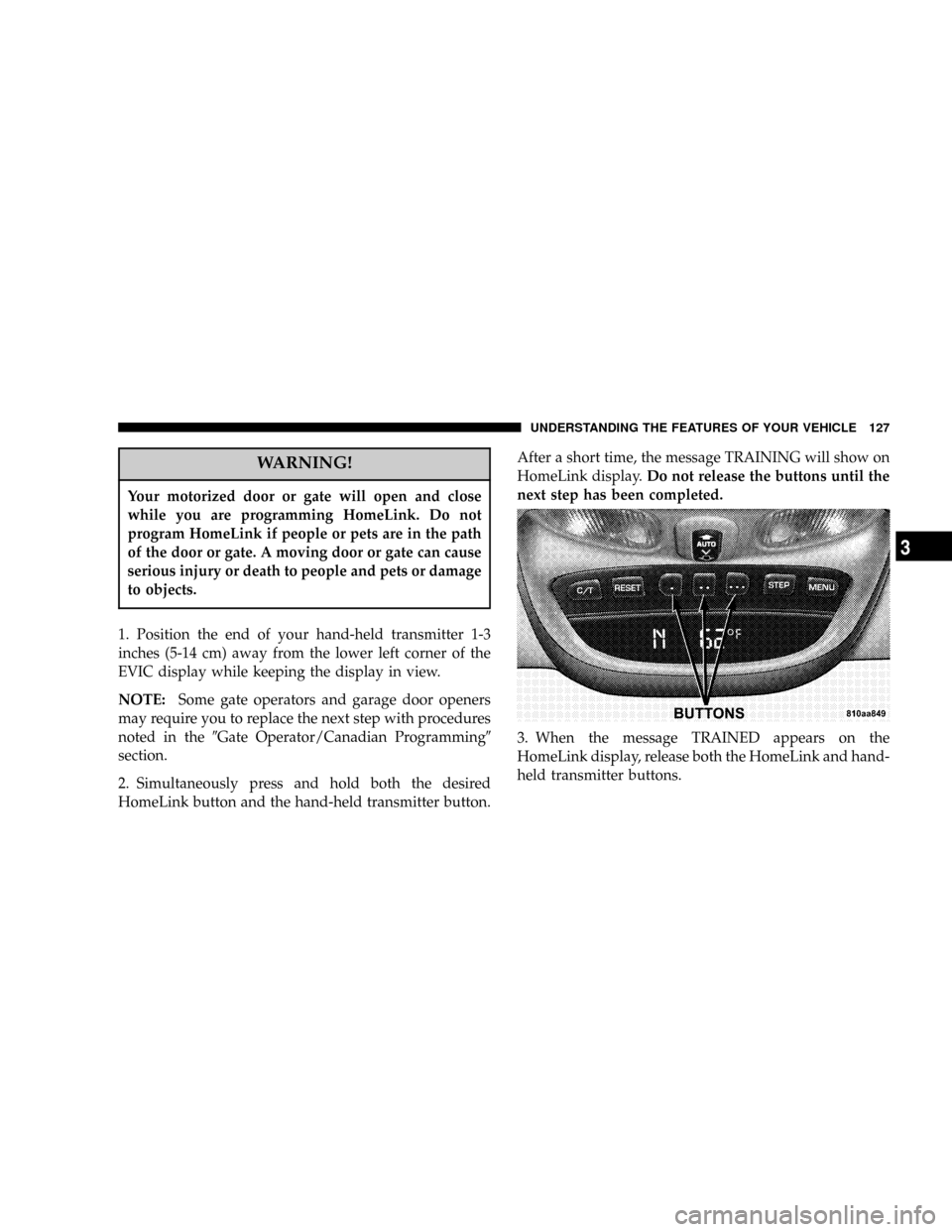
1. Position the end of your hand-held transmitter 1-3
inches (5-14 cm) away from the lower left corner of the
EVIC display while keeping the display in view.
NOTE:Some gate operators and garage door openers
may require you to replace the next step with procedures
noted in the9Gate Operator/Canadian Programming9
section.
2. Simultaneously press and hold both the desired
HomeLink button and the hand-held transmitter button.After a short time, the message TRAINING will show on
HomeLink display.Do not release the buttons until the
next step has been completed.
3. When the message TRAINED appears on the
HomeLink display, release both the HomeLink and hand-
held transmitter buttons.
UNDERSTANDING THE FEATURES OF YOUR VEHICLE 127
3
Page 154 of 374

towing a trailer. It should not be allowed to exceed the
upper limits of the normal operating range.
If the pointer rises to the red zone (five chimes will
occur), pull over and stop the vehicle. Do not turn the
engine off. Idle the vehicle with the air conditioning
turned off, until the pointer drops back into the normal
range. If the engine remains in the high range, turn the
engine off and call for service.
12. Reset Button
Press this button to toggle between the odometer and trip
odometer display. When in the trip odometer mode,
holding the button in resets the trip odometer. Also,
pressing the ªResetº button will clear out any warning
messages in the odometer display.
13. Odometer/Trip Odometer
A vacuum fluorescent display indicates the total distance
the vehicle has been driven. Also, the cluster will display,
replacing the odometer/trip odometer, vehicle warningmessages such as: door/gate/glass ajar and low washer
fluid. See appropriate sections for more information.
NOTE:If vehicle is equipped with the optional Elec-
tronic Vehicle Information Center (EVIC) in the overhead
console, all warnings including ªdoorº, ªGATEº,
ªGLASSº, and ªLOWASHº will only be displayed in the
EVIC display (not in the instrument cluster). For addi-
tional information, refer to ªOverhead Console Ð If
Equippedº in Section 3.
U.S. federal regulations require that upon transfer of
vehicle ownership, the seller certify to the purchaser the
correct mileage that the vehicle has been driven. There-
fore, if the odometer reading is changed during repair or
replacement, be sure to keep a record of the reading
before and after the service so that the correct mileage can
be determined.
154 UNDERSTANDING YOUR INSTRUMENT PANEL