warning JEEP LIBERTY 2008 KK / 2.G Workshop Manual
[x] Cancel search | Manufacturer: JEEP, Model Year: 2008, Model line: LIBERTY, Model: JEEP LIBERTY 2008 KK / 2.GPages: 493
Page 150 of 493

Vehicles equipped with a manual transmission may need
to be shifted into a lower gear to climb hills without
speed loss.
WARNING!
Speed Control can be dangerous where the system
can't maintain a constant speed. Your vehicle could
go too fast for the conditions, and you could lose
control. An accident could be the result. Don't use
Speed Control in heavy traffic or on roads that are
winding, icy, snow-covered, or slippery.
REAR PARK ASSIST SYSTEM Ð IF EQUIPPED
The Rear Park Assist System is a driver aid that senses for
obstacles behind the vehicle and provides both visible
and audible warnings to indicate the range of the object.
System Usage Precautions
NOTE:
²Ensure that the rear bumper is free of dirt and debris
to keep the Rear Park Assist System operating prop-
erly.
²Jackhammers, large trucks, and other vibrations could
affect the performance of the Rear Park Assist System.
²When you turn off the Rear Park Assist System, the
instrument cluster will display ªPARK ASSIST DIS-
ABLED.º Furthermore, once you turn off the Rear
Park Assist System, it remains off until you turn it on
again, even if you cycle the ignition key.
150 UNDERSTANDING THE FEATURES OF YOUR VEHICLE
Page 152 of 493

WARNING!
²Drivers must be careful when backing up even when
using the Rear Park Assist System. Always check
carefully behind your vehicle, look behind you, and
be sure to check for pedestrians, animals, other
vehicles, obstructions, and blind spots before back-
ing up. You are responsible for safety and must
continue to pay attention to your surroundings. Fail-
ure to do so can result in serious injury or death.
²Before using the Rear Park Assist System, it is
strongly recommended that the ball mount and hitch
ball assembly is disconnected from the vehicle when
the vehicle is not used for towing. Failure to do so
can result in injury or damage to vehicles or obstacles
because the hitch ball will be much closer to the
obstacle than the rear fascia when the warning dis-
play turns the red LEDs ON. Also, the sensors could
detect the ball mount and hitch ball assembly, de-
pending on its size and shape, giving a false indica-
tion that an obstacle is behind the vehicle.
Enabling & Disabling the System
There are times when you may want to disable the Rear
Park Assist System, such as when towing a trailer.
Vehicles Equipped With the Electronic Vehicle
Information Center (EVIC)
You can turn the Rear Park Assist System on or off
through the EVIC. For details, refer to ªPersonal Settings
(Customer Programmable Features)º under ªElectronic
Vehicle Information Center (EVIC)º in Section 4 of this
manual.
Vehicles Equipped with Rear Park Assist Switch
You can turn the Rear Park Assist System on or off by
pressing the Rear Park Assist switch located the lower
switch bank below the climate controls.
152 UNDERSTANDING THE FEATURES OF YOUR VEHICLE
Page 153 of 493

System Operation
The system uses four sensors located in the rear bumper
fascia to scan for obstacles up to 79 inches (200 cm) away
from the rear bumper fascia. The warning display located
above the rear window provides both visible and audible
warnings to indicate the range of the object.The warning display contains two sets of yellow and red
LEDs, one set to warn of obstacles behind the left rear of
the vehicle and the other set to warn of obstacles behind
the right rear of the vehicle. The driver can view the LEDs
either through the rear view mirror or by looking at the
display above the rear window.
Rear Park Assist SwitchRear Park Assist Indicator
UNDERSTANDING THE FEATURES OF YOUR VEHICLE 153
3
Page 154 of 493
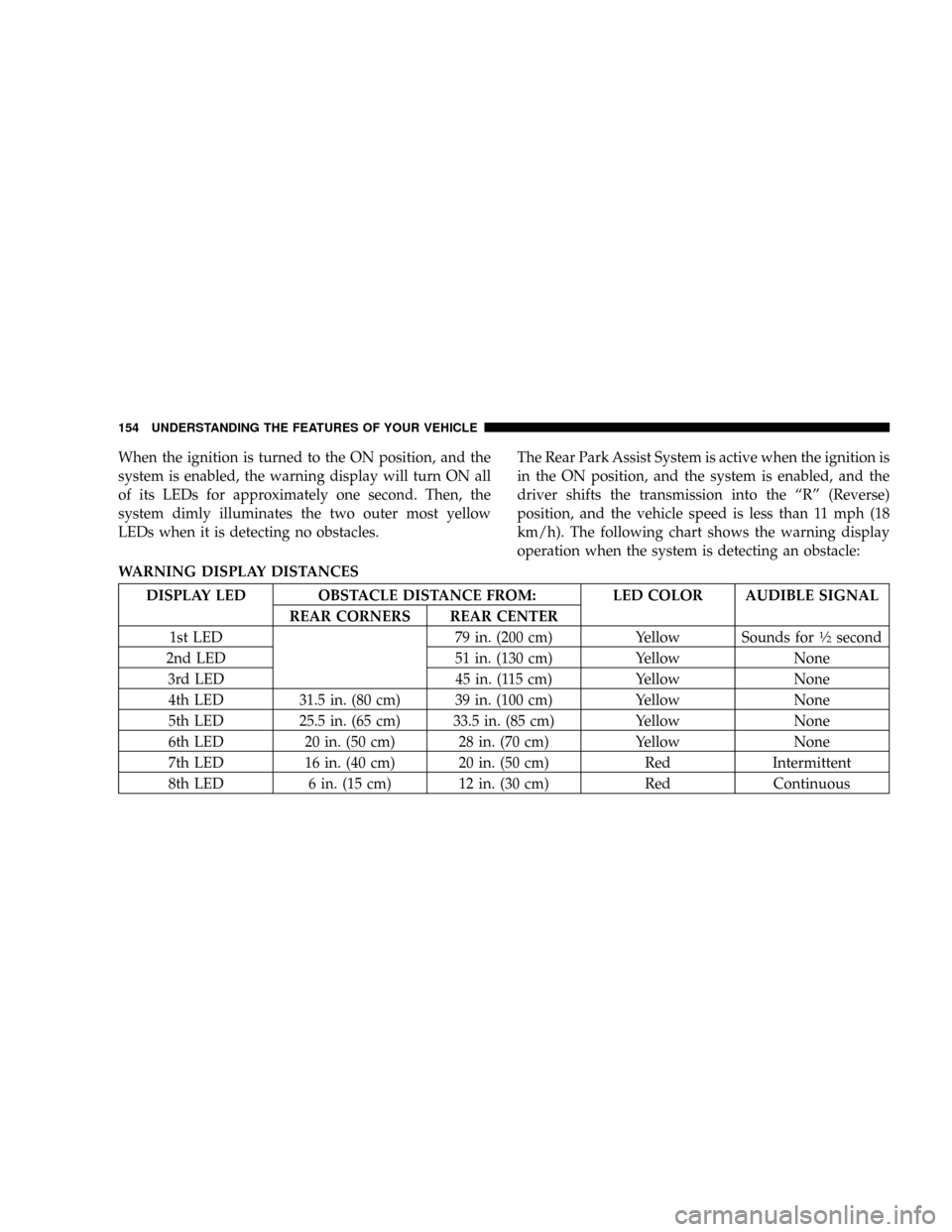
When the ignition is turned to the ON position, and the
system is enabled, the warning display will turn ON all
of its LEDs for approximately one second. Then, the
system dimly illuminates the two outer most yellow
LEDs when it is detecting no obstacles.The Rear Park Assist System is active when the ignition is
in the ON position, and the system is enabled, and the
driver shifts the transmission into the ªRº (Reverse)
position, and the vehicle speed is less than 11 mph (18
km/h). The following chart shows the warning display
operation when the system is detecting an obstacle:
WARNING DISPLAY DISTANCES
DISPLAY LED OBSTACLE DISTANCE FROM: LED COLOR AUDIBLE SIGNAL
REAR CORNERS REAR CENTER
1st LED 79 in. (200 cm) Yellow Sounds for
1¤2second
2nd LED 51 in. (130 cm) Yellow None
3rd LED 45 in. (115 cm) Yellow None
4th LED 31.5 in. (80 cm) 39 in. (100 cm) Yellow None
5th LED 25.5 in. (65 cm) 33.5 in. (85 cm) Yellow None
6th LED 20 in. (50 cm) 28 in. (70 cm) Yellow None
7th LED 16 in. (40 cm) 20 in. (50 cm) Red Intermittent
8th LED 6 in. (15 cm) 12 in. (30 cm) Red Continuous
154 UNDERSTANDING THE FEATURES OF YOUR VEHICLE
Page 155 of 493

GARAGE DOOR OPENER Ð IF EQUIPPED
HomeLinktreplaces up to three remote controls (hand
held transmitters) that operate devices such as garage
door openers, motorized gates, lighting, or home security
systems. The HomeLinktunit operates off your vehicle's
battery.
NOTE:HomeLinktis disabled when the Vehicle Secu-
rity Alarm is active.WARNING!
Your motorized door or gate will open and close while
you are training the Universal Transceiver. Do not train
the transceiver if people or pets are in the path of the
door or gate. Only use this transceiver with a garage
door opener that has a ªstop and reverseº feature as
required by federal safety standards. This includes
most garage door opener models manufactured after
1982. Do not use a garage door opener without these
safety features. Call toll-free 1±800±355±3515 or, on the
Internet at www.HomeLink.com for safety information
or assistance.
UNDERSTANDING THE FEATURES OF YOUR VEHICLE 155
3
Page 156 of 493

WARNING!
Vehicle exhaust contains carbon monoxide, a danger-
ous gas. Do not run your vehicle in the garage while
training the transceiver. Exhaust gas can cause seri-
ous injury or death.
Programming HomeLinkT
Before You Begin
If you have not trained any of the HomeLinktbuttons,
erase all channels before you begin training.
To do this, press and hold the two outside buttons for 20
seconds until the red indicator flashes.
It is recommended that a new battery be placed in the
hand-held transmitter of the device being programmed
to HomeLinktfor more efficient training and accurate
transmission of the radio-frequency signal.Your vehicle should be parked outside of the garage
when programming.
1. Turn the ignition switch to the ON/RUN position.
2. Hold the battery side of the hand-held transmitter
away from the HomeLinktbutton you wish to program.
Place the hand-held transmitter 1±3 inches (3±8 cm) away
from the HomeLinktbutton you wish to program while
keeping the indicator light in view.
3. Simultaneously press and hold both the chosen
HomeLinktbutton and the hand-held transmitter button
until the HomeLinktindicator changes from a slow to a
rapidly blinking light, then release both the HomeLinkt
and hand-held transmitter buttons.
Watch for the HomeLinktindicator to change flash rates.
When it changes, it is programmed. It may take up to 30
seconds, or longer in rare cases. The garage door may
open & close while you train.
156 UNDERSTANDING THE FEATURES OF YOUR VEHICLE
Page 162 of 493

WARNING!
²Never leave children in a vehicle, with the keys in
the ignition switch. Occupants, particularly unat-
tended children, can become entrapped by the
power sunroof while operating the power sunroof
switch. Such entrapment may result in serious
injury or death.
²In an accident, there is a greater risk of being
thrown from a vehicle with an open sunroof. You
could also be seriously injured or killed. Always
fasten your seat belt properly and make sure all
passengers are properly secured too.
²Do not allow small children to operate the sun-
roof. Never allow fingers or other body parts, or
any object to project through the sunroof opening.
Injury may result.
Opening Sunroof - Express
Press the switch rearward and release, and the sunroof
will open automatically from any position. The sunroof
will open fully and stop automatically. This is called
Express Open. During Express Open operation, any
movement of the sunroof switch will stop the sunroof.
Closing Sunroof - Express
Press the switch forward and release, and the sunroof
will close automatically from any position. The sunroof
will close fully and stop automatically. This is called
Express Close. During Express Close operation, any
movement of the switch will stop the sunroof.
Pinch Protect Feature
This feature will detect an obstruction in the opening of
the sunroof during Express Close operation. If an ob-
struction in the path of the sunroof is detected, the
162 UNDERSTANDING THE FEATURES OF YOUR VEHICLE
Page 165 of 493

CAUTION!
²Never attempt to open or close the Sky Slidertwhen
it is frozen. Wait until the Sky Slidertis thawed
before operating.
²Opening the Sky Slidertwhen damp, wet, or dirty
can cause stains, mildew, and damage to the soft-top
material and the inside of your vehicle. Make sure
the Sky Slidertis dry before opening.
²Always close the Sky Slidertwhen leaving your
vehicle so as not to leave the interior exposed to
potentially damaging outdoor conditions.
²Do not leave the Sky Slidertopen for several weeks
at a time. Close it occasionally to prevent discolora-
tion in the folds of the fabric and to allow the creases
to smooth out. This is especially important if the Sky
Slidertwas opened when not completely dry.
Failure to follow these cautions can cause damage to the
Sky Slider,tvehicle contents, and the vehicle interior.
WARNING!
²In an accident, there is a greater risk of being thrown from a
vehicle with the Sky Slidertopen. Always fasten your seat belt
properly and make sure all passengers are properly secured too.
²Before operating the Sky Slider,tmake sure that no moving parts
of the Sky Slidertcan injure a person or animal.
²Never place any extremities (hands, feet, etc.) near the Sky Slidert
components or the roof area while operating the Sky Slider.t
²If potential danger exists while opening or closing the Sky Slidert
in Automatic Mode, press and release the switch immediately to
interrupt the operation.
²If potential danger exists while opening or closing the Sky Slidert
in Operator Mode, release the switch immediately to interrupt the
operation.
²Do not allow small children to operate the Sky Slider.t
²Never leave children in a vehicle, with the key in the ignition
switch. Occupants, particularly unattended children, can become
entrapped by the Sky Slidertwhile operating the Power Top
switch. Such entrapment may result in serious injury or death.
Failure to follow these warnings can result in injuries that are serious
or fatal to you, your passengers, and others around you.
UNDERSTANDING THE FEATURES OF YOUR VEHICLE 165
3
Page 168 of 493

To resume the operation from a partially closed position,
press and hold the switch once again.
Manually
The Sky Slidertdrive motors are mounted to the roof
above the cargo lamp. In the event that your vehicle
losses battery power, you can close the Sky Slidertby
turning the drive gears in the appropriate motor with a 6
mm Allen wrench. To do so, you must first remove the
cargo lamp from the headliner. Then, insert the wrench
into the ªAllenº shaped hole in the appropriate motor
and turn the wrench clockwise until the top closes
completely. The left motor facing forward will close the
top when it is open from the rear of the vehicle. The right
motor will close the top when it is open from the front of
the vehicle.
Anti-Pinch Protect Feature
The Sky Slidertwill retract automatically if it detects an
obstruction while closing. If this occurs, remove the
obstruction and use the switch again to close the Sky
Slider.t
WARNING!
There is no anti-pinch protection when the Sky
Slidertis almost closed. Be sure to clear all objects
from the Sky Slidertbefore closing.
Wind Buffeting
Wind buffeting can be described as the perception of
pressure on the ears or a helicopter type sound in the
ears. Your vehicle may exhibit wind buffeting with the
windows down, or the Sky Slidertin certain open or
partially open positions. This is a normal occurrence and
can be minimized. If the buffeting occurs with the rear
168 UNDERSTANDING THE FEATURES OF YOUR VEHICLE
Page 171 of 493

A control switch for the outlet is located in the lower
switch bank below the climate controls.
Press and release the switch once to turn on the power
outlet. A status indicator in the switch will illuminate in
approximately one second to indicate that power isavailable at the outlet. Press and release the switch again
to turn off the power outlet. The status indicator will also
turn off.
NOTE:Due to built-in overload protection, the power
outlet will shut down if the 115 Volt AC (150 Watt
maximum) power rating is exceeded.
WARNING!
To Avoid Serious Injury or Death:
²Do not use a 3-Prong Adaptor.
²Do not insert any objects into the receptacles.
²Do not touch with wet hands.
²Close the lid when not in use.
²If this outlet is mishandled, it may cause an
electric shock and failure.
115VAC (150W) Power Outlet Control Switch
UNDERSTANDING THE FEATURES OF YOUR VEHICLE 171
3