phone JEEP PATRIOT 2017 1.G Owner's Guide
[x] Cancel search | Manufacturer: JEEP, Model Year: 2017, Model line: PATRIOT, Model: JEEP PATRIOT 2017 1.GPages: 421, PDF Size: 3.4 MB
Page 384 of 421
•You can also push the Voice Commandbutton at any
time while the list is being played, and then choose
the phone you wish to delete.
Things You Should Know About Your Uconnect
Phone
Uconnect Phone Tutorial
To hear a brief tutorial of the system features, push the
Phone
button and say “Uconnect Tutorial.”
Voice Training
For users experiencing difficulty with the system recogniz-
ing their voice commands or numbers, the Uconnect Phone
Voice Training feature may be used. To enter this training
mode, follow one of the two following procedures:
• From outside the Uconnect Phone mode (e.g., from radio
mode), push and hold the Voice Command
button
for five seconds until the session begins, or,
• Push the Voice Commandbutton and say the “Voice
Training,” “System Training,” or “Start Voice Train-
ing” command.
You can either push the Uconnect Phone button to restore
the factory setting or repeat the words and phrases when
prompted by the Uconnect Phone. For best results, the Voice Training session should be completed when the
vehicle is parked with the engine running, all windows
closed, and the blower fan switched off.
This procedure may be repeated with a new user. The
system will adapt to the last trained voice only.
Reset
To Reset all settings using Voice Command:
1. Push the Phone
button.
2. After the “Ready” prompt and the following beep, say
“Setup,” then “Reset.”
• This will delete all phone pairing, phone book entries,
and other settings in all language modes. The System
will prompt you before resetting to factory settings.
Voice Command
For best performance:
•
Adjust the rearview mirror to provide at least ½ inch (1 cm)
gap between the overhead console (if equipped) and the
mirror.
• Always wait for the beep before speaking.
382 MULTIMEDIA
Page 385 of 421
•Speak normally without pausing, just as you would speak
to a person sitting a few feet/meters away from you.
• Make sure that no one other than you is speaking during
a Voice Command period.
Performance is maximized under:
• Low-to-medium blower setting
• Low-to-medium vehicle speed
• Low road noise
• Smooth road surface
• Fully closed windows
• Dry weather condition
NOTE:
• Even though the system is designed for users speaking
in North American English, French, and Spanish accents,
the system may not always work for some.
• When navigating through an automated system such as
voice mail, or when sending a page, at the end of
speaking the digit string, make sure to say “Send.” •
Storing names in the phonebook when the vehicle is not
in motion is recommended.
• It is not recommended to store similar sounding names
in the Uconnect Phonebook.
• Phonebook (Downloaded and Uconnect Phone Local)
name recognition rate is optimized when the entries are
not similar.
• Numbers must be spoken in single digits. “800” must be
spoken “eight-zero-zero” not “eight hundred.”
• You can say “O” (letter “O”) for “0” (zero).
• Even though international dialing for most number
combinations is supported, some shortcut dialing num-
ber combinations may not be supported.
Far End Audio Performance
Audio quality is maximized under:
• Low-to-medium blower setting
• Low-to-medium vehicle speed
• Low road noise
• Smooth road surface
• Fully closed windows
10
MULTIMEDIA 383
Page 386 of 421
•Dry weather conditions
• Operation from the driver’s seat
• Performance, such as audio clarity, echo, and loudness
to a large degree rely on the phone and network, and not
the Uconnect Phone
• Echo at the phone far end can sometimes be reduced by
lowering the in-vehicle audio volume
Recent Calls
If your phone supports “Automatic Phonebook Down-
load,” Uconnect Phone can list your Outgoing, Incoming
and Missed Calls.
Voice Text Reply
Uconnect Phone can read or send new messages on your
phone.
Read Messages:
If you receive a new text message while your phone is
connected to Uconnect Phone, an announcement will be
made to notify you that you have a new text message. If
you wish to hear the new message:
• Push the Phone
button.
•After the “Ready” prompt and the following beep, say
“SMS Read” or “Read Messages.”
• Uconnect Phone will play the new text message for you.
After reading a message, you can “Reply” or “Forward”
the message using Uconnect Phone.
Send Messages:
You can send messages using Uconnect Phone. To send a
new message:
• Push the Phone
button.
•After the “Ready” prompt and the following beep, say
“SMS Send” or “Send Messages.”
• You can either say the message you wish to send or say
“List Messages.” There are 20 preset messages.
To send a message, push the Voice Command
button
while the system is listing the message and say “Send.”
Uconnect Phone will prompt you to say the name or
number of the person you wish to send the message to.
List of Preset Messages:
1. Yes
384 MULTIMEDIA
Page 387 of 421
2. No
3. Where are you?
4. I need more direction
5. L O L
6. Why
7. I love you
8. Call me
9. Call me later
10. Thanks
11. See you in 15 minutes
12. I am on my way
13. I’ll be late
14. Are you there yet?
15. Where are we meeting?
16. Can this wait?
17. Bye for now
18. When can we meet?19. Send number to call
20. Start without me
Turn SMS Incoming Announcement ON/OFF
Turning the SMS Incoming Announcement OFF will stop
the system from announcing the new incoming messages.
•
Push the Phone
button.
•After the “Ready” prompt and the following beep, say
“Setup, Incoming Message Announcement,” you will
then be given a choice to change it.
Bluetooth Communication Link
Mobile phones have been found to lose connection to the
Uconnect Phone. When this happens, the connection can
generally be reestablished by switching the phone off/on.
Your mobile phone is recommended to remain in Bluetooth
ON mode.
Power-Up
After switching the ignition key from OFF to either the ON
or ACC position, or after a language change, you must wait
at least 15 seconds prior to using the system.
10
MULTIMEDIA 385
Page 391 of 421
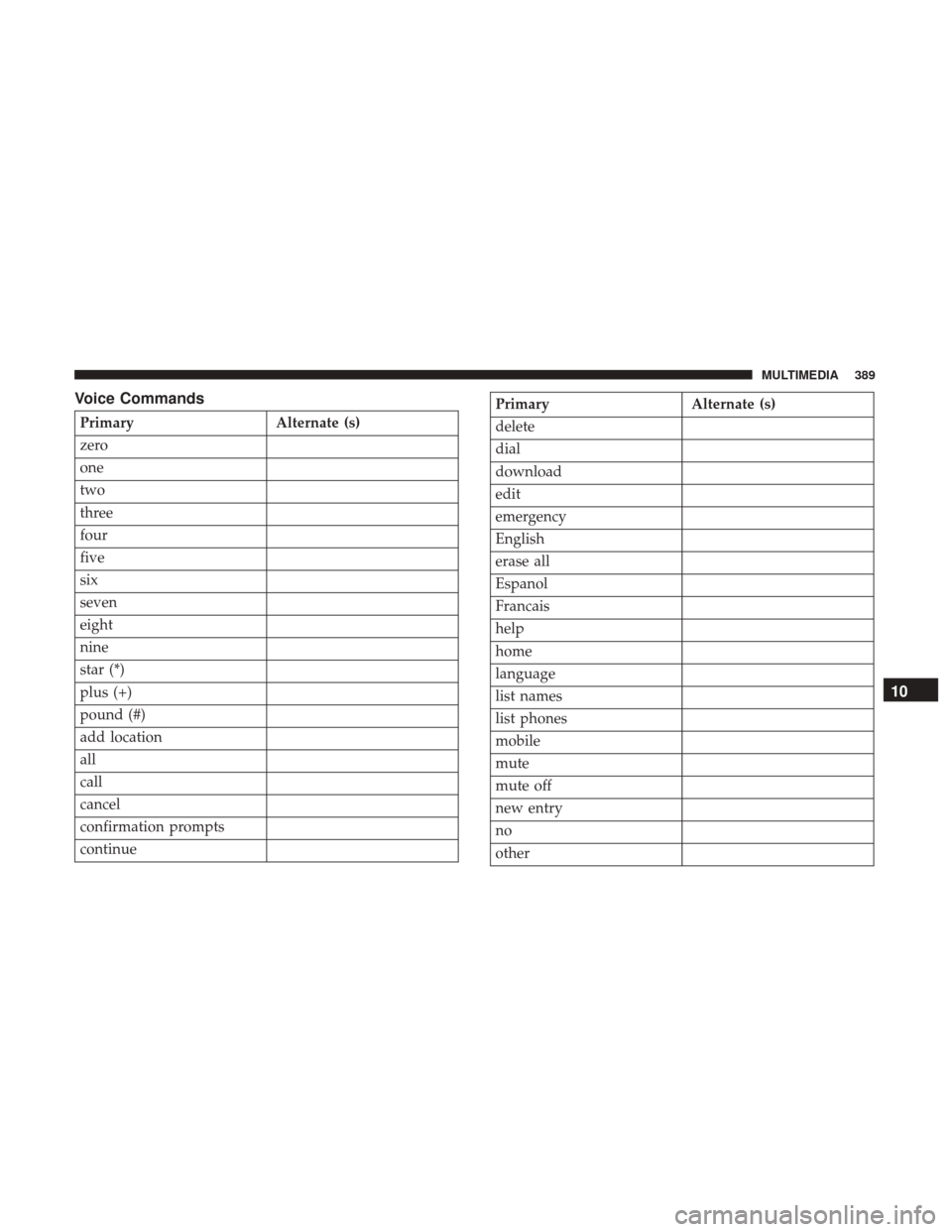
Voice Commands
PrimaryAlternate (s)
zero
one
two
three
four
five
six
seven
eight
nine
star (*)
plus (+)
pound (#)
add location
all
call
cancel
confirmation prompts
continue
Primary Alternate (s)
delete
dial
download
edit
emergency
English
erase all
Espanol
Francais
help
home
language
list names
list phones
mobile
mute
mute off
new entry
no
other
10
MULTIMEDIA 389
Page 392 of 421
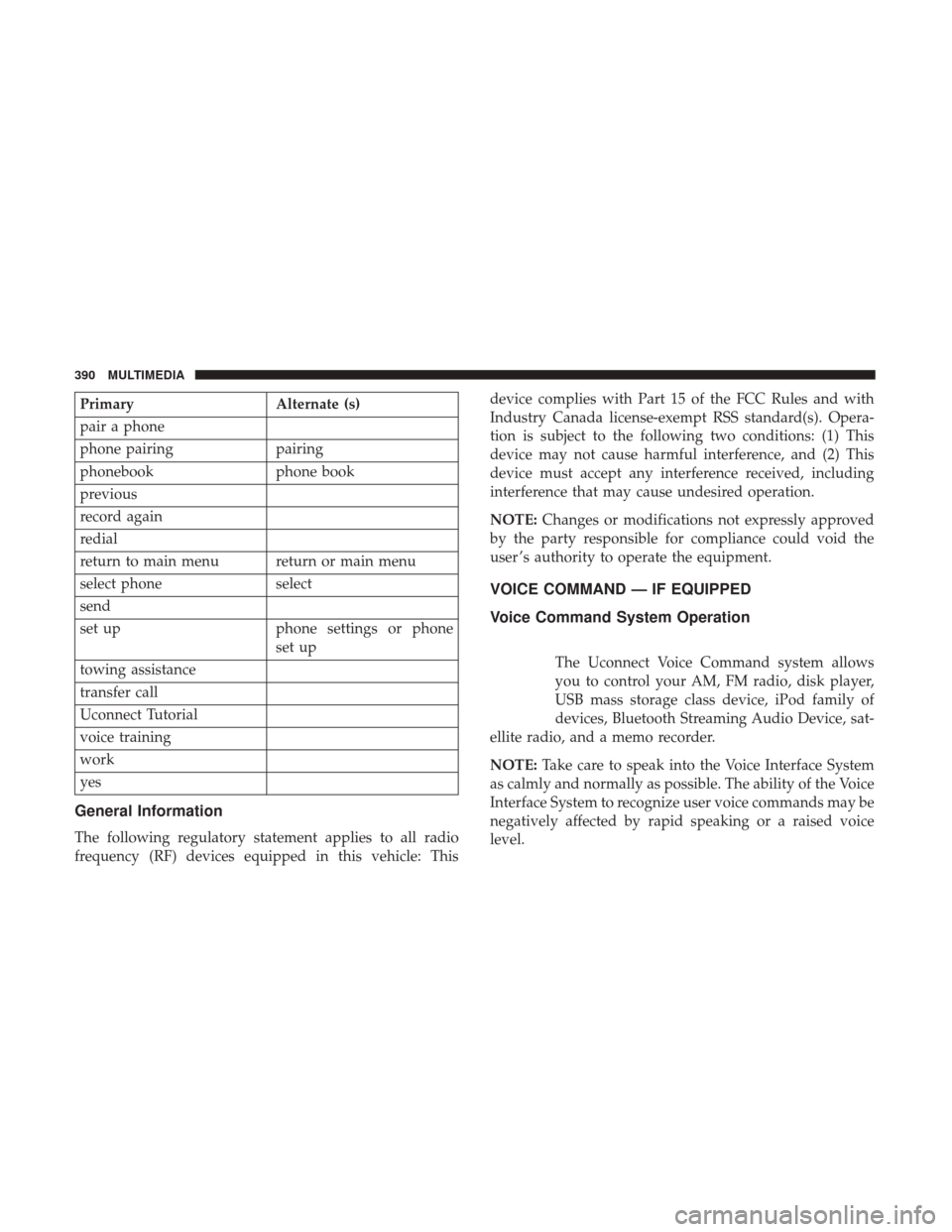
PrimaryAlternate (s)
pair a phone
phone pairing pairing
phonebook phone book
previous
record again
redial
return to main menu return or main menu
select phone select
send
set up phone settings or phone
set up
towing assistance
transfer call
Uconnect Tutorial
voice training
work
yes
General Information
The following regulatory statement applies to all radio
frequency (RF) devices equipped in this vehicle: This device complies with Part 15 of the FCC Rules and with
Industry Canada license-exempt RSS standard(s). Opera-
tion is subject to the following two conditions: (1) This
device may not cause harmful interference, and (2) This
device must accept any interference received, including
interference that may cause undesired operation.
NOTE:
Changes or modifications not expressly approved
by the party responsible for compliance could void the
user ’s authority to operate the equipment.
VOICE COMMAND — IF EQUIPPED
Voice Command System Operation
The Uconnect Voice Command system allows
you to control your AM, FM radio, disk player,
USB mass storage class device, iPod family of
devices, Bluetooth Streaming Audio Device, sat-
ellite radio, and a memo recorder.
NOTE: Take care to speak into the Voice Interface System
as calmly and normally as possible. The ability of the Voice
Interface System to recognize user voice commands may be
negatively affected by rapid speaking or a raised voice
level.
390 MULTIMEDIA
Page 397 of 421
Voice Training
For users experiencing difficulty with the system recogniz-
ing their voice commands or numbers the Uconnect Voice
“Voice Training” feature may be used.
1. Push the Voice Command
button, say “System
Setup” and once you are in that menu then say “Voice
Training.” This will train your own voice to the
system and will improve recognition.
2.Repeat the words and phrases when prompted by
Uconnect Voice. For best results, the “Voice Training”
session should be completed when the vehicle is parked,
engine running, all windows closed, and the blower fan
switched off. This procedure may be repeated with a new
user. The system will adapt to the last trained voice only.
RADIO OPERATION AND MOBILE PHONES
Under certain conditions, the mobile phone being on in
your vehicle can cause erratic or noisy performance from
your radio. This condition may be lessened or eliminated
by relocating the mobile phone antenna. This condition is
not harmful to the radio. If your radio performance does
not satisfactorily “clear” by the repositioning of the an-
tenna, it is recommended that the radio volume be turned
down or off during mobile phone operation when not
using Uconnect (if equipped).
Regulatory And Safety Information
USA/CANADA
Exposure to Radio Frequency Radiation
The radiated output power of the internal wireless radio is
far below the FCC radio frequency exposure limits. Nev-
ertheless, the wireless radio will be used in such a manner
that the radio is 20 cm or further from the human body.
The internal wireless radio operates within guidelines found
in radio frequency safety standards and recommendations,
which reflect the consensus of the scientific community.
The radio manufacturer believes the internal wireless radio
is safe for use by consumers. The level of energy emitted is
far less than the electromagnetic energy emitted by wire-
less devices such as mobile phones. However, the use of
wireless radios may be restricted in some situations or
environments, such as aboard airplanes. If you are unsure
of restrictions, you are encouraged to ask for authorization
before turning on the wireless radio.
This device complies with Part 15 of the FCC Rules and
with Industry Canada license-exempt RSS standard(s).
Operation is subject to the following two conditions:
1. This device may not cause harmful interference.
10
MULTIMEDIA 395
Page 401 of 421
Any communication to the manufacturer’s customer center
should include the following information:
•Owner’s name and address
• Owner’s telephone number (home and office)
• Authorized dealer name
• Vehicle Identification Number (VIN)
• Vehicle delivery date and mileage
FCA US LLC Customer Center
P.O. Box 21–8004
Auburn Hills, MI 48321–8004
Phone: (800) 247-9753
FCA Canada Inc. Customer Center
P.O. Box 1621
Windsor, Ontario N9A 4H6
Phone: (800) 465-2001 English / (800) 387-9983 French
In Mexico Contact
Av. Prolongacion Paseo de la Reforma, 1240
Sante Fe C.P. 05109
Mexico, D. F.
In Mexico City: 5081-7568
Outside Mexico City: 1-800-505-1300
Puerto Rico And U.S. Virgin Islands
Customer Service Chrysler International Services LLC
P.O. Box 191857
San Juan 00919-1857
Tel.: (787) 782-5757
Fax: (787) 782-3345
Customer Assistance For The Hearing Or Speech
Impaired (TDD/TTY)
To assist customers who have hearing difficulties, the
manufacturer has installed special TDD (Telecommunica-
tion Devices for the Deaf) equipment at its customer center.
Any hearing or speech impaired customer, who has access
11
CUSTOMER ASSISTANCE 399
Page 403 of 421
WARRANTY INFORMATION
See the Warranty Information Booklet, located in the
owners information kit, for the terms and provisions of
FCA US LLC warranties applicable to this vehicle and
market.
MOPAR PARTS
MOPAR fluids, lubricants, parts, and accessories are avail-
able from an authorized dealer. They are recommended for
your vehicle in order to help keep the vehicle operating at
its best.
REPORTING SAFETY DEFECTS
In The 50 United States And Washington, D.C.
If you believe that your vehicle has a defect that could
cause a crash or cause injury or death, you should imme-
diately inform the National Highway Traffic Safety Admin-
istration (NHTSA) in addition to notifying FCA US LLC.
If NHTSA receives similar complaints, it may open an
investigation, and if it finds that a safety defect exists in a
group of vehicles, it may order a recall and remedy
campaign. However, NHTSA cannot become involved in
individual problems between you, your authorized dealer
or FCA US LLC.To contact NHTSA, you may call the Vehicle Safety Hotline
toll free at 1-888-327-4236 (TTY: 1-800-424-9153); or go to
http://www.safercar.gov; or write to: Administrator,
NHTSA, 1200 New Jersey Avenue, SE., West Building,
Washington, D.C. 20590. You can also obtain other infor-
mation about motor vehicle safety from http://
www.safercar.gov.
In Canada
If you believe that your vehicle has a safety defect, you
should contact the Customer Service Department immedi-
ately. Canadian customers who wish to report a safety
defect to the Canadian government should contact Trans-
port Canada, Motor Vehicle Defect Investigations and
Recalls at 1-800-333-0510 or go to http://www.tc.gc.ca/
roadsafety/
PUBLICATION ORDER FORMS
To order the following manuals, you may use either the
website or the phone numbers listed below. Visa, Master-
card, American Express, and Discover orders are accepted.
If you prefer mailing your payment, please call for an order
form.
NOTE:
A street address is required when ordering manu-
als (no P.O. Boxes).11
CUSTOMER ASSISTANCE 401
Page 407 of 421
Gear Ranges........................ .204, 209
Special Additives .....................299, 301
Axle Fluid .............................. .338
Battery ................................. .102
Charging System Light ....................102
Belts, Seat ............................... .190
Body Mechanism Lubrication ..................290
B-Pillar Location .......................... .306
Brake Assist System ........................ .132
Brake Fluid .............................. .338
Brake, Parking ............................ .198
Brakes ................................. .329
Brake System ......................... .297, 329
Master Cylinder ........................ .297
Parking .............................. .198
Warning Light .......................... .100
Brake/Transmission Interlock ..................203
Bulb Replacement ......................... .243
Bulbs, Light .......................... .192, 243
Calibration, Compass ....................... .124
Camera, Rear ............................ .217
Capacities, Antifreeze (Engine Coolant) ...........335
Capacities, Fluid .......................... .335Caps, Filler
Fuel ................................. .219
Oil (Engine) ..................... .282, 283, 286
Power Steering ......................... .213
Radiator (Coolant Pressure) .................295
Carbon Monoxide Warning ................189, 334
Cargo Area Cover ...........................74
Cargo Area Features .........................74
Cargo Compartment .........................74
Light ..................................74
Luggage Carrier ..........................91
Cargo Light ...............................74
Cargo Load Floor ...........................75
Cargo Tie-Downs ...........................76
Car Washes .............................. .324
Cellular
Phone........................ .367, 395
Center High Mounted Stop Light ...............245
Certification Label ......................... .220
Chains, Tire ............................. .320
Changing A Flat Tire .....................249, 302
Check Engine Light (Malfunction Indicator Light). . . .127
Checking Your Vehicle For Safety ...............189
Checks, Safety ............................ .189
Child Restraint ........................... .174
12
INDEX 405