door lock JEEP PATRIOT 2019 Owner handbook (in English)
[x] Cancel search | Manufacturer: JEEP, Model Year: 2019, Model line: PATRIOT, Model: JEEP PATRIOT 2019Pages: 332, PDF Size: 1.99 MB
Page 25 of 332
DOOR LOCKS
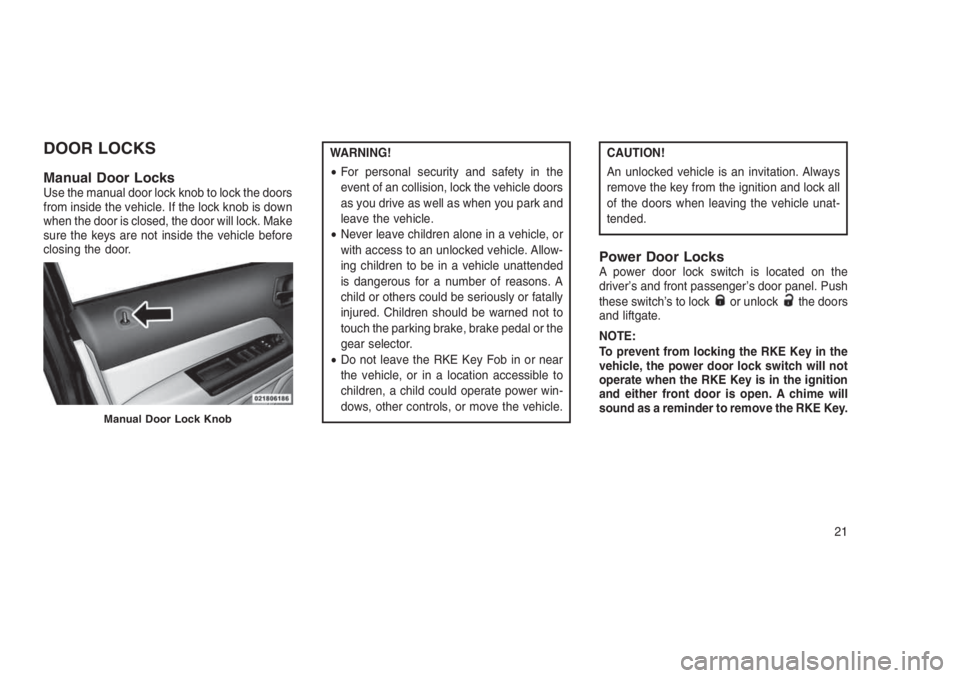
Manual Door LocksUse the manual door lock knob to lock the doors
from inside the vehicle. If the lock knob is down
when the door is closed, the door will lock. Make
sure the keys are not inside the vehicle before
closing the door.
WARNING!
•For personal security and safety in the
event of an collision, lock the vehicle doors
as you drive as well as when you park and
leave the vehicle.
•Never leave children alone in a vehicle, or
with access to an unlocked vehicle. Allow-
ing children to be in a vehicle unattended
is dangerous for a number of reasons. A
child or others could be seriously or fatally
injured. Children should be warned not to
touch the parking brake, brake pedal or the
gear selector.
•Do not leave the RKE Key Fob in or near
the vehicle, or in a location accessible to
children, a child could operate power win-
dows, other controls, or move the vehicle.CAUTION!
An unlocked vehicle is an invitation. Always
remove the key from the ignition and lock all
of the doors when leaving the vehicle unat-
tended.
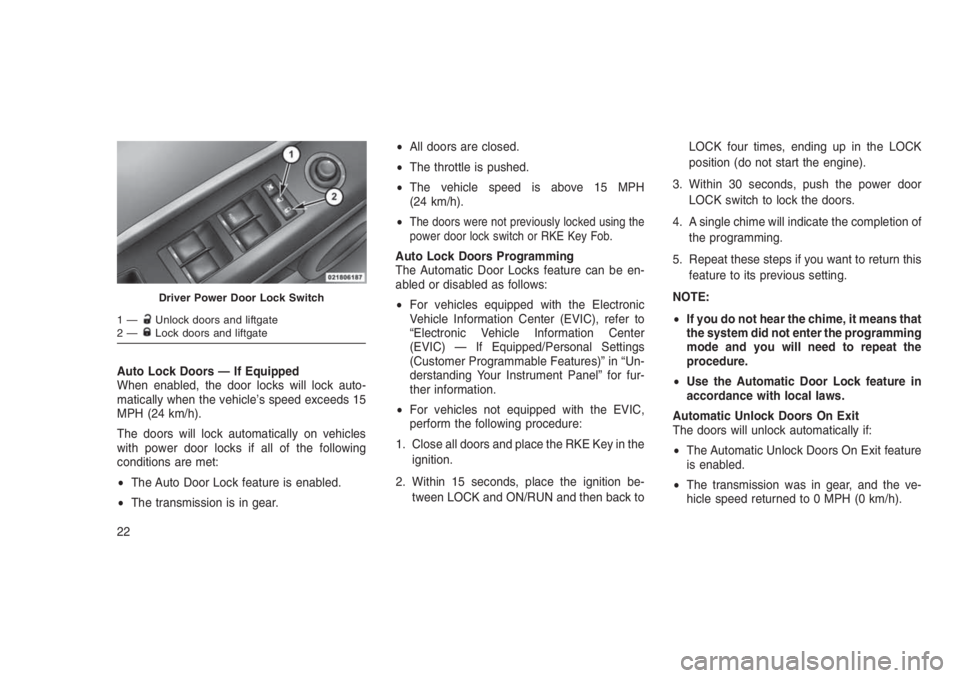
Power Door LocksA power door lock switch is located on the
driver’s and front passenger’s door panel. Push
these switch’s to lock
or unlockthe doors
and liftgate.
NOTE:
To prevent from locking the RKE Key in the
vehicle, the power door lock switch will not
operate when the RKE Key is in the ignition
and either front door is open. A chime will
sound as a reminder to remove the RKE Key.
Manual Door Lock Knob
21
Page 26 of 332
Auto Lock Doors — If Equipped
When enabled, the door locks will lock auto-
matically when the vehicle’s speed exceeds 15
MPH (24 km/h).
The doors will lock automatically on vehicles
with power door locks if all of the following
conditions are met:
•The Auto Door Lock feature is enabled.
•The transmission is in gear.•All doors are closed.
•The throttle is pushed.
•The vehicle speed is above 15 MPH
(24 km/h).
•
The doors were not previously locked using the
power door lock switch or RKE Key Fob.
Auto Lock Doors Programming
The Automatic Door Locks feature can be en-
abled or disabled as follows:
•For vehicles equipped with the Electronic
Vehicle Information Center (EVIC), refer to
“Electronic Vehicle Information Center
(EVIC) — If Equipped/Personal Settings
(Customer Programmable Features)” in “Un-
derstanding Your Instrument Panel” for fur-
ther information.
•For vehicles not equipped with the EVIC,
perform the following procedure:
1. Close all doors and place the RKE Key in the
ignition.
2. Within 15 seconds, place the ignition be-
tween LOCK and ON/RUN and then back toLOCK four times, ending up in the LOCK
position (do not start the engine).
3. Within 30 seconds, push the power door
LOCK switch to lock the doors.
4. A single chime will indicate the completion of
the programming.
5. Repeat these steps if you want to return this
feature to its previous setting.
NOTE:
•If you do not hear the chime, it means that
the system did not enter the programming
mode and you will need to repeat the
procedure.
•Use the Automatic Door Lock feature in
accordance with local laws.
Automatic Unlock Doors On Exit
The doors will unlock automatically if:
•The Automatic Unlock Doors On Exit feature
is enabled.
•The transmission was in gear, and the ve-
hicle speed returned to 0 MPH (0 km/h).
Driver Power Door Lock Switch
1—Unlock doors and liftgate
2—Lock doors and liftgate
22
Page 27 of 332
•The transmission is in NEUTRAL or PARK.
•The driver’s door is opened.
•The doors were not previously unlocked.
Automatic Unlock Doors On Exit
Programming
The Automatic Unlock Doors On Exit feature
can be enabled or disabled as follows:
•For vehicles equipped with the EVIC, refer to
“Electronic Vehicle Information Center
(EVIC) — If Equipped/Personal Settings
(Customer-Programmable Features)” in “Un-
derstanding Your Instrument Panel” for fur-
ther information.
•For vehicles not equipped with the EVIC,
perform the following procedure:
1. Close all doors and place the RKE Key in the
ignition.
2. Within 15 seconds, place the ignition be-
tween LOCK and ON/RUN and then back to
LOCK five times, ending up in the ON/RUN
position (do not start the engine).3. Within 30 seconds, push the power door
UNLOCK switch to unlock the doors.
4. A single chime will indicate the completion of
the programming.
5. Repeat these steps if you want to return this
feature to its previous setting.
NOTE:
•If you do not hear the chime, it means that
the system did not enter the programming
mode and you will need to repeat the
procedure.
•Use the Automatic Unlock Doors On Exit
feature in accordance with local laws.
Child-Protection Door Lock System
— Rear Doors
To provide a safer environment for small chil-
dren riding in the rear seats, the rear doors are
equipped with Child-Protection Door Lock sys-
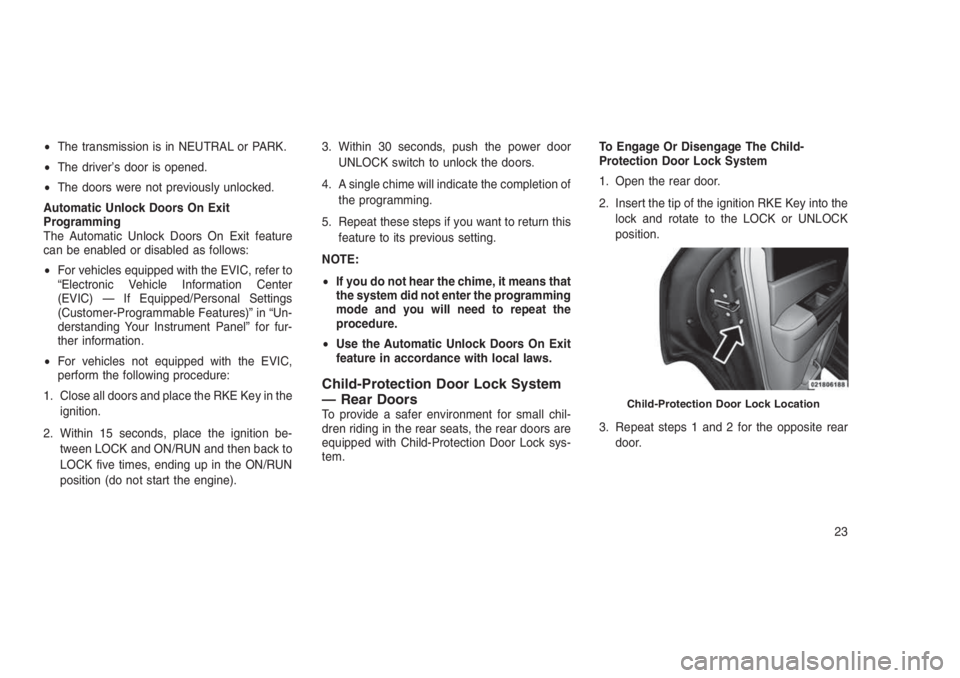
tem.To Engage Or Disengage The Child-
Protection Door Lock System
1. Open the rear door.
2. Insert the tip of the ignition RKE Key into the
lock and rotate to the LOCK or UNLOCK
position.
3. Repeat steps 1 and 2 for the opposite rear
door.Child-Protection Door Lock Location
23
Page 28 of 332
WARNING!
Avoid trapping anyone in a vehicle in a
collision. Remember that the rear doors can
only be opened from the outside when the
Child-Protection locks are engaged.
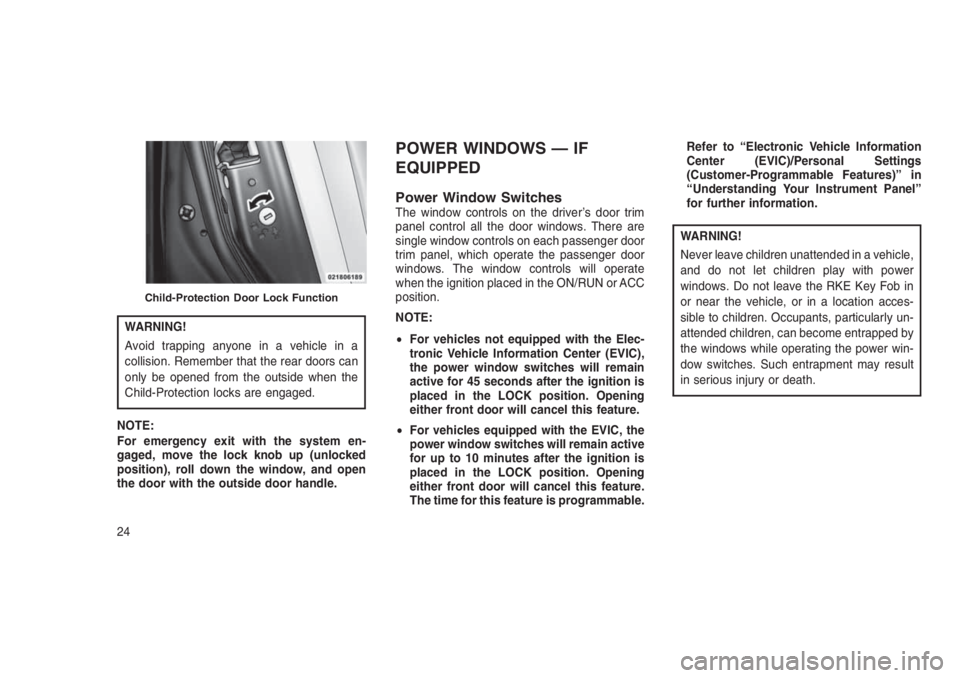
NOTE:
For emergency exit with the system en-
gaged, move the lock knob up (unlocked
position), roll down the window, and open
the door with the outside door handle.
POWER WINDOWS — IF
EQUIPPED
Power Window SwitchesThe window controls on the driver’s door trim
panel control all the door windows. There are
single window controls on each passenger door
trim panel, which operate the passenger door
windows. The window controls will operate
when the ignition placed in the ON/RUN or ACC
position.
NOTE:
•For vehicles not equipped with the Elec-
tronic Vehicle Information Center (EVIC),
the power window switches will remain
active for 45 seconds after the ignition is
placed in the LOCK position. Opening
either front door will cancel this feature.
•For vehicles equipped with the EVIC, the
power window switches will remain active
for up to 10 minutes after the ignition is
placed in the LOCK position. Opening
either front door will cancel this feature.
The time for this feature is programmable.Refer to “Electronic Vehicle Information
Center (EVIC)/Personal Settings
(Customer-Programmable Features)” in
“Understanding Your Instrument Panel”
for further information.
WARNING!
Never leave children unattended in a vehicle,
and do not let children play with power
windows. Do not leave the RKE Key Fob in
or near the vehicle, or in a location acces-
sible to children. Occupants, particularly un-
attended children, can become entrapped by
the windows while operating the power win-
dow switches. Such entrapment may result
in serious injury or death.
Child-Protection Door Lock Function
24
Page 29 of 332
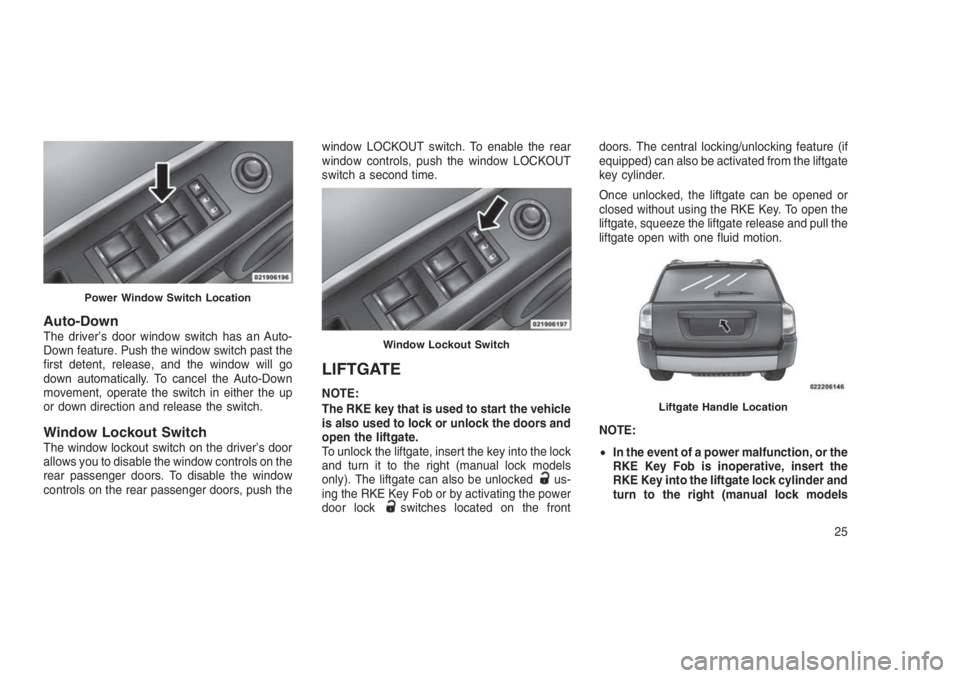
Auto-DownThe driver’s door window switch has an Auto-
Down feature. Push the window switch past the
first detent, release, and the window will go
down automatically. To cancel the Auto-Down
movement, operate the switch in either the up
or down direction and release the switch.
Window Lockout SwitchThe window lockout switch on the driver’s door
allows you to disable the window controls on the
rear passenger doors. To disable the window
controls on the rear passenger doors, push thewindow LOCKOUT switch. To enable the rear
window controls, push the window LOCKOUT
switch a second time.
LIFTGATE
NOTE:
The RKE key that is used to start the vehicle
is also used to lock or unlock the doors and
open the liftgate.
To unlock the liftgate, insert the key into the lock
and turn it to the right (manual lock models
only). The liftgate can also be unlocked
us-
ing the RKE Key Fob or by activating the power
door lock
switches located on the frontdoors. The central locking/unlocking feature (if
equipped) can also be activated from the liftgate
key cylinder.
Once unlocked, the liftgate can be opened or
closed without using the RKE Key. To open the
liftgate, squeeze the liftgate release and pull the
liftgate open with one fluid motion.
NOTE:
•In the event of a power malfunction, or the
RKE Key Fob is inoperative, insert the
RKE Key into the liftgate lock cylinder and
turn to the right (manual lock models
Power Window Switch Location
Window Lockout Switch
Liftgate Handle Location
25
Page 48 of 332
•Flash hazard lights as long as the battery has
power or until the hazard light button is
pressed. The hazard lights can be deacti-
vated by pressing the hazard light button.
•Turn on the interior lights, which remain on as
long as the battery has power.
•Unlock the power door locks.
Enhanced Accident Response System
Reset Procedure
In order to reset the Enhanced Accident Re-
sponse System functions after an event, the
ignition must be changed from the START or
ON/RUN position to the OFF position. Carefully
check the vehicle for fuel leaks in the engine
compartment and on the ground near the en-
gine compartment and fuel tank before resetting
the system and starting the engine.
Air Bag Warning Light
The air bags must be ready to
inflate for your protection in a colli-
sion. The Occupant Restraint Con-
troller (ORC) monitors the internal
circuits and interconnecting wiring
associated with air bag system electrical com-
ponents.The ORC monitors the readiness of the elec-
tronic parts of the air bag system whenever the
ignition is placed in the START or ON/RUN
position. If the ignition is in the OFF position or
in the ACC position, the air bag system is not on
and the air bags will not inflate.
The ORC contains a backup power supply
system that may deploy the air bags even if the
battery loses power or it becomes disconnected
prior to deployment.
The ORC turns on the Air Bag Warning Light in
the instrument panel for approximately four to
eight seconds for a self-check when the ignition
is first placed in the ON/RUN position. After the
self-check, the Air Bag Warning Light will turn
off. If the ORC detects a malfunction in any part
of the system, it turns on the Air Bag Warning
Light, either momentarily or continuously. A
single chime will sound to alert you if the light
comes on again after initial startup.
The ORC also includes diagnostics that will
illuminate the instrument panel Air Bag Warning
Light if a malfunction is detected that could
affect the air bag system. The diagnostics also
record the nature of the malfunction. While theair bag system is designed to be maintenance
free, if any of the following occurs, have an
authorized dealer service the air bag system
immediately.
•The Air Bag Warning Light does not come on
during the four to eight seconds when the
ignition is first placed in the ON/RUN posi-
tion.
•The Air Bag Warning Light remains on after
the four to eight-second interval.
•The Air Bag Warning Light comes on inter-
mittently or remains on while driving.
NOTE:
If the speedometer, tachometer, or any en-
gine related gauges are not working, the
Occupant Restraint Controller (ORC) may
also be disabled. In this condition the air
bags may not be ready to inflate for your
protection. Have an authorized dealer ser-
vice the air bag system immediately.
44
Page 64 of 332
WARNING!(Continued)
•Always make sure that objects cannot fall
into the driver footwell while the vehicle is
moving. Objects can become trapped un-
der the brake pedal and accelerator pedal
causing a loss of vehicle control.
•If required, mounting posts must be prop-
erly installed, if not equipped from the
factory.
Failure to properly follow floor mat installa-
tion or mounting can cause interference with
the brake pedal and accelerator pedal opera-
tion causing loss of control of the vehicle.
Periodic Safety Checks You Should
Make Outside The Vehicle
Tires
Examine tires for excessive tread wear and
uneven wear patterns. Check for stones, nails,
glass, or other objects lodged in the tread or
sidewall. Inspect the tread for cuts and cracks.
Inspect sidewalls for cuts, cracks, and bulges.
Check the wheel nuts for tightness. Check the
tires (including spare) for proper cold inflation
pressure.
Lights
Have someone observe the operation of brake
lights and exterior lights while you work the
controls. Check turn signal and high beam
indicator lights on the instrument panel.Door Latches
Check for proper closing, latching, and locking.
Fluid Leaks
Check area under vehicle after overnight park-
ing for fuel, engine coolant, oil, or other fluid
leaks. Also, if gasoline fumes are detected or if
fuel, power steering fluid (if equipped), or brake
fluid leaks are suspected. The cause should be
located and corrected immediately.
60
Page 111 of 332
Closing Sunroof — Manual ModeTo close the sunroof, push and hold the switch
in the forward position. Any release of the
switch will stop the movement and the sunroof
will remain in a partially closed condition until
the sunroof switch is pushed again.
Pinch Protect FeatureThis feature will detect an obstruction in the
opening of the sunroof during Express Close
operation. If an obstruction in the path of the
sunroof is detected, the sunroof will automati-
cally retract. Remove the obstruction if this
occurs. Next, push the switch forward and re-
lease to Express Close.
Venting Sunroof — ExpressPush and release the Vent button within one
half second and the sunroof will open to the
vent position. This is called “Express Vent”, and
it will occur regardless of sunroof position. Dur-
ing Express Vent operation, any other actuation
of the switch will stop the sunroof.
Sunshade OperationThe sunshade can be opened manually. How-
ever, the sunshade will open automatically as
the sunroof opens.
NOTE:
The sunshade cannot be closed if the sun-
roof is open.
Wind BuffetingWind buffeting can be described as the percep-
tion of pressure on the ears or a helicopter-type
sound in the ears. Your vehicle may exhibit wind
buffeting with the windows down, or the sunroof
(if equipped) in certain open or partially open
positions. This is a normal occurrence and can
be minimized. If the buffeting occurs with the
rear windows open, open the front and rear
windows together to minimize the buffeting. If
the buffeting occurs with the sunroof open,
adjust the sunroof opening to minimize the
buffeting or open any window.
Sunroof MaintenanceUse only a non-abrasive cleaner and a soft
cloth to clean the glass panel.
Ignition Off OperationFor Vehicles Not Equipped With The Elec-
tronic Vehicle Information Center (EVIC)
The power sunroof switch will remain active for
45 seconds after the ignition switch is turned to
the LOCK position. Opening either front door
will cancel this feature.
For Vehicles Equipped With The EVIC
The power sunroof switch will remain active for
up to approximately ten minutes after the igni-
tion switch is turned to the LOCK position.
Opening either front door will cancel this fea-
ture.
107
Page 146 of 332
WARNINGS PRESENT” is displayed will dis-
play each stored warning for each button push.
Push and release theMENUbutton to return to
the Main Menu.
Personal Settings (Customer-
Programmable Features)
This allows the driver to set and recall features
when the transmission is in PARK (automatic
transmission) or the vehicle is stopped (manual
transmission).
Push and release theDOWN
arrow button
until “Personal Settings” is displayed in the
EVIC then push theRIGHT
arrow button.
Use theRIGHT
arrow button to display one
of the following choices:
Language
When in this display, you may select different
languages for all display nomenclature, includ-
ing the trip functions. Pushing theDOWN
ar-
row button while in this display selects English,
Espanol, Deutsch, Italiano, Francais, or NL
depending on availability. As you continue, the
displayed information will be shown in the se-
lected language.Auto Lock Doors — If Equipped
When ON is selected, all doors lock automati-
cally when the speed of the vehicle reaches 15
MPH (24 km/h). Push and hold theRIGHT
arrow button when in this display until “ON”
or “OFF” appears to make your selection.
Auto Unlock On Exit
When ON is selected, all the vehicle’s doors will
unlock when the driver’s door is opened if the
vehicle is stopped (manual transmission) or the
vehicle is stopped and the transmission is in
PARK or NEUTRAL position (automatic trans-
mission). Push and hold theRIGHT
arrow
button when in this display until “ON” or “OFF”
appears to make your selection.
RKE Unlock
When Driver’s Door 1st is selected, only the
driver’s door will unlock on the first push of the
RKE Key Fob UNLOCK button and require a
second push to unlock the remaining locked
doors. When Remote Unlock All Doors is se-
lected, all of the doors will unlock at the first
push of the RKE Key Fob UNLOCK button.
Push and hold theRIGHT
arrow button
when in this display until “Driver’s Door 1st” or
“All Doors” appears to make your selection.Flash Lights with Lock
When ON is selected, the front and rear turn
signals will flash when the doors are locked or
unlocked using the RKE Key Fob. Push and
hold theRIGHT
arrow button when in this
display until “ON” or “OFF” appears to make
your selection.
Headlamp Off Delay
When this feature is selected, the driver can
choose to have the headlamps remain on for 0,
30, 60, or 90 seconds when exiting the vehicle.
Push and hold theRIGHT
arrow button
when in this display until 0, 30, 60, or 90
appears to make your selection.
Key Off Power Delay
When this feature is selected, the power win-
dow switches, radio, Uconnect phone, power
sunroof, and power outlets will remain active for
up to 10 minutes after the ignition switch has
been turned off. Opening either front vehicle
door will cancel this feature. Push and hold the
RIGHT
arrow button when in this display
until “Off,” “45 sec,” “5 min,” or “10 min.” ap-
pears to make your selection.
142
Page 147 of 332
Illuminated Approach
When this feature is selected, the headlights will
activate and remain on for up to 90 seconds
when the doors are unlocked using the RKE
Key Fob. Push and hold theRIGHT
arrow
button when in this display until “OFF,” “30 sec,”
“60 sec,” or “90 sec.” appears to make your
selection.
Hill Start Assist (HSA) — If Equipped
When “On” is selected, the HSA system is
active. Refer to “Electronic Brake Control Sys-
tem” in “Starting And Operating” for system
function and operating information. To make
your selection, push and release theRIGHT
arrow button until “On” or “Off” appears.
Display Units In
The EVIC, odometer, and Uconnect GPS sys-
tem units can be changed between US and
Metric.
Push and hold theRIGHT
arrow button
when in this display until “US” or “METRIC”
appears to make your selection.
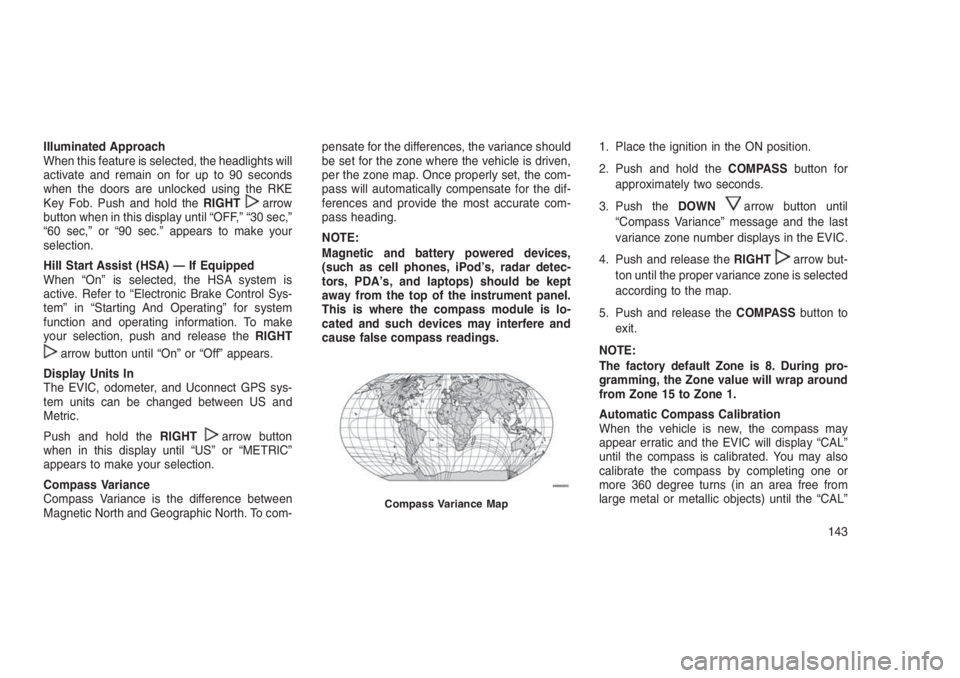
Compass Variance
Compass Variance is the difference between
Magnetic North and Geographic North. To com-pensate for the differences, the variance should
be set for the zone where the vehicle is driven,
per the zone map. Once properly set, the com-
pass will automatically compensate for the dif-
ferences and provide the most accurate com-
pass heading.
NOTE:
Magnetic and battery powered devices,
(such as cell phones, iPod’s, radar detec-
tors, PDA’s, and laptops) should be kept
away from the top of the instrument panel.
This is where the compass module is lo-
cated and such devices may interfere and
cause false compass readings.1. Place the ignition in the ON position.
2. Push and hold theCOMPASSbutton for
approximately two seconds.
3. Push theDOWN
arrow button until
“Compass Variance” message and the last
variance zone number displays in the EVIC.
4. Push and release theRIGHT
arrow but-
ton until the proper variance zone is selected
according to the map.
5. Push and release theCOMPASSbutton to
exit.
NOTE:
The factory default Zone is 8. During pro-
gramming, the Zone value will wrap around
from Zone 15 to Zone 1.
Automatic Compass Calibration
When the vehicle is new, the compass may
appear erratic and the EVIC will display “CAL”
until the compass is calibrated. You may also
calibrate the compass by completing one or
more 360 degree turns (in an area free from
large metal or metallic objects) until the “CAL”
Compass Variance Map
143