key JEEP RENEGADE 2014 1.G Owner's Guide
[x] Cancel search | Manufacturer: JEEP, Model Year: 2014, Model line: RENEGADE, Model: JEEP RENEGADE 2014 1.GPages: 212, PDF Size: 17.48 MB
Page 146 of 212
EMERGENCY REMOVAL
OF THE IGNITION KEY
57)
The ignition key (versions with
mechanical key) can be removed only if
the gear lever is in position P (Park).
If the vehicle battery is flat and the key
is engaged, the latter is locked in
position.
To remove the key manually, proceed
as follows:
❒stop the vehicle in safety conditions,
engage a gear and the electric parking
brake;
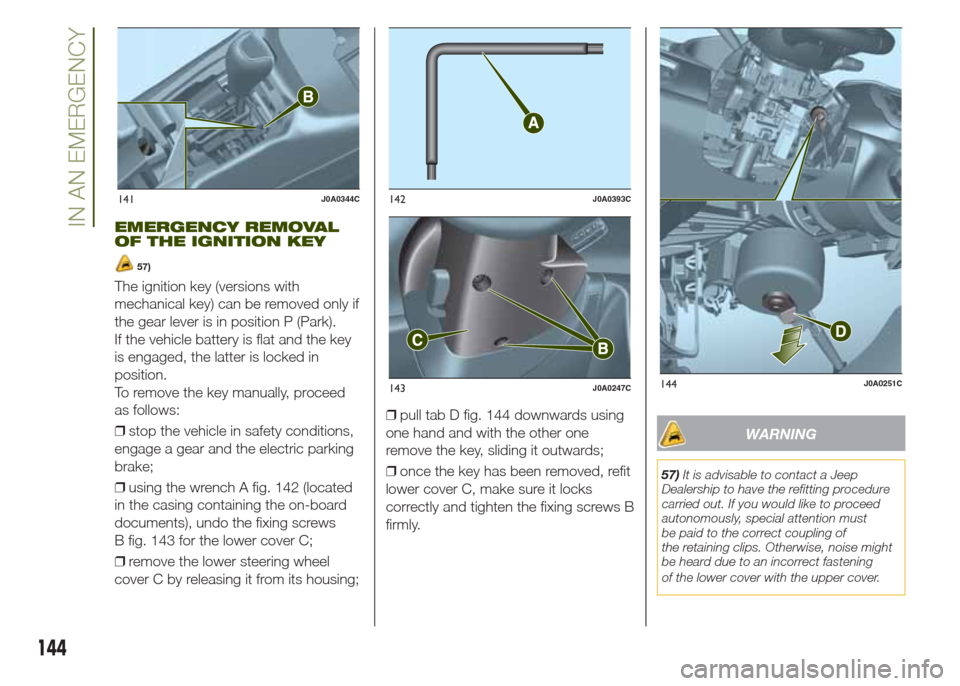
❒using the wrench A fig. 142 (located
in the casing containing the on-board
documents), undo the fixing screws
B fig. 143 for the lower cover C;
❒remove the lower steering wheel
cover C by releasing it from its housing;❒pull tab D fig. 144 downwards using
one hand and with the other one
remove the key, sliding it outwards;
❒once the key has been removed, refit
lower cover C, make sure it locks
correctly and tighten the fixing screws B
firmly.
WARNING
57)It is advisable to contact a Jeep
Dealership to have the refitting procedure
carried out. If you would like to proceed
autonomously, special attention must
be paid to the correct coupling of
the retaining clips. Otherwise, noise might
be heard due to an incorrect fastening
of the lower cover with the upper cover.
141J0A0344C142J0A0393C
143J0A0247C144J0A0251C
144
IN AN EMERGENCY
Page 147 of 212
TOWING THE
VEHICLE
ATTACHING THE TOW
HOOK
161) 162) 163)
The tow hook provided with the vehicle
is located in the tool box inside the
luggage compartment.
Front
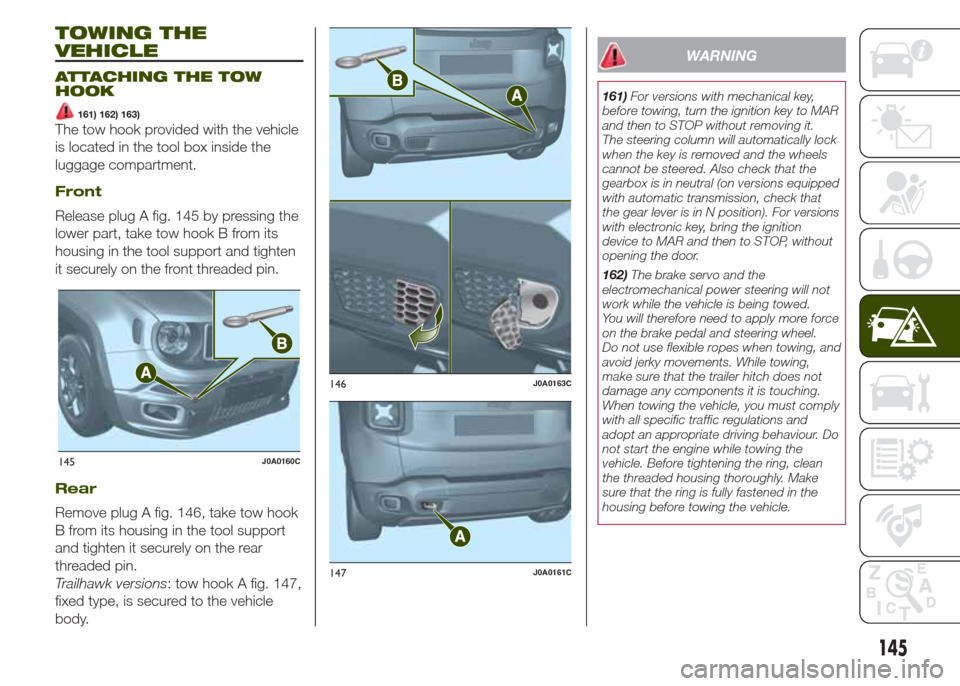
Release plug A fig. 145 by pressing the
lower part, take tow hook B from its
housing in the tool support and tighten
it securely on the front threaded pin.
Rear
Remove plug A fig. 146, take tow hook
B from its housing in the tool support
and tighten it securely on the rear
threaded pin.
Trailhawk versions: tow hook A fig. 147,
fixed type, is secured to the vehicle
body.
WARNING
161)For versions with mechanical key,
before towing, turn the ignition key to MAR
and then to STOP without removing it.
The steering column will automatically lock
when the key is removed and the wheels
cannot be steered. Also check that the
gearbox is in neutral (on versions equipped
with automatic transmission, check that
the gear lever is in N position). For versions
with electronic key, bring the ignition
device to MAR and then to STOP, without
opening the door.
162)The brake servo and the
electromechanical power steering will not
work while the vehicle is being towed.
You will therefore need to apply more force
on the brake pedal and steering wheel.
Do not use flexible ropes when towing, and
avoid jerky movements. While towing,
make sure that the trailer hitch does not
damage any components it is touching.
When towing the vehicle, you must comply
with all specific traffic regulations and
adopt an appropriate driving behaviour. Do
not start the engine while towing the
vehicle. Before tightening the ring, clean
the threaded housing thoroughly. Make
sure that the ring is fully fastened in the
housing before towing the vehicle.
145J0A0160C
146J0A0163C
147J0A0161C
145
Page 183 of 212
TIPS, CONTROLS
AND GENERAL
INFORMATION
ROAD SAFETY
Learn how to use the various system
functions before setting off.
Read the instructions for the system
carefully before setting off.
182) 183)
RECEPTION CONDITIONS
Reception conditions change
constantly while driving. Reception may
be interfered with by the presence of
mountains, buildings or bridges,
especially when you are far away from
the broadcaster.
IMPORTANT The volume may be
increased when receiving traffic alerts
and news.
CARE AND MAINTENANCE
Observe the following precautions
to ensure the system is fully
operational:
❒the display lens should not come into
contact with pointed or rigid objects
which could damage its surface; use a
soft, dry anti-static cloth to clean and
do not press.
❒never use alcohol, petrols and
derivatives to clean the display lens.❒prevent any liquid from entering the
system: this could damage it beyond
repair.
80) 81)
ANTI-THEFT
PROTECTION
The system is equipped with an
anti-theft protection system based on
the exchange of information with the
electronic control unit (Body Computer)
on the vehicle.
This guarantees maximum safety and
prevents the secret code from being
entered after the power supply has
been disconnected.
If the check has a positive outcome, the
system will start to operate, whereas if
the comparison codes are not the
same or if the electronic control unit
(Body Computer) is replaced, the
system will ask the user to enter the
secret code according to the procedure
described in the paragraph below.
Entering the secret code(excluding versions equipped with
Uconnect 6.5" Radionav)
When the system is switched on, if the
code is requested, the display will
show "Please enter Anti-Theft Code"
followed by the video page showing
a keypad to enter the secret code.The secret code is made up of four
digits, from 0 to 9: to insert the first digit
of the code, turn the BROWSE/ENTER
right knob and press to confirm.
After entering the fourth digit, the
system begins operating.
If an incorrect code is entered, the
system displays "Incorrect Code" to
notify the user of the need to enter the
correct code.
After the 3 available attempts to enter
the code, the system displays
"Incorrect Code. Radio locked. Wait for
30 minutes". Once the text has
disappeared you can start the code
entering procedure again.
Vehicle radio passport(excluding versions equipped with
Uconnect 6.5" Radionav)
This document certifies ownership of
the system. The vehicle radio passport
shows the system model, serial number
and secret code.
In the case of loss of the vehicle radio
passport, contact the Jeep Dealership,
taking an ID document and the vehicle
ownership documents.
IMPORTANT Keep the vehicle radio
passport in a safe place so that you
can give the information to the relevant
authorities if the system is stolen.
181
Page 189 of 212
USB/iPod/AUX SUPPORT
Versions with Uconnect 5" Radio:
the vehicle has a USB/AUX port located
on the central tunnel.
Versions with Uconnect 5" Radio
Nav: the vehicle has a USB/AUX port
located in the centre tunnel and a USB
port located inside the front armrest.
RADIO MODE
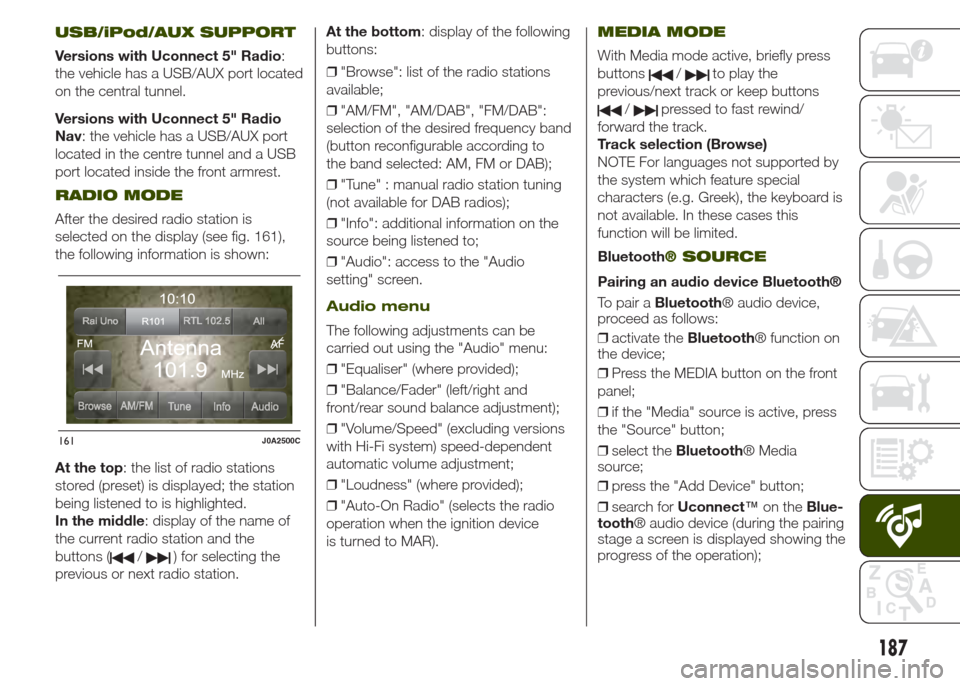
After the desired radio station is
selected on the display (see fig. 161),
the following information is shown:
At the top: the list of radio stations
stored (preset) is displayed; the station
being listened to is highlighted.
In the middle: display of the name of
the current radio station and the
buttons (
/) for selecting the
previous or next radio station.At the bottom: display of the following
buttons:
❒"Browse": list of the radio stations
available;
❒"AM/FM", "AM/DAB", "FM/DAB":
selection of the desired frequency band
(button reconfigurable according to
the band selected: AM, FM or DAB);
❒"Tune" : manual radio station tuning
(not available for DAB radios);
❒"Info": additional information on the
source being listened to;
❒"Audio": access to the "Audio
setting" screen.
Audio menu
The following adjustments can be
carried out using the "Audio" menu:
❒"Equaliser" (where provided);
❒"Balance/Fader" (left/right and
front/rear sound balance adjustment);
❒"Volume/Speed" (excluding versions
with Hi-Fi system) speed-dependent
automatic volume adjustment;
❒"Loudness" (where provided);
❒"Auto-On Radio" (selects the radio
operation when the ignition device
is turned to MAR).
MEDIA MODE
With Media mode active, briefly press
buttons
/to play the
previous/next track or keep buttons
/pressed to fast rewind/
forward the track.
Track selection (Browse)
NOTE For languages not supported by
the system which feature special
characters (e.g. Greek), the keyboard is
not available. In these cases this
function will be limited.
Bluetooth
® SOURCE
Pairing an audio device Bluetooth®
To pair aBluetooth® audio device,
proceed as follows:
❒activate theBluetooth® function on
the device;
❒Press the MEDIA button on the front
panel;
❒if the "Media" source is active, press
the "Source" button;
❒select theBluetooth® Media
source;
❒press the "Add Device" button;
❒search forUconnect™on theBlue-
tooth® audio device (during the pairing
stage a screen is displayed showing the
progress of the operation);
161J0A2500C
187
Page 190 of 212
❒when requested by the audio device,
enter the PIN code shown on the
system display or confirm on the device
the PIN displayed;
❒if the pairing procedure is completed
successfully, a screen is displayed.
Answer "Yes" to the question to pair the
Bluetooth® audio device as favourite
(the device will have priority over all
other devices that will be paired subse-
quently). If "No" is selected, the priority
is determined according to the order of
pairing. The last device connected will
have the highest priority;
❒an audio device can also be paired
by pressing the
PHONE button
on the front panel and by selecting
"Settings" or, from the "Settings" menu,
selecting "Phone/Bluetooth".
IMPORTANT If theBluetooth® pairing
between mobile phone and system is
lost, consult the mobile phone owner's
handbook.
PHONE MODE
Phone mode activation: press the
PHONE button on the front panel.
The buttons on the display can be used
to:
❒compose the phone number (using
the graphic keypad on the display);
❒display and call the contacts on the
mobile phone phonebook;❒display and call contacts from the
registers of recent calls;
❒pair up to 10 phones/audio devices
to make access and connection easier
and quicker;
❒transfer calls from the system to the
mobile phone and vice versa and
deactivate the microphone audio for
private conversations.
NOTE The mobile phone audio is
transmitted through the vehicle’s audio
system; the system automatically
mutes the system audio when the
Phone function is used.
Pairing a mobile phone
Proceed as follows:
❒activate theBluetooth® function on
the mobile phone;
❒press the
PHONE button on the
front panel;
❒if no phone is paired with the system
yet, the display shows a dedicated
screen;
❒select "Yes" to start the pairing
procedure, then search for the
Uconnect™device on the mobile
phone (if "No" is selected, the Phone
main screen is displayed);❒when prompted by the mobile
phone, use its keyboard to enter the
PIN code shown on the system display
or confirm on the mobile phone the
PIN displayed;
❒from the "Phone" screen you can
always pair a mobile phone by pressing
the "Settings" button: press the "Add
Device" button and proceed as
described above;
❒during the pairing stage a screen is
displayed showing the progress of
the operation;
❒when the pairing procedure is
completed successfully, a screen is
displayed: answer "Yes" to the question
to pair the mobile phone as favourite
(the mobile phone will have priority over
all other mobile phones that will be
paired subsequently). If no other
devices are paired, the system will
consider the first associated device as
favourite.
Making a phone call
Proceed as follows:
❒selecting the
icon (mobile
phone phonebook);
❒selecting "Recent Calls";
❒selecting the
icon (graphic
keyboard);
❒pressing the "Redial" button.
188
MULTIMEDIA
Page 199 of 212
❒if the pairing procedure is completed
successfully, a screen is displayed.
Answer "Yes" to the question to pair the
Bluetooth® audio device as favourite
(the device will have priority over all
other devices that will be paired subse-
quently). If "No" is selected, the priority
is determined according to the order of
pairing. The last device connected will
have the highest priority;
❒an audio device can also be paired
by pressing the MORE button on the
front panel and then selecting the
options "Settings" and "Bluetooth", or
pressing the MEDIA button on the front
panel and then selecting "Media" and
"Bluetooth".
IMPORTANT If theBluetooth® pairing
between mobile phone and system is
lost, consult the mobile phone owner's
handbook.
PHONE MODE
Phone mode activation: press the
PHONE button on the front panel.
The buttons on the display can be used
to:
❒compose the phone number (using
the graphic keypad on the display);
❒display and call the contacts on the
mobile phone phonebook;
❒display and call contacts from the
registers of recent calls;❒pair up to 10 phones/audio devices
to make access and connection easier
and quicker;
❒transfer calls from the system to the
mobile phone and vice versa and
deactivate the microphone audio for
private conversations.
NOTE The mobile phone audio is
transmitted through the vehicle’s audio
system; the system automatically
mutes the system audio when the
Phone function is used.
Pairing a mobile phone
Proceed as follows:
❒activate theBluetooth® function on
the mobile phone;
❒press the PHONE button on the front
panel;
❒if no phone is paired with the system
yet, the display shows a dedicated
screen;
❒select "Yes" to start the pairing
procedure, then search for the
Uconnect™device on the mobile
phone (if "No" is selected, the Phone
main screen is displayed);
❒when prompted by the mobile
phone, use its keyboard to enter the
PIN code shown on the system display
or confirm on the mobile phone the
PIN displayed;❒from the "Phone" screen you can
always pair a mobile phone by pressing
the "Settings" button: press the "Add
Device" button and proceed as
described above;
❒during the pairing stage a screen is
displayed showing the progress of
the operation;
❒when the pairing procedure is
completed successfully, a screen is
displayed: answer "Yes" to the question
to pair the mobile phone as favourite
(the mobile phone will have priority over
all other mobile phones that will be
paired subsequently). If no other
devices are paired, the system will
consider the first associated device as
favourite.
Making a phone call
Proceed as follows:
❒selecting the
icon (mobile
phone phonebook);
❒selecting "Recent Calls";
❒selecting the
icon (graphic
keyboard);
❒pressing the "Redial" button.
NOTE The operations described above
can only be accessed if supported by
the mobile phone in use.
197
Page 209 of 212
INDEX
4
WD LOW mode
(engagement/release)................... 110
ABS (system) ................................ 64
Active safety systems ..................... 64
Airbag ............................................ 91
Alarm ............................................. 11
All-wheel drive ................................ 109
Automatic transmission gear
lever unlocking ............................. 143
Automatic transmission .................. 103
Auxiliary driving systems................. 69
Battery recharging ........................ 160
Bodywork (cleaning and
maintenance) ............................... 164
Bonnet ........................................... 33
Broken-down vehicle towing .......... 146
BSM system .................................. 69
Changing a wheel ......................... 135
Child protection systems ................ 81
Climate control ............................... 24
CO2 emissions............................... 179
Control panel and on-board
instruments .................................. 38
Daytime running lights (DRL) ......... 19
Dimensions .................................... 171
Dipped beam headlights ................ 19
Direction indicators ........................ 20
Disabling active safety systems ...... 66Display ........................................... 40
Doors ............................................. 11
DST (system).................................. 65
DTC (system) ................................. 64
Electric Parking Brake (EPB) ......... 100
Electric steering wheel heating ....... 17
Electric sun roof ............................. 29
Electric windows ............................ 28
Electronic Cruise Control ................ 108
Engine compartment...................... 155
Engine............................................ 167
ERM (system) ................................. 65
ESC (system) ................................. 64
Exterior lights ................................. 19
Fluids and lubricants ..................... 176
Fog lights ....................................... 19
Forward Collision Warning Plus
system ......................................... 71
Front airbags .................................. 91
Front courtesy lights ....................... 21
Fuel consumption .......................... 178
Fuel cut-off system......................... 143
Fuse boxes .................................... 130
Fuses (replacement) ....................... 130
Hazard warning lights ................... 124
HDC (system) ................................. 65
Headlight alignment adjustment ..... 20
Head restraints............................... 16
HSA (system) ................................. 64
Identification data .......................... 166
Ignition device ................................ 8
Important information and
recommendations ........................ 201
Interior lights .................................. 21
Jump starting ................................ 141
Keys
– electronic key ............................ 7
– key with remote control ............. 7
Lane Change ................................ 20
LaneSense system ......................... 114
Lifting the vehicle ........................... 163
Light switch.................................... 19
Luggage compartment................... 34
Main beam headlights .................. 20
Main beam headlights
– Automatic main beam
headlights ................................. 20
Manual gearbox ............................. 103
MySky sun roof .............................. 31
Occupant protection systems ....... 76
Parking lights ................................ 20
ParkSense (system)........................ 112
PBA (system) ................................. 64
Performance (top speed) ................ 178
Prescriptions for handling the
vehicle at the end of its life ........... 179
Pretensioners ................................. 79
Page 210 of 212
Rear camera (ParkView® rear
backup camera) ........................... 115
Rear view mirrors ........................... 18
Rear window wiper
– blade replacement..................... 161
Refuelling the vehicle ...................... 120
Replacing a bulb ............................ 124
SBR (Seat Belt Reminder)
system ......................................... 77
Scheduled servicing ....................... 148
Seat belts....................................... 76
Seats ............................................. 14
Selec-Terrain (device) ..................... 111
Sentry Key (system) ....................... 10
Servicing procedures ..................... 161
Side bags....................................... 95
Snow chains .................................. 170
Speed Limiter................................. 107
Starting the engine ......................... 99
Steering lock .................................. 9
Steering wheel ............................... 17
Stop/Start system .......................... 106
Supplementary Restraint System
(SRS) - Airbag .............................. 91
Supplies ......................................... 175
Symbols......................................... 3
TC (system)................................... 64
The keys ........................................ 7
Tips, controls and general
information ................................... 181TireKit ............................................ 139
Towing the vehicle .......................... 145
Towing trailers ................................ 117
TPMS............................................. 73
TSC (system) ................................. 65
Uconnect 5 Radio/Uconnect 5
Radio Nav .................................... 183
UConnect 6.5 Radio Nav ............... 194
Use of the Owner Handbook.......... 4
Warning lights and messages ....... 43
Weights.......................................... 174
Wheels and tyres ........................... 163
Wheels ........................................... 169
Windscreen/rear window wiper ...... 22
Windscreen wiper
– replacing wiper blades............... 161
INDEX
Chrysler Group LLC
603.99.641
Printed in Europe1 Edition