brake JEEP RENEGADE 2015 1.G Owners Manual
[x] Cancel search | Manufacturer: JEEP, Model Year: 2015, Model line: RENEGADE, Model: JEEP RENEGADE 2015 1.GPages: 678, PDF Size: 29.84 MB
Page 551 of 678
Use only manufacturer’s recommended brake fluid. Re-
fer to “Fluids, Lubricants, and Genuine Parts” in the
“Technical Data” section for further information.
WARNING!
•Use only manufacturer ’s recommended brake
fluid. Refer to “Fluids, Lubricants, and Genuine
Parts” in the “Technical Data” section for further
information. Using the wrong type of brake fluid
can severely damage your brake system and/or
impair its performance. The proper type of brake
fluid for your vehicle is also identified on the
original factory installed hydraulic master cylinder
reservoir.
(Continued)
WARNING!(Continued)
•To avoid contamination from foreign matter or
moisture, use only new brake fluid or fluid that has
been in a tightly closed container. Keep the master
cylinder reservoir cap secured at all times. Brake
fluid in a open container absorbs moisture from the
air resulting in a lower boiling point. This may
cause it to boil unexpectedly during hard or pro-
longed braking, resulting in sudden brake failure.
This could result in a collision.
•Overfilling the brake fluid reservoir can result in
spilling brake fluid on hot engine parts, causing
the brake fluid to catch fire. Brake fluid can also
damage painted and vinyl surfaces, care should be
taken to avoid its contact with these surfaces.
(Continued)
9
MAINTAINING AND CARING FOR YOUR VEHICLE 549
Page 552 of 678
WARNING!(Continued)
•Overfilling the brake fluid reservoir can result in
spilling brake fluid on hot engine parts, causing
the brake fluid to catch fire. Brake fluid can also
damage painted and vinyl surfaces, care should be
taken to avoid its contact with these surfaces.
CAUTION!
Use of improper brake fluids will affect overall
clutch system performance. Improper brake fluids
may damage the clutch system resulting in loss of
clutch function and the ability to shift the transmis-
sion.
Manual Transmission — If Equipped
Lubricant Selection
Use only the manufacturers recommended transmission
fluid. Refer to “Fluids, Lubricants, and Genuine Parts” in
“Maintaining And Caring For Your Vehicle” for further
information.
Fluid Level Check
Check the fluid level by removing the fill plug. The fluid
level should be between the bottom of the fill hole and a
point not more than 3/16 inch (4.7 mm) below the bottom
of the hole.
Add fluid, if necessary, to maintain the proper level.
Frequency Of Fluid Change
Under normal operating conditions, the fluid installed at
the factory will give satisfactory lubrication for the life of
550 MAINTAINING AND CARING FOR YOUR VEHICLE
Page 557 of 678
•If your vehicle is damaged due to a collision or similar
cause that destroys the paint and protective coating,
have your vehicle repaired as soon as possible. The
cost of such repairs is considered the responsibility of
the owner.
•If you carry special cargo such as chemicals, fertilizers,
de-icer salt, etc., be sure that such materials are well
packaged and sealed.
•If a lot of driving is done on gravel roads, consider
mud or stone shields behind each wheel.
•Use MOPAR® Touch Up Paint on scratches as soon as
possible. Your authorized dealer has touch up paint to
match the color of your vehicle.
Wheel And Wheel Trim Care
•All wheels and wheel trim, especially aluminum and
chrome plated wheels, should be cleaned regularly
with a mild soap and water to prevent corrosion.
•To remove heavy soil and/or excessive brake dust, use
MOPAR® Wheel Cleaner.
NOTE:If your vehicle is equipped with Dark Vapor or
Black Satin Chrome wheels DO NOT USE wheel cleaners,
abrasives or polishing compounds. They will perma-
nently damage this finish and such damage is not cov-
ered by the New Vehicle Limited Warranty. USE ONLY
MILD SOAP AND WATER WITH A SOFT CLOTH. Used
on a regular basis this is all that is required to maintain
this finish.
CAUTION!
Do not use scouring pads, steel wool, a bristle brush,
or metal polishes. Do not use oven cleaner. These
products may damage the wheel’s protective finish.
Avoid automatic car washes that use acidic solutions
(Continued)
9
MAINTAINING AND CARING FOR YOUR VEHICLE 555
Page 589 of 678
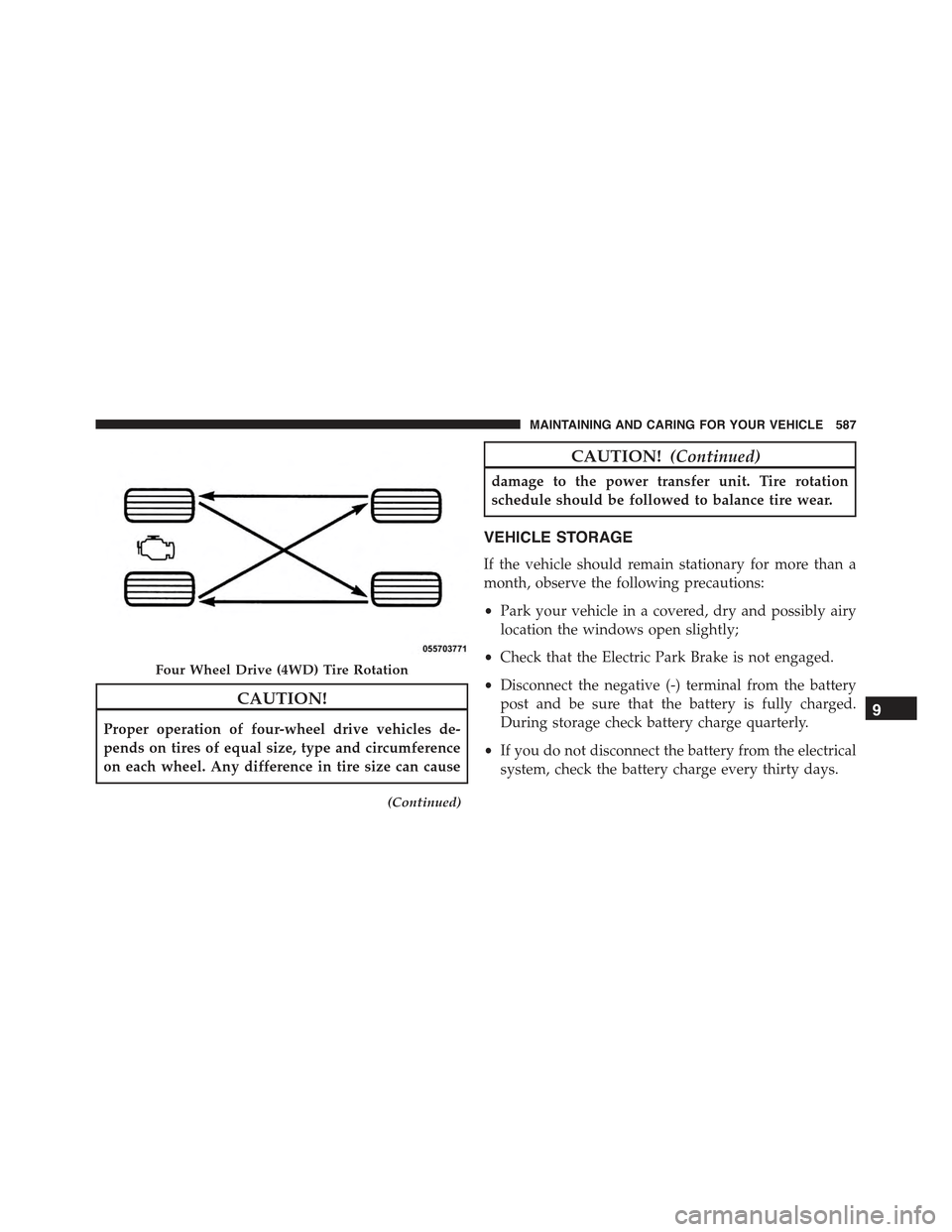
CAUTION!
Proper operation of four-wheel drive vehicles de-
pends on tires of equal size, type and circumference
on each wheel. Any difference in tire size can cause
(Continued)
CAUTION!(Continued)
damage to the power transfer unit. Tire rotation
schedule should be followed to balance tire wear.
VEHICLE STORAGE
If the vehicle should remain stationary for more than a
month, observe the following precautions:
•Park your vehicle in a covered, dry and possibly airy
location the windows open slightly;
•Check that the Electric Park Brake is not engaged.
•Disconnect the negative (-) terminal from the battery
post and be sure that the battery is fully charged.
During storage check battery charge quarterly.
•If you do not disconnect the battery from the electrical
system, check the battery charge every thirty days.
Four Wheel Drive (4WD) Tire Rotation
9
MAINTAINING AND CARING FOR YOUR VEHICLE 587
Page 596 of 678
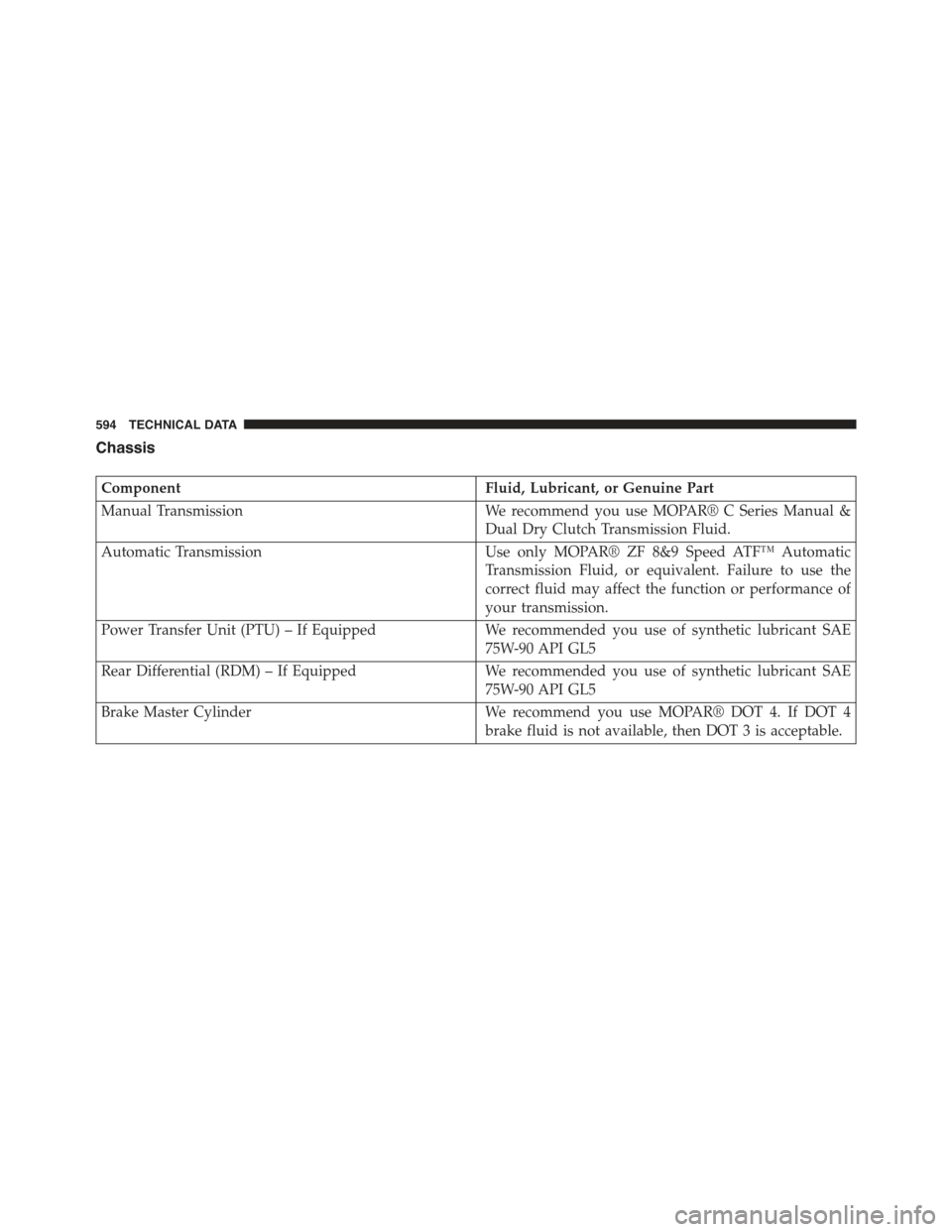
Chassis
ComponentFluid, Lubricant, or Genuine Part
Manual TransmissionWe recommend you use MOPAR® C Series Manual &
Dual Dry Clutch Transmission Fluid.
Automatic TransmissionUse only MOPAR® ZF 8&9 Speed ATF™ Automatic
Transmission Fluid, or equivalent. Failure to use the
correct fluid may affect the function or performance of
your transmission.
Power Transfer Unit (PTU) – If EquippedWe recommended you use of synthetic lubricant SAE
75W-90 API GL5
Rear Differential (RDM) – If EquippedWe recommended you use of synthetic lubricant SAE
75W-90 API GL5
Brake Master CylinderWe recommend you use MOPAR® DOT 4. If DOT 4
brake fluid is not available, then DOT 3 is acceptable.
594 TECHNICAL DATA
Page 606 of 678
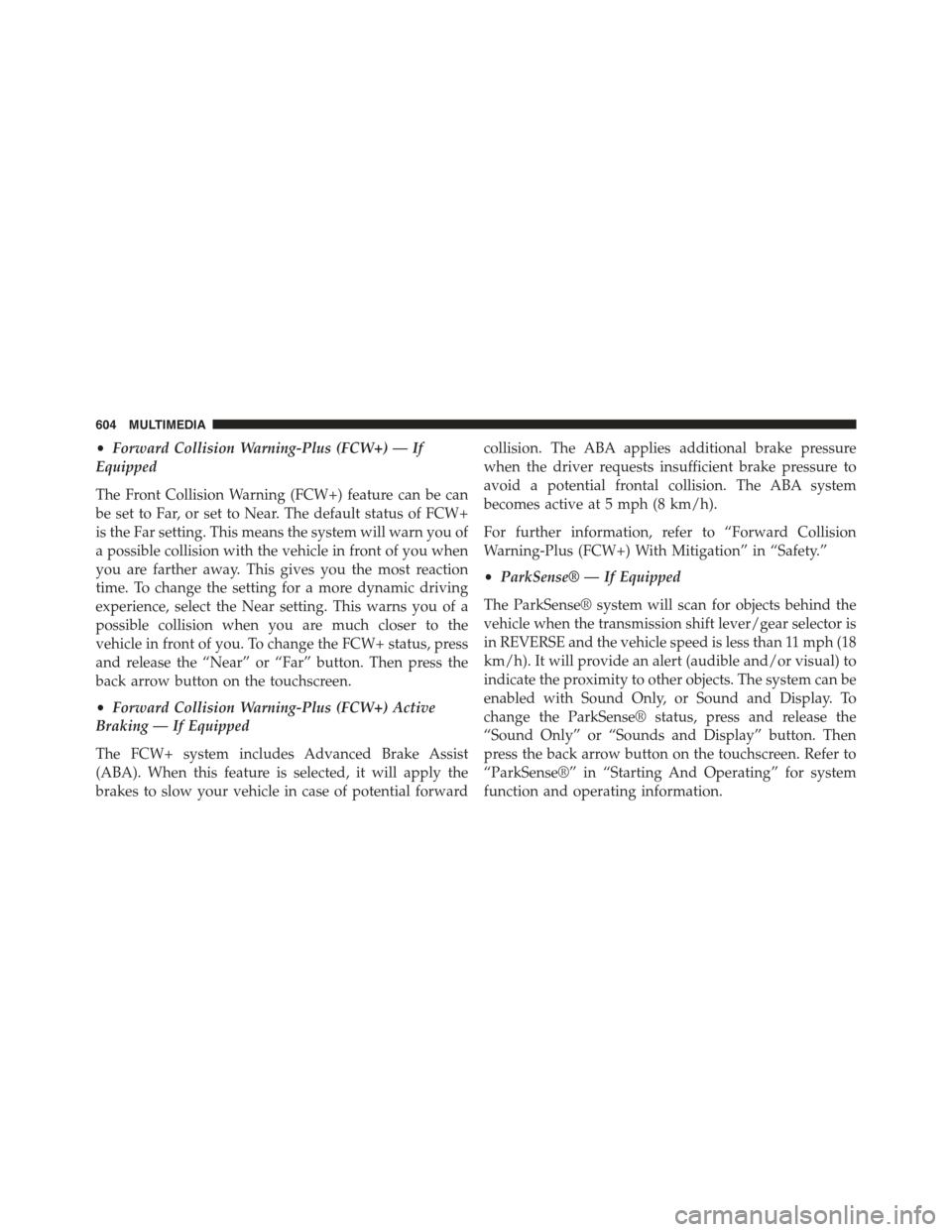
•Forward Collision Warning-Plus (FCW+) — If
Equipped
The Front Collision Warning (FCW+) feature can be can
be set to Far, or set to Near. The default status of FCW+
is the Far setting. This means the system will warn you of
a possible collision with the vehicle in front of you when
you are farther away. This gives you the most reaction
time. To change the setting for a more dynamic driving
experience, select the Near setting. This warns you of a
possible collision when you are much closer to the
vehicle in front of you. To change the FCW+ status, press
and release the “Near” or “Far” button. Then press the
back arrow button on the touchscreen.
•Forward Collision Warning-Plus (FCW+) Active
Braking — If Equipped
The FCW+ system includes Advanced Brake Assist
(ABA). When this feature is selected, it will apply the
brakes to slow your vehicle in case of potential forward
collision. The ABA applies additional brake pressure
when the driver requests insufficient brake pressure to
avoid a potential frontal collision. The ABA system
becomes active at 5 mph (8 km/h).
For further information, refer to “Forward Collision
Warning-Plus (FCW+) With Mitigation” in “Safety.”
•ParkSense® — If Equipped
The ParkSense® system will scan for objects behind the
vehicle when the transmission shift lever/gear selector is
in REVERSE and the vehicle speed is less than 11 mph (18
km/h). It will provide an alert (audible and/or visual) to
indicate the proximity to other objects. The system can be
enabled with Sound Only, or Sound and Display. To
change the ParkSense® status, press and release the
“Sound Only” or “Sounds and Display” button. Then
press the back arrow button on the touchscreen. Refer to
“ParkSense®” in “Starting And Operating” for system
function and operating information.
604 MULTIMEDIA
Page 608 of 678
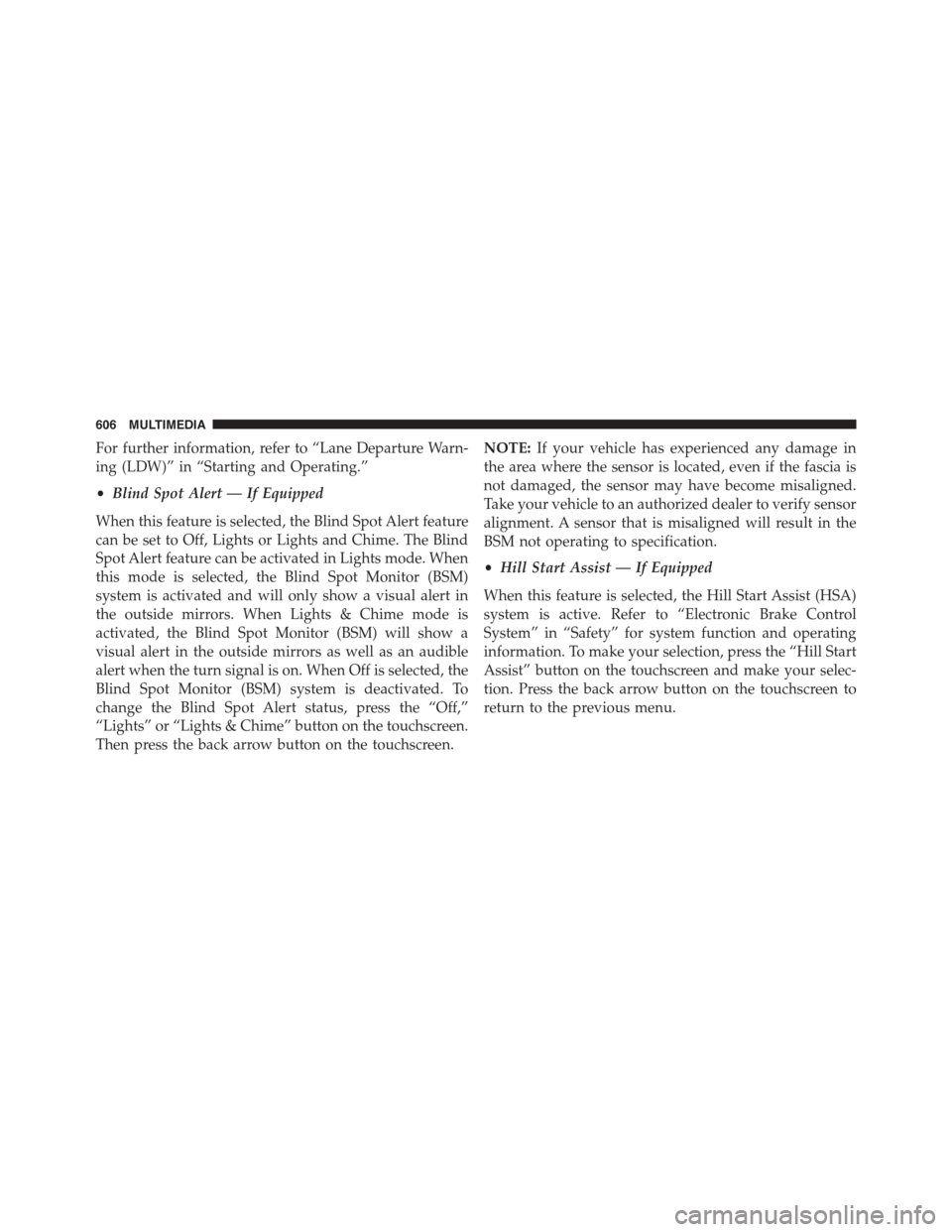
For further information, refer to “Lane Departure Warn-
ing (LDW)” in “Starting and Operating.”
•Blind Spot Alert — If Equipped
When this feature is selected, the Blind Spot Alert feature
can be set to Off, Lights or Lights and Chime. The Blind
Spot Alert feature can be activated in Lights mode. When
this mode is selected, the Blind Spot Monitor (BSM)
system is activated and will only show a visual alert in
the outside mirrors. When Lights & Chime mode is
activated, the Blind Spot Monitor (BSM) will show a
visual alert in the outside mirrors as well as an audible
alert when the turn signal is on. When Off is selected, the
Blind Spot Monitor (BSM) system is deactivated. To
change the Blind Spot Alert status, press the “Off,”
“Lights” or “Lights & Chime” button on the touchscreen.
Then press the back arrow button on the touchscreen.
NOTE:If your vehicle has experienced any damage in
the area where the sensor is located, even if the fascia is
not damaged, the sensor may have become misaligned.
Take your vehicle to an authorized dealer to verify sensor
alignment. A sensor that is misaligned will result in the
BSM not operating to specification.
•Hill Start Assist — If Equipped
When this feature is selected, the Hill Start Assist (HSA)
system is active. Refer to “Electronic Brake Control
System” in “Safety” for system function and operating
information. To make your selection, press the “Hill Start
Assist” button on the touchscreen and make your selec-
tion. Press the back arrow button on the touchscreen to
return to the previous menu.
606 MULTIMEDIA
Page 609 of 678
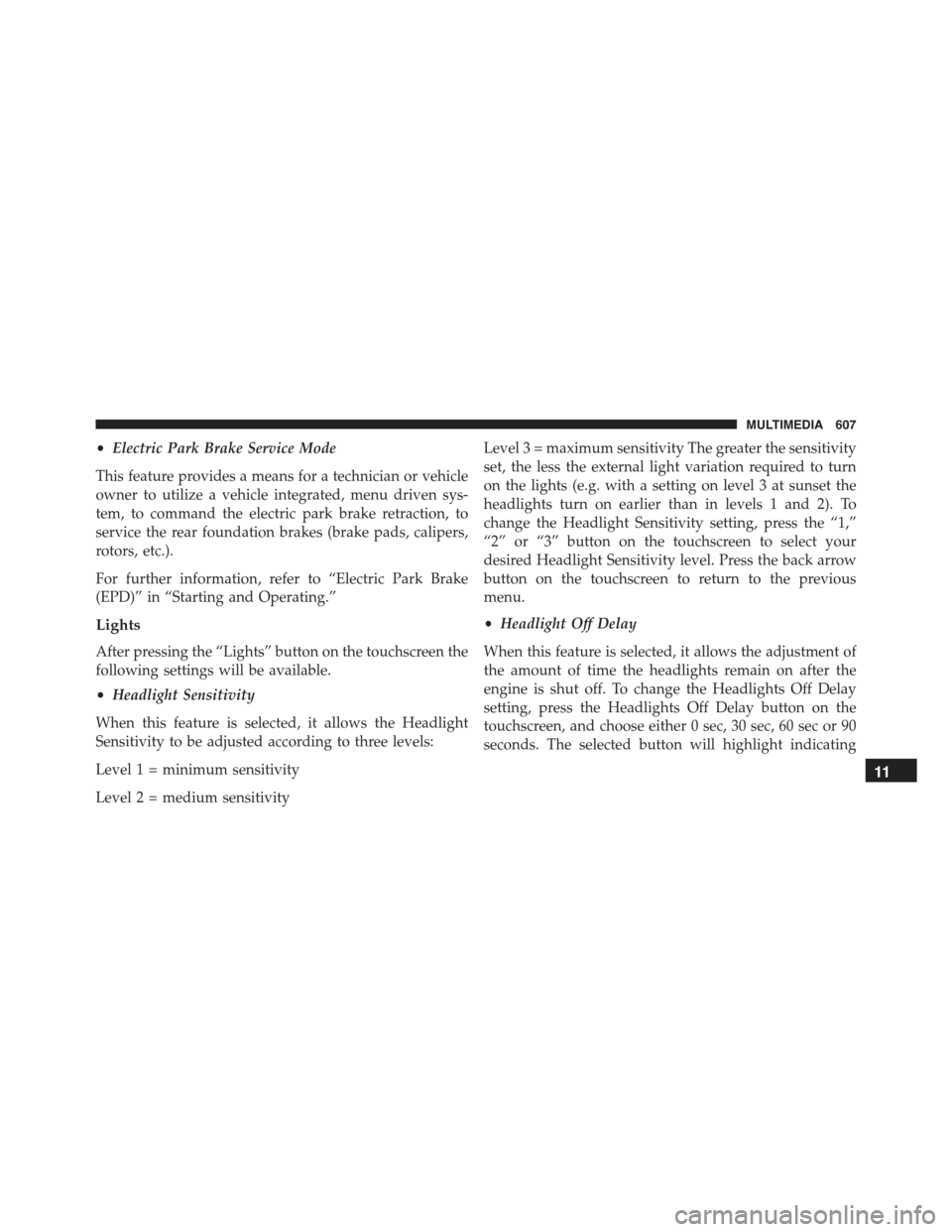
•Electric Park Brake Service Mode
This feature provides a means for a technician or vehicle
owner to utilize a vehicle integrated, menu driven sys-
tem, to command the electric park brake retraction, to
service the rear foundation brakes (brake pads, calipers,
rotors, etc.).
For further information, refer to “Electric Park Brake
(EPD)” in “Starting and Operating.”
Lights
After pressing the “Lights” button on the touchscreen the
following settings will be available.
•Headlight Sensitivity
When this feature is selected, it allows the Headlight
Sensitivity to be adjusted according to three levels:
Level 1 = minimum sensitivity
Level 2 = medium sensitivity
Level 3 = maximum sensitivity The greater the sensitivity
set, the less the external light variation required to turn
on the lights (e.g. with a setting on level 3 at sunset the
headlights turn on earlier than in levels 1 and 2). To
change the Headlight Sensitivity setting, press the “1,”
“2” or “3” button on the touchscreen to select your
desired Headlight Sensitivity level. Press the back arrow
button on the touchscreen to return to the previous
menu.
•Headlight Off Delay
When this feature is selected, it allows the adjustment of
the amount of time the headlights remain on after the
engine is shut off. To change the Headlights Off Delay
setting, press the Headlights Off Delay button on the
touchscreen, and choose either 0 sec, 30 sec, 60 sec or 90
seconds. The selected button will highlight indicating
11
MULTIMEDIA 607
Page 624 of 678
the “Fwd Collision Warning” button and select the
“Near” or “Far” button. Press the back arrow/Done
button on the touchscreen to return to the previous
menu.
•Forward Collision Warning-Plus (FCW+) Active
Braking — If Equipped
The FCW+ system includes Advanced Brake Assist
(ABA). When this feature is selected, it will apply the
brakes to slow your vehicle in case of potential forward
collision. The ABA applies additional brake pressure
when the driver requests insufficient brake pressure to
avoid a potential frontal collision. The ABA system
becomes active at 5 mph (8 km/h). To change the Active
Braking status, press the “Active Braking” button and
select the “On” or “Off” button. Press the back arrow/
Done button on the touchscreen to return to the previous
menu.
For further information, refer to “Forward Collision
Warning-Plus (FCW+) With Mitigation” in “Safety.”
•LaneSense Warning — If Equipped
When this feature is selected, it sets the distance at which
the steering wheel will provide feedback for potential
lane departures. The LDW sensitivity can be set to
provide either an “early,” “medium,” or “late” warning
zone start point. To change the LaneSense Warning
status, press the “LaneSense Warning” button and select
from the “Early,” “Med,” or “Late” buttons. Press the
back arrow/Done button on the touchscreen to return to
the previous menu.
For further information, refer to “LaneSense Warning
(LDW)” in “Starting And Operating.”
•LaneSense Strength — If Equipped
When this feature is selected, it sets the strength of the
steering wheel feedback for potential lane departures.
622 MULTIMEDIA
Page 627 of 678
vehicle is shifted out of REVERSE (with camera delay
turned ON), the rear view image with dynamic grid lines
will be displayed for up to 10 seconds after shifting out of
“REVERSE” unless the forward vehicle speed exceeds
8 mph (12 km/h), the transmission is shifted into PARK
or the ignition is switched to the OFF position. To set the
ParkView® Backup Camera Delay press the “MORE”
button on the faceplate, the “settings” button on the
touchscreen, then the “Safety & Driving Assistance”
button on the touchscreen. Press the “Parkview Backup
camera Delay” button on the touchscreen to turn the
ParkView® Delay ON or OFF.
•Brakes
This feature provides a means for a technician or vehicle
owner to utilize a vehicle integrated, menu driven sys-
tem, to command the electric park brake retraction, to
service the rear foundation brakes (brake pads, calipers,
rotors, etc.). For further information, refer to “Service
Mode (Unlocking rear brake pads)” in “Maintaining And
Caring For Your Vehicle.”
•Auto Park Brake
This feature provides a means for a technician or vehicle
owner to enable/disable auto insertion of the Electric
Park Brake. For further information, refer to “Auto Park
Brake” in “Starting And Operating.”
Lights
After pressing the “Lights” button on the touchscreen the
following settings will be available:
•Headlight Sensitivity
When this feature is selected, it allows the Headlight
Sensitivity to be adjusted according to three levels (level
1 = minimum sensitivity, level 2 = medium sensitivity,
level 3 = maximum sensitivity); the greater the sensitivity
set, the less the external light variation required to turn
11
MULTIMEDIA 625