light JEEP RENEGADE 2015 1.G Owners Manual
[x] Cancel search | Manufacturer: JEEP, Model Year: 2015, Model line: RENEGADE, Model: JEEP RENEGADE 2015 1.GPages: 678, PDF Size: 29.84 MB
Page 351 of 678
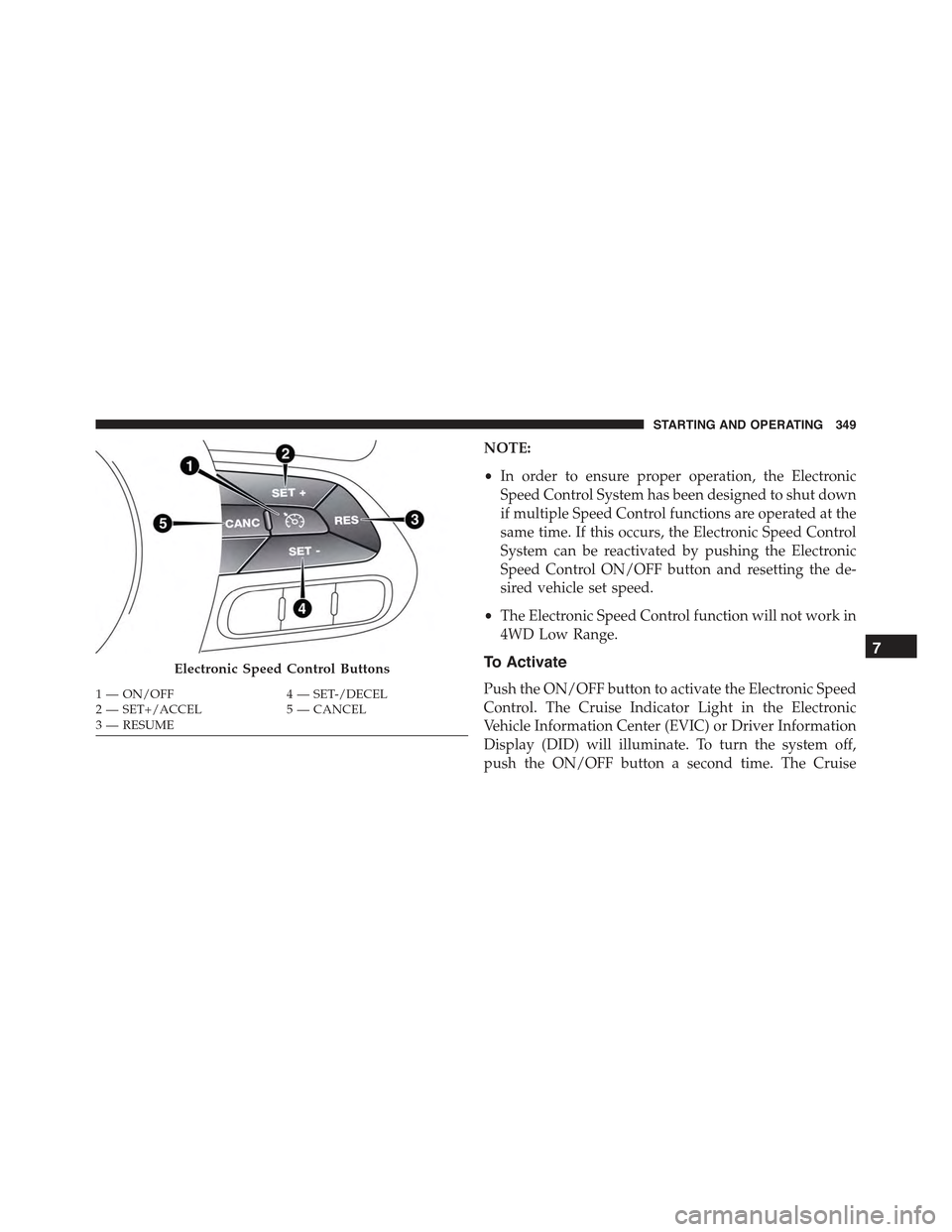
NOTE:
•In order to ensure proper operation, the Electronic
Speed Control System has been designed to shut down
if multiple Speed Control functions are operated at the
same time. If this occurs, the Electronic Speed Control
System can be reactivated by pushing the Electronic
Speed Control ON/OFF button and resetting the de-
sired vehicle set speed.
•The Electronic Speed Control function will not work in
4WD Low Range.
To Activate
Push the ON/OFF button to activate the Electronic Speed
Control. The Cruise Indicator Light in the Electronic
Vehicle Information Center (EVIC) or Driver Information
Display (DID) will illuminate. To turn the system off,
push the ON/OFF button a second time. The Cruise
Electronic Speed Control Buttons
1—ON/OFF4—SET-/DECEL2—SET+/ACCEL5—CANCEL3—RESUME
7
STARTING AND OPERATING 349
Page 352 of 678
Indicator Light will turn off. The system should be
turned off when not in use.
WARNING!
Leaving the Electronic Speed Control system on
when not in use is dangerous. You could accidentally
set the system or cause it to go faster than you want.
You could lose control and have an accident. Always
leave the system OFF when you are not using it.
To Set A Desired Speed
Turn the Electronic Speed Control ON.
NOTE:The vehicle should be traveling at a steady speed
and on level ground before pushing the SET (+) or SET (-)
button.
When the vehicle has reached the desired speed, push the
SET (+) or SET (-) button and release. Release the
accelerator and the vehicle will operate at the selected
speed.
To Deactivate
A soft tap on the brake pedal, pushing the CANCEL
button, or normal brake pressure while slowing the
vehicle will deactivate the Electronic Speed Control with-
out erasing the set speed from memory.
Pushing the ON/OFF button or turning the ignition
switch OFF erases the set speed from memory.
To Resume Speed
To resume a previously set speed, push the RES button
and release. Resume can be used at any speed above
20 mph (32 km/h).
350 STARTING AND OPERATING
Page 354 of 678
The drivers preferred units can be selected through the
Uconnect® system if equipped. Refer to ”Uconnect®
Settings” in “Multimedia” for more information. The
speed increment shown is dependant on the chosen
speed unit of U.S. (mph) or Metric (km/h):
U.S. Speed (mph)
•Pushing the SET-button once will result ina1mph
decrease in set speed. Each subsequent tap of the
button results in a decrease of 1 mph.
•If the button is continually pushed, the set speed will
continue to decrease until the button is released, then
the new set speed will be established.
Metric Speed (km/h)
•Pushing the SET-button once will result in a 1 km/h
decrease in set speed. Each subsequent tap of the
button results in a decrease of 1 km/h.
•If the button is continually pushed, the set speed will
continue to decrease until the button is released, then
the new set speed will be established.
To Accelerate For Passing
Push the accelerator as you would normally. When the
pedal is released, the vehicle will return to the set speed.
Using Electronic Speed Control On Hills
The transmission may downshift on hills to maintain the
vehicle set speed.
NOTE:The Electronic Speed Control system maintains
speed up and down hills. A slight speed change on
moderate hills is normal.
On steep hills, a greater speed loss or gain may occur so
it may be preferable to drive without Electronic Speed
Control.
352 STARTING AND OPERATING
Page 358 of 678
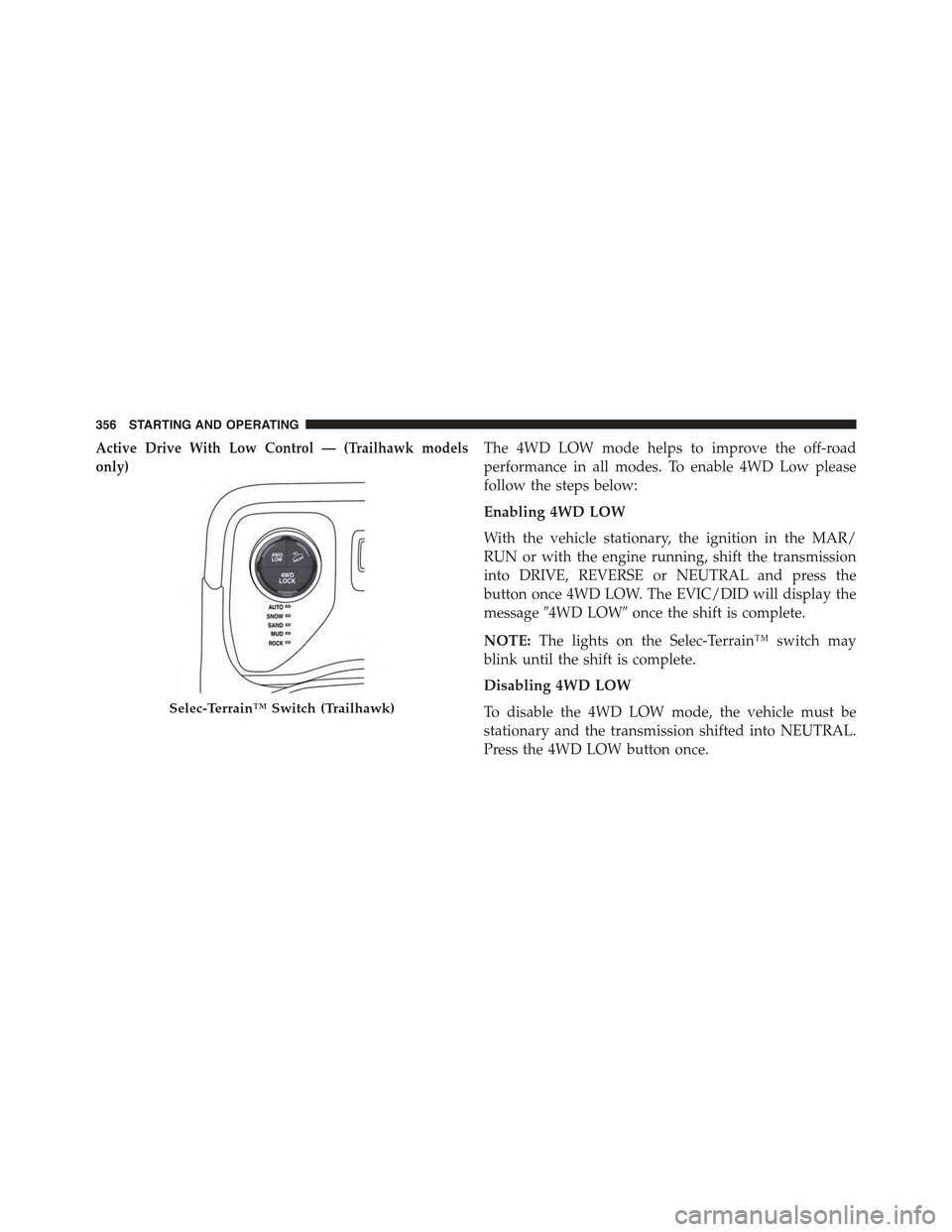
Active Drive With Low Control — (Trailhawk models
only)
The 4WD LOW mode helps to improve the off-road
performance in all modes. To enable 4WD Low please
follow the steps below:
Enabling 4WD LOW
With the vehicle stationary, the ignition in the MAR/
RUN or with the engine running, shift the transmission
into DRIVE, REVERSE or NEUTRAL and press the
button once 4WD LOW. The EVIC/DID will display the
message#4WD LOW#once the shift is complete.
NOTE:The lights on the Selec-Terrain™ switch may
blink until the shift is complete.
Disabling 4WD LOW
To disable the 4WD LOW mode, the vehicle must be
stationary and the transmission shifted into NEUTRAL.
Press the 4WD LOW button once.
Selec-Terrain™ Switch (Trailhawk)
356 STARTING AND OPERATING
Page 381 of 678
The TPMS will continue to warn the driver of low tire
pressure as long as the condition exists, and will not turn
off until the tire pressure is at or above the recommended
cold placard pressure. Once the low tire pressure warn-
ing (Tire Pressure Monitoring Telltale Light) illuminates,
you must increase the tire pressure to the recommended
cold placard pressure in order for the “Tire Pressure
Monitoring Telltale Light” to turn off.
NOTE:When filling warm tires, the tire pressure may
need to be increased up to an additional 4 psi (30 kPa)
above the recommended cold placard pressure in order
to turn the Tire Pressure Monitoring Telltale Light off.
The system will automatically update and the “Tire
Pressure Monitoring Telltale Light” will turn off once the
system receives the updated tire pressures. The vehicle
may need to be driven for up to 20 minutes above 15 mph
(24 km/h) in order for the TPMS to receive this informa-
tion.
For example, your vehicle may have a recommended
cold (parked for more than three hours) placard pressure
of 33 psi (227 kPa). If the ambient temperature is 68°F
(20°C) and the measured tire pressure is 28 psi (193 kPa),
a temperature drop to 20°F (-7°C) will decrease the tire
pressure to approximately 24 psi (165 kPa). This tire
pressure is low enough to turn ON the “Tire Pressure
Monitoring Telltale Light.” Driving the vehicle may cause
the tire pressure to rise to approximately 28 psi (193 kPa),
but the “Tire Pressure Monitoring Telltale Light” will still
be on. In this situation, the “Tire Pressure Monitoring
Telltale Light” will turn off only after the tires are inflated
to the vehicle’s recommended cold placard pressure
value.
NOTE:When filling warm tires, the tire pressure may
need to be increased up to an additional 4 psi (30 kPa)
above the recommended cold placard pressure in order
to turn the Tire Pressure Monitoring Telltale Light off.
7
STARTING AND OPERATING 379
Page 383 of 678
•Driving on a significantly underinflated tire causes the
tire to overheat and can lead to tire failure. Underin-
flation also reduces fuel efficiency and tire tread life,
and may affect the vehicle’s handling and stopping
ability.
•The TPMS is not a substitute for proper tire mainte-
nance, and it is the driver ’s responsibility to maintain
correct tire pressure using an accurate tire pressure
gauge, even if underinflation has not reached the level
to trigger illumination of the “Tire Pressure Monitor-
ing Telltale Light.”
•Seasonal temperature changes will affect tire pressure,
and the TPMS will monitor the actual tire pressure in
the tire.
Base System
The Tire Pressure Monitor System (TPMS) uses wireless
technology with wheel rim mounted electronic sensors to
monitor tire pressure levels. Sensors, mounted to each
wheel as part of the valve stem, transmit tire pressure
readings to the receiver module.
NOTE:It is particularly important for you to check the
tire pressure in all of the tires on your vehicle monthly
and to maintain the proper pressure.
The TPMS consists of the following components:
•Receiver Module
•Four Tire Pressure Monitoring Sensors
•Tire Pressure Monitoring Telltale Light
Tire Pressure Monitoring Low Pressure Warnings
The “Tire Pressure Monitoring Telltale Light” will
illuminate in the instrument cluster, a “LOW TIRE
PRESSURE” message will display in the instrument
cluster, an#Inflate to XX#message will be displayed and
7
STARTING AND OPERATING 381
Page 384 of 678
a chime will sound when tire pressure is low in one or
more of the four active road tires. Should this occur, you
should stop as soon as possible, check the inflation
pressure of each tire on your vehicle, and inflate each tire
to the vehicle’s recommended cold placard pressure
value as shown in the#Inflate to XX#message. Once the
system receives the updated tire pressures, the system
will automatically update and the “Tire Pressure Moni-
toring Telltale Light” will turn off.
NOTE:When filling warm tires, the tire pressure may
need to be increased up to an additional 4 psi (30 kPa)
above the recommended cold placard pressure in order
to turn the Tire Pressure Monitoring Telltale Light off.
The vehicle may need to be driven for up to 20 minutes
above 15 mph (24 km/h) in order for the TPMS to receive
this information.
Service TPMS Warning
When a system fault is detected, the “Tire Pressure
Monitoring Telltale Light” will flash on and off for 75
seconds and then remain on solid. The system fault will
also sound a chime. If the ignition is cycled, this sequence
will repeat, providing the system fault still exists. The
“Tire Pressure Monitoring Telltale Light” will turn off
when the fault condition no longer exists. A system fault
can occur due to any of the following:
1. Jamming due to electronic devices or driving next to
facilities emitting the same radio frequencies as the
TPMS sensors.
2. Installing some form of aftermarket window tinting
that affects radio wave signals.
3. Lots of snow or ice around the wheels or wheel
housings.
382 STARTING AND OPERATING
Page 385 of 678
4. Using tire chains on the vehicle.
5. Using wheels/tires not equipped with TPMS sensors.
Vehicles With Compact Spare or non-Matching Full
Size Spare
1. The compact spare tire or non-matching full size spare
tire does not have a tire pressure monitoring sensor.
Therefore, the TPMS will not monitor the pressure in
the spare tire.
2. If you install the compact or non-matching full size
spare tire in place of a road tire that has a pressure
below the low-pressure warning limit, a chime will
sound and the “TPMS Telltale Light” and “LOW TIRE
PRESSURE” and#Inflate to XX#messages will turn on
upon the next ignition cycle.
3. After driving the vehicle for up to 20 minutes above
15 mph (24 km/h), the “TPMS Telltale Light” will
flash on and off for 75 seconds and then remain on
solid.
4. For each subsequent ignition cycle, a chime will sound
and the “TPMS Telltale Light” will flash on and off for
75 seconds and then remain on solid.
5. Once you repair or replace the original road tire and
reinstall it on the vehicle in place of the compact spare
or non-matching full size spare, the TPMS will update
automatically and the “TPMS Telltale Light” will turn
off, as long as no tire pressure is below the low-
pressure warning limit in any of the four active road
tires. The vehicle may need to be driven for up to 20
minutes above 15 mph (24 km/h) in order for the
TPMS to receive this information.
7
STARTING AND OPERATING 383
Page 386 of 678
Premium System — If Equipped
The Tire Pressure Monitor System (TPMS) uses wireless
technology with wheel rim mounted electronic sensors to
monitor tire pressure levels. Sensors, mounted to each
wheel as part of the valve stem, transmit tire pressure
readings to the receiver module.
NOTE:It is particularly important for you to check the
tire pressure in all of the tires on your vehicle monthly
and to maintain the proper pressure.
The TPMS consists of the following components:
•Receiver Module
•Four Tire Pressure Monitoring Sensors
•Various Tire Pressure Monitoring System messages,
which display in the Electronic Vehicle Information
Center (EVIC) or Driver Information Display (DID).
•Tire Pressure Monitoring Telltale Light
Tire Pressure Monitoring Low Pressure Warnings
The “Tire Pressure Monitoring Telltale Light” will
illuminate in the instrument cluster and a chime
will sound when tire pressure is low in one or more of the
four active road tires. In addition, the Electronic Vehicle
Information Center (EVIC)/Driver information Display
(DID) will display a#Tire Low#message for a minimum
of five seconds, an#Inflate to XX#message and a graphic
showing the pressure values of each tire with the low tire
pressure values in a different color.
384 STARTING AND OPERATING
Page 387 of 678
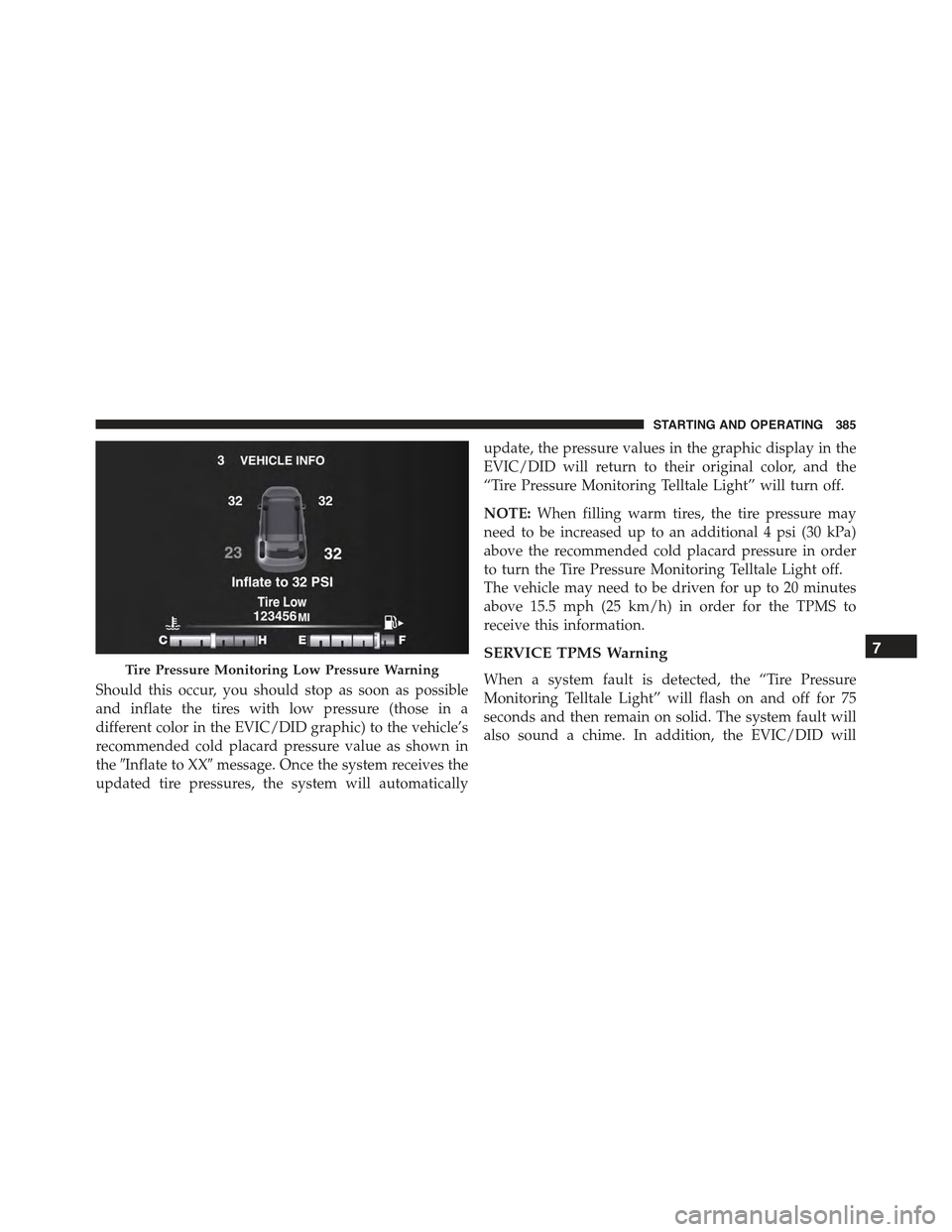
Should this occur, you should stop as soon as possible
and inflate the tires with low pressure (those in a
different color in the EVIC/DID graphic) to the vehicle’s
recommended cold placard pressure value as shown in
the#Inflate to XX#message. Once the system receives the
updated tire pressures, the system will automatically
update, the pressure values in the graphic display in the
EVIC/DID will return to their original color, and the
“Tire Pressure Monitoring Telltale Light” will turn off.
NOTE:When filling warm tires, the tire pressure may
need to be increased up to an additional 4 psi (30 kPa)
above the recommended cold placard pressure in order
to turn the Tire Pressure Monitoring Telltale Light off.
The vehicle may need to be driven for up to 20 minutes
above 15.5 mph (25 km/h) in order for the TPMS to
receive this information.
SERVICE TPMS Warning
When a system fault is detected, the “Tire Pressure
Monitoring Telltale Light” will flash on and off for 75
seconds and then remain on solid. The system fault will
also sound a chime. In addition, the EVIC/DID will
Tire Pressure Monitoring Low Pressure Warning
7
STARTING AND OPERATING 385