display JEEP RENEGADE 2015 1.G Service Manual
[x] Cancel search | Manufacturer: JEEP, Model Year: 2015, Model line: RENEGADE, Model: JEEP RENEGADE 2015 1.GPages: 678, PDF Size: 29.84 MB
Page 216 of 678
•See Navigation:allows you to view, on the instrument
cluster display, information relating to the navigation
mode.
$Units Of Measure$
By selecting the item#Units of measure,#you can select
the unit of measure to use for displaying various magni-
tudes.
Possible options are:
•US
•Metric
•Custom
$Clock & Data$
By selecting the item,#Clock & Data#you can adjust the
clock.
Possible options are:
•Set Time: adjust hours/minutes
•Set Format: adjust the time format#12h#(12 hours) or
#24h#(24 hours)
•Set Date: adjust day/month/year
Safety
By selecting the item “Safety,” you can make the follow-
ing adjustments:
•Speed Warning:
Set the vehicle speed limit (km/h or mph), which the
driver is notified through a visual and acoustic signaling
(display of a message and a symbol on the display).
•Speed Belt Buzzer:
This function is only viewable when the Seat Belt Re-
minder (SBR) system is active.
214 GETTING TO KNOW YOUR INSTRUMENT PANEL
Page 220 of 678
Variance
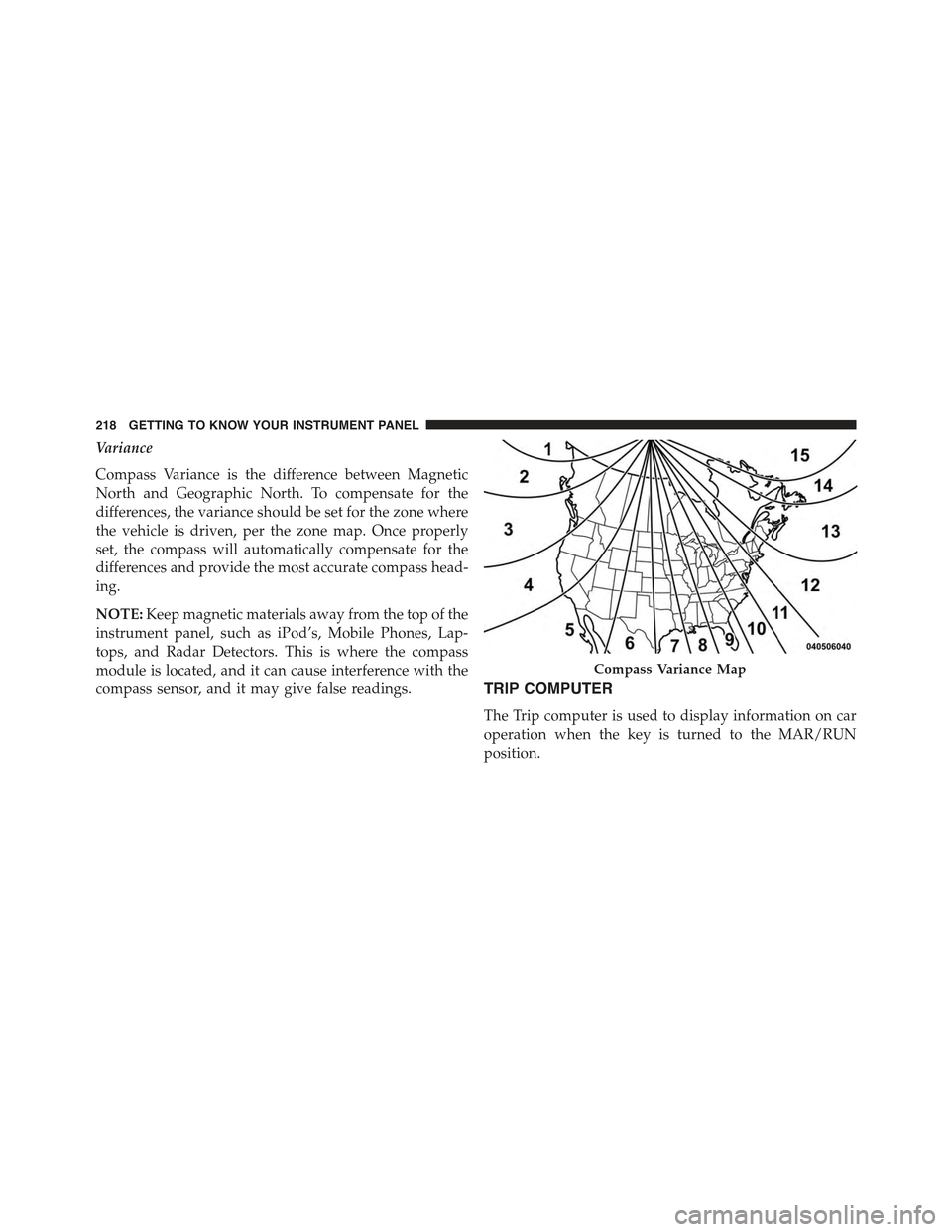
Compass Variance is the difference between Magnetic
North and Geographic North. To compensate for the
differences, the variance should be set for the zone where
the vehicle is driven, per the zone map. Once properly
set, the compass will automatically compensate for the
differences and provide the most accurate compass head-
ing.
NOTE:Keep magnetic materials away from the top of the
instrument panel, such as iPod’s, Mobile Phones, Lap-
tops, and Radar Detectors. This is where the compass
module is located, and it can cause interference with the
compass sensor, and it may give false readings.TRIP COMPUTER
The Trip computer is used to display information on car
operation when the key is turned to the MAR/RUN
position.
Compass Variance Map
218 GETTING TO KNOW YOUR INSTRUMENT PANEL
Page 221 of 678
This function allows you to define two separate trips
called “Trip A” and “Trip B” where the car’s#complete
trips#are monitored in an independent manner.
Both trips can be reset (reset - start of a new trip). To
perform a reset, push and hold the OK button on the
steering wheel controls.
“Trip A” is used to display the figures relating to:
•Distance Travelled
•Average Consumption
•Travel Time (driving time)
Quantities Displayed
Distance Travelled
Indicates the distance travelled by the start of the new trip.
Average Consumption
Represents the average fuel consumption since the start
of the new trip.
Travel Time
Elapsed time since the start of the new trip.
OK Button
Short Push Of The Button: display of various param-
eters.
Long Push Of The Button: reset quantities and begin a
new trip.
New trip
Starts after reset:
•#Manual#by pressing theOKbutton.
•#Automatic#when the#distance#reaches the value is
62140 (99999.9 km) or when the#time travel#reaches
the value of 999.59 (999 hours and 59 minutes).
•After each disconnection and reconnection of the bat-
tery.
5
GETTING TO KNOW YOUR INSTRUMENT PANEL 219
Page 250 of 678
Changing FCW And Active Braking Status
By changing the settings on the menu of the Uconnect®
system, you can change the sensitivity of the system by
choosing one of the following three options:#Near#,
#Medium#or#Far#. Refer to “Multimedia” for further
information.
The default option is#Medium#. This setting provides
that the system notify the driver of a possible accident
with the vehicle ahead of it when the latter is at a
standard distance, intermediate between the other two
possible settings.
By setting the sensitivity of the system to#Far#, the
system will warn the driver of a possible accident with
the vehicle in front when the latter is at a greater distance,
giving you the chance to act on the brakes in a more
limited and gradual. This setting gives the driver the
maximum possible time of reaction to prevent a possible
accident.
By changing the option to#Near#, the system will warn
the driver of a possible accident with the vehicle ahead of
it when the latter is a reduced distance. This setting offers
a reaction time to the driver lower than the settings
#Medium#and#Far#, in the case of a potential accident,
while a more dynamic driving of the car.
The setting of the sensitivity of the system is maintained
in memory when the engine is switched off.
FCW Limited Warning
If the EVIC/DID displays “FCW Limited Functionality”
or “FCW Limited Functionality Clean Front Windshield”
momentarily, there may be a condition that limits FCW
functionality. Although the vehicle is still drivable under
normal conditions, the active braking may not be fully
available. Once the condition that limited the system
performance is no longer present, the system will return
to its full performance state. If the problem persists, see
your authorized dealer.
248 SAFETY
Page 251 of 678
Service FCW Warning
If the system turns off, and the EVIC/DID displays:
•FCW Unavailable Service Required
This indicates there is an internal system fault. Although
the vehicle is still drivable under normal conditions, have
the system checked by an authorized dealer.
Precautions While Driving With FCW
In certain driving conditions, such as:
•Driving in the vicinity of a curve
•Small vehicles and/or not aligned to the lane
•Lane changing of other vehicles
•Passing of vehicles in an oncoming intersection
The intervention of the system could be unexpected or
delayed. The driver must therefore always pay particular
attention, while maintaining control of the car to drive in
complete safety.
Driving In The Vicinity Of A Curve
Entering or exiting a large curve, the system could detect
the presence of a vehicle that is in front of the car, but that
does not preside in the same lane . In cases such as this,
the system might respond.
6
SAFETY 249
Page 334 of 678
WARNING!(Continued)
you have any doubt about your ability to perform a
service job, take your vehicle to a competent me-
chanic.
MANUAL TRANSMISSION
WARNING!
You or others could be injured if you leave the
vehicle unattended without having the parking
brake fully applied. The parking brake should al-
ways be applied when the driver is not in the vehicle,
especially on an incline.
CAUTION!
Never drive with your foot resting on the clutch
pedal, or attempt to hold the vehicle on a hill with the
clutch pedal partially engaged, as this will cause
abnormal wear on the clutch.
NOTE:During cold weather, you may experience in-
creased effort in shifting until the transmission fluid
warms up. This is normal.
To shift the gears, press the clutch pedal to the floor and
put the shift lever to the desired position (the diagram for
the engagement of the gears is displayed on the handle of
the lever).
332 STARTING AND OPERATING
Page 338 of 678
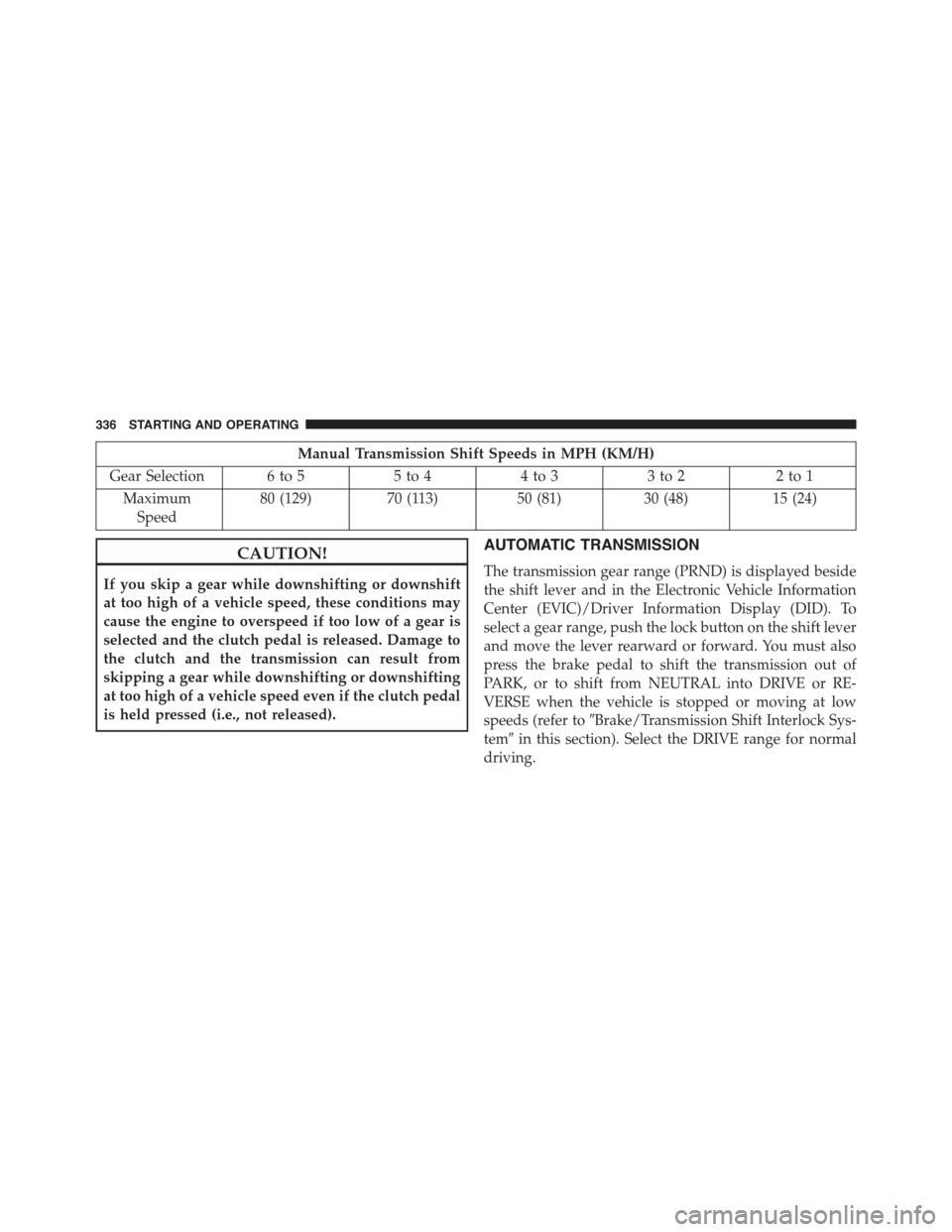
Manual Transmission Shift Speeds in MPH (KM/H)
Gear Selection 6 to 55 to 44 to 33 to 22 to 1
Maximum
Speed
80 (129)70 (113)50 (81)30 (48)15 (24)
CAUTION!
If you skip a gear while downshifting or downshift
at too high of a vehicle speed, these conditions may
cause the engine to overspeed if too low of a gear is
selected and the clutch pedal is released. Damage to
the clutch and the transmission can result from
skipping a gear while downshifting or downshifting
at too high of a vehicle speed even if the clutch pedal
is held pressed (i.e., not released).
AUTOMATIC TRANSMISSION
The transmission gear range (PRND) is displayed beside
the shift lever and in the Electronic Vehicle Information
Center (EVIC)/Driver Information Display (DID). To
select a gear range, push the lock button on the shift lever
and move the lever rearward or forward. You must also
press the brake pedal to shift the transmission out of
PARK, or to shift from NEUTRAL into DRIVE or RE-
VERSE when the vehicle is stopped or moving at low
speeds (refer to#Brake/Transmission Shift Interlock Sys-
tem#in this section). Select the DRIVE range for normal
driving.
336 STARTING AND OPERATING
Page 341 of 678
Shift Lever
The transmission shift lever has PARK, REVERSE, NEU-
TRAL, DRIVE, and AutoStick (+/-) shift positions.
Manual shifts can be made using the AutoStick shift
control (refer to “AutoStick” in this section for further
information). Toggling the shift lever forward (-) or
rearward (+) while in the AutoStick position (beside the
DRIVE position) will manually select the transmission
gear, and will display the current gear in the instrument
cluster as 1, 2, 3, etc.
NOTE:If the shift lever cannot be moved to the PARK,
REVERSE, or NEUTRAL position (when pushed for-
ward) it is probably in the AutoStick (+/-) position
(beside the DRIVE position). In AutoStick mode, the
transmission gear (1, 2, 3, etc.) is displayed in the
instrument cluster. Move the shift lever to the right (into
the DRIVE [D] position) for access to PARK, REVERSE,
and NEUTRAL.
The transmission gear range (PRND) is displayed both
beside the shift lever and in the Electronic Vehicle Infor-
mation Center (EVIC)/Driver Information Display
(DID). To select a gear range, push the shift lever lock
button on the shift lever and move the lever rearward or
forward. You must also press the brake pedal to shift the
transmission out of PARK, or to shift from NEUTRAL
into DRIVE or REVERSE when the vehicle is stopped or
moving at low speeds (refer to#Brake/Transmission Shift
Interlock System#in this section for further information).
Select the DRIVE range for normal driving.
The electronically-controlled transmission provides a
precise shift schedule. The transmission electronics are
self-calibrating. The first few shifts on a new vehicle may
be somewhat abrupt. This is a normal condition, and
precision shifts will develop within a few hundred miles
(kilometers).
7
STARTING AND OPERATING 339
Page 345 of 678
CAUTION!
•Before moving the shift lever out of PARK, you
must turn the ignition switch from the STOP/OFF
position to the MAR/RUN position, and also press
the brake pedal. Otherwise, damage to the shift
lever could result.
•DO NOT race the engine when shifting from
PARK or NEUTRAL into another gear range, as this
can damage the drivetrain.
The following indicators should be used to ensure that
you have engaged the transmission into the PARK posi-
tion:
•When shifting into PARK, push the LOCK button on
the shift lever and firmly move the shift lever all the
way forward until it stops and is fully seated.
•Look at the transmission gear position display and
verify that it indicates the PARK.
•With the brake pedal released, verify that the shift
lever will not move out of PARK.
Reverse (R)
This range is for moving the vehicle backward. Shift into
REVERSE only after the vehicle has come to a complete
stop.
Neutral (N)
Use this range when the vehicle is standing for prolonged
periods with the engine running. The engine may be
started in this range. Apply the EPB and shift the
transmission into PARK if you must leave the vehicle.
WARNING!
Do not coast in NEUTRAL and never turn off the
ignition to coast down a hill. These are unsafe
practices that limit your response to changing traffic
(Continued)
7
STARTING AND OPERATING 343
Page 347 of 678
If the transmission becomes extremely hot, the “Trans-
mission Temperature Warning Light” may illuminate and
the transmission may operate differently until the trans-
mission cools down.
During cold temperatures, transmission operation may
be modified depending on engine and transmission
temperature as well as vehicle speed. This feature im-
proves warm up time of the engine and transmission to
achieve maximum efficiency. Engagement of the torque
converter clutch, and shifts into 8th or 9th gear, are
inhibited until the transmission fluid is warm (refer to the
“Note” under “Torque Converter Clutch” in this section).
Normal operation will resume once the transmission
temperature has risen to a suitable level.
AutoStick
AutoStick is a driver-interactive transmission feature
providing manual shift control, giving you more control
of the vehicle. AutoStick allows you to maximize engine
braking, eliminate undesirable upshifts and downshifts,
and improve overall vehicle performance. This system
can also provide you with more control during passing,
city driving, cold slippery conditions, mountain driving,
trailer towing, and many other situations.
Operation
When the shift lever is in the AutoStick position (beside
the DRIVE position), it can be moved forward and
rearward. This allows the driver to manually select the
transmission gear being used. Moving the shift lever
forward (-) triggers a downshift, and rearward (+) an
upshift. The current gear is displayed in the instrument
cluster.
NOTE:In AutoStick mode, the transmission will only
shift up or down when the driver moves the shift lever
rearward (+) or forward (-), except as described below.
•The transmission will automatically upshift when nec-
essary to prevent engine over-speed.
7
STARTING AND OPERATING 345