display JEEP RENEGADE 2015 1.G Workshop Manual
[x] Cancel search | Manufacturer: JEEP, Model Year: 2015, Model line: RENEGADE, Model: JEEP RENEGADE 2015 1.GPages: 678, PDF Size: 29.84 MB
Page 348 of 678
•The transmission will automatically downshift as the
vehicle slows (to prevent engine lugging) and will
display the current gear.
•The transmission will automatically downshift to first
or second gear (depending on model) when coming to
a stop. After a stop, the driver should manually upshift
(+) the transmission as the vehicle is accelerated.
•You can start out (from a stop) in first or second gear.
Starting out in second gear can be helpful in snow or
icy conditions. Tap the shift lever forward or rearward
to select the desired gear after the vehicle is brought to
a stop.
•If a requested downshift would cause the engine to
over-speed, that shift will not occur.
•The system will ignore attempts to upshift at too low
of a vehicle speed.
•Avoid using speed control when AutoStick is engaged
because the transmission will not shift automatically.
•Transmission shifting will be more noticeable when
AutoStick is engaged.
•The system may revert to automatic shift mode if a
fault or overheat condition is detected.
To disengage AutoStick mode, return the shift lever to the
DRIVE position. You can shift in or out of the AutoStick
position at any time without taking your foot off the
accelerator pedal.
WARNING!
Do not downshift for additional engine braking on a
slippery surface. The drive wheels could lose their
grip and the vehicle could skid, causing a collision or
personal injury.
346 STARTING AND OPERATING
Page 351 of 678
NOTE:
•In order to ensure proper operation, the Electronic
Speed Control System has been designed to shut down
if multiple Speed Control functions are operated at the
same time. If this occurs, the Electronic Speed Control
System can be reactivated by pushing the Electronic
Speed Control ON/OFF button and resetting the de-
sired vehicle set speed.
•The Electronic Speed Control function will not work in
4WD Low Range.
To Activate
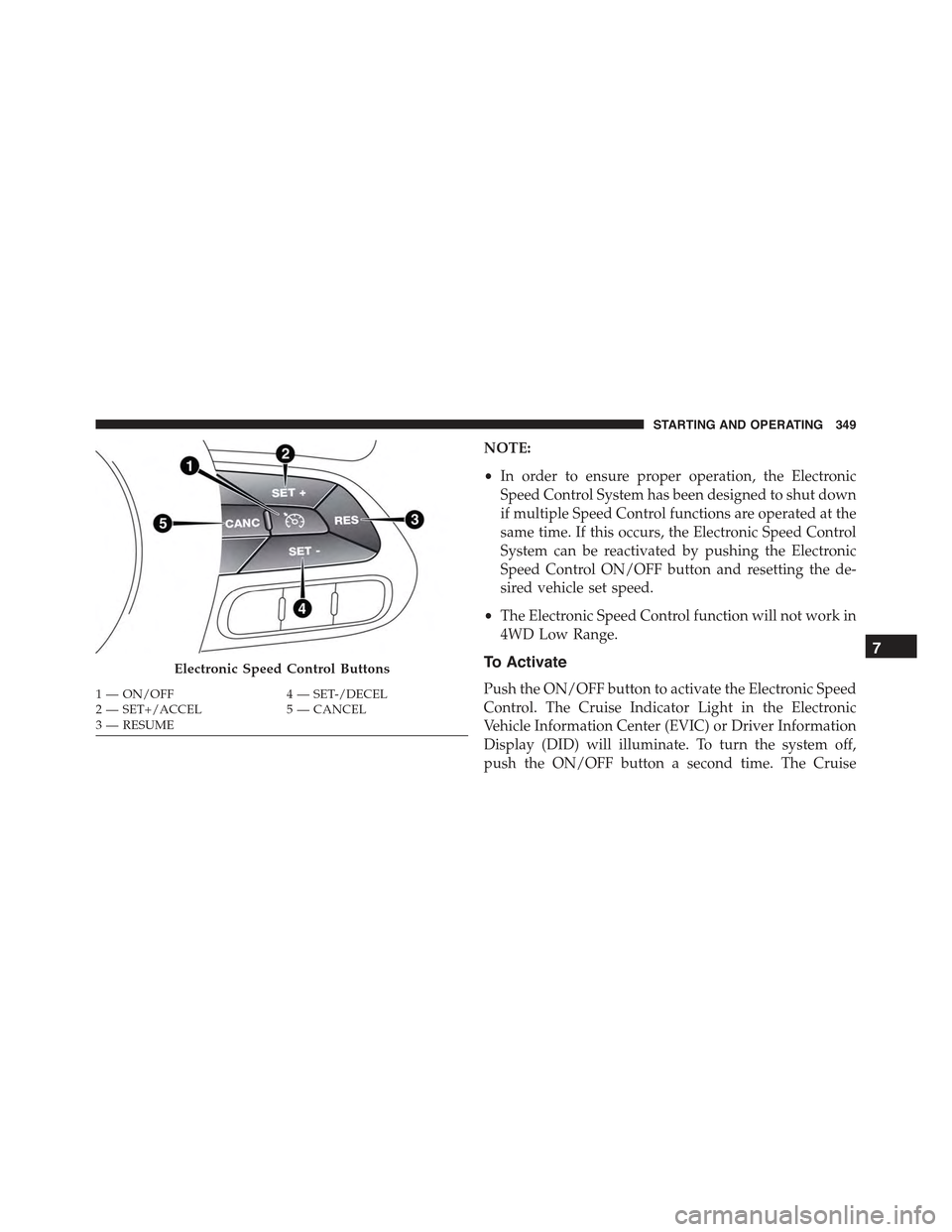
Push the ON/OFF button to activate the Electronic Speed
Control. The Cruise Indicator Light in the Electronic
Vehicle Information Center (EVIC) or Driver Information
Display (DID) will illuminate. To turn the system off,
push the ON/OFF button a second time. The Cruise
Electronic Speed Control Buttons
1—ON/OFF4—SET-/DECEL2—SET+/ACCEL5—CANCEL3—RESUME
7
STARTING AND OPERATING 349
Page 358 of 678
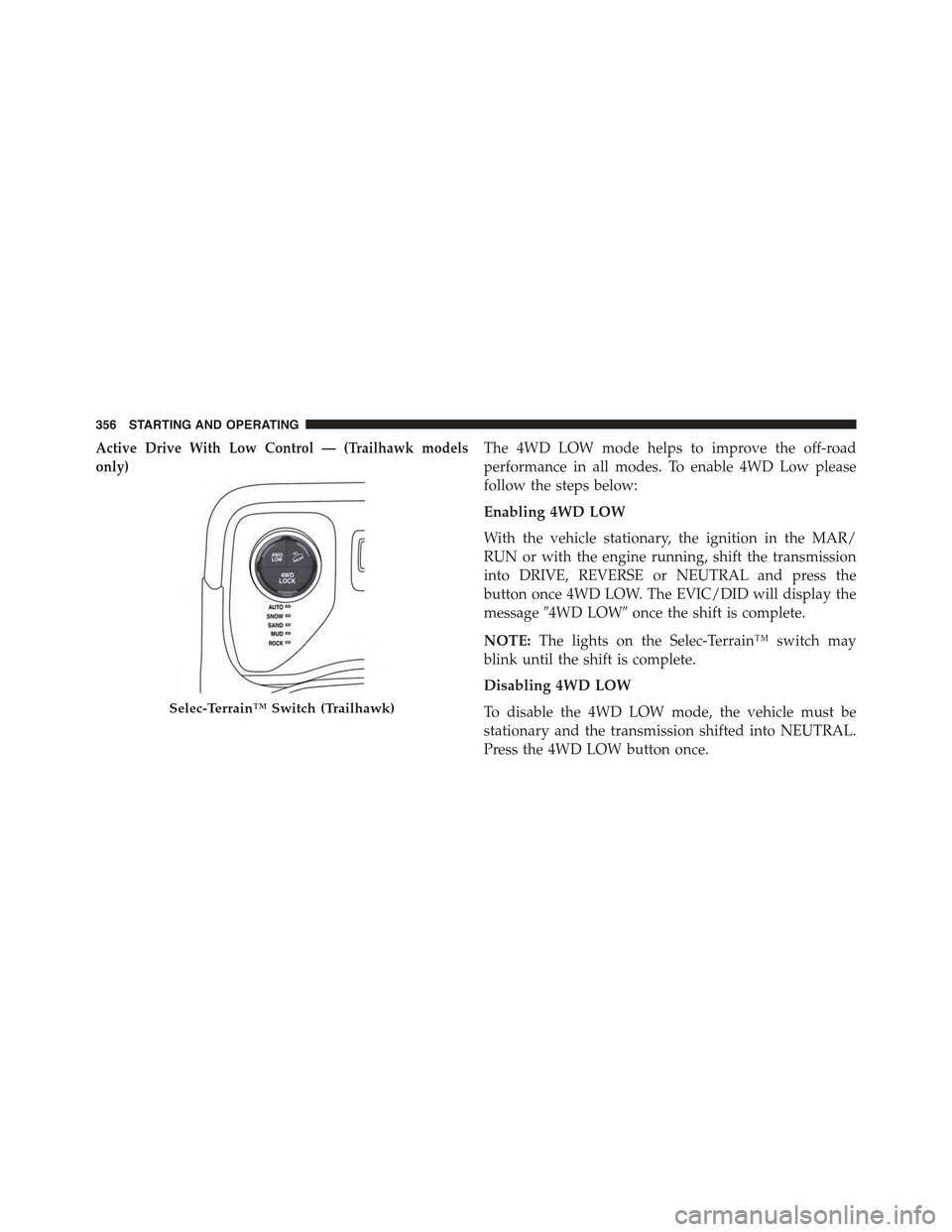
Active Drive With Low Control — (Trailhawk models
only)
The 4WD LOW mode helps to improve the off-road
performance in all modes. To enable 4WD Low please
follow the steps below:
Enabling 4WD LOW
With the vehicle stationary, the ignition in the MAR/
RUN or with the engine running, shift the transmission
into DRIVE, REVERSE or NEUTRAL and press the
button once 4WD LOW. The EVIC/DID will display the
message#4WD LOW#once the shift is complete.
NOTE:The lights on the Selec-Terrain™ switch may
blink until the shift is complete.
Disabling 4WD LOW
To disable the 4WD LOW mode, the vehicle must be
stationary and the transmission shifted into NEUTRAL.
Press the 4WD LOW button once.
Selec-Terrain™ Switch (Trailhawk)
356 STARTING AND OPERATING
Page 361 of 678
maximize traction and allow the highest steering ca-
pacity for off-road surfaces. This mode gives you the
maximum performance off-road. Use for low speed
obstacles such as large rocks, deep ruts, etc.
NOTE:
•Rock mode is only available on the vehicles equipped
with the Off-Road package.
•Activate the Hill Descent Control or Selec Speed
Control for steep downhill control. See “Electronic
Brake Control System” in this section for further
information.
LANESENSE — IF EQUIPPED
LaneSense Operation
The LaneSense system is operational at speeds above
37 mph (60 km/h) and below 112 mph (180 km/h). The
LaneSense system uses a forward looking camera to
detect lane markings and measure vehicle position
within the lane boundaries.
When both lane markings are detected and the driver
unintentionally drifts out of the lane (no turn signal
applied), the LaneSense system provides a haptic warn-
ing in the form of torque applied to the steering wheel to
prompt the driver to remain within the lane boundaries.
If the driver continues to unintentionally drift out of the
lane, the LaneSense system provides a visual warning
through the Electronic Vehicle Information Center (EVIC)
or Driver Information Display (DID) to prompt the driver
to remain within the lane boundaries.
The driver may manually override the haptic warning by
applying torque into the steering wheel at any time.
When only a single lane marking is detected and the
driver unintentionally drifts across the lane marking (no
turn signal applied), the LaneSense system provides a
7
STARTING AND OPERATING 359
Page 362 of 678
visual warning through the EVIC/DID to prompt the
driver to remain within the lane. When only a single lane
marking is detected, a haptic (torque) warning will not be
provided.
NOTE:When operating conditions have been met, the
LaneSense system will monitor if the driver ’s hands are
on the steering wheel and provides an audible warning
to the driver when the driver ’s hands are not detected on
the steering wheel. The system will cancel if the driver
does not return their hands to the wheel.
Turning LaneSense ON Or OFF
The default status of LaneSense is “OFF”.
The LaneSense button is located on the switch panel
below the Uconnect® display.
To turn the LaneSense system ON, push the
LaneSense button (LED turns on). A “Lane
Sense On” message is shown in the EVIC/DID.
To turn the LaneSense system OFF, push the LaneSense
button once (LED turns off).
NOTE:The LaneSense system will retain the last system
state ON or OFF from the last ignition cycle when the
ignition is changed to the ON/RUN position.
LaneSense Warning Message
The LaneSense system will indicate the current lane drift
condition through the Electronic Vehicle Information
Center (EVIC) or Driver Information Display (DID).
3.5 EVIC Screen — If Equipped
When the LaneSense system is ON, the lane lines are gray
when both of the lane boundaries have not been detected
and the LaneSense indicator is solid white.
360 STARTING AND OPERATING
Page 371 of 678
PARKSENSE® REAR PARK ASSIST — IF
EQUIPPED
The ParkSense® Rear Park Assist system provides visual
and audible indications of the distance between the rear
fascia and a detected obstacle when backing up, e.g.
during a parking maneuver. Refer to ParkSense® System
Usage Precautions for limitations of this system and
recommendations.
ParkSense® will retain the last system state (enabled or
disabled) from the last ignition cycle when the ignition is
changed to the MAR/RUN position.
ParkSense® can be active only when the shift lever/gear
selector is in REVERSE. If ParkSense® is enabled at this
shift lever position, the system will remain active until
the vehicle speed is increased to approximately 7 mph
(11 km/h) or above. When in REVERSE and above the
system’s operating speed, a warning will appear within
the Electronic Vehicle Information Center (EVIC) or
Driver Information Display (DID).
ParkSense® Sensors
The four ParkSense® sensors, located in the rear fascia/
bumper, monitor the area behind the vehicle that is
within the sensors’ field of view. The sensors can detect
obstacles from approximately 12 in (30 cm) up to 59 in
(150 cm) from the rear fascia/bumper in the horizontal
direction, depending on the location, type and orienta-
tion of the obstacle.7
STARTING AND OPERATING 369
Page 373 of 678
Detection Distances
If the sensors detect more obstacles, it is taken into
account only what is the shorter distance.
Instrument Cluster Display
ParkSense is displayed on the instrument cluster only if
you have selected the item#beep and display#inside the
#Settings#menu of the Uconnect® system.
If an obstacle is detected in the center rear region, the
display will show a single solid arc in the center rear
region and will produce a one-half second tone. As the
vehicle moves closer to the obstacle, the display will
show the single arc moving closer to the vehicle and the
sound tone will change from slow, to fast, to continuous.
If an obstacle is detected in the left and/or right rear
region, the display will show a single flashing arc in the
left and/or right rear region and will produce a fast
sound tone. As the vehicle moves closer to the obstacle,
the display will show the single arc moving closer to the
vehicle and the tone will change from fast to continuous.
In general, the car is closest to the obstacle when the
display shows only a flashing arc and the chime becomes
continuous.
The color on the display depends on the distance and
location of the obstacle.
Enabling And Disabling ParkSense®
ParkSense® can be enabled and disabled with the
ParkSense® switch.
When the ParkSense® switch is pressed to
disable the system, the instrument cluster will
display the “PARKSENSE OFF” message for
approximately five seconds. Refer to “Elec-
tronic Vehicle Information Center (EVIC)” or “Driver
Information Display (DID)” in “Getting To Know Your
Instrument Panel” for further information. When the
7
STARTING AND OPERATING 371
Page 374 of 678
shift lever is moved to REVERSE and the system is
disabled, the EVIC/DID will display the “PARKSENSE
OFF” message for as long as the vehicle is in REVERSE.
The ParkSense® switch LED will be ON when
ParkSense® is disabled or requires service. The
ParkSense® switch LED will be OFF when the system is
enabled. If the ParkSense® switch is pushed, and re-
quires service, the ParkSense® switch LED will blink
momentarily, and then the LED will be ON.
ParkSense will remember the previous state when the
vehicle is switch off.
CAUTION!
After turning off the ignition, the ParkSense® re-
mains in this setting until the next key cycle, even in
the case of changing the setting of starting MAR/
RUN to STOP/OFF and then again in MAR/RUN.
Service The ParkSense® Rear Park Assist
System
During vehicle start up, when the ParkSense® Rear Park
Assist System has detected a faulted condition, the
instrument cluster will actuate a single chime, once per
ignition cycle, and it will display the “PARKSENSE
UNAVAILABLE WIPE REAR SENSORS” or the
“PARKSENSE UNAVAILABLE SERVICE REQUIRED”
message. Refer to “Electronic Vehicle Information Center
(EVIC) or Driver Information Display (DID)” for further
information. When the shift lever is moved to REVERSE
and the system has detected a faulted condition, the
EVIC/DID will display the#PARKSENSE UNAVAIL-
ABLE WIPE REAR SENSORS#or#PARKSENSE UN-
AVAILABLE SERVICE REQUIRED#message for as long
as the vehicle is in REVERSE. Under this condition,
ParkSense® will not operate.
If “PARKSENSE UNAVAILABLE WIPE REAR SEN-
SORS” appears in the Electronic Vehicle Information
372 STARTING AND OPERATING
Page 375 of 678
Center (EVIC) or Driver Information Display (DID) make
sure the outer surface and the underside of the rear
fascia/bumper is clean and clear of snow, ice, mud, dirt
or other obstructions and then cycle the ignition. If the
message continues to appear, see an authorized dealer.
If “PARKSENSE UNAVAILABLE SERVICE REQUIRED”
appears in the EVIC/DID, see an authorized dealer.
Park Assist System Usage Precautions
NOTE:
•Ensure that the outer surface and the underside of the
rear bumper is clean and clear of snow, ice, mud, dirt
or other obstruction to keep the Rear Park Assist
system operating properly.
•Jackhammers, large trucks, and other vibrations could
affect the performance of Rear Park Assist.
•Clean the Rear Park Assist sensors regularly, taking
care not to scratch or damage them. The sensors must
not be covered with ice, snow, slush, mud, dirt or
debris. Failure to do so can result in the system not
working properly. The Rear Park Assist system might
not detect an obstacle behind the fascia/bumper, or it
could provide a false indication that an obstacle is
behind the fascia/bumper.
•Objects such as bicycle carriers, etc., must not be
placed within 12 inches (30 cm) from the rear fascia/
bumper while driving the vehicle. Failure to do so can
result in the system misinterpreting a close object as a
sensor problem, causing a failure indication to be
displayed in the instrument cluster.
7
STARTING AND OPERATING 373
Page 377 of 678
WARNING!(Continued)
•Before using ParkSense®, it is strongly recom-
mended that the ball mount and hitch ball assem-
bly is disconnected from the vehicle when the
vehicle is not used for towing. Failure to do so can
result in injury or damage to vehicles or obstacles
because the hitch ball will be much closer to the
obstacle than the rear fascia when the loudspeaker
sounds the continuous tone. Also, the sensors
could detect the ball mount and hitch ball assem-
bly, depending on its size and shape, giving a false
indication that an obstacle is behind the vehicle.
If it’s necessary to keep the trailer hitch and hitch ball
assembly mounted for a long period, it is possible to filter
out the trailer hitch and hitch ball assembly presence in
sensor field of view. The filtering operation must be
performed only by an authorized dealer.
PARKVIEW® REAR BACK UP CAMERA — IF
EQUIPPED
The ParkView® Rear Back Up Camera that allows you to
see an on-screen image of your vehicle’s rear surround-
ings when the shift lever is put into REVERSE. The image
will be displayed on the touchscreen display along with
a note to “check entire surroundings” across the top of
the screen. After five seconds this note will disappear.
The ParkView® camera is located above the rear license
plate.
7
STARTING AND OPERATING 375