battery JEEP RENEGADE 2023 User Guide
[x] Cancel search | Manufacturer: JEEP, Model Year: 2023, Model line: RENEGADE, Model: JEEP RENEGADE 2023Pages: 364, PDF Size: 18.65 MB
Page 43 of 364
GETTING TO KNOW YOUR VEHICLE 41
To operate the rear dome light, proceed as follows:
Push the switch to the on/right position from its
center position and the lights are always on.
Push the switch to the off/left position from its
center position and the lights are always off.
Leave the switch in the center position, and the
lights are turned on and off when the doors are
opened or closed.
DOME LIGHT TIMING
The dome light will automatically illuminate when
the doors are unlocked, the doors are opened or
after the doors are closed.
Timing Entering The Vehicle
The dome lights illuminate in the following ways:
When the doors are unlocked, the dome light
will illuminate for approximately 27 seconds.
When one of the doors is opened, the dome light
will illuminate for approximately three minutes.
When the doors are closed, the dome light will
automatically shut off after approximately 27
seconds.
The timing stops once the ignition is placed in the
ON/RU N
position. The dome light will turn off under any of the
follow
i
ng conditions:
The dome light is disabled when the ignition is
placed in the ON/RUN position.
The dome lights will turn off automatically when
the doors are locked.
The dome lights will automatically turn off after
approximately 15 minutes of inactivity to
prese r
ve the battery.
Timing Exiting The Vehicle
The dome light will illuminate under the following
condit i
ons when the ignition is placed to the OFF
position and the key is removed:
The dome light will illuminate for 27 seconds
after the ignition is placed in the OFF position.
The opening of one of the doors (approximately
three minutes).
After closing a door (approximately 27 seconds).
The dome light timing is disabled when the doors
a re
l
oc
ked.
WINDSHIELD WIPERS AND WASHERS
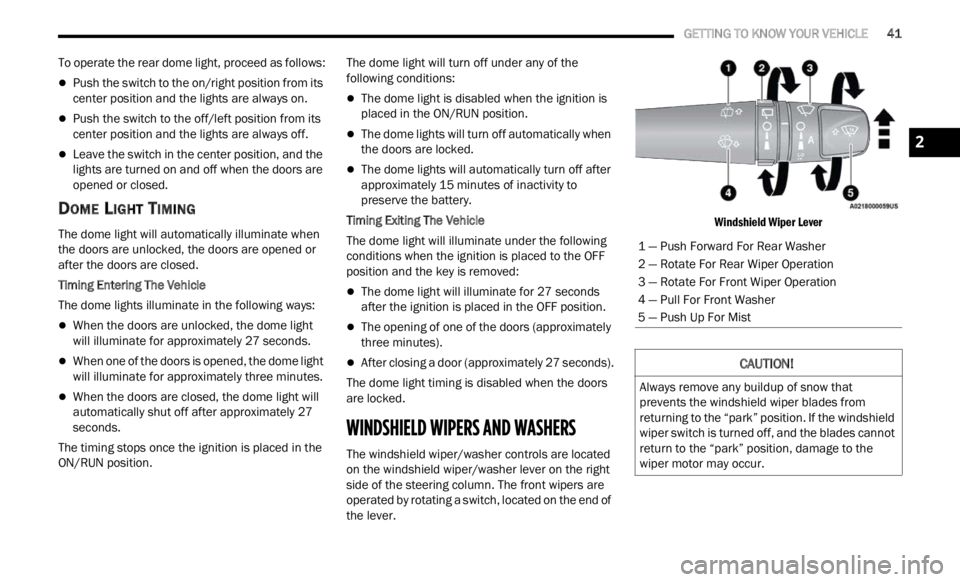
The windshield wiper/washer controls are located
on the windshield wiper/washer lever on the right
side of the steering column. The front wipers are
operated by rotating a switch, located on the end of
the lever.
Windshield Wiper Lever
1 — Push Forward For Rear Washer
2 — Rotate For Rear Wiper Operation
3 — Rotate For Front Wiper Operation
4 — Pull For Front Washer
5 — Push Up For Mist
CAUTION!
Always remove any buildup of snow that
prevents the windshield wiper blades from
returning to the “park” position. If the windshield
wiper switch is turned off, and the blades cannot
return to the “park” position, damage to the
wiper motor may occur.
2
Page 53 of 364
GETTING TO KNOW YOUR VEHICLE 51
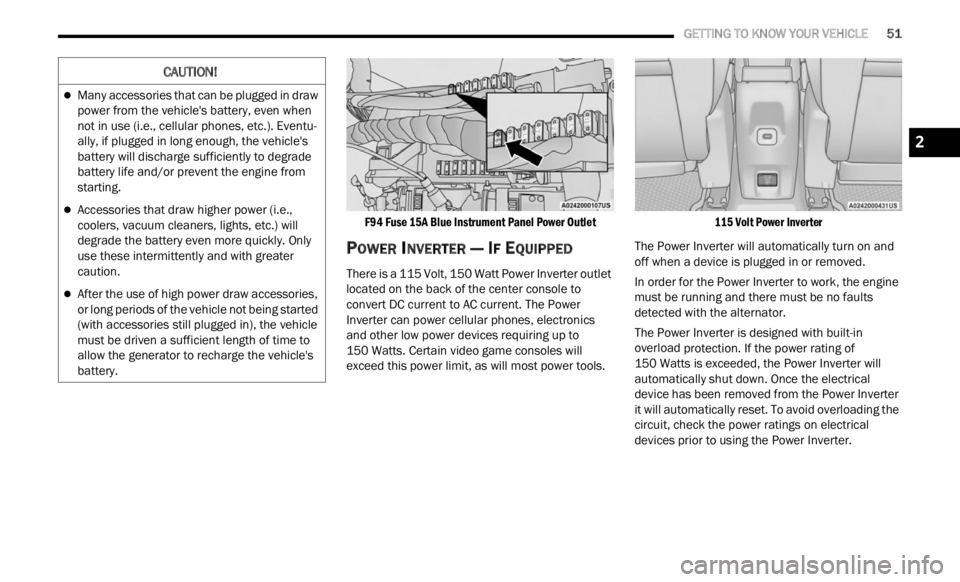
F94 Fuse 15A Blue Instrument Panel Power Outlet
POWER INVERTER — IF EQUIPPED
There is a 115 Volt, 150 Watt Power Inverter outlet
located on the back of the center console to
convert DC current to AC current. The Power
Inverter can power cellular phones, electronics
and other low power devices requiring up to
150 Watts. Certain video game consoles will
excee d
this power limit, as will most power tools.
115 Volt Power Inverter
The Power Inverter will automatically turn on and
off wh e
n a device is plugged in or removed.
In order for the Power Inverter to work, the engine
must b
e running and there must be no faults
detected with the alternator.
The Power Inverter is designed with built-in
overloa d
protection. If the power rating of
150 Watts is exceeded, the Power Inverter will
a utomat
ically shut down. Once the electrical
device has been removed from the Power Inverter
it will automatically reset. To avoid overloading the
circuit, check the power ratings on electrical
devices prior to using the Power Inverter.
CAUTION!
Many accessories that can be plugged in draw
power from the vehicle's battery, even when
not in use (i.e., cellular phones, etc.). Eventu -
ally, if plugged in long enough, the vehicle's
batte r
y will discharge sufficiently to degrade
battery life and/or prevent the engine from
starting.
Accessories that draw higher power (i.e.,
coolers, vacuum cleaners, lights, etc.) will
degrade the battery even more quickly. Only
use these intermittently and with greater
caution.
After the use of high power draw accessories,
or long periods of the vehicle not being started
(with accessories still plugged in), the vehicle
must be driven a sufficient length of time to
allow the generator to recharge the vehicle's
battery.
2
Page 68 of 364

66 GETTING TO KNOW YOUR INSTRUMENT PANEL
INSTRUMENT CLUSTER DISPLAY MENU
I
TEMS
NOTE:
The instrument cluster display menu items display
in th e
center of the instrument cluster. Menu items
may vary depending on your vehicle features.
Speedometer
Push and release the up or down arrow
button until the speedometer is displayed in the
i n s
tr
u
ment cluster display. Push and release the
OK button to toggle units (mph or km/h) of the
speedometer.
Vehicle Info
Push and release the up or down arrow
button until “Vehicle Info” is highlighted in the
instr u
ment cluster display. Push and release the
right arrow button and Coolant Temp will be
displayed. Push the right
or left arrow button
to sc
roll through the following information displays:
Tire Pressure — View the information relating to
the Tire Pressure Monitoring System (If
Equipped).
Coolant Temperature — View the engine coolant
temperature.
Trans Temperature — View the trans oil
temperature.
Oil Temperature — View the oil temperature.
Battery Voltage — View the voltage value (state
of charge) of the battery.
Service — View the service status message(s) (If
Equipped).
Driver Assist — If Equipped
Push and release the up or down arrow
button until the Driver Assist menu title displayed
is hi g
hlighted in the instrument cluster display.
LaneSense — If Equipped
The instrument cluster display displays the current
LaneSe n
se status and information. The
information displayed depends on LaneSense
system status and the conditions that need to be
met Ú page 133.
Fuel Economy
This menu item allows you to view the fuel
economy of the vehicle. The following will display:
Range (Miles or km)
Current Consumption (mpg or L/100 km or
km/L)
Average Consumption (mpg or L/100 km or
km/L)
Reset procedure shown at the bottom of the
d ispla
y.
Trip Info
Push and release the up or down arrow
button until the Trip menu title is displayed in the
instr u
ment cluster display. Toggle the left
or
right arrow button to select Trip A or Trip B. The
Trip information will display the following:
Distance – Shows the total distance (mi or km)
traveled for Trip A or Trip B since the last reset.
Average Fuel Economy – Shows the average
fuel economy (MPG or L/100 km or km/L) of
Trip A
or Trip B since the last reset.
Elapsed Time – Shows the total elapsed time of
travel since Trip A or Trip B has been reset.
Hold the OK butt
on to reset feature information.
Stop/Start – If Equipped
Push and release the up or down arrow
button until the Stop/Start menu title is displayed
i n
t h
e
instrument cluster display.
This menu shows messages related to Stop/Start.
Only on
e message can be viewed at a time until the
condition is cleared. When the Stop/Start is
engaged (and the engine is off), the associated
hardware telltale is turned on. Whenever a user
pushes the Stop/Start button on the central stack,
a pop-up message of the Stop/Start status will
appear on the instrument cluster display.
Page 71 of 364

GETTING TO KNOW YOUR INSTRUMENT PANEL 69
Sound Horn With Lock: activate/deactivate the
horn when pushing the LOCK button on the key
fob. The options are “Off,” “First Press,” and
“Second Press”
Horn With Remote Start: activate/deactivate
the horn at the Remote Starting of the engine
with the key fob
Remote Door Unlock: allows you to open the
driver door only on the first push of the UNLOCK
button on the key fob
“Compass”
By selecting the item “Compass” you can make the
f ollowi
ng adjustments:
Compass Calibration
Compass Variance
TRIP COMPUTER
The Trip computer is used to display information on
car operation when the key is turned to the RUN
position.
This function allows you to define two separate
trips
called “Trip A” and “Trip B” where the car's
“complete trips” are monitored in an independent
manner.
Both trips can be reset (reset - start of a new trip).
To perf
orm a reset, push and hold the OK button on
the steering wheel controls. “Trip A” and “Trip B” are used to display the figures
relat
i
ng to:
Distance Traveled
Average Consumption
Travel Time (driving time)
Quantities Displayed
Distance Traveled
Indicates the distance traveled by the start of
the new trip.
Average Consumption
Represents the average fuel consumption since
the start of the new trip.
Travel Time
Elapsed time since the start of the new trip.
OK Button
Short Push Of The Button: display of various
p arame
ters.
Long Push Of The Button: reset quantities and
begin
a new trip.
New trip
Starts after reset:
“Manual” by pushing the OK button.
“Automatic” when the “distance” reaches the
value of 62140 (99999.9 km) or when the “time
travel” reaches the value of 999.59
(999 hours and 59 minutes).
After each disconnection and reconnection of
the battery.
WARNING/INDICATOR LIGHTS AND
MESSAGES
The warning/indicator light switches on in the
instrument panel together with a dedicated
message and/or acoustic signal when applicable.
These indications are indicative and precautionary
and as such must not be considered as exhaustive
and/or alternative to the information contained in
the Owner Manual, which you are advised to read
carefully in all cases. Always refer to the
information in this chapter in the event of a failure
indication.
All active telltales will display first, if applicable.
The sy
stem check menu may appear different
based upon equipment options and current vehicle
status. Some telltales are optional and may not
appear.
The following warning lamps and indicators will
alert
you to a vehicle condition that may become
serious. Some lamps will illuminate when you start
your vehicle to make sure they work. If any lamps
remain on after starting your vehicle, refer to the
respective system warning lamp for further
information.
3
Page 72 of 364
70 GETTING TO KNOW YOUR INSTRUMENT PANEL
RED WARNING LIGHTS
Air Bag Warning Light
This light will turn on for four to eight
seconds as a bulb check when the
i
g n
it
i
on is placed in the ON/RUN or MAR/
ON/RUN position. If the light is either not
on during startup, stays on, or turns on while
driving, have the system inspected at an
authorized dealer as soon as possible. This light
will illuminate with a single chime when a fault with
the Air Bag Warning Light has been detected, it will
stay on until the fault is cleared. If the light comes
on intermittently or remains on while driving, have
an authorized dealer service the vehicle
immediately.
Brake Warning Light
This light monitors various brake
functions, including brake fluid level and
parki n
g brake application. If the brake
light turns on it may indicate that the
parking brake is applied, that the brake fluid level
is low, or that there is a problem with the Anti-Lock
Brake System reservoir.
If the light remains on when the parking brake has
been d
isengaged, and the fluid level is at the full
mark on the master cylinder reservoir, it indicates
a possible brake hydraulic system malfunction or
that a problem with the Brake Booster has been
detected by the Anti-Lock Brake System (ABS) / Electronic Stability Control (ESC) system. In this
case, the light will remain on until the condition has
been corrected. If the problem is related to the
brake booster, the ABS pump will run when
applying the brake, and a brake pedal pulsation
may be felt during each stop.
The dual brake system provides a reserve braking
capac
i
ty in the event of a failure to a portion of the
hydraulic system. A leak in either half of the dual
brake system is indicated by the Brake Warning
Light, which will turn on when the brake fluid level
in the master cylinder has dropped below a
specified level.
The light will remain on until the cause is corrected.
NOTE:
The light may flash momentarily during sharp
corner i
ng maneuvers, which change fluid level
conditions. The vehicle should have service
performed, and the brake fluid level checked.
If brake failure is indicated, immediate repair is
necess
ary. Vehicles equipped with the Anti-Lock Brake System
(ABS)
are also equipped with Electronic Brake
Force Distribution (EBD). In the event of an EBD
failure, the Brake Warning Light will turn on along
with the ABS Light. Immediate repair to the ABS
system is required.
Operation of the Brake Warning Light can be
check e
d by turning the ignition switch from the OFF
position to the ON/RUN position. The light should
illuminate for approximately two seconds. The light
should then turn off unless the parking brake is
applied or a brake fault is detected. If the light does
not illuminate, have the light inspected by an
authorized dealer.
The light also will turn on when the parking brake
is ap p
lied with the ignition switch in the ON/RUN
position.
NOTE:
This light shows only that the parking brake is
appli e
d. It does not show the degree of brake appli -
cation.
Battery Charge Warning Light
This warning light will illuminate when the
battery is not charging properly. If it stays
on wh i
le the engine is running, there may
be a malfunction with the charging system.
Contact an authorized dealer as soon as possible.
This indicates a possible problem with the
electr
ical system or a related component.
WARNING!
Driving a vehicle with the red brake light on is
dangerous. Part of the brake system may have
failed. It will take longer to stop the vehicle. You
could have a collision. Have the vehicle checked
immediately.
Page 80 of 364
78 GETTING TO KNOW YOUR INSTRUMENT PANEL
ONBOARD DIAGNOSTIC SYSTEM
(OBD II) C
YBERSECURITY
Your vehicle is required to have an OBD II and a
connection port to allow access to information
related to the performance of your emissions
controls. Authorized service technicians may need
to access this information to assist with the
diagnosis and service of your vehicle and
emissions system Ú page 133.
EMISSIONS INSPECTION AND
MAINTENANCE PROGRAMS
In some localities, it may be a legal requirement to
pass an inspection of your vehicle's emissions
control system. Failure to pass could prevent
vehicle registration.
For states that require an Inspection and
Maintenance (I/M), this check verifies
the Ma
lfunction Indicator Light (MIL) is
functioning and is not on when the
engine is running, and that the OBD II system is
ready for testing.
Normally, the OBD II system will be ready. The
OBD II system may n
ot be r
eady if your vehicle was
recently serviced, recently had a depleted battery
or a battery replacement. If the OBD II system
should be determined not ready for the I/M test,
your vehicle may fail the test.
CAUTION!
Prolonged driving with the MIL on could cause
further damage to the emission control
system. It could also affect fuel economy and
driveability. The vehicle must be serviced
before any emissions tests can be performed.
If the MIL is flashing, while the engine is
running, severe catalytic converter damage
and power loss will soon occur. Immediate
service is required.
WARNING!
ONLY an authorized service technician should
connect equipment to the OBD II connection
port in order to read the VIN, diagnose, or
service your vehicle.
If unauthorized equipment is connected to the
OBD II connection port, such as a
driver-behavior tracking device, it may:
Be possible that vehicle systems,
including safety related systems, could be
impaired or a loss of vehicle control could
occur that may result in an accident
involving serious injury or death.
Access, or allow others to access, infor -
mation stored in your vehicle systems,
inclu d
ing personal information.
Page 81 of 364

GETTING TO KNOW YOUR INSTRUMENT PANEL 79
Your vehicle has a simple ignition actuated test,
which you can use prior to going to the test station.
To check if your vehicle's OBD II system is ready,
you must do the following:
1. Cycle the ignition switch to the ON position,
but d
o not crank or start the engine.
NOTE:
If you crank or start the engine, you will have to
start
this test over.
2. As soon as you cycle the ignition switch to the ON pos
ition, you will see the Malfunction
Indicator Light (MIL) symbol come on as part of
a normal bulb check. 3. Approximately 15 seconds later, one of two
thing
s will happen:
The MIL will flash for about 10 seconds and
then return to being fully illuminated until
you turn OFF the ignition or start the engine.
This means that your vehicle's OBD II
system is not ready and you should not
proceed to the I/M station.
The MIL will not flash at all and will remain
fully illuminated until you place the ignition
in the off position or start the engine. This
means that your vehicle's OBD II system is
ready and you can proceed to the I/M
station. If your OBD II system is
not rea
dy, you should see
an authorized dealer or repair facility. If your
vehicle was recently serviced or had a battery
failure or replacement, you may need to do nothing
more than drive your vehicle as you normally would
in order for your OBD II system to update. A
recheck with the above test routine may then
indicate that the system is now ready.
Regardless of whether your vehicle's OBD II system
is re a
dy or not, if the MIL is illuminated during
normal vehicle operation you should have your
vehicle serviced before going to the I/M station.
The I/M station can fail your vehicle because the
MIL is on with the engine running.3
Page 83 of 364

STARTING AND OPERATING 81
COLD WEATHER OPERATION
To ensure reliable starting under extreme cold
conditions an externally powered electric block
heater (if equipped) is required for the 1.3L Turbo
engine below -20°F (-29°C). To prevent possible engine damage while starting
at low
temperatures, this vehicle will inhibit engine
cranking when the ambient temperature is less
than -20°F (-29°C) for the 1.3L Turbo engine, and
the oil temperature sensor reading indicates an
engine block heater has not been used. The
message “plug in engine heater” will be displayed
in the instrument cluster when the ambient
temperature is below -4°F (-20°C) at the time the
engine is shut off as a reminder to avoid possible
crank delays at the next cold start.
EXTENDED PARK STARTING
NOTE:
Extended Park condition occurs when the vehicle
has n ot
been started or driven for at least 30 days.
1. Install a battery charger or jumper cables to the ba
ttery to ensure a full battery charge
during the crank cycle.
2. Press the START/STOP ignition button and relea
se it when the engine starts.
3. If the engine fails to start within 10 seconds, place
the ignition in the OFF position, wait
10 to 15 seconds to allow the starter to cool,
t hen r
epeat the Extended Park Starting
procedure.
4. If the engine fails to start after eight attempts, allow
the starter to cool for at least
10 minutes, then repeat the procedure.
AFTER STARTING — WARMING UP THE
E
NGINE
Proceed as follows:
Travel slowly, letting the engine run at a reduced
RPM, without accelerating suddenly.
It is recommended to wait until the engine
coolant temperature gauge starts to rise for
maximum performance.
STOPPING THE ENGINE
To shut off the engine with a vehicle speed greater
than 5 mph (8 km/h), you must push and hold the
ignit i
on or push the START/STOP button three
times consecutively within a few seconds. The
engine will shut down, and the ignition will be
placed in the RUN position.
Vehicles Equipped With Electronic Key
(Keyless Enter ‘n Go™)
Turning off the car (cycle the ignition from the RUN
p ositi on
to the OFF position), the power supply to
the accessories are maintained for a period of
three minutes.
Do not attempt to push or tow your vehicle to
get it started. Vehicles equipped with an auto -
matic transmission cannot be started this
w ay. U
nburned fuel could enter the catalytic
converter and once the engine has started,
ignite and damage the converter and vehicle.
If the vehicle has a discharged battery,
booster cables may be used to obtain a start
from a booster battery or the battery in
another vehicle. This type of start can be
dangerous if done improperly Ú page 278.
CAUTION!
To prevent damage to the starter, do not
continuously crank the engine for more than
10 seconds at a time. Wait 10 to 15 seconds
before
trying again.
WARNING!CAUTION!
To prevent damage to the starter, do not crank
continuously for more than 10 seconds at a
time. Wait 10 to 15 seconds before trying again.
4
Page 96 of 364

94 STARTING AND OPERATING
POSSIBLE REASONS THE ENGINE DOES
N
OT AUTOSTOP
Prior to engine shut down, the system will check
many safety and comfort conditions to see if they
are fulfilled. Detailed information about the
operation of the Stop/Start system may be viewed
in the instrument cluster display Stop/Start
Screen. In the following situations the engine will
not stop:
Driver’s seat belt is not buckled.
Driver’s door is not closed.
Battery temperature is too warm or cold.
Battery charge is low.
The vehicle is on a steep grade.
Cabin heating or cooling is in process and an
acceptable cabin temperature has not been
achieved.
HVAC is set to full defrost mode at a high blower
speed.
HVAC is set to MAX A/C.
Engine has not reached normal operating
temperature.
The transmission is not in a forward gear.
Hood is open.
Vehicle is in 4WD LOW transfer case mode (if
equipped with 4WD).
Brake pedal is not pressed with sufficient pres -
sure with vehicle in DRIVE position.
Accelerator pedal input.
Engine temp is too high.
5 mph (8 km/h) threshold not achieved from
previou
s AUTOSTOP.
Steering angle is beyond threshold.
It may be possible for the vehicle to be driven
s e v
e r
a
l times without the Stop/Start system going
into a STOP/START READY state under more
extreme conditions of the items listed above.
TO START THE ENGINE WHILE IN
A
UTOSTOP MODE
While in a forward gear, the engine will start when
the brake pedal is released or the throttle pedal is
pressed. The transmission will automatically
re-engage upon engine restart.
Conditions That Will Cause The Engine To Start
Automat
ically While In Autostop Mode:
The transmission gear selector is moved out of
DRIVE except in the PARK and NEUTRAL posi
-
tion.
To maintain cabin temperature comfort.
HVAC is set to full defrost mode.
HVAC system temperature or fan speed is
manually adjusted.
Battery voltage drops too low.
Stop/Start OFF switch is pushed.
A Stop/Start system error occurs.
4WD system is put into 4WD LOW mode (if
equipped with 4WD).
A system fault is present.
Conditions That Force An Application Of The
E le
ct
r
ic Park Brake While In Autostop Mode:
The driver’s door is open and brake pedal
released.
The driver’s door is open and the driver’s seat
belt is unbuckled.
The engine hood has been opened.
A Stop/Start system error occurs.
If the Electric Park Brake is applied with the engine
of f,
t
h
e engine may require a manual restart and
the Electric Park Brake may require a manual
release (press brake pedal and push Electric Park
Brake switch) Ú page 64.
Page 112 of 364

110 STARTING AND OPERATING
The system warns the driver with an acoustic
signal and where provided, with visual indications
on the instrument panel display.
NOTE:
Parksense will reduce the volume of the radio if
on when the system is sounding an audible
tone.
The alert chime is activated only when the
obstacle is in the vehicle path.
Activation — Deactivation
The system can operate only after driving a short
distance and if the vehicle speed is between 0 and
11
mph (0 and 18 km/h). The system can be
activa
ted/deactivated via the "Settings" menu of
the Uconnect system. If the ParkSense System is
deactivated via the ParkSense Hard switch then
the Side Distance Warning system will
automatically be deactivated.
Message on the display for Side Distance Warning
featu r
e:
“Wipe Sensors” — This message is displayed in the
case o
f a failure of the Side Distance Warning
system sensors. Free the bumpers of any
obstacles, ensure that the front and rear bumper
are free of snow, ice, mud, dirt and debris to keep
the ParkSense system operating properly.
“SDW Not Available” — This message is displayed
if the
Side Distance Warning system is not
available. The failed operation of the system might
be due to the insufficient voltage from the battery
or other failures on the electrical system. Contact
an authorized dealer as soon as possible to have
the electrical system checked.
Operation With A Trailer
The system is automatically deactivated when the
trailer's electric plug is inserted in the vehicle's tow
hook socket. The rear sensors are automatically
reactivated when the trailer's cable plug is
removed.
ParkSense Usage Precautions
Some conditions may influence the performance
of the Side Distance Warning system:
NOTE:
Ensure that the front and rear bumper are free
of snow, ice, mud, dirt and debris to keep the
ParkSense system operating properly.
Construction equipment, large trucks, and other
vibrations could affect the performance of Park -
Sense.
When you turn ParkSense off, the message to
appear in the instrument cluster display will
read “PARKSENSE OFF.” Furthermore, once you
turn ParkSense off, it remains off until you turn
it on again, even if you cycle the ignition key.
ParkSense, when on, will reduce the volume of
the radio when it is sounding a tone.
WARNING ALERTS
Distance
(inches/cm) Less than
12 inc h
es
( 3 0
c
m
) 12–65
inches
(30–6 0
cm)
Arcs-Left 11th Flashing 12th Flashing
Arcs-Right 11th Flashing 12th Flashing
Audible Alert Chime C
on
tinuousAudible chime
incre
a
ses as
the objects within the
vehicle’s path get close to the vehicle
Radio Volume Reduc e
d Yes
Yes