climate control JEEP RENEGADE 2023 User Guide
[x] Cancel search | Manufacturer: JEEP, Model Year: 2023, Model line: RENEGADE, Model: JEEP RENEGADE 2023Pages: 364, PDF Size: 18.65 MB
Page 50 of 364

48 GETTING TO KNOW YOUR VEHICLE
leaves. Leaves collected in the air intake may
reduce airflow, and if they enter the air distribution
box, they could plug the water drains. In Winter
months, make sure the air intake is clear of ice,
slush, and snow.
Cabin Air Filter
The Climate Control system filters out dust and
pollen from the air. Contact an authorized dealer to
service your cabin air filter, and to have it replaced
when needed.
NOTE:
In the Red Special Series models, the cabin air
filte r
was treated with a biocide substance having
antibacterial and antiviral properties based on the
active ingredient, citric acid.
Stop/Start System — If Equipped
While in an Autostop, the Climate Control system
may automatically adjust airflow to maintain cabin
comfort. Customer settings will be maintained
upon return to an engine running condition.
Windshield Wiper De-Icer — If Equipped
The windshield wiper de-icer is a heating element
located at the base of the windshield.
It operates automatically once the following
conditi
ons are met:
Activation By Front Defrost
The wiper de-icer activates automatically during
a cold
weather manual start with full defrost,
and when the ambient temperature is below
40°F (4.4°C) .
Activation By Rear Defrost
The wiper de-icer activates automatically when
the R e
ar Defrost is operating and the ambient
temperature is below 40°F (4.4°C) .
Activation By Remote Start Operation
When Remote Start is active and the outside
ambient temperature is less than 40°F (4.4°C),
the Windshield Wiper De-Icer will activate.
Exiting Remote Start will resume its previous
operation. If the Windshield Wiper De-Icer was
active, the timer and operation will continue.
Operating Tips Chart
NOTE:
The following chart is for Manual Override Oper -
ation, otherwise run in AUTO.INTERIOR STORAGE AND EQUIPMENT
STORAGE
Glove Compartment
The glove compartment is located on the
passenger’s side of the instrument panel.
To open the glove compartment proceed as
follows:
1
. Unlock the compartment using the vehicle emerge
ncy key.
WEATHER CONTROL SETTINGS
Hot Weather And
Vehicle Interior Is Very Hot Set the mode control to
(Panel Mode), (A/C) on,
and blower on high. Roll
d own th
e windows for a
minute to flush out the hot
air. Adjust the controls as
needed to achieve comfort.
Warm WeatherTurn (A/C) on and set
the mode control to
(Panel Mode).
Cool Sunny Operate in
(Bi-Level
Mode).
Cool & Humid Condit i
ons Set the mode control to
(Floor Mode) and turn
(A/C) on to keep windows
c le
ar
.
C
old Weather Set the mode control to
(Floor Mode). If windshield
f ogging
starts to occur,
move the control to (Mix
Mode).
WEATHER CONTROL SETTINGS
Page 149 of 364
MULTIMEDIA 147
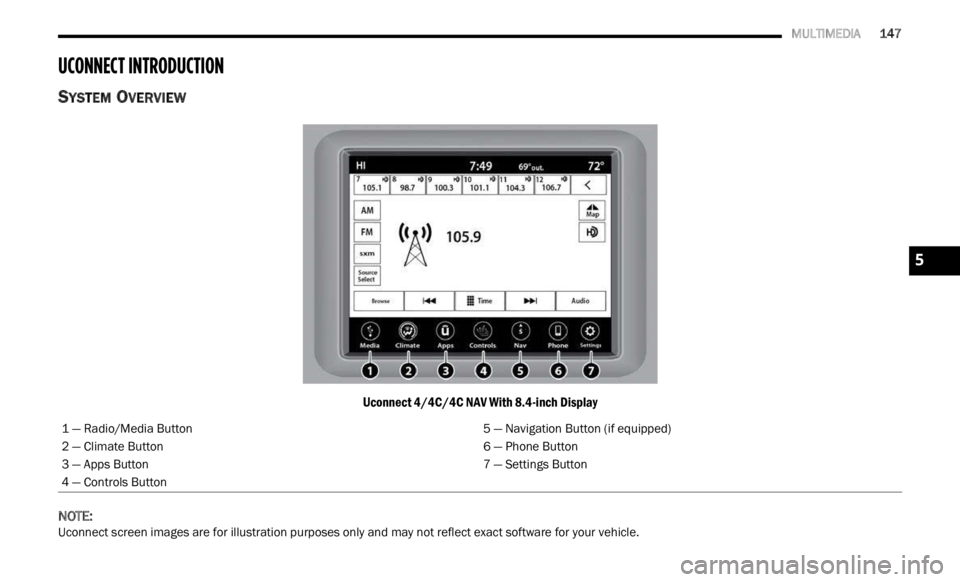
UCONNECT INTRODUCTION
SYSTEM OVERVIEW
Uconnect 4/4C/4C NAV With 8.4-inch Display
NOTE:
Uconnect screen images are for illustration purposes only and may not reflect exact software for your vehicle. 1 — Radio/Media Button
5 — Navigation Button (if equipped)
2 — Climate Button 6 — Phone Button
3 — Apps Button 7 — Settings Button
4 — Controls Button
5
Page 211 of 364

MULTIMEDIA 209
Working Vehicle Conditions
The vehicle must in PARK or at a standstill.
The vehicle must be in an open area with cell
tower reception.
Your mobile device must have a cellular or Wi-Fi
connection.
Requirements
Vehicle must be properly equipped with
SiriusXM Guardian™.
Vehicle must have an operable LTE (voice/data)
or 3G or 4G (data) network connection. If using
the Mobile App to command your vehicle, your
device must be compatible and be connected to
an operable LTE (voice/data) or 3G or 4G (data)
network connection.
Vehicle must be registered with SiriusXM
Guardian™ and have an active subscription that
includes the applicable feature.
An ignition cycle is required for some remote
commands, such as Remote Vehicle Start and
Remote Door Lock/Unlock if following a Remote
Horn & Lights activation.
Your Remote Door Lock/Unlock request will not
be processed if the vehicle is in motion, the igni -
tion key is on or during an emergency call.
NOTE:
All other remote services should be performed via
your O w
ner’s Site or through the Mobile App on
your compatible device.
Remote Vehicle Start
Description
The Remote Vehicle Start feature provides you with
the a b
ility to start the engine on your vehicle
without the keys and from virtually any distance.
Once started, the preset climate controls in your
vehicle can warm up or cool down the interior.
You can also send a command to turn off an
engin e
that has been started using Remote Vehicle
Start. After 15 minutes, if you have not entered
your ve
hicle with the key, the engine will shut off
automatically.
This remote function requires your vehicle to be
equip p
ed with a factory-installed Remote Start
system.
You can set up push notifications every time a
comman d
is sent to activate or cancel Remote
Start. Working Vehicle Conditions
The vehicle must be off or in ACC mode.
The vehicle has been started with the key fob
within the last 14 days.
The vehicle must be in PARK or at a standstill.
The vehicle’s security system has been armed
and not triggered since the last vehicle start.
The doors, hood, and trunk/liftgate are closed.
The vehicle’s check engine light must be off.
The vehicle must have at least a quarter tank of
fuel, along with oil and battery power.
The vehicle’s hazard lights must be off.
If equipped, the vehicle must have an automatic
transmission.
The vehicle must be in an open area with cell
tower reception.
Your mobile device must have a cellular or Wi-Fi
connection.
If the Panic button has been pressed, the
vehicle must be started at least once after
alarming the system.
NOTE:
The SiriusXM Guardian™ Customer Care agents
are n ot
authorized for Remote Vehicle Start
services. Contact the Uconnect Care Team for
assistance.
5
Page 226 of 364
224 SAFETY
ESC Operation Modes
To disable ESC and other safety systems, follow
the instructions below.
There are three modes of active safety systems
presen
t on the vehicle:
ESC On
Partial Off
Full Off
ESC On – Two-Wheel Drive Vehicles And
Four-W h
eel Drive Vehicles In 2WD And 4WD High
This is the normal operating mode for ESC when
operati
ng a two-wheel drive vehicle. It is also the
normal mode for operating a four-wheel drive
vehicle in 2WD or 4WD High. The ESC system will
be in “ESC On” mode whenever the vehicle is
started or the power transfer unit (if equipped) is
shifted out of 4WD Low. This mode should be used
for most driving situations. ESC should only be
turned to “Partial Off” or “Full Off” for specific
reasons as noted. Refer to “Partial Off” and to “Full
Off” for additional information.
NOTE:
It is recommended to select the mode "Partial Off"
or "Fu l
l Off" only for specific reasons.
Partial Off – Two-Wheel Drive Vehicles And
Four-Wh
eel Drive Vehicles In 2WD And 4WD High
The “Partial Off” mode is intended for driving in
deep s
now, sand, or gravel. This mode raises the threshold for TCS and ESC activation, which allows
for more wheel spin than what ESC normally
allows.
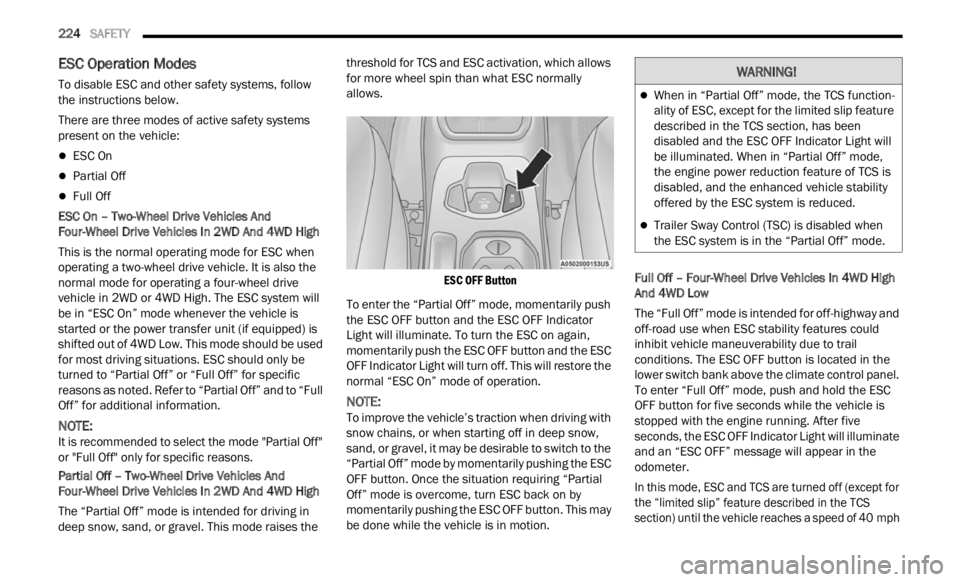
ESC OFF Button
To enter the “Partial Off” mode, momentarily push
the E S
C OFF button and the ESC OFF Indicator
Light will illuminate. To turn the ESC on again,
momentarily push the ESC OFF button and the ESC
OFF Indicator Light will turn off. This will restore the
normal “ESC On” mode of operation.
NOTE:
To improve the vehicle’s traction when driving with
snow c h
ains, or when starting off in deep snow,
sand, or gravel, it may be desirable to switch to the
“Partial Off” mode by momentarily pushing the ESC
OFF button. Once the situation requiring “Partial
Off” mode is overcome, turn ESC back on by
momentarily pushing the ESC OFF button. This may
be done while the vehicle is in motion. Full Off – Four-Wheel Drive Vehicles In 4WD High
And 4
W
D Low
The “Full Off” mode is intended for off-highway and
off-road
use when ESC stability features could
inhibit vehicle maneuverability due to trail
conditions. The ESC OFF button is located in the
lower switch bank above the climate control panel.
To enter “Full Off” mode, push and hold the ESC
OFF button for five seconds while the vehicle is
stopped with the engine running. After five
seconds, the ESC OFF Indicator Light will illuminate
and an “ESC OFF” message will appear in the
odometer.
In this mode, ESC and TCS are turned off (except for
the “ l
imited slip” feature described in the TCS
section) until the vehicle reaches a speed of 40 mph
WARNING!
When in “Partial Off” mode, the TCS function -
ality of ESC, except for the limited slip feature
descr i
bed in the TCS section, has been
disabled and the ESC OFF Indicator Light will
be illuminated. When in “Partial Off” mode,
the engine power reduction feature of TCS is
disabled, and the enhanced vehicle stability
offered by the ESC system is reduced.
Trailer Sway Control (TSC) is disabled when
the ESC system is in the “Partial Off” mode.
Page 269 of 364
SAFETY 267
PERIODIC SAFETY CHECKS YOU SHOULD
M
AKE OUTSIDE THE VEHICLE
Tires
Examine tires for excessive tread wear and uneven
wear patterns. Check for stones, nails, glass, or
other objects lodged in the tread or sidewall.
Inspect the tread for cuts and cracks. Inspect
sidewalls for cuts, cracks, and bulges. Check the
lug nuts/bolt torque for tightness. Check the tires
(including spare) for proper cold inflation pressure.
Lights
Have someone observe the operation of brake
lights and exterior lights while you work the
controls. Check turn signal and high beam
indicator lights on the instrument panel.
Door Latches
Check for proper closing, latching, and locking.
Fluid Leaks
Check area under the vehicle after overnight
parking for fuel, coolant, oil, or other fluid leaks.
Also, if gasoline fumes are detected or if fuel or
brake fluid leaks are suspected, the cause should
be located and corrected immediately.
EXHAUST GAS
The best protection against carbon monoxide entry
into the vehicle body is a properly maintained
engine exhaust system.
Whenever a change is noticed in the sound of the
exhau s
t system, when exhaust fumes can be
detected inside the vehicle, or when the underside
or rear of the vehicle is damaged, have an
authorized dealer inspect the complete exhaust system and adjacent body areas for broken,
damaged, deteriorated, or mispositioned parts.
Open seams or loose connections could permit
exhaust fumes to seep into the passenger
compartment. In addition, inspect the exhaust
system each time the vehicle is raised for
lubrication or oil change. Replace as required.
CARBON MONOXIDE WARNINGS
WARNING!
Exhaust gases can injure or kill. They contain
carbon monoxide (CO), which is colorless and
odorless. Breathing it can make you
unconscious and can eventually poison you. To
avoid breathing (CO), follow these safety tips:
Do not run the engine in a closed garage or in
confined areas any longer than needed to
move your vehicle in or out of the area.
If you are required to drive with the trunk/lift
-
gate/rear doors open, make sure that all
window s
are closed and the climate control
BLOWER switch is set at high speed. DO NOT
use the recirculation mode.
If it is necessary to sit in a parked vehicle with
the engine running, adjust your heating or
cooling controls to force outside air into the
vehicle. Set the blower at high speed.
WARNING!
Carbon monoxide (CO) in exhaust gases is
deadly. Follow the precautions below to prevent
carbon monoxide poisoning:
Do not inhale exhaust gases. They contain
carbon monoxide, a colorless and odorless gas,
which can kill. Never run the engine in a closed
area, such as a garage, and never sit in a
parked vehicle with the engine running for an
extended period. If the vehicle is stopped in an
open area with the engine running for more
than a short period, adjust the ventilation
system to force fresh, outside air into the
vehicle.
Guard against carbon monoxide with proper
maintenance. Have the exhaust system
inspected every time the vehicle is raised.
Have any abnormal conditions repaired
promptly. Until repaired, drive with all side
windows fully open.
6
Page 339 of 364
SERVICING AND MAINTENANCE 337
DEPARTMENT OF TRANSPORTATION
UNIFORM TIRE QUALITY GRADES
The following tire grading categories
were established by the National
Highway Traffic Safety Administration.
The specific grade rating assigned by the
tire's manufacturer in each category is
shown on the sidewall of the tires on
your vehicle.
All passenger vehicle tires must conform
to Fede
ral safety requirements in
addition to these grades.
TREADWEAR
The Treadwear grade is a comparative
rating, based on the wear rate of the tire
when tested under controlled conditions on a specified government test course.
For example, a tire graded 150 would
wear one and one-half times as well on
the government course as a tire graded
100. The relative performance of tires
depends upon the actual conditions of
their use, however, and may depart
significantly from the norm due to
variations in driving habits, service
practices, and differences in road
characteristics and climate.
TRACTION GRADES
The Traction grades, from highest to
lowest, are AA, A, B, and C. These grades
represent the tire's ability to stop on wet
pavement, as measured under
controlled conditions on specified
government test surfaces of asphalt and
concrete. A tire marked C may have poor
traction performance.
TEMPERATURE GRADES
The Temperature grades are A (the
highest), B, and C, representing the tire's
resistance to the generation of heat and
its ability to dissipate heat, when tested
under controlled conditions on a
specified indoor laboratory test wheel.
Sustained high temperature can cause
the ma
terial of the tire to degenerate
and reduce tire life, and excessive
temperature can lead to sudden tire
failure. The grade C corresponds to a
level of performance, which all
passenger vehicle tires must meet
under the Federal Motor Vehicle Safety
Standard No. 109. Grades B and A
represent higher levels of performance
on the laboratory test wheel, than the
minimum required by law.
CAUTION!
Proper operation of four-wheel drive vehicles
depends on tires of equal size, type and
circumference on each wheel. Any difference in
tire size can cause damage to the power transfer
unit. Tire rotation schedule should be followed to
balance tire wear.
WARNING!
The traction grade assigned to this tire is based
on straight-ahead braking traction tests, and
does not include acceleration, cornering,
hydroplaning, or peak traction characteristics.
WARNING!
The temperature grade for this tire is
established for a tire that is properly inflated and
not overloaded. Excessive speed,
under-inflation, or excessive loading, either
separately or in combination, can cause heat
buildup and possible tire failure.
8
Page 354 of 364

352
Body Mechanism Lubrication........................297Brake Assist System......................................222Brake Control System, Electronic..................222Brake Fluid....................................................345Brake System......................................302, 341Anti-Lock (ABS)..........................................341Fluid Check...............................................345Master Cylinder.........................................302Warning Light..............................................70Brakes...........................................................302Brightness, Interior Lights................................40Bulbs, Light....................................................267
C
Camera..........................................................121Camera, Rear................................................121Capacities, Fluid............................................344Caps, Filler
Oil (Engine)................................................293Radiator (Coolant Pressure)......................301Car Washes...................................................338Carbon Monoxide Warning............................267CD..................................................................162Cellular Phone...............................................220Certification Label.........................................123Changing A Flat Tire.......................................271Chart, Tire Sizing............................................323Check Engine Light (Malfunction Indicator
Light)...............................................................78
Checking Your Vehicle For Safety..................265
Checks, Safety..............................................265Child Restraint..............................................255Child Restraints Booster Seats...........................................258Child Seat Installation..............................263How To Stow An unused ALR Seat Belt....262Infant And Child Restraints.......................257LATCH Positions.......................................259Locating The LATCH Anchorages..............260Lower Anchors And Tethers For Children..259Older Children And Child Restraints.........257Seating Positions......................................258Child Safety Locks...........................................25Clean Air Gasoline.........................................342CleaningWheels.....................................................334Climate Control................................................44Clutch...........................................................302Fluid.........................................................302Coin Holder......................................................49Cold Weather Operation..................................81Compact Spare Tire......................................333Connected Services......................................202Connected Services FAQ...............................215Connected Services Features.......................205Connected Services, Getting Started............203Connected Services, Introduction.................202ConnectorUCI...............................................................50
Universal Consumer Interface (UCI).............50
Console............................................................49Floor............................................................49Contract, Service...........................................347Controls........................................................151Cooling Pressure Cap (Radiator Cap)............301Cooling System.............................................299Adding Coolant (Antifreeze)......................300Coolant Level...................................299, 301Cooling Capacity.......................................344Disposal Of Used Coolant.........................301Drain, Flush, And Refill.............................300Inspection.................................................301Points To Remember................................301Pressure Cap............................................301Radiator Cap.............................................301Selection Of Coolant
(Antifreeze).........................300, 344, 345Corrosion Protection.....................................338Cruise Control (Speed Control).........................95Cruise Light...............................................76, 77Customer Assistance....................................346Customer Programmable Features...............134Cybersecurity................................................133
D
Daytime Running Lights...................................37Dealer Service...............................................295Defroster, Rear Window...................................43Defroster, Windshield...................................265
De-Icer, Remote Start......................................20