interior lights JEEP RENEGADE 2023 User Guide
[x] Cancel search | Manufacturer: JEEP, Model Year: 2023, Model line: RENEGADE, Model: JEEP RENEGADE 2023Pages: 364, PDF Size: 18.65 MB
Page 211 of 364

MULTIMEDIA 209
Working Vehicle Conditions
The vehicle must in PARK or at a standstill.
The vehicle must be in an open area with cell
tower reception.
Your mobile device must have a cellular or Wi-Fi
connection.
Requirements
Vehicle must be properly equipped with
SiriusXM Guardian™.
Vehicle must have an operable LTE (voice/data)
or 3G or 4G (data) network connection. If using
the Mobile App to command your vehicle, your
device must be compatible and be connected to
an operable LTE (voice/data) or 3G or 4G (data)
network connection.
Vehicle must be registered with SiriusXM
Guardian™ and have an active subscription that
includes the applicable feature.
An ignition cycle is required for some remote
commands, such as Remote Vehicle Start and
Remote Door Lock/Unlock if following a Remote
Horn & Lights activation.
Your Remote Door Lock/Unlock request will not
be processed if the vehicle is in motion, the igni -
tion key is on or during an emergency call.
NOTE:
All other remote services should be performed via
your O w
ner’s Site or through the Mobile App on
your compatible device.
Remote Vehicle Start
Description
The Remote Vehicle Start feature provides you with
the a b
ility to start the engine on your vehicle
without the keys and from virtually any distance.
Once started, the preset climate controls in your
vehicle can warm up or cool down the interior.
You can also send a command to turn off an
engin e
that has been started using Remote Vehicle
Start. After 15 minutes, if you have not entered
your ve
hicle with the key, the engine will shut off
automatically.
This remote function requires your vehicle to be
equip p
ed with a factory-installed Remote Start
system.
You can set up push notifications every time a
comman d
is sent to activate or cancel Remote
Start. Working Vehicle Conditions
The vehicle must be off or in ACC mode.
The vehicle has been started with the key fob
within the last 14 days.
The vehicle must be in PARK or at a standstill.
The vehicle’s security system has been armed
and not triggered since the last vehicle start.
The doors, hood, and trunk/liftgate are closed.
The vehicle’s check engine light must be off.
The vehicle must have at least a quarter tank of
fuel, along with oil and battery power.
The vehicle’s hazard lights must be off.
If equipped, the vehicle must have an automatic
transmission.
The vehicle must be in an open area with cell
tower reception.
Your mobile device must have a cellular or Wi-Fi
connection.
If the Panic button has been pressed, the
vehicle must be started at least once after
alarming the system.
NOTE:
The SiriusXM Guardian™ Customer Care agents
are n ot
authorized for Remote Vehicle Start
services. Contact the Uconnect Care Team for
assistance.
5
Page 219 of 364

MULTIMEDIA 217
CONNECTED SERVICES STOLEN VEHICLE
A
SSISTANCE FAQS — IF EQUIPPED
1.
Can someone locate my vehicle?
To enhance
your privacy, and the privacy of others using
your vehicle, a stolen vehicle police report is
required for you to activate this service. You
must involve local law enforcement to have
SiriusXM Guardian™ locate your vehicle. We
may also locate the vehicle for other law
enforcement or government agencies,
subject to a valid court order telling SiriusXM
Guardian™ to do so. We will also provide the
service for FCA entities to locate a vehicle that
you have purchased through them.
2. How will I know if my vehicle is recovered?
Afte r
you provide the SiriusXM Guardian™
Customer Care agent with the stolen vehicle
report, the agent will work together with law
enforcement to try to locate your vehicle. If
your vehicle is recovered, you will be contacted
by law enforcement.
3. Can SiriusXM Guardian™ lower my insurance
rates
? Some insurance providers offer lower
rates on vehicles equipped with systems that
can deter auto theft. When shopping for
insurance, be sure to inform the insurance
provider of your SiriusXM Guardian™ connected
services subscription to find out if the insurance
provider can offer you a lower rate.
NOTE:
Neither FCA nor SiriusXM® are insurance
compan i
es, and SiriusXM Guardian™ is not an
insurance product. You are responsible for
obtaining insurance coverage for your vehicle and
yourself.
CONNECTED SERVICES REMOTE VEHICLE
S
TART FAQS
1.
How long does it take to remotely start my
vehicle?
Depending on various conditions, it
can take three minutes or more for the
request to get through to your vehicle.
2. Which is faster, my key fob or the Mobile App?
Your k
ey fob will remote start your vehicle
more quickly. However its range is limited. For
example, when you are leaving the stadium
after the game, you can use the Mobile App to
remote start your vehicle and have the inside
of your vehicle comfortable by the time you get
to it.
3. Will my vehicle be safe if I lose my wireless
devi c
e? People sometimes lose their wireless
devices, which is why security measures have
been engineered into the Mobile App. Asking
for your username, password and SiriusXM
Guardian™ Security PIN help to ensure that
nobody can start your vehicle if they happen to
find your device. 4.
Can someone drive off with my vehicle using
the A
pp? No. Driving your vehicle still requires
the keys to be in the vehicle. The Remote Start
feature simply starts the engine to warm up or
cool down the interior before you arrive.
5. Can I stop a vehicle that is being driven with
the c
ancel Remote Vehicle Start command?
No. If the vehicle is in motion, the cancel
Remote Vehicle Start button will not stop the
vehicle.
6. Why can’t all mobile devices use the Mobile
App? T
he Mobile App has been designed to
work on most devices with the Apple® and
Android™ operating systems. The capabilities
of these devices allow us to remotely
command your vehicle. Other operating
systems may be supported in the future.
CONNECTED SERVICES REMOTE HORN
& L
IGHTS FAQS
1.
How long does it take to sound my horn and
flash the lights?
Depending on various
conditions, it can take three minutes or more
for the request to get through to your vehicle.
2. Which is faster, my key fob or the Mobile App?
Your k
ey fob will sound the horn and flash the
lights quicker; however, its range is limited.
5
Page 254 of 364

252 SAFETY
If A Deployment Occurs
The front air bags are designed to deflate
immediately after deployment.
NOTE:
Front and/or side air bags will not deploy in all colli -
sions. This does not mean something is wrong with
t he a i
r bag system.
If you do have a collision which deploys the air
bags,
any or all of the following may occur:
The air bag material may sometimes cause
abrasions and/or skin reddening to the occu -
pants as the air bags deploy and unfold. The
abrasi
ons are similar to friction rope burns or
those you might get sliding along a carpet or
gymnasium floor. They are not caused by
contact with chemicals. They are not permanent
and normally heal quickly. However, if you
haven’t healed significantly within a few days, or
if you have any blistering, see your doctor imme -
diately.
As the air bags deflate, you may see some
smoke-like particles. The particles are a normal
by-product of the process that generates the
non-toxic gas used for air bag inflation. These
airborne particles may irritate the skin, eyes,
nose, or throat. If you have skin or eye irritation,
rinse the area with cool water. For nose or throat
irritation, move to fresh air. If the irritation
continues, see your doctor. If these particles settle on your clothing, follow the garment
manufacturer’s instructions for cleaning.
Do not drive your vehicle after the air bags have
deploy e
d. If you are involved in another collision,
the air bags will not be in place to protect you.
NOTE:
Air bag covers may not be obvious in the interior
trim, but they will open during air bag deploy -
ment.
After any collision, the vehicle should be taken
to an authorized dealer immediately.
Enhanced Accident Response System
In the event of an impact, if the communication
network remains intact, and the power remains
intact, depending on the nature of the event, the
Occupant Restraint Controller (ORC) will determine
whether to have the Enhanced Accident Response
System perform the following functions:
Cut off fuel to the engine (if equipped)
Cut off battery power to the electric motor (if
equipped)
Flash hazard lights as long as the battery has
power
Turn on the interior lights, which remain on as
long as the battery has power or for 15 minutes
f r
om
t h
e intervention of the Enhanced Accident
Response System
Unlock the power door locks
Your vehicle may also be designed to perform any
of the s
e other functions in response to the
Enhanced Accident Response System:
Turn off the Fuel Filter Heater, Turn off the HVAC
Blower Motor, Close the HVAC Circulation Door
Cut off battery power to the:
Engine
Electric Motor (if equipped)
Electric power steering
Brake booster
Electric park brake
Automatic transmission gear selector
Horn
Front wiper
Headlamp washer pump (if equipped)
WARNING!
Deployed air bags and seat belt pretensioners
cannot protect you in another collision. Have the
air bags, seat belt pretensioners, and the seat
belt retractor assemblies replaced by an autho -
rized dealer immediately. Also, have the Occu -
pant Restraint Controller System serviced as well.
Page 288 of 364
286
SERVICING AND MAINTENANCE
SCHEDULED SERVICING
Your vehicle is equipped with an automatic oil
change indicator system. The oil change indicator
system will remind you that it is time to take your
vehicle in for scheduled maintenance.
Based on engine operation conditions, the oil
change
indicator message will illuminate in the
instrument cluster. This means that service is
required for your vehicle. Operating conditions
such as frequent short-trips, trailer tow and
extremely hot or cold ambient temperatures will
influence when the “Change Oil” or “Oil Change
Required” message is displayed. Have your vehicle
serviced as soon as possible, within the next
500 miles (805 km). An authorized dealer will reset the oil change
indica
tor message after completing the scheduled
oil change.
NOTE:
Under no circumstances should oil change
inter v
als exceed 10,000 miles (16,000 km),
1 year or 350 hours of engine run time, whichever
c omes f
irst. The 350 hours of engine run or idle
time is generally only a concern for fleet
customers.
NOTE:
The Oil Change Indicator will not illuminate under
these
conditions. Once A Month Or Before A Long Trip:
Check engine oil level.
Check windshield washer fluid level.
Check the tire inflation pressures and look for
unusual wear or damage.
Check the fluid levels of the coolant reservoir,
and brake master cylinder reservoir, and fill as
needed.
Check function of all interior and exterior lights.
Page 313 of 364

SERVICING AND MAINTENANCE 311
BULB REPLACEMENT
General Information
Before you replace a bulb, check the contacts to
be sure they are not oxidized.
Replace the bulbs with the same type and
wattage.
After replacing a light bulb, always check the
correct orientation.
Before replacing a bulb that is not functioning,
check that the fuse is intact.
NOTE:
Lens fogging can occur under certain atmospheric
condit i
ons. This will usually clear as atmospheric
conditions change to allow the condensation to
change back into a vapor. Turning the lamps on will
usually accelerate the clearing process.Replacement Bulbs, Names, And Part
Numbers
In the instance a bulb needs to be replaced, this
section includes bulb description and replacement
part numbers.
NOTE:
See an authorized dealer for LED bulb
repla c
ement.
Interior Bulbs
Lamps Bulb Number
Front Courtesy Light C5W
Front Courtesy Lights (Sun Visors) C5W
Rear Dome Light (Models Without Retractable Roof) C5W
Rear Interior Lights (Models With Retractable Roof) C5W
Interior Lights W5W
Dome Light (Glove Compartment) W5W
Exterior Bulbs
Lamps Bulb Number
Low Beam/High Beam Headlamps (LED Version) LED (Serviced at an authorized dealer)
Low Beam/High Beam Headlamps H13
8
Page 321 of 364
SERVICING AND MAINTENANCE 319
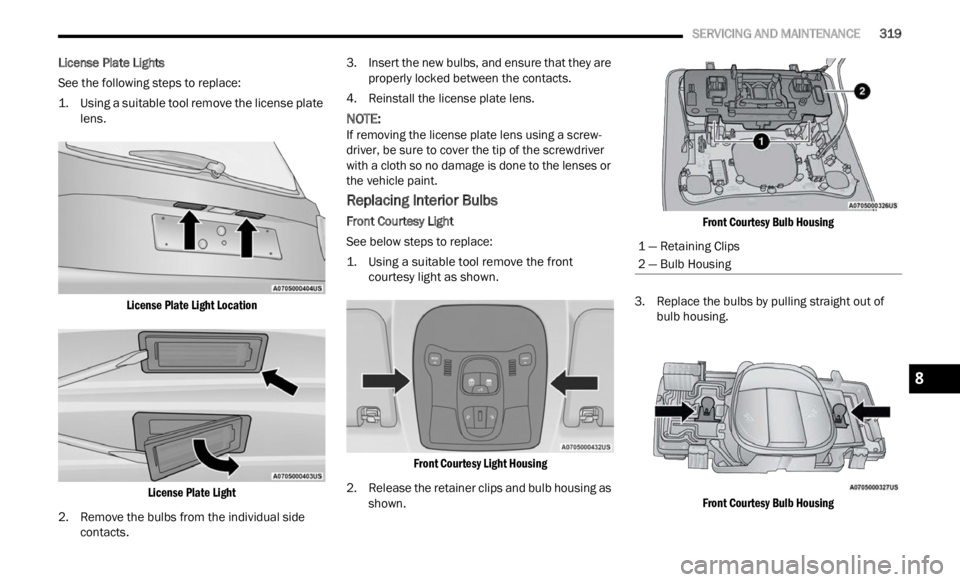
License Plate Lights
See the following steps to replace:
1. U
sing a suitable tool remove the license plate
lens.
L
icense Plate Light LocationLicense Plate Light
2. R emove the bulbs from the individual side
conta c
ts. 3. Insert the new bulbs, and ensure that they are
proper
ly locked between the contacts.
4. Reinstall the license plate lens.
NOTE:
If removing the license plate lens using a screw -
driver, be sure to cover the tip of the screwdriver
w ith a
cloth so no damage is done to the lenses or
the vehicle paint.
Replacing Interior Bulbs
Front Courtesy Light
See below steps to replace:
1. U sing a suitable tool remove the front
courte
sy light as shown.
Front Courtesy Light Housing
2. Release the retainer clips and bulb housing as shown .
F
ront Courtesy Bulb Housing
3. Replace the bulbs by pulling straight out of bulb
housing.
Front Courtesy Bulb Housing
1 — Retaining Clips
2 — Bulb Housing
8
Page 354 of 364

352
Body Mechanism Lubrication........................297Brake Assist System......................................222Brake Control System, Electronic..................222Brake Fluid....................................................345Brake System......................................302, 341Anti-Lock (ABS)..........................................341Fluid Check...............................................345Master Cylinder.........................................302Warning Light..............................................70Brakes...........................................................302Brightness, Interior Lights................................40Bulbs, Light....................................................267
C
Camera..........................................................121Camera, Rear................................................121Capacities, Fluid............................................344Caps, Filler
Oil (Engine)................................................293Radiator (Coolant Pressure)......................301Car Washes...................................................338Carbon Monoxide Warning............................267CD..................................................................162Cellular Phone...............................................220Certification Label.........................................123Changing A Flat Tire.......................................271Chart, Tire Sizing............................................323Check Engine Light (Malfunction Indicator
Light)...............................................................78
Checking Your Vehicle For Safety..................265
Checks, Safety..............................................265Child Restraint..............................................255Child Restraints Booster Seats...........................................258Child Seat Installation..............................263How To Stow An unused ALR Seat Belt....262Infant And Child Restraints.......................257LATCH Positions.......................................259Locating The LATCH Anchorages..............260Lower Anchors And Tethers For Children..259Older Children And Child Restraints.........257Seating Positions......................................258Child Safety Locks...........................................25Clean Air Gasoline.........................................342CleaningWheels.....................................................334Climate Control................................................44Clutch...........................................................302Fluid.........................................................302Coin Holder......................................................49Cold Weather Operation..................................81Compact Spare Tire......................................333Connected Services......................................202Connected Services FAQ...............................215Connected Services Features.......................205Connected Services, Getting Started............203Connected Services, Introduction.................202ConnectorUCI...............................................................50
Universal Consumer Interface (UCI).............50
Console............................................................49Floor............................................................49Contract, Service...........................................347Controls........................................................151Cooling Pressure Cap (Radiator Cap)............301Cooling System.............................................299Adding Coolant (Antifreeze)......................300Coolant Level...................................299, 301Cooling Capacity.......................................344Disposal Of Used Coolant.........................301Drain, Flush, And Refill.............................300Inspection.................................................301Points To Remember................................301Pressure Cap............................................301Radiator Cap.............................................301Selection Of Coolant
(Antifreeze).........................300, 344, 345Corrosion Protection.....................................338Cruise Control (Speed Control).........................95Cruise Light...............................................76, 77Customer Assistance....................................346Customer Programmable Features...............134Cybersecurity................................................133
D
Daytime Running Lights...................................37Dealer Service...............................................295Defroster, Rear Window...................................43Defroster, Windshield...................................265
De-Icer, Remote Start......................................20
Page 356 of 364

354
Fuel...............................................................342Adding.......................................................122Additives...................................................343Clean Air....................................................342Ethanol......................................................342Gasoline....................................................342Gauge..........................................................73Materials Added........................................343Methanol...................................................342Octane Rating.................................342, 345Requirements...........................................342Specifications............................................345Fuses.............................................................303
G
Gasoline, (Fuel).............................................342Gasoline, Clean Air........................................342Gasoline, Reformulated.................................342Gauges
Fuel.............................................................73Gear Selector Override..................................281Glass Cleaning...............................................340Gross Axle Weight Rating...............................124GVWR............................................................123
H
Hazard Warning Flashers..............................268Head Restraints...............................................31Head Rests......................................................31
HeadlightsAutomatic....................................................38Automatic High Beam..................................37Cleaning...................................................338Delay...........................................................38High Beam/Low Beam Select Switch..........37Lights On Reminder.....................................38Passing........................................................37Switch..........................................................36Time Delay...................................................38Heated Mirrors.................................................36Heated Seats...................................................30High Beam/Low Beam Select (Dimmer)
Switch..............................................................37Hill Descent Control......................................226Hill Descent Control Indicator.......................226Hill Start Assist..............................................227Hitches Trailer Towing...........................................125Holder, Coin.....................................................49Hood Prop........................................................56Hood Release..................................................56
I
Ignition.............................................................17Switch..........................................................17Inside Rearview Mirror............................34, 268
Instrument Cluster.............................62, 65, 76Descriptions.................................................76Display Controls...........................................64Engine Oil Reset..........................................65Menu Items.................................................66Instrument Cluster Display...............................64Trip..............................................................69Instrument Panel Lens Cleaning...................340Interior Appearance Care..............................339Interior Lights...................................................39Intermittent Wipers (Delay Wipers)..................41InverterPower...........................................................51
J
Jack Location................................................272Jack Operation.....................................271, 273Jacking And Tire Changing............................271Jacking Instructions......................................273Jump Starting................................................278
K
Key FobArm The Alarm
.............................................20Disarm The Alarm........................................21Keyless Entry...............................................22Programming Additional Key Fobs...............16Remote Keyless Entry..................................14Key Fob Battery Service (Remote Keyless
Entry)
...............................................................15
Page 357 of 364

355
Key Fob Programming (Remote Keyless
Entry)...............................................................16Keyless Enter-N-Go..........................................22Enter The Trunk...........................................22Lock The Vehicle’s Doors............................22Passive Entry...............................................22Passive Entry Programming.........................22Remote Control...........................................22Unlock From The Driver’s Side....................22Unlock From The Passenger’s Side.............22Keyless Entry...................................................14Keys.................................................................14
L
Lane Change And Turn Signals........................39LaneSense....................................................117Lap/Shoulder Belts.......................................241Latches..........................................................267Lead Free Gasoline........................................342Leaks, Fluid...................................................267Life Of Tires...................................................331Liftgate.....................................................57, 58Closing........................................................58Opening.......................................................57Liftgate Window Wiper/Washer.......................43Light Bulbs.....................................................267Lights.............................................................267Air Bag.......................................70, 246, 265Automatic Headlights..................................38
Automatic High Beam..................................37
Brake Assist Warning...............................225Brake Warning.............................................70Cruise...................................................76, 77Daytime Running.........................................37Dimmer Switch, Headlight...........................37Exterior.....................................................267Fog..............................................................38Hazard Warning Flasher...........................268Headlight Switch..........................................36Headlights...................................................36Headlights On Reminder.............................38High Beam...................................................37High Beam/Low Beam Select......................37Hill Descent Control Indicator...................226Instrument Cluster.......................................36Intensity Control..........................................40Interior.........................................................39Lights On Reminder.....................................38Malfunction Indicator (Check Engine)..........73Park.............................................................76Passing........................................................37Seat Belt Reminder.....................................72Security Alarm.............................................72Tire Pressure Monitoring (TPMS)..............235Traction Control........................................225Turn Signals................................39, 76, 267Vanity Mirror................................................34Warning Instrument Cluster
Descriptions.....................................71, 76
Loading Vehicle.............................................123Tires..........................................................326Locks Child Protection...........................................25Power Door..................................................22Low Tire Pressure System.............................235Lubrication, Body..........................................297Lug Nuts........................................................341Luggage Carrier................................................61
M
Maintenance....................................................56Maintenance Free Battery............................294Maintenance Schedule.................................286Malfunction Indicator Light (Check
Engine)......................................................73, 78Manual Service......................................................348Master CylinderBrakes......................................................302Media Mode..................................................162Methanol.......................................................342MirrorsHeated.........................................................36Outside........................................................35Rearview............................................34, 268Vanity...........................................................34Mobile App....................................................20311