lights JEEP RENEGADE 2023 User Guide
[x] Cancel search | Manufacturer: JEEP, Model Year: 2023, Model line: RENEGADE, Model: JEEP RENEGADE 2023Pages: 364, PDF Size: 18.65 MB
Page 38 of 364
36 GETTING TO KNOW YOUR VEHICLE
Manual Adjustment Mirrors — If Equipped
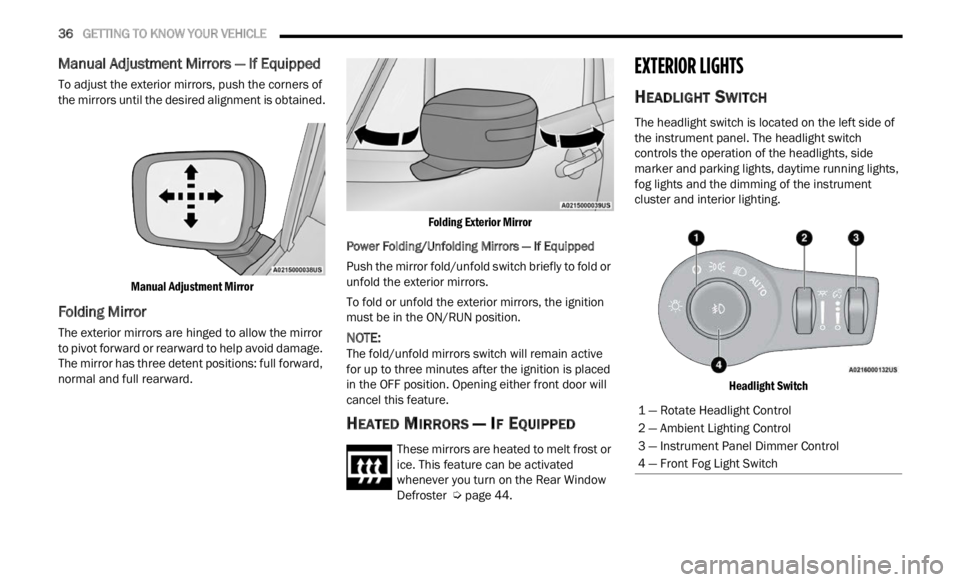
To adjust the exterior mirrors, push the corners of
the mirrors until the desired alignment is obtained.
Manual Adjustment Mirror
Folding Mirror
The exterior mirrors are hinged to allow the mirror
to pivot forward or rearward to help avoid damage.
The mirror has three detent positions: full forward,
normal and full rearward.
Folding Exterior Mirror
Power Folding/Unfolding Mirrors — If Equipped
Push the mirror fold/unfold switch briefly to fold or
unfold
the exterior mirrors.
To fold or unfold the exterior mirrors, the ignition
must b
e in the ON/RUN position.
NOTE:
The fold/unfold mirrors switch will remain active
for up
to three minutes after the ignition is placed
in the OFF position. Opening either front door will
cancel this feature.
HEATED MIRRORS — IF EQUIPPED
These mirrors are heated to melt frost or
ice. This feature can be activated
whene v
er you turn on the Rear Window
Defroster Ú page 44.
EXTERIOR LIGHTS
HEADLIGHT SWITCH
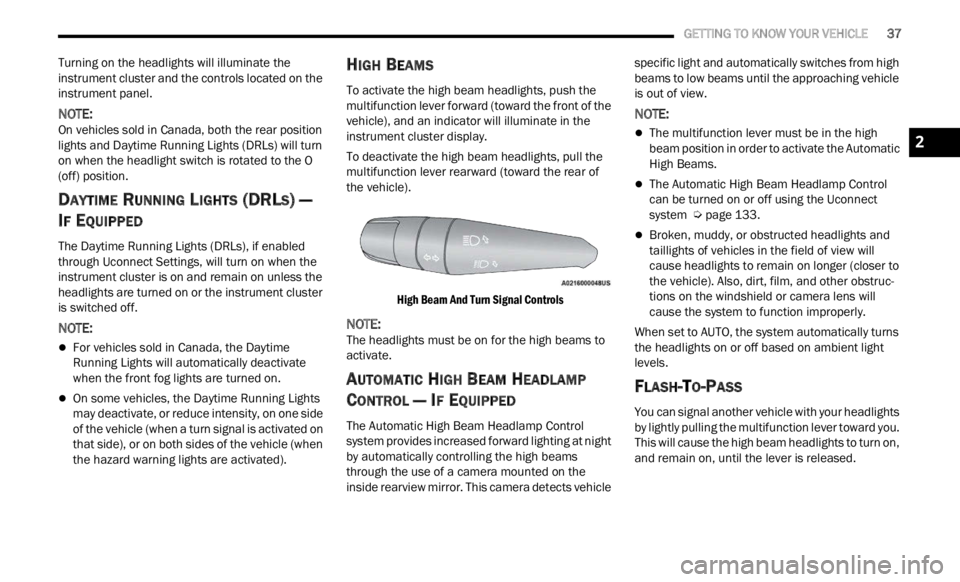
The headlight switch is located on the left side of
the instrument panel. The headlight switch
controls the operation of the headlights, side
marker and parking lights, daytime running lights,
fog lights and the dimming of the instrument
cluster and interior lighting.
Headlight Switch
1 — Rotate Headlight Control
2 — Ambient Lighting Control
3 — Instrument Panel Dimmer Control
4 — Front Fog Light Switch
Page 39 of 364
GETTING TO KNOW YOUR VEHICLE 37
Turning on the headlights will illuminate the
instrument cluster and the controls located on the
instrument panel.
NOTE:
On vehicles sold in Canada, both the rear position
light s
and Daytime Running Lights (DRLs) will turn
on when the headlight switch is rotated to the O
(off) position.
DAYTIME RUNNING LIGHTS (DRLS) —
I
F EQUIPPED
The Daytime Running Lights (DRLs), if enabled
through Uconnect Settings, will turn on when the
instrument cluster is on and remain on unless the
headlights are turned on or the instrument cluster
is switched off.
NOTE:
For vehicles sold in Canada, the Daytime
Running Lights will automatically deactivate
when the front fog lights are turned on.
On some vehicles, the Daytime Running Lights
may deactivate, or reduce intensity, on one side
of the vehicle (when a turn signal is activated on
that side), or on both sides of the vehicle (when
the hazard warning lights are activated).
HIGH BEAMS
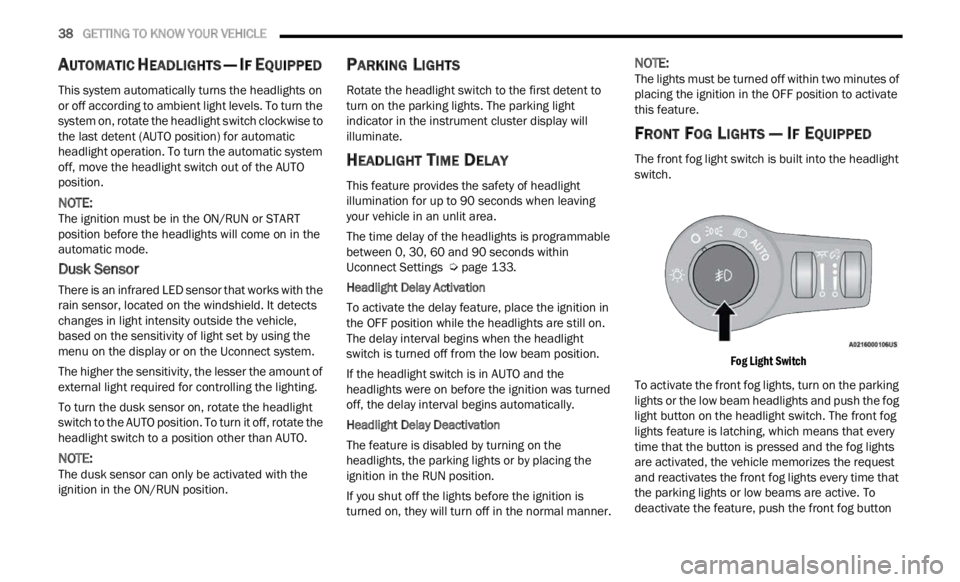
To activate the high beam headlights, push the
multifunction lever forward (toward the front of the
vehicle), and an indicator will illuminate in the
instrument cluster display.
To deactivate the high beam headlights, pull the
multif
unction lever rearward (toward the rear of
the vehicle).
High Beam And Turn Signal Controls
NOTE:
The headlights must be on for the high beams to
activ a
te.
AUTOMATIC HIGH BEAM HEADLAMP
C
ONTROL — IF EQUIPPED
The Automatic High Beam Headlamp Control
system provides increased forward lighting at night
by automatically controlling the high beams
through the use of a camera mounted on the
inside rearview mirror. This camera detects vehicle specific light and automatically switches from high
beams to low beams until the approaching vehicle
is out of view.
NOTE:
The multifunction lever must be in the high
beam position in order to activate the Automatic
High Beams.
The Automatic High Beam Headlamp Control
can be turned on or off using the Uconnect
system
Ú page 133.
Broken, muddy, or obstructed headlights and
taillights of vehicles in the field of view will
cause headlights to remain on longer (closer to
the vehicle). Also, dirt, film, and other obstruc
-
tions on the windshield or camera lens will
c ause
the system to function improperly.
When set to AUTO, the system automatically turns
the he
adlights on or off based on ambient light
levels.
FLASH-TO-PASS
You can signal another vehicle with your headlights
by lightly pulling the multifunction lever toward you.
This will cause the high beam headlights to turn on,
and remain on, until the lever is released.
2
Page 40 of 364
38 GETTING TO KNOW YOUR VEHICLE
AUTOMATIC HEADLIGHTS — IF EQUIPPED
This system automatically turns the headlights on
or off according to ambient light levels. To turn the
system on, rotate the headlight switch clockwise to
the last detent (AUTO position) for automatic
headlight operation. To turn the automatic system
off, move the headlight switch out of the AUTO
position.
NOTE:
The ignition must be in the ON/RUN or START
positi on
before the headlights will come on in the
automatic mode.
Dusk Sensor
There is an infrared LED sensor that works with the
rain sensor, located on the windshield. It detects
changes in light intensity outside the vehicle,
based on the sensitivity of light set by using the
menu on the display or on the Uconnect system.
The higher the sensitivity, the lesser the amount of
exter n
al light required for controlling the lighting.
To turn the dusk sensor on, rotate the headlight
switch
to the AUTO position. To turn it off, rotate the
headlight switch to a position other than AUTO.
NOTE:
The dusk sensor can only be activated with the
ignit i
on in the ON/RUN position.
PARKING LIGHTS
Rotate the headlight switch to the first detent to
turn on the parking lights. The parking light
indicator in the instrument cluster display will
illuminate.
HEADLIGHT TIME DELAY
This feature provides the safety of headlight
illumination for up to 90 seconds when leaving
your vehicle in an unlit area.
The time delay of the headlights is programmable
betwe e
n 0, 30, 60 and 90 seconds within
Uconnect Settings Ú page 133.
Headlight Delay Activation
To activate the delay feature, place the ignition in
t he OF
F position while the headlights are still on.
The delay interval begins when the headlight
switch is turned off from the low beam position.
If the headlight switch is in AUTO and the
headli
ghts were on before the ignition was turned
off, the delay interval begins automatically.
Headlight Delay Deactivation
The feature is disabled by turning on the
h eadli
ghts, the parking lights or by placing the
ignition in the RUN position.
If you shut off the lights before the ignition is
turne d
on, they will turn off in the normal manner.
NOTE:
The lights must be turned off within two minutes of
placi n
g the ignition in the OFF position to activate
this feature.
FRONT FOG LIGHTS — IF EQUIPPED
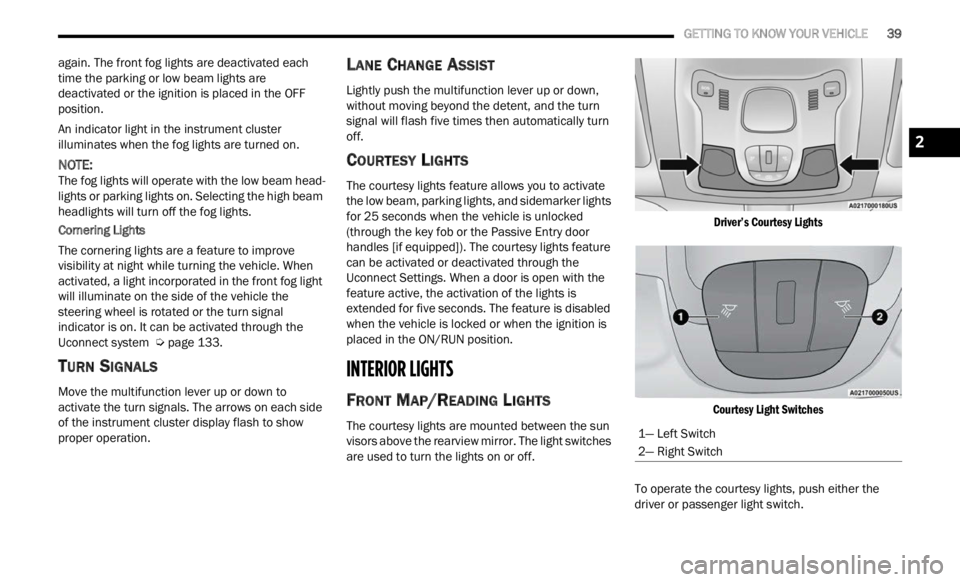
The front fog light switch is built into the headlight
switch.
Fog Light Switch
To activate the front fog lights, turn on the parking
light s
or the low beam headlights and push the fog
light button on the headlight switch. The front fog
lights feature is latching, which means that every
time that the button is pressed and the fog lights
are activated, the vehicle memorizes the request
and reactivates the front fog lights every time that
the parking lights or low beams are active. To
deactivate the feature, push the front fog button
Page 41 of 364
GETTING TO KNOW YOUR VEHICLE 39
again. The front fog lights are deactivated each
time the parking or low beam lights are
deactivated or the ignition is placed in the OFF
position.
An indicator light in the instrument cluster
illumi
nates when the fog lights are turned on.
NOTE:
The fog lights will operate with the low beam head -
lights or parking lights on. Selecting the high beam
h eadl i
ghts will turn off the fog lights.
Cornering Lights
The cornering lights are a feature to improve
visib i
lity at night while turning the vehicle. When
activated, a light incorporated in the front fog light
will illuminate on the side of the vehicle the
steering wheel is rotated or the turn signal
indicator is on. It can be activated through the
Uconnect system Ú page 133.
TURN SIGNALS
Move the multifunction lever up or down to
activate the turn signals. The arrows on each side
of the instrument cluster display flash to show
proper operation.
LANE CHANGE ASSIST
Lightly push the multifunction lever up or down,
without moving beyond the detent, and the turn
signal will flash five times then automatically turn
off.
COURTESY LIGHTS
The courtesy lights feature allows you to activate
the low beam, parking lights, and sidemarker lights
for 25 seconds when the vehicle is unlocked
(through the key fob or the Passive Entry door
handles [if equipped]). The courtesy lights feature
can be activated or deactivated through the
Uconnect Settings. When a door is open with the
feature active, the activation of the lights is
extended for five seconds. The feature is disabled
when the vehicle is locked or when the ignition is
placed in the ON/RUN position.
INTERIOR LIGHTS
FRONT MAP/READING LIGHTS
The courtesy lights are mounted between the sun
visors above the rearview mirror. The light switches
are used to turn the lights on or off.
Driver’s Courtesy Lights
Courtesy Light Switches
To operate the courtesy lights, push either the
d rive
r
or passenger light switch.
1— Left Switch
2— Right Switch
2
Page 42 of 364
40 GETTING TO KNOW YOUR VEHICLE
NOTE:
Before exiting the vehicle, make sure that the
interior lights are turned off. This will prevent the
battery from discharging once the doors are
closed.
If a light is left on, it will automatically be turned
off after approximately 15 minutes after the
ignit i
on is in the OFF position.
DIMMER CONTROLS
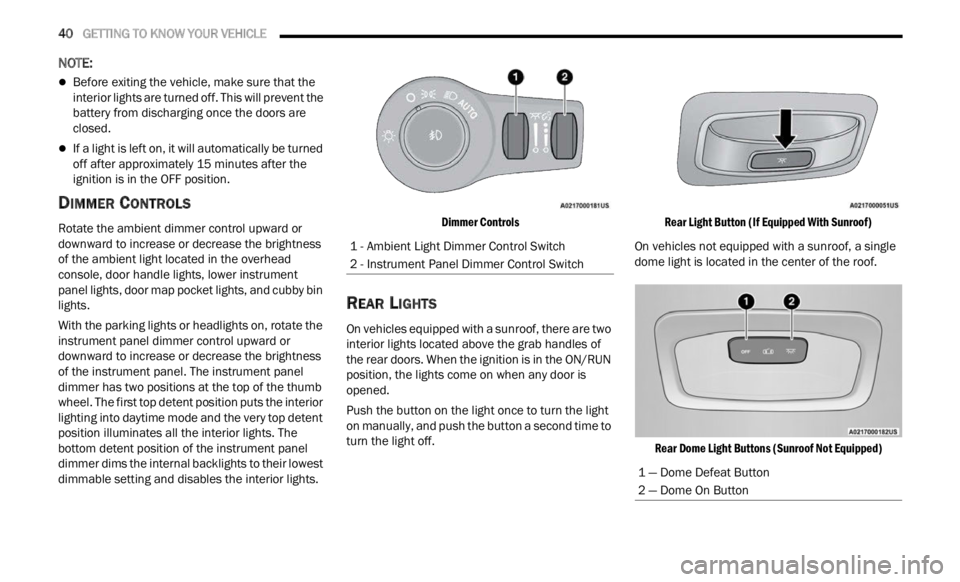
Rotate the ambient dimmer control upward or
downward to increase or decrease the brightness
of the ambient light located in the overhead
console, door handle lights, lower instrument
panel lights, door map pocket lights, and cubby bin
lights.
With the parking lights or headlights on, rotate the
instru
ment panel dimmer control upward or
downward to increase or decrease the brightness
of the instrument panel. The instrument panel
dimmer has two positions at the top of the thumb
wheel. The first top detent position puts the interior
lighting into daytime mode and the very top detent
position illuminates all the interior lights. The
bottom detent position of the instrument panel
dimmer dims the internal backlights to their lowest
dimmable setting and disables the interior lights.
Dimmer Controls
REAR LIGHTS
On vehicles equipped with a sunroof, there are two
interior lights located above the grab handles of
the rear doors. When the ignition is in the ON/RUN
position, the lights come on when any door is
opened.
Push the button on the light once to turn the light
on man
u
ally, and push the button a second time to
turn the light off.
Rear Light Button (If Equipped With Sunroof)
On vehicles not equipped with a sunroof, a single
dome l i
ght is located in the center of the roof.
Rear Dome Light Buttons (Sunroof Not Equipped)
1 - Ambient Light Dimmer Control Switch
2 - Instrument Panel Dimmer Control Switch
1 — Dome Defeat Button
2 — Dome On Button
Page 43 of 364
GETTING TO KNOW YOUR VEHICLE 41
To operate the rear dome light, proceed as follows:
Push the switch to the on/right position from its
center position and the lights are always on.
Push the switch to the off/left position from its
center position and the lights are always off.
Leave the switch in the center position, and the
lights are turned on and off when the doors are
opened or closed.
DOME LIGHT TIMING
The dome light will automatically illuminate when
the doors are unlocked, the doors are opened or
after the doors are closed.
Timing Entering The Vehicle
The dome lights illuminate in the following ways:
When the doors are unlocked, the dome light
will illuminate for approximately 27 seconds.
When one of the doors is opened, the dome light
will illuminate for approximately three minutes.
When the doors are closed, the dome light will
automatically shut off after approximately 27
seconds.
The timing stops once the ignition is placed in the
ON/RU N
position. The dome light will turn off under any of the
follow
i
ng conditions:
The dome light is disabled when the ignition is
placed in the ON/RUN position.
The dome lights will turn off automatically when
the doors are locked.
The dome lights will automatically turn off after
approximately 15 minutes of inactivity to
prese r
ve the battery.
Timing Exiting The Vehicle
The dome light will illuminate under the following
condit i
ons when the ignition is placed to the OFF
position and the key is removed:
The dome light will illuminate for 27 seconds
after the ignition is placed in the OFF position.
The opening of one of the doors (approximately
three minutes).
After closing a door (approximately 27 seconds).
The dome light timing is disabled when the doors
a re
l
oc
ked.
WINDSHIELD WIPERS AND WASHERS
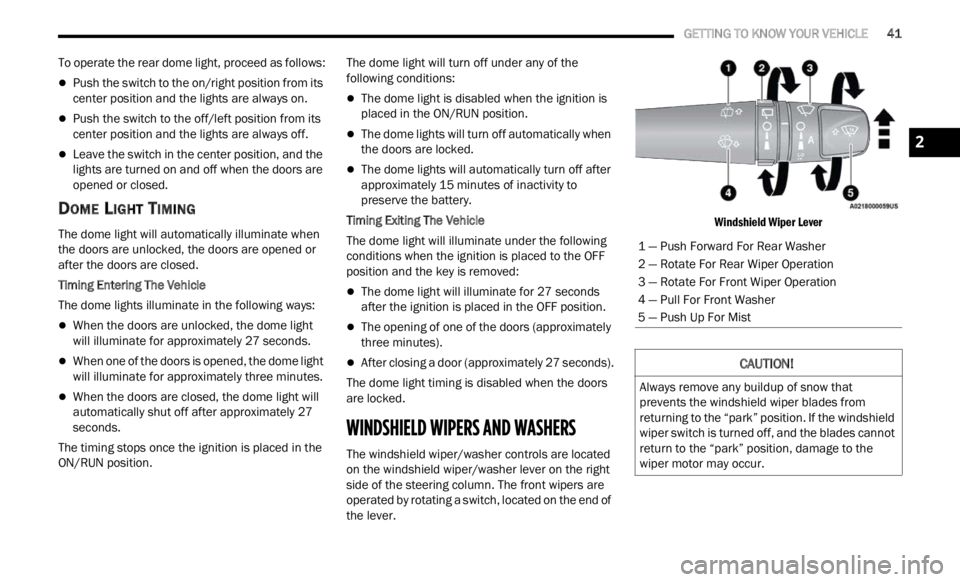
The windshield wiper/washer controls are located
on the windshield wiper/washer lever on the right
side of the steering column. The front wipers are
operated by rotating a switch, located on the end of
the lever.
Windshield Wiper Lever
1 — Push Forward For Rear Washer
2 — Rotate For Rear Wiper Operation
3 — Rotate For Front Wiper Operation
4 — Pull For Front Washer
5 — Push Up For Mist
CAUTION!
Always remove any buildup of snow that
prevents the windshield wiper blades from
returning to the “park” position. If the windshield
wiper switch is turned off, and the blades cannot
return to the “park” position, damage to the
wiper motor may occur.
2
Page 53 of 364
GETTING TO KNOW YOUR VEHICLE 51
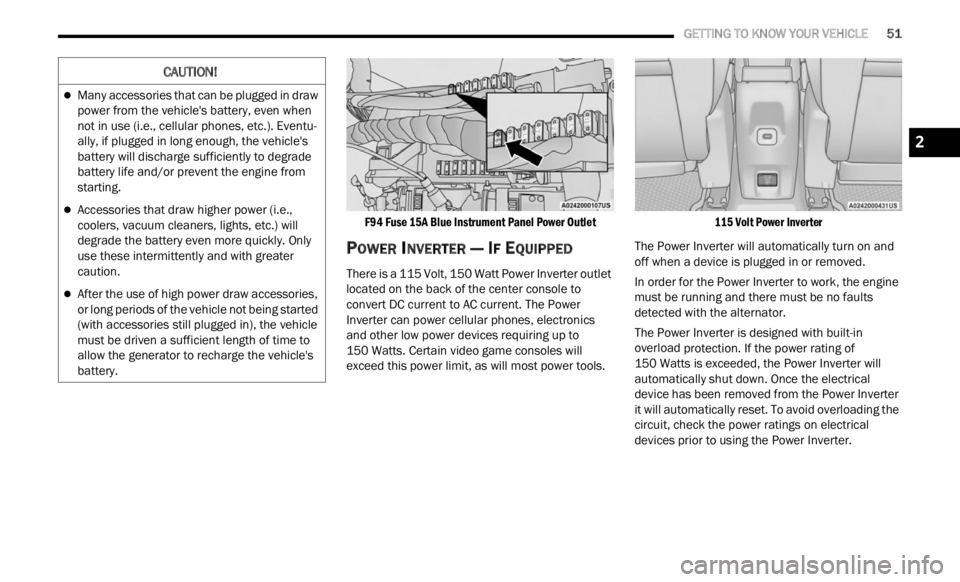
F94 Fuse 15A Blue Instrument Panel Power Outlet
POWER INVERTER — IF EQUIPPED
There is a 115 Volt, 150 Watt Power Inverter outlet
located on the back of the center console to
convert DC current to AC current. The Power
Inverter can power cellular phones, electronics
and other low power devices requiring up to
150 Watts. Certain video game consoles will
excee d
this power limit, as will most power tools.
115 Volt Power Inverter
The Power Inverter will automatically turn on and
off wh e
n a device is plugged in or removed.
In order for the Power Inverter to work, the engine
must b
e running and there must be no faults
detected with the alternator.
The Power Inverter is designed with built-in
overloa d
protection. If the power rating of
150 Watts is exceeded, the Power Inverter will
a utomat
ically shut down. Once the electrical
device has been removed from the Power Inverter
it will automatically reset. To avoid overloading the
circuit, check the power ratings on electrical
devices prior to using the Power Inverter.
CAUTION!
Many accessories that can be plugged in draw
power from the vehicle's battery, even when
not in use (i.e., cellular phones, etc.). Eventu -
ally, if plugged in long enough, the vehicle's
batte r
y will discharge sufficiently to degrade
battery life and/or prevent the engine from
starting.
Accessories that draw higher power (i.e.,
coolers, vacuum cleaners, lights, etc.) will
degrade the battery even more quickly. Only
use these intermittently and with greater
caution.
After the use of high power draw accessories,
or long periods of the vehicle not being started
(with accessories still plugged in), the vehicle
must be driven a sufficient length of time to
allow the generator to recharge the vehicle's
battery.
2
Page 69 of 364

GETTING TO KNOW YOUR INSTRUMENT PANEL 67
Audio
Push and release the up or down arrow
button until the Audio menu title is displayed in the
instr u
ment cluster display.
Stored Messages
Push and release the up or down arrow
button until the Messages Menu Icon is highlighted
in th e
instrument cluster display. This feature
shows the number of stored warning messages.
Pushing the left
or right arrow button will
all ow
you to scroll through the stored messages.
Screen Setup
This menu item allows you to change the position
of the information on the display.
Display Gears (Vehicles With Reconfigurable
Multi-
Functional Display And Automatic
Transmission)
By selecting this item, you can select the display
mode, t
he particulars relating to the automatic
transmission, and choose between the following
options:
“Single digit”
The right side of the display will show the letter
concer n
ing the automatic transmission gear
selector (P,R,N or D) position. After approxi -
mately two seconds, the letter will be displayed
in a c
entral position.
“Full PRND”
The letters PRND will display on the right side,
the p o
sition assumed by the gear selector will
be highlighted in the display. During the opera -
tion in sequential mode (“AutoStick”), in place
of the
letter D, the gear will be will be displayed.
In The Upper Left/Top Right
The information relating to the following can be
displ a
yed:
External temperature
Ignition Button — If Equipped
Compass — If Equipped
Date (Month/Day)
Time (Hours/Minutes)
In the central area of the display, you can view all
of t
h e
information listed above as well as the
following:
Compass — If Equipped
Speed Display — If Equipped
Date (Day/Month/Year)
Time
Compass — If Equipped
Ignition Button — If Equipped
External Temp — If equipped
Menu Item
Distance Traveled A (Trip A)
Distance Traveled B (Trip B)
Restore Default Settings
Selecting this item, and you can reset and restore
t he de
fault settings.
Settings
This menu item allows you to change the settings
for the following:
Display
Units
Clock and Date
Security
Safety and Assistance
Lights
Doors and Locks
NOTE:
Some items may be displayed and managed
throug h
the Uconnect system.
Vehicles Equipped With Multi-functional Display
Reconfi
gurable:
The following menu/submenu items are available
in the
cluster display.
3
Page 70 of 364

68 GETTING TO KNOW YOUR INSTRUMENT PANEL
“Vehicle Shut Off (If Equipped)”
By selecting the item “Vehicle Shut Off”, you can
turn of
f the engine from the instrument cluster.
This feature is available in the event of an ignition
switch failure, and will display instructions for
turning off the engine via the instrument cluster
display controls.
“Display”
By selecting the “Display,” you can access the
follow i
ng setting:
Language : allows you to select the language in
which to display the information/warnings.
“Units Of Measure”
By selecting the item “Units of Measure,” you can
selec t
the unit of measure to use for displaying
various magnitudes.
Possible options are:
US
Metric
Custom
“Clock & Date”
By selecting the item, “Clock & Date” you can
a djust
the clock.
Possible options are:
Set Time: adjust hours/minutes
Set Format: adjust the time format “12h”
(12 hours) or “24h” (24 hours)
Set Date: adjust day/month/year
“Security”
By selecting the item “Security,” you can make the
f ollowi
ng adjustments:
Speed Warning:
Set the vehicle speed limit, which the driver is
notifi e
d through a visual and acoustic signaling
(display of a message and a symbol on the
display).
When the speed warning is set, the icon should
remain
visualized for the same duration time of
the pop-up. If the driver exceeded the set speed,
the icon should remain for however long the
vehicle is over the set speed.
Driver may also turn the Speed Warning “OFF”
should
you choose not to use this feature.
Seat Belt Reminder:
This function is only viewable when the Seat Belt
Remin d
er (SBR) system is active.
Hill Start Assist:
Activation/Deactivation of the Hill Start Assist
syste m
.
Passenger Air Bag — If Equipped
Front passenger air bag may be enabled or
disab l
ed. “Lights”
By selecting the item “Lights,” you can make the
followi
n
g adjustments:
Headlight Off Delay: set the delay for headlight
shutoff after engine shutoff
Headlight Sensitivity: adjust the sensitivity of
headlight brightness
Daytime Running Lights: activate/deactivate
the daytime running lights
Cornering lights: activate/deactivate the
cornering lights (If Equipped)
Interior Ambient lights: adjust the level of inte-
rior ambient lights
Greeting Lights: activate / deactivate greeting
lights
“Doors & Locks”
By selecting the item “Doors & Locks,” you can
make t
he following adjustments:
Auto Door Lock: activate/deactivate the auto -
matic locking of the doors with the vehicle
m ov i
n g
Auto Unlock On Exit: automatic unlocking of the
doors when exiting the vehicle
Flash Light with Lock: activate the direction indi
-
cators when closing the doors
Page 71 of 364

GETTING TO KNOW YOUR INSTRUMENT PANEL 69
Sound Horn With Lock: activate/deactivate the
horn when pushing the LOCK button on the key
fob. The options are “Off,” “First Press,” and
“Second Press”
Horn With Remote Start: activate/deactivate
the horn at the Remote Starting of the engine
with the key fob
Remote Door Unlock: allows you to open the
driver door only on the first push of the UNLOCK
button on the key fob
“Compass”
By selecting the item “Compass” you can make the
f ollowi
ng adjustments:
Compass Calibration
Compass Variance
TRIP COMPUTER
The Trip computer is used to display information on
car operation when the key is turned to the RUN
position.
This function allows you to define two separate
trips
called “Trip A” and “Trip B” where the car's
“complete trips” are monitored in an independent
manner.
Both trips can be reset (reset - start of a new trip).
To perf
orm a reset, push and hold the OK button on
the steering wheel controls. “Trip A” and “Trip B” are used to display the figures
relat
i
ng to:
Distance Traveled
Average Consumption
Travel Time (driving time)
Quantities Displayed
Distance Traveled
Indicates the distance traveled by the start of
the new trip.
Average Consumption
Represents the average fuel consumption since
the start of the new trip.
Travel Time
Elapsed time since the start of the new trip.
OK Button
Short Push Of The Button: display of various
p arame
ters.
Long Push Of The Button: reset quantities and
begin
a new trip.
New trip
Starts after reset:
“Manual” by pushing the OK button.
“Automatic” when the “distance” reaches the
value of 62140 (99999.9 km) or when the “time
travel” reaches the value of 999.59
(999 hours and 59 minutes).
After each disconnection and reconnection of
the battery.
WARNING/INDICATOR LIGHTS AND
MESSAGES
The warning/indicator light switches on in the
instrument panel together with a dedicated
message and/or acoustic signal when applicable.
These indications are indicative and precautionary
and as such must not be considered as exhaustive
and/or alternative to the information contained in
the Owner Manual, which you are advised to read
carefully in all cases. Always refer to the
information in this chapter in the event of a failure
indication.
All active telltales will display first, if applicable.
The sy
stem check menu may appear different
based upon equipment options and current vehicle
status. Some telltales are optional and may not
appear.
The following warning lamps and indicators will
alert
you to a vehicle condition that may become
serious. Some lamps will illuminate when you start
your vehicle to make sure they work. If any lamps
remain on after starting your vehicle, refer to the
respective system warning lamp for further
information.
3