wheel JEEP RENEGADE 2023 User Guide
[x] Cancel search | Manufacturer: JEEP, Model Year: 2023, Model line: RENEGADE, Model: JEEP RENEGADE 2023Pages: 364, PDF Size: 18.65 MB
Page 66 of 364
64 GETTING TO KNOW YOUR INSTRUMENT PANEL
INSTRUMENT CLUSTER DESCRIPTIONS
1. Tachometer
Indicates the engine speed in revolutions
per minute (RPM x 1000).
2. Instrument Cluster Display
The instrument cluster display features a
driver interactive display Ú page 64.
3. Speedometer
Indicates vehicle speed.
4. T emperature Gauge
The temperature gauge shows engine
coolant temperature. Any reading within the
normal range indicates that the engine
cooling system is operating satisfactorily.
The gauge will likely indicate a higher
temperature when driving in hot weather or
up mountain grades. It should not be
allowed to exceed the upper limits of the
normal operating range. 5. Fuel Gauge
The fuel gauge shows the level of fuel in the
fuel tank when the ignition is in the ON/RUN
position.
The fuel pump symbol points to the
side of the vehicle where the fuel
d oor
is
located.
INSTRUMENT CLUSTER DISPLAY
Your vehicle is equipped with an instrument cluster
display, which offers useful information to the
driver. With the ignition in the OFF position,
opening/closing of a door will activate the display
for viewing, and display the total miles, or
kilometers, in the odometer. Your instrument
cluster display is designed to display important
information about your vehicle’s systems and
features. Using a driver interactive display located on the instrument panel, your instrument cluster
display can show you how systems are working and
give you warnings when they aren’t. The steering
wheel mounted controls allow you to scroll through
and enter the main menus and submenus. You can
access the specific information you want and
make selections and adjustments.
INSTRUMENT CLUSTER DISPLAY
L
OCATION AND CONTROLS
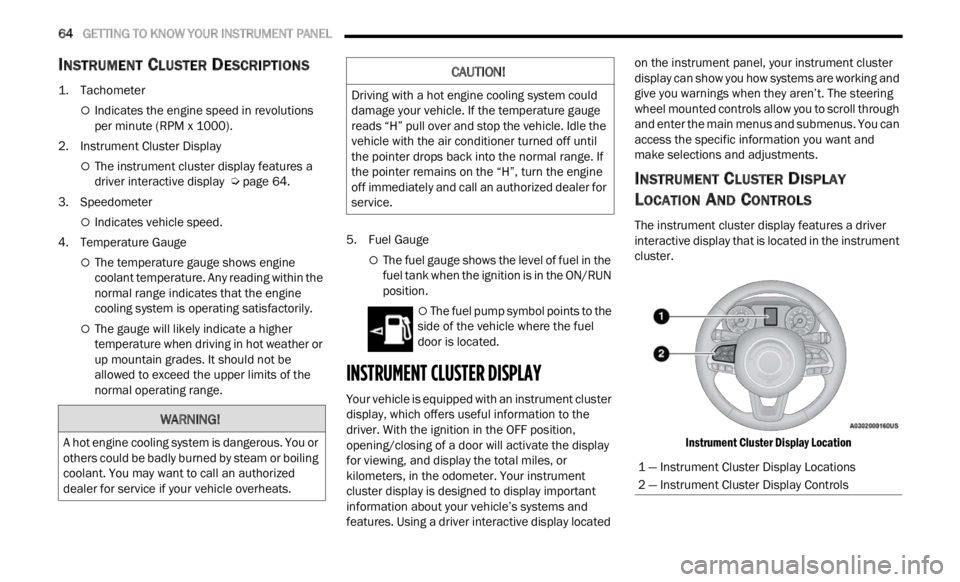
The instrument cluster display features a driver
interactive display that is located in the instrument
cluster.
Instrument Cluster Display Location
WARNING!
A hot engine cooling system is dangerous. You or
others could be badly burned by steam or boiling
coolant. You may want to call an authorized
dealer for service if your vehicle overheats.
CAUTION!
Driving with a hot engine cooling system could
damage your vehicle. If the temperature gauge
reads “H” pull over and stop the vehicle. Idle the
vehicle with the air conditioner turned off until
the pointer drops back into the normal range. If
the pointer remains on the “H”, turn the engine
off immediately and call an authorized dealer for
service.
1 — Instrument Cluster Display Locations
2 — Instrument Cluster Display Controls
Page 67 of 364
GETTING TO KNOW YOUR INSTRUMENT PANEL 65
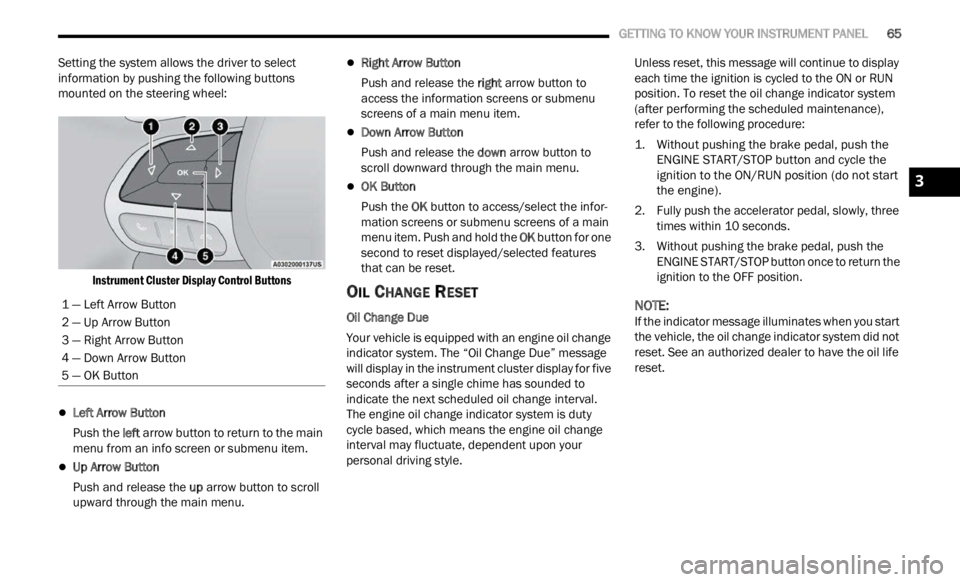
Setting the system allows the driver to select
information by pushing the following buttons
mounted on the steering wheel:
Instrument Cluster Display Control Buttons
Left Arrow Button
Push the l
eft a
rr
ow
button to return to the main
menu from an info screen or submenu item.
Up Arrow Button
Push and release the u
p a
rr
ow
button to scroll
upward through the main menu.
Right Arrow Button
Push and release the right
arrow button to
access the information screens or submenu
screens of a main menu item.
Down Arrow Button
Push and release the d
ow n
a r
r
ow button to
scroll downward through the main menu.
OK Button
Push the O
K b
ut
t
on to access/select the infor -
mation screens or submenu screens of a main
menu i
tem. Push and hold the OK button for one
second to reset displayed/selected features
that can be reset.
OIL CHANGE RESET
Oil Change Due
Your vehicle is equipped with an engine oil change
indic a
tor system. The “Oil Change Due” message
will display in the instrument cluster display for five
seconds after a single chime has sounded to
indicate the next scheduled oil change interval.
The engine oil change indicator system is duty
cycle based, which means the engine oil change
interval may fluctuate, dependent upon your
personal driving style. Unless reset, this message will continue to display
each
t
ime the ignition is cycled to the ON or RUN
position. To reset the oil change indicator system
(after performing the scheduled maintenance),
refer to the following procedure:
1. Without pushing the brake pedal, push the ENGI N
E START/STOP button and cycle the
ignition to the ON/RUN position (do not start
the engine).
2. Fully push the accelerator pedal, slowly, three times
within 10 seconds.
3. Without pushing the brake pedal, push the ENGIN
E START/STOP button once to return the
ignition to the OFF position.
NOTE:
If the indicator message illuminates when you start
the v e
hicle, the oil change indicator system did not
reset. See an authorized dealer to have the oil life
reset.
1 — Left Arrow Button
2 — Up Arrow Button
3 — Right Arrow Button
4 — Down Arrow Button
5 — OK Button
3
Page 71 of 364

GETTING TO KNOW YOUR INSTRUMENT PANEL 69
Sound Horn With Lock: activate/deactivate the
horn when pushing the LOCK button on the key
fob. The options are “Off,” “First Press,” and
“Second Press”
Horn With Remote Start: activate/deactivate
the horn at the Remote Starting of the engine
with the key fob
Remote Door Unlock: allows you to open the
driver door only on the first push of the UNLOCK
button on the key fob
“Compass”
By selecting the item “Compass” you can make the
f ollowi
ng adjustments:
Compass Calibration
Compass Variance
TRIP COMPUTER
The Trip computer is used to display information on
car operation when the key is turned to the RUN
position.
This function allows you to define two separate
trips
called “Trip A” and “Trip B” where the car's
“complete trips” are monitored in an independent
manner.
Both trips can be reset (reset - start of a new trip).
To perf
orm a reset, push and hold the OK button on
the steering wheel controls. “Trip A” and “Trip B” are used to display the figures
relat
i
ng to:
Distance Traveled
Average Consumption
Travel Time (driving time)
Quantities Displayed
Distance Traveled
Indicates the distance traveled by the start of
the new trip.
Average Consumption
Represents the average fuel consumption since
the start of the new trip.
Travel Time
Elapsed time since the start of the new trip.
OK Button
Short Push Of The Button: display of various
p arame
ters.
Long Push Of The Button: reset quantities and
begin
a new trip.
New trip
Starts after reset:
“Manual” by pushing the OK button.
“Automatic” when the “distance” reaches the
value of 62140 (99999.9 km) or when the “time
travel” reaches the value of 999.59
(999 hours and 59 minutes).
After each disconnection and reconnection of
the battery.
WARNING/INDICATOR LIGHTS AND
MESSAGES
The warning/indicator light switches on in the
instrument panel together with a dedicated
message and/or acoustic signal when applicable.
These indications are indicative and precautionary
and as such must not be considered as exhaustive
and/or alternative to the information contained in
the Owner Manual, which you are advised to read
carefully in all cases. Always refer to the
information in this chapter in the event of a failure
indication.
All active telltales will display first, if applicable.
The sy
stem check menu may appear different
based upon equipment options and current vehicle
status. Some telltales are optional and may not
appear.
The following warning lamps and indicators will
alert
you to a vehicle condition that may become
serious. Some lamps will illuminate when you start
your vehicle to make sure they work. If any lamps
remain on after starting your vehicle, refer to the
respective system warning lamp for further
information.
3
Page 76 of 364
74 GETTING TO KNOW YOUR INSTRUMENT PANEL
Service Forward Collision Warning (FCW)
Light — If Equipped
This warning light will illuminate to
indicate a fault in the Forward Collision
W
ar
n i
n
g System. Contact an authorized
dealer for service Ú page 232.
Service Stop/Start System Warning Light —
If Equipped
This warning light will illuminate when the
Stop/Start system is not functioning
p
rop
er
l
y and service is required. Contact
an authorized dealer for service.
Tire Pressure Monitoring System (TPMS)
Warning Light
The warning light switches on and a
message is displayed to indicate that the
tire p
ressure is lower than the
recommended value and/or that slow
pressure loss is occurring. In these cases, optimal
tire duration and fuel consumption may not be
guaranteed.
Should one or more tires be in the condition
mention
ed above, the display will show the
indications corresponding to each tire. Each tire, including the spare (if provided), should
be ch
e
cked monthly when cold and inflated to the
inflation pressure recommended by the vehicle
manufacturer on the vehicle placard or tire
inflation pressure label. If your vehicle has tires of
a different size than the size indicated on the
vehicle placard or tire inflation pressure label, you
should determine the proper tire inflation pressure
for those tires.
As an added safety feature, your vehicle has been
equip p
ed with a TPMS that illuminates a low tire
pressure telltale when one or more of your tires is
significantly underinflated. Accordingly, when the
low tire pressure telltale illuminates, you should
stop and check your tires as soon as possible, and
inflate them to the proper pressure. Driving on a
significantly underinflated tire causes the tire to
overheat and can lead to tire failure. Underinflation
also reduces fuel efficiency and tire tread life, and
may affect the vehicle’s handling and stopping
ability. Please note that the TPMS is not a substitute for
proper
tire maintenance, and it is the driver’s
responsibility to maintain correct tire pressure,
even if underinflation has not reached the level to
trigger illumination of the TPMS low tire pressure
telltale.
Your vehicle has also been equipped with a TPMS
malfu n
ction indicator to indicate when the system
is not operating properly. The TPMS malfunction
indicator is combined with the low tire pressure
telltale. When the system detects a malfunction,
the telltale will flash for approximately one minute
and then remain continuously illuminated. This
sequence will continue upon subsequent vehicle
start-ups as long as the malfunction exists. When
the malfunction indicator is illuminated, the
system may not be able to detect or signal low tire
pressure as intended. TPMS malfunctions may
occur for a variety of reasons, including the
installation of replacement or alternate tires or
wheels on the vehicle that prevent the TPMS from
functioning properly. Always check the TPMS
malfunction telltale after replacing one or more
tires or wheels on your vehicle to ensure that the
replacement or alternate tires and wheels allow
the TPMS to continue to function properly.
CAUTION!
Do not continue driving with one or more flat
tires as handling may be compromised. Stop the
vehicle, avoiding sharp braking and steering. If a
tire puncture occurs, repair immediately using
the dedicated tire repair kit and contact an
authorized dealer as soon as possible.
Page 77 of 364
GETTING TO KNOW YOUR INSTRUMENT PANEL 75
Towing Hook Breakdown Warning Light —
If Equipped
This light illuminates when there is a
failure with the tow hook. Contact an
a ut
h or
i
zed dealer for service.
Transmission Temperature Warning Light
This light indicates that the transmission
fluid temperature is running hot. This
may occ
ur with severe usage, such as
trailer towing. If this light turns on, safely
pull over and stop the vehicle. Then, shift the
transmission into PARK and run the engine at idle
or slightly higher until the light turns off.
4WD Over Temperature Warning Light
The icon will appear on the instrument
panel display to indicate overheating of
t h e
4
W
D system. The mode selected by
the user will be applied as soon as the
system exits the overheating condition.
YELLOW INDICATOR LIGHTS
4WD Low Indicator Light — If Equipped
This light alerts the driver that the vehicle
is in the 4WD Low mode. The front and
rear d
riveshafts are mechanically locked
together forcing the front and rear
wheels to rotate at the same speed. Low range provides a greater gear reduction ratio to provide
increased torque at the wheels
Ú page 90.
4WD Lock Indicator Light
This light alerts the driver that the vehicle
is in the four-wheel drive LOCK mode.
The f r
ont and rear driveshafts are
mechanically locked together, forcing the
front and rear wheels to rotate at the same speed
Ú page 90.
Dusk Sensor Malfunction Indicator Light
This symbol lights up (together with a
dedicated message on display) when a
dusk s
ensor malfunction is detected
Ú page 38.
Electronic Stability Control (ESC) Active
Warning Light — If Equipped
This warning light will indicate when the
ESC system is Active. The ESC Indicator
Light
in the instrument cluster will come
on when the ignition is placed in the ON/
RUN or ACC/ON/RUN position, and when ESC is
activated. It should go out with the engine running.
If the ESC Indicator Light comes on continuously
with the engine running, a malfunction has been
detected in the ESC system. If this warning light
remains on after several ignition cycles, and the
vehicle has been driven several miles (kilometers)
CAUTION!
The TPMS has been optimized for the original
equipment tires and wheels. TPMS pressures
and warning have been established for the tire
size equipped on your vehicle. Undesirable sys -
tem operation or sensor damage may result
w hen u
sing replacement equipment that is not
of the same size, type, and/or style. Aftermarket
wheels can cause sensor damage. Using after -
market tire sealants may cause the Tire Pres -
sure Monitoring System (TPMS) sensor to
b ecome
inoperable. After using an aftermarket
tire sealant it is recommended that you take
your vehicle to an authorized dealer to have your
sensor function checked.
WARNING!
If you continue operating the vehicle when the
Transmission Temperature Warning Light is
illuminated you could cause the fluid to boil over,
come in contact with hot engine or exhaust
components and cause a fire.
CAUTION!
Continuous driving with the Transmission
Temperature Warning Light illuminated will
eventually cause severe transmission damage
or transmission failure.
3
Page 89 of 364
STARTING AND OPERATING 87
(Continued)
(Continued)
GEAR RANGES
PARK (P)
This range supplements the Electric Park Brake
(
E P
B )
by locking the transmission. The engine can
be started in this range. Never attempt to use
PARK while the vehicle is in motion.
When parking on a hill, apply the EPB before
shifti
ng the transmission to PARK, otherwise the
load on the transmission locking mechanism may
make it difficult to move the gear selector out of
PARK. As an added precaution, turn the front
wheels toward the curb on a downhill grade and
away from the curb on an uphill grade.
When exiting the vehicle, always:
Apply the parking brake.
Shift the transmission into PARK.
Turn the ignition OFF.
Remove the key fob from the vehicle.
CAUTION!
After selecting any gear range, wait a moment to
allow the selected gear to engage before
accelerating. This is especially important when
the engine is cold.
WARNING!
Never use the PARK position as a substitute
for the parking brake. Always apply the
parking brake fully when exiting the vehicle to
guard against vehicle movement and possible
injury or damage.
Your vehicle could move and injure you and
others if it is not in PARK. Check by trying to
move the transmission gear selector out of
PARK with the brake pedal released. Make
sure the transmission is in PARK before
exiting the vehicle.
The transmission may not engage PARK if the
vehicle is moving. Always bring the vehicle to a
complete stop before shifting to PARK, and
verify that the transmission gear position indi -
cator solidly indicates PARK (P) without
b linki
ng. Ensure that the vehicle is completely
stopped, and the PARK position is properly
indicated, before exiting the vehicle.
It is dangerous to shift out of PARK or
NEUTRAL if the engine speed is higher than
idle speed. If your foot is not firmly pressing
the brake pedal, the vehicle could accelerate
quickly forward or in reverse. You could lose
control of the vehicle and hit someone or
something. Only shift into gear when the
engine is idling normally (or stopped) and your
foot is firmly pressing the brake pedal.
Unintended movement of a vehicle could
injure those in or near the vehicle. As with all
vehicles, you should never exit a vehicle while
the engine is running or the propulsion system
is active. Before exiting a vehicle, always come
to a complete stop, then apply the parking
brake, shift the transmission into PARK, and
turn the ignition OFF. When the ignition is in
the OFF position, the transmission is locked in
PARK, securing the vehicle against unwanted
movement.
When leaving the vehicle, always make sure
the ignition is in the OFF position, remove the
key fob from the vehicle, and lock the vehicle.
WARNING!
4
Page 91 of 364

STARTING AND OPERATING 89
these conditions, using a lower gear will improve
performance and extend transmission life by
reducing excessive shifting and heat buildup.
If the transmission temperature exceeds normal
operat i
ng limits, the transmission controller may
modify the transmission shift schedule, reduce
engine torque, and/or expand the range of torque
converter clutch engagement. This is done to
prevent transmission damage due to overheating.
If the transmission becomes extremely hot, the
Trans m
ission Temperature Warning Light may
illuminate and the transmission may operate
differently until the transmission cools down.
During cold temperatures, transmission operation
may be
modified depending on engine and
transmission temperature as well as vehicle
speed. This feature improves warm up time of the
engine and transmission to achieve maximum
efficiency. Engagement of the torque converter
clutch, and shifts into EIGHTH or NINTH gear, are
inhibited until the transmission fluid is warm.
Normal operation will resume once the
transmission temperature has risen to a suitable
level.
AutoStick
AutoStick is a driver-interactive transmission
f eatu r
e providing manual shift control, giving you
more control of the vehicle. AutoStick allows you to
maximize engine braking, eliminate undesirable
upshifts and downshifts, and improve overall vehicle performance. This system can also provide
you with more control during passing, city driving,
cold slippery conditions, mountain driving, trailer
towing and many other situations.
Operation
When the gear selector is in the AutoStick position
(besi
d
e the DRIVE position), it can be moved
forward and rearward. This allows the driver to
manually select the transmission gear being used.
Moving the gear selector forward (-) triggers a
downshift, and rearward (+) an upshift. The current
gear is displayed in the instrument cluster.
NOTE:
In AutoStick mode, the transmission will only shift
up or d
own when the driver moves the gear
selector rearward (+) or forward (-), except as
described below:
The transmission will automatically upshift
when necessary to prevent engine overspeed.
The transmission will automatically downshift
as the vehicle slows (to prevent engine lugging)
and will display the current gear.
The transmission will automatically downshift to
FIRST or SECOND gear (depending on model)
when coming to a stop. After a stop, the driver
should manually upshift (+) the transmission as
the vehicle is accelerated.
You can start out (from a stop) in FIRST or
SECOND gear. Starting out in SECOND gear can
be helpful in snow or icy conditions. Tap the gear
selector forward or rearward to select the
desired gear after the vehicle is brought to a
stop.
If a requested downshift would cause the
engine to overspeed, that shift will not occur.
The system will ignore attempts to upshift at too
low of a vehicle speed.
Avoid using Cruise Control when AutoStick is
engaged because the transmission will not shift
automatically.
Transmission shifting will be more noticeable
when AutoStick is enabled.
The system may revert to automatic shift mode
if a fault or overheat condition is detected.
To disengage AutoStick mode, return the gear
select
or to the DRIVE position. You can shift in or
out of the AutoStick position at any time without
taking your foot off the accelerator pedal.
WARNING!
Do not downshift for additional engine braking
on a slippery surface. The drive wheels could
lose their grip and the vehicle could skid,
causing a collision or personal injury.
4
Page 92 of 364

90 STARTING AND OPERATING
TRANSMISSION LIMP HOME MODE
Transmission function is electronically monitored
for abnormal conditions. If a condition is detected
that could result in transmission damage,
Transmission Limp Home Mode is activated. In this
mode, the transmission may operate only in a fixed
gear, or may remain in neutral. The Malfunction
Indicator Light (MIL) may be illuminated. Limp
Home Mode may allow the vehicle to be driven to
an authorized dealer for service without damaging
the transmission.
In the event of a momentary problem, the
trans m
ission can be reset to regain all forward
gears by performing the following steps:
1. Stop the vehicle.
2. S hif
t the transmission into PARK, if possible. If
n ot
,
s
hift the transmission to NEUTRAL.
3. Push and hold the ignition switch until the engin
e turns off.
4. Wait approximately 30 seconds.
5. Res
tart the engine.
6. S hif
t into the desired gear range. If the
p r
ob l
e
m is no longer detected, the
transmission will return to normal operation.
NOTE:
Even if the transmission can be reset, we
recomm e
nd that you visit an authorized dealer at your earliest possible convenience. An authorized
dealer has diagnostic equipment to determine if
the problem could recur. If the transmission
cannot be reset, authorized dealer service is
required.
IGNITION PARK INTERLOCK
(K
EYLESS VEHICLE)
This vehicle is equipped with an Ignition Park
Interlock, which requires the transmission to be in
PARK before the ignition can be turned to the OFF
position. Also, the transmission is locked in PARK
whenever the ignition is in the OFF position.
BRAKE TRANSMISSION SHIFT
I
NTERLOCK (BTSI) SYSTEM
This vehicle is equipped with a BTSI that holds the
transmission gear selector in PARK unless the
brakes are applied. To shift the transmission out of
PARK, the ignition must be in the RUN position
(engine running or not) and the brake pedal must
be pressed.
The brake pedal must also be pressed before
pushi n
g the button on the gear selector to shift
from NEUTRAL into DRIVE or REVERSE when the
vehicle is stopped or moving at low speeds.
FOUR-WHEEL DRIVE
Active Drive (4WD) And Active Drive Low (4WD
LOW)
Your vehicle may be equipped with a Power
Transf
er Unit (PTU). This system is automatic with
no driver inputs or additional driving skills
required. Under normal driving conditions, the
front wheels provide most of the traction. If the
front wheels begin to lose traction, power is shifted
automatically to the rear wheels. The greater the
front wheel traction loss, the greater the power
transfer to the rear wheels.
Additionally, on dry pavement under heavy throttle
input
(where one may have no wheel spin), torque
will be sent to the rear in a preemptive effort to
improve vehicle launch and performance
characteristics.
CAUTION!
All wheels must have the same size and type
tires. Unequal tire sizes must not be used.
Unequal tire size may cause failure of the power
transfer unit.
Page 93 of 364
STARTING AND OPERATING 91
FOUR-WHEEL DRIVE (4WD)
The four-wheel drive (4WD) is fully automatic in
normal driving mode.
NOTE:
It is not possible to carry out the change of mode
when t
he vehicle exceeds the speed of 75 mph
( 1
2 0
k m
/h).
Enabling Four-Wheel Drive (4WD)
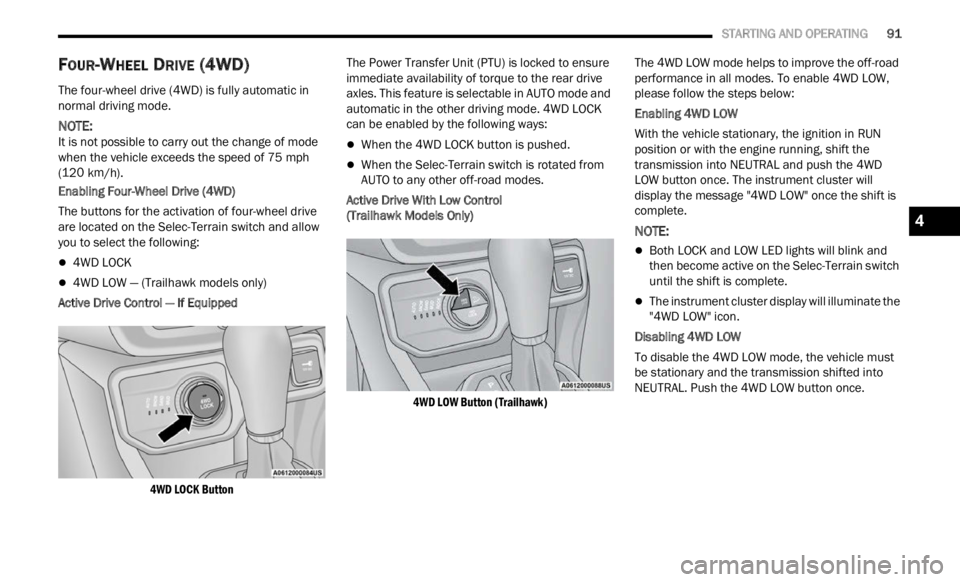
The buttons for the activation of four-wheel drive
a re l oc
ated on the Selec-Terrain switch and allow
you to select the following:
4WD LOCK
4WD LOW — (Trailhawk models only)
Active Drive Control — If Equipped
4WD LOCK Button
The Power Transfer Unit (PTU) is locked to ensure
immed
i
ate availability of torque to the rear drive
axles. This feature is selectable in AUTO mode and
automatic in the other driving mode. 4WD LOCK
can be enabled by the following ways:
When the 4WD LOCK button is pushed.
When the Selec-Terrain switch is rotated from
AUTO to any other off-road modes.
Active Drive With Low Control
(Trailhawk Models Only)
4WD LOW Button (Trailhawk)
The 4WD LOW mode helps to improve the off-road
perform
ance in all modes. To enable 4WD LOW,
please follow the steps below:
Enabling 4WD LOW
With the vehicle stationary, the ignition in RUN
p osition
or with the engine running, shift the
transmission into NEUTRAL and push the 4WD
LOW button once. The instrument cluster will
display the message "4WD LOW" once the shift is
complete.
NOTE:
Both LOCK and LOW LED lights will blink and
then become active on the Selec-Terrain switch
until the shift is complete.
The instrument cluster display will illuminate the
"4WD LOW" icon.
Disabling 4WD LOW
To disable the 4WD LOW mode, the vehicle must
be st a
tionary and the transmission shifted into
NEUTRAL. Push the 4WD LOW button once.
4
Page 94 of 364
92 STARTING AND OPERATING
SELEC-TERRAIN
Selec-Terrain combines the capabilities of the
vehicle control systems, along with driver input, to
provide the best performance for all terrains.
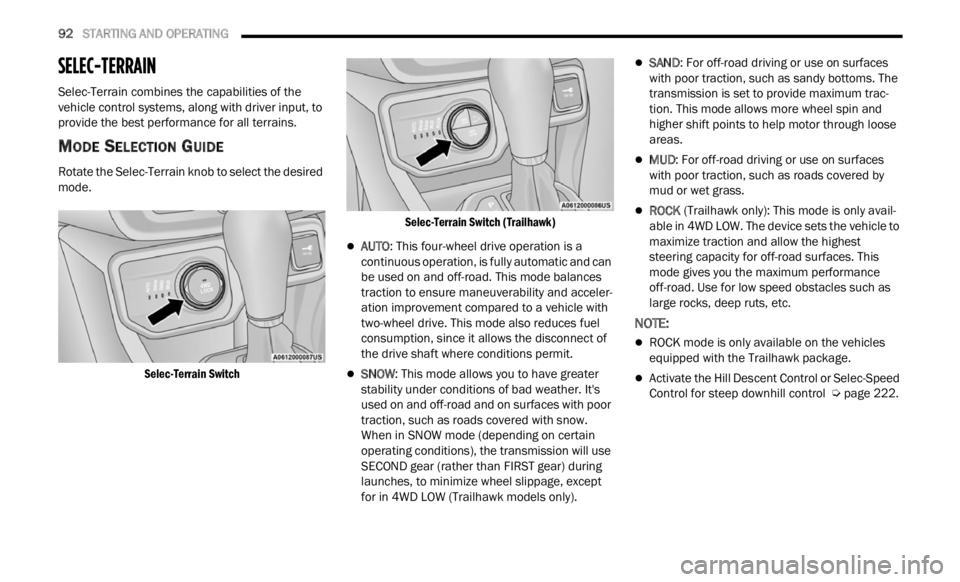
MODE SELECTION GUIDE
Rotate the Selec-Terrain knob to select the desired
mode.
Selec-Terrain Switch Selec-Terrain Switch (Trailhawk)
AUTO
: This four-wheel drive operation is a
continuous operation, is fully automatic and can
be used on and off-road. This mode balances
traction to ensure maneuverability and acceler -
ation improvement compared to a vehicle with
t wo-whe
el drive. This mode also reduces fuel
consumption, since it allows the disconnect of
the drive shaft where conditions permit.
SNOW : This mode allows you to have greater
stability under conditions of bad weather. It's
used on and off-road and on surfaces with poor
traction, such as roads covered with snow.
When in SNOW mode (depending on certain
operating conditions), the transmission will use
SECOND gear (rather than FIRST gear) during
launches, to minimize wheel slippage, except
for in 4WD LOW (Trailhawk models only).
SAND : For off-road driving or use on surfaces
with poor traction, such as sandy bottoms. The
transmission is set to provide maximum trac -
tion. This mode allows more wheel spin and
highe r
shift points to help motor through loose
areas.
MUD : For off-road driving or use on surfaces
with poor traction, such as roads covered by
mud or wet grass.
ROCK (Trailhawk only): This mode is only avail -
able in 4WD LOW. The device sets the vehicle to
m ax
im
i
ze traction and allow the highest
steering capacity for off-road surfaces. This
mode gives you the maximum performance
off-road. Use for low speed obstacles such as
large rocks, deep ruts, etc.
NOTE:
ROCK mode is only available on the vehicles
equipped with the Trailhawk package.
Activate the Hill Descent Control or Selec-Speed
Control for steep downhill control Ú page 222.