automatic transmission JEEP RENEGADE 2023 Owner's Manual
[x] Cancel search | Manufacturer: JEEP, Model Year: 2023, Model line: RENEGADE, Model: JEEP RENEGADE 2023Pages: 364, PDF Size: 18.65 MB
Page 254 of 364

252 SAFETY
If A Deployment Occurs
The front air bags are designed to deflate
immediately after deployment.
NOTE:
Front and/or side air bags will not deploy in all colli -
sions. This does not mean something is wrong with
t he a i
r bag system.
If you do have a collision which deploys the air
bags,
any or all of the following may occur:
The air bag material may sometimes cause
abrasions and/or skin reddening to the occu -
pants as the air bags deploy and unfold. The
abrasi
ons are similar to friction rope burns or
those you might get sliding along a carpet or
gymnasium floor. They are not caused by
contact with chemicals. They are not permanent
and normally heal quickly. However, if you
haven’t healed significantly within a few days, or
if you have any blistering, see your doctor imme -
diately.
As the air bags deflate, you may see some
smoke-like particles. The particles are a normal
by-product of the process that generates the
non-toxic gas used for air bag inflation. These
airborne particles may irritate the skin, eyes,
nose, or throat. If you have skin or eye irritation,
rinse the area with cool water. For nose or throat
irritation, move to fresh air. If the irritation
continues, see your doctor. If these particles settle on your clothing, follow the garment
manufacturer’s instructions for cleaning.
Do not drive your vehicle after the air bags have
deploy e
d. If you are involved in another collision,
the air bags will not be in place to protect you.
NOTE:
Air bag covers may not be obvious in the interior
trim, but they will open during air bag deploy -
ment.
After any collision, the vehicle should be taken
to an authorized dealer immediately.
Enhanced Accident Response System
In the event of an impact, if the communication
network remains intact, and the power remains
intact, depending on the nature of the event, the
Occupant Restraint Controller (ORC) will determine
whether to have the Enhanced Accident Response
System perform the following functions:
Cut off fuel to the engine (if equipped)
Cut off battery power to the electric motor (if
equipped)
Flash hazard lights as long as the battery has
power
Turn on the interior lights, which remain on as
long as the battery has power or for 15 minutes
f r
om
t h
e intervention of the Enhanced Accident
Response System
Unlock the power door locks
Your vehicle may also be designed to perform any
of the s
e other functions in response to the
Enhanced Accident Response System:
Turn off the Fuel Filter Heater, Turn off the HVAC
Blower Motor, Close the HVAC Circulation Door
Cut off battery power to the:
Engine
Electric Motor (if equipped)
Electric power steering
Brake booster
Electric park brake
Automatic transmission gear selector
Horn
Front wiper
Headlamp washer pump (if equipped)
WARNING!
Deployed air bags and seat belt pretensioners
cannot protect you in another collision. Have the
air bags, seat belt pretensioners, and the seat
belt retractor assemblies replaced by an autho -
rized dealer immediately. Also, have the Occu -
pant Restraint Controller System serviced as well.
Page 273 of 364
IN CASE OF EMERGENCY 271
(Continued)
LTE (voice/data) or 4G (data) network conges -
tion.
Weather.
Buildings, structures, geographic terrain, or
tunnels.
NOTE:
Your vehicle may be transmitting data as autho -
rized by the subscriber.
Never place anything on or near the vehicle’s
LTE (voice/data) or 4G (data) and GPS
antennas. You could prevent LTE (voice/data) or
4G (data) and GPS signal reception, which can
prevent your vehicle from placing an emergency
call. An operable LTE (voice/data) or 4G (data)
network connection and a GPS signal is
required for the SOS Call system to function
properly.
NOTE:
Changes or modifications not expressly approved
by th e
party responsible for compliance could void
the user's authority to operate the equipment.
Automatic SOS — If Equipped
Automatic SOS is a hands-free safety service that
c an im
mediately connect you with help in the event
that your vehicle’s airbags deploy. Please refer to
your provided radio supplement for complete
information.
JACKING AND TIRE CHANGING
PREPARATIONS FOR JACKING
1. Park the vehicle on a firm level surface as far from the edge of the roadway as possible.
Avoid icy or slippery areas.
2. Turn on the Hazard Warning Flashers.
3. A ppl
y the Electric Park Brake.
4 .
Pl
a
ce the gear selector into PARK (P)
(aut om
atic transmission) or REVERSE (R)
(manual transmission).
5. Turn the ignition to the OFF position.
WARNING!
ALWAYS obey traffic laws and pay attention to
the road. ALWAYS drive safely with your hands on
the steering wheel. You have full responsibility
and assume all risks related to the use of the
features and applications in this vehicle. Only
use the features and applications when it is safe
to do so. Failure to do so may result in an
accident involving serious injury or death.
WARNING!
Do not attempt to change a tire on the side of
the vehicle close to moving traffic. Pull far
enough off the road to avoid the danger of
being hit when operating the jack or changing
the wheel.
Being under a jacked-up vehicle is dangerous.
The vehicle could slip off the jack and fall on
you. You could be crushed. Never put any part
of your body under a vehicle that is on a jack.
If you need to get under a raised vehicle, take
it to a service center where it can be raised on
a lift.
Never start or run the engine while the vehicle
is on a jack.
The jack is designed to be used as a tool for
changing tires only. The jack should not be
used to lift the vehicle for service purposes.
The vehicle should be jacked on a firm level
surface only. Avoid ice or slippery areas.
WARNING!
Do not attempt to change a tire on the side of
the vehicle close to moving traffic. Pull far
enough off the road to avoid being hit when
operating the jack or changing the wheel.
WARNING!
7
Page 284 of 364
282 IN CASE OF EMERGENCY
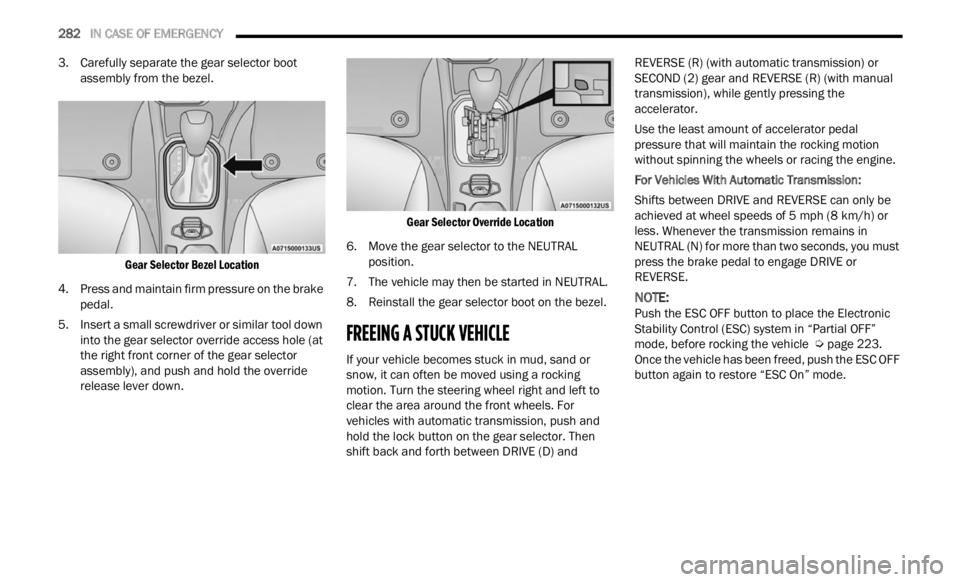
3. Carefully separate the gear selector boot
assembly from the bezel.
Gear Selector Bezel Location
4. Press and maintain firm pressure on the brake peda l
.
5. Insert a small screwdriver or similar tool down into t
he gear selector override access hole (at
the right front corner of the gear selector
assembly), and push and hold the override
release lever down.
Gear Selector Override Location
6. Move the gear selector to the NEUTRAL posit i
on.
7. The vehicle may then be started in NEUTRAL.
8. R ein
stall the gear selector boot on the bezel.
FREEING A STUCK VEHICLE
If your vehicle becomes stuck in mud, sand or
snow, it can often be moved using a rocking
motion. Turn the steering wheel right and left to
clear the area around the front wheels. For
vehicles with automatic transmission, push and
hold the lock button on the gear selector. Then
shift back and forth between DRIVE (D) and REVERSE (R) (with automatic transmission) or
SECOND (2) gear and REVERSE (R) (with manual
transmission), while gently pressing the
accelerator.
Use the least amount of accelerator pedal
pressu
re that will maintain the rocking motion
without spinning the wheels or racing the engine.
For Vehicles With Automatic Transmission:
Shifts between DRIVE and REVERSE can only be
a chiev
ed at wheel speeds of 5 mph (8 km/h) or
less.
Whenever the transmission remains in
NEUTRAL (N) for more than two seconds, you must
press the brake pedal to engage DRIVE or
REVERSE.
NOTE:
Push the ESC OFF button to place the Electronic
Stabi l
ity Control (ESC) system in “Partial OFF”
mode, before rocking the vehicle Ú page 223.
Once the vehicle has been freed, push the ESC OFF
button
again to restore “ESC On” mode.
Page 285 of 364
IN CASE OF EMERGENCY 283
(Continued)
TOWING A DISABLED VEHICLE
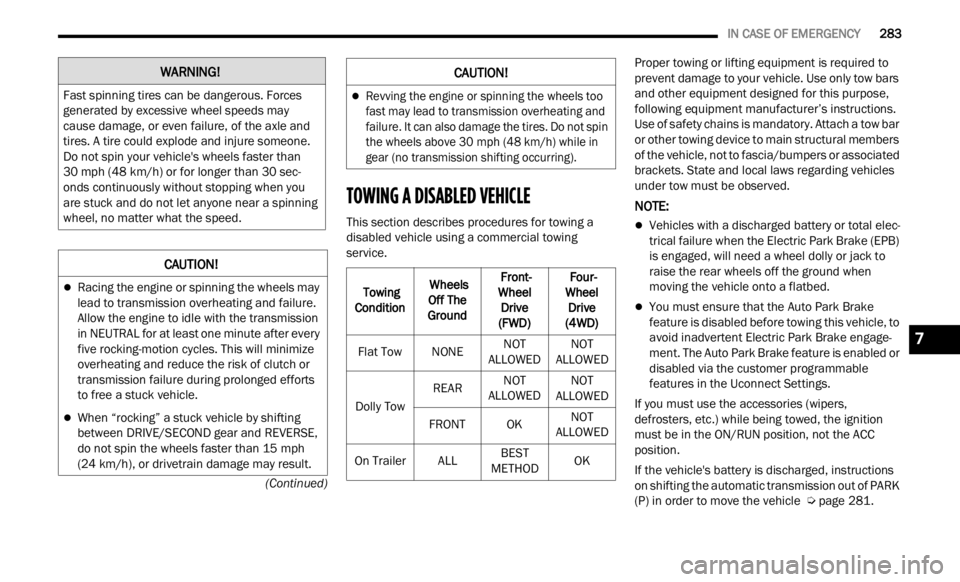
This section describes procedures for towing a
disabled vehicle using a commercial towing
service. Proper towing or lifting equipment is required to
preve
n
t damage to your vehicle. Use only tow bars
and other equipment designed for this purpose,
following equipment manufacturer’s instructions.
Use of safety chains is mandatory. Attach a tow bar
or other towing device to main structural members
of the vehicle, not to fascia/bumpers or associated
brackets. State and local laws regarding vehicles
under tow must be observed.
NOTE:
Vehicles with a discharged battery or total elec -
trical failure when the Electric Park Brake (EPB)
is en g
aged, will need a wheel dolly or jack to
raise the rear wheels off the ground when
moving the vehicle onto a flatbed.
You must ensure that the Auto Park Brake
feature is disabled before towing this vehicle, to
avoid inadvertent Electric Park Brake engage -
ment. The Auto Park Brake feature is enabled or
disab l
ed via the customer programmable
features in the Uconnect Settings.
If you must use the accessories (wipers,
defros t
ers, etc.) while being towed, the ignition
must be in the ON/RUN position, not the ACC
position.
If the vehicle's battery is discharged, instructions
on shif
ting the automatic transmission out of PARK
(P) in order to move the vehicle Ú page 281.
WARNING!
Fast spinning tires can be dangerous. Forces
generated by excessive wheel speeds may
cause damage, or even failure, of the axle and
tires. A tire could explode and injure someone.
Do not spin your vehicle's wheels faster than
30
mph (48 km/h) or for longer than 30 sec-
onds c on
tinuously without stopping when you
are stuck and do not let anyone near a spinning
wheel, no matter what the speed.
CAUTION!
Racing the engine or spinning the wheels may
lead to transmission overheating and failure.
Allow the engine to idle with the transmission
in NEUTRAL for at least one minute after every
five rocking-motion cycles. This will minimize
overheating and reduce the risk of clutch or
transmission failure during prolonged efforts
to free a stuck vehicle.
When “rocking” a stuck vehicle by shifting
between DRIVE/SECOND gear and REVERSE,
do not spin the wheels faster than 15 mph
(24 km/
h), or drivetrain damage may result.
Revving the engine or spinning the wheels too
fast may lead to transmission overheating and
failure. It can also damage the tires. Do not spin
the wheels above 30 mph (48 km/h) while in
gear (
no transmission shifting occurring).
Towing
Condit i
on Wheels
Off T h
e
Ground Front-
Wheel
D
rive
(FWD) Four-
Wheel D
rive
(4WD)
Flat Tow NONENOT
ALLOWED N
O
T
ALLOWED
Dol
ly Tow REAR
NOT
ALLOWED N
O
T
ALLOWED
FR
ONT OK NOT
ALLOWED
O n
Trailer ALLBEST
METHOD O
K
CAUTION!
7
Page 305 of 364

SERVICING AND MAINTENANCE 303
(Continued)
AUTOMATIC TRANSMISSION
Special Additives
The manufacturer strongly recommends against
using any special additives in the transmission.
Automatic Transmission Fluid (ATF) is an
engine
ered product and its performance may be
impaired by supplemental additives. Therefore, do
not add any fluid additives to the transmission. The
only exception to this policy is the use of special
dyes for diagnosing fluid leaks. Avoid using
transmission sealers as they may adversely affect
seals.
Fluid Level Check
The fluid level is preset at the factory and does not
require adjustment under normal operating
conditions. Routine fluid level checks are not
required; therefore the transmission has no
dipstick. An authorized dealer can check your
transmission fluid level using special service tools.
If you notice fluid leakage or transmission
malfunction, visit an authorized dealer immediately to have the transmission fluid level
checked. Operating the vehicle with an improper
fluid level can cause severe transmission damage.
Fluid And Filter Changes
Under normal operating conditions, the fluid
installed at the factory will provide satisfactory
lubrication for the life of the vehicle.
Routine fluid and filter changes are not required.
However
,
change the fluid and filter if the fluid
becomes contaminated (with water, etc.), or if the
transmission is disassembled for any reason.
Selection Of Lubricant
It is important to use the proper transmission fluid
to ensure optimum transmission performance and
life. Use the manufacturer specified transmission
fluid Ú page 345. It is important to maintain the
transmission fluid at the correct level using the
r ecomme
nded fluid.
NOTE:
No chemical flushes should be used in any trans -
mission; only the approved lubricant should be
u sed.
FUSES
General InformationCAUTION!
Do not use chemical flushes in your
transmission as the chemicals can damage your
transmission components. Such damage is not
covered by the New Vehicle Limited Warranty.
CAUTION!
If a transmission fluid leak occurs, visit an
authorized dealer immediately. Severe
transmission damage may occur. An authorized
dealer has the proper tools to adjust the fluid
level accurately.CAUTION!
Using a transmission fluid other than the
manufacturer recommended fluid may cause
deterioration in transmission shift quality and/or
torque converter shudder Ú page 345.
WARNING!
When replacing a blown fuse, always use an
appropriate replacement fuse with the same
amp rating as the original fuse. Never replace
a fuse with another fuse of higher amp rating.
Never replace a blown fuse with metal wires or
any other material. Failure to use proper fuses
may result in serious personal injury, fire and/
or property damage.
Before replacing a fuse, make sure that the
ignition is off and that all the other services
are switched off and/or disengaged.
8
Page 308 of 364
306 SERVICING AND MAINTENANCE
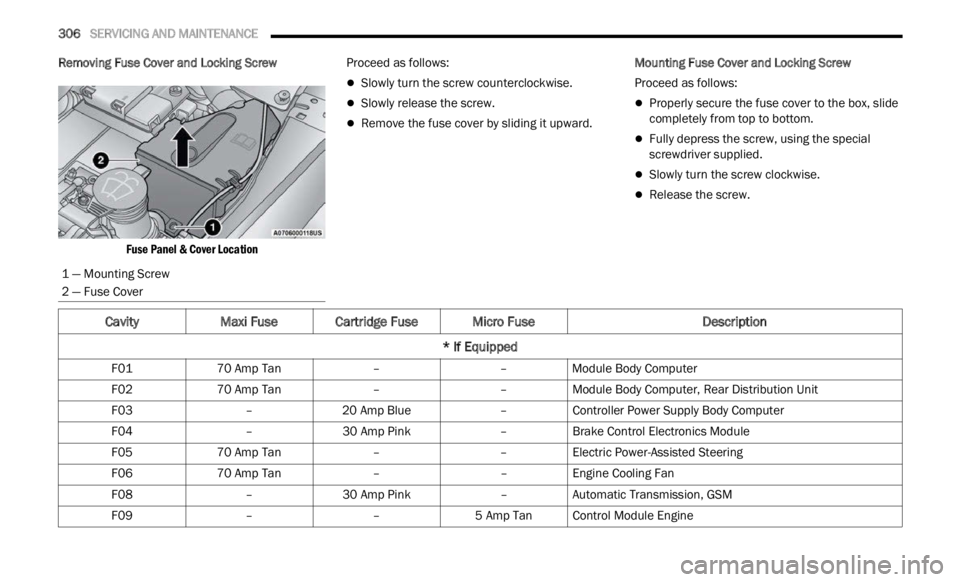
Removing Fuse Cover and Locking Screw
Fuse Panel & Cover Location
Proceed as follows:
Slowly turn the screw counterclockwise.
Slowly release the screw.
Remove the fuse cover by sliding it upward.
Mounting Fuse Cover and Locking Screw
Proceed as follows:
Properly secure the fuse cover to the box, slide
completely from top to bottom.
Fully depress the screw, using the special
screwdriver supplied.
Slowly turn the screw clockwise.
Release the screw.
1 — Mounting Screw
2 — Fuse Cover
CavityMaxi Fuse Cartridge Fuse Micro Fuse Description
* If Equipped
F01 70 Amp Tan ––Module Body Computer
F02 70 Amp Tan ––Module Body Computer, Rear Distribution Unit
F03 –20 Amp Blue –Controller Power Supply Body Computer
F04 –30 Amp Pink –Brake Control Electronics Module
F05 70 Amp Tan ––Electric Power-Assisted Steering
F06 70 Amp Tan ––Engine Cooling Fan
F08 –30 Amp Pink –Automatic Transmission, GSM
F09 ––5 Amp TanControl Module Engine
Page 309 of 364

SERVICING AND MAINTENANCE 307
F10 ––15 Amp Blue Horn
F11 ––5 Amp TanSupply Secondary Loads
F14 ––15 Amp Blue WCAC Pump/Active Grille Shutters
F15 40 Amp Orange ––Brake Control Module Pump
F16 ––5 Amp TanEngine Control Module Power, Automatic Transmission
F17 ––30 Amp Green Supply Primary Loads
F18 ––5 Amp TanIntelligent Battery Sensor
F19 ––7.5 Amp Brown Air Conditioner 1.3L Compressor
F20 ––5 Amp TanElectronic Power Four-Wheel Drive
F21 ––15 Amp Blue Fuel Pump
F22 ––10 Amp Red Power Control Module Engine
F23 ––30 Amp Green Heated Windshield *
F24 ––15 Amp Blue Electronic Unit Supply Automatic Transmission
F82 –20 Amp Yellow –Power Control Module Engine
F83 –40 Amp Green –Air Conditioning Fan
F84 ––30 Amp Green Power Supply All Wheel Drive
F87 ––5 Amp TanGear Selector Automatic Transmission
F88 ––7.5 Amp Brown Heated Outside Mirrors
F89 –30 Amp Green –Heated Rear Window
Cavity Maxi Fuse Cartridge Fuse Micro Fuse Description
* If Equipped
8
Page 347 of 364

TECHNICAL SPECIFICATIONS 345
ENGINE FLUIDS AND LUBRICANTS
CHASSIS FLUIDS AND LUBRICANTS
Component Fluid, Lubricant, or Genuine Part
Engine Coolant We recommend using Mopar® Antifreeze/Coolant 10 Year/150,000 Mile
(240,
0
00 km) Formula OAT (Organic Additive Technology) or equivalent
meeti n
g the requirements of the manufacturer Material Standard MS.90032.
Engine Oil We recommend using Mopar® SAE 0W-30 Full Synthetic Engine Oil which
m
eets
the requirements of the manufacturer Material Standard MS-13340.
Equivalent full synthetic SAE 0W-30 engine oil can be used but must have the
API Starburst trademark Ú page 295.
Engine Oil Filter We recommend using a Mopar® Engine Oil Filter. If a Mopar® Engine Oil Filter
is un
a
vailable, only use filters that meet or exceed SAE/USCAR-36 Filter
Performance Requirements.
Fuel Selection 87 Octane (R+M)/2 Method, 0–15% ethanol
ComponentFluid, Lubricant, or Genuine Part
Automatic Transmission Use only Mopar® ZF 8 & 9 Speed ATF Automatic Transmission Fluid, or
equiv
a
lent. Failure to use the correct fluid may affect the function or
performance of your transmission.
Power Transfer Unit (PTU) – If Equipped We recommend using Mopar® Front Axle/PTU Synthetic Axle Lubricant SAE
75W-90
(API GL-5).
Rear Differential (RDM) – If Equipped We recommend using Mopar® Rear Axle/RDM Synthetic Axle Lubricant SAE
75W-9
0
(API GL-5).
Brake Master Cylinder We recommend using Mopar® DOT 4.
DOT 4 brake fluid must be changed every two years regardless of mileage.
9
Page 353 of 364

351
INDEX
A
About Your Brakes.........................................341Adding Engine Coolant (Antifreeze)...............300Adding Fuel....................................................122Adding Washing Fluid....................................294Additives, Fuel...............................................343Advance Phone Connectivity.........................172Air Bag...........................................................247Advance Front Air Bag...............................247Air Bag Operation......................................248Air Bag Warning Light................................246Driver Knee Air Bag...................................249Enhanced Accident Response.........252, 285Event Data Recorder (EDR).......................285Front Air Bag.............................................247If Deployment Occurs................................252Knee Impact Bolsters................................249Maintaining Your Air Bag System..............255Maintenance.............................................255Redundant Air Bag Warning Light.............247Side Air Bags.............................................249Transporting Pets......................................265Air Bag Light..................................70, 246, 265Air Cleaner, Engine (Engine Air Cleaner
Filter).............................................................296Air Conditioner Maintenance.........................296
Air Conditioner Refrigerant..................296, 297Air Conditioning.............................................297Air Conditioning Filter..............................48, 297Air Conditioning System................................296Air Conditioning, Operating Tips.......................47Air Pressure Tires.........................................................329AlarmArm The System..........................................20Disarm The System.....................................21Security Alarm......................................20, 72Alterations/ModificationsVehicle.........................................................10Android Auto........................................174, 176Android Auto™
S
.......................................174Antifreeze (Engine Coolant).................300, 344Disposal...................................................301Anti-Lock Brake System (ABS)......................221Anti-Lock Warning Light............................72, 76Apple CarPlay.......................................174, 178Apple CarPlay®
S
......................................176Assist, Hill Start.............................................227Audio Settings...............................................160Audio Systems (Radio)..................................133Auto Down Power Windows.............................53Auto Up Power Windows..................................53
Automatic Headlights.......................................38Automatic High Beams.....................................37Automatic Temperature Control (ATC)..............47Automatic Transmission.........................85, 303Adding Fluid.....................................303, 345Autostick......................................................87Fluid And Filter Change.............................303Fluid Change.............................................303Fluid Level Check......................................303Fluid Type........................................303, 345Special Additives......................................303Auxiliary Electrical Outlet (Power Outlet)..........50Auxiliary Power Outlet......................................50Axle Fluid.......................................................345Axle Lubrication............................................345
B
Back-Up Camera...........................................121Battery...................................................70, 294Charging System Light.................................70Keyless Key Fob Replacement....................15Belts, Seat....................................................265Blind Spot Monitoring...................................228BluetoothConnecting To A Particular Mobile Phone
Or Audio Device After Pairing
................168
11
Page 361 of 364

359
Tires...................................267, 329, 333, 337Aging (Life Of Tires)...................................331Air Pressure...............................................329Chains.......................................................335Changing...................................................271Compact Spare.........................................333General Information........................329, 333High Speed................................................330Inflation Pressure......................................329Jacking......................................................271Life Of Tires...............................................331Load Capacity............................................326Pressure Monitoring System (TPMS)..74, 235Quality Grading..........................................337Radial........................................................330Replacement.............................................332Rotation....................................................336Safety..............................................322, 329Sizes..........................................................323Snow Tires.................................................333Spare Tires......................................333, 334Spinning....................................................331Trailer Towing............................................127Tread Wear Indicators...............................331Tongue Weight/Trailer Weight.......................126Tow HooksEmergency................................................284
Towing..........................................................124Disabled Vehicle.......................................283Guide........................................................126Recreational.............................................129Weight......................................................126Trailer Sway Control (TSC).............................227Trailer Towing...............................................124Hitches.....................................................125Minimum Requirements...........................126Trailer And Tongue Weight........................126Wiring.......................................................128Trailer Towing Guide.....................................126Trailer Weight................................................126TransmissionAutomatic...........................................85, 303Fluid.........................................................345Transporting Pets..........................................265Tread Wear Indicators..................................331Turn Signals..............................................39, 76
U
UconnectPhone Call Features
.................................170Things You Should Know About Your
Uconnect Phone...................................172Uconnect Settings..............................19, 134
Uconnect Phone...................................166, 168Answer Or Ignore An Incoming Call —
Call Currently In Progress.....................171Answer Or Ignore An Incoming Call —
No Call Currently In Progress................171Bluetooth Communication Link................174Call Continuation......................................172Call Controls.............................................170Call Termination.......................................172Cancel Command.....................................166Connecting To A Particular Mobile P
hone Or Audio Device After Pairing.......168Help Command.........................................166Join Calls..................................................172Making A Phone Or Audio Device A Favorite................................................169Making A Second Call While Current Call
Is In Progress........................................172Managing Your Favorites..........................169Natural Speech.........................................166Operation..................................................165Overview...................................................164Pair (Link) Uconnect Phone To A Mobile
Phone...................................................166Pair A Bluetooth Streaming Audio
Device..................................................168
11