lock JEEP RENEGADE 2023 Owner's Manual
[x] Cancel search | Manufacturer: JEEP, Model Year: 2023, Model line: RENEGADE, Model: JEEP RENEGADE 2023Pages: 364, PDF Size: 18.65 MB
Page 41 of 364
GETTING TO KNOW YOUR VEHICLE 39
again. The front fog lights are deactivated each
time the parking or low beam lights are
deactivated or the ignition is placed in the OFF
position.
An indicator light in the instrument cluster
illumi
nates when the fog lights are turned on.
NOTE:
The fog lights will operate with the low beam head -
lights or parking lights on. Selecting the high beam
h eadl i
ghts will turn off the fog lights.
Cornering Lights
The cornering lights are a feature to improve
visib i
lity at night while turning the vehicle. When
activated, a light incorporated in the front fog light
will illuminate on the side of the vehicle the
steering wheel is rotated or the turn signal
indicator is on. It can be activated through the
Uconnect system Ú page 133.
TURN SIGNALS
Move the multifunction lever up or down to
activate the turn signals. The arrows on each side
of the instrument cluster display flash to show
proper operation.
LANE CHANGE ASSIST
Lightly push the multifunction lever up or down,
without moving beyond the detent, and the turn
signal will flash five times then automatically turn
off.
COURTESY LIGHTS
The courtesy lights feature allows you to activate
the low beam, parking lights, and sidemarker lights
for 25 seconds when the vehicle is unlocked
(through the key fob or the Passive Entry door
handles [if equipped]). The courtesy lights feature
can be activated or deactivated through the
Uconnect Settings. When a door is open with the
feature active, the activation of the lights is
extended for five seconds. The feature is disabled
when the vehicle is locked or when the ignition is
placed in the ON/RUN position.
INTERIOR LIGHTS
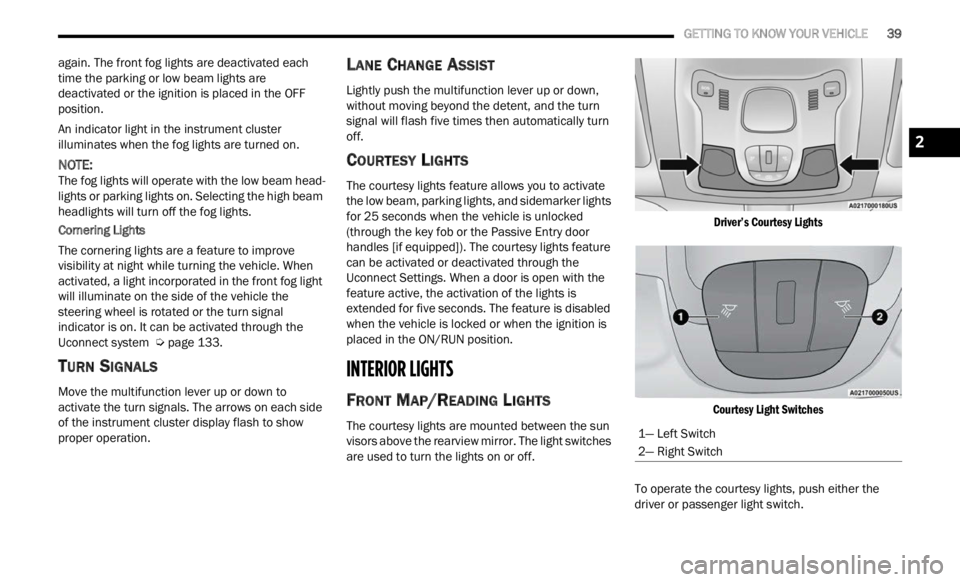
FRONT MAP/READING LIGHTS
The courtesy lights are mounted between the sun
visors above the rearview mirror. The light switches
are used to turn the lights on or off.
Driver’s Courtesy Lights
Courtesy Light Switches
To operate the courtesy lights, push either the
d rive
r
or passenger light switch.
1— Left Switch
2— Right Switch
2
Page 43 of 364

GETTING TO KNOW YOUR VEHICLE 41
To operate the rear dome light, proceed as follows:
Push the switch to the on/right position from its
center position and the lights are always on.
Push the switch to the off/left position from its
center position and the lights are always off.
Leave the switch in the center position, and the
lights are turned on and off when the doors are
opened or closed.
DOME LIGHT TIMING
The dome light will automatically illuminate when
the doors are unlocked, the doors are opened or
after the doors are closed.
Timing Entering The Vehicle
The dome lights illuminate in the following ways:
When the doors are unlocked, the dome light
will illuminate for approximately 27 seconds.
When one of the doors is opened, the dome light
will illuminate for approximately three minutes.
When the doors are closed, the dome light will
automatically shut off after approximately 27
seconds.
The timing stops once the ignition is placed in the
ON/RU N
position. The dome light will turn off under any of the
follow
i
ng conditions:
The dome light is disabled when the ignition is
placed in the ON/RUN position.
The dome lights will turn off automatically when
the doors are locked.
The dome lights will automatically turn off after
approximately 15 minutes of inactivity to
prese r
ve the battery.
Timing Exiting The Vehicle
The dome light will illuminate under the following
condit i
ons when the ignition is placed to the OFF
position and the key is removed:
The dome light will illuminate for 27 seconds
after the ignition is placed in the OFF position.
The opening of one of the doors (approximately
three minutes).
After closing a door (approximately 27 seconds).
The dome light timing is disabled when the doors
a re
l
oc
ked.
WINDSHIELD WIPERS AND WASHERS
The windshield wiper/washer controls are located
on the windshield wiper/washer lever on the right
side of the steering column. The front wipers are
operated by rotating a switch, located on the end of
the lever.
Windshield Wiper Lever
1 — Push Forward For Rear Washer
2 — Rotate For Rear Wiper Operation
3 — Rotate For Front Wiper Operation
4 — Pull For Front Washer
5 — Push Up For Mist
CAUTION!
Always remove any buildup of snow that
prevents the windshield wiper blades from
returning to the “park” position. If the windshield
wiper switch is turned off, and the blades cannot
return to the “park” position, damage to the
wiper motor may occur.
2
Page 48 of 364
46 GETTING TO KNOW YOUR VEHICLE
Push the blue button on the faceplate or
touchscreen or press and slide the
tempe r
ature bar towards the blue arrow
button on the touchscreen for cooler
temperature settings.
SYNC Button
Press the SYNC button on the
touchscreen to toggle the Sync feature
on/off.
The SYNC indicator is illuminated
when SYNC is on. SYNC is used to
synchronize the passenger temperature setting
with the driver temperature setting. Changing the
passenger temperature setting while in SYNC will
automatically exit this feature.
NOTE:
The SYNC button is only available on the touch-
screen.
Blower Control
Blower Control is used to regulate the
amount of air forced through the Climate
Control
system. There are seven blower
speeds available. Adjusting the blower
will cause automatic mode to switch to manual
operation. The speeds can be selected using either
the blower control knob on the faceplate or the
buttons on the touchscreen. Faceplate
The blower speed increases as you turn the blower
c
ontrol
knob clockwise from the lowest blower
setting. The blower speed decreases as you turn
the blower control knob counterclockwise.
Touchscreen
Use the small blower icon to reduce the blower
setti n
g and the large blower icon to increase the
blower setting. Blower can also be selected by
pressing the blower bar area between the icons.
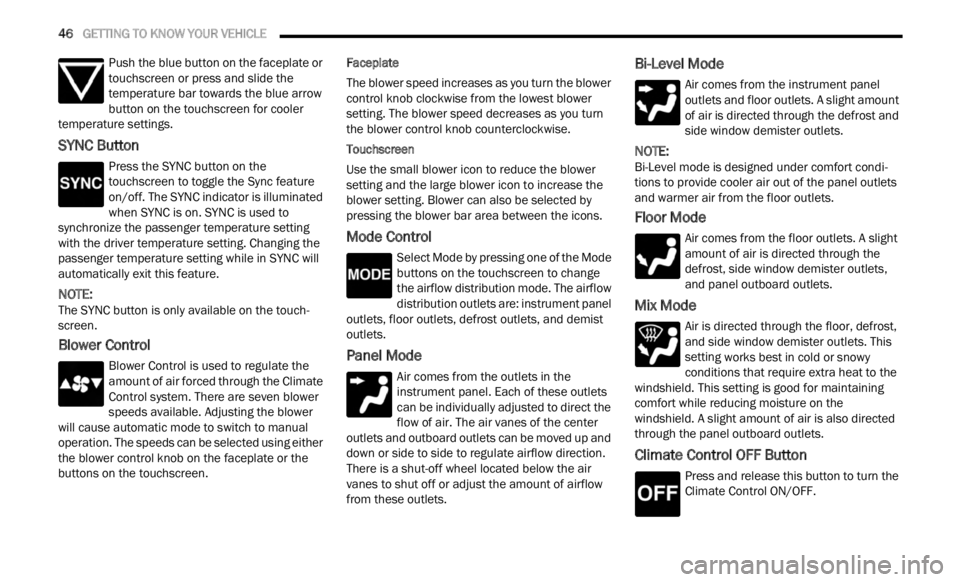
Mode Control
Select Mode by pressing one of the Mode
buttons on the touchscreen to change
the a i
rflow distribution mode. The airflow
distribution outlets are: instrument panel
outlets, floor outlets, defrost outlets, and demist
outlets.
Panel Mode
Air comes from the outlets in the
instrument panel. Each of these outlets
can b e
individually adjusted to direct the
flow of air. The air vanes of the center
outlets and outboard outlets can be moved up and
down or side to side to regulate airflow direction.
There is a shut-off wheel located below the air
vanes to shut off or adjust the amount of airflow
from these outlets.
Bi-Level Mode
Air comes from the instrument panel
outlets and floor outlets. A slight amount
of ai r
is directed through the defrost and
side window demister outlets.
NOTE:
Bi-Level mode is designed under comfort condi -
tions to provide cooler air out of the panel outlets
a nd w a
rmer air from the floor outlets.
Floor Mode
Air comes from the floor outlets. A slight
amount of air is directed through the
defrost
, side window demister outlets,
and panel outboard outlets.
Mix Mode
Air is directed through the floor, defrost,
and side window demister outlets. This
setti n
g works best in cold or snowy
conditions that require extra heat to the
windshield. This setting is good for maintaining
comfort while reducing moisture on the
windshield. A slight amount of air is also directed
through the panel outboard outlets.
Climate Control OFF Button
Press and release this button to turn the
Climate Control ON/OFF.
Page 50 of 364

48 GETTING TO KNOW YOUR VEHICLE
leaves. Leaves collected in the air intake may
reduce airflow, and if they enter the air distribution
box, they could plug the water drains. In Winter
months, make sure the air intake is clear of ice,
slush, and snow.
Cabin Air Filter
The Climate Control system filters out dust and
pollen from the air. Contact an authorized dealer to
service your cabin air filter, and to have it replaced
when needed.
NOTE:
In the Red Special Series models, the cabin air
filte r
was treated with a biocide substance having
antibacterial and antiviral properties based on the
active ingredient, citric acid.
Stop/Start System — If Equipped
While in an Autostop, the Climate Control system
may automatically adjust airflow to maintain cabin
comfort. Customer settings will be maintained
upon return to an engine running condition.
Windshield Wiper De-Icer — If Equipped
The windshield wiper de-icer is a heating element
located at the base of the windshield.
It operates automatically once the following
conditi
ons are met:
Activation By Front Defrost
The wiper de-icer activates automatically during
a cold
weather manual start with full defrost,
and when the ambient temperature is below
40°F (4.4°C) .
Activation By Rear Defrost
The wiper de-icer activates automatically when
the R e
ar Defrost is operating and the ambient
temperature is below 40°F (4.4°C) .
Activation By Remote Start Operation
When Remote Start is active and the outside
ambient temperature is less than 40°F (4.4°C),
the Windshield Wiper De-Icer will activate.
Exiting Remote Start will resume its previous
operation. If the Windshield Wiper De-Icer was
active, the timer and operation will continue.
Operating Tips Chart
NOTE:
The following chart is for Manual Override Oper -
ation, otherwise run in AUTO.INTERIOR STORAGE AND EQUIPMENT
STORAGE
Glove Compartment
The glove compartment is located on the
passenger’s side of the instrument panel.
To open the glove compartment proceed as
follows:
1
. Unlock the compartment using the vehicle emerge
ncy key.
WEATHER CONTROL SETTINGS
Hot Weather And
Vehicle Interior Is Very Hot Set the mode control to
(Panel Mode), (A/C) on,
and blower on high. Roll
d own th
e windows for a
minute to flush out the hot
air. Adjust the controls as
needed to achieve comfort.
Warm WeatherTurn (A/C) on and set
the mode control to
(Panel Mode).
Cool Sunny Operate in
(Bi-Level
Mode).
Cool & Humid Condit i
ons Set the mode control to
(Floor Mode) and turn
(A/C) on to keep windows
c le
ar
.
C
old Weather Set the mode control to
(Floor Mode). If windshield
f ogging
starts to occur,
move the control to (Mix
Mode).
WEATHER CONTROL SETTINGS
Page 56 of 364
54 GETTING TO KNOW YOUR VEHICLE
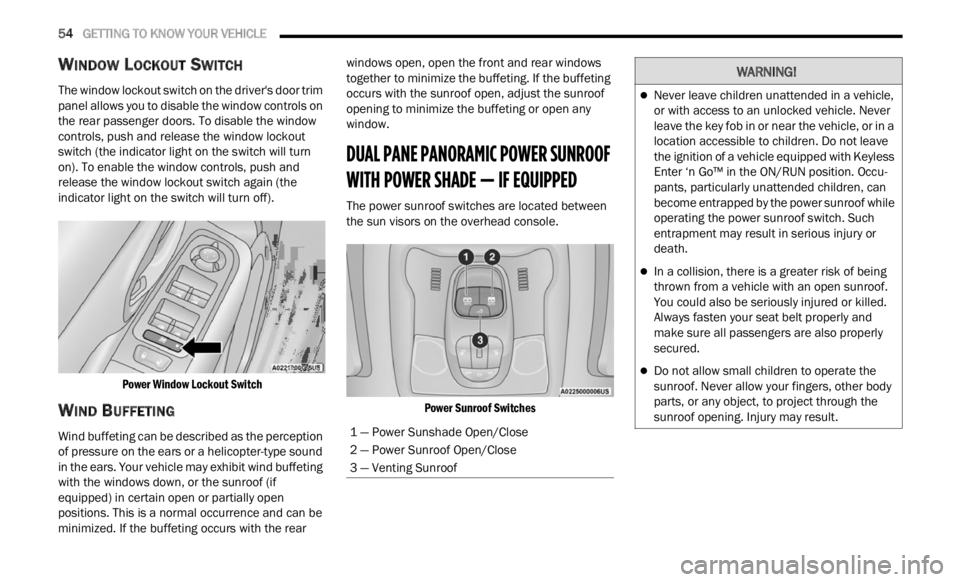
WINDOW LOCKOUT SWITCH
The window lockout switch on the driver's door trim
panel allows you to disable the window controls on
the rear passenger doors. To disable the window
controls, push and release the window lockout
switch (the indicator light on the switch will turn
on). To enable the window controls, push and
release the window lockout switch again (the
indicator light on the switch will turn off).
Power Window Lockout Switch
WIND BUFFETING
Wind buffeting can be described as the perception
of pressure on the ears or a helicopter-type sound
in the ears. Your vehicle may exhibit wind buffeting
with the windows down, or the sunroof (if
equipped) in certain open or partially open
positions. This is a normal occurrence and can be
minimized. If the buffeting occurs with the rear windows open, open the front and rear windows
together to minimize the buffeting. If the buffeting
occurs with the sunroof open, adjust the sunroof
opening to minimize the buffeting or open any
window.
DUAL PANE PANORAMIC POWER SUNROOF
WITH POWER SHADE — IF EQUIPPED
The power sunroof switches are located between
the sun visors on the overhead console.
Power Sunroof Switches
1 — Power Sunshade Open/Close
2 — Power Sunroof Open/Close
3 — Venting Sunroof
WARNING!
Never leave children unattended in a vehicle,
or with access to an unlocked vehicle. Never
leave the key fob in or near the vehicle, or in a
location accessible to children. Do not leave
the ignition of a vehicle equipped with Keyless
Enter ‘n Go™ in the ON/RUN position. Occu -
pants, particularly unattended children, can
b ecom e
entrapped by the power sunroof while
operating the power sunroof switch. Such
entrapment may result in serious injury or
death.
In a collision, there is a greater risk of being
thrown from a vehicle with an open sunroof.
You could also be seriously injured or killed.
Always fasten your seat belt properly and
make sure all passengers are also properly
secured.
Do not allow small children to operate the
sunroof. Never allow your fingers, other body
parts, or any object, to project through the
sunroof opening. Injury may result.
Page 57 of 364

GETTING TO KNOW YOUR VEHICLE 55
OPENING AND CLOSING THE SUNROOF
To retract the sunroof to the open position, push
the Open/Close switch and the sunroof will fully
open. The sunroof can be stopped in any position
by pushing/pulling the switch a second time while
opening.
To close the sunroof completely, pull the Open/
Close s
witch and the sunroof will fully close. The
sunroof can be stopped in any position by pushing/
pulling the switch a second time while it is closing.
VENTING SUNROOF
To vent the sunroof push the vent switch.
NOTE:
The vent switch has the automatic function only at
the op e
ning of the sunroof. During the closing of
the sunroof, the switch must be held until closed.
OPENING AND CLOSING THE POWER
S
UNSHADE
Express Open/Close
Push the shade switch for about one-half second
and t h
e shade will automatically open. During the
automatic open operation, any movement of the
shade switch will stop the shade. Pull the shade switch for about one-half second
and t
h
e shade will automatically close. During the
automatic close operation, any movement of the
shade switch will stop the shade.
Manual Open/Close
To open the shade part way, push the shade switch
brief l
y and release.
To close the shade part way, pull the shade switch
briefl
y and release.
NOTE:
The sunroof and the shade controls will operate
only when the ignition is in the ON/RUN posi -
tion.
If the Remote Start functionality is active, it is
not possible to move the sunroof.
PINCH PROTECT FEATURE
This feature will detect an obstruction in the
opening of the sunroof during Express Close
operation. If an obstruction in the path of the
sunroof is detected, the sunroof will automatically
retract. Remove the obstruction if this occurs.
WARNING!
Do not let children play with the sunroof.
Never leave children unattended in a vehicle,
or with access to an unlocked vehicle. Do not
leave the key fob in or near the vehicle, and do
not leave the ignition of a vehicle equipped
with Keyless Enter ‘n Go™ in the ACC or ON/
RUN position. Occupants, particularly unat -
tended children, can become entrapped by
the p ow
er sunroof while operating the power
sunroof switch. Such entrapment may result
in serious injury or death.
In a collision, there is a greater risk of being
thrown from a vehicle with an open sunroof.
You could also be severely injured or killed.
Always fasten your seat belt properly and
make sure all passengers are properly
secured.
Do not allow small children to operate the
sunroof. Never allow your fingers, other body
parts, or any object to project through the
sunroof opening. Injury may result.
2
Page 58 of 364
56 GETTING TO KNOW YOUR VEHICLE
SUNROOF MAINTENANCE
Use only a non-abrasive cleaner and a soft cloth to
clean the glass panel. Periodically check for and
clear out any debris that may have collected in the
tracks.
HOOD
TO OPEN THE HOOD
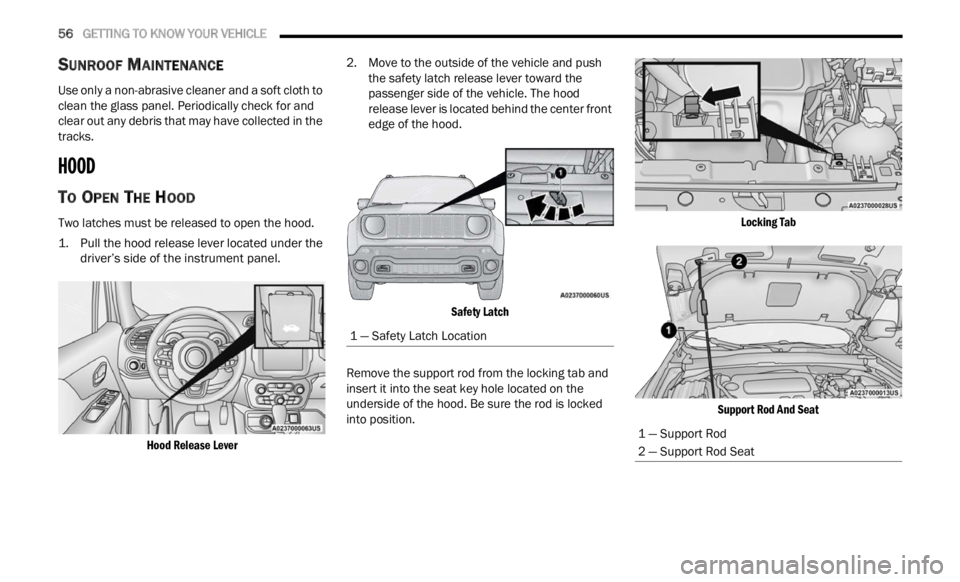
Two latches must be released to open the hood.
1. Pull the hood release lever located under the
driver’ s
side of the instrument panel.
Hood Release Lever
2. Move to the outside of the vehicle and push
the s
afety latch release lever toward the
passenger side of the vehicle. The hood
release lever is located behind the center front
edge of the hood.
Safety Latch
Remove the support rod from the locking tab and
inser t
it into the seat key hole located on the
underside of the hood. Be sure the rod is locked
into position.
Locking Tab
Support Rod And Seat
1 — Safety Latch Location
1 — Support Rod
2 — Support Rod Seat
Page 59 of 364
GETTING TO KNOW YOUR VEHICLE 57
TO CLOSE THE HOOD
LIFTGATE
UNLOCK/OPEN THE LIFTGATE
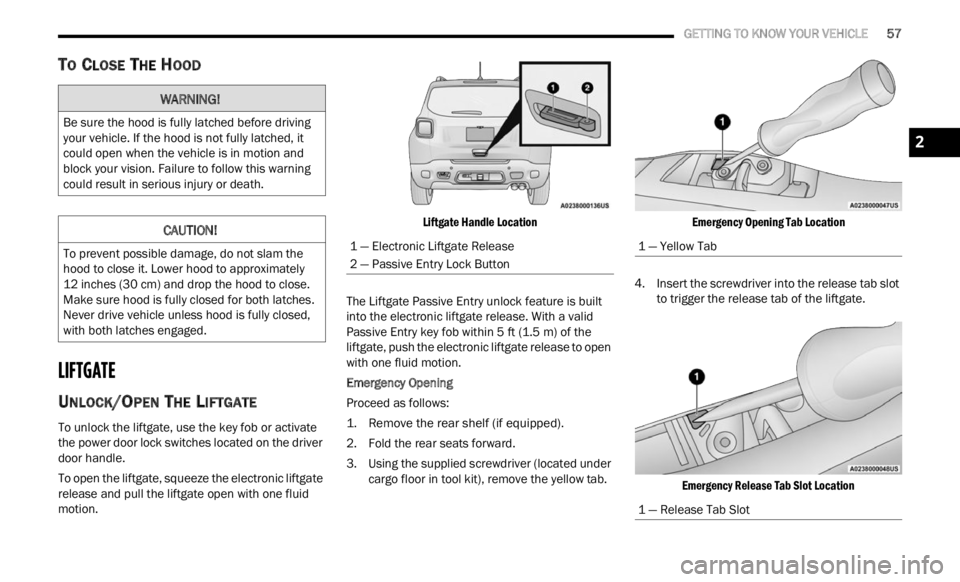
To unlock the liftgate, use the key fob or activate
the power door lock switches located on the driver
door handle.
To open the liftgate, squeeze the electronic liftgate
relea s
e and pull the liftgate open with one fluid
motion.
Liftgate Handle Location
The Liftgate Passive Entry unlock feature is built
into t h
e electronic liftgate release. With a valid
Passive Entry key fob within 5 ft (1.5 m) of the
liftga
te, push the electronic liftgate release to open
with one fluid motion.
Emergency Opening
Proceed as follows:
1. R emove the rear shelf (if equipped).
2. Fol d
the rear seats forward.
3. Us i
ng the supplied screwdriver (located under
carg o
floor in tool kit), remove the yellow tab.
Emergency Opening Tab Location
4. Insert the screwdriver into the release tab slot to tri
gger the release tab of the liftgate.
Emergency Release Tab Slot Location
WARNING!
Be sure the hood is fully latched before driving
your vehicle. If the hood is not fully latched, it
could open when the vehicle is in motion and
block your vision. Failure to follow this warning
could result in serious injury or death.
CAUTION!
To prevent possible damage, do not slam the
hood to close it. Lower hood to approximately
12 inches (30 cm) and drop the hood to close.
Make s
ure hood is fully closed for both latches.
Never drive vehicle unless hood is fully closed,
with both latches engaged.
1 — Electronic Liftgate Release
2 — Passive Entry Lock Button
1 — Yellow Tab
1 — Release Tab Slot
2
Page 60 of 364
58 GETTING TO KNOW YOUR VEHICLE
LOCK/CLOSE THE LIFTGATE
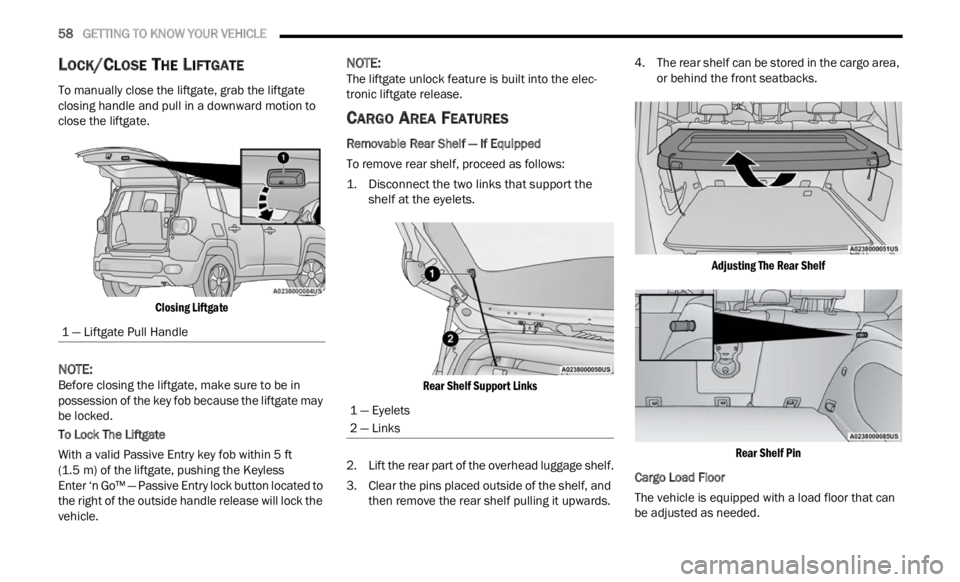
To manually close the liftgate, grab the liftgate
closing handle and pull in a downward motion to
close the liftgate.
Closing Liftgate
NOTE:
Before closing the liftgate, make sure to be in
posses s
ion of the key fob because the liftgate may
be locked.
To Lock The Liftgate
With a valid Passive Entry key fob within 5 ft
( 1.5 m)
of the liftgate, pushing the Keyless
Enter ‘n Go™ — Passive Entry lock button located to
t he ri
ght of the outside handle release will lock the
vehicle.
NOTE:
The liftgate unlock feature is built into the elec -
tronic liftgate release.
CARGO AREA FEATURES
Removable Rear Shelf — If Equipped
To remove rear shelf, proceed as follows:
1. D isconnect the two links that support the
shelf a
t the eyelets.
Rear Shelf Support Links
2. Li ft the rear part of the overhead luggage shelf.
3 . C
le
ar the pins placed outside of the shelf, and
then
remove the rear shelf pulling it upwards. 4. The rear shelf can be stored in the cargo area,
or be h
ind the front seatbacks.
Adjusting The Rear Shelf Rear Shelf Pin
Cargo Load Floor
The vehicle is equipped with a load floor that can
b e ad j
usted as needed.
1 — Liftgate Pull Handle
1 — Eyelets
2 — Links
Page 69 of 364

GETTING TO KNOW YOUR INSTRUMENT PANEL 67
Audio
Push and release the up or down arrow
button until the Audio menu title is displayed in the
instr u
ment cluster display.
Stored Messages
Push and release the up or down arrow
button until the Messages Menu Icon is highlighted
in th e
instrument cluster display. This feature
shows the number of stored warning messages.
Pushing the left
or right arrow button will
all ow
you to scroll through the stored messages.
Screen Setup
This menu item allows you to change the position
of the information on the display.
Display Gears (Vehicles With Reconfigurable
Multi-
Functional Display And Automatic
Transmission)
By selecting this item, you can select the display
mode, t
he particulars relating to the automatic
transmission, and choose between the following
options:
“Single digit”
The right side of the display will show the letter
concer n
ing the automatic transmission gear
selector (P,R,N or D) position. After approxi -
mately two seconds, the letter will be displayed
in a c
entral position.
“Full PRND”
The letters PRND will display on the right side,
the p o
sition assumed by the gear selector will
be highlighted in the display. During the opera -
tion in sequential mode (“AutoStick”), in place
of the
letter D, the gear will be will be displayed.
In The Upper Left/Top Right
The information relating to the following can be
displ a
yed:
External temperature
Ignition Button — If Equipped
Compass — If Equipped
Date (Month/Day)
Time (Hours/Minutes)
In the central area of the display, you can view all
of t
h e
information listed above as well as the
following:
Compass — If Equipped
Speed Display — If Equipped
Date (Day/Month/Year)
Time
Compass — If Equipped
Ignition Button — If Equipped
External Temp — If equipped
Menu Item
Distance Traveled A (Trip A)
Distance Traveled B (Trip B)
Restore Default Settings
Selecting this item, and you can reset and restore
t he de
fault settings.
Settings
This menu item allows you to change the settings
for the following:
Display
Units
Clock and Date
Security
Safety and Assistance
Lights
Doors and Locks
NOTE:
Some items may be displayed and managed
throug h
the Uconnect system.
Vehicles Equipped With Multi-functional Display
Reconfi
gurable:
The following menu/submenu items are available
in the
cluster display.
3