lock JEEP RENEGADE 2023 Manual PDF
[x] Cancel search | Manufacturer: JEEP, Model Year: 2023, Model line: RENEGADE, Model: JEEP RENEGADE 2023Pages: 364, PDF Size: 18.65 MB
Page 223 of 364
221
(Continued)
SAFETY
SAFETY FEATURES
ANTI-LOCK BRAKE SYSTEM (ABS)
ABS provides increased vehicle stability and brake
performance under most braking conditions. The
system automatically prevents wheel lock and
enhances vehicle control during braking.
The ABS performs a self-check cycle to ensure that
the AB
S is working properly each time the vehicle
is started and driven. During this self-check, you
may hear a slight clicking sound as well as some
related motor noises.
The ABS is activated during braking when the
syste m
detects one or more wheels are beginning
to lock. Road conditions such as ice, snow, gravel,
bumps, railroad tracks, loose debris, or panic stops
may increase the likelihood of ABS activation(s).
You also may experience the following normal
chara c
teristics when the ABS activates:
ABS motor noise or clicking sounds (you may
continue to hear for a short time after the stop)
Brake pedal pulsations
A slight drop of the brake pedal at the end of the
stop ABS is designed to function with the Original
Equip
m
ent Manufacturer (OEM) tires. Modification
may result in degraded ABS performance.
Anti-Lock Brake System (ABS) Warning
Light
The yellow ABS Warning Light will turn on when the
ignition is placed in the ON/RUN mode and may
stay on for as long as four seconds.
If the ABS Warning Light remains on or comes on
while
driving, it indicates that the anti-lock portion
of the brake system is not functioning and that
service is required. However, the conventional
brake system will continue to operate normally if
the ABS Warning Light is on.
WARNING!
The ABS contains sophisticated electronic
equipment that may be susceptible to interfer -
ence caused by improperly installed or high
output
radio transmitting equipment. This
interference can cause possible loss of
anti-lock braking capability. Installation of
such equipment should be performed by qual -
ified professionals.
Pumping of the Anti-Lock Brakes will diminish
their effectiveness and may lead to a collision.
Pumping makes the stopping distance longer.
Just press firmly on your brake pedal when you
need to slow down or stop.
The ABS cannot prevent the natural laws of
physics from acting on the vehicle, nor can it
increase braking or steering efficiency beyond
that afforded by the condition of the vehicle
brakes and tires or the traction afforded.
The ABS cannot prevent collisions, including
those resulting from excessive speed in turns,
following another vehicle too closely, or hydro -
planing.
The capabilities of an ABS equipped vehicle
must never be exploited in a reckless or
dangerous manner that could jeopardize the
user’s safety or the safety of others.
WARNING!
6
Page 224 of 364
222 SAFETY
If the ABS Warning Light is on, the brake system
should be serviced as soon as possible to restore
the benefits of Anti-Lock Brakes. If the ABS
Warning Light does not come on when the ignition
is placed in the ON/RUN mode, have the light
repaired as soon as possible.
ELECTRONIC BRAKE CONTROL (EBC)
S
YSTEM
Your vehicle is equipped with an advanced
Electronic Brake Control (EBC) system. This system
includes Anti-Lock Brake System (ABS), Brake
Assist System (BAS), Electronic Roll Mitigation
(ERM), Electronic Stability Control (ESC), Hill Start
Assist (HSA) and Traction Control System (TCS).
These systems work together to enhance both
vehicle stability and control in various driving
conditions.
Your vehicle may also be equipped with Dynamic
Steer i
ng Torque (DST), Hill Descent Control (HDC)
and Trailer Sway Control (TSC).
Brake Assist System (BAS)
The BAS is designed to optimize the vehicle’s
braking capability during emergency braking
maneuvers. The system detects an emergency
braking situation by sensing the rate and amount
of brake application and then applies optimum
pressure to the brakes. This can help reduce
braking distances. The BAS complements the Anti-Lock Brake System (ABS). Applying the brakes
very quickly results in the best BAS assistance. To
receive the benefit of the system, you must apply
continuous braking pressure during the stopping
sequence (do not “pump” the brakes). Do not
reduce brake pedal pressure unless braking is no
longer desired. Once the brake pedal is released,
the BAS is deactivated.Dynamic Steering Torque (DST)
DST uses the integration of the Electronic Stability
Control (ESC) system with the electric power
steering to increase the safety level of the whole
vehicle. In critical situations (understeering,
oversteering, braking with different grip
conditions), through the DST function the ESC
system controls the steering to implement an additional torque contribution on the steering
wheel, to suggest the most correct maneuver to
the driver. The coordinated action of brakes and
steering increases the safety and feeling of vehicle
control.
NOTE:
The DST is a driving aid system and does not
repla c
e the driver’s actions while driving the car.
Electronic Roll Mitigation (ERM)
ERM anticipates the potential for wheel lift by
monitoring the driver’s steering wheel input and
the speed of the vehicle. When Electronic Roll
Mitigation (ERM) determines that the rate of
change of the steering wheel angle and vehicle's
speed are sufficient to potentially cause wheel lift,
it then applies the appropriate brake and may also
reduce engine power to lessen the chance that
wheel lift will occur. ERM can only reduce the
chance of wheel lift occurring during severe or
evasive driving maneuvers, and it will only
intervene during these types of maneuvers. It
cannot prevent wheel lift due to other factors, such
as road conditions, leaving the roadway, or striking
objects or other vehicles.
NOTE:
ERM is disabled any time the ESC is in “Full Off”
mode. F
or a complete explanation of the available
ESC modes, see Ú page 223.
WARNING!
The Brake Assist System (BAS) cannot prevent
the natural laws of physics from acting on the
vehicle, nor can it increase the traction afforded
by prevailing road conditions. BAS cannot
prevent collisions, including those resulting from
excessive speed in turns, driving on very slippery
surfaces, or hydroplaning. The capabilities of a
BAS-equipped vehicle must never be exploited in
a reckless or dangerous manner, which could
jeopardize the user's safety or the safety of
others.
Page 230 of 364
228 SAFETY
AUXILIARY DRIVING SYSTEMS
BLIND SPOT MONITORING (BSM) —
I
F EQUIPPED
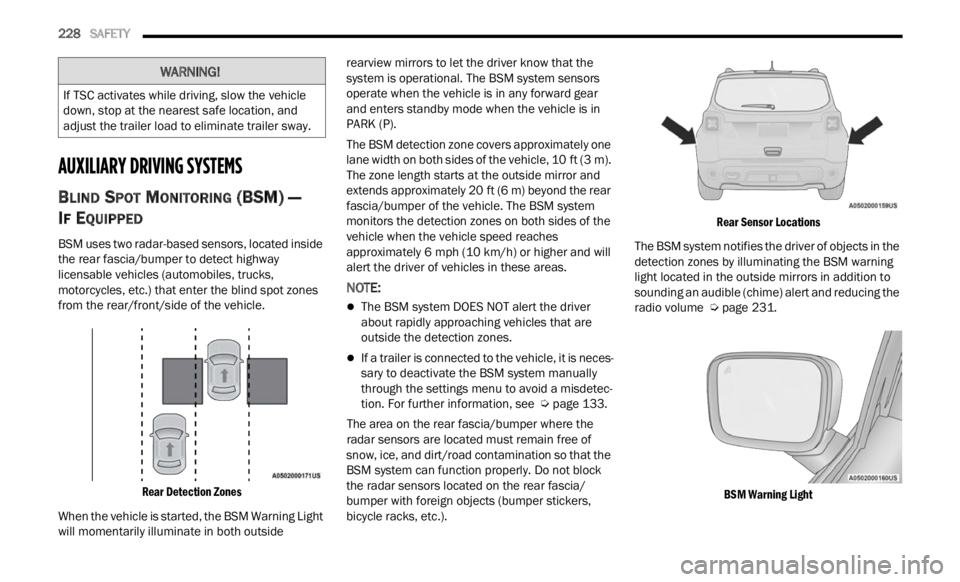
BSM uses two radar-based sensors, located inside
the rear fascia/bumper to detect highway
licensable vehicles (automobiles, trucks,
motorcycles, etc.) that enter the blind spot zones
from the rear/front/side of the vehicle.
Rear Detection Zones
When the vehicle is started, the BSM Warning Light
will m
omentarily illuminate in both outside rearview mirrors to let the driver know that the
system is operational. The BSM system sensors
operate when the vehicle is in any forward gear
and enters standby mode when the vehicle is in
PARK (P).
The BSM detection zone covers approximately one
lane
w
idth on both sides of the vehicle, 10 ft (3 m).
The z on
e length starts at the outside mirror and
extends approximately 20 ft (6 m) beyond the rear
fascia
/bumper of the vehicle. The BSM system
monitors the detection zones on both sides of the
vehicle when the vehicle speed reaches
approximately 6 mph (10 km/h) or higher and will
alert
the driver of vehicles in these areas.
NOTE:
The BSM system DOES NOT alert the driver
about rapidly approaching vehicles that are
outside the detection zones.
If a trailer is connected to the vehicle, it is neces -
sary to deactivate the BSM system manually
t h r
ou g
h
the settings menu to avoid a misdetec -
tion. For further information, see Ú page 133.
The area on the rear fascia/bumper where the
r adar
sensors are located must remain free of
snow, ice, and dirt/road contamination so that the
BSM system can function properly. Do not block
the radar sensors located on the rear fascia/
bumper with foreign objects (bumper stickers,
bicycle racks, etc.).
Rear Sensor Locations
The BSM system notifies the driver of objects in the
detec t
ion zones by illuminating the BSM warning
light located in the outside mirrors in addition to
sounding an audible (chime) alert and reducing the
radio volume Ú page 231.
BSM Warning Light
WARNING!
If TSC activates while driving, slow the vehicle
down, stop at the nearest safe location, and
adjust the trailer load to eliminate trailer sway.
Page 232 of 364
230 SAFETY
The BSM system is designed not to issue an alert
on stationary objects such as guardrails, posts,
walls, foliage, berms, etc. However, occasionally
the system may alert on such objects. This is
normal operation and your vehicle does not require
service.
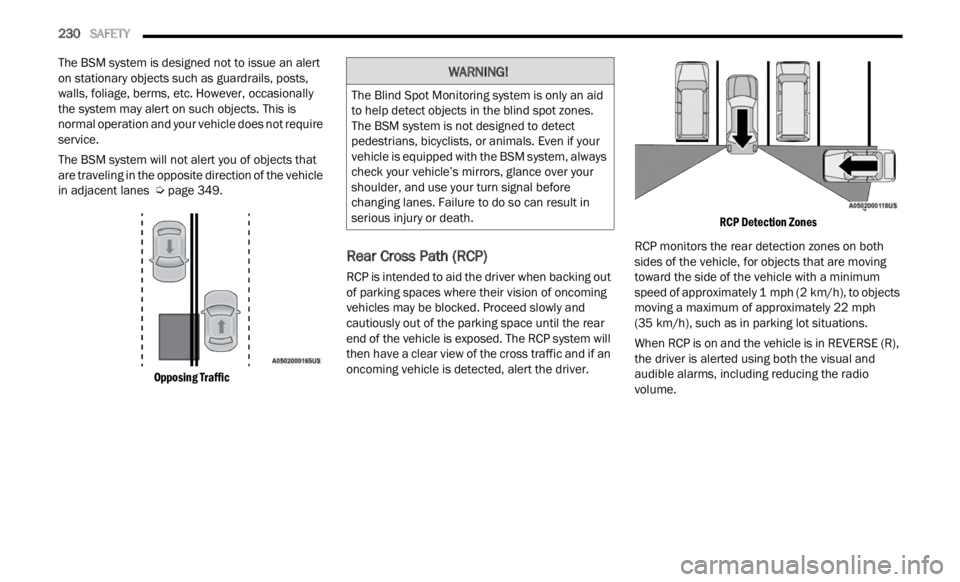
The BSM system will not alert you of objects that
are t r
aveling in the opposite direction of the vehicle
in adjacent lanes Ú page 349.
Opposing Traffic
Rear Cross Path (RCP)
RCP is intended to aid the driver when backing out
of parking spaces where their vision of oncoming
vehicles may be blocked. Proceed slowly and
cautiously out of the parking space until the rear
end of the vehicle is exposed. The RCP system will
then have a clear view of the cross traffic and if an
oncoming vehicle is detected, alert the driver.
RCP Detection Zones
RCP monitors the rear detection zones on both
sides
of the vehicle, for objects that are moving
toward the side of the vehicle with a minimum
speed of approximately 1 mph (2 km/h), to objects
moving
a maximum of approximately 22 mph
(35 km /
h), such as in parking lot situations.
When RCP is on and the vehicle is in REVERSE (R),
the dr
iver is alerted using both the visual and
audible alarms, including reducing the radio
volume.
WARNING!
The Blind Spot Monitoring system is only an aid
to help detect objects in the blind spot zones.
The BSM system is not designed to detect
pedestrians, bicyclists, or animals. Even if your
vehicle is equipped with the BSM system, always
check your vehicle’s mirrors, glance over your
shoulder, and use your turn signal before
changing lanes. Failure to do so can result in
serious injury or death.
Page 233 of 364
SAFETY 231
NOTE:
In a parking lot situation, oncoming vehicles can be
blocke d
by vehicles parked on either side. If the
sensors are blocked by other structures or
vehicles, the system will not be able to alert the
driver.
Blind Spot Modes
Blind Spot has three selectable modes of
operation that are available in the Uconnect
system.
Blind Spot Alert Lights Only
When operating in Blind Spot Alert mode, the BSM
s ystem
will provide a visual alert in the appropriate
side view mirror based on a detected object.
However, when the system is operating in Rear
Cross Path (RCP) mode, the system will respond with both visual and audible alerts when a
detected object is present. Whenever an audible
alert is requested, the radio is muted.
Blind Spot Alert Lights/Chime
When operating in Blind Spot Alert Lights/Chime
m
ode, t
he BSM system will provide a visual alert in
the appropriate side view mirror based on a
detected object. If the turn signal is then activated,
and it corresponds to an alert present on that side
of the vehicle, an audible chime will also be
sounded. Whenever a turn signal and detected
object are present on the same side at the same
time, both the visual and audible alerts will be
issued. In addition to the audible alert, the radio (if
on) will also be muted.
NOTE:
Whenever an audible alert is requested by the
BSM s y
stem, the radio is also muted.
When the system is in RCP, the system will respond
with b
oth visual and audible alerts when a
detected object is present. Whenever an audible
alert is requested, the radio is also muted. Turn/
hazard signal status is ignored; the RCP state
always requests the chime.
Blind Spot Alert Off
When the BSM system is turned off, there will be a
relat e
d message on instrument cluster display. If
BSM system is off, this message will be visualized
every time the vehicle is restarted.
NOTE:
The BSM system will store the current operating
mode w h
en the vehicle is shut off. Each time the
vehicle is started the previously stored mode will
be recalled and used.
Blind Spot Monitoring Fault Warnings
Blinded Sensor
In the case of a sensor that is blinded:
BSM Mirror Warning Lights are turned on contin -
uously
An instrument cluster dedicated message will
display
NOTE:
The rear fascia/bumper must be clean and free of
any ob s
tructing debris.
System Not Available
In the case of the system being temporarily
unava i
lable:
BSM Mirror Warning Lights are turned on contin -
uously
An instrument cluster dedicated message will
display
In the case of the system being completely
unavai
lable:
A chime will sound
An instrument cluster dedicated message will
display
WARNING!
Rear Cross Path Detection (RCP) is not a backup
aid system. It is intended to be used to help a
driver detect an oncoming vehicle in a parking
lot situation. Drivers must be careful when
backing up, even when using RCP. Always check
carefully behind your vehicle, look behind you,
and be sure to check for pedestrians, animals,
other vehicles, obstructions, and blind spots
before backing up. Failure to do so can result in
serious injury or death.
6
Page 236 of 364
234 SAFETY
Service FCW Warning
If the system turns off, and the instrument cluster
display reads: “FCW Unavailable Service
Required”, this indicates there is an internal
system fault. Although the vehicle is still drivable
under normal conditions, have the system checked
by an authorized dealer.
“FCW Front Radar Sensor Temporarily Blocked”
Warni n
g
The “FCW Front Radar Sensor Temporarily
Blocked
” warning will display when conditions
temporarily limit system performance. This most
often occurs at times of poor visibility, such as in
snow or heavy rain. The system may also become
temporarily blinded due to obstructions, such as
mud, dirt or ice. In these cases, the instrument
cluster display will read “FCW Front Radar Sensor
Temporarily Blocked” and the system will
deactivate.
The “FCW Front Radar Sensor Temporarily
Blocke d
” message can sometimes be displayed
while driving in highly reflective areas (i.e. tunnels
with reflective tiles, or ice and snow). The system
will recover after the vehicle has left these areas.
Under rare conditions, when the radar is not
tracking any vehicles or objects in its path, this
warning may temporarily occur. If weather conditions are not a factor, the driver
shoul
d
examine the sensor. It may require cleaning
or removal of an obstruction. In absence of visible
obstructions on the fasica/bumper, it could be
necessary to wipe off the radar directly on the
surface, after having the radar cover removed. It’s
recommended that an authorized dealer perform
this operation.
NOTE:
If the “FCW Front Radar Sensor Temporarily
Blocked” message occurs frequently (e.g. more
than once on every trip) without any snow, rain,
mud, or other obstruction, have the radar
sensor realigned at an authorized dealer.
Installing a snow plow or front-end protector is
not recommended. Doing so may block the
sensor and inhibit FCW operation.
Use only a soft cloth for cleaning. Do not use
solvents or abrasive pastes.
The radar is equipped with a defrost system, so
in some climatic conditions it could reach high
temperatures. Wait at least 30 seconds after
the engine has been turned off before touching
the sensor.
Precautions While Driving With FCW
In certain driving conditions, such as:
Driving in the vicinity of a curve
Small vehicles and/or not aligned to the lane
Lane changing of other vehicles
Passing of vehicles in an oncoming intersection
The intervention of the system could be
u n e
xp
e
cted or delayed. The driver must therefore
always pay particular attention, while maintaining
control of the vehicle to drive in complete safety.
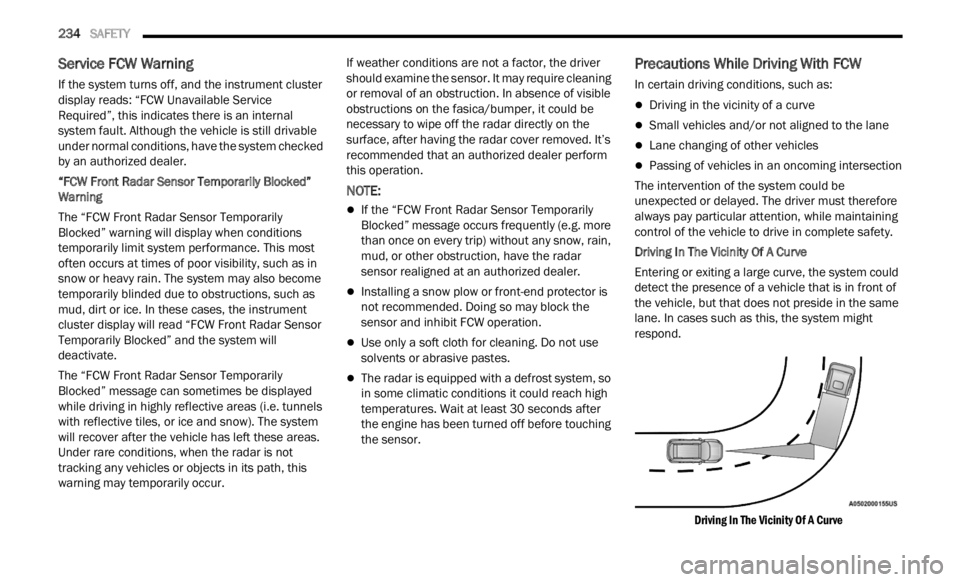
Driving In The Vicinity Of A Curve
Entering or exiting a large curve, the system could
detec t
the presence of a vehicle that is in front of
the vehicle, but that does not preside in the same
lane. In cases such as this, the system might
respond.
Driving In The Vicinity Of A Curve
Page 243 of 364

SAFETY 241
SEAT BELT SYSTEMS
Buckle up even though you are an excellent driver,
even on short trips. Someone on the road may be
a poor driver and could cause a collision that
includes you. This can happen far away from home
or on your own street.
Research has shown that seat belts save lives, and
they c
an reduce the seriousness of injuries in a
collision. Some of the worst injuries happen when
people are thrown from the vehicle. Seat belts
reduce the possibility of ejection and the risk of
injury caused by striking the inside of the vehicle.
Everyone in a motor vehicle should be belted at all
times.
Enhanced Seat Belt Use Reminder System
(BeltAlert)
Driver And Passenger BeltAlert — If Equipped
BeltAlert is a feature intended to remind the driver and outboard front seat
passenger to buckle their seat belts. The
BeltAlert feature is active whenever the
ignition switch is in the START or ON/RUN position.
Initial Indication
If the driver is unbuckled when the ignition switch
is fi r
st in the START or ON/RUN position a chime
will signal for a few seconds. If the driver or
outboard front seat passenger is unbuckled when
the ignition switch is first in the START or ON/RUN position the Seat Belt Reminder Light will turn solid
red and remain red until the seat belt is buckled.
After the driver and outboard front seat passenger
have buckled their seat belts all Seat Belt
Reminder Lights will turn off. The outboard front
passenger seat BeltAlert is not active when the
outboard front passenger seat is unoccupied. The
cluster display will inform the driver that you must
fasten the driver’s seat belt in order to release the
parking brake.
BeltAlert Warning Sequence
The BeltAlert warning sequence is activated when
t
he v e
hicle is moving above a specified vehicle
speed range and the driver or outboard front seat
passenger is unbuckled (the outboard front
passenger seat BeltAlert is not active when the
outboard front passenger seat is unoccupied). The
BeltAlert warning sequence starts by blinking the
Seat Belt Reminder Light and sounding an
intermittent chime. Once the BeltAlert warning
sequence has completed, the Seat Belt Reminder
Light will remain solid red until the driver and
outboard front seat passenger are buckled. The
BeltAlert warning sequence may repeat based on
vehicle speed until the driver and occupied
outboard front seat passenger seat belts are
buckled. The driver should instruct all occupants to
buckle their seat belts. Change Of Status
If the driver or outboard front seat passenger
unbuc
k
les their seat belt while the vehicle is
traveling, the BeltAlert warning sequence will begin
until the seat belts are buckled again.
The outboard front passenger seat BeltAlert is not
active
when the outboard front passenger seat is
unoccupied. BeltAlert may be triggered when an
animal or other items are placed on the outboard
front passenger seat or when the seat is folded flat
(if equipped). It is recommended that pets be
restrained in the rear seat (if equipped) in pet
harnesses or pet carriers that are secured by seat
belts, and cargo is properly stowed.
BeltAlert can be activated or deactivated by an
author i
zed dealer. FCA US LLC does not
recommend deactivating BeltAlert.
NOTE:
If BeltAlert has been deactivated, the Seat Belt
Remin d
er Light will turn on and remain on until the
driver and outboard front seat passenger seat
belts are buckled.
Lap/Shoulder Belts
All seating positions in your vehicle are equipped
with lap/shoulder belts.
The seat belt webbing retractor will lock only during
very s
udden stops or collisions. This feature allows
the shoulder part of the seat belt to move freely
with you under normal conditions. However, in a
6
Page 244 of 364
242 SAFETY
(Continued)
(Continued)
collision the seat belt will lock and reduce your risk
of striking the inside of the vehicle or being thrown
out of the vehicle.
WARNING!
Relying on the air bags alone could lead to
more severe injuries in a collision. The air
bags work with your seat belt to restrain you
properly. In some collisions, the air bags won’t
deploy at all. Always wear your seat belt even
though you have air bags.
In a collision, you and your passengers can
suffer much greater injuries if you are not
properly buckled up. You can strike the inte -
rior of your vehicle or other passengers, or you
can b e
thrown out of the vehicle. Always be
sure you and others in your vehicle are
buckled up properly.
It is dangerous to ride in a cargo area, inside
or outside of a vehicle. In a collision, people
riding in these areas are more likely to be seri -
ously injured or killed.
Do not allow people to ride in any area of your
vehicle that is not equipped with seats and
seat belts.
Be sure everyone in your vehicle is in a seat
and using a seat belt properly. Occupants,
including the driver, should always wear their
seat belts whether or not an air bag is also
provided at their seating position to minimize
the risk of severe injury or death in the event
of a crash.
Wearing your seat belt incorrectly could make
your injuries in a collision much worse. You
might suffer internal injuries, or you could
even slide out of the seat belt. Follow these
instructions to wear your seat belt safely and
to keep your passengers safe, too.
Two people should never be belted into a
single seat belt. People belted together can
crash into one another in a collision, hurting
one another badly. Never use a lap/shoulder
belt or a lap belt for more than one person, no
matter what their size.
WARNING!WARNING!
A lap belt worn too high can increase the risk
of injury in a collision. The seat belt forces
won’t be at the strong hip and pelvic bones,
but across your abdomen. Always wear the lap
part of your seat belt as low as possible and
keep it snug.
A twisted seat belt may not protect you prop -
erly. In a collision, it could even cut into you.
Be su r
e the seat belt is flat against your body,
without twists. If you can’t straighten a seat
belt in your vehicle, take it to an authorized
dealer immediately and have it fixed.
A seat belt that is buckled into the wrong
buckle will not protect you properly. The lap
portion could ride too high on your body,
possibly causing internal injuries. Always
buckle your seat belt into the buckle nearest
you.
A seat belt that is too loose will not protect you
properly. In a sudden stop, you could move too
far forward, increasing the possibility of injury.
Wear your seat belt snugly.
Page 246 of 364
244 SAFETY
5. Position the shoulder belt across the shoulder
and chest with minimal, if any slack so that it
is comfortable and not resting on your neck.
The retractor will withdraw any slack in the
shoulder belt.
6. To release the seat belt, push the red button on th e
buckle. The seat belt will automatically
retract to its stowed position. If necessary,
slide the latch plate down the webbing to allow
the seat belt to retract fully.
Lap/Shoulder Belt Untwisting Procedure
Use the following procedure to untwist a twisted
lap/shoulder belt.
1. Position the latch plate as close as possible to the an
chor point.
2. At about 6 to 12 inch
es (15 to 30 cm) above
the la
tch plate, grab and twist the seat belt
webbing 180 degrees to create a fold that
begins immediately above the latch plate.
3. Slide the latch plate upward over the folded webbi
ng. The folded webbing must enter the
slot at the top of the latch plate.
4. Continue to slide the latch plate up until it clea r
s the folded webbing and the seat belt is
no longer twisted.
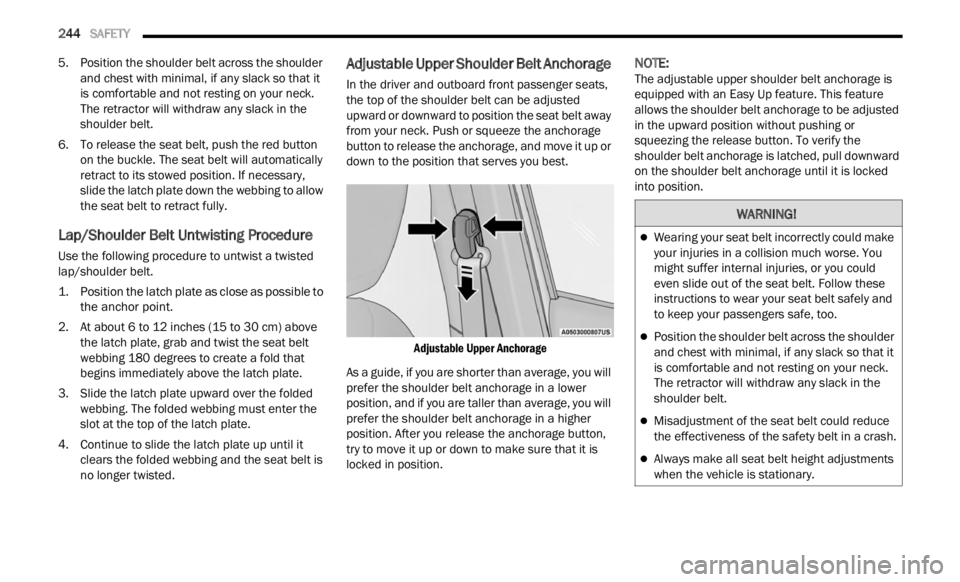
Adjustable Upper Shoulder Belt Anchorage
In the driver and outboard front passenger seats,
the top of the shoulder belt can be adjusted
upward or downward to position the seat belt away
from your neck. Push or squeeze the anchorage
button to release the anchorage, and move it up or
down to the position that serves you best.
Adjustable Upper Anchorage
As a guide, if you are shorter than average, you will
p refe
r
the shoulder belt anchorage in a lower
position, and if you are taller than average, you will
prefer the shoulder belt anchorage in a higher
position. After you release the anchorage button,
try to move it up or down to make sure that it is
locked in position.
NOTE:
The adjustable upper shoulder belt anchorage is
equip p
ed with an Easy Up feature. This feature
allows the shoulder belt anchorage to be adjusted
in the upward position without pushing or
squeezing the release button. To verify the
shoulder belt anchorage is latched, pull downward
on the shoulder belt anchorage until it is locked
into position.
WARNING!
Wearing your seat belt incorrectly could make
your injuries in a collision much worse. You
might suffer internal injuries, or you could
even slide out of the seat belt. Follow these
instructions to wear your seat belt safely and
to keep your passengers safe, too.
Position the shoulder belt across the shoulder
and chest with minimal, if any slack so that it
is comfortable and not resting on your neck.
The retractor will withdraw any slack in the
shoulder belt.
Misadjustment of the seat belt could reduce
the effectiveness of the safety belt in a crash.
Always make all seat belt height adjustments
when the vehicle is stationary.
Page 247 of 364
SAFETY 245
Seat Belts And Pregnant Women
Seat Belts And Pregnant Women
Seat belts must be worn by all occupants including
pregna
nt women: the risk of injury in the event of
an accident is reduced for the mother and the
unborn child if they are wearing a seat belt.
Position the lap belt snug and low below the
abdomen
and across the strong bones of the hips.
Place the shoulder belt across the chest and away
from the neck. Never place the shoulder belt
behind the back or under the arm.
Seat Belt Pretensioner
The front outboard seat belt system is equipped
with pretensioning devices that are designed to
remove slack from the seat belt in the event of a
collision. These devices may improve the
performance of the seat belt by removing slack from the seat belt early in a collision. Pretensioners
work for all size occupants, including those in child
restraints.
NOTE:
These devices are not a substitute for proper seat
belt p
lacement by the occupant. The seat belt still
must be worn snugly and positioned properly.
The pretensioners are triggered by the Occupant
Restr a
int Controller (ORC). Like the air bags, the
pretensioners are single use items. A deployed
pretensioner or a deployed air bag must be
replaced immediately.
Energy Management Feature
The front outboard seat belt system is equipped
with an Energy Management feature that may help
further reduce the risk of injury in the event of a
collision. The seat belt system has a retractor
assembly that is designed to release webbing in a
controlled manner.
Switchable Automatic Locking Retractor
(ALR)
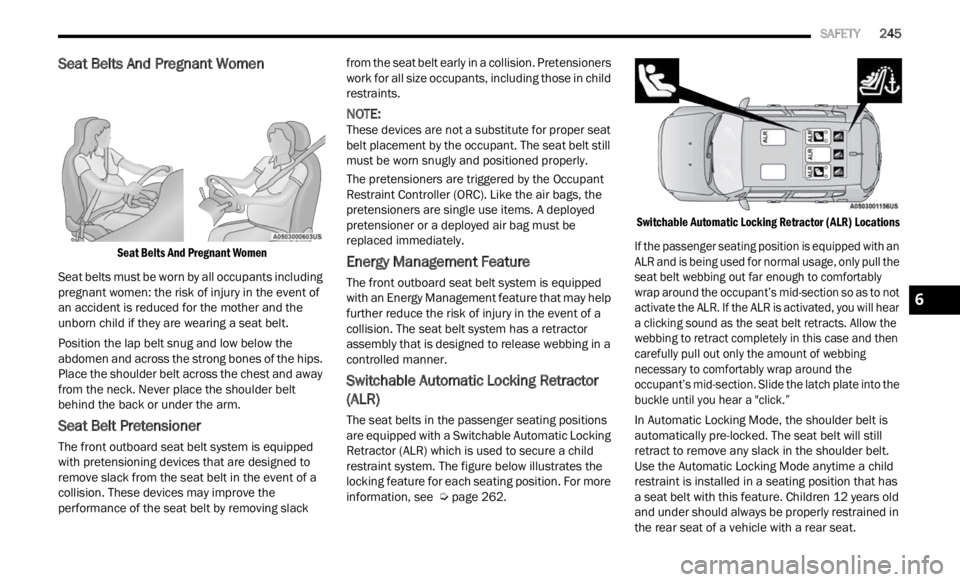
The seat belts in the passenger seating positions
are equipped with a Switchable Automatic Locking
Retractor (ALR) which is used to secure a child
restraint system. The figure below illustrates the
locking feature for each seating position. For more
information, see Ú page 262.
Switchable Automatic Locking Retractor (ALR) Locations
If the passenger seating position is equipped with an
ALR an
d is being used for normal usage, only pull the
seat belt webbing out far enough to comfortably
wrap around the occupant’s mid-section so as to not
activate the ALR. If the ALR is activated, you will hear
a clicking sound as the seat belt retracts. Allow the
webbing to retract completely in this case and then
carefully pull out only the amount of webbing
necessary to comfortably wrap around the
occupant’s mid-section. Slide the latch plate into the
buckle until you hear a "click.”
In Automatic Locking Mode, the shoulder belt is
automa t
ically pre-locked. The seat belt will still
retract to remove any slack in the shoulder belt.
Use the Automatic Locking Mode anytime a child
restraint is installed in a seating position that has
a seat belt with this feature. Children 12 years old
and under should always be properly restrained in
the rear seat of a vehicle with a rear seat.
6