radio JEEP WAGONEER 2023 User Guide
[x] Cancel search | Manufacturer: JEEP, Model Year: 2023, Model line: WAGONEER, Model: JEEP WAGONEER 2023Pages: 396, PDF Size: 15.17 MB
Page 46 of 396
44GETTING TO KNOW YOUR VEHICLE
The level of heat selected will stay on until the operator
changes it.
NOTE:The engine must be running for the heated seats to
operate.
VENTILATED SEATS — IF EQUIPPED
Located in the seat cushion and seatback are fans that
draw the air from the passenger compartment and move
air through fine perforations in the seat cover to help keep
the occupant cooler in higher ambient temperatures.
Front Ventilated Seats
The ventilated seats control buttons are
located on the sides of the radio or within the
Uconnect system. The fans operate at three
speeds: HI, MED and LO.
Press the ventilated seat button once to choose HI.
Press the ventilated seat button a second time to
choose MED.
Press the ventilated seat button a third time to choose
LO.
Press the ventilated seat button a fourth time to turn
the ventilation off.
The fans can be turned on in the seatback only, seat
cushion only, or both. Press the seat image on the
touchscreen or push the seat zone button on the side of
the radio to cycle through these seat zones. An LED will
illuminate next to the selected zone(s). If equipped with
touchscreen buttons, the selected zones will be
highlighted on the seat image.
NOTE:The engine must be running for the ventilated seats to
operate.
For information on use with the Remote Start system, see
Úpage 23.
Rear Ventilated Seats — If Equipped
The two second row outboard seats may be
equipped with ventilated seats. The rear
ventilated seat control switches are located on
the rear of the center console and allow the
rear passengers to operate the seats independently.
If equipped with a Rear Comfort And Convenience Display,
ventilated seat settings can be selected within the display
Úpage 69.
You can choose from HI, MED, LO, or OFF fan speed.
Indicator lights in each switch illuminate indicating the
level of fan speed in use.
Push the ventilated seat switch once to choose HI.
Push the ventilated seat switch a second time to
choose MED.
Push the ventilated seat switch a third time to choose
LO.
Push the ventilated seat switch a fourth time to turn
the ventilation off.
NOTE:The engine must be running for the ventilated seats to
operate.
HEAD RESTRAINTS
Head restraints are designed to reduce the risk of injury by
restricting head movement in the event of a rear impact.
Head restraints should be adjusted so that the top of the
head restraint is located above the top of your ear.
Front Head Restraints
Your vehicle is equipped with front four-way driver and
passenger head restraints.
The Wagoneer is equipped with manual four-way head
restraints, and the Grand Wagoneer is equipped with
power four-way head restraints with adjustable wings.
If your vehicle is equipped with manual front head
restraints, to raise the head restraint, push the
adjustment button, located on the left side of the head
restraint, and pull upward on the head restraint. To lower
the head restraint, push the adjustment button, and push
downward on the head restraint.
WARNING!
All occupants, including the driver, should not
operate a vehicle or sit in a vehicle’s seat until the
head restraints are placed in their proper positions in
order to minimize the risk of neck injury in the event
of a crash.
Head restraints should never be adjusted while the
vehicle is in motion. Driving a vehicle with the head
restraints improperly adjusted or removed could
cause serious injury or death in the event of a
collision.
23_WS_OM_EN_USC_t.book Page 44
Page 48 of 396
46GETTING TO KNOW YOUR VEHICLE
(Continued)
Grand Wagoneer front power head restraints are also
equipped with adjustable wings, located on the outer
left-hand and right-hand front face of the head restraint.
Adjustable Wing (Left-Hand Side Shown)
To adjust the wings for additional comfort and support,
pull forward on the wings. To return the wings, push the
wings rearward to the flat position.
Wing Adjustment
Wing Extended (Left-Hand Side Shown)
NOTE:The head restraints should only be removed by qualified
technicians, for service purposes only. If either of the head
restraints require removal, see an authorized dealer.
Head Restraints — Second Row Captain’s
Chairs
If the second row is equipped with captain’s chairs, the
head restraints are not adjustable or removable. They
automatically fold forward when the seatback is folded,
and do not return to their normal position when the
seatback is raised. After returning the seatback to its
upright position after a folding operation, raise the head
restraint until it locks in place.
The driver can also fold the second row outboard head
restraints through the radio, for improved visibility when
the vehicle is in REVERSE and there are no occupants in
the seats.
Press the Headrest Fold button within the
Controls menu of the Uconnect system to
power fold the second row outboard head
restraints.
NOTE:
The head restraints must be raised manually when
occupying the second row.
Do not fold if there are passengers seated in the
second row seats.
WARNING!
All occupants, including the driver, should not
operate a vehicle or sit in a vehicle’s seat until the
head restraints are placed in their proper positions in
order to minimize the risk of neck injury in the event
of a crash.
Head restraints should never be adjusted while the
vehicle is in motion. Driving a vehicle with the head
restraints improperly adjusted or removed could
cause serious injury or death in the event of a
collision.
WARNING!
All occupants, including the driver, should not
operate a vehicle or sit in a vehicle’s seat until the
head restraints are placed in their proper positions in
order to minimize the risk of neck injury in the event
of a crash.
23_WS_OM_EN_USC_t.book Page 46
Page 49 of 396
GETTING TO KNOW YOUR VEHICLE47
(Continued)
Head Restraints — Second Row Bench
If the second row is equipped with a bench seat, the head
restraints on the outboard seats are not adjustable or
removable. They automatically fold forward when the
seatback is folded, and do not return to their normal
position when the seatback is raised. After returning the
seatback to its upright position after a folding operation,
raise the head restraint until it locks in place.
The driver can also fold the second row outboard head
restraints through the radio, for improved visibility when
the vehicle is in REVERSE, and there are no occupants in
the seats.
Press the Headrest Fold button within the
Controls menu of the Uconnect system to
power fold the second row outboard head
restraints.
NOTE:
The head restraints must be raised manually when
occupying the second row.
Do not fold if there are passengers seated in the
second row seats. The center head restraint has one adjustment position,
and can be adjusted up, when the seat is occupied, or
down for storage. To adjust this head restraint, push the
adjustment button, located on the base of the head
restraint, while pulling upward or pushing downward until
it locks into place.
NOTE:The center head restraint is not removable.
Center Seat Head Restraint Adjustment Button
NOTE:For information on child restraint tethering, see Úpage 256.
Third Row Head Restraints
The head restraint in the center position can be raised and
lowered for tether routing or height adjustment
Úpage 256.
Center Head Restraint Adjustment Button
NOTE:The center head restraint should only be removed by qual
-
ified technicians, for service purposes only. If the head
restraint requires removal, see an authorized dealer.
Head restraints should never be adjusted while the
vehicle is in motion. Driving a vehicle with the head
restraints improperly adjusted or removed could
cause serious injury or death in the event of a
collision.
WARNING!
WARNING!
All occupants, including the driver, should not
operate a vehicle or sit in a vehicle’s seat until the
head restraints are placed in their proper positions in
order to minimize the risk of neck injury in the event
of a crash.
Head restraints should never be adjusted while the
vehicle is in motion. Driving a vehicle with the head
restraints improperly adjusted or removed could
cause serious injury or death in the event of a colli -
sion.
WARNING!
2
23_WS_OM_EN_USC_t.book Page 47
Page 51 of 396
GETTING TO KNOW YOUR VEHICLE49
Uconnect Voice Command Buttons
ADDITIONAL INFORMATION
© 2022 FCA US LLC. All rights reserved. Mopar and
Uconnect are registered trademarks and Mopar Owner
Connect is a trademark of FCA US LLC. SiriusXM® and all
related marks and logos are trademarks of SiriusXM®
Radio Inc.
Úpage 382.
For Uconnect system support, call 1-877-855-8400
(24 hours a day 7 days a week) or visit DriveUconnect.com
(US) or DriveUconnect.ca (Canada).
DRIVER ADJUSTABLE PEDALS
The adjustable pedals system is designed to allow a
greater range of driver comfort for steering wheel tilt and
seat position. This feature allows the brake and
accelerator pedals to move toward or away from the driver
to provide improved position with the steering wheel.
The adjustable pedal switch is located on the instrument
panel, next to the headlight switch.
Adjustable Pedals Switch
The pedals can be adjusted with the ignition in the OFF
position.
The pedals cannot be adjusted when the vehicle is in
REVERSE or when the Cruise Control system or Adap -
tive Cruise Control system is on. If there is an attempt
to adjust the pedals when the system is locked out, the
following messages will appear:
Adjustable Pedal Disabled — Cruise Control
Engaged
Adjustable Pedal Disabled — Vehicle In Reverse
NOTE:
Always adjust the pedals to a position that allows full
movement of the pedal.
Further small adjustments may be necessary to find
the best possible seat/pedal position.
For vehicles equipped with Driver Memory Settings
Úpage 31, you can use your key fob or the memory
switch on the driver’s door trim panel to return the
adjustable pedals to saved positions.
1 — For Vehicles Equipped With Navigation: Push The
Voice Recognition Button To Begin Radio, Media, Naviga -
tion, Climate, Start Or Answer A Phone Call, And Send Or
Receive A Text
1 — For Vehicles Not Equipped With Navigation: Push The
Phone Button To Answer An Incoming Phone Call
2 — Push To Access The Tile Feature
3 — Push The Hang Up Button To End A Call Currently In
Progress
WARNING!
Do not adjust the pedals while the vehicle is moving.
You could lose control and have an accident. Always
adjust the pedals while the vehicle is parked.
CAUTION!
Do not place any article under the adjustable pedals or
impede its ability to move, as it may cause damage to
the pedal controls. Pedal travel may become limited if
movement is stopped by an obstruction in the
adjustable pedal's path.
2
23_WS_OM_EN_USC_t.book Page 49
Page 55 of 396
GETTING TO KNOW YOUR VEHICLE53
NOTE:If the mirrors were folded manually by using the power
folding mirror switch on the driver’s door panel, they will
not automatically unfold.
HEATED MIRRORS
These mirrors are heated to melt frost or ice.
This feature will be activated whenever you
turn on the rear window defroster (if equipped)
Úpage 64.
TILT SIDE MIRRORS IN REVERSE
Tilt Side Mirrors In Reverse provides automatic outside
mirror positioning which will aid the driver’s view of the
ground rearward of the front doors. Outside mirrors will
move slightly downward from the present position when
the vehicle is shifted into REVERSE. Outside mirrors will
then return to the original position when the vehicle is
shifted out of REVERSE position. Each stored memory
setting will have an associated Tilt Side Mirrors In Reverse
position.
NOTE:The Tilt Side Mirrors In Reverse feature can be turned on
and off using the Uconnect system Úpage 197.
UNIVERSAL GARAGE DOOR OPENER
(HOMELINK®)
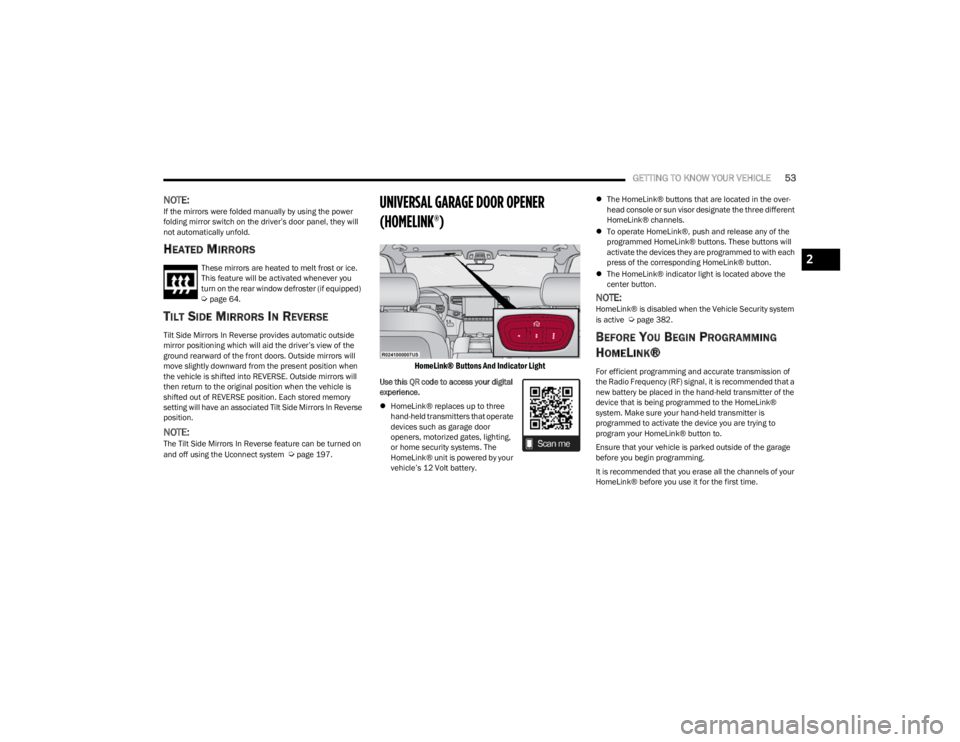
HomeLink® Buttons And Indicator Light
Use this QR code to access your digital
experience.
HomeLink® replaces up to three
hand-held transmitters that operate
devices such as garage door
openers, motorized gates, lighting,
or home security systems. The
HomeLink® unit is powered by your
vehicle’s 12 Volt battery.
The HomeLink® buttons that are located in the over -
head console or sun visor designate the three different
HomeLink® channels.
To operate HomeLink®, push and release any of the
programmed HomeLink® buttons. These buttons will
activate the devices they are programmed to with each
press of the corresponding HomeLink® button.
The HomeLink® indicator light is located above the
center button.
NOTE:HomeLink® is disabled when the Vehicle Security system
is active Úpage 382.
BEFORE YOU BEGIN PROGRAMMING
H
OMELINK®
For efficient programming and accurate transmission of
the Radio Frequency (RF) signal, it is recommended that a
new battery be placed in the hand-held transmitter of the
device that is being programmed to the HomeLink®
system. Make sure your hand-held transmitter is
programmed to activate the device you are trying to
program your HomeLink® button to.
Ensure that your vehicle is parked outside of the garage
before you begin programming.
It is recommended that you erase all the channels of your
HomeLink® before you use it for the first time.
2
23_WS_OM_EN_USC_t.book Page 53
Page 57 of 396
GETTING TO KNOW YOUR VEHICLE55
PROGRAMMING HOMELINK® TO A
M
ISCELLANEOUS DEVICE
The procedure on how to program HomeLink® to a
miscellaneous device follows the same procedure as
programming to a garage door opener
Úpage 54. Be sure
to determine if the device has a rolling code, or non-rolling
code before beginning the programming process.
NOTE:Canadian Radio Frequency (RF) laws require transmitter
signals to time-out (or quit) after several seconds of trans -
mission, which may not be long enough for HomeLink® to
pick up the signal during programming. Similar to this
Canadian law, some U.S. gate operators are designed to
time-out in the same manner. The procedure may need to
be performed multiple times to successfully pair the
device to your HomeLink® buttons.
REPROGRAMMING A SINGLE
H
OMELINK® BUTTON
To reprogram a single HomeLink® button that has been
previously trained, without erasing all the channels,
proceed as follows. Be sure to determine whether the new
device you want to program the HomeLink® button to has
a rolling code, or non-rolling code.
1. Place the ignition in the ON/RUN position, without
starting the engine.
2. Push and hold the desired HomeLink® button until the HomeLink® indicator light begins to flash after
20 seconds. Do not release the button.
3. Without releasing the button , proceed with Step 2 in
“Programming HomeLink® To A Garage Door
Opener” and follow all remaining steps.
CANADIAN/GATE OPERATOR
P
ROGRAMMING
For programming transmitters in Canada/United States
that require the transmitter signals to “time-out” after
several seconds of transmission:
Canadian Radio Frequency (RF) laws require transmitter
signals to time-out (or quit) after several seconds of
transmission, which may not be long enough for
HomeLink® to pick up the signal during programming.
Similar to this Canadian law, some U.S. gate operators are
designed to time-out in the same manner. It may be helpful to unplug the device during the cycling
process to prevent possible overheating of the garage
door or gate motor.
1. Place the ignition in the ON/RUN position.
NOTE:For vehicles equipped with Keyless Enter ‘n Go™, place
the ignition in the RUN position. Make sure while
programming HomeLink® with the engine on that your
vehicle is outside of your garage, or that the garage door
remains open at all times.
2. Place the hand-held transmitter 1 to 3 inches
(3 to 8 cm) away from the HomeLink® button you
wish to program while keeping the HomeLink®
indicator light in view.
3. Continue to push and hold the HomeLink® button while you push and release (cycle) your hand-held
transmitter every two seconds until HomeLink® has
successfully accepted the frequency signal. The
indicator light will flash slowly and then rapidly when
fully trained.
WARNING!
Your motorized door or gate will open and close while
you are programming the universal transmitter. Do
not program the transmitter if people or pets are in
the path of the door or gate.
Do not run your vehicle in a closed garage or
confined area while programming the transmitter.
Exhaust gas from your vehicle contains carbon
monoxide (CO) which is odorless and colorless.
Carbon monoxide is poisonous when inhaled and
can cause you and others to be severely injured or
killed.
2
23_WS_OM_EN_USC_t.book Page 55
Page 64 of 396
62GETTING TO KNOW YOUR VEHICLE
Multicolor Ambient Lighting — If Equipped
The color of certain ambient lighting inside of the vehicle
can be selected within the Apps menu on the radio screen,
or within Uconnect Settings
Úpage 197. Brightness is
adjusted using the ambient light dimmer control on the
headlight switch.
Five colors can be selected for the following two zones
inside of the vehicle:
Zone 1:
Instrument panel decorative ambient lights
Door panel decorative ambient lights
Zone 2:
Front seat footwell areas below the instrument
panel
Lighting below the second row seats
Map pocket lighting on all four door panels
These areas can be set to different colors, or if the SYNC
button is selected within the settings menu, all colored
lights will be set to the same color automatically.
NOTE:All other ambient lighting inside of the vehicle will remain
white, and the ambient light dimmer control switch will
adjust all ambient lighting at the same time.
ILLUMINATED ENTRY — IF EQUIPPED
The Illuminated Entry feature allows you to activate the
low beam, parking lights, and side marker lights for 25
seconds when the vehicle is unlocked (through the key fob
or the Passive Entry door handles [if equipped]). This feature can be activated or deactivated through the
Uconnect Settings
Úpage 197.
NOTE:
When a door is open with the feature active, the activa -
tion of the lights is extended for five seconds.
The feature is disabled when the vehicle is locked or
when the ignition is placed in the ON/RUN position.
WINDSHIELD WIPERS AND WASHERS
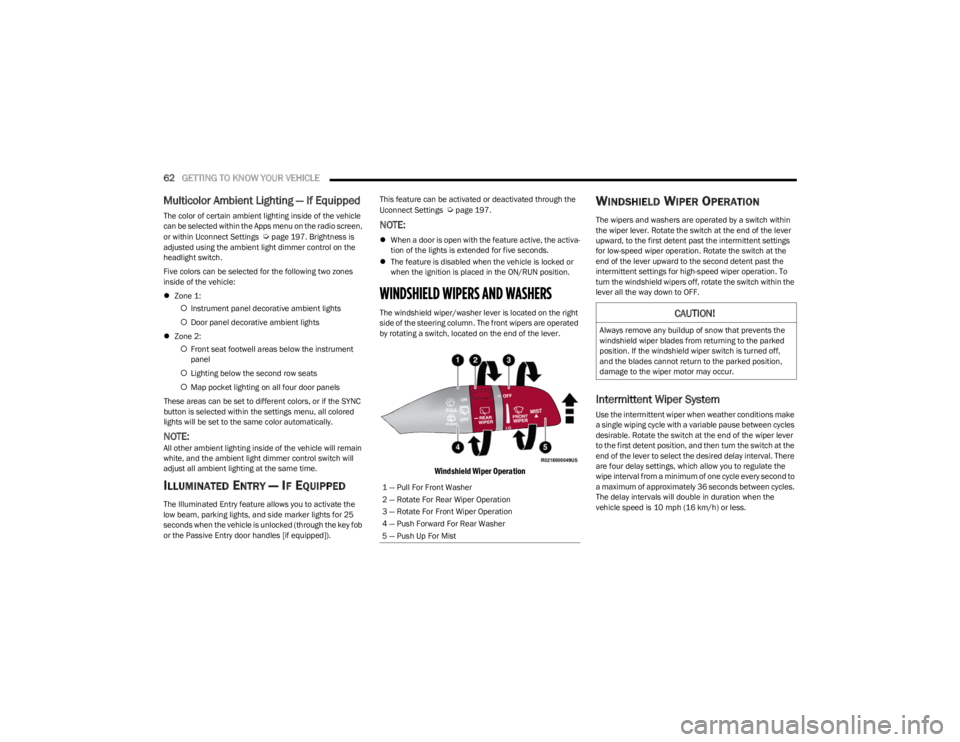
The windshield wiper/washer lever is located on the right
side of the steering column. The front wipers are operated
by rotating a switch, located on the end of the lever.
Windshield Wiper Operation
WINDSHIELD WIPER OPERATION
The wipers and washers are operated by a switch within
the wiper lever. Rotate the switch at the end of the lever
upward, to the first detent past the intermittent settings
for low-speed wiper operation. Rotate the switch at the
end of the lever upward to the second detent past the
intermittent settings for high-speed wiper operation. To
turn the windshield wipers off, rotate the switch within the
lever all the way down to OFF.
Intermittent Wiper System
Use the intermittent wiper when weather conditions make
a single wiping cycle with a variable pause between cycles
desirable. Rotate the switch at the end of the wiper lever
to the first detent position, and then turn the switch at the
end of the lever to select the desired delay interval. There
are four delay settings, which allow you to regulate the
wipe interval from a minimum of one cycle every second to
a maximum of approximately 36 seconds between cycles.
The delay intervals will double in duration when the
vehicle speed is 10 mph (16 km/h) or less.
1 — Pull For Front Washer
2 — Rotate For Rear Wiper Operation
3 — Rotate For Front Wiper Operation
4 — Push Forward For Rear Washer
5 — Push Up For Mist
CAUTION!
Always remove any buildup of snow that prevents the
windshield wiper blades from returning to the parked
position. If the windshield wiper switch is turned off,
and the blades cannot return to the parked position,
damage to the wiper motor may occur.
23_WS_OM_EN_USC_t.book Page 62
Page 66 of 396
64GETTING TO KNOW YOUR VEHICLE
REAR WIPER AND WASHER
The rear wiper/washer is operated by rotating a switch,
located at the middle of the lever.
Rotate the center portion of the lever upward to
the first detent for intermittent operation and to
the second detent for continuous rear wiper
operation.
Rear Window Washer Operation Pushing the windshield wiper lever forward
activates the rear window washer. If the lever is
pushed while on the intermittent setting, the
wipers will turn on and operate for several wipe
cycles after the lever is released, and then resume the
intermittent interval previously selected. If the lever is
pushed while the wipers are in the off position, the wipers
will operate several wipe cycles, then turn off.
NOTE:When the rear window washer is activated, the rear Back
Up camera and Digital Rearview Mirror (if equipped)
cameras are also washed.
WINDSHIELD WIPER DE-ICER —
I
F EQUIPPED
Your vehicle may be equipped with a Windshield Wiper
De-Icer feature that may be activated under the following
conditions:
Activation By Front Defrost — The Windshield Wiper
De-Icer shall be activated automatically in the case of
a cold weather manual start with full front defrost, and
when the ambient temperature is below 33°F (0.6°C).
Activation By Rear Defrost — The Windshield Wiper
De-Icer shall be activated automatically when the rear
defrost is turned on and when the ambient tempera -
ture is below 33°F (0.6°C).
Activation By Remote Start Operation — When Remote
Start is active and the outside ambient temperature is
less than 33°F (0.6°C), the Windshield Wiper De-Icer
will activate. Exiting Remote Start will resume its
previous operation. If the Windshield Wiper De-Icer was
active, the timer and operation will continue.
CLIMATE CONTROLS
The Climate Control system allows you to regulate the
temperature, air flow, and direction of air circulating
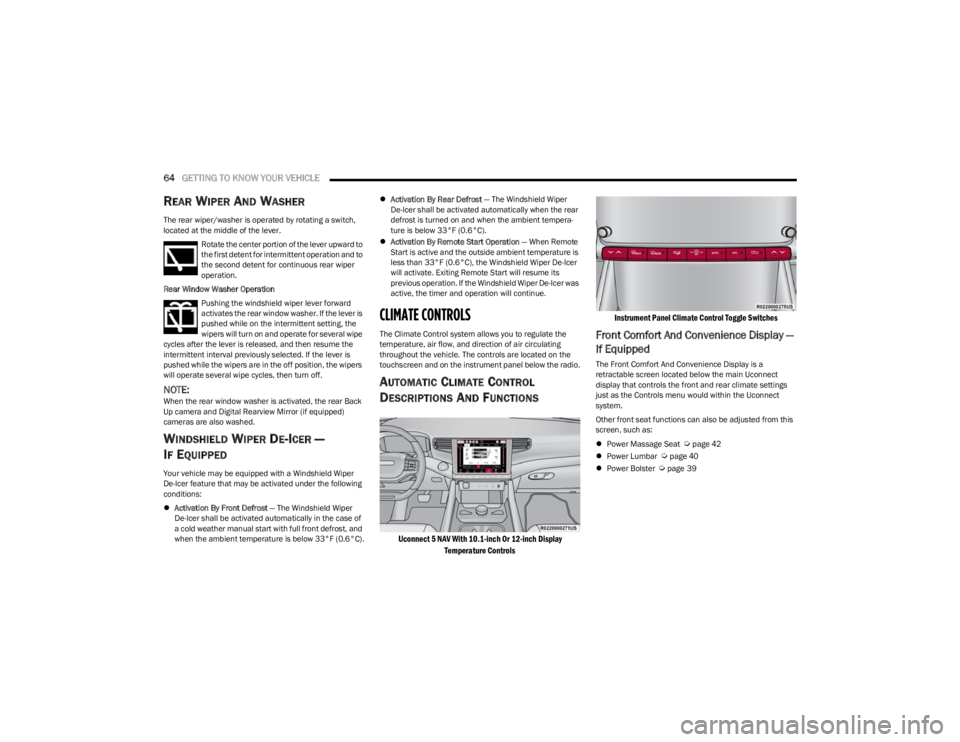
throughout the vehicle. The controls are located on the
touchscreen and on the instrument panel below the radio.
AUTOMATIC CLIMATE CONTROL
D
ESCRIPTIONS AND FUNCTIONS
Uconnect 5 NAV With 10.1-inch Or 12-inch Display
Temperature Controls Instrument Panel Climate Control Toggle Switches
Front Comfort And Convenience Display —
If Equipped
The Front Comfort And Convenience Display is a
retractable screen located below the main Uconnect
display that controls the front and rear climate settings
just as the Controls menu would within the Uconnect
system.
Other front seat functions can also be adjusted from this
screen, such as:
Power Massage Seat
Úpage 42
Power Lumbar Úpage 40
Power Bolster Úpage 39
23_WS_OM_EN_USC_t.book Page 64
Page 69 of 396
GETTING TO KNOW YOUR VEHICLE67
Changing the front passenger temperature or rear
passenger temperature, mode, and blower settings while
in SYNC will automatically exit this feature.
NOTE:
When SYNC is not active, the rear passenger climate
control settings will need to be adjusted manually to
achieve desired comfort. See
Úpage 68 and Úpage 69 for more information.
The SYNC setting is only available on the touchscreen.
Blower Control
Blower Control is used to regulate the amount
of air forced through the Climate Control
system. There are several blower speeds
available. The speeds can be selected using
the blower control buttons on the touchscreen.
Use the small blower icon to reduce the blower setting and
the large blower icon to increase the blower setting.
Blower speed can also be selected by pressing the
numbered blower speed on the bar area between the
blower icons.
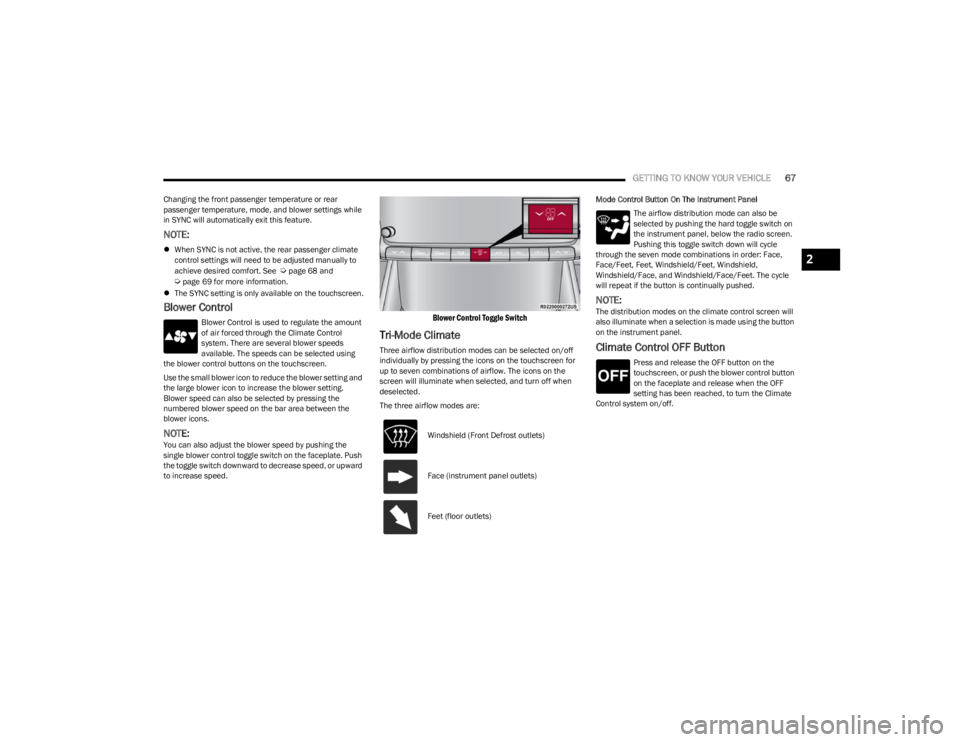
NOTE:You can also adjust the blower speed by pushing the
single blower control toggle switch on the faceplate. Push
the toggle switch downward to decrease speed, or upward
to increase speed.
Blower Control Toggle Switch
Tri-Mode Climate
Three airflow distribution modes can be selected on/off
individually by pressing the icons on the touchscreen for
up to seven combinations of airflow. The icons on the
screen will illuminate when selected, and turn off when
deselected.
The three airflow modes are: Mode Control Button On The Instrument Panel
The airflow distribution mode can also be
selected by pushing the hard toggle switch on
the instrument panel, below the radio screen.
Pushing this toggle switch down will cycle
through the seven mode combinations in order: Face,
Face/Feet, Feet, Windshield/Feet, Windshield,
Windshield/Face, and Windshield/Face/Feet. The cycle
will repeat if the button is continually pushed.
NOTE:The distribution modes on the climate control screen will
also illuminate when a selection is made using the button
on the instrument panel.
Climate Control OFF Button
Press and release the OFF button on the
touchscreen, or push the blower control button
on the faceplate and release when the OFF
setting has been reached, to turn the Climate
Control system on/off.
Windshield (Front Defrost outlets)
Face (instrument panel outlets)
Feet (floor outlets)
2
23_WS_OM_EN_USC_t.book Page 67
Page 78 of 396
76GETTING TO KNOW YOUR VEHICLE
The keypad will then turn red again, and return to the
locked mode when the safe lid is closed.
NOTE:The keypad will flash red if an incorrect lock code is
entered. If the incorrect code is entered ten times in a row,
the user will be locked out from further attempts for
approximately 30 minutes.
To revert the safe back to the unlocked mode:
1. Enter the programmed 6-digit code.
2. Press and hold the Door Open button for two
seconds. The keypad will flash red and change to
pink.
3. Enter the 6-digit code and press the Door Open button. The keypad will flash white.
Once this procedure is completed, the safe will no longer
lock when the lid is closed.
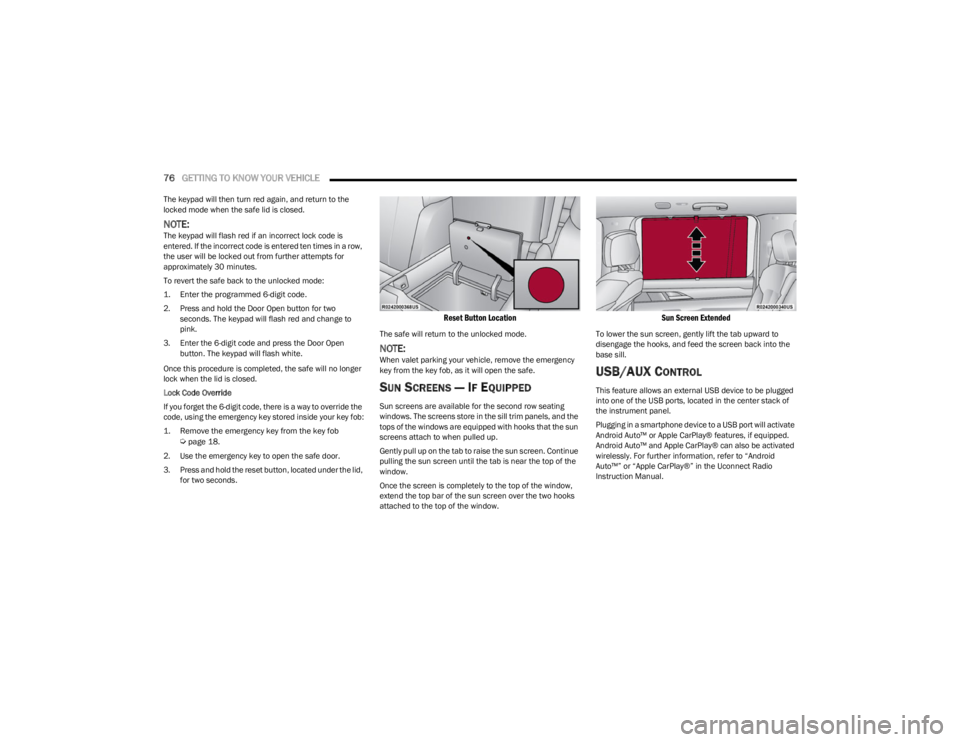
Lock Code Override
If you forget the 6-digit code, there is a way to override the
code, using the emergency key stored inside your key fob:
1. Remove the emergency key from the key fob
Ú
page 18.
2. Use the emergency key to open the safe door.
3. Press and hold the reset button, located under the lid, for two seconds.
Reset Button Location
The safe will return to the unlocked mode.
NOTE:When valet parking your vehicle, remove the emergency
key from the key fob, as it will open the safe.
SUN SCREENS — IF EQUIPPED
Sun screens are available for the second row seating
windows. The screens store in the sill trim panels, and the
tops of the windows are equipped with hooks that the sun
screens attach to when pulled up.
Gently pull up on the tab to raise the sun screen. Continue
pulling the sun screen until the tab is near the top of the
window.
Once the screen is completely to the top of the window,
extend the top bar of the sun screen over the two hooks
attached to the top of the window.
Sun Screen Extended
To lower the sun screen, gently lift the tab upward to
disengage the hooks, and feed the screen back into the
base sill.
USB/AUX CONTROL
This feature allows an external USB device to be plugged
into one of the USB ports, located in the center stack of
the instrument panel.
Plugging in a smartphone device to a USB port will activate
Android Auto™ or Apple CarPlay® features, if equipped.
Android Auto™ and Apple CarPlay® can also be activated
wirelessly. For further information, refer to “Android
Auto™” or “Apple CarPlay®” in the Uconnect Radio
Instruction Manual.
23_WS_OM_EN_USC_t.book Page 76