radio JEEP WAGONEER 2023 Owner's Manual
[x] Cancel search | Manufacturer: JEEP, Model Year: 2023, Model line: WAGONEER, Model: JEEP WAGONEER 2023Pages: 396, PDF Size: 15.17 MB
Page 80 of 396
78GETTING TO KNOW YOUR VEHICLE
Once a device is connected to the USB port, it will begin
charging and is ready for use with the system. Type C and
Type A charge-only USB ports can be used at the same
time but cannot be used simultaneously while playing
media. When both Type C and Type A charge-only USB
ports are in use they will be charged at a reduced rate.
If equipped, your vehicle may have additional charge-only
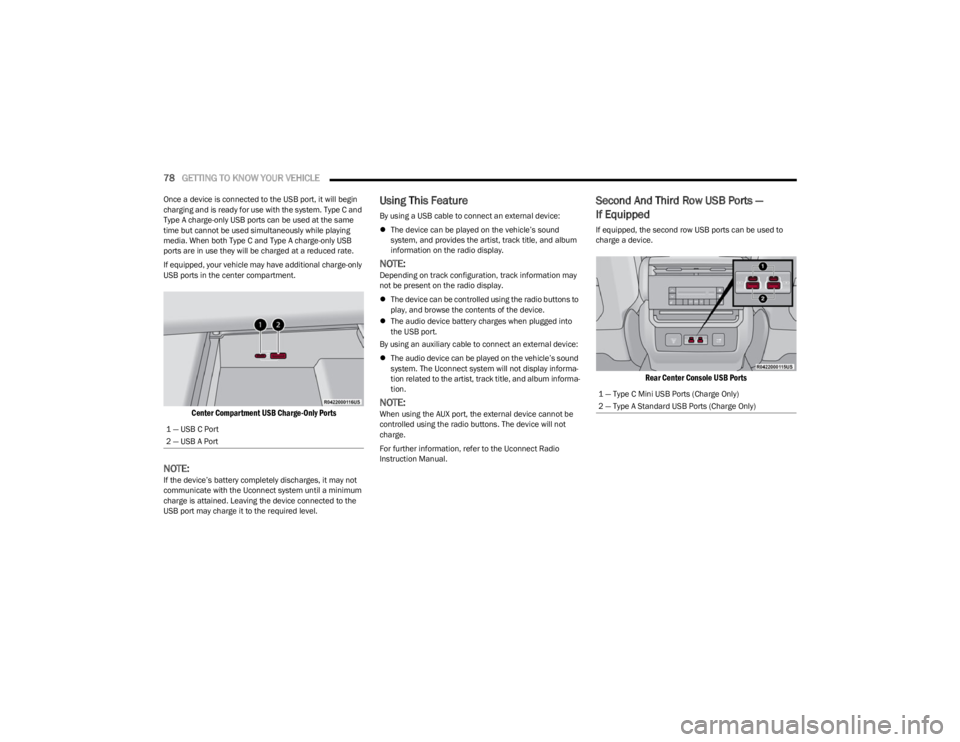
USB ports in the center compartment.
Center Compartment USB Charge-Only Ports
NOTE:If the device’s battery completely discharges, it may not
communicate with the Uconnect system until a minimum
charge is attained. Leaving the device connected to the
USB port may charge it to the required level.
Using This Feature
By using a USB cable to connect an external device:
The device can be played on the vehicle’s sound
system, and provides the artist, track title, and album
information on the radio display.
NOTE:Depending on track configuration, track information may
not be present on the radio display.
The device can be controlled using the radio buttons to
play, and browse the contents of the device.
The audio device battery charges when plugged into
the USB port.
By using an auxiliary cable to connect an external device:
The audio device can be played on the vehicle’s sound
system. The Uconnect system will not display informa -
tion related to the artist, track title, and album informa -
tion.
NOTE:When using the AUX port, the external device cannot be
controlled using the radio buttons. The device will not
charge.
For further information, refer to the Uconnect Radio
Instruction Manual.
Second And Third Row USB Ports —
If Equipped
If equipped, the second row USB ports can be used to
charge a device.
Rear Center Console USB Ports
1 — USB C Port
2 — USB A Port
1 — Type C Mini USB Ports (Charge Only)
2 — Type A Standard USB Ports (Charge Only)
23_WS_OM_EN_USC_t.book Page 78
Page 85 of 396
GETTING TO KNOW YOUR VEHICLE83
Window Lockout Switch
The window lockout switch on the driver's door trim panel
allows you to disable the window controls on the rear
passenger doors. To disable the window controls, push
and release the window lockout button (the indicator light
on the button will turn on). To enable the window controls,
push and release the window lockout button again (the
indicator light on the button will turn off).
Power Window Lockout Switch
WIND BUFFETING
Wind buffeting can be described as the perception of
pressure on the ears or a helicopter-type sound in the
ears. Your vehicle may exhibit wind buffeting with the
windows down, or the sunroof (if equipped) in certain open
or partially open positions. This is a normal occurrence
and can be minimized. If the buffeting occurs with the rear
windows open, open the front and rear windows together
to minimize the buffeting. If the buffeting occurs with the
sunroof open, adjust the sunroof opening to minimize the
buffeting or open any window.
RADIO SIGNAL DEVICES ON
W
INDSHIELD — IF EQUIPPED
Your vehicle may be equipped with premium tint infrared
reflective glass (IRR). In the necessity of mounting devices
such as transponders, garage door openers, radar
detectors, or any other device that sends out a radio
signal, please refer to the allocated area on the
windshield. There is a small box located near the
passenger side of the mirror cover. The location is
identifiable by a slight discoloration in the glass due to the
removal of the IRR coating.
Metalized windshield coatings available on the Grand
Wagoneer can potentially disrupt RFID transmission/
reception depending on signal location or additional
interference, regardless of the provided deletion zone. In
the event that any RFID or signal interruption between a
vehicle mounted device (e.g. toll transponder) does not
function properly, you may need to consult with your toll
transponder company and may have to use an alternate
device such as a license plate attached toll transponder.
Radio Signal Device Mounting Location
POWER SUNROOF — IF EQUIPPED
TRI-PANE POWER SUNROOF
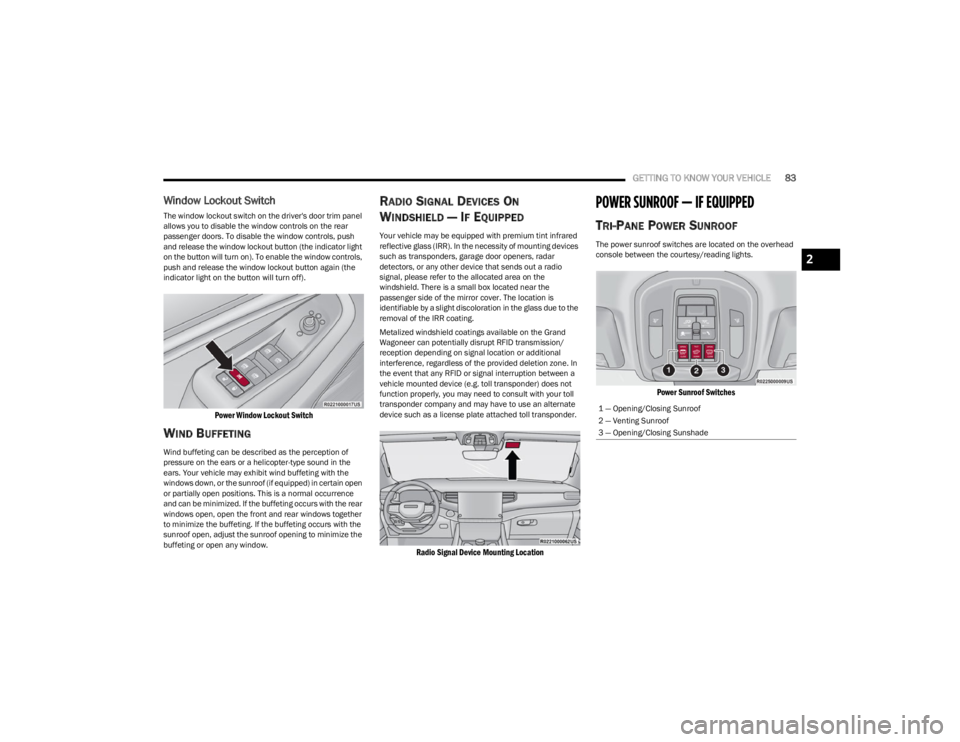
The power sunroof switches are located on the overhead
console between the courtesy/reading lights.
Power Sunroof Switches
1 — Opening/Closing Sunroof
2 — Venting Sunroof
3 — Opening/Closing Sunshade
2
23_WS_OM_EN_USC_t.book Page 83
Page 110 of 396

108GETTING TO KNOW YOUR INSTRUMENT PANEL
When load reduction is activated, the message “Battery
Saver On” or “Battery Saver Mode” will appear in the
instrument cluster.
These messages indicate the vehicle battery has a low
state of charge and continues to lose electrical charge at
a rate that the charging system cannot sustain.
NOTE:
The charging system is independent from load reduc -
tion. The charging system performs a diagnostic on the
charging system continuously.
If the Battery Charge Warning Light is on it may indicate
a problem with the charging system
Úpage 109.
The electrical loads that may be switched off (if equipped),
and vehicle functions which can be affected by load
reduction:
Heated Seat/Vented Seats/Heated Wheel
Rear Defroster And Heated Mirrors
HVAC System
115 Volt AC Power Inverter System
Audio and Telematics System
Loss of the battery charge may indicate one or more of the
following conditions:
The charging system cannot deliver enough electrical
power to the vehicle system because the electrical
loads are larger than the capability of the charging
system. The charging system is still functioning
properly.
Turning on all possible vehicle electrical loads (e.g.
HVAC to max settings, exterior and interior lights, over -
loaded power outlets +12 Volt, 115 Volt AC, USB ports)
during certain driving conditions (city driving, towing,
frequent stopping, etc.).
Installing options like additional lights, upfitter elec -
trical accessories, audio systems, alarms and similar
devices.
Unusual driving cycles (short trips separated by long
parking periods).
The vehicle was parked for an extended period of time
(weeks, months).
The battery was recently replaced and was not charged
completely.
The battery was discharged by an electrical load left on
when the vehicle was parked.
The battery was used for an extended period with the
engine not running to supply radio, lights, chargers,
+12 Volt portable appliances like vacuum cleaners,
game consoles and similar devices.
What to do when an electrical load reduction action
message is present (“Battery Saver On” or “Battery Saver
Mode”)
During a trip:
Reduce power to unnecessary loads if possible:
Turn off redundant lights (interior or exterior)
Check what may be plugged in to power outlets
+12 Volt, 115 Volt AC, USB ports
Check HVAC settings (blower, temperature)
Check the audio settings (volume) After a trip:
Check if any aftermarket equipment was installed
(additional lights, upfitter electrical accessories, audio
systems, alarms) and review specifications if any (load
and Ignition Off Draw currents).
Evaluate the latest driving cycles (distance, driving
time and parking time).
The vehicle should have service performed if the
message is still present during consecutive trips, and if
the evaluation and driving pattern of the vehicle did not
help to identify the cause.WARNING LIGHTS AND MESSAGES
The warning/indicator lights will illuminate in the
instrument panel together with a dedicated message and/
or acoustic signal when applicable. These indications are
indicative and precautionary and as such must not be
considered as exhaustive and/or alternative to the
information contained in the Owner’s Manual, which you
are advised to read carefully in all cases. Always refer to
the information in this chapter in the event of a failure
indication. All active telltales will display first if applicable.
The system check menu may appear different based upon
equipment options and current vehicle status. Some
telltales are optional and may not appear.
23_WS_OM_EN_USC_t.book Page 108
Page 135 of 396

STARTING AND OPERATING133
Normal Ride Height (NRH) – This is the standard posi -
tion of the suspension and is meant for normal driving.
Off-Road 1 (OR1) (Raises the vehicle approximately
1.2 inches [30 mm]) – This is the primary position for
all off-road driving until OR2 is needed. A smoother and
more comfortable ride will result. Push the toggle
switch forward once from the NRH position while the
vehicle speed is below 38 mph (61 km/h). When in the
OR1 position, if the vehicle speed remains between
40 mph (64 km/h) and 50 mph (80 km/h) for greater than 20 seconds or if the vehicle speed exceeds
50 mph (80 km/h), the vehicle will be automatically
lowered to NRH
Úpage 193. OR1 is unavailable on
4x2 air suspension vehicles.
Off-Road 2 (OR2) (Raises the vehicle approximately
2.0 inches [51 mm]) – This position is intended for
off-roading use only where maximum ground clearance
is required. To enter OR2, push the toggle switch
forward twice from the NRH position or once from the
OR1 position while vehicle speed is below 20 mph
(32 km/h). While in OR2, if the vehicle speed exceeds
25 mph (40 km/h) the vehicle height will be automati -
cally lowered to OR1
Úpage 193. OR2 is unavailable
on 4x2 air suspension vehicles.
Aero Height (Lowers the vehicle approximately
-0.6 inches [-15 mm]) – This position provides
improved aerodynamics by lowering the vehicle. The
vehicle will automatically enter Aero Height when the
vehicle speed remains between 62 mph (100 km/h)
and 66 mph (106 km/h) for greater than 20 seconds
or if the vehicle speed exceeds 66 mph (106 km/h). The vehicle will return to Default Ride Height from Aero
Height if the vehicle speed remains between 30 mph
(48 km/h) and 35 mph (56 km/h) for greater than
20 seconds or if the vehicle speed falls below 30 mph
(48 km/h). The vehicle will enter Aero Height, regard
-
less of vehicle speed if the vehicle is in “SPORT” mode.
Entry/Exit Height (Lowers the vehicle approximately
-1.6 inches [-40 mm]) – This position lowers the
vehicle for easier passenger entry and exit as well as
lowering the rear of the vehicle for easier loading and
unloading of cargo. To enter Entry/Exit Height, push the
toggle switch down twice from NRH while the vehicle
speed is below 6 mph (10 km/h). To exit Entry/Exit
Height, push the UP button once while in Entry/Exit
Height or drive the vehicle over 4 mph (6 km/h).
NOTE:Automatic lowering of the vehicle into Entry/Exit Height
can be enabled through the Uconnect Touchscreen Radio.
If this feature is enabled, the vehicle will only lower if the
gear selector is in PARK, the terrain switch is in AUTO, the
transfer case is in AUTO and the vehicle level is either in
Normal or Aero Height. The vehicle will not automatically
lower if the air suspension level is in OR2 or OR1. When
towing, the automatic Entry/Exit feature may be disabled
through the Uconnect Touchscreen Radio to prevent
vehicle and trailer movement when gear selector is moved
to PARK. The Selec-Terrain system will automatically change the
vehicle to the proper height based on the position of the
Selec-Terrain switch. The height can be changed from the
default Selec-Terrain setting by normal use of the air
suspension buttons
Úpage 131.
The system requires that the engine be running for all
changes. When lowering the vehicle all of the doors,
including the liftgate, must be closed. If a door is opened
at any time while the vehicle is lowering the change will not
be completed until the open door(s) is/are closed.
The Quadra-Lift Air Suspension system uses a lifting and
lowering pattern which keeps the headlights from
incorrectly shining into oncoming traffic. When raising the
vehicle, the rear of the vehicle will move up first and then
the front. When lowering the vehicle, the front will move
down first and then the rear.
After the engine is turned off, it may be noticed that the air
suspension system operates briefly; this is normal. The
system is correcting the position of the vehicle to ensure a
proper appearance.
To assist with changing a spare tire, the Quadra-Lift Air
Suspension system has a feature which allows the
automatic leveling to be disabled
Úpage 197.
4
23_WS_OM_EN_USC_t.book Page 133
Page 136 of 396
134STARTING AND OPERATING
NOTE:Default Ride Height:
Select Aero Height or Normal Ride Height as the default
for all vehicle speeds and operation. This is the
selected height that the suspension will level for speed
changes (e.g. raising from Entry/Exit Height at speed,
lowering from Off Road Height at speed, etc.).
Default ride height can be changed by manually
adjusting the Quadra-Lift switch to Normal Ride Height
or Aero Ride Height and stay in the selected height for
2.5 seconds. It will be stored as the default ride height
and the height will be maintained until a new default
ride height is selected.
If equipped with a Uconnect Touchscreen Radio, all
enabling/disabling of air suspension features must be
done through the radio
Úpage 197.
AIR SUSPENSION MODES
The Air Suspension system has multiple modes to protect
the system in unique situations: Tire/Jack Mode
To assist with changing a spare tire, the air suspension
system has a feature which allows the automatic leveling
to be disabled
Úpage 197. Tire/Jack mode is used for
connecting a trailer with a weight-distributing hitch
Úpage 179.
NOTE:This mode is intended to be enabled with the engine
running.
Auto Entry/Exit Mode
To assist in entering and exiting the vehicle, the air
suspension system has a feature which automatically
lowers the vehicle to Entry/Exit Height
Úpage 197.
NOTE:This mode is intended to be enabled with the engine
running. When towing, the automatic Entry/Exit feature
may be disabled through the Uconnect Touchscreen Radio
to prevent vehicle and trailer movement when the gear
selector is moved to PARK.
Transport Mode
To assist with flatbed towing, the air suspension system
has a feature which will put the vehicle into Entry/Exit
Height and disable the automatic load leveling system
Úpage 197.
NOTE:This mode is intended to be enabled with engine running. Suspension Display Messages Mode
The “Suspension Display Messages” setting allows you to
only display suspension warnings instead of all
suspension messages (i.e., “Normal Height Achieved”)
Úpage 197.
NOTE:This mode is intended to be enabled with the engine
running.
Wheel Alignment Mode
Before performing a wheel alignment this mode must be
enabled which will move the vehicle to Normal Ride Height
and disable the air suspension during the alignment
Úpage 197.
NOTE:This mode is intended to be enabled with the engine
running.
If equipped with a Uconnect Touchscreen Radio, all
enabling/disabling of air suspension features must be
done through the radio
Úpage 197.
INSTRUMENT CLUSTER DISPLAY
M
ESSAGES
When the appropriate conditions exist, a message will
appear in the instrument cluster Úpage 99.
WARNING!
The air suspension system uses a high pressure
volume of air to operate the system. To avoid personal
injury or damage to the system, see an authorized
dealer for service.
23_WS_OM_EN_USC_t.book Page 134
Page 158 of 396

156STARTING AND OPERATING
The vehicle is close to the obstacle when the instrument cluster display shows one flashing arc and sounds a continuous tone. The following chart shows the warning alert operation
when the system is detecting an obstacle:
NOTE:ParkSense will reduce the volume of the radio, if on, when the system is sounding an audio tone.
WARNING ALERTS FOR REAR
Rear Distance
(inches/cm) Greater than
79 inches (200 cm) 79-59 inches
(200-150 cm) 59-47 inches
(150-120 cm) 47-39 inches
(120-100 cm) 39-25 inches
(100-65 cm) 25-12 inches
(65-30 cm) Less than 12 inches
(30 cm)
Audible Alert Chime None Single 1/2 Second
Tone Slow
Slow FastFastContinuous
Arcs-Left NoneNoneNoneNoneNone6th Flashing 5th Flashing
Arcs-Center None10th Solid 9th Solid8th Solid7th Flashing 6th Flashing 5th Flashing
Arcs-Right NoneNoneNoneNoneNone6th Flashing 5th Flashing
Radio Volume Reduced No
Yes YesYesYesYesYes
WARNING ALERTS FOR FRONT
Front Distance
(inches/cm) Greater than 47 inches
(120 cm) 47-39 inches
(120-100 cm) 39-25 inches
(100-65 cm) 25-12 inches
(65-30 cm) Less than 12 inches
(30 cm)
Audible Alert Chime NoneNoneNone FastContinuous
Arcs-Left NoneNoneNone3rd Flashing 4th Flashing
Arcs-Center None1st Solid2nd Flashing 3rd Flashing4th Flashing
Arcs-Right NoneNoneNone3rd Flashing 4th Flashing
Radio Volume Reduced NoNoNo Yes Yes
23_WS_OM_EN_USC_t.book Page 156
Page 160 of 396
158STARTING AND OPERATING
PARKSENSE SYSTEM USAGE
P
RECAUTIONS
NOTE:
Ensure that the front and rear fascias/bumpers are
free of snow, ice, mud, dirt and debris to keep the
ParkSense system operating properly.
Jackhammers, large trucks, and other vibrations could
affect the performance of ParkSense.
When you turn ParkSense off, the instrument cluster
will display “PARKSENSE OFF.” Furthermore, once you
turn ParkSense off, it remains off until you turn it on
again, even if you cycle the ignition.
When you move the gear selector to the REVERSE posi -
tion and ParkSense is turned off, the instrument
cluster will display “PARKSENSE OFF” for as long as the
vehicle is in REVERSE.
ParkSense, when on, will reduce the volume of the
radio when it is sounding a tone.
Clean the ParkSense sensors regularly, taking care not
to scratch or damage them. The sensors must not be
covered with ice, snow, slush, mud, dirt or debris.
Failure to do so can result in the system not working
properly. The ParkSense system might not detect an
obstacle behind or in front of the fascia/bumper, or it
could provide a false indication that an obstacle is
behind or in front of the fascia/bumper.
Use the ParkSense switch to turn the ParkSense
system off if objects such as bicycle carriers, trailer
hitches, etc. are placed within 12 inches (30 cm) of the
rear fascia/bumper. Failure to do so can result in the
system misinterpreting a close object as a sensor
problem, causing the “PARKSENSE UNAVAILABLE
SERVICE REQUIRED” message to be displayed in the
instrument cluster.
ParkSense should be disabled when the liftgate is in
the open position. An opened liftgate could provide a
false indication that an obstacle is behind the vehicle.
SIDE DISTANCE WARNING SYSTEM —
I
F EQUIPPED
The Side Distance Warning system detects the presence
of side obstacles near the vehicle using the parking
sensors located in the front and rear fascia/bumpers.
Side Distance Warning Display
The Side Distance Warning screen will only be displayed if
this feature is enabled within Uconnect Settings
Úpage 197.
The system warns the driver with an acoustic signal and,
when enabled, with visual indications on the instrument
cluster display.
WARNING!
Drivers must be careful when backing up even when
using ParkSense. Always check carefully behind your
vehicle, look behind you, and be sure to check for
pedestrians, animals, other vehicles, obstructions,
and blind spots before backing up. You are respon -
sible for safety and must continue to pay attention to
your surroundings. Failure to do so can result in
serious injury or death.
Before using ParkSense, it is strongly recommended
that the ball mount and hitch ball assembly be
disconnected from the vehicle when the vehicle is
not used for towing. Failure to do so can result in
injury or damage to vehicles or obstacles because
the hitch ball will be much closer to the obstacle than
the rear fascia when the vehicle sounds the contin -
uous tone. Also, the sensors could detect the ball
mount and hitch ball assembly, depending on its size
and shape, giving a false indication that an obstacle
is behind the vehicle.
CAUTION!
ParkSense is only a parking aid and it is unable to
recognize every obstacle, including small obstacles.
Parking curbs might be temporarily detected or not
detected at all. Obstacles located above or below the
sensors will not be detected when they are in close
proximity.
The vehicle must be driven slowly when using Park -
Sense in order to be able to stop in time when an
obstacle is detected. It is recommended that the
driver looks over his/her shoulder when using
ParkSense.
23_WS_OM_EN_USC_t.book Page 158
Page 161 of 396

STARTING AND OPERATING159
When the vehicle is in DRIVE, the Side Distance Warning
volume/chime will match the Front ParkSense volume
and chime type.
When the vehicle is in REVERSE, the Side Distance
Warning volume/chime will match the Rear ParkSense
volume and chime type.
NOTE:Parksense will reduce the volume of the radio if on when
the system is sounding an audible tone. An audible tone
will only sound if a collision is possible.
Activation/Deactivation
The system can operate only after driving a short distance
and if the vehicle speed is between 0 and 7 mph
(0 and 11 km/h). The system can be activated/
deactivated via the Settings menu of the Uconnect
system. If the ParkSense System is deactivated via the
ParkSense hard switch then the Side Distance Warning
system will automatically be deactivated.
Message on the display for Side Distance Warning
feature:
“Wipe Sensors” — This message is displayed in the case of
a failure of the Side Distance Warning system sensors.
Free the bumpers of any obstacles, ensure that the front
and rear fascia/bumper are free of snow, ice, mud, dirt
and debris to keep the ParkSense system operating
properly.
“System Not Available” — This message is displayed if the
Side Distance Warning system is not available. The failed
operation of the system might be due to the insufficient
voltage from the battery or other failures on the electrical
system. Contact an authorized dealer as soon as possible
to have the electrical system checked.
ParkSense Usage Precautions
Some conditions may influence the performance of the
Side Distance Warning system:
NOTE:
Ensure that the front and rear fascia/bumper are free
of snow, ice, mud, dirt and debris to keep the Park -
Sense system operating properly.
Construction equipment, large trucks, and other vibra -
tions could affect the performance of ParkSense.
When you turn ParkSense off, the message to appear
in the instrument cluster display will read “PARKSENSE
OFF.” Furthermore, once you turn ParkSense off, it
remains off until you turn it on again, even if you cycle
the ignition.
ParkSense, when on, will reduce the volume of the
radio when it is sounding a tone.
Clean the ParkSense sensors regularly, taking care not
to scratch or damage them. The sensors must not be
covered with ice, snow, slush, mud, dirt or debris.
Failure to do so can result in the system not working
properly. The ParkSense system might not detect an
obstacle behind or in front of the fascia/bumper, or it
could provide a false indication that an obstacle is
behind or in front of the fascia/bumper.
The presence of a tow hook without a trailer may inter -
fere with the correct operation of the parking sensors.
Before using the ParkSense system, it is recom -
mended to remove the removable tow hook ball
assembly and any attachments from the vehicle when
it is not used for towing operations.
WARNING ALERTS
Distance
(inches/cm) Less than
12 inches
(30 cm)12 – 24 inches
(30 – 60 cm)
Arcs-Left 11th Flashing 12th Flashing
Arcs-Right 11th Flashing 12th Flashing
Audible Alert
Chime ContinuousFast audible
chime as the
objects get close
to the vehicle
Radio Volume
Reduced Yes
Yes
4
23_WS_OM_EN_USC_t.book Page 159
Page 170 of 396
168STARTING AND OPERATING
If the driver crosses the lane marking, the system will
either guide the vehicle back to the center of the lane,
provide a vibration in the steering wheel, or both,
depending on radio settings.
When both lane markings are detected, and the driver
uses the turn signal to indicate a lane change, and a
vehicle is detected in the BSM zone on that side of the
vehicle, the ALM system provides a warning in the form of
steering assist and/or steering vibration (depending on
radio settings) to guide the vehicle back to the center of
the lane.
NOTE:
The system will suppress visual warnings, steering
vibration (if selected in radio settings), and steering
assistance (if selected in radio settings) when the
driver activates the turn signal, the blind spot zone is
clear of vehicles, and a lane change is occurring.
If the Blind Spot Monitoring (BSM) system detects a
vehicle in the adjacent lane, and the turn signal is
applied in that direction, the BSM LED on the mirror will
flash. If the driver continues to attempt the lane
change, steering wheel torque will be provided to keep
the vehicle within its lane markings.
The driver may manually override the steering assist
warning by applying force to the steering wheel at any
time.
When only a single lane marking is detected and the driver
drifts across the lane marking (no turn signal applied), the
Active Lane Management system provides a visual
warning in the instrument cluster, as well as a steering
assist torque (if configured in Uconnect Settings), to
prompt the driver to remain within the lane boundaries. If the driver continues to drift out of the lane, the system
provides a flashing visual warning through the instrument
cluster display as well as a haptic steering wheel vibration
(if configured in Uconnect Settings) when the vehicle
crosses the lane boundary.
NOTE:When operating conditions have been met, the Active
Lane Management system will monitor if the driver’s
hands are on the steering wheel and provides an audible
and visual warning to the driver if removed. The system
will cancel if the driver does not return their hands to the
wheel.
TURNING ACTIVE LANE MANAGEMENT
O
N OR OFF
The Active Lane Management button is located
on the switch panel on the forward part of the
center console, in front of the gear selector. To turn the system on, push the Active Lane
Management button (LED turns off). A message is
shown in the instrument cluster display.
To turn the system off, push the button again (LED turns
on.
NOTE:
The Active Lane Management system will retain the last
system state on or off from the last ignition cycle when the
ignition is placed in the ON/RUN position.
ACTIVE LANE MANAGEMENT WARNING
M
ESSAGE
The Active Lane Management system will indicate the
current lane drift condition through the instrument cluster
display.
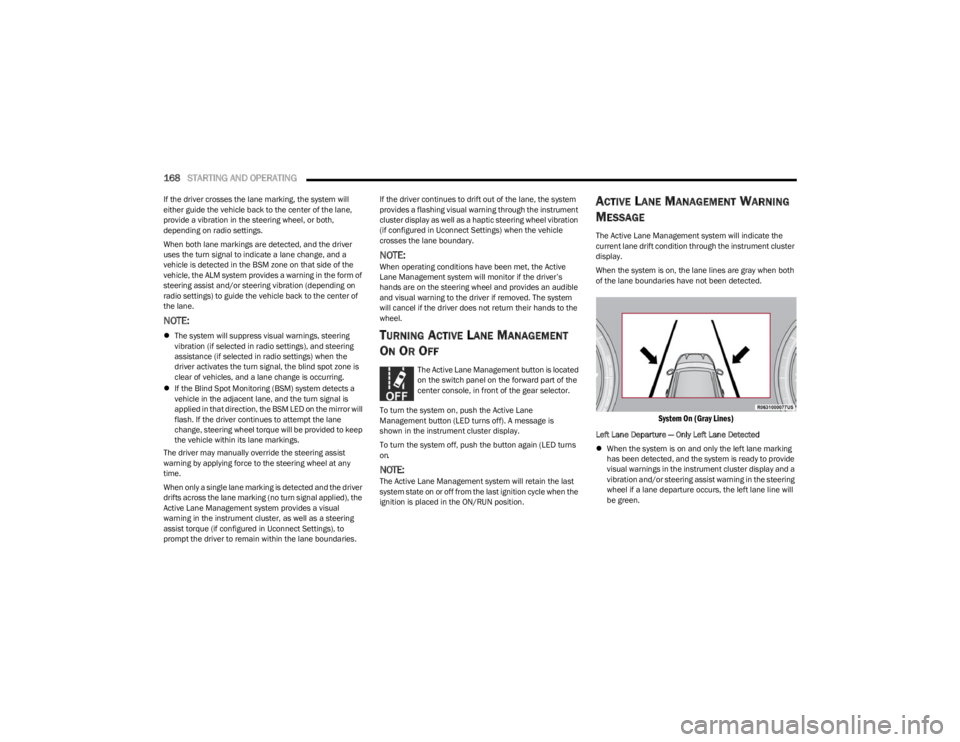
When the system is on, the lane lines are gray when both
of the lane boundaries have not been detected.
System On (Gray Lines)
Left Lane Departure — Only Left Lane Detected
When the system is on and only the left lane marking
has been detected, and the system is ready to provide
visual warnings in the instrument cluster display and a
vibration and/or steering assist warning in the steering
wheel if a lane departure occurs, the left lane line will
be green.
23_WS_OM_EN_USC_t.book Page 168
Page 172 of 396

170STARTING AND OPERATING
NOTE:
The Active Lane Management system operates with
similar behavior for a right lane departure.
If the turn signal is activated, and the vehicle begins to
depart the lane at the same time the Blind Spot Moni -
toring (BSM) system detects another vehicle in the
BSM zones, the system will provide haptic steering
wheel vibration and/or steering assist torque (if
programmed in Uconnect Settings).
CHANGING ACTIVE LANE MANAGEMENT
S
TATUS
Configurable settings for the Active Lane Management
system are available within the Uconnect system
Úpage 197.
Selectable Warning Types:
Vibration Only
Steering Assist Only
Vibration And Steering Assist
Other configurable settings for this system are for the
intensity of the vibration (high/med/low), steering assist
strength (hi/med/low), and the warning zone sensitivity
(early/medium/late).
NOTE:
The system will not apply vibration and/or steering
assist to the steering wheel whenever a safety system
engages (Anti-Lock Brakes, Traction Control System,
Electronic Stability Control, Forward Collision Warning,
etc.).
The Blind Spot Monitoring system will be forced on
when the ALM system is enabled.
The ALM system will be suppressed when the Active
Driving Assist system (if equipped) is engaged.
PARKVIEW REAR BACK UP CAMERA
Your vehicle is equipped with the ParkView Rear Back Up
Camera that allows you to see an on-screen image of the
rear surroundings of your vehicle whenever the gear
selector is put into REVERSE. The image will be displayed
on the Navigation/Multimedia radio display screen along
with a caution note to “Check Entire Surroundings” across
the top of the screen. After five seconds this note will
disappear. The ParkView camera is located on the rear of
the vehicle above the rear license plate.
When the vehicle is shifted out of REVERSE with camera
delay turned off, the rear camera mode is exited and the
previous screen appears.
Manual Activation Of The Back Up Camera
1. Press the Vehicle button located on the bottom of
the Uconnect display and then select the Controls
menu.
2. Press the Back Up Camera icon to turn the Rear View Camera system on.
NOTE:
The Rear View camera can also be turned on manually
through the Apps menu within the Uconnect system.
The ParkView Rear Back Up Camera has program -
mable modes of operation that may be selected
through the Uconnect system
Úpage 197. When the vehicle is shifted out of REVERSE with camera
delay turned off, the rear camera mode is exited and the
previous screen appears. When the vehicle is shifted out
of REVERSE with camera delay turned on, the camera
image will continue to be displayed for up to 10 seconds
unless the following conditions occur: the vehicle speed
exceeds 8 mph (13 km/h), the vehicle is shifted into
PARK, the vehicle’s ignition is placed in the OFF position,
or the touchscreen X button to disable the display of the
Rear View Camera is pressed.
When enabled, active guidelines are overlaid on the image
to illustrate the width of the vehicle and its projected back
up path based on the steering wheel position. A dashed
center line overlay indicates the center of the vehicle to
assist with parking or aligning to a hitch/receiver.
Different colored zones indicate the distance to the rear of
the vehicle.
The following table shows the approximate distances for
each zone:
Zone Distance To The Rear Of The
Vehicle
Red 0 - 1 ft
(0 - 30 cm)
Yellow 1 ft - 6.5 ft
(30 cm - 2 m)
Green 6.5 ft or greater
(2 m or greater)
23_WS_OM_EN_USC_t.book Page 170