4WD JEEP WAGONEER 2023 Owner's Manual
[x] Cancel search | Manufacturer: JEEP, Model Year: 2023, Model line: WAGONEER, Model: JEEP WAGONEER 2023Pages: 396, PDF Size: 15.17 MB
Page 196 of 396
194STARTING AND OPERATING
When To Use 4WD LOW — If Equipped
When off-road driving, shift to 4WD LOW for additional
traction. This range should be limited to extreme
situations such as deep snow, mud, or sand where
additional low speed pulling power is needed. Vehicle
speeds in excess of 25 mph (40 km/h) should be avoided
when in 4WD LOW.
Driving Through Water
Although your vehicle is capable of driving through water,
there are a number of precautions that must be
considered before entering the water.
NOTE:Your vehicle is capable of water fording in up to 20 inches
(51 cm) of water, while crossing small rivers or streams. To
maintain optimal performance of your vehicle's heating
and ventilation system it is recommended to switch the
system into recirculation mode during water fording. Driving through water more than a few inches/
centimeters deep will require extra caution to ensure
safety and prevent damage to your vehicle. If you must
drive through water, try to determine the depth and the
bottom condition (and location of any obstacles) prior to
entering. Proceed with caution and maintain a steady
controlled speed less than 5 mph (8 km/h) in deep water
to minimize wave effects.
Flowing Water
If the water is swift flowing and rising (as in storm run-off),
avoid crossing until the water level recedes and/or the
flow rate is reduced. If you must cross flowing water avoid
depths in excess of 9 inches (23 cm). The flowing water
can erode the streambed, causing your vehicle to sink into
deeper water. Determine exit point(s) that are
downstream of your entry point to allow for drifting.
Standing Water
Avoid driving in standing water deeper than 24 inches
(60 cm), and reduce speed appropriately to minimize
wave effects. Maximum speed is 5 mph (8 km/h).Maintenance
After driving through deep water, inspect your vehicle
fluids and lubricants (engine oil, transmission oil, axle,
transfer case) to ensure the fluids have not been
contaminated. Contaminated fluid (milky, foamy in
appearance) should be flushed/changed as soon as
possible to prevent component damage.
Driving In Snow, Mud And Sand
In heavy snow, when pulling a load, or for additional
control at slower speeds, shift the transmission to a low
gear and shift the transfer case to 4WD LOW if necessary
Úpage 129. Only shift into a lower gear to maintain
forward motion. Over-revving the engine can spin the
wheels and traction will be lost.
Avoid abrupt downshifts on icy or slippery roads, because
engine braking may cause skidding and loss of control.
Hill Climbing
NOTE:Before attempting to climb a hill, determine the conditions
at the crest and/or on the other side.
Before climbing a steep hill, shift the transmission to a
lower gear and shift the transfer case to 4WD LOW. Use
FIRST gear and 4WD LOW for very steep hills.
WARNING!
Do not drive in 4WD LOW on dry pavement; driveline
damage may result. 4WD LOW locks front and rear
drivelines together and does not allow for differential
action between the front to rear driveshafts. Driving in
4WD LOW on pavement will cause driveline binding;
use only on wet or slippery surfaces.
CAUTION!
When driving through water, do not exceed 5 mph
(8 km/h). Always check water depth before entering as
a precaution, and check all fluids afterward. Driving
through water may cause damage that may not be
covered by the New Vehicle Limited Warranty.
23_WS_OM_EN_USC_t.book Page 194
Page 197 of 396
STARTING AND OPERATING195
If you stall or begin to lose forward motion while climbing
a steep hill, allow your vehicle to come to a stop and
immediately apply the brakes. Restart the engine, and
shift into REVERSE (R). Back slowly down the hill, allowing
the compression braking of the engine to help regulate
your speed. If the brakes are required to control vehicle
speed, apply them lightly and avoid locking or skidding the
tires.
Remember, never drive diagonally across a hill. Always
drive straight up or down.
If the wheels start to slip as you approach the crest of a
hill, ease off the accelerator and maintain forward motion
by turning the front wheels slowly. This may provide a fresh
“bite” into the surface and will usually provide traction to
complete the climb.Traction Downhill
When descending mountains or hills, use Hill Descent
Control or Selec-Speed Control to avoid repeated heavy
braking.
If not equipped with Hill Descent Control or Selec-Speed
Control use the following procedure:
Shift the transmission into a low gear, and the transfer
case into 4WD LOW range. Let the vehicle go slowly down
the hill with all four wheels turning against engine
compression drag. This will permit you to control the
vehicle speed and direction.
When descending mountains or hills, repeated braking
can cause brake fade with loss of braking control. Avoid
repeated heavy braking by downshifting the transmission
whenever possible.
After Driving Off-Road
Off-road operation puts more stress on your vehicle than
does most on-road driving. After going off-road, it is always
a good idea to check for damage. That way you can get any
problems taken care of right away and have your vehicle
ready when you need it.
Completely inspect the underbody of your vehicle.
Check tires, body structure, steering, suspension, and
exhaust system for damage.
Inspect the radiator for mud and debris and clean as
required.
Check threaded fasteners for looseness, particularly
on the chassis, drivetrain components, steering, and
suspension. Retighten them, if required, and torque to
the values specified in the Service Manual.
Check for accumulations of plants or brush. These
things could be a fire hazard. They might hide damage
to fuel lines, brake hoses, axle pinion seals, and
propeller shafts.
After extended operation in mud, sand, water, or
similar dirty conditions, have the radiator, fan, brake
rotors, wheels, brake linings, and axle yokes inspected
and cleaned as soon as possible.
If you experience unusual vibration after driving in
mud, slush or similar conditions, check the wheels for
impacted material. Impacted material can cause a
wheel imbalance and freeing the wheels of it will
correct the situation.
WARNING!
If the engine stalls, you lose forward motion, or cannot
make it to the top of a steep hill or grade, never attempt
to turn around. To do so may result in tipping and rolling
the vehicle. Always back carefully straight down a hill in
REVERSE gear. Never back down a hill in NEUTRAL
using only the brake.
WARNING!
Abrasive material in any part of the brakes may cause
excessive wear or unpredictable braking. You might not
have full braking power when you need it to prevent a
collision. If you have been operating your vehicle in dirty
conditions, get your brakes checked and cleaned as
necessary.
4
23_WS_OM_EN_USC_t.book Page 195
Page 239 of 396
MULTIMEDIA237
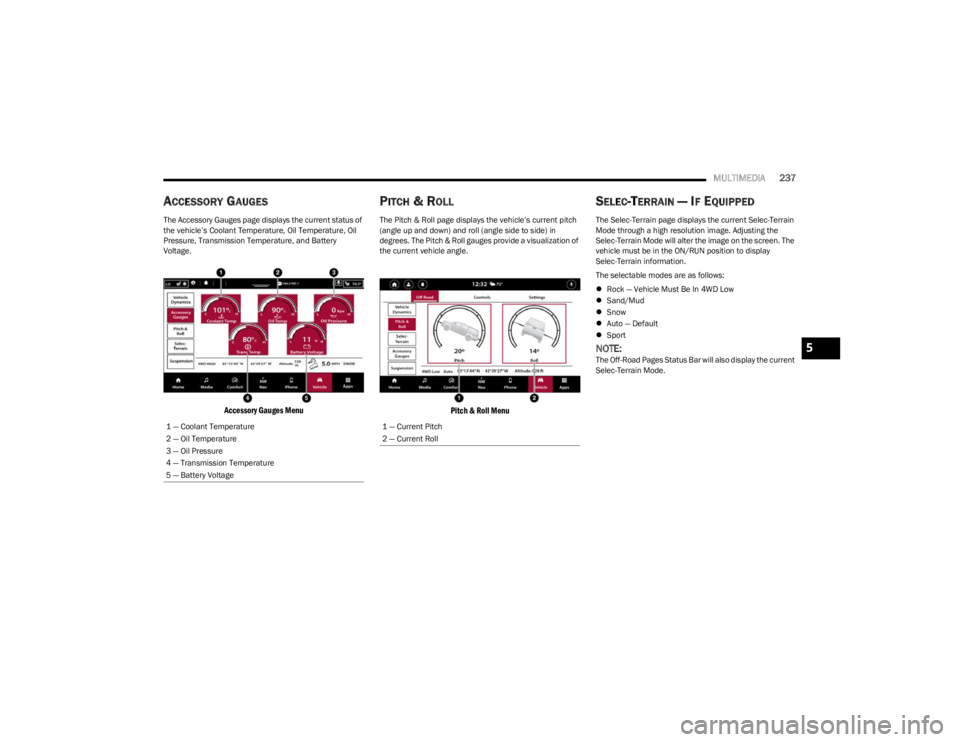
ACCESSORY GAUGES
The Accessory Gauges page displays the current status of
the vehicle’s Coolant Temperature, Oil Temperature, Oil
Pressure, Transmission Temperature, and Battery
Voltage.
Accessory Gauges Menu
PITCH & ROLL
The Pitch & Roll page displays the vehicle’s current pitch
(angle up and down) and roll (angle side to side) in
degrees. The Pitch & Roll gauges provide a visualization of
the current vehicle angle.
Pitch & Roll Menu
SELEC-TERRAIN — IF EQUIPPED
The Selec-Terrain page displays the current Selec-Terrain
Mode through a high resolution image. Adjusting the
Selec-Terrain Mode will alter the image on the screen. The
vehicle must be in the ON/RUN position to display
Selec-Terrain information.
The selectable modes are as follows:
Rock — Vehicle Must Be In 4WD Low
Sand/Mud
Snow
Auto — Default
Sport
NOTE:The Off-Road Pages Status Bar will also display the current
Selec-Terrain Mode.
1 — Coolant Temperature
2 — Oil Temperature
3 — Oil Pressure
4 — Transmission Temperature
5 — Battery Voltage
1 — Current Pitch
2 — Current Roll
5
23_WS_OM_EN_USC_t.book Page 237
Page 245 of 396
SAFETY243
ESC Activation/Malfunction Indicator Light
And ESC OFF Indicator Light
The ESC Activation/Malfunction Indicator Light
in the instrument cluster will come on when the
ignition is placed in the ON/RUN mode. It
should go out with the engine running. If the
ESC Activation/Malfunction Indicator Light comes on
continuously with the engine running, a malfunction has
been detected in the ESC system. If this light remains on
after several ignition cycles, and the vehicle has been
driven several miles (kilometers) at speeds greater than
30 mph (48 km/h), see an authorized dealer as soon as possible to have the problem diagnosed and corrected. The ESC Activation/Malfunction Indicator Light starts to
flash as soon as the tires lose traction and the ESC system
becomes active. The ESC Activation/Malfunction Indicator
Light also flashes when TCS is active. If the ESC
Activation/Malfunction Indicator Light begins to flash
during acceleration, ease up on the accelerator and apply
as little throttle as possible. Be sure to adapt your speed
and driving to the prevailing road conditions.
The ESC OFF Indicator Light indicates the
customer has elected to have the Electronic
Stability Control (ESC) in a reduced mode.
NOTE:
The ESC Activation/Malfunction Indicator Light and the
ESC OFF Indicator Light come on momentarily each
time the ignition is placed in the ON/RUN mode.
Each time the ignition is placed in the ON/RUN mode,
the ESC system will be on even if it was turned off previ -
ously.
The ESC system will make buzzing or clicking sounds
when it is active. This is normal; the sounds will stop
when ESC becomes inactive following the maneuver
that caused the ESC activation.
Hill Descent Control (HDC) — If Equipped
HDC is intended for low speed off-road driving
while in 4WD Low. HDC maintains vehicle
speed while descending hills during various
driving situations. HDC controls vehicle speed
by actively controlling the brakes. HDC Has Three States:
1. Off (feature is not enabled and will not activate).
2. Enabled (feature is enabled and ready but activation
conditions are not met, or driver is actively overriding
with brake or throttle application).
3. Active (feature is enabled and actively controlling vehicle speed).
Enabling HDC
HDC is enabled by pushing the HDC switch, but the
following conditions must also be met to enable HDC:
The driveline is in 4WD Low.
The vehicle speed is below 5 mph (8 km/h).
The parking brake is released.
The driver door is closed.
Activating HDC
Once HDC is enabled it will activate automatically if driven
down a grade of sufficient magnitude. The set speed for
HDC is selectable by the driver, and can be adjusted by
using the gear shift +/-. The following summarizes the
HDC set speeds:
WARNING!
When in “Partial Off” mode, the TCS functionality of
ESC, except for the limited slip feature described in
the TCS section, has been disabled and the ESC OFF
Indicator Light will be illuminated. When in “Partial
Off” mode, the engine power reduction feature of
TCS is disabled, and the enhanced vehicle stability
offered by the ESC system is reduced.
Trailer Sway Control (TSC) is disabled when the ESC
system is in the “Partial Off” mode.
6
23_WS_OM_EN_USC_t.book Page 243
Page 246 of 396

244SAFETY
HDC Target Set Speeds
P = No set speed. HDC may be enabled but will not
activate.
R = 0.6 mph (1 km/h)
N = 1.2 mph (2 km/h)
D = 0.6 mph (1 km/h)
1st = 0.6 mph (1 km/h)
2nd = 1.2 mph (2 km/h)
3rd = 1.8 mph (3 km/h)
4th = 2.5 mph (4 km/h)
5th = 3.1 mph (5 km/h)
6th = 3.7 mph (6 km/h)
7th = 4.3 mph (7 km/h)
8th = 5.0 mph (8 km/h)
9th = 5.6 mph (9 km/h) – If Equipped
NOTE:During HDC the +/- shifter input is used for HDC target
speed selection, but will not affect the gear chosen by the
transmission. When actively controlling HDC the trans -
mission will shift appropriately for the driver-selected set
speed and corresponding driving conditions.
Driver Override
The driver may override HDC activation with throttle or
brake application at any time.
Deactivating HDC
HDC will be deactivated but remain available if any of the
following conditions occur:
The driver overrides HDC set speed with throttle or
brake application.
The vehicle speed exceeds 20 mph (32 km/h) but
remains below 40 mph (64 km/h).
The vehicle is on a downhill grade of insufficient magni -
tude, is on level ground, or is on an uphill grade.
The vehicle is shifted to PARK.
Disabling HDC
HDC will be deactivated and disabled if any of the
following conditions occur:
The driver pushes the HDC switch.
The driveline is shifted out of 4WD Low.
The parking brake is applied.
The driver door opens.
The vehicle is driven greater than 20 mph (32 km/h)
for greater than 70 seconds.
The vehicle is driven greater than 40 mph (64 km/h)
(HDC exits immediately).
HDC detects excessive brake temperature.
Feedback To The Driver
The instrument cluster has an HDC icon and the HDC
switch has an LED icon, which offers feedback to the
driver about the state HDC is in.
The cluster icon and switch light will illuminate and
remain on solid when HDC is enabled or activated. This
is the normal operating condition for HDC.
The cluster icon and switch light will flash for several
seconds, then extinguish when the driver pushes the
HDC switch but enable conditions are not met.
The cluster icon and switch light will flash for several
seconds, then extinguish when HDC disables due to
excess speed.
The cluster icon and switch light will flash when HDC
deactivates due to overheated brakes. The flashing will
stop and HDC will activate again once the brakes have
cooled sufficiently.
Hill Start Assist (HSA)
HSA is designed to mitigate roll back from a complete stop
while on an incline. If the driver releases the brake while
stopped on an incline, HSA will continue to hold the brake
pressure for a short period. If the driver does not apply the
throttle before this time expires, the system will release
brake pressure and the vehicle will roll down the hill as
normal.
The following conditions must be met in order for HSA to
activate:
The feature must be enabled.
The vehicle must be stopped.
The parking brake must be off.
The driver door must be closed.
The vehicle must be on a sufficient grade.
The gear selection must match vehicle uphill direction
(i.e., vehicle facing uphill is in forward gear; vehicle
backing uphill is in REVERSE (R) gear).
HSA will work in REVERSE gear and all forward gears.
The system will not activate if the transmission is in
PARK (P) or NEUTRAL (N).
WARNING!
HDC is only intended to assist the driver in controlling
vehicle speed when descending hills. The driver must
remain attentive to the driving conditions and is
responsible for maintaining a safe vehicle speed.
23_WS_OM_EN_USC_t.book Page 244
Page 247 of 396
SAFETY245
Disabling And Enabling HSA
This feature can be turned on or turned off. To change the
current setting, proceed as follows:
If disabling HSA using your instrument cluster display,
see
Úpage 99 for further information.
If disabling HSA using Uconnect Settings, see
Úpage 197 for further information.
Towing With HSA
HSA will also provide assistance to mitigate roll back while
towing a trailer.
Rain Brake Support (RBS)
RBS may improve braking performance in wet conditions.
It will periodically apply a small amount of brake pressure
to remove any water buildup on the front brake rotors. It
functions when the windshield wipers are in LO or HI
speed. When RBS is active, there is no notification to the
driver and no driver interaction is required.
Ready Alert Braking (RAB)
RAB may reduce the time required to reach full braking
during emergency braking situations. It anticipates when
an emergency braking situation may occur by monitoring
how fast the throttle is released by the driver. The
Electronic Brake Controller (EBC) will prepare the brake
system for a panic stop.
Selec-Speed Control (SSC) — If Equipped
Selec-Speed Control (SSC) is intended for
off-road driving in 4WD Low only. SSC
maintains vehicle speed by actively controlling
engine torque and brakes.
SSC has three states:
1. Off (feature is not enabled and will not activate)
2. Enabled (feature is enabled and ready but activation conditions are not met, or driver is actively overriding
with brake or throttle application)
3. Active (feature is enabled and actively controlling vehicle speed)
Enabling SSC
SSC is enabled by pushing the SSC switch, but the
following conditions must also be met to enable SSC:
The driveline is in 4WD Low.
The vehicle speed is below 5 mph (8 km/h).
The parking brake is released.
The driver door is closed.
The driver is not applying throttle.
Activating SSC
Once SSC is enabled it will activate automatically once the
following conditions are met:
Driver releases throttle.
Driver releases brake.
Transmission is in any selection other than PARK.
Vehicle speed is below 20 mph (32 km/h).WARNING!
There may be situations where the Hill Start Assist
(HSA) will not activate and slight rolling may occur, such
as on minor hills or with a loaded vehicle, or while
pulling a trailer. HSA is not a substitute for active driving
involvement. It is always the driver’s responsibility to be
attentive to distance to other vehicles, people, and
objects, and most importantly brake operation to
ensure safe operation of the vehicle under all road
conditions. Your complete attention is always required
while driving to maintain safe control of your vehicle.
Failure to follow these warnings can result in a collision
or serious personal injury.
WARNING!
If you use a trailer brake controller with your trailer,
the trailer brakes may be activated and deactivated
with the brake switch. If so, there may not be enough
brake pressure to hold both the vehicle and the
trailer on a hill when the brake pedal is released. In
order to avoid rolling down an incline while resuming
acceleration, manually activate the trailer brake or
apply more vehicle brake pressure prior to releasing
the brake pedal.
HSA is not a parking brake. Always apply the parking
brake fully when exiting your vehicle. Also, be certain
to place the transmission in PARK.
Failure to follow these warnings can result in a colli -
sion or serious personal injury.
6
23_WS_OM_EN_USC_t.book Page 245
Page 248 of 396

246SAFETY
The set speed for SSC is selectable by the driver, and can
be adjusted by using the gear shift +/-. Additionally, the
SSC set speed may be reduced when climbing a grade and
the level of set speed reduction depends on the
magnitude of grade. The following summarizes the SSC
set speeds:
SSC Target Set Speeds
1st = .6 mph (1 km/h)
2nd = 1.2 mph (2 km/h)
3rd = 1.8 mph (3 km/h)
4th = 2.5 mph (4 km/h)
5th = 3.1 mph (5 km/h)
6th = 3.7 mph (6 km/h)
7th = 4.3 mph (7 km/h)
8th = 5 mph (8 km/h)
9th = 5.6 mph (9 km/h) – If Equipped
REVERSE = .6 mph (1 km/h)
NEUTRAL = 1.2 mph (2 km/h)
PARK = SSC remains enabled but not active
NOTE:
During SSC the +/- shifter input is used for SSC target
speed selection but will not affect the gear chosen by
the transmission. While actively controlling SSC the
transmission will shift appropriately for the
driver-selected set speed and corresponding driving
conditions.
SSC performance is influenced by the Select-Terrain
mode. This difference may be notable to the driver and
may be perceived as a varying level of aggressiveness. Driver Override:
The driver may override SSC activation with throttle or
brake application at any time.
Deactivating SSC
SSC will be deactivated but remain available if any of the
following conditions occur:
Driver overrides SSC set speed with throttle or brake
application
Vehicle speed exceeds 20 mph (32 km/h) but remains
below 40 mph (64 km/h)
Vehicle is shifted to PARK
Disabling SSC
SSC will deactivate and be disabled if any of the following
conditions occur:
The driver pushes the SSC switch.
The driveline is shifted out of 4WD Low.
The parking brake is applied.
The driver door opens.
The vehicle is driven greater than 20 mph (32 km/h)
for greater than 70 seconds.
The vehicle is driven greater than 40 mph (64 km/h)
(SSC exits immediately).
Feedback To The Driver:
The instrument cluster has an SSC icon and the SSC
switch has an LED which offers feedback to the driver
about the state SSC is in.
The cluster icon and switch light will illuminate and
remain on solid when SSC is enabled or activated. This
is the normal operating condition for SSC.
The cluster icon and switch light will flash for several
seconds then extinguish when the driver pushes the
SSC switch but enable conditions are not met.
The cluster icon and switch light will flash for several
seconds then extinguish when SSC disables due to
excess speed.
The cluster icon and switch light will flash then extin -
guish when SSC deactivates due to overheated brakes.
Traction Control System (TCS)
The TCS monitors the amount of wheel spin of each of the
driven wheels. If wheel spin is detected, the TCS may apply
brake pressure to the spinning wheel(s) and/or reduce
engine power to provide enhanced acceleration and
stability. A feature of the TCS, Brake Limited Differential
(BLD) functions similarly to a limited slip differential and
controls the wheel spin across a driven axle. If one wheel
on a driven axle is spinning faster than the other, the
system will apply the brake of the spinning wheel. This will
allow more engine power to be applied to the wheel that is
not spinning. BLD may remain enabled even if the TCS and
Electronic Stability Control (ESC) are in reduced modes.
WARNING!
SSC is only intended to assist the driver in controlling
vehicle speed when driving in off-road conditions. The
driver must remain attentive to the driving conditions
and is responsible for maintaining a safe vehicle speed.
23_WS_OM_EN_USC_t.book Page 246
Page 252 of 396
250SAFETY
Blind Spot Alert Lights/Chime
When operating in Blind Spot Alert Lights/Chime mode,
the BSM system will provide a visual alert in the
appropriate side view mirror based on a detected object.
If the turn signal is then activated, and it corresponds to
an alert present on that side of the vehicle, an audible
chime will also be sounded. Whenever a turn signal and
detected object are present on the same side at the same
time, both the visual and audible alerts will be issued. In
addition to the audible alert the radio (if on) will also be
muted.
NOTE:Whenever an audible alert is requested by the BSM
system, the radio is also muted.
When the system is in RCP, the system shall respond with
both visual and audible alerts when a detected object is
present. Whenever an audible alert is requested, the radio
is also muted. Turn/hazard signal status is ignored; the
RCP state always requests the chime.
Blind Spot Alert Off
When the BSM system is turned off, there will be no visual
or audible alerts from either the BSM or RCP systems.
NOTE:The BSM system will store the current operating mode
when the vehicle is shut off. Each time the vehicle is
started, the previously stored mode will be recalled and
used.
FORWARD COLLISION WARNING (FCW)
W
ITH MITIGATION
FCW with Mitigation system provides the driver with
audible warnings, visual warnings (within the instrument
cluster display), and may apply a brake jerk to warn the
driver when it detects a potential frontal collision. The
warnings and limited braking are intended to provide the
driver with enough time to react, avoid or mitigate the
potential collision.
NOTE:FCW monitors the information from the forward looking
sensors as well as the Electronic Brake Controller (EBC), to
calculate the probability of a forward collision. When the
system determines that a forward collision is probable, the
driver will be provided with audible and visual warnings
and may provide a brake jerk warning. If the driver does
not take action based upon these progressive warnings,
then the system will provide a limited level of active
braking to help slow the vehicle and mitigate the potential
forward collision. If the driver reacts to the warnings by
braking and the system determines that the driver intends
to avoid the collision by braking but has not applied suffi -
cient brake force, the system will compensate and provide
additional brake force as required.
If a Forward Collision Warning with Mitigation event begins
at a speed below 39 mph (62 km/h), the system may provide the maximum or partial braking to mitigate the
potential forward collision. If the Forward Collision
Warning with Mitigation event stops the vehicle
completely, the system will hold the vehicle at a standstill
for two seconds and then release the brakes.
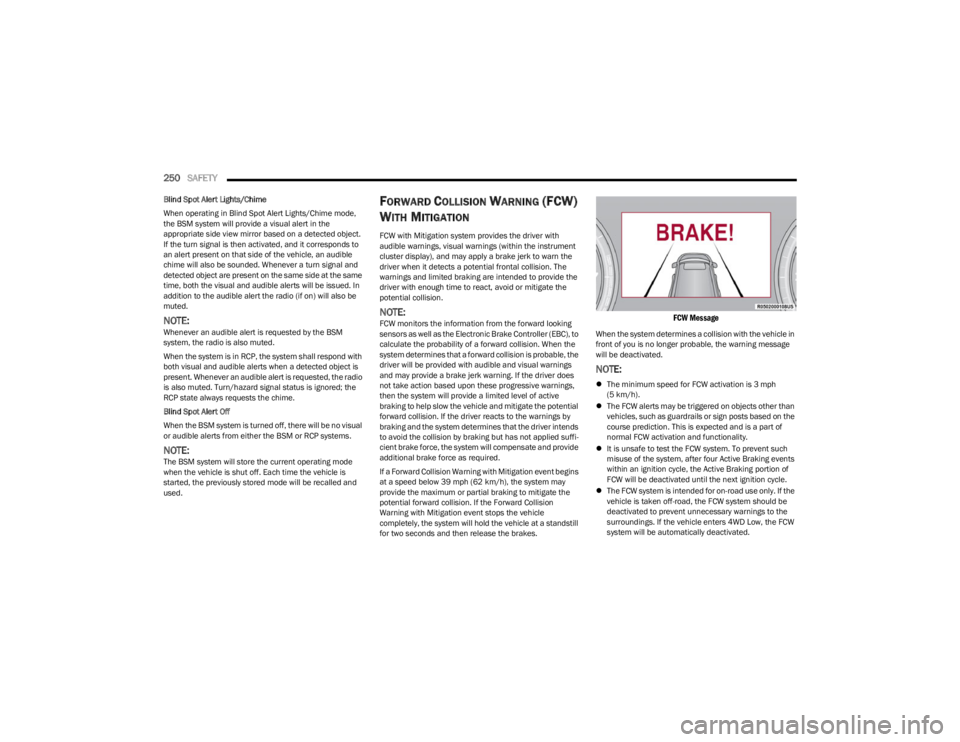
FCW Message
When the system determines a collision with the vehicle in
front of you is no longer probable, the warning message
will be deactivated.
NOTE:
The minimum speed for FCW activation is 3 mph
(5 km/h).
The FCW alerts may be triggered on objects other than
vehicles, such as guardrails or sign posts based on the
course prediction. This is expected and is a part of
normal FCW activation and functionality.
It is unsafe to test the FCW system. To prevent such
misuse of the system, after four Active Braking events
within an ignition cycle, the Active Braking portion of
FCW will be deactivated until the next ignition cycle.
The FCW system is intended for on-road use only. If the
vehicle is taken off-road, the FCW system should be
deactivated to prevent unnecessary warnings to the
surroundings. If the vehicle enters 4WD Low, the FCW
system will be automatically deactivated.
23_WS_OM_EN_USC_t.book Page 250