4WD JEEP WAGONEER 2023 User Guide
[x] Cancel search | Manufacturer: JEEP, Model Year: 2023, Model line: WAGONEER, Model: JEEP WAGONEER 2023Pages: 396, PDF Size: 15.17 MB
Page 133 of 396
STARTING AND OPERATING131
The 4WD LOW light will remain on solid when the shift is
complete.
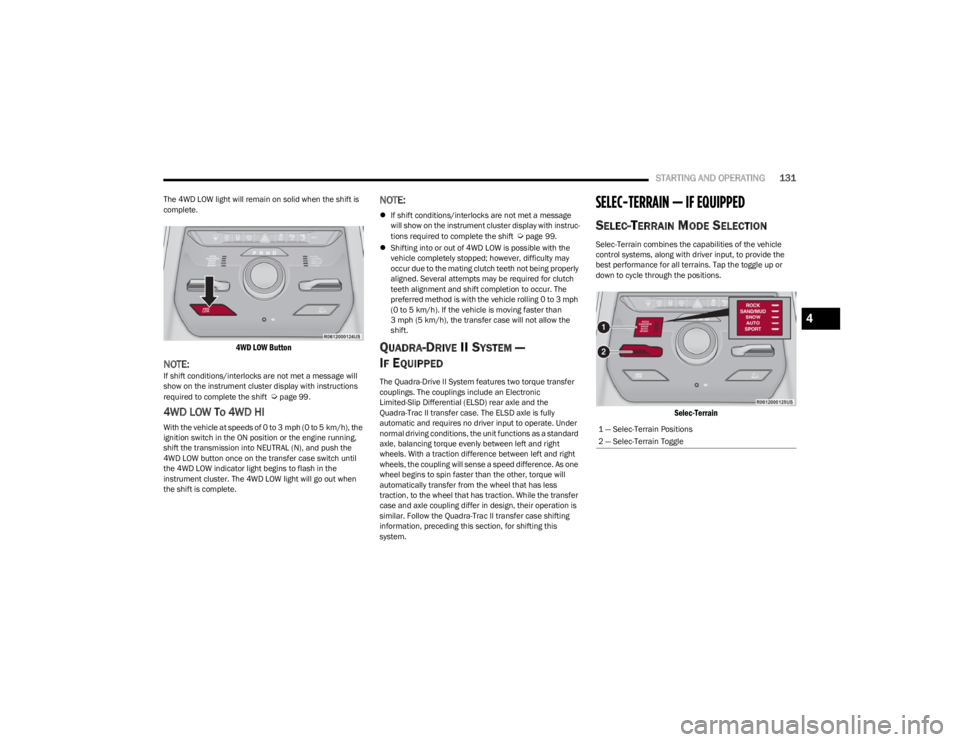
4WD LOW Button
NOTE:If shift conditions/interlocks are not met a message will
show on the instrument cluster display with instructions
required to complete the shift
Úpage 99.
4WD LOW To 4WD HI
With the vehicle at speeds of 0 to 3 mph (0 to 5 km/h), the
ignition switch in the ON position or the engine running,
shift the transmission into NEUTRAL (N), and push the
4WD LOW button once on the transfer case switch until
the 4WD LOW indicator light begins to flash in the
instrument cluster. The 4WD LOW light will go out when
the shift is complete.
NOTE:
If shift conditions/interlocks are not met a message
will show on the instrument cluster display with instruc -
tions required to complete the shift
Úpage 99.
Shifting into or out of 4WD LOW is possible with the
vehicle completely stopped; however, difficulty may
occur due to the mating clutch teeth not being properly
aligned. Several attempts may be required for clutch
teeth alignment and shift completion to occur. The
preferred method is with the vehicle rolling 0 to 3 mph
(0 to 5 km/h). If the vehicle is moving faster than
3 mph (5 km/h), the transfer case will not allow the
shift.
QUADRA-DRIVE II SYSTEM —
I
F EQUIPPED
The Quadra-Drive II System features two torque transfer
couplings. The couplings include an Electronic
Limited-Slip Differential (ELSD) rear axle and the
Quadra-Trac II transfer case. The ELSD axle is fully
automatic and requires no driver input to operate. Under
normal driving conditions, the unit functions as a standard
axle, balancing torque evenly between left and right
wheels. With a traction difference between left and right
wheels, the coupling will sense a speed difference. As one
wheel begins to spin faster than the other, torque will
automatically transfer from the wheel that has less
traction, to the wheel that has traction. While the transfer
case and axle coupling differ in design, their operation is
similar. Follow the Quadra-Trac II transfer case shifting
information, preceding this section, for shifting this
system.
SELEC-TERRAIN — IF EQUIPPED
SELEC-TERRAIN MODE SELECTION
Selec-Terrain combines the capabilities of the vehicle
control systems, along with driver input, to provide the
best performance for all terrains. Tap the toggle up or
down to cycle through the positions.
Selec-Terrain
1 — Selec-Terrain Positions
2 — Selec-Terrain Toggle
4
23_WS_OM_EN_USC_t.book Page 131
Page 134 of 396
132STARTING AND OPERATING
Selec-Terrain consists of the following positions:
ROCK (if equipped) – Off-road calibration is only avail -
able in 4WD LOW. The vehicle is raised (if equipped
with Air Suspension) for improved ground clearance.
Traction-based tuning with improved steerability for
use on high traction off-road surfaces. Use for low
speed obstacles such as large rocks, deep ruts, etc. If
equipped with air suspension, the vehicle level will
change to Off-Road 2 (OR2). If the Selec-Terrain switch
is in ROCK mode, and the transfer case is switched
from 4WD LOW to 4WD HI, the Selec-Terrain system
will return to AUTO.
SAND (if equipped) – Off-road calibration for use on low
traction surfaces such as sand or wet grass. Driveline
is maximized for traction. Some binding may be felt on
less forgiving surfaces. The electronic brake controls
are set to limit traction control management of throttle
and wheel spin. If equipped with air suspension, the
default ride height for SAND is Normal Ride Height
(NRH).
MUD (if equipped) – Off-road calibration for use on low
traction surfaces such as mud. Driveline is maximized
for traction. Some binding may be felt on less forgiving
surfaces. The electronic brake controls are set to limit
traction control management of throttle and wheel
spin. If equipped with air suspension, the level will
change to Off-Road 1 (OR1).
SNOW – Tuning set for additional stability in inclement
weather. Use on and off road on loose traction surfaces
such as snow. When in SNOW mode (depending on
certain operating conditions), the transmission may
use SECOND gear (rather than FIRST gear) during
launches, to minimize wheel slippage. If equipped with
air suspension, the default ride height for SNOW is
Normal Ride Height (NRH).
AUTO – Fully automatic full-time four-wheel drive oper -
ation can be used on and off road. Balances traction
with seamless steering feel to provide improved
handling and acceleration over two-wheel drive vehi -
cles. If equipped with air suspension, the level will
change to Normal Ride Height (NRH).
SPORT – This mode alters the transmission's auto -
matic shift schedule for sportier driving. Upshift speeds
are increased to make full use of available engine
power. Steering efforts are modified for sporty driving.
If equipped with air suspension, the level will change to
Aero Height.
INSTRUMENT CLUSTER DISPLAY
M
ESSAGES
When the appropriate conditions exist, a message will
appear in the instrument cluster Úpage 99.
QUADRA-LIFT — IF EQUIPPED
DESCRIPTION
The Quadra-Lift Air Suspension system provides full-time
load leveling capability along with the benefit of vehicle
height adjustment by a toggle switch. The vehicle will automatically raise and lower the ride
height to adapt to the appropriate driving conditions. At
higher speeds, the vehicle will lower to an aerodynamic
ride height and when operating in off-road modes (if
equipped), the vehicle will raise the ride height
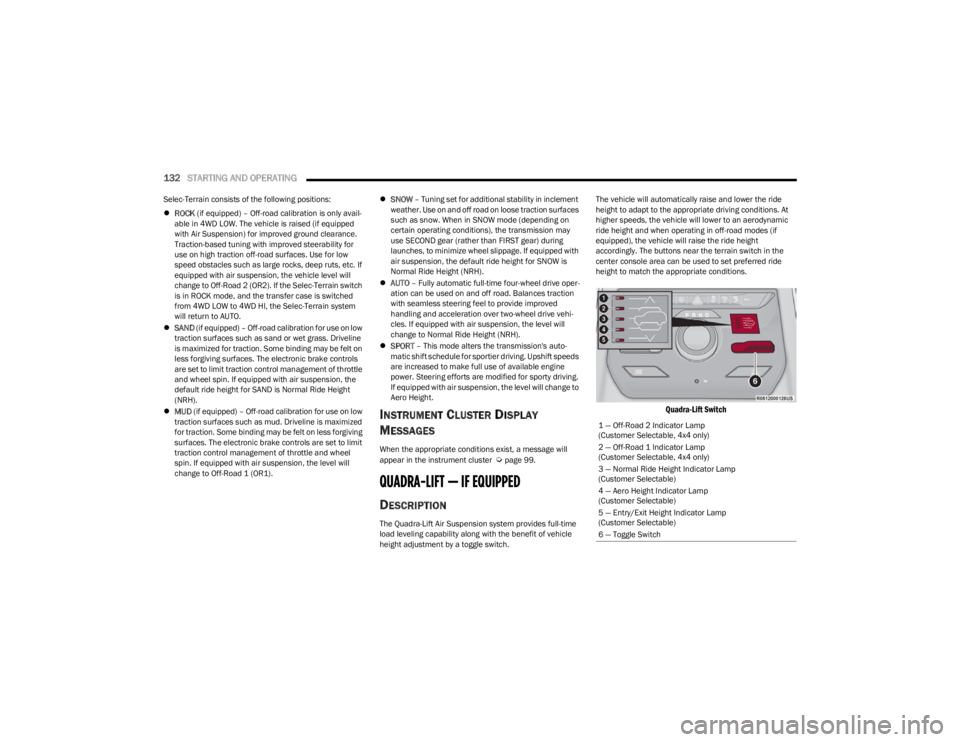
accordingly. The buttons near the terrain switch in the
center console area can be used to set preferred ride
height to match the appropriate conditions.
Quadra-Lift Switch
1 — Off-Road 2 Indicator Lamp
(Customer Selectable, 4x4 only)
2 — Off-Road 1 Indicator Lamp
(Customer Selectable, 4x4 only)
3 — Normal Ride Height Indicator Lamp
(Customer Selectable)
4 — Aero Height Indicator Lamp
(Customer Selectable)
5 — Entry/Exit Height Indicator Lamp
(Customer Selectable)
6 — Toggle Switch
23_WS_OM_EN_USC_t.book Page 132
Page 138 of 396

136STARTING AND OPERATING
NOTE:
Even if the power steering assistance is no longer oper -
ational, it is still possible to steer the vehicle. Under
these conditions there will be a substantial increase in
steering effort, especially at low speeds and during
parking maneuvers.
If the condition persists, see an authorized dealer for
service.
If the Steering icon is displayed and the “POWER
STEERING SYSTEM OVER TEMP” message is displayed on
the instrument cluster screen, they indicate that extreme
steering maneuvers may have occurred which caused an
over temperature condition in the electric power steering
system. Once driving conditions are safe, pull over and let
the vehicle idle for a few moments until the icon and
message turn off.
STOP/START SYSTEM — IF EQUIPPED
The Stop/Start function is developed to reduce fuel
consumption. The system will stop the engine
automatically during a vehicle stop if the required
conditions are met. Releasing the brake pedal or pressing
the accelerator pedal will automatically restart the engine
Úpage 136.
This vehicle has been upgraded with a heavy-duty starter,
enhanced battery, and other upgraded engine parts, to
handle the additional engine starts.
AUTOSTOP MODE
The Stop/Start feature is enabled after every normal
customer engine start. At that time, the system will go into
STOP/START READY and if all other conditions are met,
can go into a STOP/START AUTOSTOP ACTIVE Autostop
mode.
To Activate The Autostop Mode, The Following Must Occur:
The system must be in STOP/START READY state. A
“STOP/START READY” message will be displayed in the
instrument cluster display within the Stop/Start
section
Úpage 99.
The vehicle must be completely stopped.
The gear selector must be in a forward gear and the
brake pedal pressed.
The engine will shut down, the tachometer will move to the
zero position, and the Stop/Start telltale will illuminate
indicating you are in Autostop. Customer settings will be
maintained upon return to an engine-running condition.
POSSIBLE REASONS THE ENGINE DOES
N
OT AUTOSTOP
Prior to engine shut down, the system will check many
safety and comfort conditions to see if they are fulfilled.
Detailed information about the operation of the Stop/Start
system may be viewed in the instrument cluster display
Stop/Start Screen. In the following situations, the engine
will not stop:
Driver’s seat belt is not buckled.
Driver’s door is not closed.
Battery temperature is too warm or cold.
Battery charge is low.
The vehicle is on a steep grade.
Cabin heating or cooling is in process and an accept -
able cabin temperature has not been achieved.
HVAC is set to full defrost mode at a high blower speed.
HVAC is set to MAX A/C.
Engine has not reached normal operating temperature.
The transmission is not in a forward gear.
Hood is open.
Vehicle is in 4WD LOW, or an off-road
Selec-Terrain mode.
Brake pedal is not pressed with sufficient pressure.
Accelerator pedal input.
Engine temperature is too high.
5 mph (8 km/h) threshold has not been achieved from
previous Autostop.
Steering angle is beyond threshold.
It may be possible for the vehicle to be driven several
times without the Stop/Start system going into a
STOP/START READY state under more extreme conditions
of the items listed above.
TO START THE ENGINE WHILE IN
A
UTOSTOP MODE
While in a forward gear, the engine will start when the
brake pedal is released or the throttle pedal is pressed.
The transmission will automatically re-engage upon
engine restart.
23_WS_OM_EN_USC_t.book Page 136
Page 139 of 396
STARTING AND OPERATING137
Conditions That Will Cause The Engine To Start
Automatically While In Autostop Mode:
The transmission selector is moved out of DRIVE.
To maintain cabin temperature comfort.
HVAC is set to full defrost mode.
HVAC system temperature or fan speed is manually
adjusted.
Battery voltage drops too low.
Stop/Start OFF switch is pushed.
A Stop/Start system error occurs.
4WD LOW, or an off-road Selec-Terrain mode is
selected.
An off-road Selec-Terrain mode is selected.
Steering angle is beyond threshold.
TO MANUALLY TURN OFF THE
S
TOP/START SYSTEM
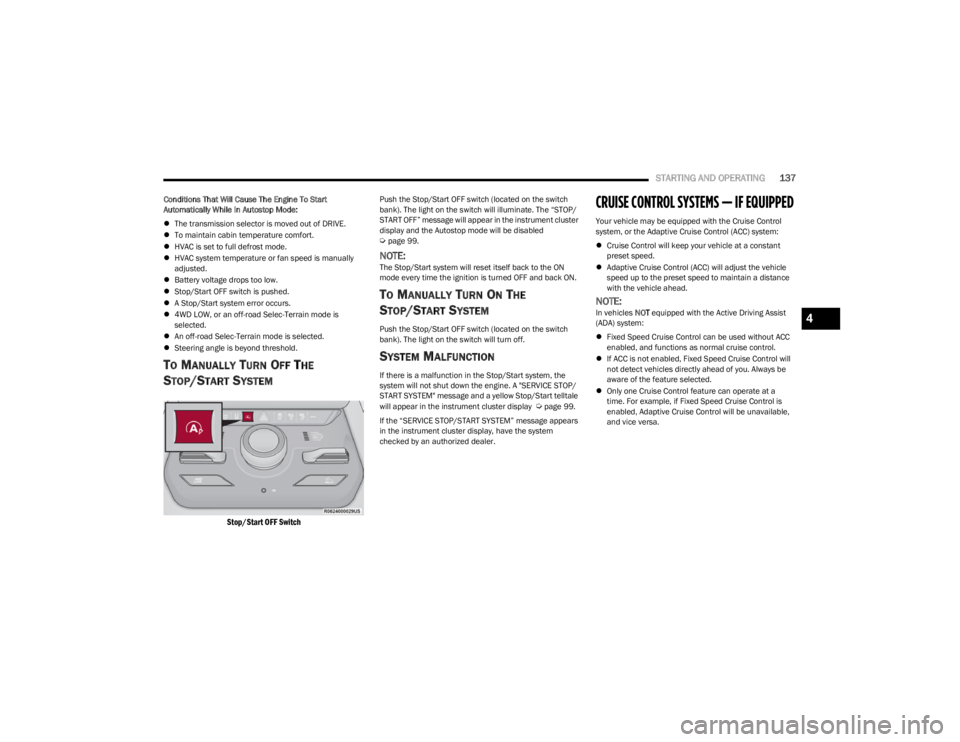
Stop/Start OFF Switch
Push the Stop/Start OFF switch (located on the switch
bank). The light on the switch will illuminate. The “STOP/
START OFF” message will appear in the instrument cluster
display and the Autostop mode will be disabled
Úpage 99.
NOTE:The Stop/Start system will reset itself back to the ON
mode every time the ignition is turned OFF and back ON.
TO MANUALLY TURN ON THE
S
TOP/START SYSTEM
Push the Stop/Start OFF switch (located on the switch
bank). The light on the switch will turn off.
SYSTEM MALFUNCTION
If there is a malfunction in the Stop/Start system, the
system will not shut down the engine. A "SERVICE STOP/
START SYSTEM" message and a yellow Stop/Start telltale
will appear in the instrument cluster display
Úpage 99.
If the “SERVICE STOP/START SYSTEM” message appears
in the instrument cluster display, have the system
checked by an authorized dealer.
CRUISE CONTROL SYSTEMS — IF EQUIPPED
Your vehicle may be equipped with the Cruise Control
system, or the Adaptive Cruise Control (ACC) system:
Cruise Control will keep your vehicle at a constant
preset speed.
Adaptive Cruise Control (ACC) will adjust the vehicle
speed up to the preset speed to maintain a distance
with the vehicle ahead.
NOTE:In vehicles NOT equipped with the Active Driving Assist
(ADA) system:
Fixed Speed Cruise Control can be used without ACC
enabled, and functions as normal cruise control.
If ACC is not enabled, Fixed Speed Cruise Control will
not detect vehicles directly ahead of you. Always be
aware of the feature selected.
Only one Cruise Control feature can operate at a
time. For example, if Fixed Speed Cruise Control is
enabled, Adaptive Cruise Control will be unavailable,
and vice versa.4
23_WS_OM_EN_USC_t.book Page 137
Page 143 of 396

STARTING AND OPERATING141
Activating Adaptive Cruise Control (ACC)
The minimum set speed for the ACC system is 20 mph
(32 km/h).
When the system is turned on and in the ready state, the
instrument cluster display will read “ACC Ready.”
When the system is off, the instrument cluster display will
read “Adaptive Cruise Control (ACC) Off.”
NOTE:You cannot engage ACC under the following conditions:
When in 4WD Low
When the brakes are applied
When the parking brake is applied
When the automatic transmission is in PARK, REVERSE
or NEUTRAL
When the brakes are overheated
When the driver’s door is open at low speeds
When the driver’s seat belt is unbuckled at low speeds
When there is a stationary vehicle in front of your
vehicle in close proximity
When ESC Full Off mode is active
To Activate/Deactivate
Push and release the Adaptive Cruise Control (ACC) on/off
button. The ACC menu in the instrument cluster displays
“ACC Ready.”
To turn the system off, push and release the Adaptive
Cruise Control (ACC) on/off button again. At this time, the
system will turn off and the instrument cluster displays
“Adaptive Cruise Control (ACC) Off.”
To Set A Desired Speed
When the vehicle reaches the speed desired, push the
SET (+) button or the SET (-) button and release. The
instrument cluster display will show the set speed.
NOTE:Fixed Speed Cruise Control (if equipped) can be used
without ACC enabled. To change between the different
modes, push the ACC on/off button which turns the ACC
and the Fixed Speed Cruise Control off. Pushing the Fixed
Speed Cruise Control on/off button will result in turning on
(changing to) Fixed Speed Cruise Control mode. If ACC is set when the vehicle speed is
below 20 mph
(32 km/h), the set speed will default to 20 mph
(32 km/h).
NOTE:Fixed Speed Cruise Control cannot be set below 20 mph
(32 km/h).
If either system is set when the vehicle speed is above
20 mph (32 km/h), the set speed shall be the current speed of the vehicle.
NOTE:
Keeping your foot on the accelerator pedal can cause
the vehicle to continue to accelerate beyond the set
speed. If this occurs, the message “DRIVER OVERRIDE”
will display in the instrument cluster display.
If you continue to accelerate beyond the set speed
while ACC is enabled, the system will not be controlling
the distance between your vehicle and the vehicle
ahead. The vehicle speed will only be determined by
the position of the accelerator pedal.
To Cancel
The following conditions cancel the ACC or Fixed Speed
Cruise Control systems:
The brake pedal is applied
The CANC (cancel) button is pushed
The Anti-Lock Brake System (ABS) activates
The gear selector is removed from the DRIVE position
WARNING!
Leaving the Adaptive Cruise Control (ACC) system on
when not in use is dangerous. You could accidentally
set the system or cause it to go faster than you want.
You could lose control and have a collision. Always leave
the system off when you are not using it.
WARNING!
In Fixed Speed Cruise Control mode, the system will not
react to vehicles ahead. In addition, the proximity
warning does not activate and no alarm will sound even
if you are too close to the vehicle ahead since neither
the presence of the vehicle ahead nor the
vehicle-to-vehicle distance is detected. Be sure to
maintain a safe distance between your vehicle and the
vehicle ahead. Always be aware which mode is
selected.
4
23_WS_OM_EN_USC_t.book Page 141
Page 144 of 396

142STARTING AND OPERATING
The Electronic Stability Control/Traction Control
System (ESC/TCS) activates
The vehicle parking brake is applied
The Trailer Sway Control (TSC) activates
The driver switches ESC to Full Off mode
The braking temperature exceeds normal range (over -
heated)
The following conditions will only cancel the ACC system:
Driver seat belt is unbuckled at low speeds
Driver door is opened at low speeds
To Turn Off
The system will turn off and erase the set speed in
memory if:
The Adaptive Cruise Control (ACC) on/off button is
pushed
The Fixed Speed Cruise Control (if equipped) on/off
button is pushed
The ignition is placed in the OFF position
4WD Low is engaged
To Resume
If there is a set speed in memory, push the RES (resume)
button and remove your foot from the accelerator pedal.
The instrument cluster display will show the last set
speed.
Resume can be used at any speed above 20 mph
(32 km/h) when only Fixed Speed Cruise Control is
being used.
Resume can be used at any speed above 0 mph (0 km/h)
when ACC is active.
NOTE:
While in ACC mode, when the vehicle comes to a
complete stop longer than two seconds, the driver will
either have to push the RES (resume) button or press
the accelerator pedal to reengage the ACC system.
ACC cannot be resumed if there is a stationary vehicle
in front of your vehicle in close proximity.
To Vary The Speed Setting
To Increase Or Decrease The Set Speed
After setting a speed, you can increase the set speed by
pushing the SET (+) button, or decrease speed by pushing
the SET (-) button.
U.S. Speed (mph)
Pushing the SET (+), or SET (-) button once will result in
a 1 mph speed adjustment. Each subsequent tap of
the button results in an adjustment of 1 mph.
If the button is continually pushed, the set speed will
continue to adjust in 5 mph increments until the button
is released. The new set speed is reflected in the instru -
ment cluster display. Metric Speed (km/h)
Pushing the SET (+), or SET (-) button once will result in
a 1 km/h speed adjustment. Each subsequent tap of
the button results in an adjustment of 1 km/h.
If the button is continually pushed, the set speed will
continue to adjust in 10 km/h increments until the
button is released. The new set speed is reflected in
the instrument cluster display.
NOTE:When you override and push the SET (+) button or SET (-)
button, the new set speed will be the current speed of the
vehicle.
When ACC Is Active
When you use the SET (-) button to decelerate, if the
engine’s braking power does not slow the vehicle suffi -
ciently to reach the set speed, the brake system will
automatically slow the vehicle.
The ACC system decelerates the vehicle to a full stop
when following the vehicle in front. If your vehicle
follows the vehicle in front to a standstill, after two
seconds the driver will either have to push the RES
(resume) button, or apply the accelerator pedal to reen -
gage the ACC to the existing set speed.
The ACC system maintains set speed when driving
uphill and downhill. However, a slight speed change on
moderate hills is normal. In addition, downshifting may
occur while climbing uphill or descending downhill. This
is normal operation and necessary to maintain set
speed. When driving uphill and downhill, the ACC
system will cancel if the braking temperature exceeds
normal range (overheated).
WARNING!
The Resume function should only be used if traffic and
road conditions permit. Resuming a set speed that is
too high or too low for prevailing traffic and road
conditions could cause the vehicle to accelerate or
decelerate too sharply for safe operation. Failure to
follow these warnings can result in a collision and death
or serious personal injury.
23_WS_OM_EN_USC_t.book Page 142
Page 156 of 396

154STARTING AND OPERATING
PARKSENSE FRONT/REAR PARK ASSIST
SYSTEM
The ParkSense Park Assist system provides visual and
audible indications of the distance between the rear and
the front fascia/bumper and a detected obstacle when
backing up or moving forward (e.g. during a parking
maneuver). The vehicle brakes may be automatically
applied and released when performing a reverse parking
maneuver if the system detects a possible collision with
an obstacle.
NOTE:
The driver can disable the automatic braking function
by turning ParkSense off via the ParkSense switch. The
driver can also override automatic braking by changing
the gear or by pressing the gas pedal over 90% of its
capacity during the braking event.
Automatic brakes are not available if the vehicle is in
4WD Low.
Automatic brakes will not be available if there is a
faulted condition detected with the ParkSense Park
Assist system or the Braking System Module.
The automatic braking function may only be applied if
the vehicle deceleration is not enough to avoid colliding
with a detected obstacle.
The automatic braking function may not be applied fast
enough for obstacles that move toward the rear of the
vehicle from the left and/or right sides.
The automatic braking function can be enabled/
disabled from the Customer Programmable Features
section of the Uconnect system.
ParkSense will retain its last known configuration state
for the automatic braking function through ignition
cycles.
The automatic braking function is intended to assist the
driver in avoiding possible collisions with detected
obstacles when backing up in REVERSE gear.
NOTE:
The system is designed to assist the driver and not to
substitute the driver.
The driver must stay in full control of the vehicle's
acceleration and braking and is responsible for the
vehicle's movements.
For limitations of this system and recommendations, see
Úpage 159.
ParkSense will retain the last system state (enabled or
disabled) from the last ignition cycle when the ignition is
changed to the ON/RUN position.
ParkSense can be active only when the gear selector is in
REVERSE or DRIVE. If ParkSense is enabled at one of
these gear selector positions, the system will remain
active until the vehicle speed is increased to
approximately 7 mph (11 km/h) or above. The system will
become active again if the vehicle speed is decreased to
speeds less than approximately 6 mph (9 km/h). A display
warning will appear in the instrument cluster display if the
vehicle is in REVERSE and the speed exceeds 7 mph
(11 km/h).
PARKSENSE SENSORS
The four ParkSense sensors located in the rear fascia/
bumper, and the six ParkSense sensors located in the
front fascia/bumper, monitor the area in front and behind
the vehicle that is within the sensors’ field of view. The
front sensors detect obstacles from approximately
12 inches (30 cm) up to 47 inches (120 cm) from the front fascia/bumper. The rear sensors can detect obstacles
from approximately 12 inches (30 cm) up to 79 inches
(200 cm) from the rear fascia/bumper. These distances
depend on the location, type and orientation of the
obstacle in the horizontal direction.
NOTE:If the vehicle is equipped with ParkSense Active Park
Assist, there will be six ParkSense sensors located in the
rear fascia/bumper.
PARKSENSE DISPLAY
The warning display will turn on indicating the system
status when the vehicle is in REVERSE or when the vehicle
is in DRIVE and an obstacle has been detected.
The system will indicate a detected obstacle by showing a
single arc in the left and/or right front or rear regions
based on the object’s distance and location relative to the
vehicle.
If an object is detected in the left and/or right rear region,
the display will show a single arc in the left and/or right
rear region and the system will produce a tone. As the
vehicle moves closer to the object, the display will show
the single arc moving closer to the vehicle and the tone will
change from a single 1/2 second tone to slow, to fast, to
continuous.
23_WS_OM_EN_USC_t.book Page 154
Page 163 of 396

STARTING AND OPERATING161
The system may not work in all conditions (e.g. environ -
mental conditions such as heavy rain, snow, etc., or if
searching for a parking space that has surfaces that
will absorb the ultrasonic sensor waves).
New vehicles from the dealership must have at least
30 miles (48 km) accumulated before the ParkSense
Active Park Assist system is fully calibrated and
performs accurately. This is due to the system’s
dynamic vehicle calibration to improve the perfor -
mance of the feature. The system will also continuously
perform the dynamic vehicle calibration to account for
differences such as over or under inflated tires and
new tires.
ENABLING AND DISABLING THE
P
ARKSENSE ACTIVE PARK ASSIST
S
YSTEM
The ParkSense Active Park Assist system can
be enabled and disabled with the ParkSense
Active Park Assist switch, located on the switch
panel on the forward part of the center console,
in front of the gear selector.
To enable the ParkSense Active Park Assist system, push
the ParkSense Active Park Assist switch once (LED turns
on). Pushing the switch a second time will disable the
system (LED turns off).
The ParkSense Active Park Assist system will turn off
automatically for any of the following conditions:
Parking maneuver is completed
Vehicle speed is greater than 28 mph (45 km/h) when
searching for a parking space during a Fully Automated
maneuver
Vehicle speed is greater than 18 mph (30 km/h) when
searching for a parking space during a Semi-Automatic
maneuver
Vehicle speed is greater than 5 mph (7 km/h) during
Semi-Automatic active steering guidance into the
parking space
Steering wheel is touched during Fully Automated or
Semi-Automatic active steering guidance into the
parking space
The gas pedal or brake pedal is pressed during Fully
Automated active steering guidance into the parking
space
ParkSense Front and Rear Park Assist switch is pushed
Any of the doors are opened during a Fully Automated
maneuver
The driver door is opened during a Semi-Automatic
maneuver
Rear liftgate is opened
A trailer is connected
Vehicle is in 4WD Low
Cruise Control, Adaptive Cruise Control, or Active
Driving Assist systems are engaged
Electronic Stability Control/Anti-Lock Braking System
intervention
The ParkSense Active Park Assist system allows a
maximum number of shifts between DRIVE and REVERSE.
If the maneuver cannot be completed within the maximum
amount of shifts, the system will cancel and the
instrument cluster display will instruct the driver to
complete the maneuver manually. The ParkSense Active Park Assist system will only operate
and search for a parking space when the following
conditions are present:
Gear selector is in DRIVE
Ignition is in the RUN position
ParkSense Active Park Assist switch is activated
All of the doors are closed
Rear liftgate is closed
Vehicle speed is less than 15 mph (25 km/h) during a
Semi-Automatic maneuver
Vehicle speed is less than 25 mph (40 km/h) during a
Fully Automated maneuver
The outer surface and the underside of the front and
rear fascias/bumpers are clean and clear of snow, ice,
mud, dirt or other obstruction
NOTE:
During a Semi-Automatic maneuver, if the vehicle is
driven above approximately 15 mph (25 km/h), the
instrument cluster display will instruct the driver to
slow down. If the vehicle is driven above approximately
18 mph (30 km/h), the system will cancel. The driver
must then reactivate the system by pushing the Park -
Sense Active Park Assist switch.
During a Fully Automated maneuver, if the vehicle is
driven above approximately 25 mph (40 km/h), the
instrument cluster display will instruct the driver to
slow down. If the vehicle is driven above approximately
28 mph (45 km/h), the system will cancel. The driver
must then reactivate the system by pushing the Park -
Sense Active Park Assist switch.
4
23_WS_OM_EN_USC_t.book Page 161
Page 192 of 396

190STARTING AND OPERATING
RECREATIONAL TOWING (BEHIND MOTORHOME)
TOWING THIS VEHICLE BEHIND ANOTHER VEHICLE
NOTE:
When towing your vehicle, always follow applicable
state and provincial laws. Contact state and provincial
Highway Safety offices for additional details.
Vehicles equipped with Quadra-Lift must be placed in
Transport Mode before tying them down (from the
body) on a trailer or flatbed truck
Úpage 132. If the
vehicle cannot be placed in Transport mode (for
example, engine will not run), tie-downs should be
fastened over the tires using specific straps (not to the
body). Failure to follow these instructions may cause
fault codes to be set and/or cause loss of proper
tie-down tension.
RECREATIONAL TOWING — TWO-WHEEL
D
RIVE MODELS
DO NOT flat tow this vehicle. Damage to the drivetrain will
result.
Recreational towing (for two-wheel drive models) is
allowed ONLY if the rear wheels are OFF the ground. This
may be accomplished using a tow dolly or vehicle trailer. If
using a tow dolly, follow this procedure:
1. Properly secure the dolly to the tow vehicle, following
the dolly manufacturer's instructions.
NOTE:If vehicle is equipped with Quadra-Lift air suspension,
ensure the vehicle is set to Normal Ride Height.
2. Drive the rear wheels onto the tow dolly.
3. Apply the Electric Park Brake. Shift the transmission into PARK.
4. Turn the ignition OFF.
Towing Condition Wheels OFF The Ground Two-Wheel Drive Models Four-Wheel Drive Models
Without 4WD LOW Range Four-Wheel Drive Models
With 4WD LOW Range
Flat Tow NONENOT ALLOWEDNOT ALLOWEDSee Instructions
Transmission in PARK
Transfer case in N (Neutral)
Tow in forward direction
Dolly Tow Front
NOT ALLOWEDNOT ALLOWEDNOT ALLOWED
Rear OKNOT ALLOWEDNOT ALLOWED
On Trailer ALLOKOKOK
23_WS_OM_EN_USC_t.book Page 190
Page 194 of 396
192STARTING AND OPERATING
Use the following procedure to prepare your vehicle for
recreational towing:
1. Bring the vehicle to a complete stop on level ground,
with the engine running.
2. Press and hold the brake pedal.
3. Shift the transmission into NEUTRAL.
4. If vehicle is equipped with Quadra-Lift air suspension, ensure the vehicle is set to Normal Ride Height.
NOTE:
Steps 1 through 4 are requirements that must be
met before pushing the N (Neutral) button, and
must continue to be met until the shift has been
completed. If any of these requirements are not
met before pushing the N (Neutral) button or are
no longer met during the shift, then the N (Neutral)
indicator light will flash continuously until all
requirements are met or until the N (Neutral)
button is released.
The ignition must be in the ON/RUN position for a
shift to take place and for the position indicator
lights to be operable. If the ignition is not in the
ON/RUN position, the shift will not take place and
no position indicator lights will be on or flashing.
A flashing N (Neutral) position indicator light indi-
cates that shift requirements have not been met.
If the vehicle is equipped with Quadra-Lift air
suspension, the engine should be started and left
running for a minimum of 60 seconds (with all the
doors closed) at least once every 24 hours. This
process allows the air suspension to adjust the
vehicle’s ride height to compensate for tempera -
ture effects.
Engaging/disengaging of the Electric Park Brake
requires the ignition to be in the ON/RUN position.
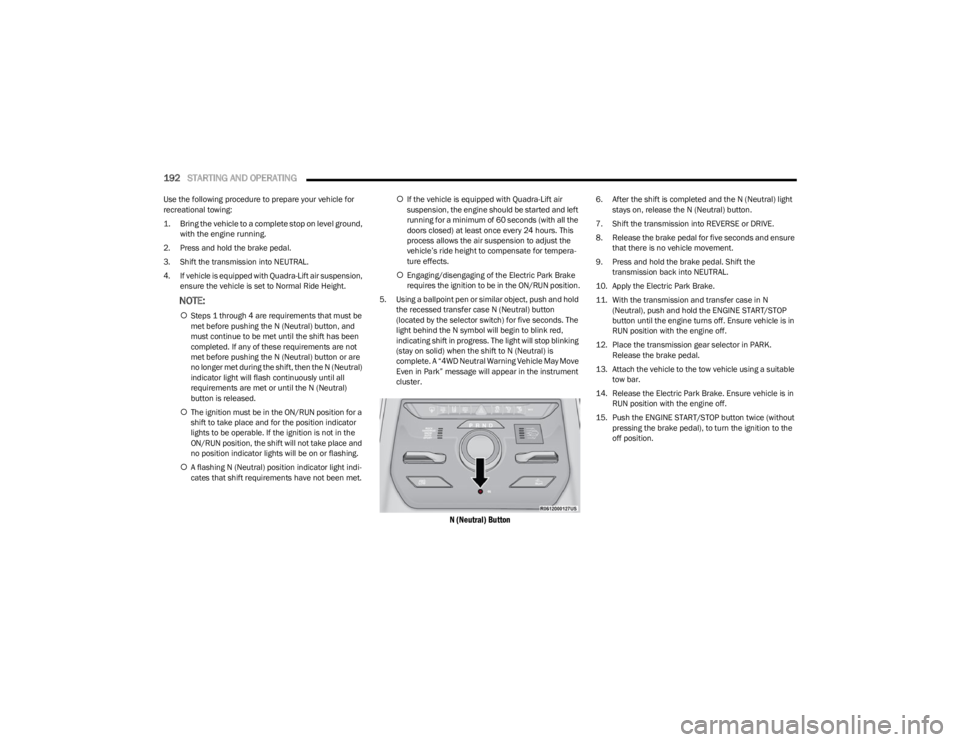
5. Using a ballpoint pen or similar object, push and hold the recessed transfer case N (Neutral) button
(located by the selector switch) for five seconds. The
light behind the N symbol will begin to blink red,
indicating shift in progress. The light will stop blinking
(stay on solid) when the shift to N (Neutral) is
complete. A “4WD Neutral Warning Vehicle May Move
Even in Park” message will appear in the instrument
cluster.
N (Neutral) Button
6. After the shift is completed and the N (Neutral) light stays on, release the N (Neutral) button.
7. Shift the transmission into REVERSE or DRIVE.
8. Release the brake pedal for five seconds and ensure that there is no vehicle movement.
9. Press and hold the brake pedal. Shift the transmission back into NEUTRAL.
10. Apply the Electric Park Brake.
11. With the transmission and transfer case in N (Neutral), push and hold the ENGINE START/STOP
button until the engine turns off. Ensure vehicle is in
RUN position with the engine off.
12. Place the transmission gear selector in PARK. Release the brake pedal.
13. Attach the vehicle to the tow vehicle using a suitable tow bar.
14. Release the Electric Park Brake. Ensure vehicle is in RUN position with the engine off.
15. Push the ENGINE START/STOP button twice (without pressing the brake pedal), to turn the ignition to the
off position.
23_WS_OM_EN_USC_t.book Page 192