lock JEEP WAGONEER 2023 Repair Manual
[x] Cancel search | Manufacturer: JEEP, Model Year: 2023, Model line: WAGONEER, Model: JEEP WAGONEER 2023Pages: 396, PDF Size: 15.17 MB
Page 143 of 396

STARTING AND OPERATING141
Activating Adaptive Cruise Control (ACC)
The minimum set speed for the ACC system is 20 mph
(32 km/h).
When the system is turned on and in the ready state, the
instrument cluster display will read “ACC Ready.”
When the system is off, the instrument cluster display will
read “Adaptive Cruise Control (ACC) Off.”
NOTE:You cannot engage ACC under the following conditions:
When in 4WD Low
When the brakes are applied
When the parking brake is applied
When the automatic transmission is in PARK, REVERSE
or NEUTRAL
When the brakes are overheated
When the driver’s door is open at low speeds
When the driver’s seat belt is unbuckled at low speeds
When there is a stationary vehicle in front of your
vehicle in close proximity
When ESC Full Off mode is active
To Activate/Deactivate
Push and release the Adaptive Cruise Control (ACC) on/off
button. The ACC menu in the instrument cluster displays
“ACC Ready.”
To turn the system off, push and release the Adaptive
Cruise Control (ACC) on/off button again. At this time, the
system will turn off and the instrument cluster displays
“Adaptive Cruise Control (ACC) Off.”
To Set A Desired Speed
When the vehicle reaches the speed desired, push the
SET (+) button or the SET (-) button and release. The
instrument cluster display will show the set speed.
NOTE:Fixed Speed Cruise Control (if equipped) can be used
without ACC enabled. To change between the different
modes, push the ACC on/off button which turns the ACC
and the Fixed Speed Cruise Control off. Pushing the Fixed
Speed Cruise Control on/off button will result in turning on
(changing to) Fixed Speed Cruise Control mode. If ACC is set when the vehicle speed is
below 20 mph
(32 km/h), the set speed will default to 20 mph
(32 km/h).
NOTE:Fixed Speed Cruise Control cannot be set below 20 mph
(32 km/h).
If either system is set when the vehicle speed is above
20 mph (32 km/h), the set speed shall be the current speed of the vehicle.
NOTE:
Keeping your foot on the accelerator pedal can cause
the vehicle to continue to accelerate beyond the set
speed. If this occurs, the message “DRIVER OVERRIDE”
will display in the instrument cluster display.
If you continue to accelerate beyond the set speed
while ACC is enabled, the system will not be controlling
the distance between your vehicle and the vehicle
ahead. The vehicle speed will only be determined by
the position of the accelerator pedal.
To Cancel
The following conditions cancel the ACC or Fixed Speed
Cruise Control systems:
The brake pedal is applied
The CANC (cancel) button is pushed
The Anti-Lock Brake System (ABS) activates
The gear selector is removed from the DRIVE position
WARNING!
Leaving the Adaptive Cruise Control (ACC) system on
when not in use is dangerous. You could accidentally
set the system or cause it to go faster than you want.
You could lose control and have a collision. Always leave
the system off when you are not using it.
WARNING!
In Fixed Speed Cruise Control mode, the system will not
react to vehicles ahead. In addition, the proximity
warning does not activate and no alarm will sound even
if you are too close to the vehicle ahead since neither
the presence of the vehicle ahead nor the
vehicle-to-vehicle distance is detected. Be sure to
maintain a safe distance between your vehicle and the
vehicle ahead. Always be aware which mode is
selected.
4
23_WS_OM_EN_USC_t.book Page 141
Page 146 of 396

144STARTING AND OPERATING
NOTE:
If your vehicle is at a standstill for longer than two
seconds, the system will hold brake pressure for up to
10 minutes. If no driver action is taken after the
10 minutes, the Electric Park Brake will be applied and
the ACC system will cancel.
While ACC is holding your vehicle at a standstill (or the
vehicle is traveling below 3 mph (5 km/h), and the
driver seat belt is unbuckled or the driver door is
opened, the Electric Park Brake will be applied and the
ACC system will cancel.
Display Warnings And Maintenance
“WIPE FRONT RADAR SENSOR IN FRONT OF
VEHICLE” WARNING
The “ACC Unavailable Wipe Front Radar Sensor” warning
will display and a chime will sound when conditions
temporarily limit system performance.
This most often occurs at times of poor visibility, such as
in snow or heavy rain. The ACC system may also become
temporarily blinded due to obstructions, such as mud, dirt
or ice. In these cases, the instrument cluster display will
display this message and the system will deactivate. This message can sometimes be displayed while driving in
highly reflective areas (i.e. ice and snow, or tunnels with
reflective tiles). The ACC system will recover after the
vehicle has left these areas. Under rare conditions, when
the radar is not tracking any vehicles or objects in its path
this warning may temporarily occur.
NOTE:If the “ACC Unavailable Wipe Front Radar Sensor” warning
is active, Fixed Speed Cruise Control is still available.
If weather conditions are not a factor, the driver should
examine the sensor. It may require cleaning or removal of
an obstruction. The sensor is located in the center of the
vehicle behind the lower grille.
To keep the ACC System operating properly, it is important
to note the following maintenance items:
Always keep the sensor clean. Carefully wipe the
sensor lens with a soft cloth. Be cautious not to
damage the sensor lens.
Do not remove any screws from the sensor. Doing so
could cause an ACC system malfunction or failure and
require a sensor realignment.
If the sensor or front end of the vehicle is damaged due
to a collision, see your authorized dealer for service.
Do not attach or install any accessories near the
sensor, including transparent material or aftermarket
grilles. Doing so could cause an ACC system failure or
malfunction. When the condition that deactivated the system is no
longer present, the system will return to the “Adaptive
Cruise Control Off” state and will resume function by
simply reactivating it.
NOTE:
If the “ACC Unavailable Wipe Front Radar Sensor”
message occurs frequently (e.g. more than once on
every trip) without any snow, rain, mud, or other
obstruction, have the radar sensor realigned at an
authorized dealer.
Installing a snowplow, front-end protector, an after -
market grille or modifying the grille is not recom -
mended. Doing so may block the sensor and inhibit
ACC operation.
“CLEAN FRONT WINDSHIELD” WARNING
The “ACC Limited Functionality Clean Front Windshield”
warning will display, and a chime will sound when
conditions temporarily limit system performance. This
most often occurs at times of poor visibility, such as in
snow or heavy rain and fog. The ACC system may also
become temporarily blinded due to obstructions, such as
mud, dirt, or ice on windshield and fog on the inside of
glass. In these cases, the instrument cluster display will
read “ACC Limited Functionality Clean Front Windshield”
and the system will have degraded performance.
This message can sometimes be displayed while driving in
adverse weather conditions. The ACC system will recover
after the vehicle has left these areas. Under rare
conditions, when the camera is not tracking any vehicles
or objects in its path this warning may temporarily occur.
WARNING!
When the ACC system is resumed, the driver must
ensure that there are no pedestrians, vehicles or
objects in the path of the vehicle. Failure to follow these
warnings can result in a collision and death or serious
personal injury.
23_WS_OM_EN_USC_t.book Page 144
Page 163 of 396

STARTING AND OPERATING161
The system may not work in all conditions (e.g. environ -
mental conditions such as heavy rain, snow, etc., or if
searching for a parking space that has surfaces that
will absorb the ultrasonic sensor waves).
New vehicles from the dealership must have at least
30 miles (48 km) accumulated before the ParkSense
Active Park Assist system is fully calibrated and
performs accurately. This is due to the system’s
dynamic vehicle calibration to improve the perfor -
mance of the feature. The system will also continuously
perform the dynamic vehicle calibration to account for
differences such as over or under inflated tires and
new tires.
ENABLING AND DISABLING THE
P
ARKSENSE ACTIVE PARK ASSIST
S
YSTEM
The ParkSense Active Park Assist system can
be enabled and disabled with the ParkSense
Active Park Assist switch, located on the switch
panel on the forward part of the center console,
in front of the gear selector.
To enable the ParkSense Active Park Assist system, push
the ParkSense Active Park Assist switch once (LED turns
on). Pushing the switch a second time will disable the
system (LED turns off).
The ParkSense Active Park Assist system will turn off
automatically for any of the following conditions:
Parking maneuver is completed
Vehicle speed is greater than 28 mph (45 km/h) when
searching for a parking space during a Fully Automated
maneuver
Vehicle speed is greater than 18 mph (30 km/h) when
searching for a parking space during a Semi-Automatic
maneuver
Vehicle speed is greater than 5 mph (7 km/h) during
Semi-Automatic active steering guidance into the
parking space
Steering wheel is touched during Fully Automated or
Semi-Automatic active steering guidance into the
parking space
The gas pedal or brake pedal is pressed during Fully
Automated active steering guidance into the parking
space
ParkSense Front and Rear Park Assist switch is pushed
Any of the doors are opened during a Fully Automated
maneuver
The driver door is opened during a Semi-Automatic
maneuver
Rear liftgate is opened
A trailer is connected
Vehicle is in 4WD Low
Cruise Control, Adaptive Cruise Control, or Active
Driving Assist systems are engaged
Electronic Stability Control/Anti-Lock Braking System
intervention
The ParkSense Active Park Assist system allows a
maximum number of shifts between DRIVE and REVERSE.
If the maneuver cannot be completed within the maximum
amount of shifts, the system will cancel and the
instrument cluster display will instruct the driver to
complete the maneuver manually. The ParkSense Active Park Assist system will only operate
and search for a parking space when the following
conditions are present:
Gear selector is in DRIVE
Ignition is in the RUN position
ParkSense Active Park Assist switch is activated
All of the doors are closed
Rear liftgate is closed
Vehicle speed is less than 15 mph (25 km/h) during a
Semi-Automatic maneuver
Vehicle speed is less than 25 mph (40 km/h) during a
Fully Automated maneuver
The outer surface and the underside of the front and
rear fascias/bumpers are clean and clear of snow, ice,
mud, dirt or other obstruction
NOTE:
During a Semi-Automatic maneuver, if the vehicle is
driven above approximately 15 mph (25 km/h), the
instrument cluster display will instruct the driver to
slow down. If the vehicle is driven above approximately
18 mph (30 km/h), the system will cancel. The driver
must then reactivate the system by pushing the Park -
Sense Active Park Assist switch.
During a Fully Automated maneuver, if the vehicle is
driven above approximately 25 mph (40 km/h), the
instrument cluster display will instruct the driver to
slow down. If the vehicle is driven above approximately
28 mph (45 km/h), the system will cancel. The driver
must then reactivate the system by pushing the Park -
Sense Active Park Assist switch.
4
23_WS_OM_EN_USC_t.book Page 161
Page 172 of 396

170STARTING AND OPERATING
NOTE:
The Active Lane Management system operates with
similar behavior for a right lane departure.
If the turn signal is activated, and the vehicle begins to
depart the lane at the same time the Blind Spot Moni -
toring (BSM) system detects another vehicle in the
BSM zones, the system will provide haptic steering
wheel vibration and/or steering assist torque (if
programmed in Uconnect Settings).
CHANGING ACTIVE LANE MANAGEMENT
S
TATUS
Configurable settings for the Active Lane Management
system are available within the Uconnect system
Úpage 197.
Selectable Warning Types:
Vibration Only
Steering Assist Only
Vibration And Steering Assist
Other configurable settings for this system are for the
intensity of the vibration (high/med/low), steering assist
strength (hi/med/low), and the warning zone sensitivity
(early/medium/late).
NOTE:
The system will not apply vibration and/or steering
assist to the steering wheel whenever a safety system
engages (Anti-Lock Brakes, Traction Control System,
Electronic Stability Control, Forward Collision Warning,
etc.).
The Blind Spot Monitoring system will be forced on
when the ALM system is enabled.
The ALM system will be suppressed when the Active
Driving Assist system (if equipped) is engaged.
PARKVIEW REAR BACK UP CAMERA
Your vehicle is equipped with the ParkView Rear Back Up
Camera that allows you to see an on-screen image of the
rear surroundings of your vehicle whenever the gear
selector is put into REVERSE. The image will be displayed
on the Navigation/Multimedia radio display screen along
with a caution note to “Check Entire Surroundings” across
the top of the screen. After five seconds this note will
disappear. The ParkView camera is located on the rear of
the vehicle above the rear license plate.
When the vehicle is shifted out of REVERSE with camera
delay turned off, the rear camera mode is exited and the
previous screen appears.
Manual Activation Of The Back Up Camera
1. Press the Vehicle button located on the bottom of
the Uconnect display and then select the Controls
menu.
2. Press the Back Up Camera icon to turn the Rear View Camera system on.
NOTE:
The Rear View camera can also be turned on manually
through the Apps menu within the Uconnect system.
The ParkView Rear Back Up Camera has program -
mable modes of operation that may be selected
through the Uconnect system
Úpage 197. When the vehicle is shifted out of REVERSE with camera
delay turned off, the rear camera mode is exited and the
previous screen appears. When the vehicle is shifted out
of REVERSE with camera delay turned on, the camera
image will continue to be displayed for up to 10 seconds
unless the following conditions occur: the vehicle speed
exceeds 8 mph (13 km/h), the vehicle is shifted into
PARK, the vehicle’s ignition is placed in the OFF position,
or the touchscreen X button to disable the display of the
Rear View Camera is pressed.
When enabled, active guidelines are overlaid on the image
to illustrate the width of the vehicle and its projected back
up path based on the steering wheel position. A dashed
center line overlay indicates the center of the vehicle to
assist with parking or aligning to a hitch/receiver.
Different colored zones indicate the distance to the rear of
the vehicle.
The following table shows the approximate distances for
each zone:
Zone Distance To The Rear Of The
Vehicle
Red 0 - 1 ft
(0 - 30 cm)
Yellow 1 ft - 6.5 ft
(30 cm - 2 m)
Green 6.5 ft or greater
(2 m or greater)
23_WS_OM_EN_USC_t.book Page 170
Page 176 of 396

174STARTING AND OPERATING
(Continued)
The system may not be able to detect pedestrians or
animals in the following situations:
Pedestrian/animal is outside of the detection range
Pedestrian/animal is fully or partially covered
Pedestrian/animal does not reach the minimum detec -
tion height
NOTE:Other objects on the road that meet the height/shape/
temperature (e.g. sun exposure) of pedestrians/animals
may be detected and classified as targets.
SERVICE THE NIGHT VISION SYSTEM
When service conditions are present, the following fault
messages may appear in the instrument cluster display
when the vehicle is placed in the ON position.
If "Night Vision Unavailable Sensor Blocked" appears in
the instrument cluster display, make sure the camera is
clear of snow, ice, mud, dirt or other debris. The camera is
located in the upper fascia/bumper, inside the driver side
grille slot. Clean the camera using a soft wet cloth or by
pressing the Clean Camera button in the Uconnect
system. If the message continues to appear after cycling
the ignition, see an authorized dealer.
If “Night Vision Temporarily Unavailable” or “Night Vision
Unavailable Service Required" appears in the instrument
cluster display after cycling the ignition, see an authorized
dealer.
The camera must be properly aligned to work correctly.
If the camera needs adjustment, see an authorized
dealer. Do not attempt to adjust the camera yourself.
NOTE:Alignment and performance of the Night Vision may be
affected by aftermarket modifications. Mopar® parts
should be used to get the optimal performance of this
system.
NIGHT VISION SYSTEM LIMITATIONS
The Night Vision display is deactivated under the following
conditions:
Vehicle is shifted into REVERSE
The ignition is not in the ON/RUN position
The headlights are off and the vehicle speed is greater
than 8 mph (13 km/h)
The Night Vision display warnings are suppressed under
the following conditions:
Daylight hours
Temperatures above 86°F (30°C)
The system may not be fully functional in the following
situations:
On steep hills
On tight curves of the road
If the camera/sensor is damaged or blocked by dirt,
snow, ice, or other debris
In poor visibility conditions such as heavy fog, rain,
snow, or other weather conditions
If the vehicle has been modified with aftermarket parts
and/or accessories
NOTE:If any of these conditions are present, the system does not
need service.
WARNING!
Night Vision can only detect pedestrians and animals
located within the range of the infrared camera.
Night Vision may not detect pedestrians or animals
and highlight them if:
They are not in an upright position, for example
if they are sitting or lying down, or if the pedes -
trian is riding a bicycle
The figure in the display appears incomplete, for
example because the pedestrian or animal is
partially behind a vehicle
The pedestrian/animal is not directly ahead in
the coverage area
The pedestrian/animal is part of a group
The pedestrian is wearing certain types of
clothing
The pedestrian/animal is moving too quickly
through the field of view
The sensor is blocked by dirt, rain, snow, or ice
WARNING!
23_WS_OM_EN_USC_t.book Page 174
Page 186 of 396
184STARTING AND OPERATING
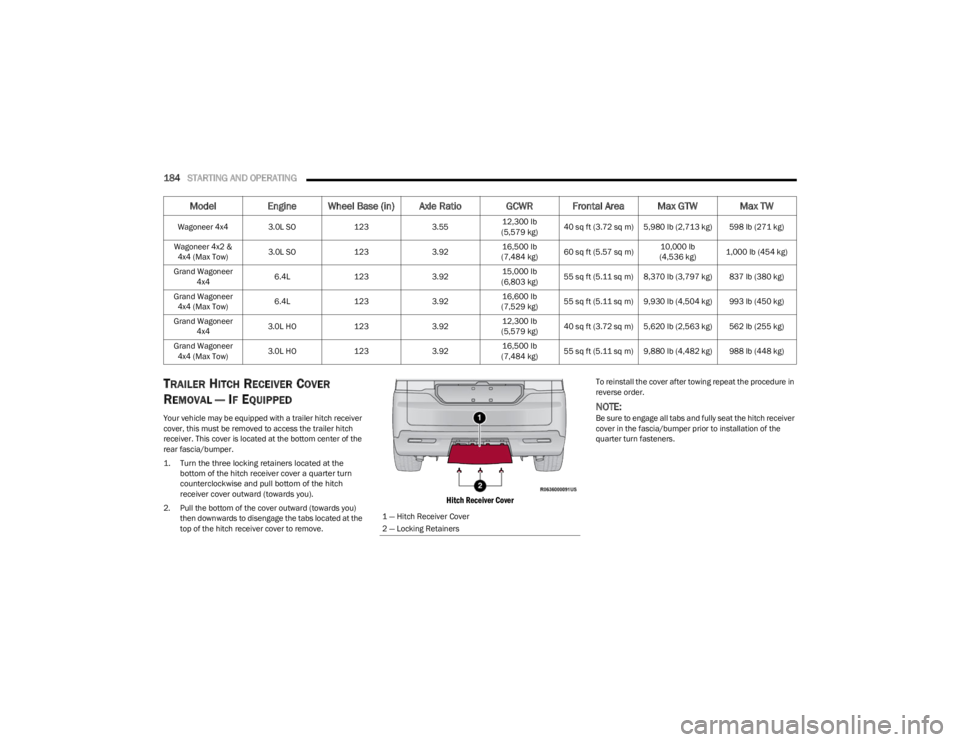
TRAILER HITCH RECEIVER COVER
R
EMOVAL — IF EQUIPPED
Your vehicle may be equipped with a trailer hitch receiver
cover, this must be removed to access the trailer hitch
receiver. This cover is located at the bottom center of the
rear fascia/bumper.
1. Turn the three locking retainers located at the
bottom of the hitch receiver cover a quarter turn
counterclockwise and pull bottom of the hitch
receiver cover outward (towards you).
2. Pull the bottom of the cover outward (towards you) then downwards to disengage the tabs located at the
top of the hitch receiver cover to remove.
Hitch Receiver Cover
To reinstall the cover after towing repeat the procedure in
reverse order.
NOTE:Be sure to engage all tabs and fully seat the hitch receiver
cover in the fascia/bumper prior to installation of the
quarter turn fasteners.
Wagoneer 4x4 3.0L SO
1233.5512,300 lb
(5,579 kg) 40 sq ft (3.72 sq m) 5,980 lb (2,713 kg) 598 lb (271 kg)
Wagoneer 4x2 & 4x4 (Max Tow) 3.0L SO
1233.9216,500 lb
(7,484 kg) 60 sq ft (5.57 sq m) 10,000 lb
(4,536 kg) 1,000 lb (454 kg)
Grand Wagoneer 4x4 6.4L
1233.9215,000 lb
(6,803 kg) 55 sq ft (5.11 sq m) 8,370 lb (3,797 kg) 837 lb (380 kg)
Grand Wagoneer 4x4 (Max Tow) 6.4L
1233.9216,600 lb
(7,529 kg) 55 sq ft (5.11 sq m) 9,930 lb (4,504 kg) 993 lb (450 kg)
Grand Wagoneer 4x4 3.0L HO
1233.9212,300 lb
(5,579 kg) 40 sq ft (3.72 sq m) 5,620 lb (2,563 kg) 562 lb (255 kg)
Grand Wagoneer 4x4 (Max Tow) 3.0L HO
1233.9216,500 lb
(7,484 kg) 55 sq ft (5.11 sq m) 9,880 lb (4,482 kg) 988 lb (448 kg)
Model
Engine Wheel Base (in) Axle Ratio GCWR Frontal Area Max GTW Max TW
1 — Hitch Receiver Cover
2 — Locking Retainers
23_WS_OM_EN_USC_t.book Page 184
Page 187 of 396
STARTING AND OPERATING185
(Continued)
TRAILER AND TONGUE WEIGHT
Never exceed the maximum tongue weight stamped on
your bumper or trailer hitch.
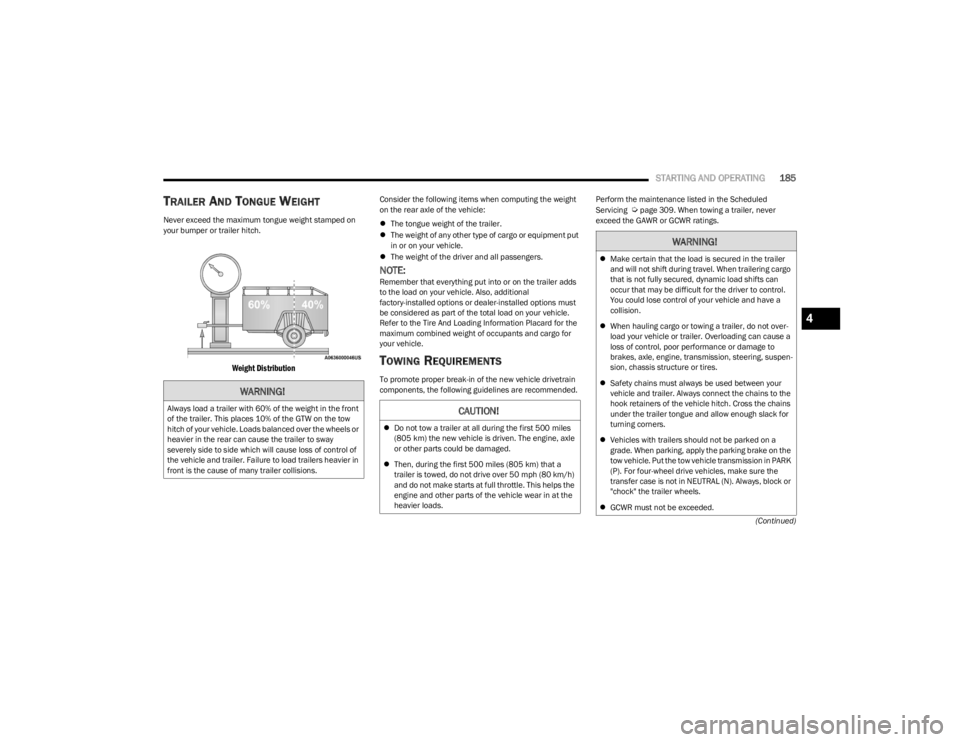
Weight Distribution
Consider the following items when computing the weight
on the rear axle of the vehicle:
The tongue weight of the trailer.
The weight of any other type of cargo or equipment put
in or on your vehicle.
The weight of the driver and all passengers.
NOTE:Remember that everything put into or on the trailer adds
to the load on your vehicle. Also, additional
factory-installed options or dealer-installed options must
be considered as part of the total load on your vehicle.
Refer to the Tire And Loading Information Placard for the
maximum combined weight of occupants and cargo for
your vehicle.
TOWING REQUIREMENTS
To promote proper break-in of the new vehicle drivetrain
components, the following guidelines are recommended. Perform the maintenance listed in the Scheduled
Servicing
Úpage 309. When towing a trailer, never
exceed the GAWR or GCWR ratings.
WARNING!
Always load a trailer with 60% of the weight in the front
of the trailer. This places 10% of the GTW on the tow
hitch of your vehicle. Loads balanced over the wheels or
heavier in the rear can cause the trailer to sway
severely side to side which will cause loss of control of
the vehicle and trailer. Failure to load trailers heavier in
front is the cause of many trailer collisions.CAUTION!
Do not tow a trailer at all during the first 500 miles
(805 km) the new vehicle is driven. The engine, axle
or other parts could be damaged.
Then, during the first 500 miles (805 km) that a
trailer is towed, do not drive over 50 mph (80 km/h)
and do not make starts at full throttle. This helps the
engine and other parts of the vehicle wear in at the
heavier loads.
WARNING!
Make certain that the load is secured in the trailer
and will not shift during travel. When trailering cargo
that is not fully secured, dynamic load shifts can
occur that may be difficult for the driver to control.
You could lose control of your vehicle and have a
collision.
When hauling cargo or towing a trailer, do not over -
load your vehicle or trailer. Overloading can cause a
loss of control, poor performance or damage to
brakes, axle, engine, transmission, steering, suspen -
sion, chassis structure or tires.
Safety chains must always be used between your
vehicle and trailer. Always connect the chains to the
hook retainers of the vehicle hitch. Cross the chains
under the trailer tongue and allow enough slack for
turning corners.
Vehicles with trailers should not be parked on a
grade. When parking, apply the parking brake on the
tow vehicle. Put the tow vehicle transmission in PARK
(P). For four-wheel drive vehicles, make sure the
transfer case is not in NEUTRAL (N). Always, block or
"chock" the trailer wheels.
GCWR must not be exceeded.
4
23_WS_OM_EN_USC_t.book Page 185
Page 189 of 396
STARTING AND OPERATING187
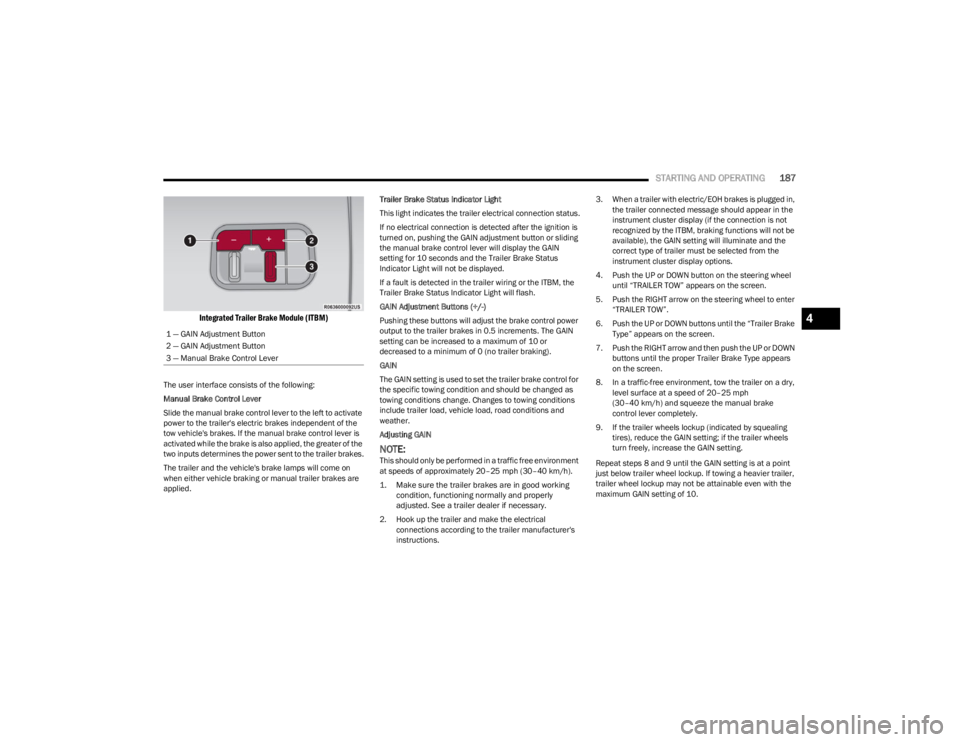
Integrated Trailer Brake Module (ITBM)
The user interface consists of the following:
Manual Brake Control Lever
Slide the manual brake control lever to the left to activate
power to the trailer's electric brakes independent of the
tow vehicle's brakes. If the manual brake control lever is
activated while the brake is also applied, the greater of the
two inputs determines the power sent to the trailer brakes.
The trailer and the vehicle's brake lamps will come on
when either vehicle braking or manual trailer brakes are
applied. Trailer Brake Status Indicator Light
This light indicates the trailer electrical connection status.
If no electrical connection is detected after the ignition is
turned on, pushing the GAIN adjustment button or sliding
the manual brake control lever will display the GAIN
setting for 10 seconds and the Trailer Brake Status
Indicator Light will not be displayed.
If a fault is detected in the trailer wiring or the ITBM, the
Trailer Brake Status Indicator Light will flash.
GAIN Adjustment Buttons (+/-)
Pushing these buttons will adjust the brake control power
output to the trailer brakes in 0.5 increments. The GAIN
setting can be increased to a maximum of 10 or
decreased to a minimum of 0 (no trailer braking).
GAIN
The GAIN setting is used to set the trailer brake control for
the specific towing condition and should be changed as
towing conditions change. Changes to towing conditions
include trailer load, vehicle load, road conditions and
weather.
Adjusting GAIN
NOTE:This should only be performed in a traffic free environment
at speeds of approximately 20–25 mph (30–40 km/h).
1. Make sure the trailer brakes are in good working condition, functioning normally and properly
adjusted. See a trailer dealer if necessary.
2. Hook up the trailer and make the electrical connections according to the trailer manufacturer's
instructions. 3. When a trailer with electric/EOH brakes is plugged in,
the trailer connected message should appear in the
instrument cluster display (if the connection is not
recognized by the ITBM, braking functions will not be
available), the GAIN setting will illuminate and the
correct type of trailer must be selected from the
instrument cluster display options.
4. Push the UP or DOWN button on the steering wheel until “TRAILER TOW” appears on the screen.
5. Push the RIGHT arrow on the steering wheel to enter “TRAILER TOW”.
6. Push the UP or DOWN buttons until the “Trailer Brake Type” appears on the screen.
7. Push the RIGHT arrow and then push the UP or DOWN buttons until the proper Trailer Brake Type appears
on the screen.
8. In a traffic-free environment, tow the trailer on a dry, level surface at a speed of 20–25 mph
(30–40 km/h) and squeeze the manual brake
control lever completely.
9. If the trailer wheels lockup (indicated by squealing tires), reduce the GAIN setting; if the trailer wheels
turn freely, increase the GAIN setting.
Repeat steps 8 and 9 until the GAIN setting is at a point
just below trailer wheel lockup. If towing a heavier trailer,
trailer wheel lockup may not be attainable even with the
maximum GAIN setting of 10.
1 — GAIN Adjustment Button
2 — GAIN Adjustment Button
3 — Manual Brake Control Lever
4
23_WS_OM_EN_USC_t.book Page 187
Page 196 of 396

194STARTING AND OPERATING
When To Use 4WD LOW — If Equipped
When off-road driving, shift to 4WD LOW for additional
traction. This range should be limited to extreme
situations such as deep snow, mud, or sand where
additional low speed pulling power is needed. Vehicle
speeds in excess of 25 mph (40 km/h) should be avoided
when in 4WD LOW.
Driving Through Water
Although your vehicle is capable of driving through water,
there are a number of precautions that must be
considered before entering the water.
NOTE:Your vehicle is capable of water fording in up to 20 inches
(51 cm) of water, while crossing small rivers or streams. To
maintain optimal performance of your vehicle's heating
and ventilation system it is recommended to switch the
system into recirculation mode during water fording. Driving through water more than a few inches/
centimeters deep will require extra caution to ensure
safety and prevent damage to your vehicle. If you must
drive through water, try to determine the depth and the
bottom condition (and location of any obstacles) prior to
entering. Proceed with caution and maintain a steady
controlled speed less than 5 mph (8 km/h) in deep water
to minimize wave effects.
Flowing Water
If the water is swift flowing and rising (as in storm run-off),
avoid crossing until the water level recedes and/or the
flow rate is reduced. If you must cross flowing water avoid
depths in excess of 9 inches (23 cm). The flowing water
can erode the streambed, causing your vehicle to sink into
deeper water. Determine exit point(s) that are
downstream of your entry point to allow for drifting.
Standing Water
Avoid driving in standing water deeper than 24 inches
(60 cm), and reduce speed appropriately to minimize
wave effects. Maximum speed is 5 mph (8 km/h).Maintenance
After driving through deep water, inspect your vehicle
fluids and lubricants (engine oil, transmission oil, axle,
transfer case) to ensure the fluids have not been
contaminated. Contaminated fluid (milky, foamy in
appearance) should be flushed/changed as soon as
possible to prevent component damage.
Driving In Snow, Mud And Sand
In heavy snow, when pulling a load, or for additional
control at slower speeds, shift the transmission to a low
gear and shift the transfer case to 4WD LOW if necessary
Úpage 129. Only shift into a lower gear to maintain
forward motion. Over-revving the engine can spin the
wheels and traction will be lost.
Avoid abrupt downshifts on icy or slippery roads, because
engine braking may cause skidding and loss of control.
Hill Climbing
NOTE:Before attempting to climb a hill, determine the conditions
at the crest and/or on the other side.
Before climbing a steep hill, shift the transmission to a
lower gear and shift the transfer case to 4WD LOW. Use
FIRST gear and 4WD LOW for very steep hills.
WARNING!
Do not drive in 4WD LOW on dry pavement; driveline
damage may result. 4WD LOW locks front and rear
drivelines together and does not allow for differential
action between the front to rear driveshafts. Driving in
4WD LOW on pavement will cause driveline binding;
use only on wet or slippery surfaces.
CAUTION!
When driving through water, do not exceed 5 mph
(8 km/h). Always check water depth before entering as
a precaution, and check all fluids afterward. Driving
through water may cause damage that may not be
covered by the New Vehicle Limited Warranty.
23_WS_OM_EN_USC_t.book Page 194
Page 197 of 396

STARTING AND OPERATING195
If you stall or begin to lose forward motion while climbing
a steep hill, allow your vehicle to come to a stop and
immediately apply the brakes. Restart the engine, and
shift into REVERSE (R). Back slowly down the hill, allowing
the compression braking of the engine to help regulate
your speed. If the brakes are required to control vehicle
speed, apply them lightly and avoid locking or skidding the
tires.
Remember, never drive diagonally across a hill. Always
drive straight up or down.
If the wheels start to slip as you approach the crest of a
hill, ease off the accelerator and maintain forward motion
by turning the front wheels slowly. This may provide a fresh
“bite” into the surface and will usually provide traction to
complete the climb.Traction Downhill
When descending mountains or hills, use Hill Descent
Control or Selec-Speed Control to avoid repeated heavy
braking.
If not equipped with Hill Descent Control or Selec-Speed
Control use the following procedure:
Shift the transmission into a low gear, and the transfer
case into 4WD LOW range. Let the vehicle go slowly down
the hill with all four wheels turning against engine
compression drag. This will permit you to control the
vehicle speed and direction.
When descending mountains or hills, repeated braking
can cause brake fade with loss of braking control. Avoid
repeated heavy braking by downshifting the transmission
whenever possible.
After Driving Off-Road
Off-road operation puts more stress on your vehicle than
does most on-road driving. After going off-road, it is always
a good idea to check for damage. That way you can get any
problems taken care of right away and have your vehicle
ready when you need it.
Completely inspect the underbody of your vehicle.
Check tires, body structure, steering, suspension, and
exhaust system for damage.
Inspect the radiator for mud and debris and clean as
required.
Check threaded fasteners for looseness, particularly
on the chassis, drivetrain components, steering, and
suspension. Retighten them, if required, and torque to
the values specified in the Service Manual.
Check for accumulations of plants or brush. These
things could be a fire hazard. They might hide damage
to fuel lines, brake hoses, axle pinion seals, and
propeller shafts.
After extended operation in mud, sand, water, or
similar dirty conditions, have the radiator, fan, brake
rotors, wheels, brake linings, and axle yokes inspected
and cleaned as soon as possible.
If you experience unusual vibration after driving in
mud, slush or similar conditions, check the wheels for
impacted material. Impacted material can cause a
wheel imbalance and freeing the wheels of it will
correct the situation.
WARNING!
If the engine stalls, you lose forward motion, or cannot
make it to the top of a steep hill or grade, never attempt
to turn around. To do so may result in tipping and rolling
the vehicle. Always back carefully straight down a hill in
REVERSE gear. Never back down a hill in NEUTRAL
using only the brake.
WARNING!
Abrasive material in any part of the brakes may cause
excessive wear or unpredictable braking. You might not
have full braking power when you need it to prevent a
collision. If you have been operating your vehicle in dirty
conditions, get your brakes checked and cleaned as
necessary.
4
23_WS_OM_EN_USC_t.book Page 195