lock JEEP WAGONEER 2023 Service Manual
[x] Cancel search | Manufacturer: JEEP, Model Year: 2023, Model line: WAGONEER, Model: JEEP WAGONEER 2023Pages: 396, PDF Size: 15.17 MB
Page 75 of 396
GETTING TO KNOW YOUR VEHICLE73
INTERIOR STORAGE AND EQUIPMENT
STORAGE
Glove Compartment
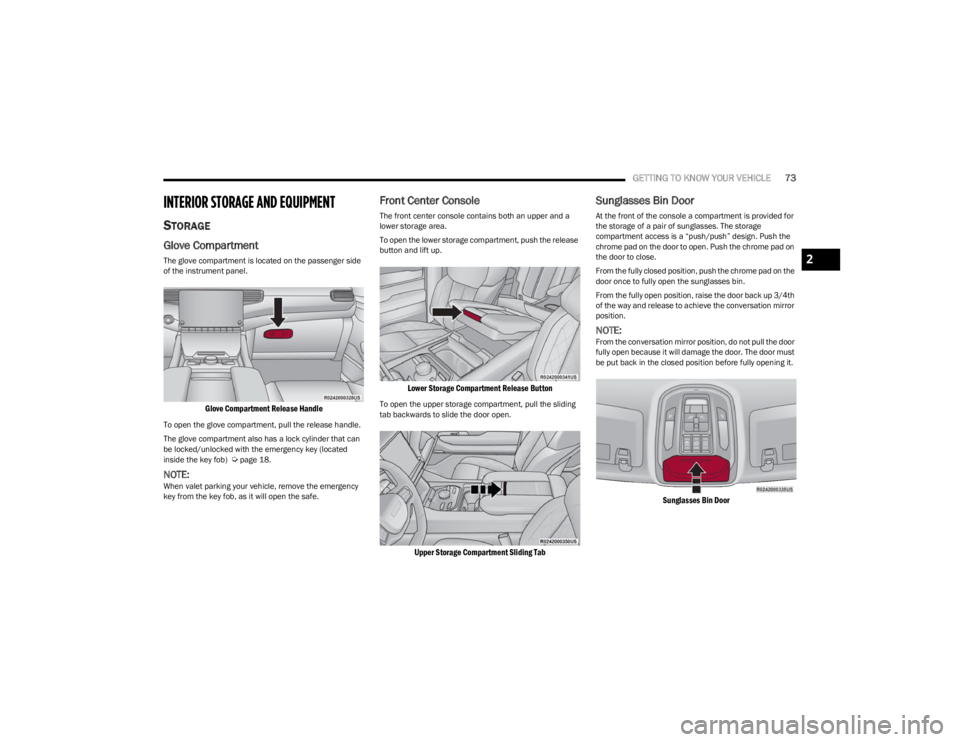
The glove compartment is located on the passenger side
of the instrument panel.
Glove Compartment Release Handle
To open the glove compartment, pull the release handle.
The glove compartment also has a lock cylinder that can
be locked/unlocked with the emergency key (located
inside the key fob)
Úpage 18.
NOTE:When valet parking your vehicle, remove the emergency
key from the key fob, as it will open the safe.
Front Center Console
The front center console contains both an upper and a
lower storage area.
To open the lower storage compartment, push the release
button and lift up.
Lower Storage Compartment Release Button
To open the upper storage compartment, pull the sliding
tab backwards to slide the door open.
Upper Storage Compartment Sliding Tab
Sunglasses Bin Door
At the front of the console a compartment is provided for
the storage of a pair of sunglasses. The storage
compartment access is a “push/push” design. Push the
chrome pad on the door to open. Push the chrome pad on
the door to close.
From the fully closed position, push the chrome pad on the
door once to fully open the sunglasses bin.
From the fully open position, raise the door back up 3/4th
of the way and release to achieve the conversation mirror
position.
NOTE:From the conversation mirror position, do not pull the door
fully open because it will damage the door. The door must
be put back in the closed position before fully opening it.
Sunglasses Bin Door
2
23_WS_OM_EN_USC_t.book Page 73
Page 77 of 396
GETTING TO KNOW YOUR VEHICLE75
CENTER CONSOLE COOLER —
I
F EQUIPPED
Your vehicle may be equipped with a console cooler
located in the front center console.
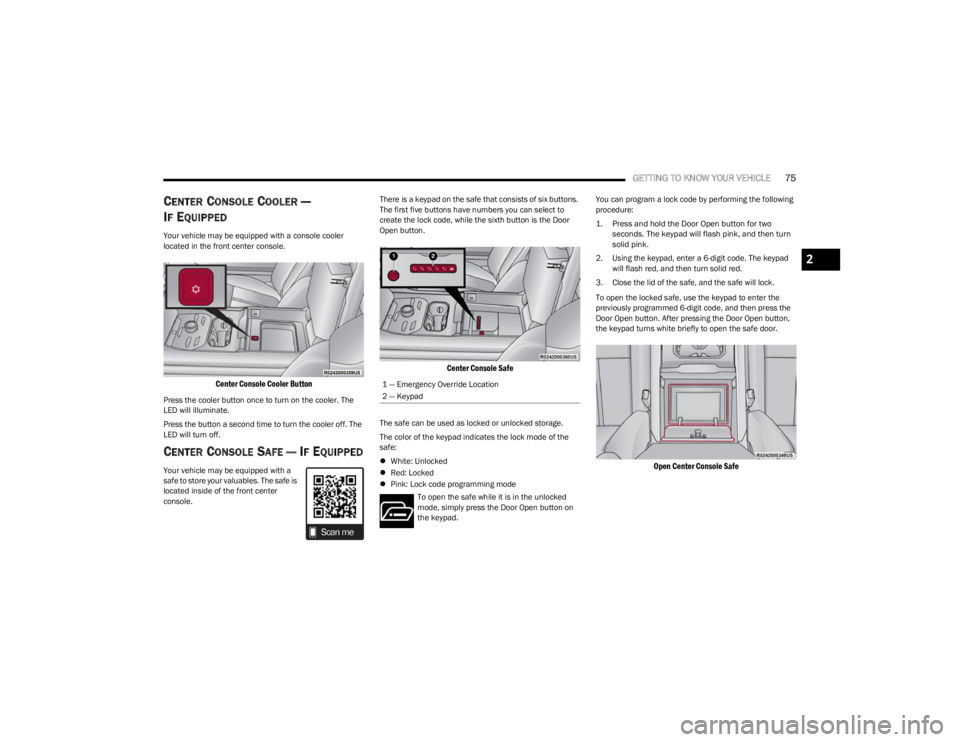
Center Console Cooler Button
Press the cooler button once to turn on the cooler. The
LED will illuminate.
Press the button a second time to turn the cooler off. The
LED will turn off.
CENTER CONSOLE SAFE — IF EQUIPPED
Your vehicle may be equipped with a
safe to store your valuables. The safe is
located inside of the front center
console. There is a keypad on the safe that consists of six buttons.
The first five buttons have numbers you can select to
create the lock code, while the sixth button is the Door
Open button.
Center Console Safe
The safe can be used as locked or unlocked storage.
The color of the keypad indicates the lock mode of the
safe:
White: Unlocked
Red: Locked
Pink: Lock code programming mode
To open the safe while it is in the unlocked
mode, simply press the Door Open button on
the keypad. You can program a lock code by performing the following
procedure:
1. Press and hold the Door Open button for two
seconds. The keypad will flash pink, and then turn
solid pink.
2. Using the keypad, enter a 6-digit code. The keypad will flash red, and then turn solid red.
3. Close the lid of the safe, and the safe will lock.
To open the locked safe, use the keypad to enter the
previously programmed 6-digit code, and then press the
Door Open button. After pressing the Door Open button,
the keypad turns white briefly to open the safe door.
Open Center Console Safe
1 — Emergency Override Location
2 — Keypad
2
23_WS_OM_EN_USC_t.book Page 75
Page 78 of 396
76GETTING TO KNOW YOUR VEHICLE
The keypad will then turn red again, and return to the
locked mode when the safe lid is closed.
NOTE:The keypad will flash red if an incorrect lock code is
entered. If the incorrect code is entered ten times in a row,
the user will be locked out from further attempts for
approximately 30 minutes.
To revert the safe back to the unlocked mode:
1. Enter the programmed 6-digit code.
2. Press and hold the Door Open button for two
seconds. The keypad will flash red and change to
pink.
3. Enter the 6-digit code and press the Door Open button. The keypad will flash white.
Once this procedure is completed, the safe will no longer
lock when the lid is closed.
Lock Code Override
If you forget the 6-digit code, there is a way to override the
code, using the emergency key stored inside your key fob:
1. Remove the emergency key from the key fob
Ú
page 18.
2. Use the emergency key to open the safe door.
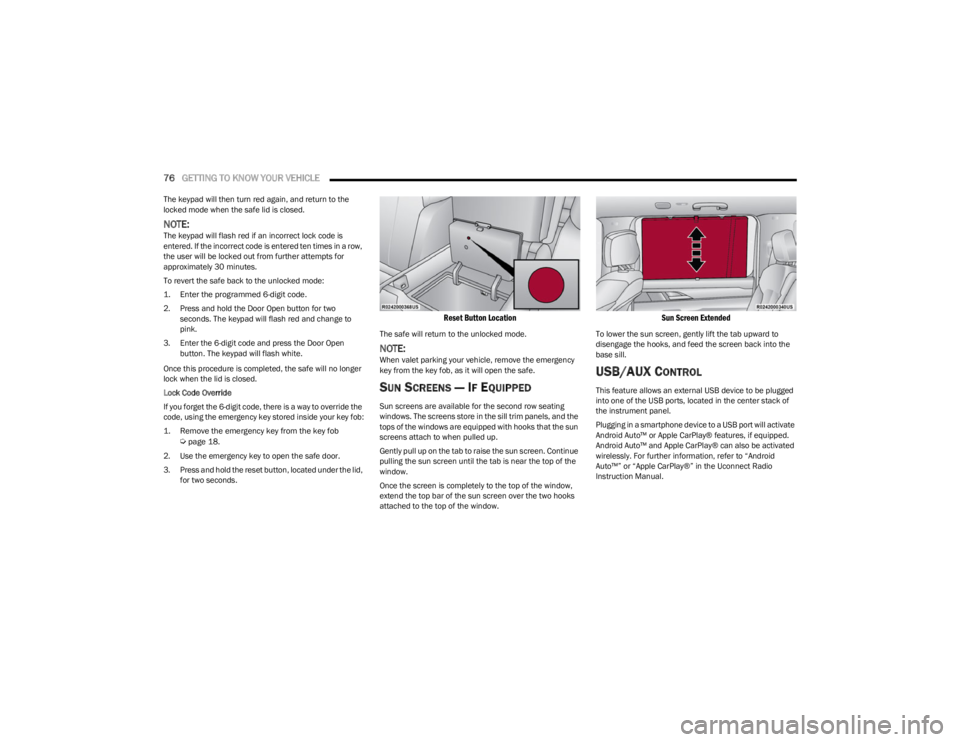
3. Press and hold the reset button, located under the lid, for two seconds.
Reset Button Location
The safe will return to the unlocked mode.
NOTE:When valet parking your vehicle, remove the emergency
key from the key fob, as it will open the safe.
SUN SCREENS — IF EQUIPPED
Sun screens are available for the second row seating
windows. The screens store in the sill trim panels, and the
tops of the windows are equipped with hooks that the sun
screens attach to when pulled up.
Gently pull up on the tab to raise the sun screen. Continue
pulling the sun screen until the tab is near the top of the
window.
Once the screen is completely to the top of the window,
extend the top bar of the sun screen over the two hooks
attached to the top of the window.
Sun Screen Extended
To lower the sun screen, gently lift the tab upward to
disengage the hooks, and feed the screen back into the
base sill.
USB/AUX CONTROL
This feature allows an external USB device to be plugged
into one of the USB ports, located in the center stack of
the instrument panel.
Plugging in a smartphone device to a USB port will activate
Android Auto™ or Apple CarPlay® features, if equipped.
Android Auto™ and Apple CarPlay® can also be activated
wirelessly. For further information, refer to “Android
Auto™” or “Apple CarPlay®” in the Uconnect Radio
Instruction Manual.
23_WS_OM_EN_USC_t.book Page 76
Page 83 of 396
GETTING TO KNOW YOUR VEHICLE81
WIRELESS CHARGING PAD —
I
F EQUIPPED
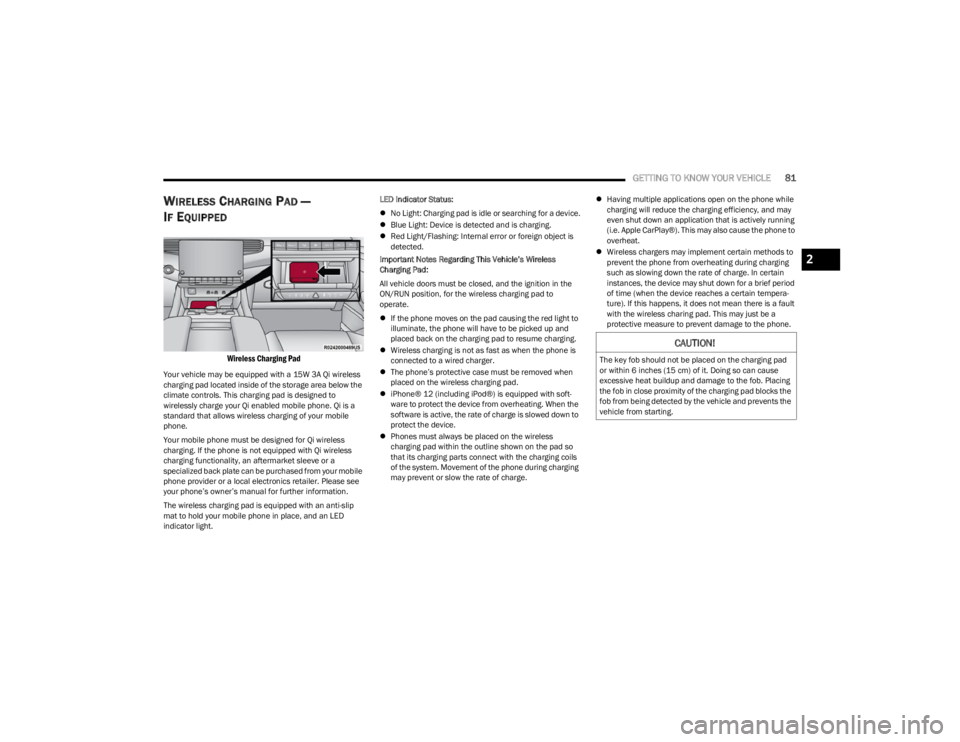
Wireless Charging Pad
Your vehicle may be equipped with a 15W 3A Qi wireless
charging pad located inside of the storage area below the
climate controls. This charging pad is designed to
wirelessly charge your Qi enabled mobile phone. Qi is a
standard that allows wireless charging of your mobile
phone.
Your mobile phone must be designed for Qi wireless
charging. If the phone is not equipped with Qi wireless
charging functionality, an aftermarket sleeve or a
specialized back plate can be purchased from your mobile
phone provider or a local electronics retailer. Please see
your phone’s owner’s manual for further information.
The wireless charging pad is equipped with an anti-slip
mat to hold your mobile phone in place, and an LED
indicator light. LED Indicator Status:
No Light: Charging pad is idle or searching for a device.
Blue Light: Device is detected and is charging.
Red Light/Flashing: Internal error or foreign object is
detected.
Important Notes Regarding This Vehicle’s Wireless
Charging Pad:
All vehicle doors must be closed, and the ignition in the
ON/RUN position, for the wireless charging pad to
operate.
If the phone moves on the pad causing the red light to
illuminate, the phone will have to be picked up and
placed back on the charging pad to resume charging.
Wireless charging is not as fast as when the phone is
connected to a wired charger.
The phone’s protective case must be removed when
placed on the wireless charging pad.
iPhone® 12 (including iPod®) is equipped with soft -
ware to protect the device from overheating. When the
software is active, the rate of charge is slowed down to
protect the device.
Phones must always be placed on the wireless
charging pad within the outline shown on the pad so
that its charging parts connect with the charging coils
of the system. Movement of the phone during charging
may prevent or slow the rate of charge.
Having multiple applications open on the phone while
charging will reduce the charging efficiency, and may
even shut down an application that is actively running
(i.e. Apple CarPlay®). This may also cause the phone to
overheat.
Wireless chargers may implement certain methods to
prevent the phone from overheating during charging
such as slowing down the rate of charge. In certain
instances, the device may shut down for a brief period
of time (when the device reaches a certain tempera -
ture). If this happens, it does not mean there is a fault
with the wireless charing pad. This may just be a
protective measure to prevent damage to the phone.
CAUTION!
The key fob should not be placed on the charging pad
or within 6 inches (15 cm) of it. Doing so can cause
excessive heat buildup and damage to the fob. Placing
the fob in close proximity of the charging pad blocks the
fob from being detected by the vehicle and prevents the
vehicle from starting.
2
23_WS_OM_EN_USC_t.book Page 81
Page 85 of 396
GETTING TO KNOW YOUR VEHICLE83
Window Lockout Switch
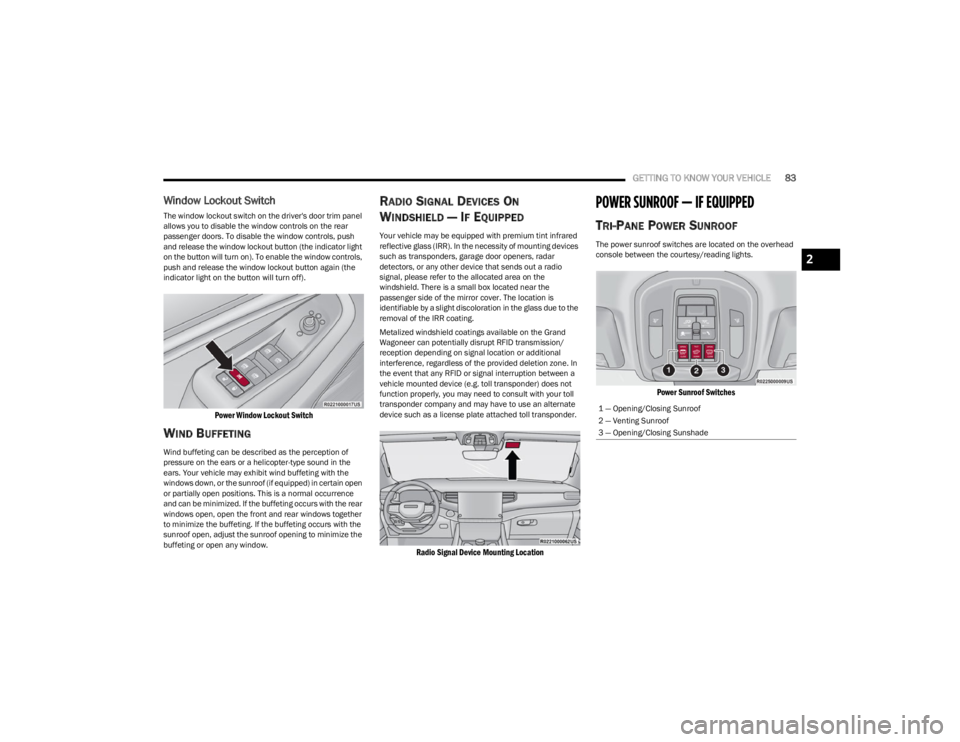
The window lockout switch on the driver's door trim panel
allows you to disable the window controls on the rear
passenger doors. To disable the window controls, push
and release the window lockout button (the indicator light
on the button will turn on). To enable the window controls,
push and release the window lockout button again (the
indicator light on the button will turn off).
Power Window Lockout Switch
WIND BUFFETING
Wind buffeting can be described as the perception of
pressure on the ears or a helicopter-type sound in the
ears. Your vehicle may exhibit wind buffeting with the
windows down, or the sunroof (if equipped) in certain open
or partially open positions. This is a normal occurrence
and can be minimized. If the buffeting occurs with the rear
windows open, open the front and rear windows together
to minimize the buffeting. If the buffeting occurs with the
sunroof open, adjust the sunroof opening to minimize the
buffeting or open any window.
RADIO SIGNAL DEVICES ON
W
INDSHIELD — IF EQUIPPED
Your vehicle may be equipped with premium tint infrared
reflective glass (IRR). In the necessity of mounting devices
such as transponders, garage door openers, radar
detectors, or any other device that sends out a radio
signal, please refer to the allocated area on the
windshield. There is a small box located near the
passenger side of the mirror cover. The location is
identifiable by a slight discoloration in the glass due to the
removal of the IRR coating.
Metalized windshield coatings available on the Grand
Wagoneer can potentially disrupt RFID transmission/
reception depending on signal location or additional
interference, regardless of the provided deletion zone. In
the event that any RFID or signal interruption between a
vehicle mounted device (e.g. toll transponder) does not
function properly, you may need to consult with your toll
transponder company and may have to use an alternate
device such as a license plate attached toll transponder.
Radio Signal Device Mounting Location
POWER SUNROOF — IF EQUIPPED
TRI-PANE POWER SUNROOF
The power sunroof switches are located on the overhead
console between the courtesy/reading lights.
Power Sunroof Switches
1 — Opening/Closing Sunroof
2 — Venting Sunroof
3 — Opening/Closing Sunshade
2
23_WS_OM_EN_USC_t.book Page 83
Page 86 of 396

84GETTING TO KNOW YOUR VEHICLE
Opening And Closing The Sunroof
The sunroof has two programmed automatic stops for the
sunroof open position: a comfort stop position and a full
open position. The comfort stop position will minimize
wind buffeting in the interior. Express Open/Close
To open the sunroof, push OPEN on the sunroof switch
and release it within one-half second. The sunroof will
open to the comfort stop position and stop automatically.
Push and release OPEN again to continue to the full open
position.
To close the sunroof, push CLOSE on the sunroof switch
and release it within one-half second. The sunroof will
close automatically from any position.
During Express Open or Express Close operation, any
other actuation of the sunroof switch will stop the sunroof.
Manual Open/Close
To open the sunroof, push and hold OPEN on the sunroof
switch. The sunroof will open to the comfort stop position,
then automatically stop. Release the switch then push and
hold again to continue to the full open position.
To close the sunroof, push and hold CLOSE on the sunroof
switch.
Any release of the switch during open or close operation
will stop the sunroof movement in a partially open
position.
Express Venting The Sunroof
To vent the sunroof, push TILT on the vent switch and
release within one half second. The sunroof will open to
the vent position regardless of its initial position. During
Express Vent operation, any other actuation of the switch
will stop the sunroof.
NOTE:If the sunshade is in the closed position when Express/
Manual Open or Vent operation is initiated, the sunshade
will automatically open to the half open position prior to
the sunroof opening.
Opening And Closing The Power Sunshade
The sunshade has two programmed open positions: half
open and full open positions. When operating the
sunshade from the closed position, the sunshade will
always stop at the half open position regardless of express
or manual open operation. The switch must be pushed
again to continue on to full open position.
If the sunroof is open or vented, the sunshade cannot be
closed beyond the half open position. Pushing the
sunshade close switch when the sunroof is open/vented
and the sunshade is at half open position will first
automatically close the sunroof prior to the sunshade
closing.
Express Open/Close
To open the sunshade, push OPEN on the sunshade
switch and release it within one-half second, the
sunshade will open to the half open position and stop
automatically. Push and release OPEN again to continue
to open the sunshade to the full open position.
To close the sunshade, push CLOSE on the sunshade
switch and release it within one-half second.
During Express Open or Express Close operation, any
other actuation of the sunroof switches will stop the
sunshade in a partially open position.
WARNING!
Never leave children unattended in a vehicle, or with
access to an unlocked vehicle. Never leave the key
fob in or near the vehicle, or in a location accessible
to children. Do not leave the Keyless Enter ‘n Go™
Ignition in the ON/RUN position. Occupants, particu -
larly unattended children, can become entrapped by
the power sunroof while operating the power sunroof
switch. Such entrapment may result in serious injury
or death.
In a collision, there is a greater risk of being thrown
from a vehicle with an open sunroof. You could also
be seriously injured or killed. Always fasten your seat
belt properly and make sure all passengers are also
properly secured.
Do not allow small children to operate the sunroof.
Never allow your fingers, other body parts, or any
object, to project through the sunroof opening. Injury
may result.
23_WS_OM_EN_USC_t.book Page 84
Page 88 of 396
86GETTING TO KNOW YOUR VEHICLE
CLOSING THE HOOD
In one continuous motion, pull down on the front edge of
the hood with moderate force until the angle is below the
crossover point (where the gas props are no longer
resisting) and let the hood continue to fall closed from its
own inertia.
LIFTGATE
TO UNLOCK/OPEN THE LIFTGATE
The power liftgate may be opened by pushing the liftgate
button on the key fob, pushing the liftgate button in the
cargo area, or by pushing the electronic liftgate release
handle
Úpage 167.
Push the liftgate button on the key fob twice within five
seconds to open the power liftgate. Once the liftgate is
open, pushing the button twice within five seconds a
second time will close the liftgate.
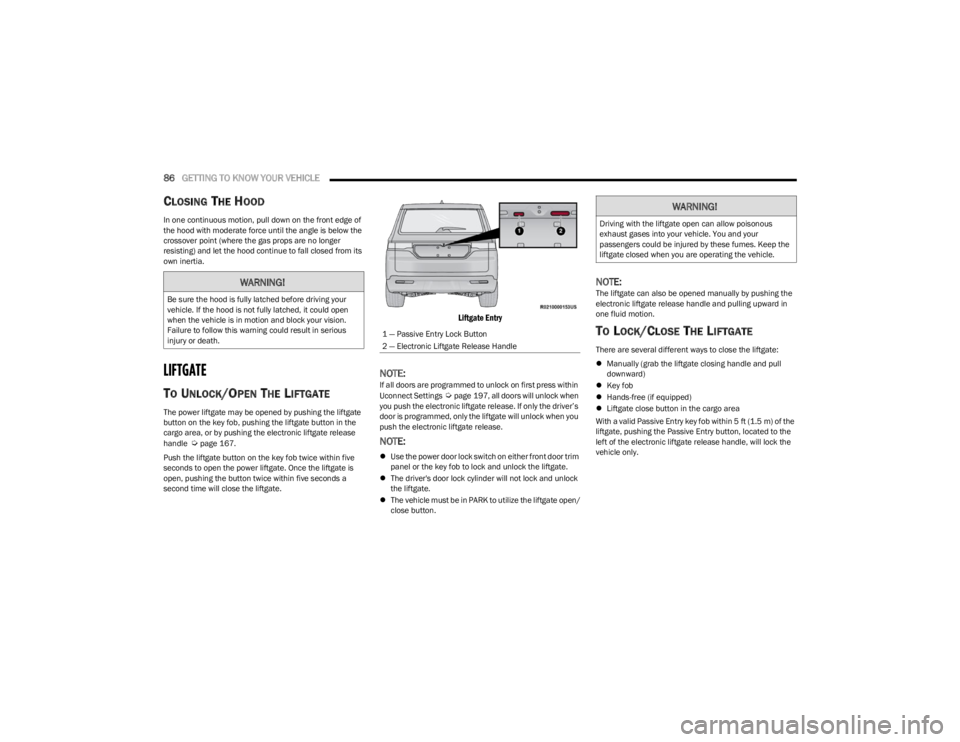
Liftgate Entry
NOTE:If all doors are programmed to unlock on first press within
Uconnect Settings Úpage 197, all doors will unlock when
you push the electronic liftgate release. If only the driver’s
door is programmed, only the liftgate will unlock when you
push the electronic liftgate release.
NOTE:
Use the power door lock switch on either front door trim
panel or the key fob to lock and unlock the liftgate.
The driver's door lock cylinder will not lock and unlock
the liftgate.
The vehicle must be in PARK to utilize the liftgate open/
close button.
NOTE:The liftgate can also be opened manually by pushing the
electronic liftgate release handle and pulling upward in
one fluid motion.
TO LOCK/CLOSE THE LIFTGATE
There are several different ways to close the liftgate:
Manually (grab the liftgate closing handle and pull
downward)
Key fob
Hands-free (if equipped)
Liftgate close button in the cargo area
With a valid Passive Entry key fob within 5 ft (1.5 m) of the liftgate, pushing the Passive Entry button, located to the
left of the electronic liftgate release handle, will lock the
vehicle only.
WARNING!
Be sure the hood is fully latched before driving your
vehicle. If the hood is not fully latched, it could open
when the vehicle is in motion and block your vision.
Failure to follow this warning could result in serious
injury or death.
1 — Passive Entry Lock Button
2 — Electronic Liftgate Release Handle
WARNING!
Driving with the liftgate open can allow poisonous
exhaust gases into your vehicle. You and your
passengers could be injured by these fumes. Keep the
liftgate closed when you are operating the vehicle.
23_WS_OM_EN_USC_t.book Page 86
Page 93 of 396
GETTING TO KNOW YOUR VEHICLE91
Retractable Cargo Area Cover —
If Equipped
The purpose of this cover is for privacy, not to secure
loads. It will not prevent cargo from shifting or protect
passengers from loose cargo.
To cover the cargo area:
1. Grab the cover at the center handle and pull over the
cargo area.
2. Insert the pins on the ends of the cover into the slots in the pillar trim cover.
3. The liftgate may be opened with the cargo cover in place.
Rear Cargo Cover
Cargo Net — If Equipped
The rear cargo area may be equipped with a cargo net to
keep items secure while driving.
To attach the cargo net, the clips must be hooked through
the loops on both sides of the cargo area.
ROOF LUGGAGE RACK — IF EQUIPPED
The crossbars and side rails are designed to carry weight
on vehicles equipped with a luggage rack. The load must
not exceed 150 lb (68 kg), and should be uniformly
distributed over the luggage rack crossbars.
The crossbars on your vehicle are delivered stowed in the
rear cargo bin. Crossbars should always be used
whenever cargo is placed on the roof rack. Check the
straps frequently to be sure that the load remains securely
attached.
The roof rack does not increase the total load carrying
capacity of the vehicle. Be sure the total load of cargo
inside the vehicle plus that on the external rack does not
exceed the maximum vehicle load capacity.
INSTALLING THE CROSSBARS
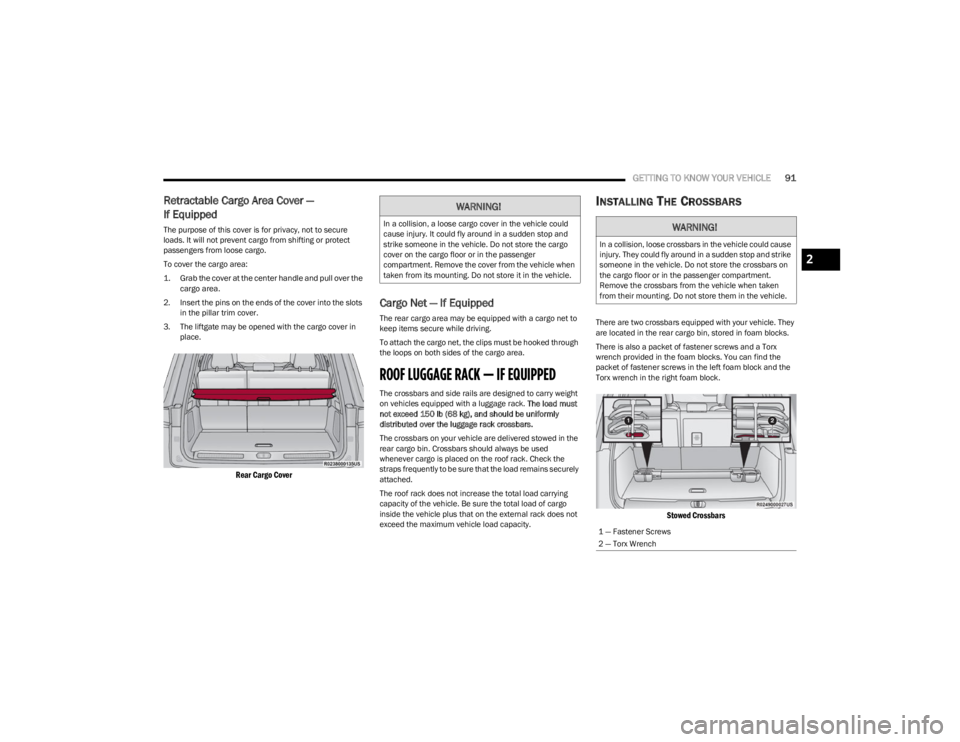
There are two crossbars equipped with your vehicle. They
are located in the rear cargo bin, stored in foam blocks.
There is also a packet of fastener screws and a Torx
wrench provided in the foam blocks. You can find the
packet of fastener screws in the left foam block and the
Torx wrench in the right foam block.
Stowed Crossbars
WARNING!
In a collision, a loose cargo cover in the vehicle could
cause injury. It could fly around in a sudden stop and
strike someone in the vehicle. Do not store the cargo
cover on the cargo floor or in the passenger
compartment. Remove the cover from the vehicle when
taken from its mounting. Do not store it in the vehicle.WARNING!
In a collision, loose crossbars in the vehicle could cause
injury. They could fly around in a sudden stop and strike
someone in the vehicle. Do not store the crossbars on
the cargo floor or in the passenger compartment.
Remove the crossbars from the vehicle when taken
from their mounting. Do not store them in the vehicle.
1 — Fastener Screws
2 — Torx Wrench
2
23_WS_OM_EN_USC_t.book Page 91
Page 94 of 396
92GETTING TO KNOW YOUR VEHICLE
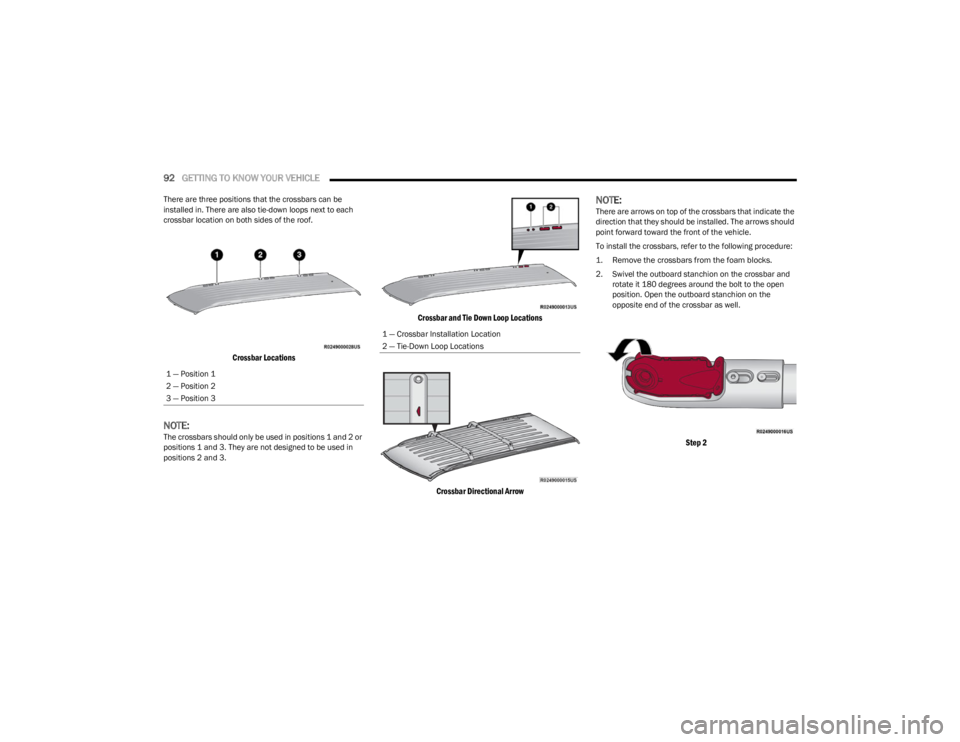
There are three positions that the crossbars can be
installed in. There are also tie-down loops next to each
crossbar location on both sides of the roof.
Crossbar Locations
NOTE:The crossbars should only be used in positions 1 and 2 or
positions 1 and 3. They are not designed to be used in
positions 2 and 3.
Crossbar and Tie Down Loop Locations
Crossbar Directional Arrow
NOTE:There are arrows on top of the crossbars that indicate the
direction that they should be installed. The arrows should
point forward toward the front of the vehicle.
To install the crossbars, refer to the following procedure:
1. Remove the crossbars from the foam blocks.
2. Swivel the outboard stanchion on the crossbar and rotate it 180 degrees around the bolt to the open
position. Open the outboard stanchion on the
opposite end of the crossbar as well.
Step 2
1 — Position 1
2 — Position 2
3 — Position 3
1 — Crossbar Installation Location
2 — Tie-Down Loop Locations
23_WS_OM_EN_USC_t.book Page 92
Page 97 of 396
GETTING TO KNOW YOUR VEHICLE95
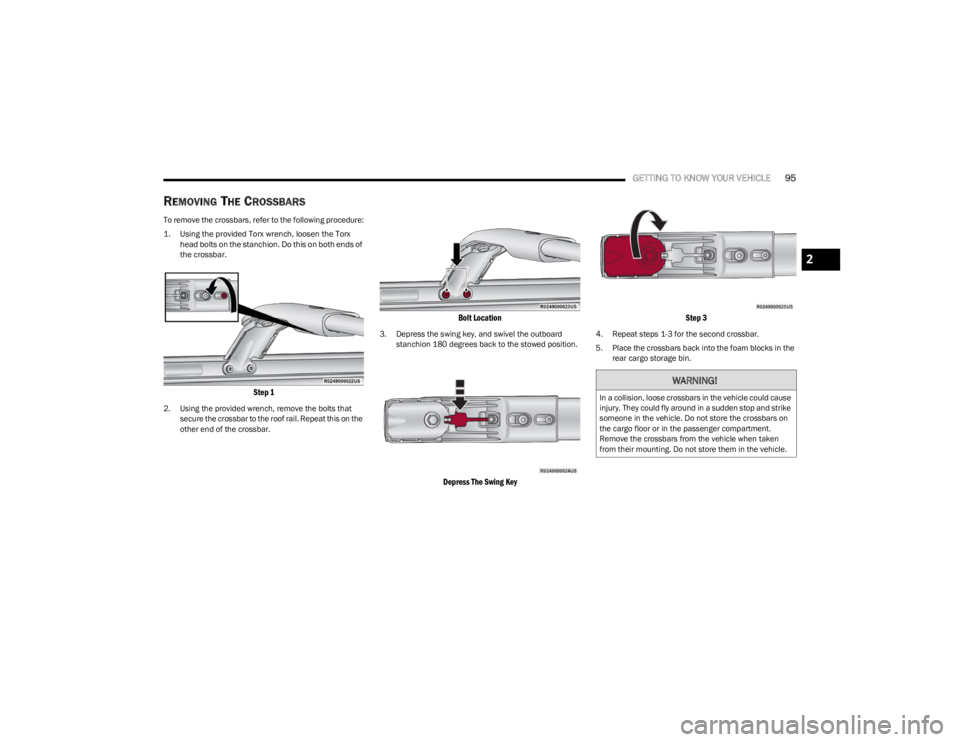
REMOVING THE CROSSBARS
To remove the crossbars, refer to the following procedure:
1. Using the provided Torx wrench, loosen the Torx
head bolts on the stanchion. Do this on both ends of
the crossbar.
Step 1
2. Using the provided wrench, remove the bolts that secure the crossbar to the roof rail. Repeat this on the
other end of the crossbar.
Bolt Location
3. Depress the swing key, and swivel the outboard stanchion 180 degrees back to the stowed position.
Depress The Swing Key Step 3
4. Repeat steps 1-3 for the second crossbar.
5. Place the crossbars back into the foam blocks in the
rear cargo storage bin.
WARNING!
In a collision, loose crossbars in the vehicle could cause
injury. They could fly around in a sudden stop and strike
someone in the vehicle. Do not store the crossbars on
the cargo floor or in the passenger compartment.
Remove the crossbars from the vehicle when taken
from their mounting. Do not store them in the vehicle.
2
23_WS_OM_EN_USC_t.book Page 95