warning JEEP WAGONEER 2023 Manual PDF
[x] Cancel search | Manufacturer: JEEP, Model Year: 2023, Model line: WAGONEER, Model: JEEP WAGONEER 2023Pages: 396, PDF Size: 15.17 MB
Page 127 of 396

STARTING AND OPERATING125
(Continued)
The following conditions must be met for Auto Hold to
activate:
Driver’s door is closed
Driver's seat belt is fastened
Vehicle is at a standstill
Forward gear is selected
ACC is not engaged
EPB is not applied
ParkSense Active Park Assist System auto parking
maneuver is not activated
Brake Maintenance Mode
We recommend having your brakes serviced by an
authorized dealer. You should only make repairs for which
you have the knowledge and the right equipment. You
should only enter Brake Maintenance mode during brake
service.
When servicing your rear brakes, it may be necessary for
you or your technician to push the rear piston into the rear
caliper bore. With the EPB system, this can only be done
after retracting the EPB actuator. Fortunately, actuator
retraction can be done easily by entering the Brake
Maintenance mode through the Uconnect Settings in your
vehicle. This menu-based system will guide you through
the steps necessary to retract the EPB actuator in order to
perform rear brake service. Maintenance mode has requirements that must be met in
order to be activated:
The vehicle must be at a standstill.
The parking brake must be unapplied.
The transmission must be in PARK or NEUTRAL.
While in Maintenance mode, the EPB Warning Light will
flash continuously while the ignition is ON.
When brake service work is complete, the following steps
must be followed to reset the parking brake system to
normal operation:
Ensure the vehicle is at a standstill.
Press the brake pedal with moderate force.
Apply the EPB switch.
AUTOMATIC TRANSMISSION
You must press and hold the brake pedal while shifting out
of PARK.
WARNING!
You can be badly injured working on or around a motor
vehicle. Do only that service work for which you have
the knowledge and the right equipment. If you have any
doubt about your ability to perform a service job, take
your vehicle to a competent mechanic.
WARNING!
Never use the PARK (P) position as a substitute for
the parking brake. Always apply the parking brake
fully when exiting the vehicle to guard against vehicle
movement and possible injury or damage.
Your vehicle could move and injure you and others if
it is not in PARK. Check by trying to move the trans -
mission gear selector out of PARK with the brake
pedal released. Make sure the transmission is in
PARK before exiting the vehicle.
The transmission may not engage PARK if the vehicle
is moving. Always bring the vehicle to a complete
stop before shifting to PARK, and verify that the
transmission gear position indicator solidly indicates
PARK without blinking. Ensure that the vehicle is
completely stopped, and the PARK position is prop -
erly indicated, before exiting the vehicle.
It is dangerous to shift out of PARK or NEUTRAL (N) if
the engine speed is higher than idle speed. If your
foot is not firmly pressing the brake pedal, the
vehicle could accelerate quickly forward or in
reverse. You could lose control of the vehicle and hit
someone or something. Only shift into gear when the
engine is idling normally and your foot is firmly
pressing the brake pedal.
4
23_WS_OM_EN_USC_t.book Page 125
Page 128 of 396

126STARTING AND OPERATING
IGNITION PARK INTERLOCK
This vehicle is equipped with an Ignition Park Interlock
which requires the transmission to be in PARK (P) before
the ignition can be turned to the OFF position. This helps
the driver avoid inadvertently leaving the vehicle without
placing the transmission in PARK. This system also locks
the transmission in PARK whenever the ignition is in the
OFF position.
NOTE:The transmission is NOT locked in PARK when the ignition
is in the ON/RUN position (even though the engine will be
off). Ensure that the transmission is in PARK, and the
ignition is OFF (not in ON/RUN position) before exiting the
vehicle.
BRAKE/TRANSMISSION SHIFT
I
NTERLOCK (BTSI) SYSTEM
This vehicle is equipped with a BTSI system that holds the
transmission gear selector in PARK unless the brakes are
applied. To shift the transmission out of PARK, the engine
must be running and the brake pedal must be pressed.
The brake pedal must also be pressed to shift from
NEUTRAL into DRIVE or REVERSE when the vehicle is
stopped or moving at low speeds.
8-SPEED AUTOMATIC TRANSMISSION
The transmission is controlled using a rotary electronic
gear selector located on the center console. The
transmission gear range (PRND) is displayed both above
the gear selector and in the instrument cluster. To select
a gear range, simply rotate the gear selector. You must
press the brake pedal to shift the transmission out of
PARK (or NEUTRAL, when the vehicle is stopped or moving
at low speeds). To shift past multiple gear ranges at once
(such as PARK to DRIVE), simply rotate the gear selector
to the appropriate detent. Select the DRIVE range for
normal driving.
NOTE:In the event of a mismatch between the gear selector
position and the actual transmission gear (for example,
driver selects PARK while driving), the position indicator
will blink continuously until the selector is returned to the
proper position, or the requested shift can be completed.
Unintended movement of a vehicle could injure
those in or near the vehicle. As with all vehicles, you
should never exit a vehicle while the engine is
running. Before exiting a vehicle, always come to a
complete stop, then apply the parking brake, shift
the transmission into PARK, and turn the ignition
OFF. When the ignition is in the OFF position, the
transmission is locked in PARK, securing the vehicle
against unwanted movement.
When exiting the vehicle, always make sure the igni -
tion is in the OFF position, remove the key fob from
the vehicle, and lock the vehicle.
Never leave children alone in a vehicle, or with
access to an unlocked vehicle. Allowing children to
be in a vehicle unattended is dangerous for a
number of reasons. A child or others could be seri -
ously or fatally injured. Children should be warned
not to touch the parking brake, brake pedal or the
transmission gear selector.
Do not leave the key fob in or near the vehicle (or in
a location accessible to children), and do not leave
the ignition in the ON/RUN position. A child could
operate power windows, other controls, or move the
vehicle.
WARNING!CAUTION!
Damage to the transmission may occur if the following
precautions are not observed:
Shift into or out of PARK or REVERSE (R) only after
the vehicle has come to a complete stop.
Do not shift between PARK, REVERSE, NEUTRAL, or
DRIVE (D) when the engine is above idle speed.
Before shifting into any gear, make sure your foot is
firmly pressing the brake pedal.
23_WS_OM_EN_USC_t.book Page 126
Page 130 of 396

128STARTING AND OPERATING
NEUTRAL (N)
Use this range when the vehicle is standing for prolonged
periods with the engine running. Apply the parking brake
and shift the transmission into PARK (P) if you must exit
the vehicle.
DRIVE (D)
This range should be used for most city and highway
driving. It provides the smoothest upshifts and downshifts,
and the best fuel economy. The transmission
automatically upshifts through all forward gears. When frequent transmission shifting occurs (such as
when operating the vehicle under heavy loading
conditions, in hilly terrain, traveling into strong head
winds, or while towing a heavy trailer), use the Electronic
Range Select (ERS) shift control to select a lower gear
Úpage 129. Under these conditions, using a lower gear
will improve performance and extend transmission life by
reducing excessive shifting and heat build-up.
During cold temperatures, transmission operation may be
modified depending on engine and transmission
temperature as well as vehicle speed. This feature
improves warm-up time of the engine and transmission to
achieve maximum efficiency. Engagement of the torque
converter clutch is inhibited until the transmission fluid is
warm. Normal operation will resume once the
transmission temperature has risen to a suitable level.
Transmission Limp Home Mode
Transmission function is monitored electronically for
abnormal conditions. If a condition is detected that could
result in transmission damage, Transmission Limp Home
mode is activated. In this mode, the transmission may
operate only in certain gears, or may not shift at all.
Vehicle performance may be severely degraded and the
engine may stall. In some situations, the transmission may
not re-engage if the engine is turned off and restarted. The
Malfunction Indicator Light (MIL) may be illuminated. A
message in the instrument cluster will inform the driver of
the more serious conditions, and indicate what actions
may be necessary. In the event of a momentary problem, the transmission
can be reset to regain all forward gears by performing the
following steps:
NOTE:In cases where the instrument cluster message indicates
the transmission may not re-engage after engine
shutdown, perform this procedure only in a desired
location (preferably, at an authorized dealer).
1. Stop the vehicle.
2. Shift the transmission into PARK (P), if possible.
If not, shift the transmission to NEUTRAL (N).
3. Push and hold the ignition switch until the engine turns off.
4. Wait approximately 30 seconds.
5. Restart the engine.
6. Shift into the desired gear range. If the problem is no longer detected, the transmission will return to
normal operation.
NOTE:Even if the transmission can be reset, we recommend that
you visit an authorized dealer at your earliest possible
convenience. An authorized dealer has diagnostic
equipment to assess the condition of your transmission.
If the transmission cannot be reset, authorized dealer
service is required.
WARNING!
Do not coast in NEUTRAL and never turn off the ignition
to coast down a hill. These are unsafe practices that
limit your response to changing traffic or road
conditions. You might lose control of the vehicle and
have a collision.
CAUTION!
Towing the vehicle, coasting, or driving for any other
reason with the transmission in NEUTRAL can cause
severe transmission damage.
For Recreational Towing see
Úpage 190.
For Towing A Disabled Vehicle see
Úpage 306.
23_WS_OM_EN_USC_t.book Page 128
Page 131 of 396
STARTING AND OPERATING129
Electronic Range Select (ERS) Operation
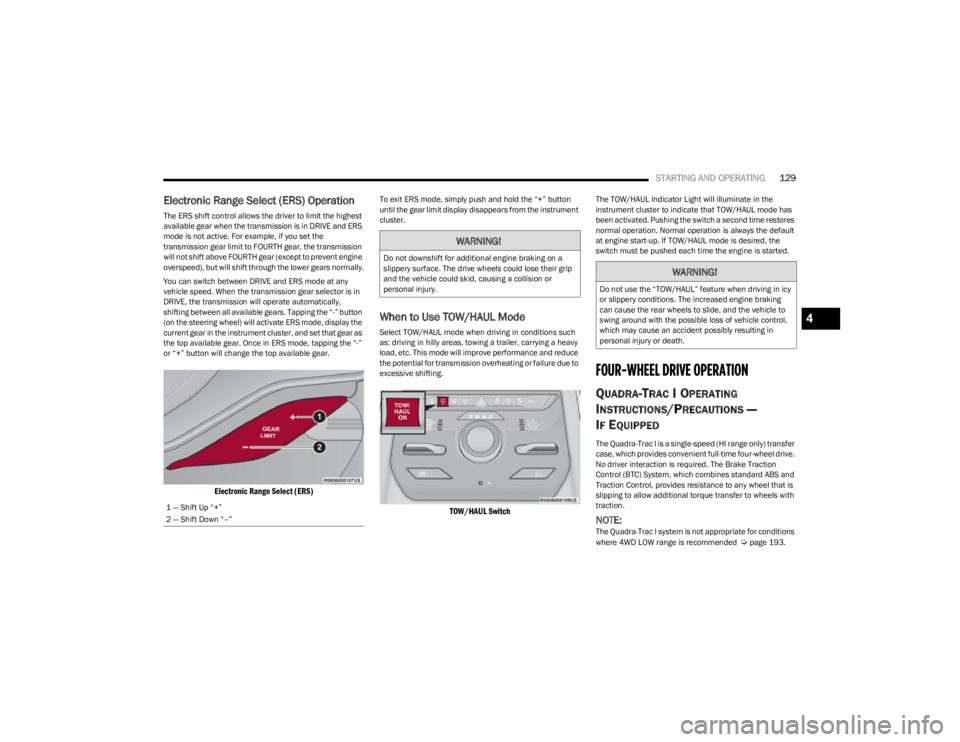
The ERS shift control allows the driver to limit the highest
available gear when the transmission is in DRIVE and ERS
mode is not active. For example, if you set the
transmission gear limit to FOURTH gear, the transmission
will not shift above FOURTH gear (except to prevent engine
overspeed), but will shift through the lower gears normally.
You can switch between DRIVE and ERS mode at any
vehicle speed. When the transmission gear selector is in
DRIVE, the transmission will operate automatically,
shifting between all available gears. Tapping the “-” button
(on the steering wheel) will activate ERS mode, display the
current gear in the instrument cluster, and set that gear as
the top available gear. Once in ERS mode, tapping the “-”
or “+” button will change the top available gear.
Electronic Range Select (ERS)
To exit ERS mode, simply push and hold the “+” button
until the gear limit display disappears from the instrument
cluster.
When to Use TOW/HAUL Mode
Select TOW/HAUL mode when driving in conditions such
as: driving in hilly areas, towing a trailer, carrying a heavy
load, etc. This mode will improve performance and reduce
the potential for transmission overheating or failure due to
excessive shifting.
TOW/HAUL Switch
The TOW/HAUL Indicator Light will illuminate in the
instrument cluster to indicate that TOW/HAUL mode has
been activated. Pushing the switch a second time restores
normal operation. Normal operation is always the default
at engine start-up. If TOW/HAUL mode is desired, the
switch must be pushed each time the engine is started.
FOUR-WHEEL DRIVE OPERATION
QUADRA-TRAC I OPERATING
I
NSTRUCTIONS/PRECAUTIONS —
I
F EQUIPPED
The Quadra-Trac I is a single-speed (HI range only) transfer
case, which provides convenient full-time four-wheel drive.
No driver interaction is required. The Brake Traction
Control (BTC) System, which combines standard ABS and
Traction Control, provides resistance to any wheel that is
slipping to allow additional torque transfer to wheels with
traction.
NOTE:The Quadra-Trac I system is not appropriate for conditions
where 4WD LOW range is recommended Úpage 193.
1 — Shift Up “+”
2 — Shift Down “–”
WARNING!
Do not downshift for additional engine braking on a
slippery surface. The drive wheels could lose their grip
and the vehicle could skid, causing a collision or
personal injury.
WARNING!
Do not use the “TOW/HAUL” feature when driving in icy
or slippery conditions. The increased engine braking
can cause the rear wheels to slide, and the vehicle to
swing around with the possible loss of vehicle control,
which may cause an accident possibly resulting in
personal injury or death.
4
23_WS_OM_EN_USC_t.book Page 129
Page 132 of 396

130STARTING AND OPERATING
QUADRA-TRAC II OPERATING
I
NSTRUCTIONS/PRECAUTIONS —
I
F EQUIPPED
The Quadra-Trac II transfer case is fully automatic in the
normal driving 4WD HI mode. The Quadra-Trac II transfer
case provides three positions:
4WD HI
N (Neutral)
4WD LOW
When additional traction is required, the 4WD LOW
position can be used for increased torque at the wheels.
Driving in the 4WD LOW position on dry, hard-surfaced
roads may cause increased tire wear and damage to
driveline components.
When operating your vehicle in 4WD LOW, the engine
speed is approximately three times that of the 4WD HI
position at a given road speed. Take care not to overspeed
the engine and do not exceed 25 mph (40 km/h).
Proper operation of four-wheel drive vehicles depends on
tires of equal size, type, and circumference on each wheel.
Any difference will adversely affect shifting and cause
damage to the transfer case.
Because four-wheel drive provides improved traction,
there is a tendency to exceed safe turning and stopping
speeds. Do not go faster than road conditions permit.
SHIFT POSITIONS
For additional information on the appropriate use of each
four-wheel drive system mode position, see the following
information:
4WD HI
This range is the default operating mode for daily use.
N (NEUTRAL)
This range disengages the driveline from the powertrain. It
is used for towing your vehicle behind another vehicle
Úpage 190.
4WD LOW
This range is for low speed four-wheel drive. It provides an
additional gear reduction which allows for increased
torque to be delivered to both the front and rear wheels
while providing maximum pulling power for loose, slippery
road surfaces. Do not exceed 25 mph (40 km/h).
SHIFTING PROCEDURES
4WD HI To 4WD LOW
With the vehicle at speeds of 0 to 3 mph (0 to 5 km/h), the
ignition switch in the ON position or the engine running,
shift the transmission into NEUTRAL (N), and push and
hold the 4WD LOW button once on the transfer case
switch until the 4WD LOW indicator light begins to flash in
the instrument cluster.
WARNING!
You or others could be injured or killed if you leave the
vehicle unattended with the transfer case in the N
(Neutral) position without first fully engaging the
parking brake. The transfer case N (Neutral) position
disengages both the front and rear drive shafts from
the powertrain and will allow the vehicle to roll, even if
the transmission is in PARK. The parking brake should
always be applied when the driver is not in the vehicle.
WARNING!
You or others could be injured or killed if you leave the
vehicle unattended with the transfer case in the N
(Neutral) position without first fully engaging the
parking brake. The transfer case N (Neutral) position
disengages both the front and rear drive shafts from
the powertrain and will allow the vehicle to roll, even if
the transmission is in PARK. The parking brake should
always be applied when the driver is not in the vehicle.
23_WS_OM_EN_USC_t.book Page 130
Page 136 of 396

134STARTING AND OPERATING
NOTE:Default Ride Height:
Select Aero Height or Normal Ride Height as the default
for all vehicle speeds and operation. This is the
selected height that the suspension will level for speed
changes (e.g. raising from Entry/Exit Height at speed,
lowering from Off Road Height at speed, etc.).
Default ride height can be changed by manually
adjusting the Quadra-Lift switch to Normal Ride Height
or Aero Ride Height and stay in the selected height for
2.5 seconds. It will be stored as the default ride height
and the height will be maintained until a new default
ride height is selected.
If equipped with a Uconnect Touchscreen Radio, all
enabling/disabling of air suspension features must be
done through the radio
Úpage 197.
AIR SUSPENSION MODES
The Air Suspension system has multiple modes to protect
the system in unique situations: Tire/Jack Mode
To assist with changing a spare tire, the air suspension
system has a feature which allows the automatic leveling
to be disabled
Úpage 197. Tire/Jack mode is used for
connecting a trailer with a weight-distributing hitch
Úpage 179.
NOTE:This mode is intended to be enabled with the engine
running.
Auto Entry/Exit Mode
To assist in entering and exiting the vehicle, the air
suspension system has a feature which automatically
lowers the vehicle to Entry/Exit Height
Úpage 197.
NOTE:This mode is intended to be enabled with the engine
running. When towing, the automatic Entry/Exit feature
may be disabled through the Uconnect Touchscreen Radio
to prevent vehicle and trailer movement when the gear
selector is moved to PARK.
Transport Mode
To assist with flatbed towing, the air suspension system
has a feature which will put the vehicle into Entry/Exit
Height and disable the automatic load leveling system
Úpage 197.
NOTE:This mode is intended to be enabled with engine running. Suspension Display Messages Mode
The “Suspension Display Messages” setting allows you to
only display suspension warnings instead of all
suspension messages (i.e., “Normal Height Achieved”)
Úpage 197.
NOTE:This mode is intended to be enabled with the engine
running.
Wheel Alignment Mode
Before performing a wheel alignment this mode must be
enabled which will move the vehicle to Normal Ride Height
and disable the air suspension during the alignment
Úpage 197.
NOTE:This mode is intended to be enabled with the engine
running.
If equipped with a Uconnect Touchscreen Radio, all
enabling/disabling of air suspension features must be
done through the radio
Úpage 197.
INSTRUMENT CLUSTER DISPLAY
M
ESSAGES
When the appropriate conditions exist, a message will
appear in the instrument cluster Úpage 99.
WARNING!
The air suspension system uses a high pressure
volume of air to operate the system. To avoid personal
injury or damage to the system, see an authorized
dealer for service.
23_WS_OM_EN_USC_t.book Page 134
Page 137 of 396

STARTING AND OPERATING135
OPERATION
The indicator lamps 1 through 5 will illuminate to show the
current position of the vehicle. Flashing indicator lamps
will show a position which the system is working to
achieve. When raising, if multiple indicator lamps are
flashing while raising, the highest flashing indicator lamp
is the position the system is working to achieve. When
lowering, if multiple indicators are flashing while lowering
the lowest solid indicator lamp is the position the system
is working to achieve.
Toggle up once moves the suspension one position higher
from the current position, assuming all conditions are met
(i.e., engine running, speed below threshold, etc.). Toggle
up can be pushed multiple times. Each toggle up will raise
the requested level by one position up to a maximum
position of OR2 or the highest position allowed based on
current conditions (i.e., vehicle speed, etc.).
Toggle down once moves the suspension one position
lower from the current level, assuming all conditions are
met (i.e., engine running, doors closed, speed below
threshold, etc.). Toggle down can be pushed multiple
times. Each toggle down will lower the requested level by
one position down to a minimum of Park mode or the
lowest position allowed based on current conditions (i.e.,
vehicle speed, etc.) Automatic height changes will occur based on vehicle
speed and the current vehicle height. The indicator lamps
and instrument cluster display messages will operate the
same for automatic changes and user requested changes.
Off-Road 2 (OR2) – Indicator lamps 1 through 5 will be
illuminated.
Off-Road 1 (OR1) – Indicator lamps 2 through 5 will be
illuminated.
Normal Ride Height (NRH) – Indicator lamps 3 through
5 will be illuminated.
Aero Height – Indicator lamps 4 and 5 will be illumi -
nated.
Entry/Exit Height – Indicator lamp 5 will be illuminated.
Transport Mode – No indicator lamps will be illumi -
nated. Driving or deselecting the mode in the Uconnect
system will disable Transport mode.
Tire/Jack Mode – Indicator lamps 1 and 5 will be illumi -
nated. Driving or deselecting the mode in the Uconnect
system will disable Tire/Jack mode.
Wheel Alignment Mode – Indicator lamps 4 and 5 will
be illuminated. Driving or deselecting the mode in the
Uconnect system will disable Wheel Alignment mode.
FUEL SAVER TECHNOLOGY 5.7L AND 6.4L
ONLY — IF EQUIPPED
This feature offers improved fuel economy by shutting off
four of the engine's eight cylinders during light load and
cruise conditions. The system is automatic with no driver
inputs or additional driving skills required.
NOTE:This system may take some time to return to full function -
ality after a battery disconnect.
POWER STEERING
The electric power steering system is designed to provide
increased vehicle response and ease of maneuverability
in tight spaces. The power steering system adapts to
different driving conditions. If the electric power steering
system experiences a fault that prevents it from providing
assist, you will still have the ability to steer the vehicle
manually.
NOTE:Alternate electric power steering efforts can be selected
through the Uconnect System Úpage 197.
If the Electric Power Steering warning icon is
displayed and the “SERVICE POWER
STEERING” or the “POWER STEERING ASSIST
OFF – SERVICE SYSTEM” message is displayed
within the instrument cluster display, this indicates the
vehicle needs to be taken to an authorized dealer for
service
Úpage 108.
WARNING!
Continued operation with reduced assist could pose a
safety risk to yourself and others. Service should be
obtained as soon as possible.
4
23_WS_OM_EN_USC_t.book Page 135
Page 140 of 396
138STARTING AND OPERATING
CRUISE CONTROL
When engaged, the Cruise Control takes over accelerator
operations at speeds greater than 20 mph (32 km/h).
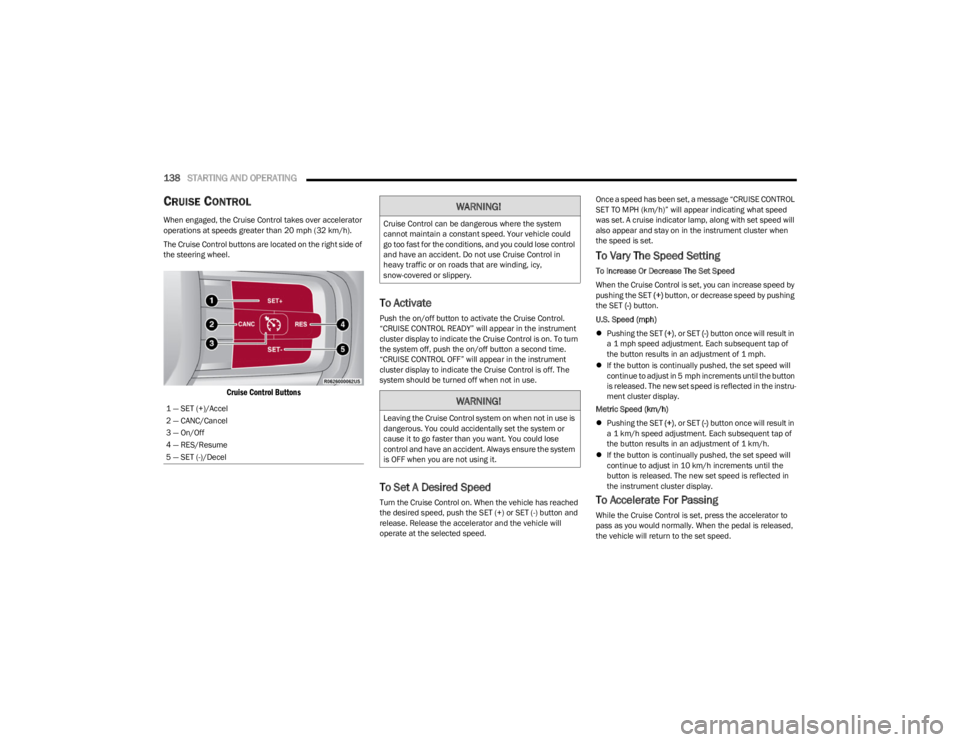
The Cruise Control buttons are located on the right side of
the steering wheel.
Cruise Control Buttons
To Activate
Push the on/off button to activate the Cruise Control.
“CRUISE CONTROL READY” will appear in the instrument
cluster display to indicate the Cruise Control is on. To turn
the system off, push the on/off button a second time.
“CRUISE CONTROL OFF” will appear in the instrument
cluster display to indicate the Cruise Control is off. The
system should be turned off when not in use.
To Set A Desired Speed
Turn the Cruise Control on. When the vehicle has reached
the desired speed, push the SET (+) or SET (-) button and
release. Release the accelerator and the vehicle will
operate at the selected speed. Once a speed has been set, a message “CRUISE CONTROL
SET TO MPH (km/h)” will appear indicating what speed
was set. A cruise indicator lamp, along with set speed will
also appear and stay on in the instrument cluster when
the speed is set.
To Vary The Speed Setting
To Increase Or Decrease The Set Speed
When the Cruise Control is set, you can increase speed by
pushing the SET
(+) button, or decrease speed by pushing
the SET (-) button.
U.S. Speed (mph)
Pushing the SET (+), or SET (-) button once will result in
a 1 mph speed adjustment. Each subsequent tap of
the button results in an adjustment of 1 mph.
If the button is continually pushed, the set speed will
continue to adjust in 5 mph increments until the button
is released. The new set speed is reflected in the instru -
ment cluster display.
Metric Speed (km/h)
Pushing the SET (+), or SET (-) button once will result in
a 1 km/h speed adjustment. Each subsequent tap of
the button results in an adjustment of 1 km/h.
If the button is continually pushed, the set speed will
continue to adjust in 10 km/h increments until the
button is released. The new set speed is reflected in
the instrument cluster display.
To Accelerate For Passing
While the Cruise Control is set, press the accelerator to
pass as you would normally. When the pedal is released,
the vehicle will return to the set speed.
1 — SET (+)/Accel
2 — CANC/Cancel
3 — On/Off
4 — RES/Resume
5 — SET (-)/Decel
WARNING!
Cruise Control can be dangerous where the system
cannot maintain a constant speed. Your vehicle could
go too fast for the conditions, and you could lose control
and have an accident. Do not use Cruise Control in
heavy traffic or on roads that are winding, icy,
snow-covered or slippery.
WARNING!
Leaving the Cruise Control system on when not in use is
dangerous. You could accidentally set the system or
cause it to go faster than you want. You could lose
control and have an accident. Always ensure the system
is OFF when you are not using it.
23_WS_OM_EN_USC_t.book Page 138
Page 141 of 396

STARTING AND OPERATING139
(Continued)
USING CRUISE CONTROL ON HILLS
The transmission may downshift on hills to maintain the
vehicle set speed.
The Cruise Control system maintains speed up and down
hills. A slight speed change on moderate hills is normal.
On steep hills, a greater speed loss or gain may occur so it
may be preferable to drive without Cruise Control.
To Resume Speed
To resume a previously set speed, push the RES button
and release. Resume can be used at any speed above
20 mph (32 km/h).
To Deactivate
A tap on the brake pedal, pushing the CANC button, or
normal brake pressure while slowing the vehicle will
deactivate the Cruise Control system without erasing the
set speed from memory. The following conditions will also deactivate the Cruise
Control without erasing the set speed from memory:
Vehicle parking brake is applied
Stability event occurs
Gear selector is moved out of DRIVE
Engine overspeed occurs
Pushing the on/off button or placing the ignition in the OFF
position, will also erase the set speed from memory.
ADAPTIVE CRUISE CONTROL (ACC)
Adaptive Cruise Control (ACC) increases the driving
convenience provided by Cruise Control while traveling on
highways and major roadways. However, it is not a safety
system and not designed to prevent collisions. The Cruise
Control function performs differently
Úpage 138.
ACC will allow you to keep Cruise Control engaged in light
to moderate traffic conditions without the constant need
to reset your Cruise Control. ACC utilizes a radar sensor
and a forward facing camera designed to detect a vehicle
directly ahead of you.
NOTE:
If the ACC sensor detects a vehicle ahead, ACC will
apply limited braking or acceleration (not to exceed the
original set speed) automatically to maintain a preset
following distance, while matching the speed of the
vehicle ahead.
Any chassis/suspension or tire size modifications to
the vehicle will affect the performance of the Adaptive
Cruise Control and Forward Collision Warning system.
In vehicles NOT equipped with the Active Driving Assist
system, Fixed Speed Cruise Control (ACC not enabled)
will not detect vehicles directly ahead of you. Always be
aware of the feature selected
Úpage 382.
WARNING!
Cruise Control can be dangerous where the system
cannot maintain a constant speed. Your vehicle could
go too fast for the conditions, and you could lose control
and have an accident. Do not use Cruise Control in
heavy traffic or on roads that are winding, icy,
snow-covered or slippery.
WARNING!
Adaptive Cruise Control (ACC) is a convenience
system. It is not a substitute for active driver involve -
ment. It is always the driver’s responsibility to be
attentive of road, traffic, and weather conditions,
vehicle speed, distance to the vehicle ahead and,
most importantly, brake operation to ensure safe
operation of the vehicle under all road conditions.
Your complete attention is always required while
driving to maintain safe control of your vehicle.
Failure to follow these warnings can result in a colli -
sion and death or serious personal injury.
The ACC system:
Does not react to pedestrians, oncoming vehi -
cles, and stationary objects (e.g., a stopped
vehicle in a traffic jam or a disabled vehicle).
Cannot take street, traffic, and weather condi -
tions into account, and may be limited upon
adverse sight distance conditions.
4
23_WS_OM_EN_USC_t.book Page 139
Page 142 of 396
140STARTING AND OPERATING
Adaptive Cruise Control (ACC) Operation
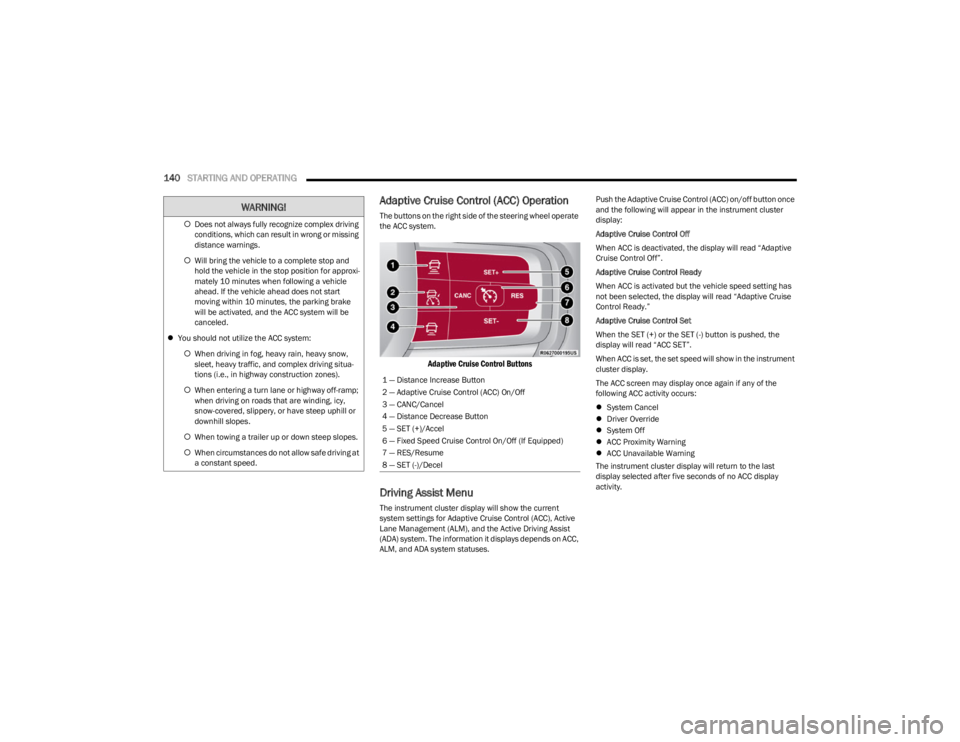
The buttons on the right side of the steering wheel operate
the ACC system.
Adaptive Cruise Control Buttons
Driving Assist Menu
The instrument cluster display will show the current
system settings for Adaptive Cruise Control (ACC), Active
Lane Management (ALM), and the Active Driving Assist
(ADA) system. The information it displays depends on ACC,
ALM, and ADA system statuses. Push the Adaptive Cruise Control (ACC) on/off button once
and the following will appear in the instrument cluster
display:
Adaptive Cruise Control Off
When ACC is deactivated, the display will read “Adaptive
Cruise Control Off”.
Adaptive Cruise Control Ready
When ACC is activated but the vehicle speed setting has
not been selected, the display will read “Adaptive Cruise
Control Ready.”
Adaptive Cruise Control Set
When the SET (+) or the SET (-) button is pushed, the
display will read “ACC SET”.
When ACC is set, the set speed will show in the instrument
cluster display.
The ACC screen may display once again if any of the
following ACC activity occurs:
System Cancel
Driver Override
System Off
ACC Proximity Warning
ACC Unavailable Warning
The instrument cluster display will return to the last
display selected after five seconds of no ACC display
activity.
Does not always fully recognize complex driving
conditions, which can result in wrong or missing
distance warnings.
Will bring the vehicle to a complete stop and
hold the vehicle in the stop position for approxi -
mately 10 minutes when following a vehicle
ahead. If the vehicle ahead does not start
moving within 10 minutes, the parking brake
will be activated, and the ACC system will be
canceled.
You should not utilize the ACC system:
When driving in fog, heavy rain, heavy snow,
sleet, heavy traffic, and complex driving situa-
tions (i.e., in highway construction zones).
When entering a turn lane or highway off-ramp;
when driving on roads that are winding, icy,
snow-covered, slippery, or have steep uphill or
downhill slopes.
When towing a trailer up or down steep slopes.
When circumstances do not allow safe driving at
a constant speed.
WARNING!
1 — Distance Increase Button
2 — Adaptive Cruise Control (ACC) On/Off
3 — CANC/Cancel
4 — Distance Decrease Button
5 — SET (+)/Accel
6 — Fixed Speed Cruise Control On/Off (If Equipped)
7 — RES/Resume
8 — SET (-)/Decel
23_WS_OM_EN_USC_t.book Page 140