belt JEEP WAGONEER 2023 Owners Manual
[x] Cancel search | Manufacturer: JEEP, Model Year: 2023, Model line: WAGONEER, Model: JEEP WAGONEER 2023Pages: 396, PDF Size: 15.17 MB
Page 8 of 396
6
SAFETY
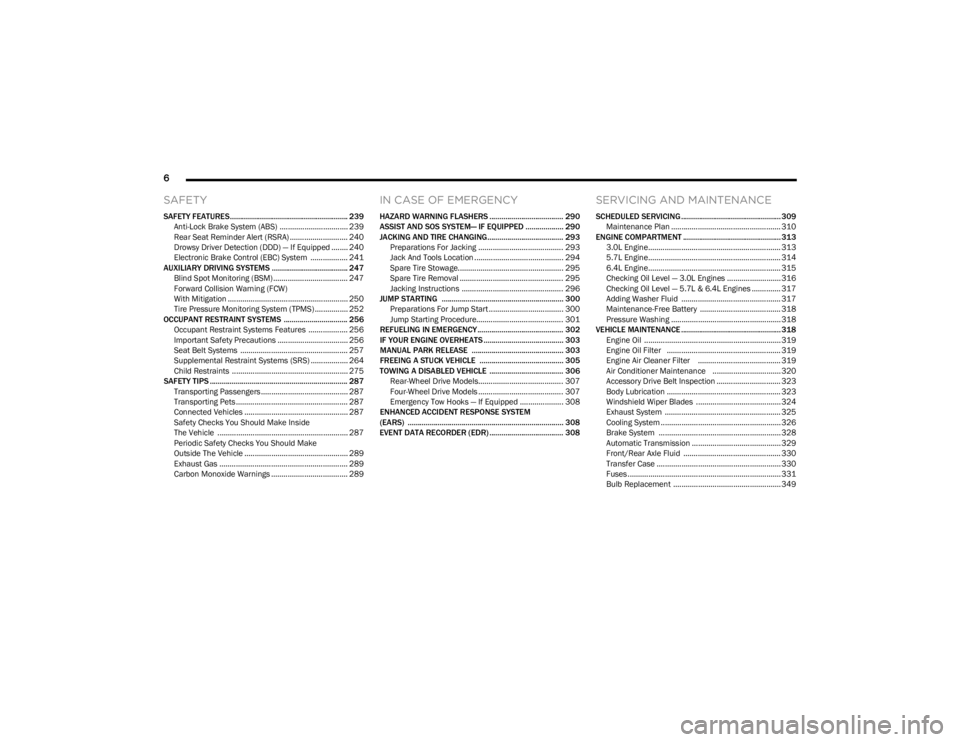
SAFETY FEATURES........................................................... 239
Anti-Lock Brake System (ABS) ................................. 239Rear Seat Reminder Alert (RSRA) ............................ 240
Drowsy Driver Detection (DDD) — If Equipped ........ 240
Electronic Brake Control (EBC) System .................. 241
AUXILIARY DRIVING SYSTEMS ...................................... 247 Blind Spot Monitoring (BSM) .................................... 247
Forward Collision Warning (FCW)
With Mitigation .......................................................... 250
Tire Pressure Monitoring System (TPMS) ................ 252
OCCUPANT RESTRAINT SYSTEMS ................................ 256 Occupant Restraint Systems Features ................... 256Important Safety Precautions .................................. 256Seat Belt Systems .................................................... 257
Supplemental Restraint Systems (SRS) .................. 264Child Restraints ........................................................ 275
SAFETY TIPS ..................................................................... 287 Transporting Passengers .......................................... 287
Transporting Pets ...................................................... 287Connected Vehicles .................................................. 287
Safety Checks You Should Make Inside
The Vehicle ............................................................... 287
Periodic Safety Checks You Should Make
Outside The Vehicle .................................................. 289
Exhaust Gas .............................................................. 289Carbon Monoxide Warnings ..................................... 289
IN CASE OF EMERGENCY
HAZARD WARNING FLASHERS ..................................... 290
ASSIST AND SOS SYSTEM— IF EQUIPPED ................... 290
JACKING AND TIRE CHANGING...................................... 293 Preparations For Jacking ......................................... 293
Jack And Tools Location ........................................... 294Spare Tire Stowage................................................... 295
Spare Tire Removal .................................................. 295Jacking Instructions ................................................. 296
JUMP STARTING ............................................................. 300 Preparations For Jump Start .................................... 300Jump Starting Procedure.......................................... 301
REFUELING IN EMERGENCY........................................... 302
IF YOUR ENGINE OVERHEATS ........................................ 303
MANUAL PARK RELEASE .............................................. 303
FREEING A STUCK VEHICLE .......................................... 305
TOWING A DISABLED VEHICLE ..................................... 306 Rear-Wheel Drive Models......................................... 307
Four-Wheel Drive Models ......................................... 307
Emergency Tow Hooks — If Equipped ..................... 308
ENHANCED ACCIDENT RESPONSE SYSTEM
(EARS) .............................................................................. 308
EVENT DATA RECORDER (EDR) ..................................... 308
SERVICING AND MAINTENANCE
SCHEDULED SERVICING .................................................. 309 Maintenance Plan ..................................................... 310
ENGINE COMPARTMENT ................................................. 313 3.0L Engine................................................................ 313
5.7L Engine................................................................ 314
6.4L Engine................................................................ 315
Checking Oil Level — 3.0L Engines .......................... 316
Checking Oil Level — 5.7L & 6.4L Engines .............. 317
Adding Washer Fluid ................................................ 317
Maintenance-Free Battery ....................................... 318Pressure Washing ..................................................... 318
VEHICLE MAINTENANCE .................................................. 318 Engine Oil .................................................................. 319
Engine Oil Filter ....................................................... 319
Engine Air Cleaner Filter ........................................ 319Air Conditioner Maintenance ................................. 320
Accessory Drive Belt Inspection ............................... 323Body Lubrication ....................................................... 323
Windshield Wiper Blades ......................................... 324
Exhaust System ........................................................ 325
Cooling System .......................................................... 326
Brake System ........................................................... 328
Automatic Transmission ........................................... 329
Front/Rear Axle Fluid ............................................... 330Transfer Case ............................................................ 330Fuses .......................................................................... 331Bulb Replacement .................................................... 349
23_WS_OM_EN_USC_t.book Page 6
Page 12 of 396
10
SYMBOLS KEY
If you do not read the entire Owner’s Manual, you may miss important information.
Observe all Cautions and Warnings.
ROLLOVER WARNING
Utility vehicles have a significantly higher rollover rate than other types of vehicles. This
vehicle has a higher ground clearance and a higher center of gravity than many passenger
vehicles. It is capable of performing better in a wide variety of off-road applications. Driven
in an unsafe manner, all vehicles can go out of control. Because of the higher center of
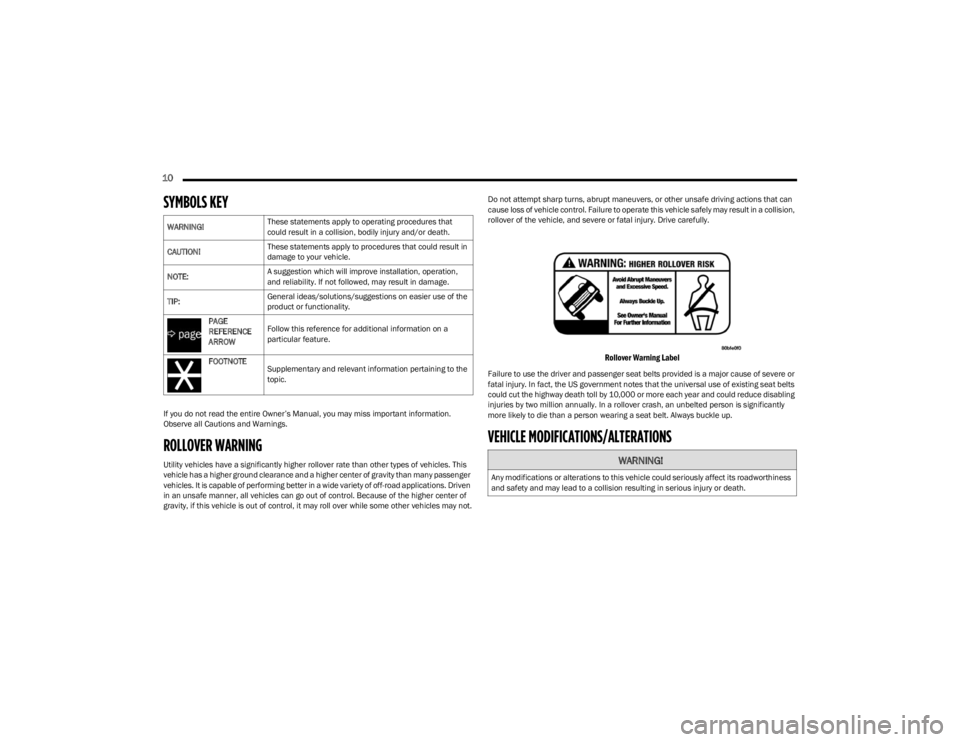
gravity, if this vehicle is out of control, it may roll over while some other vehicles may not.Do not attempt sharp turns, abrupt maneuvers, or other unsafe driving actions that can
cause loss of vehicle control. Failure to operate this vehicle safely may result in a collision,
rollover of the vehicle, and severe or fatal injury. Drive carefully.
Rollover Warning Label
Failure to use the driver and passenger seat belts provided is a major cause of severe or
fatal injury. In fact, the US government notes that the universal use of existing seat belts
could cut the highway death toll by 10,000 or more each year and could reduce disabling
injuries by two million annually. In a rollover crash, an unbelted person is significantly
more likely to die than a person wearing a seat belt. Always buckle up.
VEHICLE MODIFICATIONS/ALTERATIONS
WARNING!
These statements apply to operating procedures that
could result in a collision, bodily injury and/or death.
CAUTION! These statements apply to procedures that could result in
damage to your vehicle.
NOTE: A suggestion which will improve installation, operation,
and reliability. If not followed, may result in damage.
TIP: General ideas/solutions/suggestions on easier use of the
product or functionality.
PAGE
REFERENCE
ARROW Follow this reference for additional information on a
particular feature.
FOOTNOTE Supplementary and relevant information pertaining to the
topic.
WARNING!
Any modifications or alterations to this vehicle could seriously affect its roadworthiness
and safety and may lead to a collision resulting in serious injury or death.
23_WS_OM_EN_USC_t.book Page 10
Page 14 of 396
12
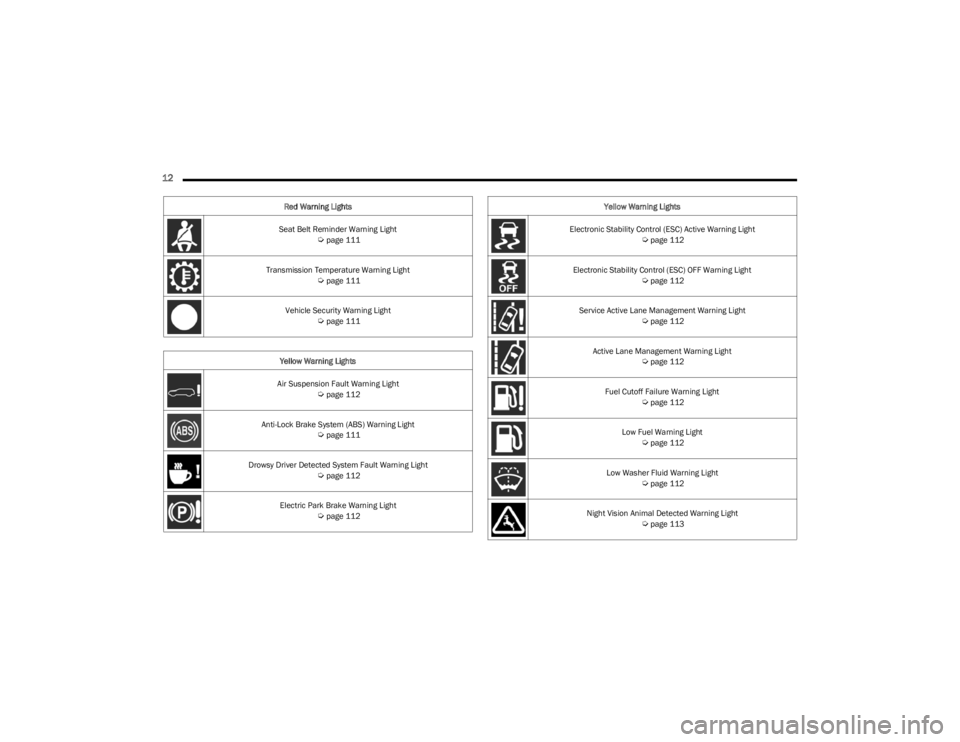
Seat Belt Reminder Warning Light Úpage 111
Transmission Temperature Warning Light
Úpage 111
Vehicle Security Warning Light
Úpage 111
Yellow Warning Lights
Air Suspension Fault Warning Light
Úpage 112
Anti-Lock Brake System (ABS) Warning Light
Úpage 111
Drowsy Driver Detected System Fault Warning Light
Úpage 112
Electric Park Brake Warning Light
Úpage 112
Red Warning Lights
Electronic Stability Control (ESC) Active Warning Light
Úpage 112
Electronic Stability Control (ESC) OFF Warning Light
Úpage 112
Service Active Lane Management Warning Light
Úpage 112
Active Lane Management Warning Light
Úpage 112
Fuel Cutoff Failure Warning Light
Úpage 112
Low Fuel Warning Light
Úpage 112
Low Washer Fluid Warning Light
Úpage 112
Night Vision Animal Detected Warning Light
Úpage 113
Yellow Warning Lights
23_WS_OM_EN_USC_t.book Page 12
Page 35 of 396
GETTING TO KNOW YOUR VEHICLE33
LINKING AND UNLINKING THE KEY FOB
T
O MEMORY
Your key fobs can be programmed to recall one of two
saved driver’s side memory profiles.
NOTE:Before programming your key fobs you must select the
“Personal Settings Linked To Key Fob” feature through the
Uconnect Settings
Úpage 197.
To program your key fobs, perform the following:
Wagoneer
1. Place the vehicle’s ignition in the OFF position.
2. Select a desired driver’s side memory profile, 1 or 2.
3. Once the profile has been recalled, push and release the set (S) button on the memory switch.
4. Within five seconds, push and release button (1) or (2) accordingly. “Memory Profile Set” (1 or 2) will
display in the instrument cluster.
5. Push and release the lock button on the key fob within 10 seconds.
NOTE:Your key fobs can be unlinked from your driver’s side
memory settings by pushing the set (S) button, and within
10 seconds, pushing the unlock button on the key fob.
Grand Wagoneer
1. Place the vehicle’s ignition in the OFF position.
2. Recall the desired memory profile (1 or 2). 3. Press the memory button (1) or (2) (according to the
previous selection) for two seconds or more, and
release.
4. Push and hold the lock button on the key fob within 10 seconds.
NOTE:Your key fobs can be unlinked from your driver’s side
memory settings by pushing the memory button (1) or (2)
for two seconds or more and releasing, and then within 10
seconds, pushing and holding the unlock button on the
key fob.
MEMORY POSITION RECALL
NOTE:Memory Recall is available when not in PARK, if the
vehicle speed is below 5 mph (8 km/h).
To recall a memory settings using the memory
switches, push memory button (1) or (2) on the
memory switch.
To recall the driver’s side memory settings using the
key fob, push the unlock button on the key fob linked
to memory position 1 or 2.
A recall can be canceled by pushing any of the memory
buttons during a recall, or by pushing any of the seat
adjustment switches. When a recall is canceled, the seat
and power tilt/telescopic steering column will stop
moving. A delay of one second will occur before another
recall can be selected.
SEATS
Seats are a part of the Occupant Restraint system of the
vehicle.
MANUAL ADJUSTMENT (REAR SEATS)
NOTE:You may experience deformation in the seat cushion from
the seat belt buckles if the seats are left folded for an
extended period of time. This is normal and by simply
unfolding the seats to the open position, over time the
seat cushion will return to its normal shape.
WARNING!
It is dangerous to ride in a cargo area, inside or
outside of a vehicle. In a collision, people riding in
these areas are more likely to be seriously injured or
killed.
Do not allow people to ride in any area of your vehicle
that is not equipped with seats and seat belts. In a
collision, people riding in these areas are more likely
to be seriously injured or killed.
Be sure everyone in your vehicle is in a seat and
using a seat belt properly.
WARNING!
Do not pile luggage or cargo higher than the top of the
seatback. This could impair visibility or become a
dangerous projectile in a sudden stop or collision.
2
23_WS_OM_EN_USC_t.book Page 33
Page 36 of 396
34GETTING TO KNOW YOUR VEHICLE
Second Row Bench Seat — If Equipped
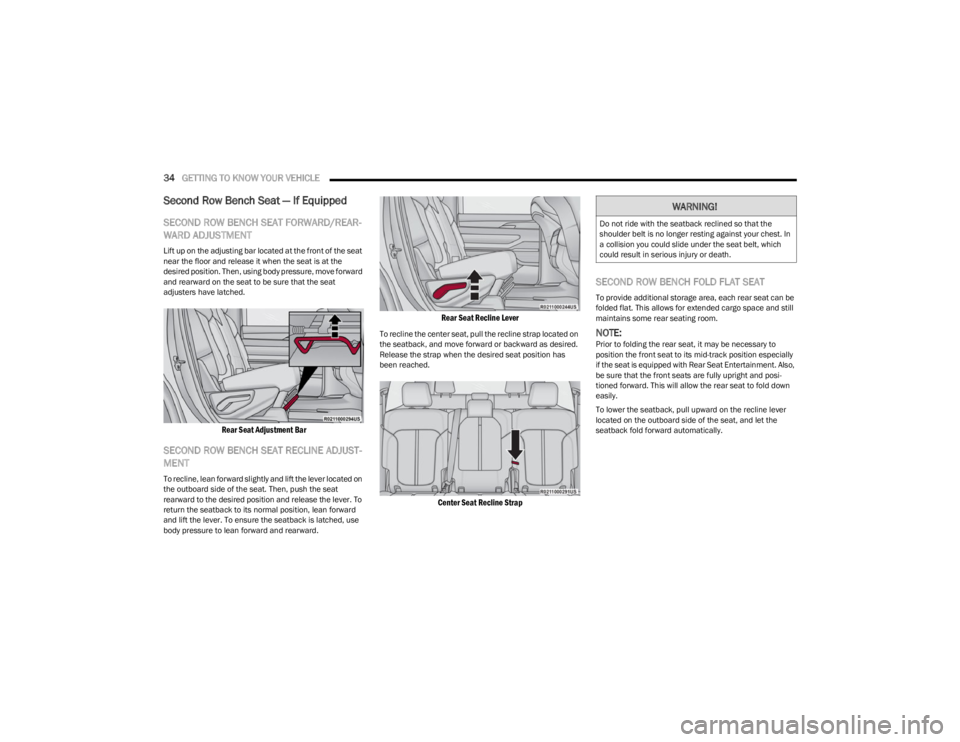
SECOND ROW BENCH SEAT FORWARD/REAR -
WARD ADJUSTMENT
Lift up on the adjusting bar located at the front of the seat
near the floor and release it when the seat is at the
desired position. Then, using body pressure, move forward
and rearward on the seat to be sure that the seat
adjusters have latched.
Rear Seat Adjustment Bar
SECOND ROW BENCH SEAT RECLINE ADJUST -
MENT
To recline, lean forward slightly and lift the lever located on
the outboard side of the seat. Then, push the seat
rearward to the desired position and release the lever. To
return the seatback to its normal position, lean forward
and lift the lever. To ensure the seatback is latched, use
body pressure to lean forward and rearward.
Rear Seat Recline Lever
To recline the center seat, pull the recline strap located on
the seatback, and move forward or backward as desired.
Release the strap when the desired seat position has
been reached.
Center Seat Recline Strap
SECOND ROW BENCH FOLD FLAT SEAT
To provide additional storage area, each rear seat can be
folded flat. This allows for extended cargo space and still
maintains some rear seating room.
NOTE:Prior to folding the rear seat, it may be necessary to
position the front seat to its mid-track position especially
if the seat is equipped with Rear Seat Entertainment. Also,
be sure that the front seats are fully upright and posi -
tioned forward. This will allow the rear seat to fold down
easily.
To lower the seatback, pull upward on the recline lever
located on the outboard side of the seat, and let the
seatback fold forward automatically.
WARNING!
Do not ride with the seatback reclined so that the
shoulder belt is no longer resting against your chest. In
a collision you could slide under the seat belt, which
could result in serious injury or death.
23_WS_OM_EN_USC_t.book Page 34
Page 38 of 396
36GETTING TO KNOW YOUR VEHICLE
Second Row Captain’s Chairs —
If Equipped
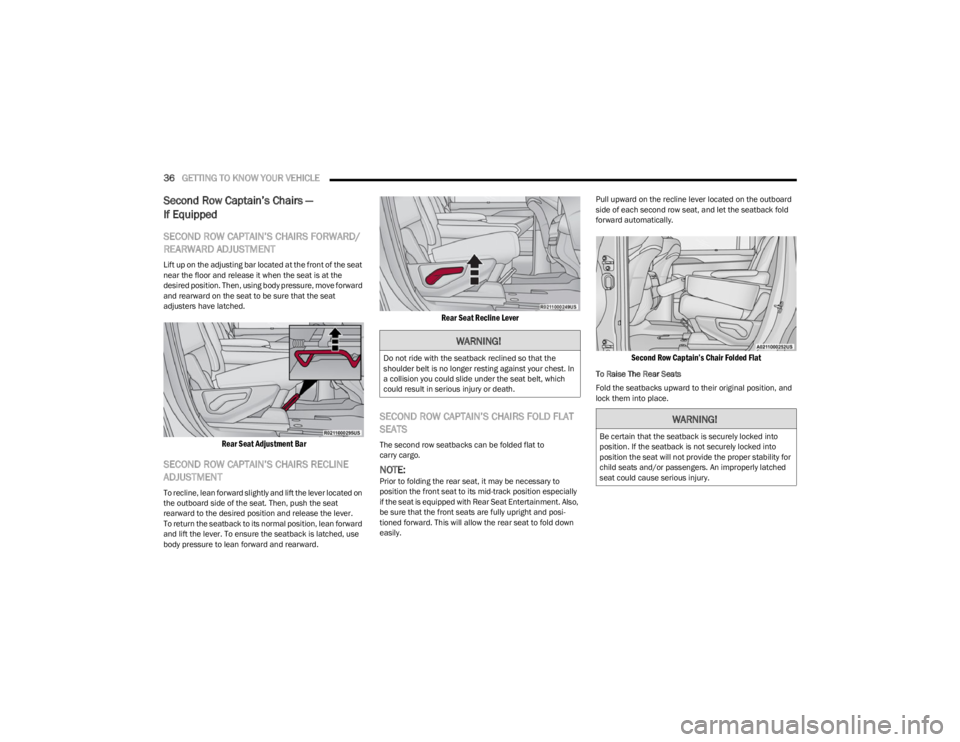
SECOND ROW CAPTAIN’S CHAIRS FORWARD/
REARWARD ADJUSTMENT
Lift up on the adjusting bar located at the front of the seat
near the floor and release it when the seat is at the
desired position. Then, using body pressure, move forward
and rearward on the seat to be sure that the seat
adjusters have latched.
Rear Seat Adjustment Bar
SECOND ROW CAPTAIN’S CHAIRS RECLINE
ADJUSTMENT
To recline, lean forward slightly and lift the lever located on
the outboard side of the seat. Then, push the seat
rearward to the desired position and release the lever.
To return the seatback to its normal position, lean forward
and lift the lever. To ensure the seatback is latched, use
body pressure to lean forward and rearward.
Rear Seat Recline Lever
SECOND ROW CAPTAIN’S CHAIRS FOLD FLAT
SEATS
The second row seatbacks can be folded flat to
carry cargo.
NOTE:Prior to folding the rear seat, it may be necessary to
position the front seat to its mid-track position especially
if the seat is equipped with Rear Seat Entertainment. Also,
be sure that the front seats are fully upright and posi -
tioned forward. This will allow the rear seat to fold down
easily. Pull upward on the recline lever located on the outboard
side of each second row seat, and let the seatback fold
forward automatically.
Second Row Captain’s Chair Folded Flat
To Raise The Rear Seats
Fold the seatbacks upward to their original position, and
lock them into place.
WARNING!
Do not ride with the seatback reclined so that the
shoulder belt is no longer resting against your chest. In
a collision you could slide under the seat belt, which
could result in serious injury or death.
WARNING!
Be certain that the seatback is securely locked into
position. If the seatback is not securely locked into
position the seat will not provide the proper stability for
child seats and/or passengers. An improperly latched
seat could cause serious injury.
23_WS_OM_EN_USC_t.book Page 36
Page 41 of 396
GETTING TO KNOW YOUR VEHICLE39
Adjusting The Seat Forward Or Rearward
The seat can be adjusted both forward and rearward. Push
the seat switch forward or rearward. The seat will move in
the direction of the switch. Release the switch when the
desired position has been reached.
Adjusting The Seat Up Or Down
The height of the seats can be adjusted up or down. Pull
upward or push downward on the rear of seat switch, the
seat will move in the direction of the switch. Release the
switch when the desired position has been reached.
Tilting The Seat Up Or Down
The angle of the seat cushion can be adjusted in two
directions. Pull upward or push downward on the front of
the seat switch, the front of the seat cushion will move in
the direction of the switch. Release the switch when the
desired position has been reached.
Reclining The Seatback
The angle of the seatback can be adjusted forward or
rearward. Push the seatback recline switch forward or
rearward, the seat will move in the direction of the switch.
Release the switch when the desired position is reached.
For Grand Wagoneer models, the angle of the upper
seatback can also be adjusted forward or rearward. Push
the upper seatback switch forward or rearward, and the
seat will move in the direction of the switch. Release the
switch when the desired position is reached.
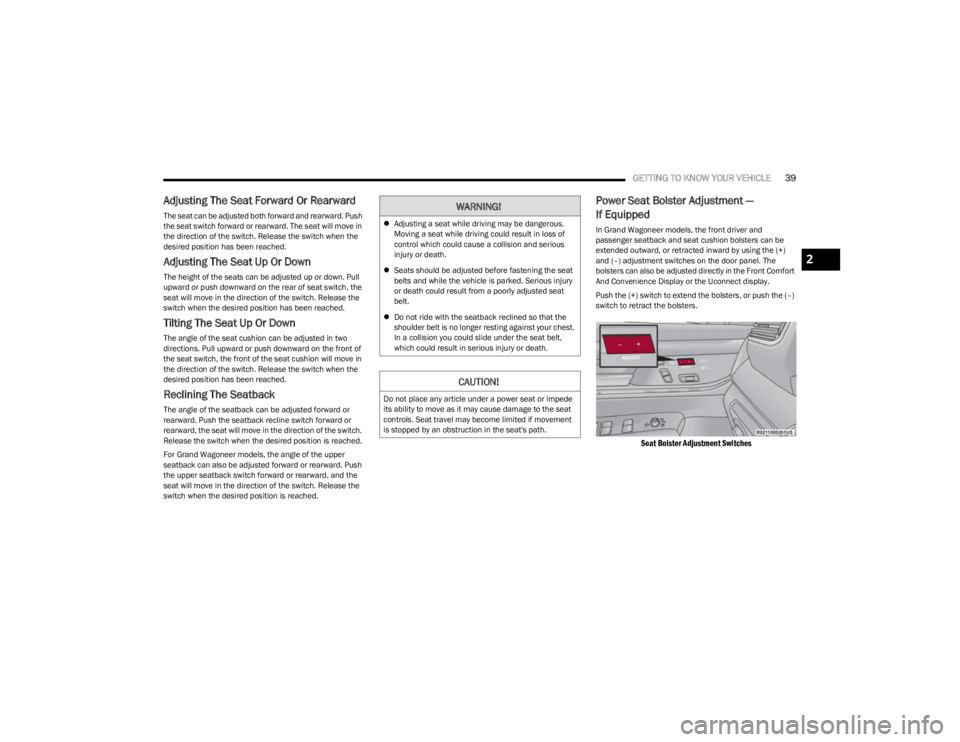
Power Seat Bolster Adjustment —
If Equipped
In Grand Wagoneer models, the front driver and
passenger seatback and seat cushion bolsters can be
extended outward, or retracted inward by using the (+)
and (–) adjustment switches on the door panel. The
bolsters can also be adjusted directly in the Front Comfort
And Convenience Display or the Uconnect display.
Push the (+) switch to extend the bolsters, or push the (–)
switch to retract the bolsters.
Seat Bolster Adjustment Switches
WARNING!
Adjusting a seat while driving may be dangerous.
Moving a seat while driving could result in loss of
control which could cause a collision and serious
injury or death.
Seats should be adjusted before fastening the seat
belts and while the vehicle is parked. Serious injury
or death could result from a poorly adjusted seat
belt.
Do not ride with the seatback reclined so that the
shoulder belt is no longer resting against your chest.
In a collision you could slide under the seat belt,
which could result in serious injury or death.
CAUTION!
Do not place any article under a power seat or impede
its ability to move as it may cause damage to the seat
controls. Seat travel may become limited if movement
is stopped by an obstruction in the seat's path.
2
23_WS_OM_EN_USC_t.book Page 39
Page 43 of 396
GETTING TO KNOW YOUR VEHICLE41
(Continued)
When enabled in Uconnect Settings, Easy Entry and Easy
Exit positions are stored in each memory setting profile
Úpage 31.
NOTE:The Easy Entry/Exit feature is not enabled when the
vehicle is delivered from the factory. The Easy Entry/Exit
feature is enabled or disabled through the programmable
features in the Uconnect system
Úpage 197.
POWER ADJUSTMENT (REAR SEATS) —
I
F EQUIPPED
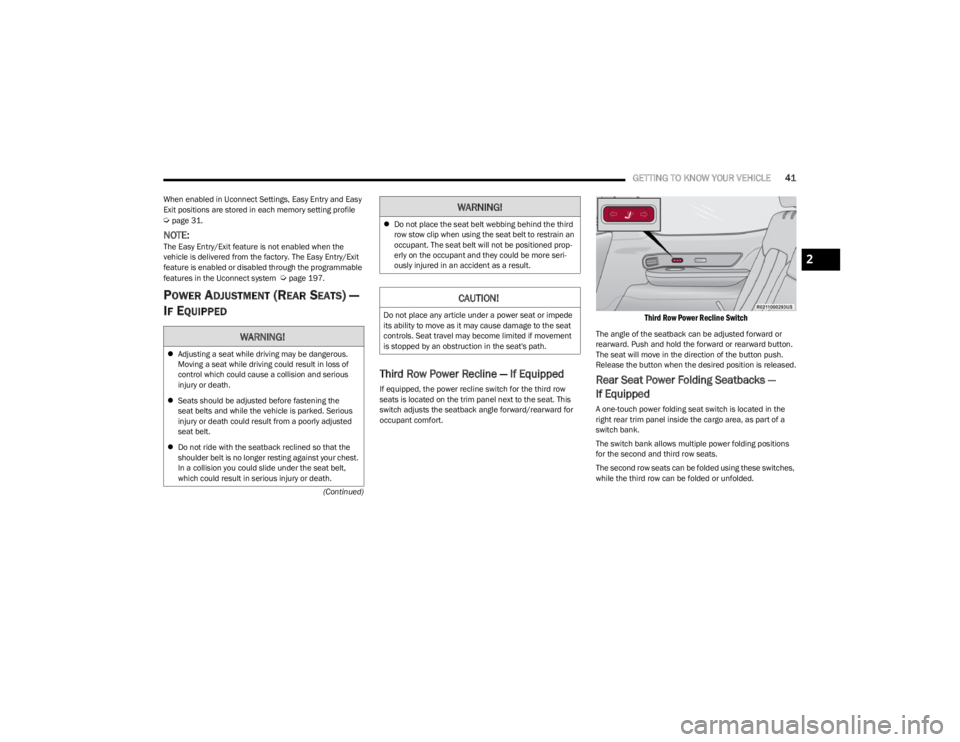
Third Row Power Recline — If Equipped
If equipped, the power recline switch for the third row
seats is located on the trim panel next to the seat. This
switch adjusts the seatback angle forward/rearward for
occupant comfort.
Third Row Power Recline Switch
The angle of the seatback can be adjusted forward or
rearward. Push and hold the forward or rearward button.
The seat will move in the direction of the button push.
Release the button when the desired position is released.
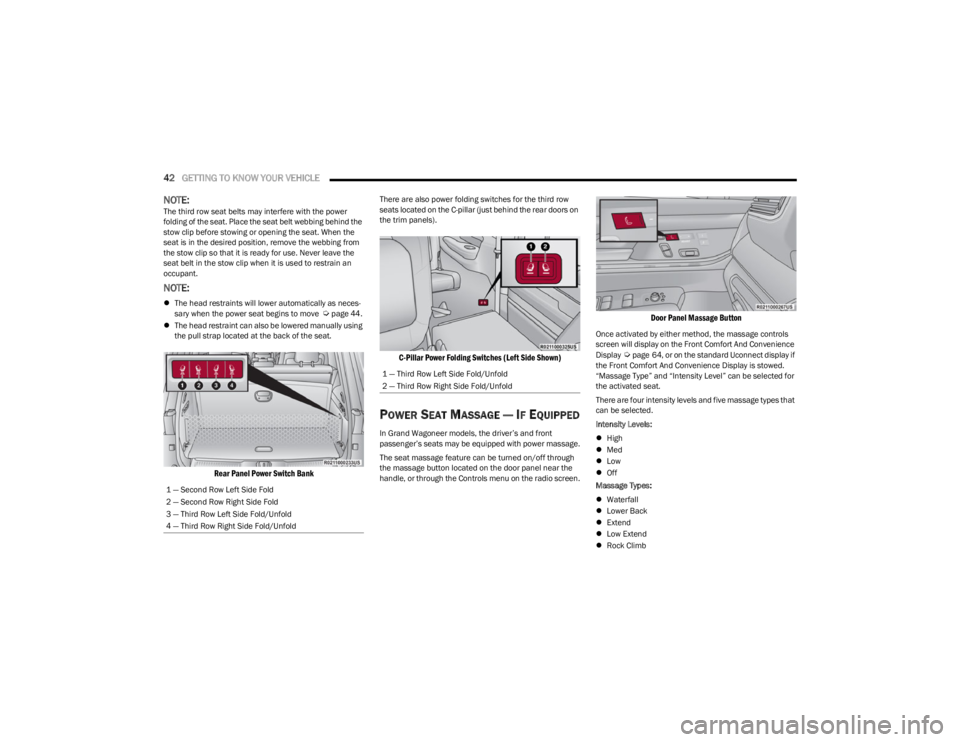
Rear Seat Power Folding Seatbacks —
If Equipped
A one-touch power folding seat switch is located in the
right rear trim panel inside the cargo area, as part of a
switch bank.
The switch bank allows multiple power folding positions
for the second and third row seats.
The second row seats can be folded using these switches,
while the third row can be folded or unfolded.
WARNING!
Adjusting a seat while driving may be dangerous.
Moving a seat while driving could result in loss of
control which could cause a collision and serious
injury or death.
Seats should be adjusted before fastening the
seat belts and while the vehicle is parked. Serious
injury or death could result from a poorly adjusted
seat belt.
Do not ride with the seatback reclined so that the
shoulder belt is no longer resting against your chest.
In a collision you could slide under the seat belt,
which could result in serious injury or death.
Do not place the seat belt webbing behind the third
row stow clip when using the seat belt to restrain an
occupant. The seat belt will not be positioned prop -
erly on the occupant and they could be more seri -
ously injured in an accident as a result.
CAUTION!
Do not place any article under a power seat or impede
its ability to move as it may cause damage to the seat
controls. Seat travel may become limited if movement
is stopped by an obstruction in the seat's path.
WARNING!
2
23_WS_OM_EN_USC_t.book Page 41
Page 44 of 396
42GETTING TO KNOW YOUR VEHICLE
NOTE:The third row seat belts may interfere with the power
folding of the seat. Place the seat belt webbing behind the
stow clip before stowing or opening the seat. When the
seat is in the desired position, remove the webbing from
the stow clip so that it is ready for use. Never leave the
seat belt in the stow clip when it is used to restrain an
occupant.
NOTE:
The head restraints will lower automatically as neces -
sary when the power seat begins to move Úpage 44.
The head restraint can also be lowered manually using
the pull strap located at the back of the seat.
Rear Panel Power Switch Bank
There are also power folding switches for the third row
seats located on the C-pillar (just behind the rear doors on
the trim panels).
C-Pillar Power Folding Switches (Left Side Shown)
POWER SEAT MASSAGE — IF EQUIPPED
In Grand Wagoneer models, the driver’s and front
passenger’s seats may be equipped with power massage.
The seat massage feature can be turned on/off through
the massage button located on the door panel near the
handle, or through the Controls menu on the radio screen.
Door Panel Massage Button
Once activated by either method, the massage controls
screen will display on the Front Comfort And Convenience
Display
Úpage 64, or on the standard Uconnect display if
the Front Comfort And Convenience Display is stowed.
“Massage Type” and “Intensity Level” can be selected for
the activated seat.
There are four intensity levels and five massage types that
can be selected.
Intensity Levels:
High
Med
Low
Off
Massage Types:
Waterfall
Lower Back
Extend
Low Extend
Rock Climb
1 — Second Row Left Side Fold
2 — Second Row Right Side Fold
3 — Third Row Left Side Fold/Unfold
4 — Third Row Right Side Fold/Unfold
1 — Third Row Left Side Fold/Unfold
2 — Third Row Right Side Fold/Unfold
23_WS_OM_EN_USC_t.book Page 42
Page 86 of 396
84GETTING TO KNOW YOUR VEHICLE
Opening And Closing The Sunroof
The sunroof has two programmed automatic stops for the
sunroof open position: a comfort stop position and a full
open position. The comfort stop position will minimize
wind buffeting in the interior. Express Open/Close
To open the sunroof, push OPEN on the sunroof switch
and release it within one-half second. The sunroof will
open to the comfort stop position and stop automatically.
Push and release OPEN again to continue to the full open
position.
To close the sunroof, push CLOSE on the sunroof switch
and release it within one-half second. The sunroof will
close automatically from any position.
During Express Open or Express Close operation, any
other actuation of the sunroof switch will stop the sunroof.
Manual Open/Close
To open the sunroof, push and hold OPEN on the sunroof
switch. The sunroof will open to the comfort stop position,
then automatically stop. Release the switch then push and
hold again to continue to the full open position.
To close the sunroof, push and hold CLOSE on the sunroof
switch.
Any release of the switch during open or close operation
will stop the sunroof movement in a partially open
position.
Express Venting The Sunroof
To vent the sunroof, push TILT on the vent switch and
release within one half second. The sunroof will open to
the vent position regardless of its initial position. During
Express Vent operation, any other actuation of the switch
will stop the sunroof.
NOTE:If the sunshade is in the closed position when Express/
Manual Open or Vent operation is initiated, the sunshade
will automatically open to the half open position prior to
the sunroof opening.
Opening And Closing The Power Sunshade
The sunshade has two programmed open positions: half
open and full open positions. When operating the
sunshade from the closed position, the sunshade will
always stop at the half open position regardless of express
or manual open operation. The switch must be pushed
again to continue on to full open position.
If the sunroof is open or vented, the sunshade cannot be
closed beyond the half open position. Pushing the
sunshade close switch when the sunroof is open/vented
and the sunshade is at half open position will first
automatically close the sunroof prior to the sunshade
closing.
Express Open/Close
To open the sunshade, push OPEN on the sunshade
switch and release it within one-half second, the
sunshade will open to the half open position and stop
automatically. Push and release OPEN again to continue
to open the sunshade to the full open position.
To close the sunshade, push CLOSE on the sunshade
switch and release it within one-half second.
During Express Open or Express Close operation, any
other actuation of the sunroof switches will stop the
sunshade in a partially open position.
WARNING!
Never leave children unattended in a vehicle, or with
access to an unlocked vehicle. Never leave the key
fob in or near the vehicle, or in a location accessible
to children. Do not leave the Keyless Enter ‘n Go™
Ignition in the ON/RUN position. Occupants, particu -
larly unattended children, can become entrapped by
the power sunroof while operating the power sunroof
switch. Such entrapment may result in serious injury
or death.
In a collision, there is a greater risk of being thrown
from a vehicle with an open sunroof. You could also
be seriously injured or killed. Always fasten your seat
belt properly and make sure all passengers are also
properly secured.
Do not allow small children to operate the sunroof.
Never allow your fingers, other body parts, or any
object, to project through the sunroof opening. Injury
may result.
23_WS_OM_EN_USC_t.book Page 84