clock JEEP WRANGLER 2015 JK / 3.G User Guide
[x] Cancel search | Manufacturer: JEEP, Model Year: 2015, Model line: WRANGLER, Model: JEEP WRANGLER 2015 JK / 3.GPages: 695, PDF Size: 20.64 MB
Page 393 of 695
mode. In Play mode, the following buttons on the radio
faceplate may be used to control the iPod® or external
USB device and display data:
•Use theTUNEcontrol knob to select the next or
previous track.
•Turning it clockwise (forward) by one click, while
playing a track, skips to the next track or push the VR
button and say#Next Track.#
•Turning it counterclockwise (backward) by one click,
will jump to the previous track in the list or push the
VR button and say#Previous Track.#
•Jump backward in the current track by pushing and
holding the <
track.
•Jump forward in the current track by pushing and
holding theFF>> button.
•A single push backward <
jump backward or forward respectively, for five sec-
onds.
•Use the <
previous or next track. Pushing theSEEK>> button
during play mode will jump to the next track in the
list, or push the VR button and say#Next or Previous
Track.#
•While a track is playing, push theINFObutton to see
the associated metadata (artist, track title, album, etc.)
for that track. Pushing theINFObutton again jumps to
the next screen of data for that track. Once all screens
have been viewed, the lastINFObutton push will go
back to the play mode screen on the radio.
•Pushing theREPEATbutton will change the audio
device mode to repeat the current playing track or
push the VR button and say#Repeat ON#or#Repeat
Off.#
4
UNDERSTANDING YOUR INSTRUMENT PANEL 391
Page 394 of 695
•Push theSCANbutton to use iPod®/USB/MP3 de-
vice scan mode, which will play the first ten seconds of
each track in the current list and then forward to the
next song. To stop SCAN mode and start playing the
desired track, when it is playing the track, push the
SCANbutton again. During Scan mode, pushing the
<
and next tracks.
•RNDbutton (available on sales code RES radio only):
Pushing this button toggles between Shuffle ON and
Shuffle OFF modes for the iPod® or external USB
device, or push the VR button and say#Shuffle ON#or
#Shuffle Off.#If theRNDicon is showing on the radio
display, then the shuffle mode is ON.
List Or Browse Mode
During Play mode, pushing any of the buttons described
below, will bring up List mode. List mode enables
scrolling through the list of menus and tracks on the
audio device.
TUNEcontrol knob: TheTUNEcontrol knob functions in
a similar manner as the scroll wheel on the audio device
or external USB device.
•Turning it clockwise (forward) and counterclockwise
(backward) scrolls through the lists, displaying the
track detail on the radio display. Once the track to be
played is highlighted on the radio display, push the
TUNEcontrol knob to select and start playing the
track. Turning theTUNEcontrol knob fast will scroll
through the list faster. During fast scroll, a slight delay
in updating the information on the radio display may
be noticeable.
392 UNDERSTANDING YOUR INSTRUMENT PANEL
Page 395 of 695
During all List modes, the iPod® displays all lists in
“wrap-around” mode. So if the track is at the bottom of
the list, just turn the wheel backward (counterclockwise)
to get to the track faster.
In List mode, the radioPRESETbuttons are used as
shortcuts to the following lists on the iPod® or external
USB device:
•Preset 1 – Playlists
•Preset 2 – Artists
•Preset 3 – Albums
•Preset 4 – Genres
•Preset 5 – Audiobooks
•Preset 6 – Podcasts
Pushing a PRESET button will display the current list on
the top line and the first item in that list on the second
line.
To exit List mode without selecting a track, push the
samePRESETbutton again to go back toPlay mode.
LISTbutton: TheLISTbutton will display the top level
menu of the iPod® or external USB device.
•Turn theTUNEcontrol knob to list the top-menu item
to be selected and push theTUNEcontrol knob. This
will display the next sub-menu list item on the audio
device, then follow the same steps to go to the desired
track in that list. Not all iPod® or external USB device
sub-menu levels are available on this system.
MUSIC TYPEbutton: TheMUSIC TYPEbutton is
another shortcut button to the genre listing on your audio
device.
4
UNDERSTANDING YOUR INSTRUMENT PANEL 393
Page 477 of 695
WARNING!(Continued)
•Failure to follow these warnings may cause the
vehicle to roll down the incline and could collide
with another vehicle, object or person, and cause
serious or fatal injury. Always remember to use the
parking brake while parking on a hill and that the
driver is responsible for braking the vehicle.
NOTE:The HSA system may also be turned on and off
if the vehicle is equipped with the Electronic Vehicle
Information Center (EVIC). Refer to “Electronic Vehicle
Information Center (EVIC)” in “Understanding Your
Instrument Panel” for further information.
HSA Off
If you wish to turn off the HSA system, follow this
procedure:
1. Start with the engine off and vehicle in PARK (auto-
matic transmission) or NEUTRAL with clutch out
(manual transmission) with wheels straight. Apply
parking brake on manual transmission vehicle.
2. Start the engine.
3. With the engine running, the brake applied, and the
clutch out, rotate the steering wheel 180° counterclock-
wise from center.
4. Press the ESC OFF switch four times within twenty
seconds.
5. Rotate the steering wheel 360° clockwise (180° clock-
wise from center).
6. Cycle ignition switch OFF then ON.
5
STARTING AND OPERATING 475
Page 566 of 695
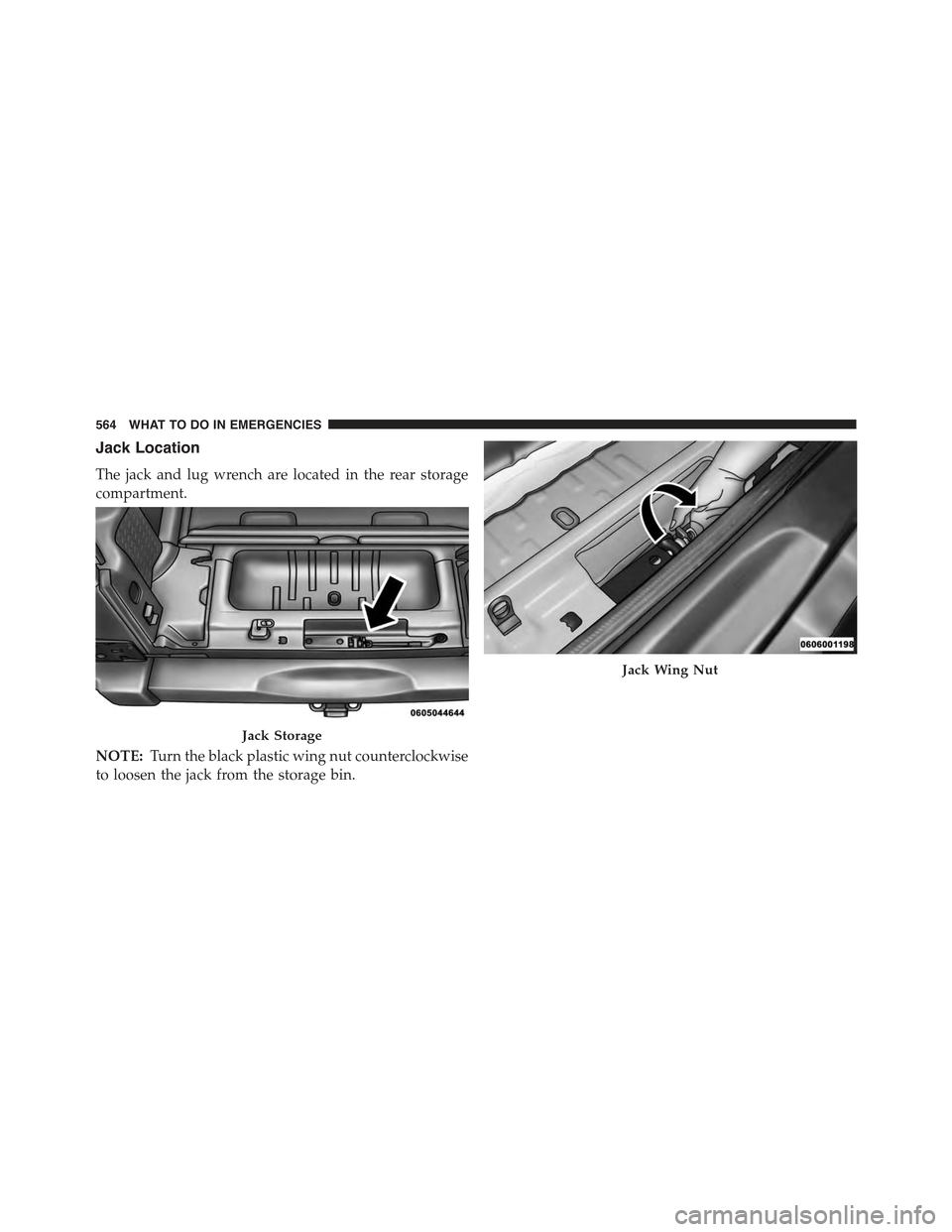
Jack Location
The jack and lug wrench are located in the rear storage
compartment.
NOTE:Turn the black plastic wing nut counterclockwise
to loosen the jack from the storage bin.
Jack Storage
Jack Wing Nut
564 WHAT TO DO IN EMERGENCIES
Page 567 of 695
Spare Tire Removal
To remove the spare tire from the carrier, remove the tire
cover, if equipped, and remove the lug nuts with the lug
wrench turning them counterclockwise.
NOTE:If you have added aftermarket accessories to the
spare tire mounted carrier, it cannot exceed a gross
weight of 85 lbs (38.5 kg) including the weight of the
spare tire.
Preparations For Jacking
1.Park on a firm, level surface. Avoid ice or slippery areas.
WARNING!
Do not attempt to change a tire on the side of the
vehicle close to moving traffic, pull far enough off
the road to avoid being hit when operating the jack
or changing the wheel.
2. Turn on the Hazard Warning flasher.
3. Set the parking brake.
4. Shift the automatic transmission into PARK, or a
manual transmission into REVERSE.
5. Turn the ignition to LOCK.
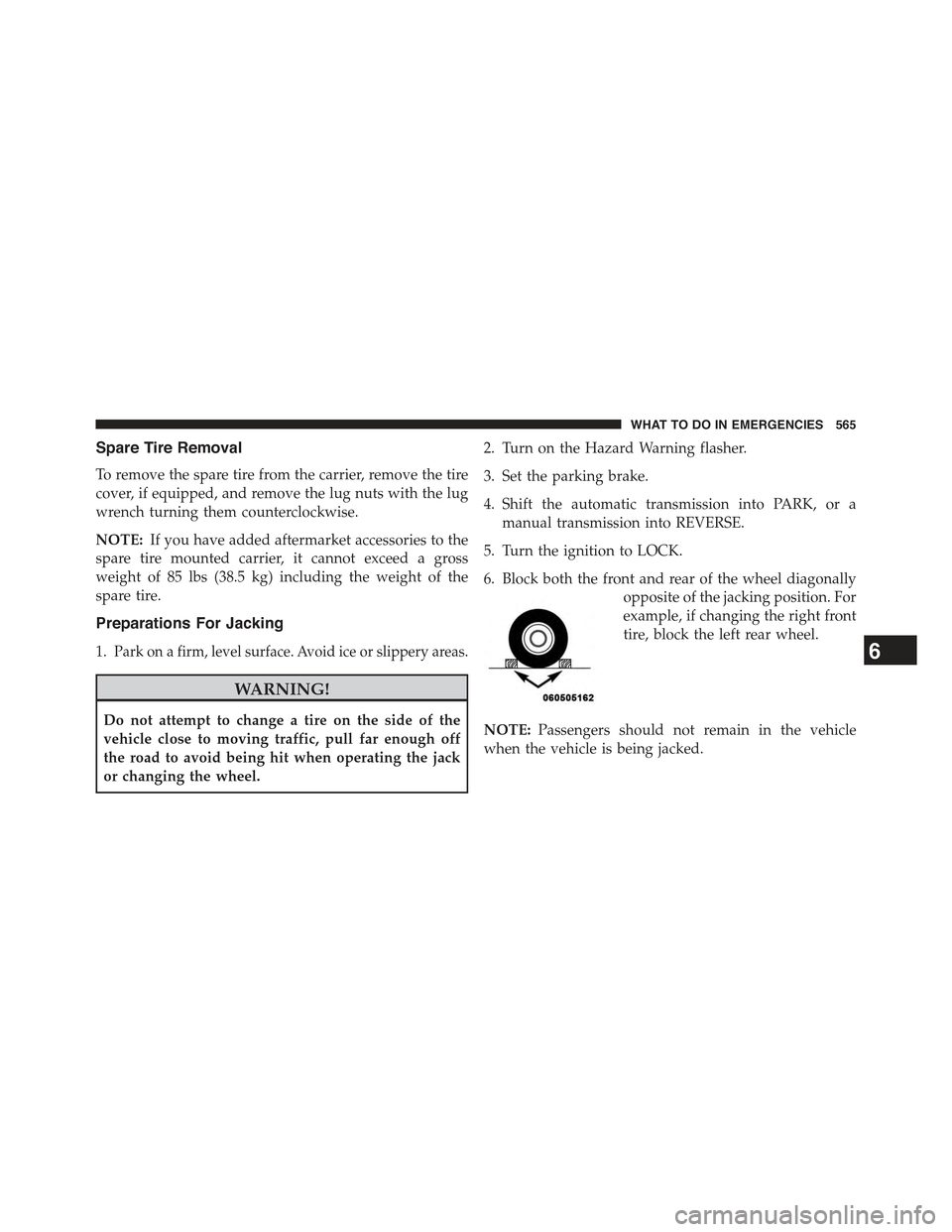
6. Block both the front and rear of the wheel diagonally
opposite of the jacking position. For
example, if changing the right front
tire, block the left rear wheel.
NOTE:Passengers should not remain in the vehicle
when the vehicle is being jacked.
6
WHAT TO DO IN EMERGENCIES 565
Page 570 of 695
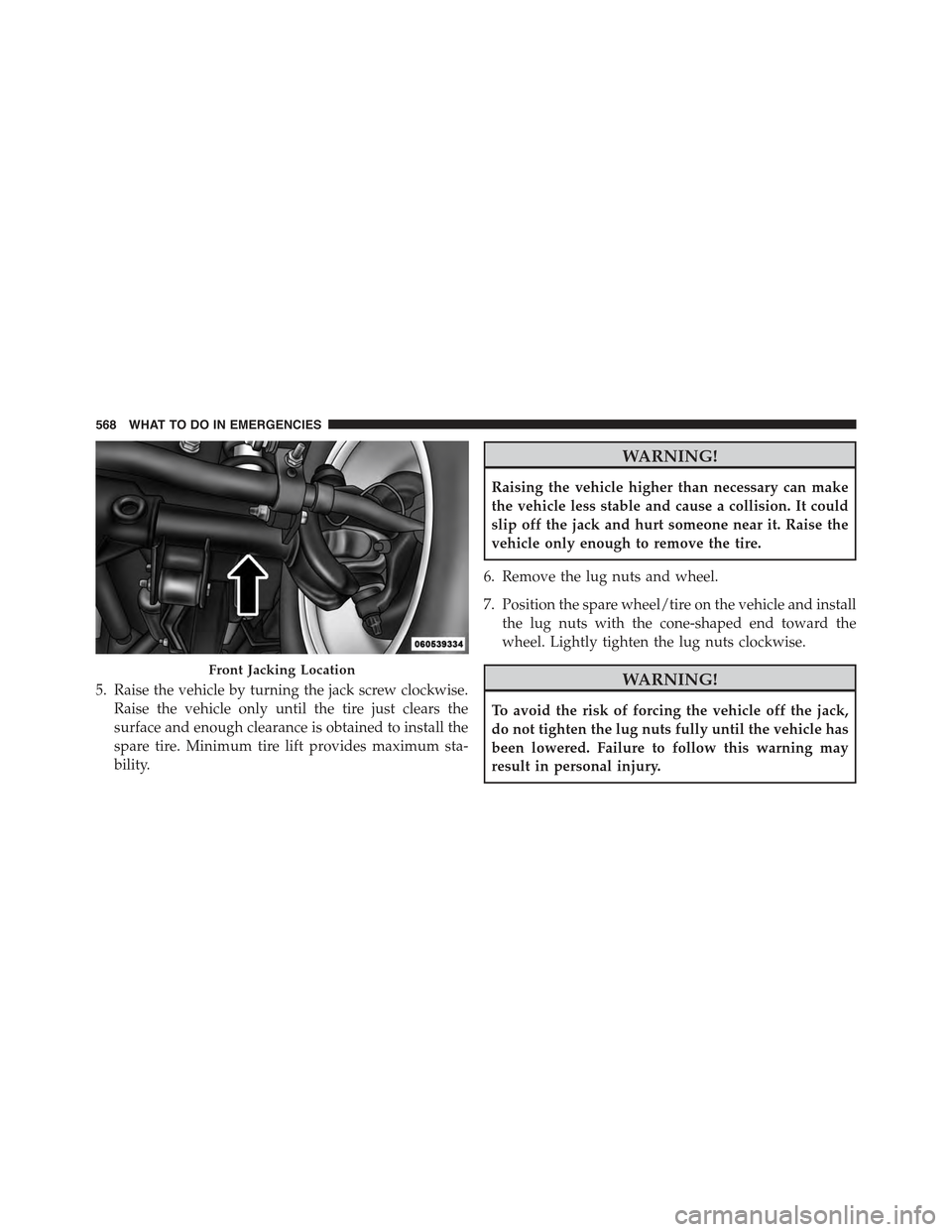
5. Raise the vehicle by turning the jack screw clockwise.
Raise the vehicle only until the tire just clears the
surface and enough clearance is obtained to install the
spare tire. Minimum tire lift provides maximum sta-
bility.
WARNING!
Raising the vehicle higher than necessary can make
the vehicle less stable and cause a collision. It could
slip off the jack and hurt someone near it. Raise the
vehicle only enough to remove the tire.
6. Remove the lug nuts and wheel.
7. Position the spare wheel/tire on the vehicle and install
the lug nuts with the cone-shaped end toward the
wheel. Lightly tighten the lug nuts clockwise.
WARNING!
To avoid the risk of forcing the vehicle off the jack,
do not tighten the lug nuts fully until the vehicle has
been lowered. Failure to follow this warning may
result in personal injury.
Front Jacking Location
568 WHAT TO DO IN EMERGENCIES
Page 571 of 695
8. Lower the vehicle by turning the jack screw to the left,
and remove the jack.
9. Finish tightening the lug nuts. Push down on the
wrench while tightening for increased leverage. Alter-
nate nuts until each nut has been tightened twice.
Refer to “Torque Specifications” in this section for
correct lug nut torque.
10. Remove the jack assembly and wheel blocks.
11. Secure the tire, jack, and tools in their proper loca-
tions.
WARNING!
A loose tire or jack thrown forward in a collision or
hard stop, could endanger the occupants of the ve-
hicle. Always stow the jack parts and the spare tire in
the places provided.
Road Tire Installation
1. Mount the road tire on the axle.
2. Install the remaining lug nuts with the cone shaped
end of the nut toward the wheel. Lightly tighten the
lug nuts.
WARNING!
To avoid the risk of forcing the vehicle off the jack,
do not tighten the lug nuts fully until the vehicle has
been lowered. Failure to follow this warning may
result in personal injury.
3. Lower the vehicle to the ground by turning the jack
handle counterclockwise.
4. Finish tightening the lug nuts. Push down on the
wrench while at the end of the handle for increased
leverage. Tighten the lug nuts in a star pattern until
6
WHAT TO DO IN EMERGENCIES 569
Page 638 of 695
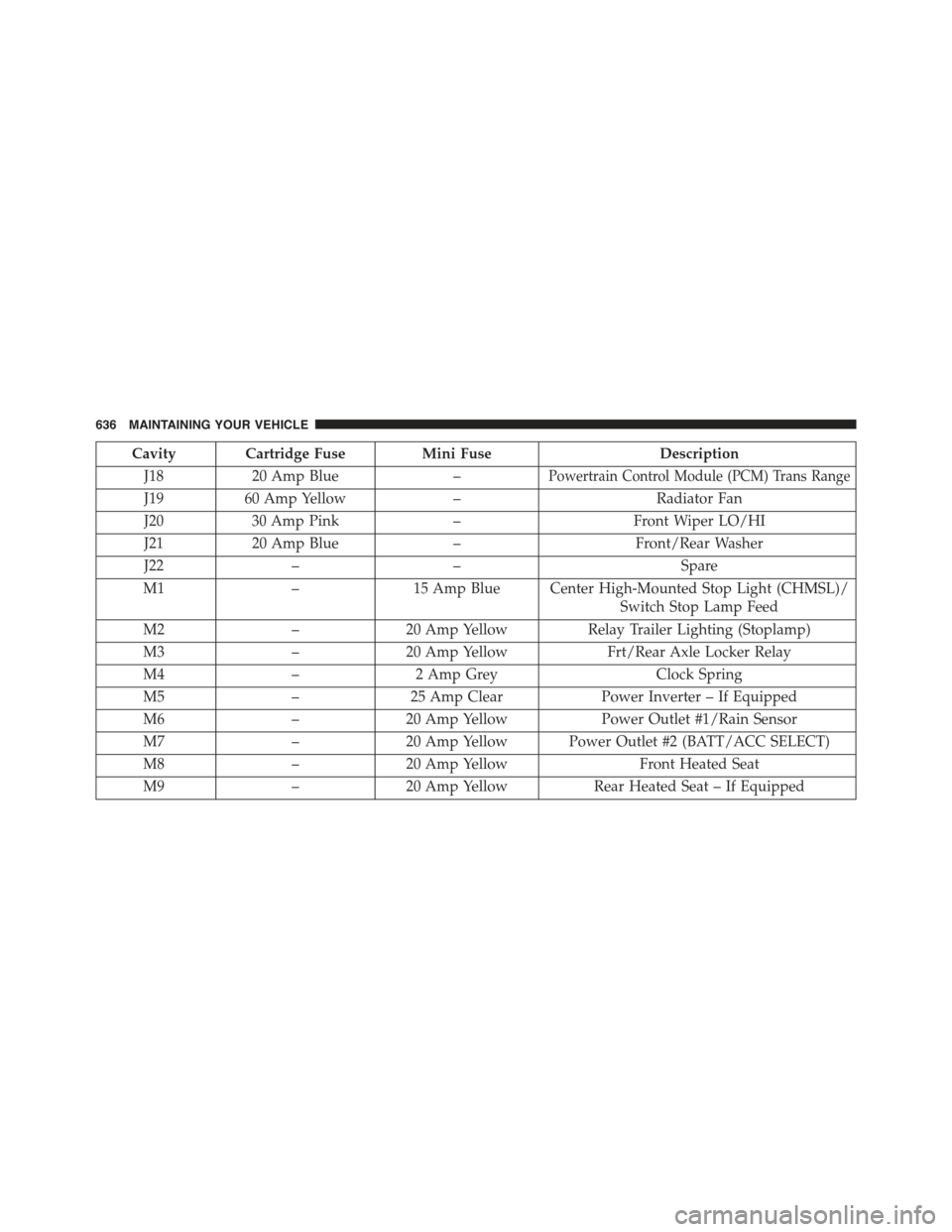
Cavity Cartridge FuseMini FuseDescription
J1820 Amp Blue–Powertrain Control Module (PCM) Trans Range
J1960 Amp Yellow–Radiator Fan
J2030 Amp Pink–Front Wiper LO/HI
J2120 Amp Blue–Front/Rear Washer
J22––Spare
M1–15 Amp Blue Center High-Mounted Stop Light (CHMSL)/
Switch Stop Lamp Feed
M2–20 Amp YellowRelay Trailer Lighting (Stoplamp)
M3–20 Amp YellowFrt/Rear Axle Locker Relay
M4–2 Amp GreyClock Spring
M5–25 Amp ClearPower Inverter – If Equipped
M6–20 Amp YellowPower Outlet #1/Rain Sensor
M7–20 Amp Yellow Power Outlet #2 (BATT/ACC SELECT)
M8–20 Amp YellowFront Heated Seat
M9–20 Amp YellowRear Heated Seat – If Equipped
636 MAINTAINING YOUR VEHICLE
Page 644 of 695
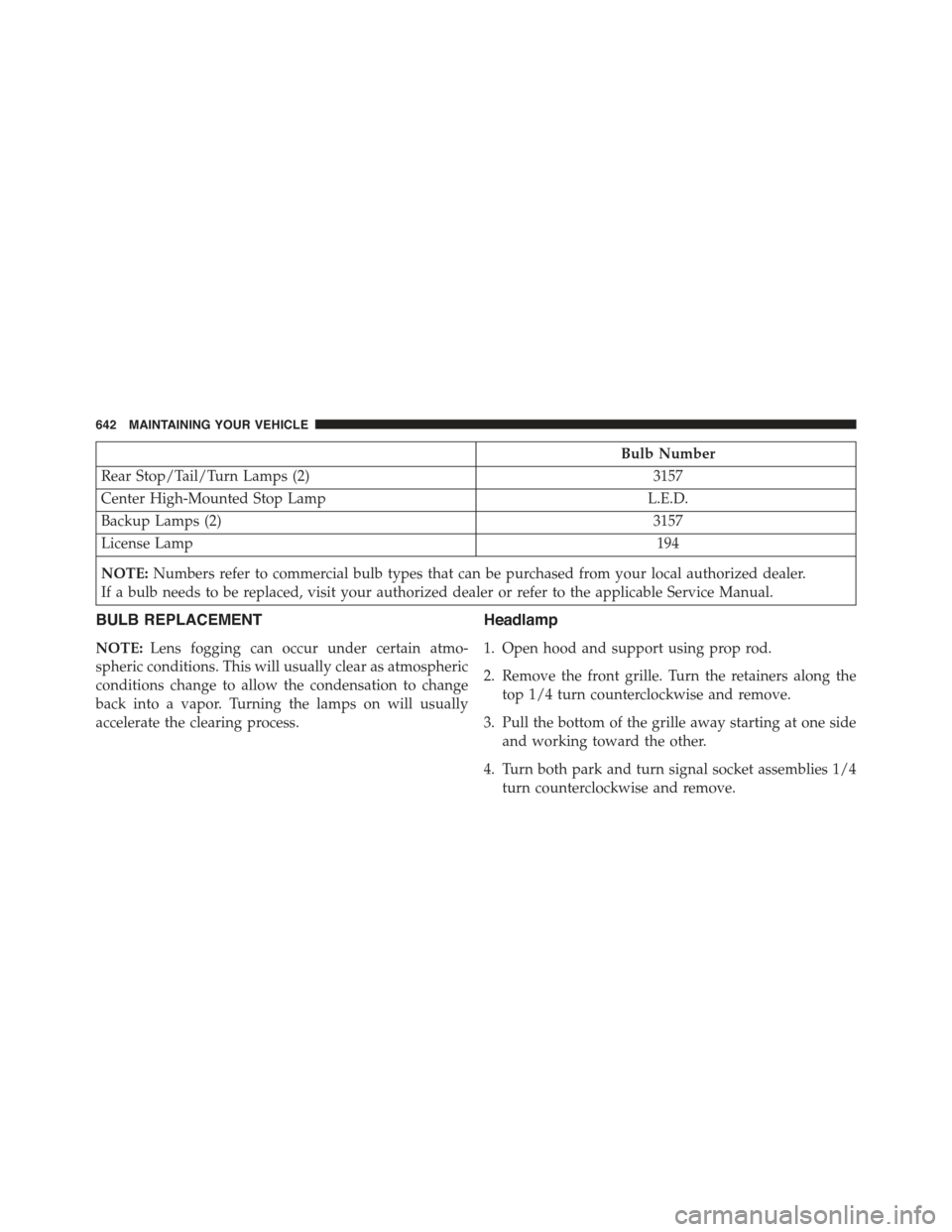
Bulb Number
Rear Stop/Tail/Turn Lamps (2)3157
Center High-Mounted Stop LampL.E.D.
Backup Lamps (2)3157
License Lamp194
NOTE:Numbers refer to commercial bulb types that can be purchased from your local authorized dealer.
If a bulb needs to be replaced, visit your authorized dealer or refer to the applicable Service Manual.
BULB REPLACEMENT
NOTE:Lens fogging can occur under certain atmo-
spheric conditions. This will usually clear as atmospheric
conditions change to allow the condensation to change
back into a vapor. Turning the lamps on will usually
accelerate the clearing process.
Headlamp
1. Open hood and support using prop rod.
2. Remove the front grille. Turn the retainers along the
top 1/4 turn counterclockwise and remove.
3. Pull the bottom of the grille away starting at one side
and working toward the other.
4. Turn both park and turn signal socket assemblies 1/4
turn counterclockwise and remove.
642 MAINTAINING YOUR VEHICLE