warning light JEEP WRANGLER 2015 JK / 3.G Owner's Manual
[x] Cancel search | Manufacturer: JEEP, Model Year: 2015, Model line: WRANGLER, Model: JEEP WRANGLER 2015 JK / 3.GPages: 156, PDF Size: 23.54 MB
Page 109 of 156
- Engine Temperature Warning Light
This light warns of an overheated engine condition.
If the light turns on and a warning chime sounds while driving, safely pull over and
stop the vehicle. If the A/C system is on, turn it off. Also, shift the transmission into
NEUTRAL and idle the vehicle. If the temperature reading does not return to normal,
turn the engine off immediately.
We recommend that you do not operate the vehicle or engine damage will occur. Have
the vehicle serviced immediately.
WARNING!
A hot engine cooling system is dangerous. You or others could be badly burned by
steam or boiling coolant.
- Brake Warning Light
This light monitors various brake functions, including brake fluid level and parking
brake application. If the brake light turns on it may indicate that the parking brake is
applied, that the brake fluid level is low, or that there is a problem with the anti-lock
brake system reservoir.
If the light remains on when the parking brake has been disengaged, and the fluid
level is at the full mark on the master cylinder reservoir, it indicates a possible brake
hydraulic system malfunction or that a problem with the Brake Booster has been
detected by the Anti-Lock Brake System (ABS)/Electronic Stability Control (ESC)
system. In this case, the light will remain on until the condition has been corrected.
If the problem is related to the brake booster, the ABS pump will run when applying
the brake and a brake pedal pulsation may be felt during each stop.
The dual brake system provides a reserve braking capacity in the event of a failure to
a portion of the hydraulic system. A leak in either half of the dual brake system is
indicated by the Brake Warning Light, which will turn on when the brake fluid level
in the master cylinder has dropped below a specified level. The light will remain on
until the cause is corrected.
Vehicles equipped with the Anti-Lock Brake System (ABS), are also equipped with
Electronic Brake Force Distribution (EBD). In the event of an EBD failure, the Brake
Warning Light will turn on along with the ABS Light. Immediate repair to the ABS
system is required.
Operation of the Brake Warning Light can be checked by turning the ignition switch
from the OFF position to the ON/RUN position. The light should illuminate for
approximately two seconds. The light should then turn off unless the parking brake
is applied or a brake fault is detected. If the light does not illuminate, have the light
inspected by an authorized dealer.
WHAT TO DO IN EMERGENCIES
107
Page 110 of 156
The light also will turn on when the parking brake is applied with the ignition switch
in the ON/RUN position.
NOTE:
This light shows only that the parking brake is applied. It does not show the degree
of brake application.
WARNING!
Driving a vehicle with the red brake light on is dangerous. Part of the brake system
may have failed. It will take longer to stop the vehicle. You could have a collision.
Have the vehicle checked immediately.
- Malfunction Indicator Light (MIL)
Certain conditions, such as a loose or missing gas cap, poor fuel quality, etc., may
illuminate the MIL after engine start. The vehicle should be serviced if the light stays
on through several typical driving cycles. In most situations, the vehicle will drive
normally and not require towing.
If the MIL flashes when the engine is running, serious conditions may exist that could
lead to immediate loss of power or severe catalytic converter damage. We recommend
you do not operate the vehicle. Have the vehicle serviced immediately.
-Electronic Stability Control (ESC ) OFF Activation/Malfunction Warning Light
If the ESC OFF warning light comes on continuously with the engine running, a
malfunction has been detected.
If this light remains on after several ignition cycles, and the vehicle has been driven
several miles (kilometers) at speeds greater than 30 mph (48 km/h), we recommend
you drive to the nearest service center and have the vehicle serviced immediately.
-ChargingSystemLight
This light shows the status of the electrical charging system. If the charging system
light remains on, it means that the vehicle is experiencing a problem with the
charging system.
We recommend you do not continue driving if the charging system light is on. Have
the vehicle serviced immediately.
- Oil Pressure Warning Light
This light indicates low engine oil pressure. If the light turns on while driving, stop
the vehicle and shut off the engine as soon as possible. A chime will sound when this
light turns on.
We recommend you do not operate the vehicle or engine damage will occur. Have the
vehicle serviced immediately.
WHAT TO DO IN EMERGENCIES
108
Page 111 of 156
- Anti-Lock Brake (ABS) Light
This light monitors the Anti-Lock Brake System (ABS).
If the light is not on during starting, stays on, or turns on while driving, we recommend
you contact the nearest authorized dealer and have the vehicle serviced immediately.
- Electronic Throttle Control (ETC) Indicator Light
This light informs you of a problem with the system.
If a problem is detected, the light will come on while the engine is running. Cycle the
ignition when the vehicle has completely stopped and the shift lever is placed in the
PARK position; the light should turn off.
If the light remains lit with the engine running, your vehicle will usually be drivable;
however, see an authorized dealer immediately. If the light is flashing when the engine
is running, immediate service is required and you may experience reduced performance,
an elevated/rough idle or engine stall and your vehicle may require towing.
- Air Bag Warning Light
• If the light is not on during starting, stays on, or turns on while driving, have the
vehicle serviced by an authorized service center immediately.
Oil Change Indicator
Message
If an “oil change” message (shown as “Change Oil Soon” and “Oil Change Needed”)
appears and a single chime sounds, it is time for your next required oil change.
Resetting The Light After Servicing
1. Turn the ignition switch to the ON/RUN position (do not start engine).
2. Fully depress the accelerator pedal three times within 10 seconds.
3. Turn the ignition switch to the OFF/LOCK position.
- Low Fuel Warning Light
If the Low Fuel Warning Light comes on the fuel level is approximately 2.8 gal
(10.6 L) this light will turn on and a single chime will sound until fuel is added.
- Seat Belt Reminder Light
When the ignition switch is first turned to ON/RUN, this light will turn on for four to eight
seconds as a bulb check. During the bulb check, if the driver's seat belt is unbuckled,
a chime will sound. After the bulb check or when driving, if the driver seat belt remains
unbuckled, the Seat Belt Reminder Light will flash or remain on continuously.
WHAT TO DO IN EMERGENCIES
109
Page 115 of 156
Jacking Instructions
1. Remove the spare tire, jack and tools
from the stored location.
2. Loosen (but do not remove) the wheel
lug nuts by turning them to the left
one turn while the wheel is still on the
ground.
3. Assemble the jack and jacking tools.
Connect the jack handle driver to the
extension, then to the lug wrench.
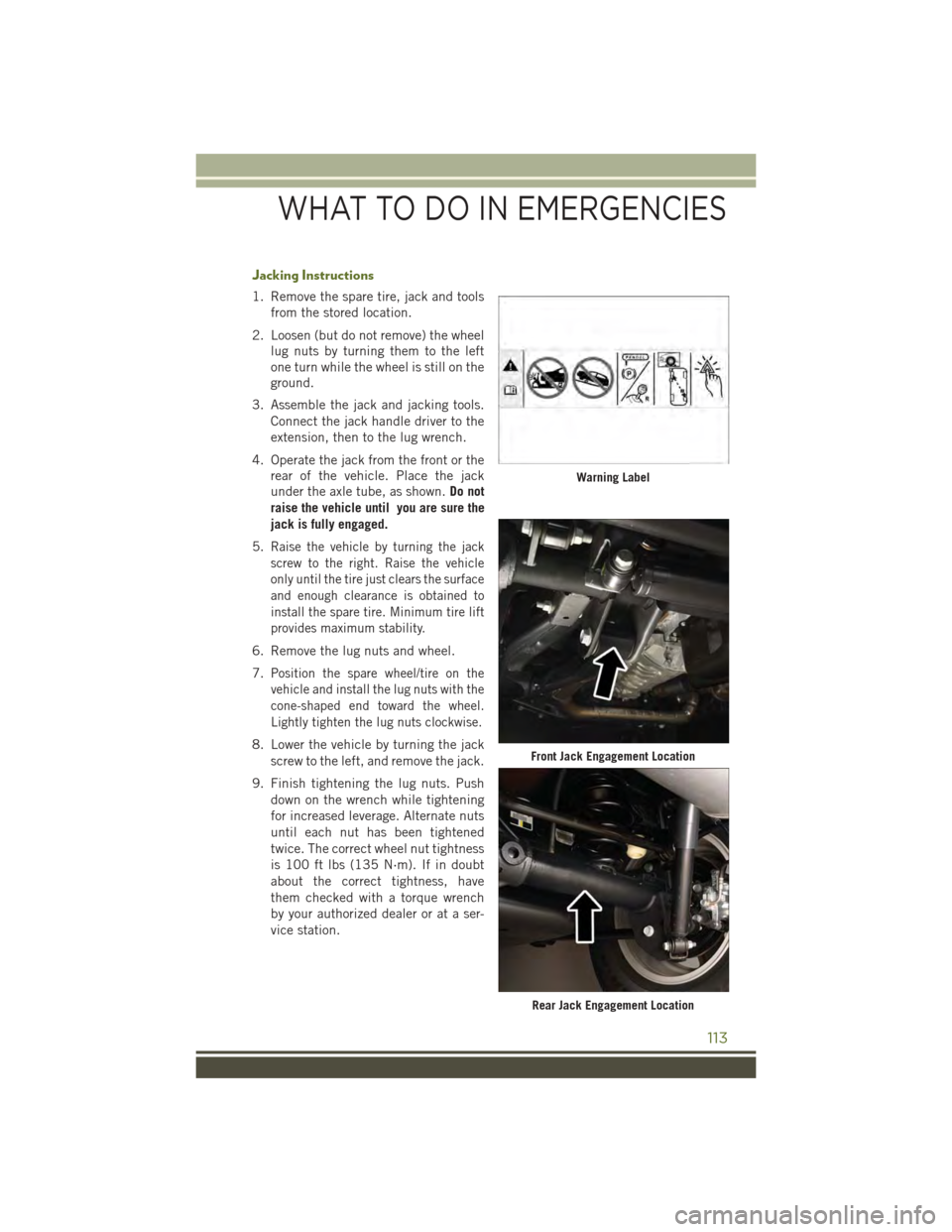
4. Operate the jack from the front or the
rear of the vehicle. Place the jack
under the axle tube, as shown.Do not
raise the vehicle until you are sure the
jack is fully engaged.
5.Raise the vehicle by turning the jack
screw to the right. Raise the vehicle
only until the tire just clears the surface
and enough clearance is obtained to
install the spare tire. Minimum tire lift
provides maximum stability.
6. Remove the lug nuts and wheel.
7.Position the spare wheel/tire on the
vehicle and install the lug nuts with the
cone-shaped end toward the wheel.
Lightly tighten the lug nuts clockwise.
8. Lower the vehicle by turning the jack
screw to the left, and remove the jack.
9. Finish tightening the lug nuts. Push
down on the wrench while tightening
for increased leverage. Alternate nuts
until each nut has been tightened
twice. The correct wheel nut tightness
is 100 ft lbs (135 N·m). If in doubt
about the correct tightness, have
them checked with a torque wrench
by your authorized dealer or at a ser-
vice station.
Warning Label
Front Jack Engagement Location
Rear Jack Engagement Location
WHAT TO DO IN EMERGENCIES
113
Page 123 of 156
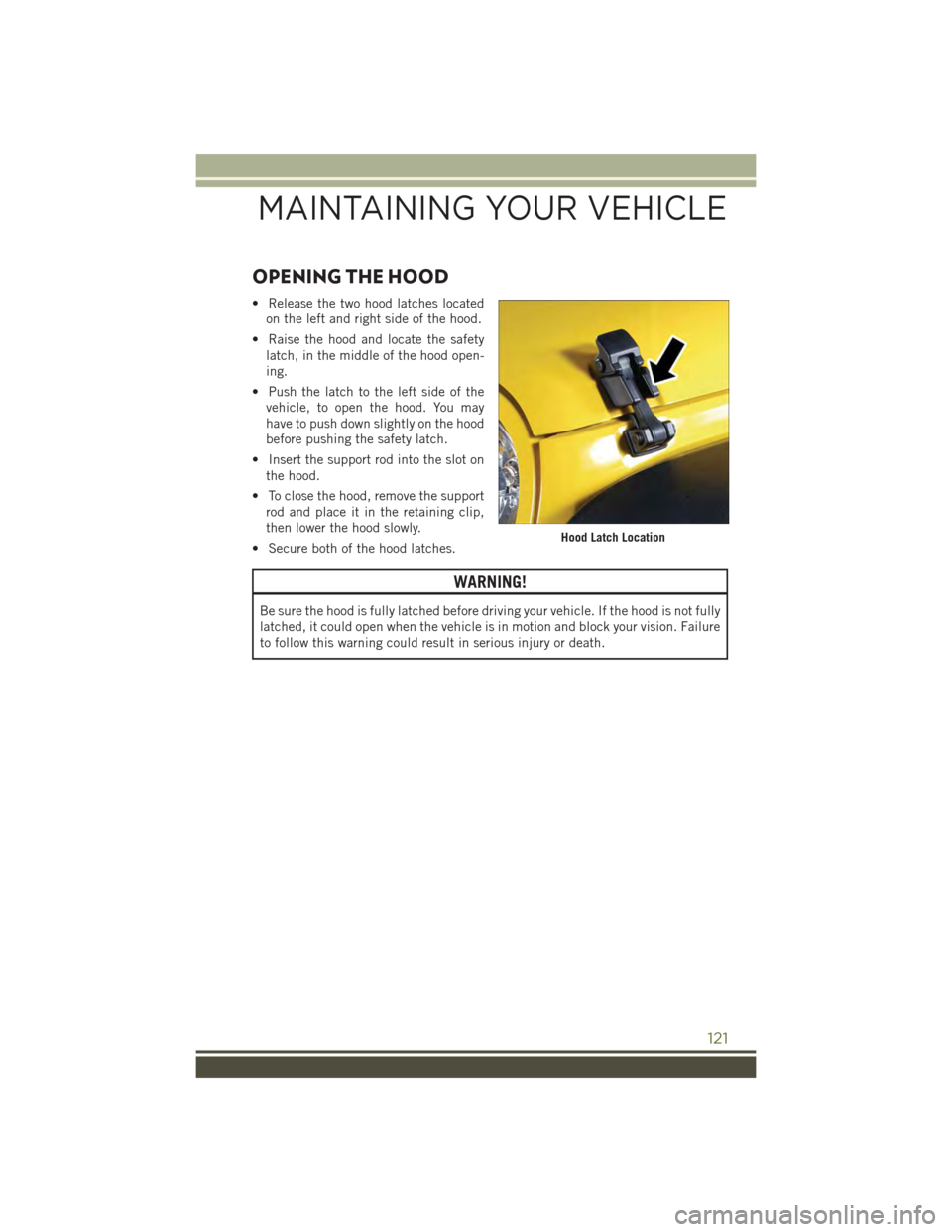
OPENING THE HOOD
• Release the two hood latches located
on the left and right side of the hood.
• Raise the hood and locate the safety
latch, in the middle of the hood open-
ing.
• Push the latch to the left side of the
vehicle, to open the hood. You may
have to push down slightly on the hood
before pushing the safety latch.
• Insert the support rod into the slot on
the hood.
• To close the hood, remove the support
rod and place it in the retaining clip,
then lower the hood slowly.
• Secure both of the hood latches.
WARNING!
Be sure the hood is fully latched before driving your vehicle. If the hood is not fully
latched, it could open when the vehicle is in motion and block your vision. Failure
to follow this warning could result in serious injury or death.
Hood Latch Location
MAINTAINING YOUR VEHICLE
121
Page 128 of 156
MAINTENANCE PROCEDURES
For information on the maintenance procedures for your vehicle, please refer to
“Maintenance Procedures” in “Maintaining Your Vehicle” in your Owner’s Manual or
applicable supplement on the DVD for further details.
MAINTENANCE SCHEDULE
Your vehicle is equipped with an automatic oil change indicator system. The oil
change indicator system will remind you that it is time to take your vehicle in for
scheduled maintenance.
Based on engine operation conditions, the oil change indicator message will
illuminate. This means that service is required for your vehicle. Operating conditions
such as frequent short-trips, trailer tow, extremely hot or cold ambient temperatures,
and E85 fuel usage will influence when the “Change Oil” or “Oil Change Required”
message is displayed. Severe Operating Conditions can cause the change oil
message to illuminate as early as 3,500 miles (5,600 km) since last reset. Have your
vehicle serviced as soon as possible, within the next 500 miles (805 km).
On Electronic Vehicle Information Center (EVIC) equipped vehicles, “Oil Change
Required” will be displayed in the EVIC and a single chime will sound, indicating that
an oil change is necessary.
On Non-EVIC equipped vehicles, “Change Oil” will flash in the instrument cluster
odometer and a single chime will sound, indicating that an oil change is necessary.
Your authorized dealer will reset the oil change indicator message after completing the
scheduled oil change. If a scheduled oil change is performed by someone other than
your authorized dealer, the message can be reset by referring to the steps described
under “Instrument Cluster Warning Lights” in “What To Do In Emergencies” in this
guide or “Instrument Cluster Descriptions” or “Electronic Vehicle Information Center
(EVIC)” in “Understanding Your Instrument Panel” in the Owner’s Manual on your DVD
for further information.
NOTE:
Under no circumstances should oil change intervals exceed 10,000 miles (16,000 km)
or twelve months, whichever comes first.
MAINTAINING YOUR VEHICLE
126
Page 143 of 156
FREQUENTLY ASKED QUESTIONS
GETTING STARTED
• How do I install my LATCH Equipped Child Seat? pg. 18
• How do I adjust the height of my Front Seat? pg. 22
OPERATING YOUR VEHICLE
• How do I operate my Soft Top? pg. 32
• How do I operate my Hard Top? pg. 43
ELECTRONICS
• Which radio is in my vehicle?
• Uconnect®430 pg. 58
• Uconnect®730N pg. 69
• How do I activate the Audio Jack?
• Uconnect®430 pg. 62
• Uconnect®730N pg. 73
• How do I set the clock on my radio?
• Uconnect®430 pg. 58
• Uconnect®730N pg. 69
• How do I use the Navigation feature?
• Uconnect®730N pg. 77
• How do I pair my cell phone via Bluetooth®with the Uconnect®Phone Hands-Free
Voice Activation System? pg. 86
• How do I use my iPod®? pg. 85
• How do I use my USB port to listen to audio through my touchscreen radio? pg. 85
OFF-ROAD CAPABILITIES
• How do I shift into different four-wheel drive selections? pg. 98
UTILITY
• How do I know how much I can tow with my Jeep Wrangler? pg. 100
WHAT TO DO IN EMERGENCIES
• What do I do if my TPMS warning light is blinking? pg. 105
• How do I change a flat tire? pg. 112
• How do I Jump-Start my vehicle? pg. 116
MAINTAINING YOUR VEHICLE
• Where is my Fuse Block located? pg. 131
• What type of oil do I use? pg. 124
• How often should I change my engine’s oil? pg. 126
• What should my tire pressure be set at? pg. 134
FREQUENTLY ASKED QUESTIONS
141
Page 144 of 156
Adding Engine Coolant(Antifreeze).............126Adding Washer Fluid.........126Air BagAdvanced Front Air Bag . . . . . .13Advance Front Air Bag . . . . . .13Air Bags . . . . . . . . . . . . . . .13Air Bag Warning Light . . . . . . .13Front Air Bag . . . . . . . . . . . .13Rollover...............13Side Impacts . . . . . . . . . . . .13Air Cleaner, Engine(Engine Air Cleaner Filter)....126Air Conditioner Maintenance....126Air Conditioning............31Air Conditioning Refrigerant.....126Air Conditioning System.......126Air Recirculation............31AlarmArm The System..........11Disarm The System........11Vehicle Security Alarm......11Alarm (Security Alarm).....11,110Antifreeze (Engine Coolant)..124,126Disposal . . . . . . . . . . . . . .126Anti-Lock Warning Light.......109Appearance Care...........126Assistance Towing..........105Audio Jack........51,54,57,62Audio Settings........51,53,56Audio Systems (Radio).........50Automatic Headlights.........26Automatic TemperatureControl (ATC)............31Automatic TransmissionFluid Type . . . . . . . . . . . .125Axle Fluid . . . . . . . . . . . . . . .125
Battery.................126Body Mechanism Lubrication....126Brake Fluid . . . . . . . . . . . . . .125Brakes . . . . . . . . . . . . . . . . .126Brake System.............126Master Cylinder.........126Warning Light . . . . . . . . . .107
Break-In Recommendations,New Vehicle.............26Bulb Replacement..........137Bulbs, Light . . . . . . . . . . . . . .137
Calibration, Compass.........93Capacities, Fluid...........124Caps, FillerOil (Engine)............126Car Washes . . . . . . . . . . . . . .126CD (Compact Disc) Player..51,54,57Change Oil Indicator.........109Changing A Flat Tire . . . . . . . . .112Charging System Light........108Child Restraint.............15Child RestraintsInstalling Child RestraintsUsing The Vehicle Seat Belt . . .18Lower Anchors And TethersFor Children . . . . . . . . . . . .18Using The Top Tether Anchorage..18CleaningWheels..............126Windshield Wiper Blades....126Climate Control.............31Clock Setting.......50,53,56,58Cluster Warning/Indicator LightsAnti-Lock Brake (ABS) Light . .109Brake Warning Light.......107Charging System Light.....108Electronic ThrottleControl (ETC) Indicator Light . .109Front Fog Light Indicator....110High Beam Indicator......110Malfunction Indicator Light(MIL) . . . . . . . . . . . . . . . .108Oil Pressure Warning Light . . .108Tire Pressure Monitoring System(TPMS) Light...........105Turn Signal Indicator......110Vehicle Security Light......110Clutch . . . . . . . . . . . . . . . . .126Clutch Fluid . . . . . . . . . . . . . .126Compact Spare Tire . . . . . . . . . .135Compass Calibration..........93
INDEX
142
Page 145 of 156
Cooling System............126Adding Coolant (Antifreeze) . .126Coolant Capacity.........124Coolant Level...........126Disposal of Used Coolant....126Drain, Flush, and Refill.....126Inspection............126Points to Remember . . . . . . .126Pressure Cap...........126Selection of Coolant(Antifreeze)........124, 126Corrosion Protection.........126Cruise Control (Speed Control)....28Customer Assistance.........138
Defects, Reporting..........139Dimmer Control.............26Dimmer Switch, Headlight......26Disabled Vehicle Towing.......105Disarming, Security System......11DisposalAntifreeze (Engine Coolant) . . .126Door Locks . . . . . . . . . . . . . . .10Driver Cockpit............6,49
ECO . . . . . . . . . . . . . . . . . . .93Electronic Speed Control (CruiseControl)................28Electronic Stability Control (ESC) . .105Electronic Stability Control (ESC)OFF Indicator...........108Electronic Throttle ControlWarning Light . . . . . . . . . . .109Electronic Vehicle InformationCenter (EVIC) . . . . . . . . . .92, 94Emergency, In Case ofJacking..............112Overheating............111To w i n g . . . . . . . . . . . . . . . 1 0 5Engine . . . . . . . . . . . . . . . . .123Air Cleaner . . . . . . . . . . . .126Break-In Recommendations . . .26Checking Oil Level........126Compartment...........122Coolant (Antifreeze).......124Cooling...............126
Fuel Requirements . . . . . . . .124Oil . . . . . . . . . . . . . .124, 126Oil Filler Cap...........126Oil Selection........124, 126Overheating............111Event Data Recorder.........120Exhaust System............126
FA Q . . . . . . . . . . . . . . . . . . . 1 4 1FiltersAir Cleaner............126Engine Oil . . . . . . . . .124, 126Engine Oil Disposal.......126FlashersTu r n S i g n a l . . . . . . . . . . . . 1 1 0Flash-To-Pass..............27Fluid, Brake..............125Fluid Capacities............124Fluids, Lubricants andGenuine Parts . . . . . . . . . . .124Fog Lights . . . . . . . . . .26, 27, 110Folding Rear Seat . . . . . . . . . . .23Four Wheel Drive............98Operation..............98Shifting...............98Systems..............98Four Wheel Drive Operation......98Freeing A Stuck Vehicle.......119Frequently Asked Questions.....141Front Heated Seats...........25FuelOctane Rating..........124Requirements . . . . . . . . . .124Specifications..........124Tank Capacity..........124Fuse . . . . . . . . . . . . . . . . . .131Fuses . . . . . . . . . . . . . . . . . .131
General Maintenance.........126Glass Cleaning............126GPS Navigation (Uconnect®gps) . . .67
HeadlightsAutomatic.............26Cleaning.............126Dimmer Switch..........26High Beam . . . . . . . . . . . . .27
INDEX
143
Page 146 of 156
Head Restraints............20Heated Seats..............25High Beam Indicator.........110High Beam/Low Beam Select(Dimmer) Switch..........27Hood Release.............121
Instrument Cluster............8Instrument Cluster WarningLights . . . . . . . . . . . . . . . .105Instrument Panel Cover.......126Instrument Panel Lens Cleaning . .126Integrated Power Module (Fuses) . .131Interior and Instrument Lights.....7Interior Appearance Care.......126Intermittent Wipers (Delay Wipers)..27Inverter Outlet (115V).........95Inverter, Power.............95iPod®/USB/MP3 Control........85Bluetooth®Streaming Audio . . .92
Jacking Instructions.........113Jack Location.............112Jack Operation.........112, 113Jump Starting.............116
Key Fob . . . . . . . . . . . . . . . . .10Arm The Alarm...........11Disarm The Alarm.........11Key Fob Programmable Features . . .94
Lane Change and Turn Signals . . . .27Lane Change Assist..........27Lap/Shoulder Belts...........12Light Bulbs . . . . . . . . . . . . . .137LightsEngine Temperature Warning . .107Fog . . . . . . . . . . . . . . . .110Four-Wheel Drive Indicator . . .110High Beam Indicator......110Security Alarm..........110Tire Pressure Monitoring(TPMS)..............105Tu r n S i g n a l . . . . . . . . . . . . . 2 7Lubrication, Body...........126
Maintenance Free Battery......126Maintenance, General........126Maintenance Procedures.......126Maintenance Record.........130Maintenance Schedule........126Malfunction Indicator Light(Check Engine) . . . . . . . . . .108Manual TransmissionLubricant Selection.......125Master Cylinder (Brakes).......126Media Center Radio . . . . . . . .55, 58
Navigation.............65,77Navigation System(Uconnect®gps) . . . . . . . . . .65Navigation Voice PromptVolume . . . . . . . . . . . . .65, 77New Vehicle Break-In Period.....26
Octane Rating, Gasoline (Fuel) . . .124Off-Road Driving (Off-Pavement) . .110Oil Change Indicator.........109Oil Change Indicator, Reset.....109Oil, Engine . . . . . . . . . . .124, 126Capacity..............124Change Interval.........126Checking.............126Disposal..............126Filter............124, 126Filter Disposal..........126Materials Added to........126Recommendation.....124, 126Viscosity..........124, 126Oil Filter, Selection..........126Oil Pressure Light...........108OutletPower . . . . . . . . . . . . . . . .96Overheating, Engine.........111
Paint Care . . . . . . . . . . . . . . .126Panic Alarm...............10Phone (Uconnect®)..........86Placard, Tire and LoadingInformation.............134
INDEX
144