ECU JEEP WRANGLER 2023 User Guide
[x] Cancel search | Manufacturer: JEEP, Model Year: 2023, Model line: WRANGLER, Model: JEEP WRANGLER 2023Pages: 396, PDF Size: 25.15 MB
Page 23 of 396
GETTING TO KNOW YOUR VEHICLE21
(Continued)
NOTE:The mechanical key can be used to lock or unlock the
doors, swing gate (if equipped with a lock), glove
compartment, and console storage.POWER DOOR LOCKS — IF EQUIPPED
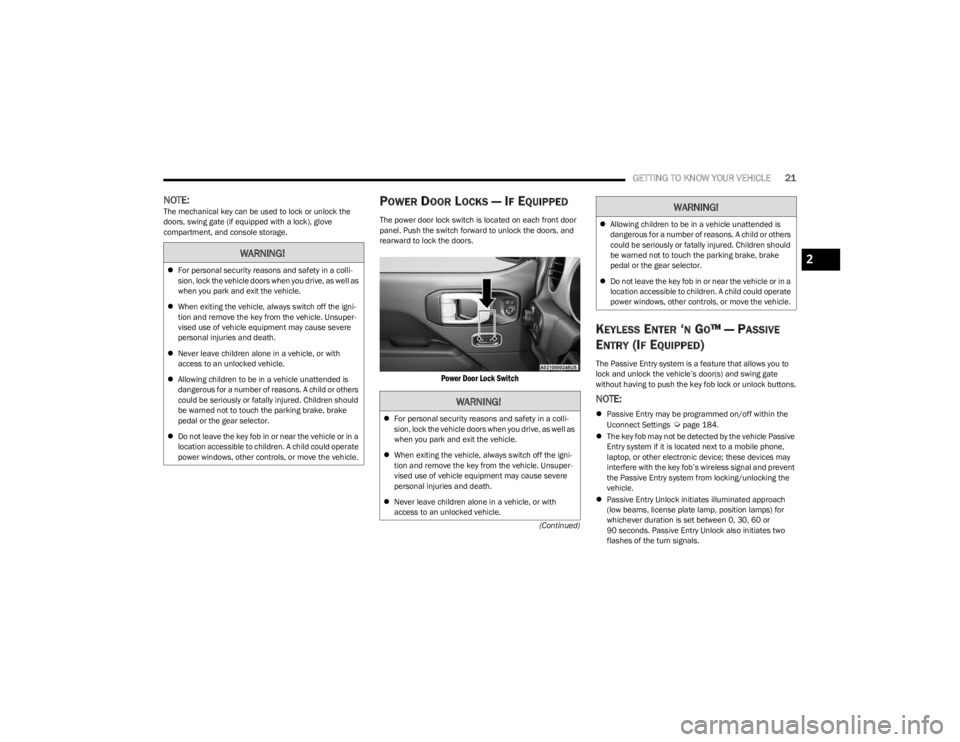
The power door lock switch is located on each front door
panel. Push the switch forward to unlock the doors, and
rearward to lock the doors.
Power Door Lock Switch
KEYLESS ENTER ‘N GO™ — PASSIVE
E
NTRY (IF EQUIPPED)
The Passive Entry system is a feature that allows you to
lock and unlock the vehicle’s door(s) and swing gate
without having to push the key fob lock or unlock buttons.
NOTE:
Passive Entry may be programmed on/off within the
Uconnect Settings Úpage 184.
The key fob may not be detected by the vehicle Passive
Entry system if it is located next to a mobile phone,
laptop, or other electronic device; these devices may
interfere with the key fob’s wireless signal and prevent
the Passive Entry system from locking/unlocking the
vehicle.
Passive Entry Unlock initiates illuminated approach
(low beams, license plate lamp, position lamps) for
whichever duration is set between 0, 30, 60 or
90 seconds. Passive Entry Unlock also initiates two
flashes of the turn signals.
WARNING!
For personal security reasons and safety in a colli -
sion, lock the vehicle doors when you drive, as well as
when you park and exit the vehicle.
When exiting the vehicle, always switch off the igni -
tion and remove the key from the vehicle. Unsuper -
vised use of vehicle equipment may cause severe
personal injuries and death.
Never leave children alone in a vehicle, or with
access to an unlocked vehicle.
Allowing children to be in a vehicle unattended is
dangerous for a number of reasons. A child or others
could be seriously or fatally injured. Children should
be warned not to touch the parking brake, brake
pedal or the gear selector.
Do not leave the key fob in or near the vehicle or in a
location accessible to children. A child could operate
power windows, other controls, or move the vehicle.
WARNING!
For personal security reasons and safety in a colli -
sion, lock the vehicle doors when you drive, as well as
when you park and exit the vehicle.
When exiting the vehicle, always switch off the igni -
tion and remove the key from the vehicle. Unsuper -
vised use of vehicle equipment may cause severe
personal injuries and death.
Never leave children alone in a vehicle, or with
access to an unlocked vehicle.
Allowing children to be in a vehicle unattended is
dangerous for a number of reasons. A child or others
could be seriously or fatally injured. Children should
be warned not to touch the parking brake, brake
pedal or the gear selector.
Do not leave the key fob in or near the vehicle or in a
location accessible to children. A child could operate
power windows, other controls, or move the vehicle.
WARNING!
2
23_JL_OM_EN_USC_t.book Page 21
Page 24 of 396
22GETTING TO KNOW YOUR VEHICLE
If wearing gloves, or if it has been raining/snowing, or
there is salt/dirt covering the Passive Entry door
handle, the unlock sensitivity can be affected, resulting
in a slower response time.
If the vehicle is unlocked by Passive Entry and no door
is opened within 60 seconds, the vehicle will relock
and, if equipped, will arm the Vehicle Security system.
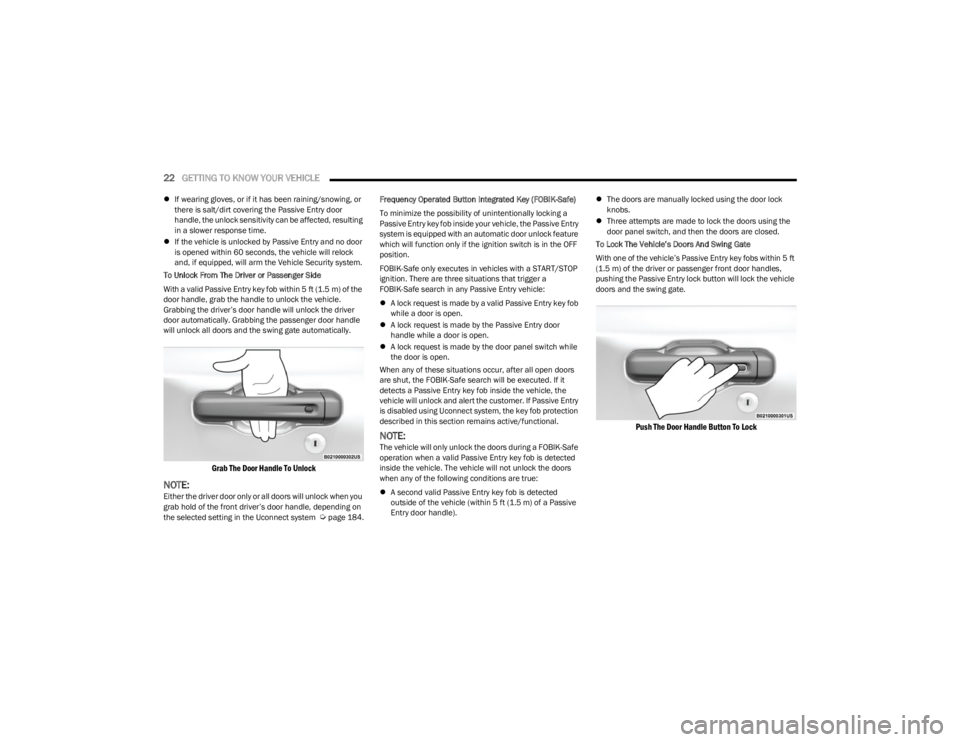
To Unlock From The Driver or Passenger Side
With a valid Passive Entry key fob within 5 ft (1.5 m) of the door handle, grab the handle to unlock the vehicle.
Grabbing the driver’s door handle will unlock the driver
door automatically. Grabbing the passenger door handle
will unlock all doors and the swing gate automatically.
Grab The Door Handle To Unlock
NOTE:Either the driver door only or all doors will unlock when you
grab hold of the front driver’s door handle, depending on
the selected setting in the Uconnect system
Úpage 184. Frequency Operated Button Integrated Key (FOBIK-Safe)
To minimize the possibility of unintentionally locking a
Passive Entry key fob inside your vehicle, the Passive Entry
system is equipped with an automatic door unlock feature
which will function only if the ignition switch is in the OFF
position.
FOBIK-Safe only executes in vehicles with a START/STOP
ignition. There are three situations that trigger a
FOBIK-Safe search in any Passive Entry vehicle:
A lock request is made by a valid Passive Entry key fob
while a door is open.
A lock request is made by the Passive Entry door
handle while a door is open.
A lock request is made by the door panel switch while
the door is open.
When any of these situations occur, after all open doors
are shut, the FOBIK-Safe search will be executed. If it
detects a Passive Entry key fob inside the vehicle, the
vehicle will unlock and alert the customer. If Passive Entry
is disabled using Uconnect system, the key fob protection
described in this section remains active/functional.
NOTE:The vehicle will only unlock the doors during a FOBIK-Safe
operation when a valid Passive Entry key fob is detected
inside the vehicle. The vehicle will not unlock the doors
when any of the following conditions are true:
A second valid Passive Entry key fob is detected
outside of the vehicle (within 5 ft (1.5 m) of a Passive
Entry door handle).
The doors are manually locked using the door lock
knobs.
Three attempts are made to lock the doors using the
door panel switch, and then the doors are closed.
To Lock The Vehicle’s Doors And Swing Gate
With one of the vehicle’s Passive Entry key fobs within 5 ft
(1.5 m) of the driver or passenger front door handles,
pushing the Passive Entry lock button will lock the vehicle
doors and the swing gate.
Push The Door Handle Button To Lock
23_JL_OM_EN_USC_t.book Page 22
Page 27 of 396
GETTING TO KNOW YOUR VEHICLE25
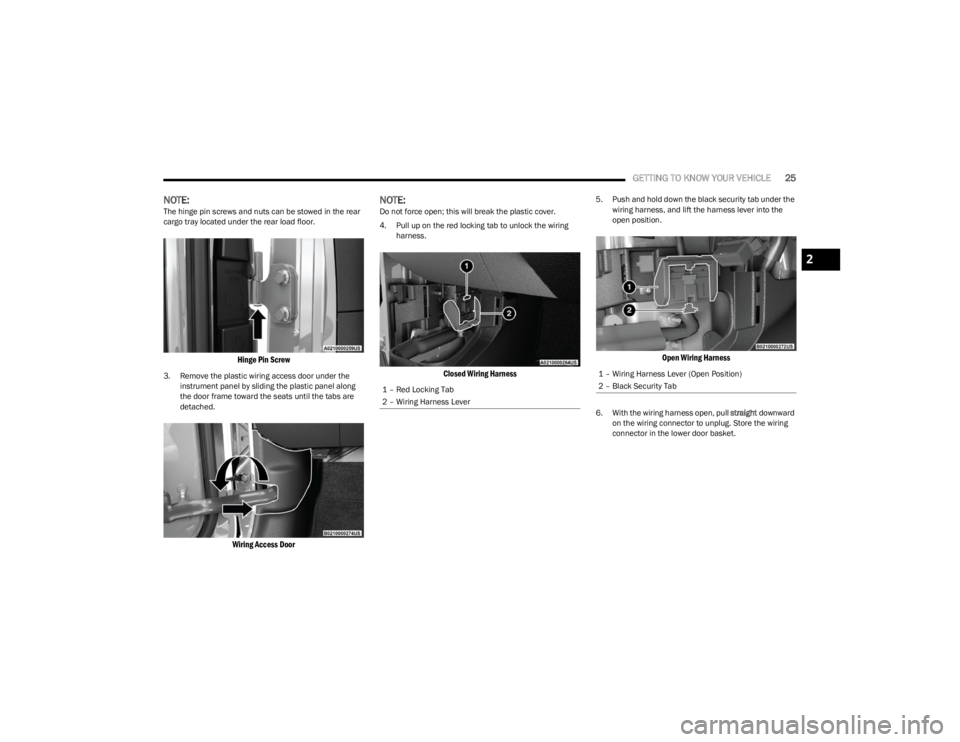
NOTE:The hinge pin screws and nuts can be stowed in the rear
cargo tray located under the rear load floor.
Hinge Pin Screw
3. Remove the plastic wiring access door under the
instrument panel by sliding the plastic panel along
the door frame toward the seats until the tabs are
detached.
Wiring Access Door
NOTE:Do not force open; this will break the plastic cover.
4. Pull up on the red locking tab to unlock the wiring harness.
Closed Wiring Harness
5. Push and hold down the black security tab under the wiring harness, and lift the harness lever into the
open position.
Open Wiring Harness
6. With the wiring harness open, pull straight downward
on the wiring connector to unplug. Store the wiring
connector in the lower door basket.
1 – Red Locking Tab
2 – Wiring Harness Lever
1 – Wiring Harness Lever (Open Position)
2 – Black Security Tab
2
23_JL_OM_EN_USC_t.book Page 25
Page 28 of 396
26GETTING TO KNOW YOUR VEHICLE
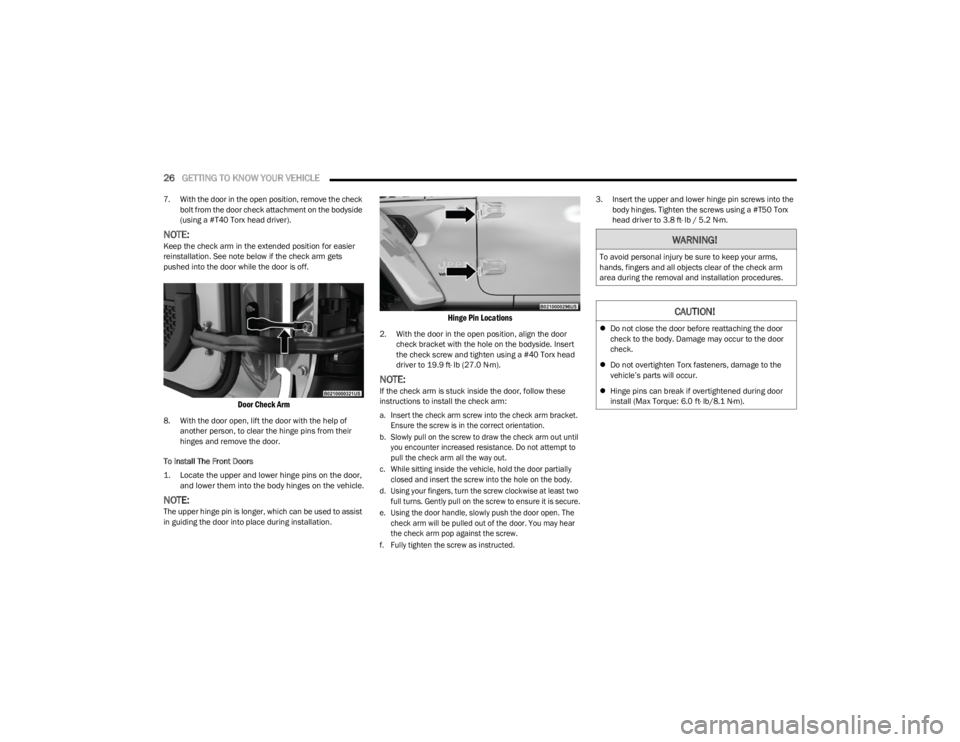
7. With the door in the open position, remove the check
bolt from the door check attachment on the bodyside
(using a #T40 Torx head driver).
NOTE:Keep the check arm in the extended position for easier
reinstallation. See note below if the check arm gets
pushed into the door while the door is off.
Door Check Arm
8. With the door open, lift the door with the help of another person, to clear the hinge pins from their
hinges and remove the door.
To Install The Front Doors
1. Locate the upper and lower hinge pins on the door, and lower them into the body hinges on the vehicle.
NOTE:The upper hinge pin is longer, which can be used to assist
in guiding the door into place during installation.
Hinge Pin Locations
2. With the door in the open position, align the door check bracket with the hole on the bodyside. Insert
the check screw and tighten using a #40 Torx head
driver to 19.9 ft· lb (27.0 N·m).
NOTE:If the check arm is stuck inside the door, follow these
instructions to install the check arm:
a. Insert the check arm screw into the check arm bracket. Ensure the screw is in the correct orientation.
b. Slowly pull on the screw to draw the check arm out until you encounter increased resistance. Do not attempt to
pull the check arm all the way out.
c. While sitting inside the vehicle, hold the door partially closed and insert the screw into the hole on the body.
d. Using your fingers, turn the screw clockwise at least two full turns. Gently pull on the screw to ensure it is secure.
e. Using the door handle, slowly push the door open. The check arm will be pulled out of the door. You may hear
the check arm pop against the screw.
f. Fully tighten the screw as instructed.
3. Insert the upper and lower hinge pin screws into the
body hinges. Tighten the screws using a #T50 Torx
head driver to 3.8 ft· lb / 5.2 N·m.
WARNING!
To avoid personal injury be sure to keep your arms,
hands, fingers and all objects clear of the check arm
area during the removal and installation procedures.
CAUTION!
Do not close the door before reattaching the door
check to the body. Damage may occur to the door
check.
Do not overtighten Torx fasteners, damage to the
vehicle’s parts will occur.
Hinge pins can break if overtightened during door
install (Max Torque: 6.0 ft· lb/8.1 N·m).
23_JL_OM_EN_USC_t.book Page 26
Page 32 of 396
30GETTING TO KNOW YOUR VEHICLE
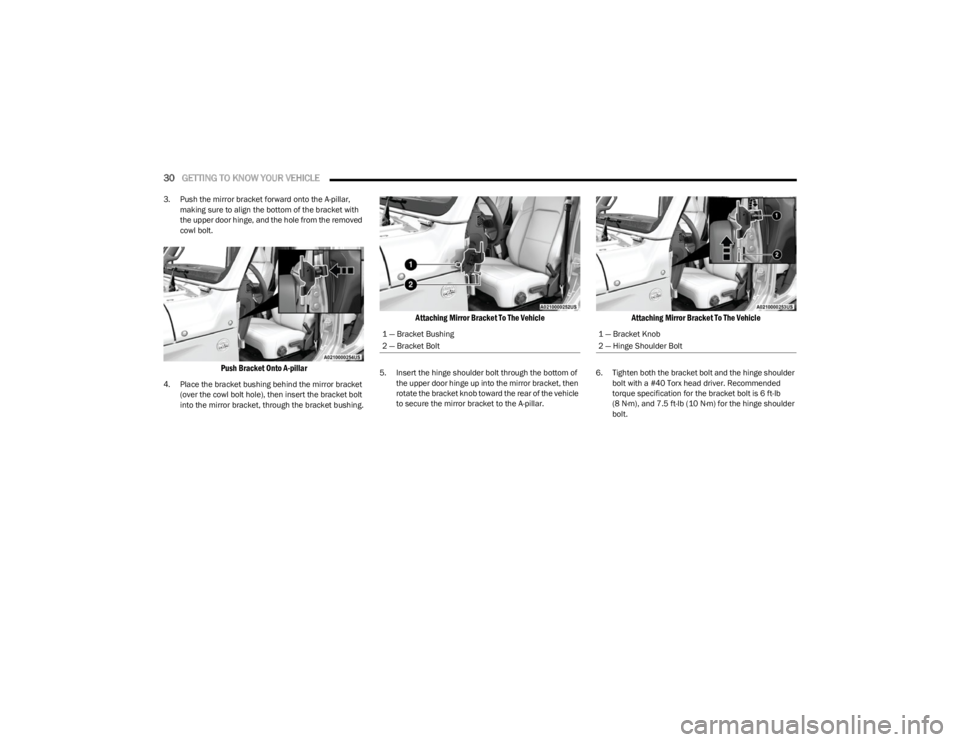
3. Push the mirror bracket forward onto the A-pillar,
making sure to align the bottom of the bracket with
the upper door hinge, and the hole from the removed
cowl bolt.
Push Bracket Onto A-pillar
4. Place the bracket bushing behind the mirror bracket (over the cowl bolt hole), then insert the bracket bolt
into the mirror bracket, through the bracket bushing.
Attaching Mirror Bracket To The Vehicle
5. Insert the hinge shoulder bolt through the bottom of the upper door hinge up into the mirror bracket, then
rotate the bracket knob toward the rear of the vehicle
to secure the mirror bracket to the A-pillar.
Attaching Mirror Bracket To The Vehicle
6. Tighten both the bracket bolt and the hinge shoulder bolt with a #40 Torx head driver. Recommended
torque specification for the bracket bolt is 6 ft-lb
(8 N·m), and 7.5 ft-lb (10 N·m) for the hinge shoulder bolt.
1 — Bracket Bushing
2 — Bracket Bolt1 — Bracket Knob
2 — Hinge Shoulder Bolt
23_JL_OM_EN_USC_t.book Page 30
Page 41 of 396
GETTING TO KNOW YOUR VEHICLE39
(Continued)
To return the seat to a sitting position, fold the seatback
upright until it locks and push the seat rearward until the
track locks.
NOTE:
The front passenger seats have a track memory, which
returns the seat to its original position.
The recline strap and easy entry lever should not be
used during the automatic returning of the seat to its
sitting position.
60/40 SPLIT FOLDING REAR SEAT —
F
OUR DOOR MODELS
To provide additional storage area, each rear seat can be
folded flat to allow for extended cargo space.
NOTE:
Be sure that the front seats are fully upright and posi -
tioned forward. This will allow the rear seat to fold down
easily.
The center head restraints must be in the lowest posi-
tion to avoid contact with the center console when
folding the seat.
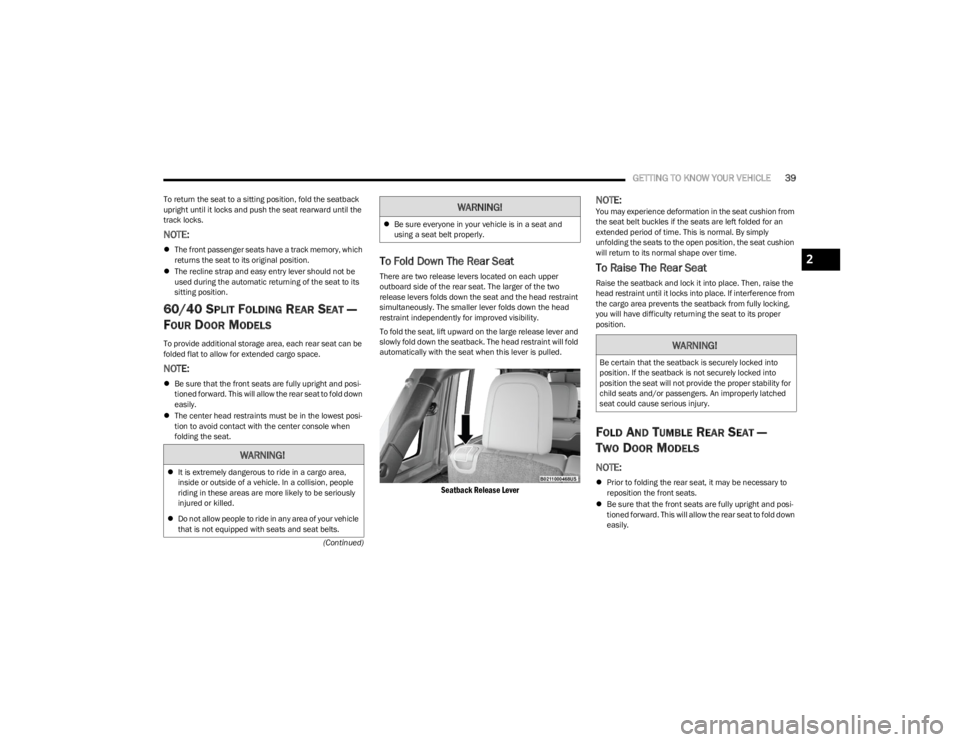
To Fold Down The Rear Seat
There are two release levers located on each upper
outboard side of the rear seat. The larger of the two
release levers folds down the seat and the head restraint
simultaneously. The smaller lever folds down the head
restraint independently for improved visibility.
To fold the seat, lift upward on the large release lever and
slowly fold down the seatback. The head restraint will fold
automatically with the seat when this lever is pulled.
Seatback Release Lever
NOTE:You may experience deformation in the seat cushion from
the seat belt buckles if the seats are left folded for an
extended period of time. This is normal. By simply
unfolding the seats to the open position, the seat cushion
will return to its normal shape over time.
To Raise The Rear Seat
Raise the seatback and lock it into place. Then, raise the
head restraint until it locks into place. If interference from
the cargo area prevents the seatback from fully locking,
you will have difficulty returning the seat to its proper
position.
FOLD AND TUMBLE REAR SEAT —
T
WO DOOR MODELS
NOTE:
Prior to folding the rear seat, it may be necessary to
reposition the front seats.
Be sure that the front seats are fully upright and posi -
tioned forward. This will allow the rear seat to fold down
easily.
WARNING!
It is extremely dangerous to ride in a cargo area,
inside or outside of a vehicle. In a collision, people
riding in these areas are more likely to be seriously
injured or killed.
Do not allow people to ride in any area of your vehicle
that is not equipped with seats and seat belts.
Be sure everyone in your vehicle is in a seat and
using a seat belt properly.
WARNING!
WARNING!
Be certain that the seatback is securely locked into
position. If the seatback is not securely locked into
position the seat will not provide the proper stability for
child seats and/or passengers. An improperly latched
seat could cause serious injury.
2
23_JL_OM_EN_USC_t.book Page 39
Page 43 of 396
GETTING TO KNOW YOUR VEHICLE41
(Continued)
HEATED SEATS — IF EQUIPPED
The heated seat control buttons are located on
the center instrument panel below the
touchscreen and also in the Climate Control
touchscreen menu.
Press the heated seat button once to turn the HI setting
on.
Press the heated seat button a second time to turn the
MED setting on.
Press the heated seat button a third time to turn the LO
setting on.
Press the heated seat button a fourth time to turn the
heating elements off.
NOTE:
The engine must be running for the heated seats to
operate.
The level of heat selected will stay on until the operator
changes it.
For information on use with the Remote Start system, see
Úpage 18.
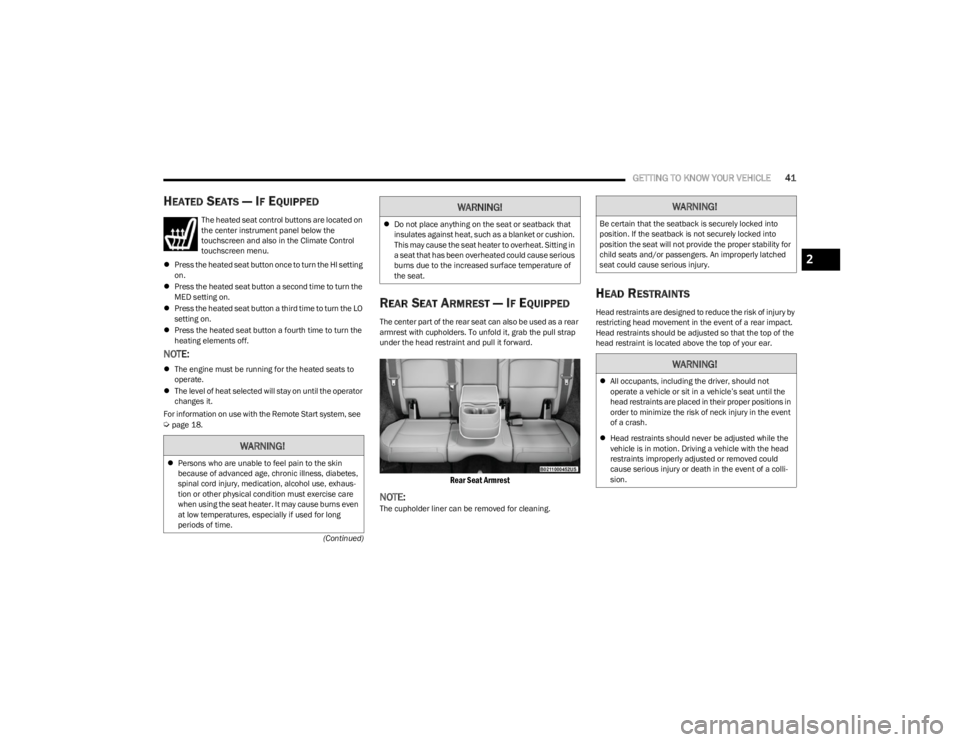
REAR SEAT ARMREST — IF EQUIPPED
The center part of the rear seat can also be used as a rear
armrest with cupholders. To unfold it, grab the pull strap
under the head restraint and pull it forward.
Rear Seat Armrest
NOTE:The cupholder liner can be removed for cleaning.
HEAD RESTRAINTS
Head restraints are designed to reduce the risk of injury by
restricting head movement in the event of a rear impact.
Head restraints should be adjusted so that the top of the
head restraint is located above the top of your ear.
WARNING!
Persons who are unable to feel pain to the skin
because of advanced age, chronic illness, diabetes,
spinal cord injury, medication, alcohol use, exhaus -
tion or other physical condition must exercise care
when using the seat heater. It may cause burns even
at low temperatures, especially if used for long
periods of time.
Do not place anything on the seat or seatback that
insulates against heat, such as a blanket or cushion.
This may cause the seat heater to overheat. Sitting in
a seat that has been overheated could cause serious
burns due to the increased surface temperature of
the seat.
WARNING!WARNING!
Be certain that the seatback is securely locked into
position. If the seatback is not securely locked into
position the seat will not provide the proper stability for
child seats and/or passengers. An improperly latched
seat could cause serious injury.
WARNING!
All occupants, including the driver, should not
operate a vehicle or sit in a vehicle’s seat until the
head restraints are placed in their proper positions in
order to minimize the risk of neck injury in the event
of a crash.
Head restraints should never be adjusted while the
vehicle is in motion. Driving a vehicle with the head
restraints improperly adjusted or removed could
cause serious injury or death in the event of a colli -
sion.
2
23_JL_OM_EN_USC_t.book Page 41
Page 44 of 396
42GETTING TO KNOW YOUR VEHICLE
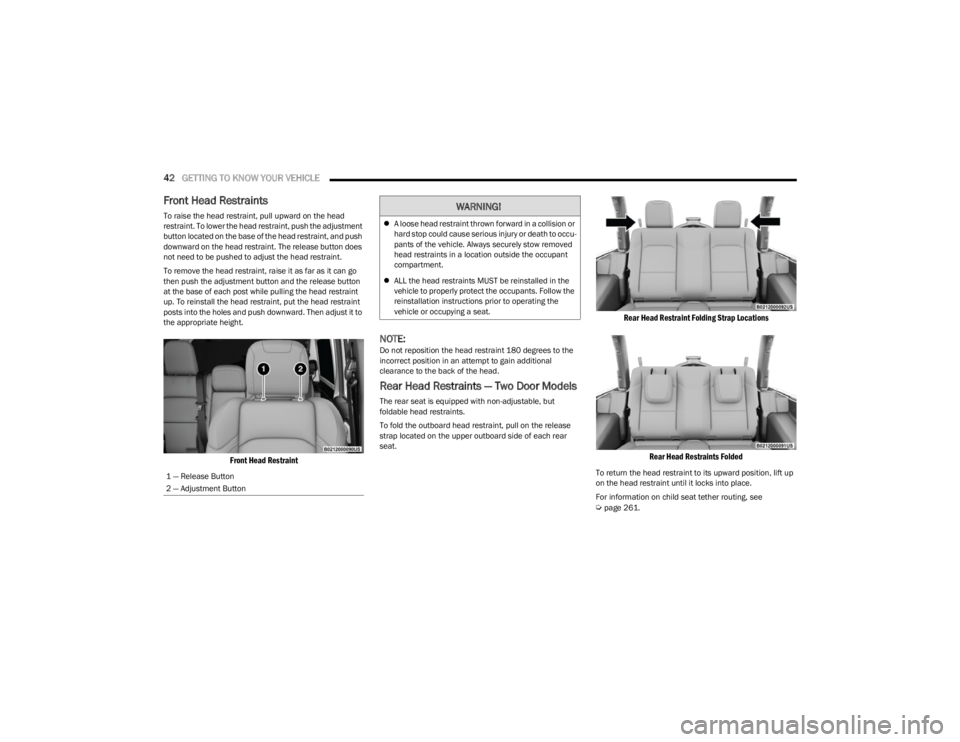
Front Head Restraints
To raise the head restraint, pull upward on the head
restraint. To lower the head restraint, push the adjustment
button located on the base of the head restraint, and push
downward on the head restraint. The release button does
not need to be pushed to adjust the head restraint.
To remove the head restraint, raise it as far as it can go
then push the adjustment button and the release button
at the base of each post while pulling the head restraint
up. To reinstall the head restraint, put the head restraint
posts into the holes and push downward. Then adjust it to
the appropriate height.
Front Head Restraint
NOTE:Do not reposition the head restraint 180 degrees to the
incorrect position in an attempt to gain additional
clearance to the back of the head.
Rear Head Restraints — Two Door Models
The rear seat is equipped with non-adjustable, but
foldable head restraints.
To fold the outboard head restraint, pull on the release
strap located on the upper outboard side of each rear
seat.
Rear Head Restraint Folding Strap Locations
Rear Head Restraints Folded
To return the head restraint to its upward position, lift up
on the head restraint until it locks into place.
For information on child seat tether routing, see
Úpage 261.
1 — Release Button
2 — Adjustment Button
WARNING!
A loose head restraint thrown forward in a collision or
hard stop could cause serious injury or death to occu -
pants of the vehicle. Always securely stow removed
head restraints in a location outside the occupant
compartment.
ALL the head restraints MUST be reinstalled in the
vehicle to properly protect the occupants. Follow the
reinstallation instructions prior to operating the
vehicle or occupying a seat.
23_JL_OM_EN_USC_t.book Page 42
Page 45 of 396
GETTING TO KNOW YOUR VEHICLE43
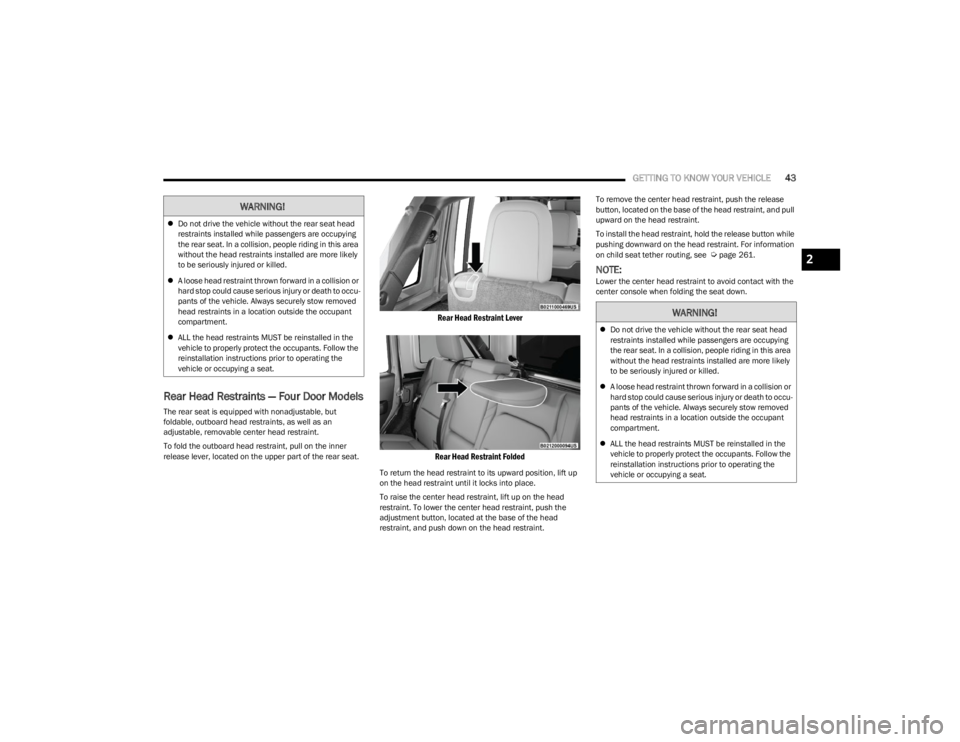
Rear Head Restraints — Four Door Models
The rear seat is equipped with nonadjustable, but
foldable, outboard head restraints, as well as an
adjustable, removable center head restraint.
To fold the outboard head restraint, pull on the inner
release lever, located on the upper part of the rear seat.
Rear Head Restraint Lever
Rear Head Restraint Folded
To return the head restraint to its upward position, lift up
on the head restraint until it locks into place.
To raise the center head restraint, lift up on the head
restraint. To lower the center head restraint, push the
adjustment button, located at the base of the head
restraint, and push down on the head restraint. To remove the center head restraint, push the release
button, located on the base of the head restraint, and pull
upward on the head restraint.
To install the head restraint, hold the release button while
pushing downward on the head restraint. For information
on child seat tether routing, see
Úpage 261.
NOTE:Lower the center head restraint to avoid contact with the
center console when folding the seat down.
WARNING!
Do not drive the vehicle without the rear seat head
restraints installed while passengers are occupying
the rear seat. In a collision, people riding in this area
without the head restraints installed are more likely
to be seriously injured or killed.
A loose head restraint thrown forward in a collision or
hard stop could cause serious injury or death to occu -
pants of the vehicle. Always securely stow removed
head restraints in a location outside the occupant
compartment.
ALL the head restraints MUST be reinstalled in the
vehicle to properly protect the occupants. Follow the
reinstallation instructions prior to operating the
vehicle or occupying a seat.
WARNING!
Do not drive the vehicle without the rear seat head
restraints installed while passengers are occupying
the rear seat. In a collision, people riding in this area
without the head restraints installed are more likely
to be seriously injured or killed.
A loose head restraint thrown forward in a collision or
hard stop could cause serious injury or death to occu -
pants of the vehicle. Always securely stow removed
head restraints in a location outside the occupant
compartment.
ALL the head restraints MUST be reinstalled in the
vehicle to properly protect the occupants. Follow the
reinstallation instructions prior to operating the
vehicle or occupying a seat.
2
23_JL_OM_EN_USC_t.book Page 43
Page 49 of 396
GETTING TO KNOW YOUR VEHICLE47
The power mirror controls consist of mirror select buttons
and a four-way mirror control switch. To adjust a mirror,
push either the L (left) or R (right) button to select the
mirror that you want to adjust.
Using the mirror control switch, push any of the four
arrows for the direction that you want the mirror to move.
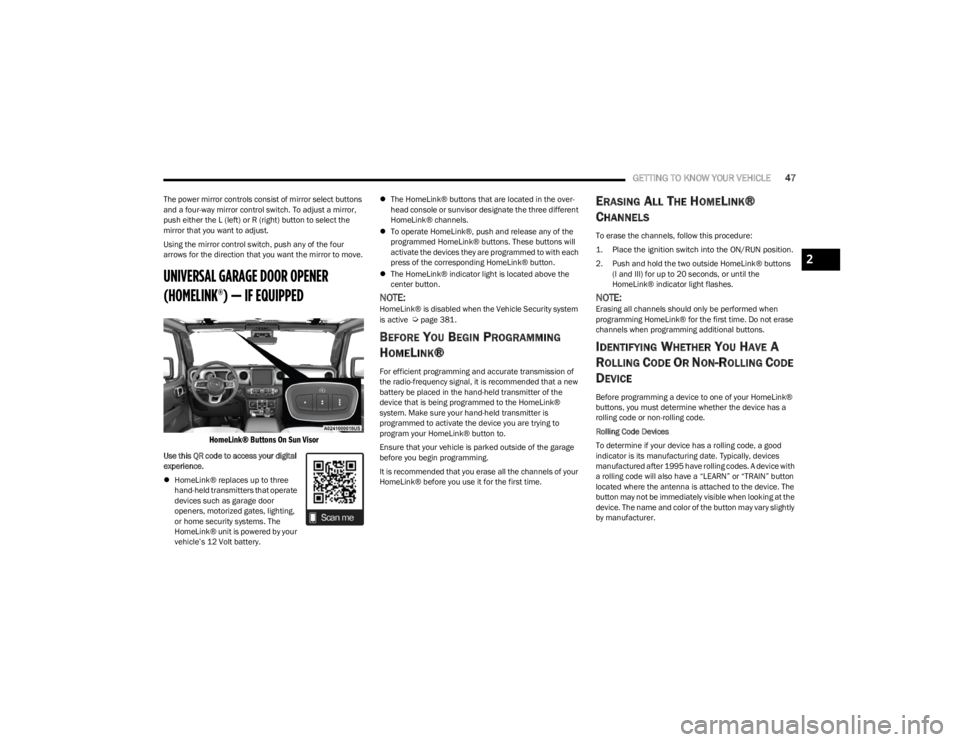
UNIVERSAL GARAGE DOOR OPENER
(HOMELINK®) — IF EQUIPPED
HomeLink® Buttons On Sun Visor
Use this QR code to access your digital
experience.
HomeLink® replaces up to three
hand-held transmitters that operate
devices such as garage door
openers, motorized gates, lighting,
or home security systems. The
HomeLink® unit is powered by your
vehicle’s 12 Volt battery.
The HomeLink® buttons that are located in the over -
head console or sunvisor designate the three different
HomeLink® channels.
To operate HomeLink®, push and release any of the
programmed HomeLink® buttons. These buttons will
activate the devices they are programmed to with each
press of the corresponding HomeLink® button.
The HomeLink® indicator light is located above the
center button.
NOTE:HomeLink® is disabled when the Vehicle Security system
is active Úpage 381.
BEFORE YOU BEGIN PROGRAMMING
H
OMELINK®
For efficient programming and accurate transmission of
the radio-frequency signal, it is recommended that a new
battery be placed in the hand-held transmitter of the
device that is being programmed to the HomeLink®
system. Make sure your hand-held transmitter is
programmed to activate the device you are trying to
program your HomeLink® button to.
Ensure that your vehicle is parked outside of the garage
before you begin programming.
It is recommended that you erase all the channels of your
HomeLink® before you use it for the first time.
ERASING ALL THE HOMELINK®
C
HANNELS
To erase the channels, follow this procedure:
1. Place the ignition switch into the ON/RUN position.
2. Push and hold the two outside HomeLink® buttons
(I and III) for up to 20 seconds, or until the
HomeLink® indicator light flashes.
NOTE:Erasing all channels should only be performed when
programming HomeLink® for the first time. Do not erase
channels when programming additional buttons.
IDENTIFYING WHETHER YOU HAVE A
R
OLLING CODE OR NON-ROLLING CODE
D
EVICE
Before programming a device to one of your HomeLink®
buttons, you must determine whether the device has a
rolling code or non-rolling code.
Rolling Code Devices
To determine if your device has a rolling code, a good
indicator is its manufacturing date. Typically, devices
manufactured after 1995 have rolling codes. A device with
a rolling code will also have a “LEARN” or “TRAIN” button
located where the antenna is attached to the device. The
button may not be immediately visible when looking at the
device. The name and color of the button may vary slightly
by manufacturer.
2
23_JL_OM_EN_USC_t.book Page 47