light JEEP WRANGLER 2023 Owner's Manual
[x] Cancel search | Manufacturer: JEEP, Model Year: 2023, Model line: WRANGLER, Model: JEEP WRANGLER 2023Pages: 396, PDF Size: 25.15 MB
Page 52 of 396
50GETTING TO KNOW YOUR VEHICLE
TROUBLESHOOTING TIPS
If you are having trouble programming HomeLink®, here
are some of the most common solutions:
Replace the battery in the garage door opener
hand-held transmitter.
Push the LEARN button on the garage door opener to
complete the training for a rolling code.
Did you unplug the device for programming and
remember to plug it back in?
If you have any problems, or require assistance, please
call toll-free 1-800-355-3515 or, on the Internet at
HomeLink.com for information or assistance.
EXTERIOR LIGHTS
HEADLIGHT SWITCH
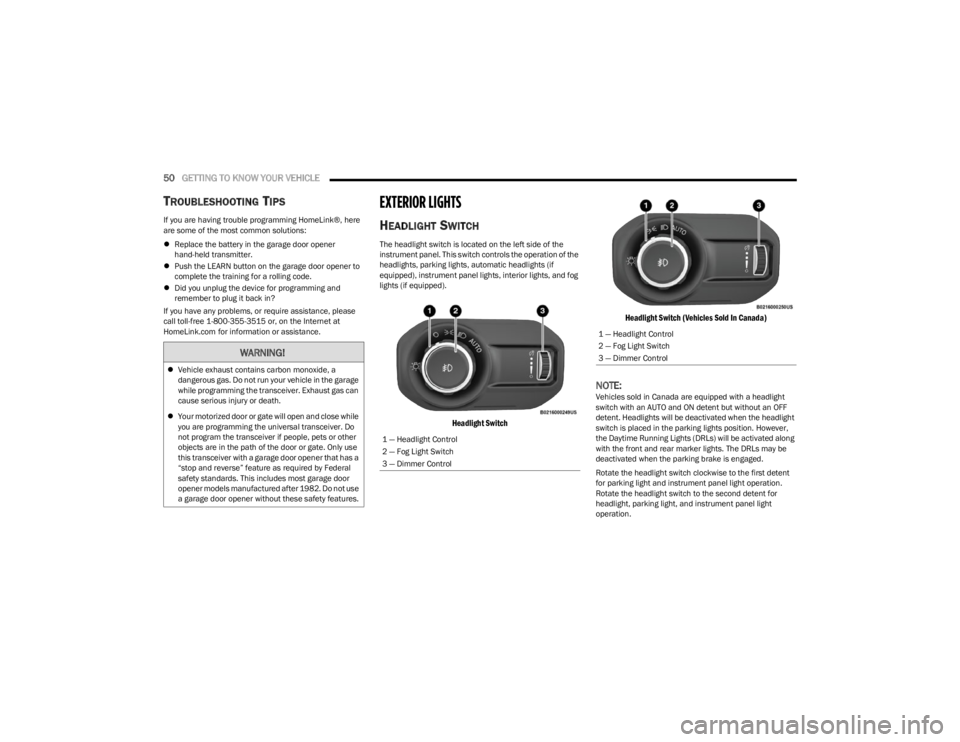
The headlight switch is located on the left side of the
instrument panel. This switch controls the operation of the
headlights, parking lights, automatic headlights (if
equipped), instrument panel lights, interior lights, and fog
lights (if equipped).
Headlight Switch Headlight Switch (Vehicles Sold In Canada)
NOTE:Vehicles sold in Canada are equipped with a headlight
switch with an AUTO and ON detent but without an OFF
detent. Headlights will be deactivated when the headlight
switch is placed in the parking lights position. However,
the Daytime Running Lights (DRLs) will be activated along
with the front and rear marker lights. The DRLs may be
deactivated when the parking brake is engaged.
Rotate the headlight switch clockwise to the first detent
for parking light and instrument panel light operation.
Rotate the headlight switch to the second detent for
headlight, parking light, and instrument panel light
operation.
WARNING!
Vehicle exhaust contains carbon monoxide, a
dangerous gas. Do not run your vehicle in the garage
while programming the transceiver. Exhaust gas can
cause serious injury or death.
Your motorized door or gate will open and close while
you are programming the universal transceiver. Do
not program the transceiver if people, pets or other
objects are in the path of the door or gate. Only use
this transceiver with a garage door opener that has a
“stop and reverse” feature as required by Federal
safety standards. This includes most garage door
opener models manufactured after 1982. Do not use
a garage door opener without these safety features.
1 — Headlight Control
2 — Fog Light Switch
3 — Dimmer Control
1 — Headlight Control
2 — Fog Light Switch
3 — Dimmer Control
23_JL_OM_EN_USC_t.book Page 50
Page 53 of 396
GETTING TO KNOW YOUR VEHICLE51
NOTE:For vehicles sold in Canada, rotate the headlight switch
clockwise from the parking lights and instrument panel
lights position to the first detent to turn on headlights,
parking lights, and instrument panel lights. Rotate the
headlight switch to the second detent for the AUTO
position.
DAYTIME RUNNING LIGHTS (DRLS) —
I
F EQUIPPED
The Daytime Running Lights are active when the low
beams are not on, and the engine is running. DRLs may be
deactivated by applying the parking brake.
NOTE:
For vehicles sold in Canada, the Daytime Running
Lights will automatically deactivate when the front fog
lights are turned on.
On some vehicles, the Daytime Running Lights may
deactivate, or reduce intensity, on one side of the
vehicle (when a turn signal is activated on that side), or
on both sides of the vehicle (when the hazard warning
lights are activated).
HIGH/LOW BEAM SWITCH
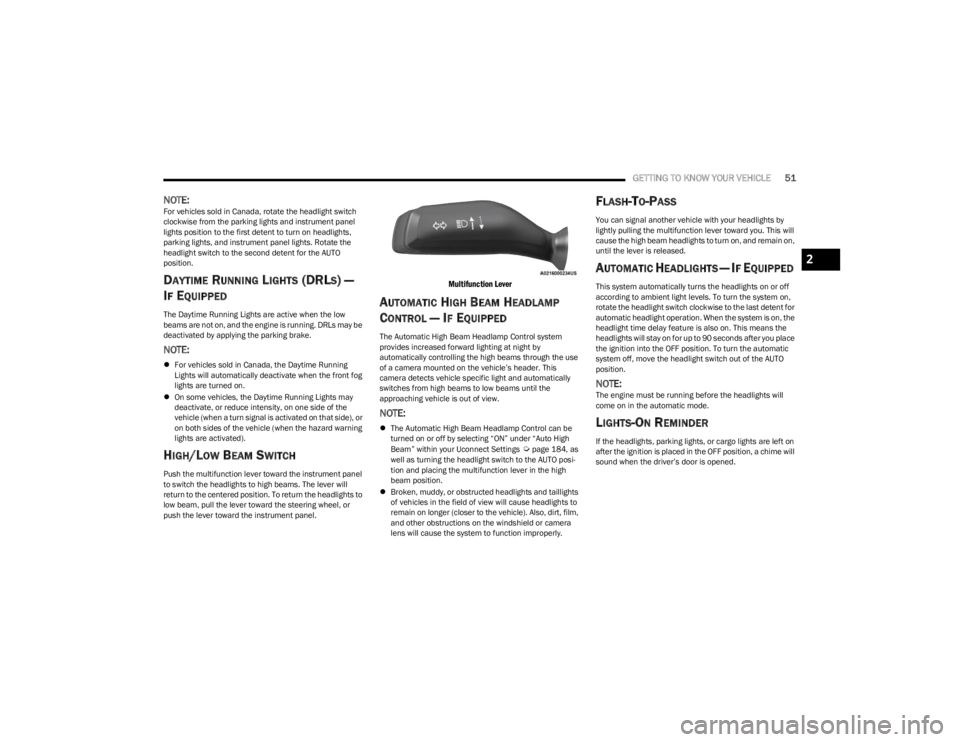
Push the multifunction lever toward the instrument panel
to switch the headlights to high beams. The lever will
return to the centered position. To return the headlights to
low beam, pull the lever toward the steering wheel, or
push the lever toward the instrument panel.
Multifunction Lever
AUTOMATIC HIGH BEAM HEADLAMP
C
ONTROL — IF EQUIPPED
The Automatic High Beam Headlamp Control system
provides increased forward lighting at night by
automatically controlling the high beams through the use
of a camera mounted on the vehicle’s header. This
camera detects vehicle specific light and automatically
switches from high beams to low beams until the
approaching vehicle is out of view.
NOTE:
The Automatic High Beam Headlamp Control can be
turned on or off by selecting “ON” under “Auto High
Beam” within your Uconnect Settings
Úpage 184, as
well as turning the headlight switch to the AUTO posi -
tion and placing the multifunction lever in the high
beam position.
Broken, muddy, or obstructed headlights and taillights
of vehicles in the field of view will cause headlights to
remain on longer (closer to the vehicle). Also, dirt, film,
and other obstructions on the windshield or camera
lens will cause the system to function improperly.
FLASH-TO-PASS
You can signal another vehicle with your headlights by
lightly pulling the multifunction lever toward you. This will
cause the high beam headlights to turn on, and remain on,
until the lever is released.
AUTOMATIC HEADLIGHTS — IF EQUIPPED
This system automatically turns the headlights on or off
according to ambient light levels. To turn the system on,
rotate the headlight switch clockwise to the last detent for
automatic headlight operation. When the system is on, the
headlight time delay feature is also on. This means the
headlights will stay on for up to 90 seconds after you place
the ignition into the OFF position. To turn the automatic
system off, move the headlight switch out of the AUTO
position.
NOTE:The engine must be running before the headlights will
come on in the automatic mode.
LIGHTS-ON REMINDER
If the headlights, parking lights, or cargo lights are left on
after the ignition is placed in the OFF position, a chime will
sound when the driver’s door is opened.
2
23_JL_OM_EN_USC_t.book Page 51
Page 54 of 396
52GETTING TO KNOW YOUR VEHICLE
FRONT FOG LIGHTS — IF EQUIPPED
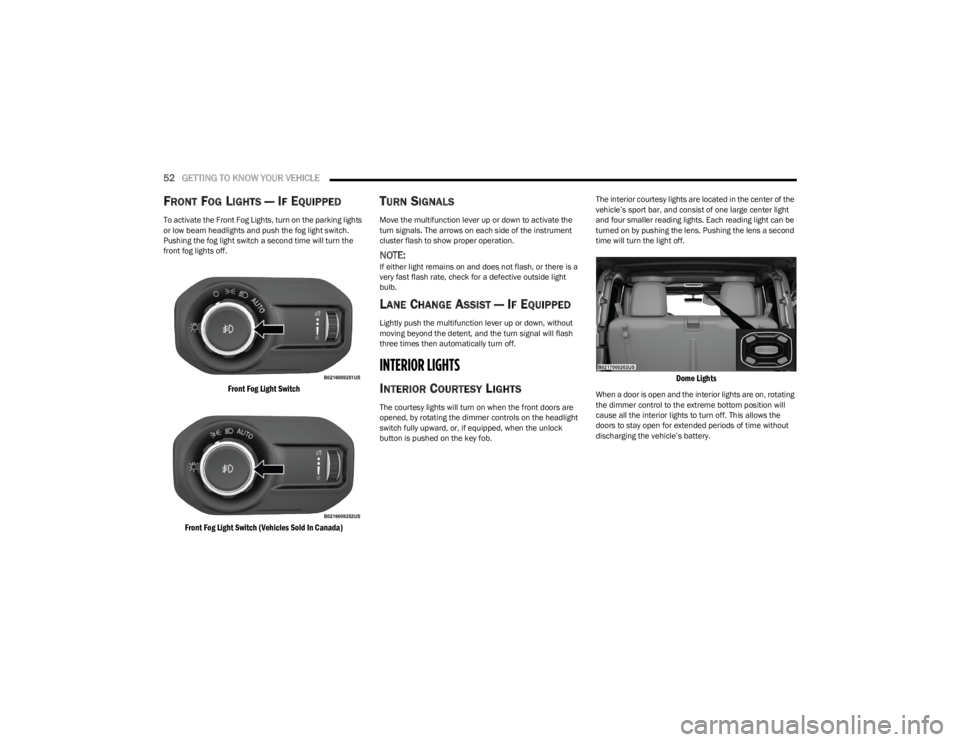
To activate the Front Fog Lights, turn on the parking lights
or low beam headlights and push the fog light switch.
Pushing the fog light switch a second time will turn the
front fog lights off.
Front Fog Light Switch
Front Fog Light Switch (Vehicles Sold In Canada)
TURN SIGNALS
Move the multifunction lever up or down to activate the
turn signals. The arrows on each side of the instrument
cluster flash to show proper operation.
NOTE:If either light remains on and does not flash, or there is a
very fast flash rate, check for a defective outside light
bulb.
LANE CHANGE ASSIST — IF EQUIPPED
Lightly push the multifunction lever up or down, without
moving beyond the detent, and the turn signal will flash
three times then automatically turn off.
INTERIOR LIGHTS
INTERIOR COURTESY LIGHTS
The courtesy lights will turn on when the front doors are
opened, by rotating the dimmer controls on the headlight
switch fully upward, or, if equipped, when the unlock
button is pushed on the key fob. The interior courtesy lights are located in the center of the
vehicle’s sport bar, and consist of one large center light
and four smaller reading lights. Each reading light can be
turned on by pushing the lens. Pushing the lens a second
time will turn the light off.
Dome Lights
When a door is open and the interior lights are on, rotating
the dimmer control to the extreme bottom position will
cause all the interior lights to turn off. This allows the
doors to stay open for extended periods of time without
discharging the vehicle’s battery.
23_JL_OM_EN_USC_t.book Page 52
Page 55 of 396
GETTING TO KNOW YOUR VEHICLE53
DIMMER CONTROL
The dimmer control is part of the headlight switch and is
located on the left side of the instrument panel.
Dimmer Control
Dimmer Control (Vehicles Sold In Canada)
With the parking lights or headlights on, rotating the
dimmer control upward will increase the brightness of the
instrument panel lights. Rotating the dimmer control will also adjust the interior and ambient light levels (e.g.
courtesy lights in the footwell, illuminated cupholders, and
front door handles).
WINDSHIELD WIPERS AND WASHERS
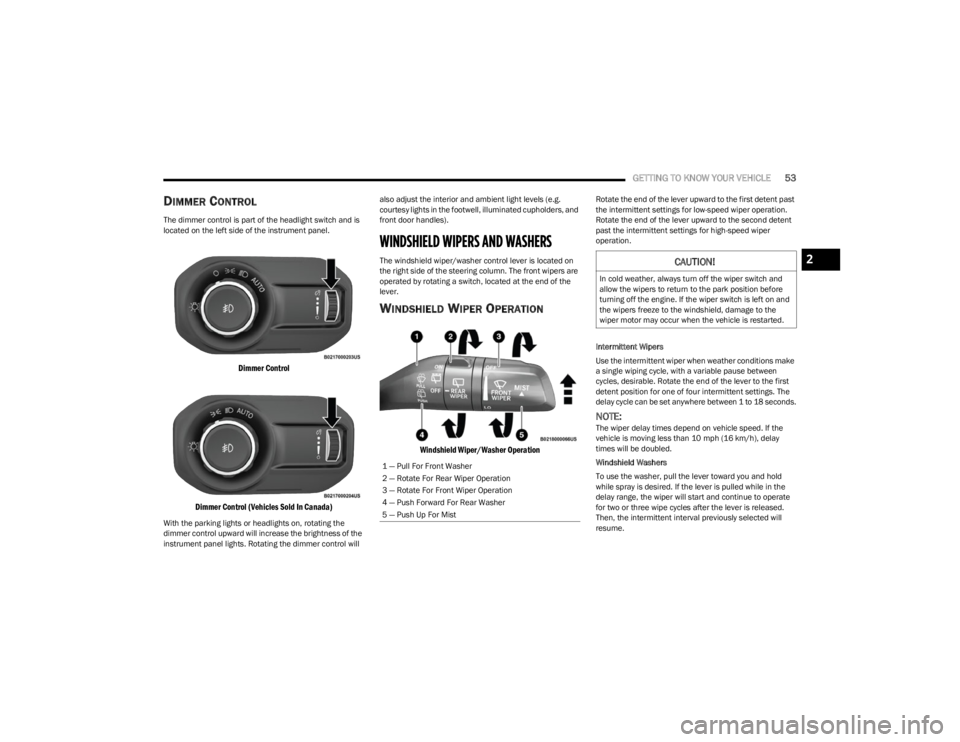
The windshield wiper/washer control lever is located on
the right side of the steering column. The front wipers are
operated by rotating a switch, located at the end of the
lever.
WINDSHIELD WIPER OPERATION
Windshield Wiper/Washer Operation
Rotate the end of the lever upward to the first detent past
the intermittent settings for low-speed wiper operation.
Rotate the end of the lever upward to the second detent
past the intermittent settings for high-speed wiper
operation.
Intermittent Wipers
Use the intermittent wiper when weather conditions make
a single wiping cycle, with a variable pause between
cycles, desirable. Rotate the end of the lever to the first
detent position for one of four intermittent settings. The
delay cycle can be set anywhere between 1 to 18 seconds.
NOTE:The wiper delay times depend on vehicle speed. If the
vehicle is moving less than 10 mph (16 km/h), delay
times will be doubled.
Windshield Washers
To use the washer, pull the lever toward you and hold
while spray is desired. If the lever is pulled while in the
delay range, the wiper will start and continue to operate
for two or three wipe cycles after the lever is released.
Then, the intermittent interval previously selected will
resume.
1 — Pull For Front Washer
2 — Rotate For Rear Wiper Operation
3 — Rotate For Front Wiper Operation
4 — Push Forward For Rear Washer
5 — Push Up For Mist
CAUTION!
In cold weather, always turn off the wiper switch and
allow the wipers to return to the park position before
turning off the engine. If the wiper switch is left on and
the wipers freeze to the windshield, damage to the
wiper motor may occur when the vehicle is restarted.
2
23_JL_OM_EN_USC_t.book Page 53
Page 58 of 396
56GETTING TO KNOW YOUR VEHICLE
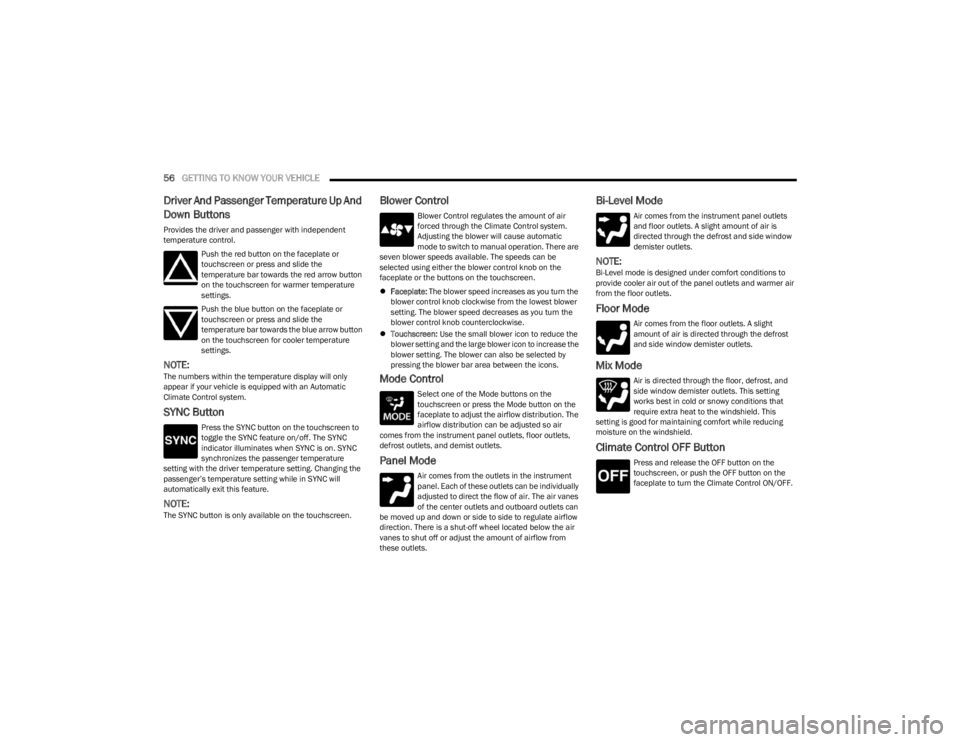
Driver And Passenger Temperature Up And
Down Buttons
Provides the driver and passenger with independent
temperature control.
Push the red button on the faceplate or
touchscreen or press and slide the
temperature bar towards the red arrow button
on the touchscreen for warmer temperature
settings.
Push the blue button on the faceplate or
touchscreen or press and slide the
temperature bar towards the blue arrow button
on the touchscreen for cooler temperature
settings.
NOTE:The numbers within the temperature display will only
appear if your vehicle is equipped with an Automatic
Climate Control system.
SYNC Button
Press the SYNC button on the touchscreen to
toggle the SYNC feature on/off. The SYNC
indicator illuminates when SYNC is on. SYNC
synchronizes the passenger temperature
setting with the driver temperature setting. Changing the
passenger’s temperature setting while in SYNC will
automatically exit this feature.
NOTE:The SYNC button is only available on the touchscreen.
Blower Control
Blower Control regulates the amount of air
forced through the Climate Control system.
Adjusting the blower will cause automatic
mode to switch to manual operation. There are
seven blower speeds available. The speeds can be
selected using either the blower control knob on the
faceplate or the buttons on the touchscreen.
Faceplate: The blower speed increases as you turn the
blower control knob clockwise from the lowest blower
setting. The blower speed decreases as you turn the
blower control knob counterclockwise.
Touchscreen: Use the small blower icon to reduce the
blower setting and the large blower icon to increase the
blower setting. The blower can also be selected by
pressing the blower bar area between the icons.
Mode Control
Select one of the Mode buttons on the
touchscreen or press the Mode button on the
faceplate to adjust the airflow distribution. The
airflow distribution can be adjusted so air
comes from the instrument panel outlets, floor outlets,
defrost outlets, and demist outlets.
Panel Mode
Air comes from the outlets in the instrument
panel. Each of these outlets can be individually
adjusted to direct the flow of air. The air vanes
of the center outlets and outboard outlets can
be moved up and down or side to side to regulate airflow
direction. There is a shut-off wheel located below the air
vanes to shut off or adjust the amount of airflow from
these outlets.
Bi-Level Mode
Air comes from the instrument panel outlets
and floor outlets. A slight amount of air is
directed through the defrost and side window
demister outlets.
NOTE:Bi-Level mode is designed under comfort conditions to
provide cooler air out of the panel outlets and warmer air
from the floor outlets.
Floor Mode
Air comes from the floor outlets. A slight
amount of air is directed through the defrost
and side window demister outlets.
Mix Mode
Air is directed through the floor, defrost, and
side window demister outlets. This setting
works best in cold or snowy conditions that
require extra heat to the windshield. This
setting is good for maintaining comfort while reducing
moisture on the windshield.
Climate Control OFF Button
Press and release the OFF button on the
touchscreen, or push the OFF button on the
faceplate to turn the Climate Control ON/OFF.
23_JL_OM_EN_USC_t.book Page 56
Page 60 of 396
58GETTING TO KNOW YOUR VEHICLE
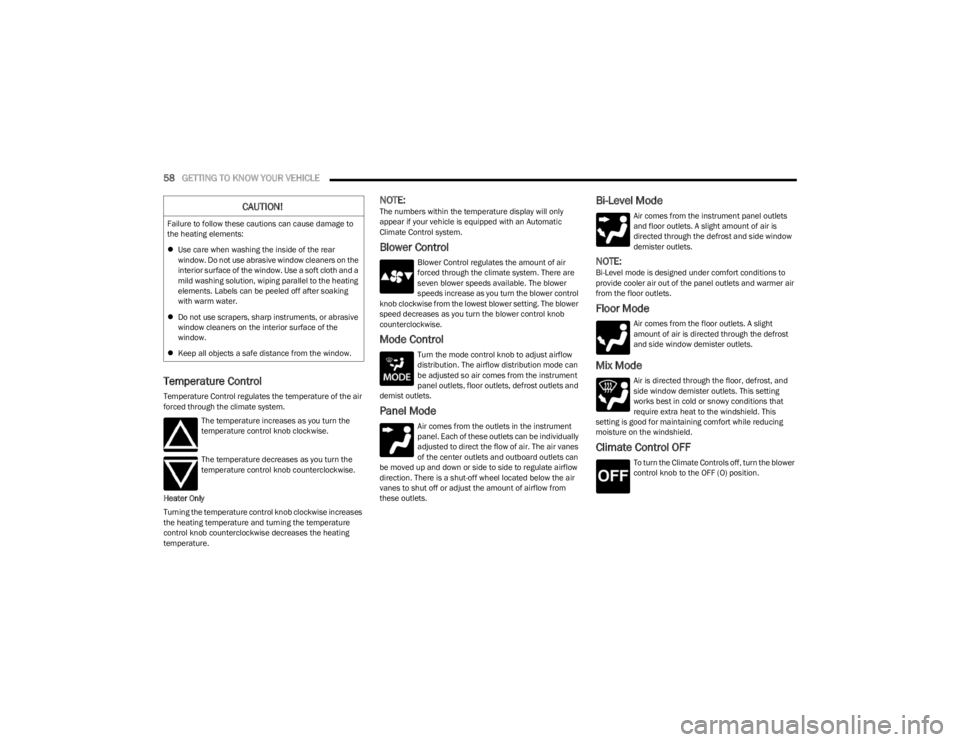
Temperature Control
Temperature Control regulates the temperature of the air
forced through the climate system.
The temperature increases as you turn the
temperature control knob clockwise.
The temperature decreases as you turn the
temperature control knob counterclockwise.
Heater Only
Turning the temperature control knob clockwise increases
the heating temperature and turning the temperature
control knob counterclockwise decreases the heating
temperature.
NOTE:The numbers within the temperature display will only
appear if your vehicle is equipped with an Automatic
Climate Control system.
Blower Control
Blower Control regulates the amount of air
forced through the climate system. There are
seven blower speeds available. The blower
speeds increase as you turn the blower control
knob clockwise from the lowest blower setting. The blower
speed decreases as you turn the blower control knob
counterclockwise.
Mode Control
Turn the mode control knob to adjust airflow
distribution. The airflow distribution mode can
be adjusted so air comes from the instrument
panel outlets, floor outlets, defrost outlets and
demist outlets.
Panel Mode
Air comes from the outlets in the instrument
panel. Each of these outlets can be individually
adjusted to direct the flow of air. The air vanes
of the center outlets and outboard outlets can
be moved up and down or side to side to regulate airflow
direction. There is a shut-off wheel located below the air
vanes to shut off or adjust the amount of airflow from
these outlets.
Bi-Level Mode
Air comes from the instrument panel outlets
and floor outlets. A slight amount of air is
directed through the defrost and side window
demister outlets.
NOTE:Bi-Level mode is designed under comfort conditions to
provide cooler air out of the panel outlets and warmer air
from the floor outlets.
Floor Mode
Air comes from the floor outlets. A slight
amount of air is directed through the defrost
and side window demister outlets.
Mix Mode
Air is directed through the floor, defrost, and
side window demister outlets. This setting
works best in cold or snowy conditions that
require extra heat to the windshield. This
setting is good for maintaining comfort while reducing
moisture on the windshield.
Climate Control OFF
To turn the Climate Controls off, turn the blower
control knob to the OFF (O) position.
CAUTION!
Failure to follow these cautions can cause damage to
the heating elements:
Use care when washing the inside of the rear
window. Do not use abrasive window cleaners on the
interior surface of the window. Use a soft cloth and a
mild washing solution, wiping parallel to the heating
elements. Labels can be peeled off after soaking
with warm water.
Do not use scrapers, sharp instruments, or abrasive
window cleaners on the interior surface of the
window.
Keep all objects a safe distance from the window.
23_JL_OM_EN_USC_t.book Page 58
Page 63 of 396
GETTING TO KNOW YOUR VEHICLE61
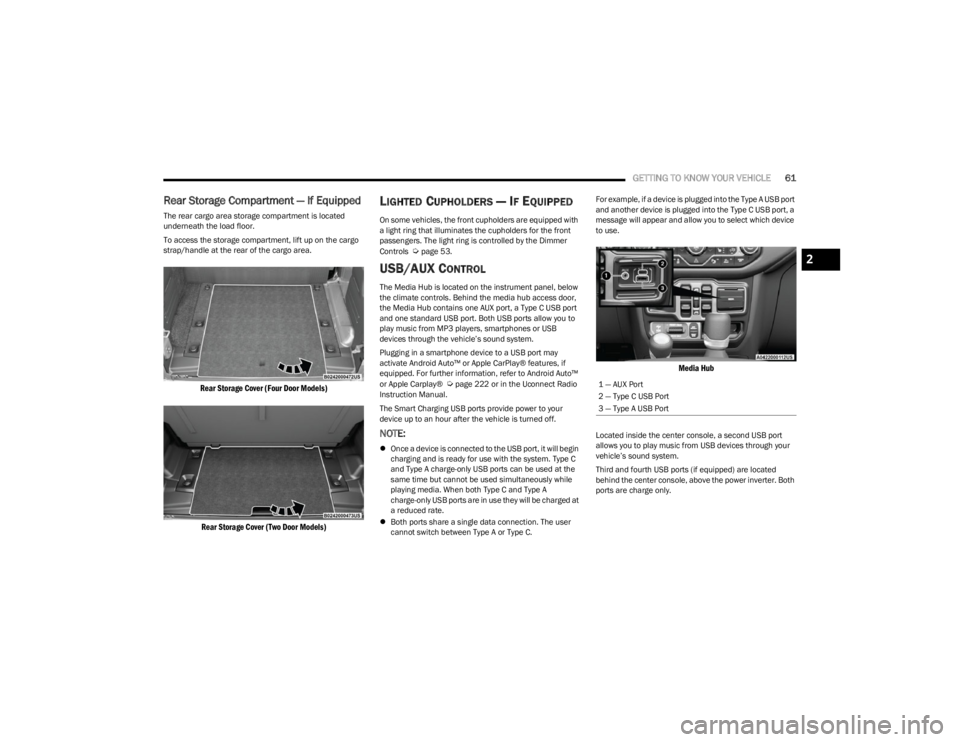
Rear Storage Compartment — If Equipped
The rear cargo area storage compartment is located
underneath the load floor.
To access the storage compartment, lift up on the cargo
strap/handle at the rear of the cargo area.
Rear Storage Cover (Four Door Models)
Rear Storage Cover (Two Door Models)
LIGHTED CUPHOLDERS — IF EQUIPPED
On some vehicles, the front cupholders are equipped with
a light ring that illuminates the cupholders for the front
passengers. The light ring is controlled by the Dimmer
Controls
Úpage 53.
USB/AUX CONTROL
The Media Hub is located on the instrument panel, below
the climate controls. Behind the media hub access door,
the Media Hub contains one AUX port, a Type C USB port
and one standard USB port. Both USB ports allow you to
play music from MP3 players, smartphones or USB
devices through the vehicle’s sound system.
Plugging in a smartphone device to a USB port may
activate Android Auto™ or Apple CarPlay® features, if
equipped. For further information, refer to Android Auto™
or Apple Carplay®
Úpage 222 or in the Uconnect Radio
Instruction Manual.
The Smart Charging USB ports provide power to your
device up to an hour after the vehicle is turned off.
NOTE:
Once a device is connected to the USB port, it will begin
charging and is ready for use with the system. Type C
and Type A charge-only USB ports can be used at the
same time but cannot be used simultaneously while
playing media. When both Type C and Type A
charge-only USB ports are in use they will be charged at
a reduced rate.
Both ports share a single data connection. The user
cannot switch between Type A or Type C. For example, if a device is plugged into the Type A USB port
and another device is plugged into the Type C USB port, a
message will appear and allow you to select which device
to use.
Media Hub
Located inside the center console, a second USB port
allows you to play music from USB devices through your
vehicle’s sound system.
Third and fourth USB ports (if equipped) are located
behind the center console, above the power inverter. Both
ports are charge only.
1 — AUX Port
2 — Type C USB Port
3 — Type A USB Port
2
23_JL_OM_EN_USC_t.book Page 61
Page 65 of 396
GETTING TO KNOW YOUR VEHICLE63
(Continued)
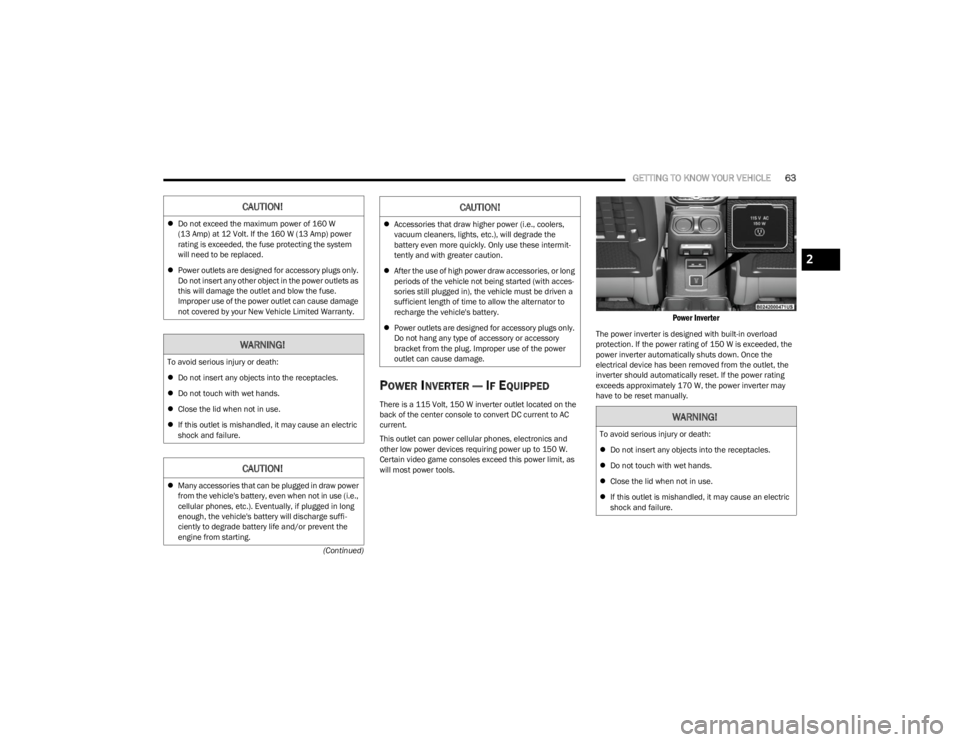
POWER INVERTER — IF EQUIPPED
There is a 115 Volt, 150 W inverter outlet located on the
back of the center console to convert DC current to AC
current.
This outlet can power cellular phones, electronics and
other low power devices requiring power up to 150 W.
Certain video game consoles exceed this power limit, as
will most power tools.
Power Inverter
The power inverter is designed with built-in overload
protection. If the power rating of 150 W is exceeded, the
power inverter automatically shuts down. Once the
electrical device has been removed from the outlet, the
inverter should automatically reset. If the power rating
exceeds approximately 170 W, the power inverter may
have to be reset manually.
CAUTION!
Do not exceed the maximum power of 160 W
(13 Amp) at 12 Volt. If the 160 W (13 Amp) power
rating is exceeded, the fuse protecting the system
will need to be replaced.
Power outlets are designed for accessory plugs only.
Do not insert any other object in the power outlets as
this will damage the outlet and blow the fuse.
Improper use of the power outlet can cause damage
not covered by your New Vehicle Limited Warranty.
WARNING!
To avoid serious injury or death:
Do not insert any objects into the receptacles.
Do not touch with wet hands.
Close the lid when not in use.
If this outlet is mishandled, it may cause an electric
shock and failure.
CAUTION!
Many accessories that can be plugged in draw power
from the vehicle's battery, even when not in use (i.e.,
cellular phones, etc.). Eventually, if plugged in long
enough, the vehicle's battery will discharge suffi -
ciently to degrade battery life and/or prevent the
engine from starting.
Accessories that draw higher power (i.e., coolers,
vacuum cleaners, lights, etc.), will degrade the
battery even more quickly. Only use these intermit -
tently and with greater caution.
After the use of high power draw accessories, or long
periods of the vehicle not being started (with acces -
sories still plugged in), the vehicle must be driven a
sufficient length of time to allow the alternator to
recharge the vehicle's battery.
Power outlets are designed for accessory plugs only.
Do not hang any type of accessory or accessory
bracket from the plug. Improper use of the power
outlet can cause damage.
CAUTION!
WARNING!
To avoid serious injury or death:
Do not insert any objects into the receptacles.
Do not touch with wet hands.
Close the lid when not in use.
If this outlet is mishandled, it may cause an electric
shock and failure.
2
23_JL_OM_EN_USC_t.book Page 63
Page 78 of 396
76GETTING TO KNOW YOUR VEHICLE
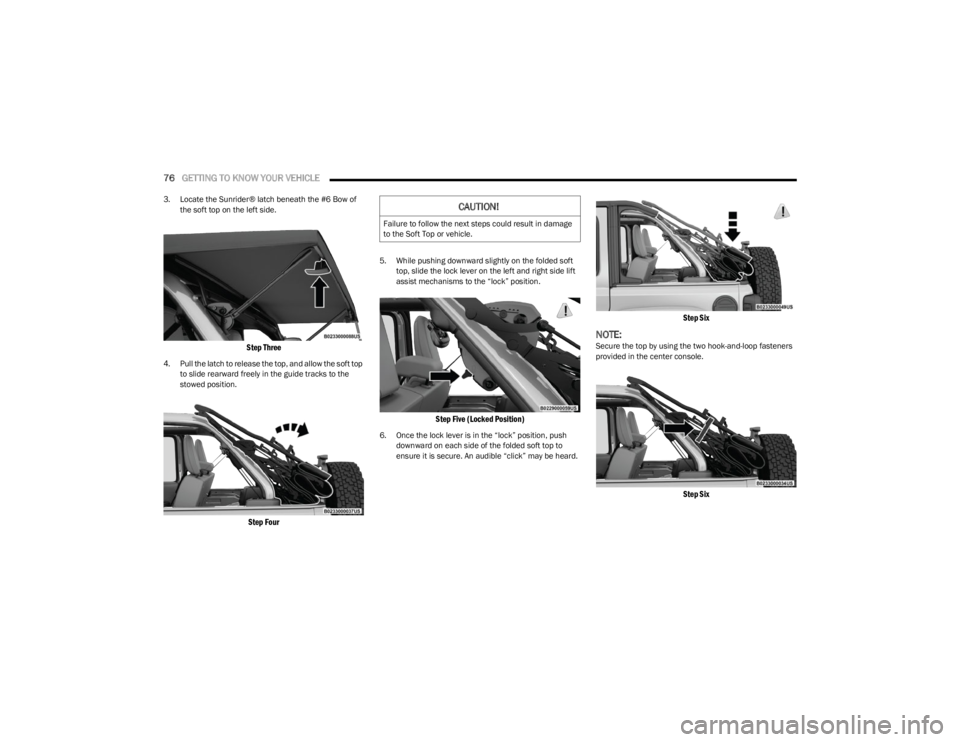
3. Locate the Sunrider® latch beneath the #6 Bow of
the soft top on the left side.
Step Three
4. Pull the latch to release the top, and allow the soft top to slide rearward freely in the guide tracks to the
stowed position.
Step Four
5. While pushing downward slightly on the folded soft top, slide the lock lever on the left and right side lift
assist mechanisms to the “lock” position.
Step Five (Locked Position)
6. Once the lock lever is in the “lock” position, push downward on each side of the folded soft top to
ensure it is secure. An audible “click” may be heard.
Step Six
NOTE:Secure the top by using the two hook-and-loop fasteners
provided in the center console.
Step Six
CAUTION!
Failure to follow the next steps could result in damage
to the Soft Top or vehicle.
23_JL_OM_EN_USC_t.book Page 76
Page 94 of 396

92GETTING TO KNOW YOUR VEHICLE
(Continued)
NOTE:
The power top is non-removable. If desired, the rear
quarter windows can be removed and stored in the
provided storage bag
Úpage 93.
The power top will not open in temperatures below
-4°F (-20°C). However, if it is opened at a higher
temperature, it can be closed at temperatures above
-40°F (-40°C).
The power top will not operate at vehicle speeds above
60 mph (96 km/h).
NOTE:A slight pause in audio may be heard when opening and
closing the Power Sliding Top as a result of the Uconnect
system switching between power top Closed and power
top Open audio modes.
Opening And Closing The Power Top
Express Open/Close
Push the open switch and release it within one-half
second and the power top will open automatically from
any position. The power top will open fully and stop
automatically.
Push the close switch and release it within one-half
second and the power top will close automatically from
any position. The power top will close fully and stop
automatically.
During Express Open or Express Close operation, any
other movement of the power top switch will stop the
power top.
Manual Open/Close
To open the power top manually, push and hold the open
switch to the full open position, then release.
To close the power top manually, push and hold the close
switch to the fully closed position, then release.
Any release of the switch during open or close operation
will stop the power top movement. The top will remain in a
partially opened position until the switch is operated and
held again.
Pinch Protect Feature
This feature will detect an obstruction in the opening of
the power top during Express Close operation. If an
obstruction in the path of the power top is detected, the
power top will automatically retract. Remove the
obstruction if this occurs. Next, push the close switch and
release to Express Close.
NOTE:
The Power Sliding Top may reverse motion if closing
during a severe headwind. If this occurs, push and hold
the Power Sliding Top switch again to close the top
completely.
If three consecutive power top close attempts result in
Pinch Protect reversals, Pinch Protect will disable and
the power top must be closed in Manual Mode.
Power Top Maintenance
Use only a non-abrasive cleaner and a soft cloth to clean
the quarter window glass panel. For important information
on cleaning and caring for your vehicle
Úpage 360.
WARNING!
Never leave children unattended in a vehicle, or with
access to an unlocked vehicle. Never leave the key
fob in or near the vehicle, or in a location accessible
to children. Do not leave the Keyless Enter ‘n Go™
Ignition in the ACC or ON/RUN position. Occupants,
particularly unattended children, can become
entrapped by the power top while operating the
power top switch. Such entrapment may result in
serious injury or death.
In a collision, there is a greater risk of being thrown
from a vehicle with an open power top. You could
also be seriously injured or killed. Always fasten your
seat belt properly and make sure all passengers are
also properly secured.
Do not allow small children to operate the power top.
Never allow your fingers, other body parts, or any
object, to project through the power top opening.
Injury may result.
WARNING!
WARNING!
There is no anti-pinch protection when the power top is
almost closed. To avoid personal injury be sure to clear
your arms, hands, fingers and all objects from the top’s
path before closing.
23_JL_OM_EN_USC_t.book Page 92