light JEEP WRANGLER 2023 Repair Manual
[x] Cancel search | Manufacturer: JEEP, Model Year: 2023, Model line: WRANGLER, Model: JEEP WRANGLER 2023Pages: 396, PDF Size: 25.15 MB
Page 150 of 396
148STARTING AND OPERATING
POSSIBLE REASONS THE ENGINE DOES
N
OT AUTOSTOP
Prior to engine shut down, the system will check many
safety and comfort conditions to see if they are fulfilled.
Detailed information about the operation of the Stop/Start
system may be viewed in the instrument cluster display
Stop/Start screen. Situations when the engine will not
stop include (but not limited to):
Driver’s seat belt is not buckled.
Driver’s door is not closed.
Battery temperature is too warm or cold.
Battery charge is low.
The vehicle is on a steep grade.
Cabin heating or cooling is in process and an accept -
able cabin temperature has not been achieved.
Gear selector is in MANUAL (M) mode.
HVAC is set to full defrost mode at a high blower speed.
HVAC is set to MAX A/C.
Engine has not reached normal operating temperature.
Engine or exhaust temperature is too high.
The transmission is not in a forward gear.
Hood is open.
Transfer case is in 4L or N (Neutral).
Brake pedal is not pressed with sufficient pressure.
Accelerator pedal input.
Vehicle speed threshold has not been achieved from
previous Autostop.
Steering angle is beyond threshold (ESS Models Only).
ACC is on and speed is set.
Vehicle is at high altitude.
System fault is present. It may be possible for the vehicle to be driven several
times without the Stop/Start system going into a STOP/
START READY state under more extreme conditions of the
previously listed items.
TO START THE ENGINE WHILE IN
A
UTOSTOP MODE
While in a forward gear, the engine will start when the
brake pedal is released or the throttle pedal is pressed.
The transmission will automatically re-engage upon
engine restart.
Conditions That Will Cause The Engine To Start
Automatically While In Autostop Mode:
The transmission selector is moved out of DRIVE.
To maintain cabin temperature comfort.
Actual cabin temperature is significantly different than
temperature set on Auto HVAC.
HVAC is set to full defrost mode.
HVAC system temperature or fan speed is manually
adjusted higher.
Battery voltage drops too low.
Stop/Start OFF switch is pushed.
A Stop/Start system error occurs.
Stop/Start Autostop Active time exceeds five minutes.
Transfer case is in 4L or N (Neutral).
Steering wheel is turned beyond threshold (ESS
Models Only).
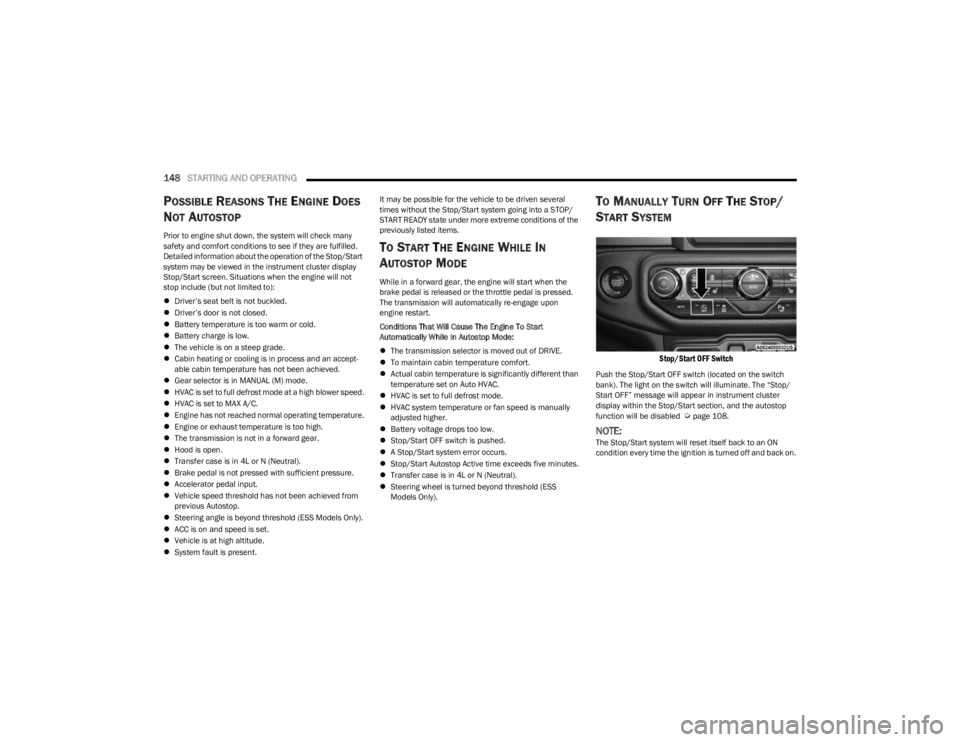
TO MANUALLY TURN OFF THE STOP/
S
TART SYSTEM
Stop/Start OFF Switch
Push the Stop/Start OFF switch (located on the switch
bank). The light on the switch will illuminate. The “Stop/
Start OFF” message will appear in instrument cluster
display within the Stop/Start section, and the autostop
function will be disabled
Úpage 108.
NOTE:The Stop/Start system will reset itself back to an ON
condition every time the ignition is turned off and back on.
23_JL_OM_EN_USC_t.book Page 148
Page 151 of 396
STARTING AND OPERATING149
TO MANUALLY TURN ON THE STOP/
S
TART SYSTEM
Push the Stop/Start OFF switch (located on the switch
bank). The light on the switch will turn off.
SYSTEM MALFUNCTION
If there is a malfunction in the Stop/Start system, the
system will not shut down the engine. A “SERVICE STOP/
START SYSTEM” message and a yellow Stop/Start telltale
will appear in the Instrument Cluster Display
Úpage 108.
If the “SERVICE STOP/START SYSTEM” message appears
in the instrument cluster display, have the system
checked by an authorized dealer.
If a malfunction occurs during an autostop, the vehicle
may not auto start and will need a key start.
STOP/START SYSTEM — MANUAL
TRANSMISSION (IF EQUIPPED)
The Engine Stop/Start (ESS) function is designed to
reduce fuel consumption. The system will stop the engine
automatically during a vehicle stop if the required
conditions are met. Pressing the clutch pedal will
automatically restart the vehicle.
ESS vehicles have been upgraded with a heavy-duty
starter, enhanced battery, and other upgraded engine
parts, to handle the additional engine starts. Vehicles
equipped with eTorque contain a heavy duty motor generator and an additional hybrid electric battery to store
energy from vehicle deceleration for use on engine startup
after a stop as well as providing launch torque assist.
NOTE:It is recommended that Stop/Start be disabled during
off-road use.
Secondary Battery
Your vehicle may be equipped with a secondary battery
used to power the Stop/Start system and the 12 Volt
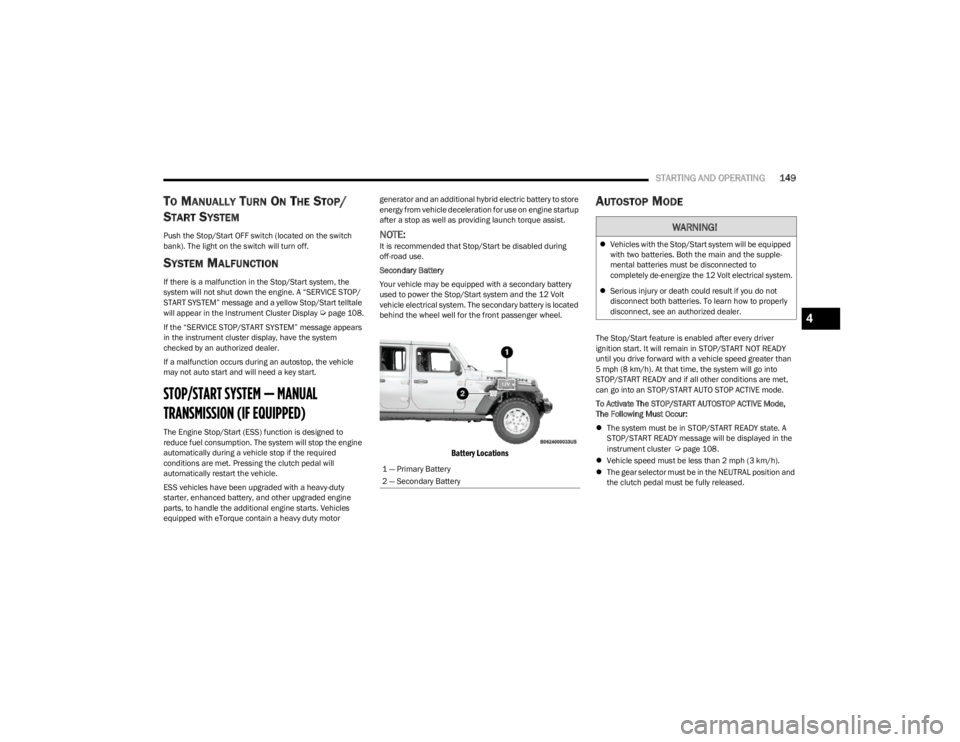
vehicle electrical system. The secondary battery is located
behind the wheel well for the front passenger wheel.
Battery Locations
AUTOSTOP MODE
The Stop/Start feature is enabled after every driver
ignition start. It will remain in STOP/START NOT READY
until you drive forward with a vehicle speed greater than
5 mph (8 km/h). At that time, the system will go into
STOP/START READY and if all other conditions are met,
can go into an STOP/START AUTO STOP ACTIVE mode.
To Activate The STOP/START AUTOSTOP ACTIVE Mode,
The Following Must Occur:
The system must be in STOP/START READY state. A
STOP/START READY message will be displayed in the
instrument cluster
Úpage 108.
Vehicle speed must be less than 2 mph (3 km/h).
The gear selector must be in the NEUTRAL position and
the clutch pedal must be fully released.
1 — Primary Battery
2 — Secondary Battery
WARNING!
Vehicles with the Stop/Start system will be equipped
with two batteries. Both the main and the supple -
mental batteries must be disconnected to
completely de-energize the 12 Volt electrical system.
Serious injury or death could result if you do not
disconnect both batteries. To learn how to properly
disconnect, see an authorized dealer.
4
23_JL_OM_EN_USC_t.book Page 149
Page 152 of 396
150STARTING AND OPERATING
POSSIBLE REASONS THE ENGINE DOES
N
OT AUTOSTOP
Prior to engine shut down, the system will check many
safety and comfort conditions to see if they are fulfilled.
Situations when the engine will not stop include (but not
limited to):
Driver’s seat belt is not buckled.
Outside temperature is less than 10°F (–12°C) or
greater than 109°F (43°C).
Actual cabin temperature is significantly different than
temperature set on Auto HVAC.
HVAC is set to full defrost mode.
Engine has not reached normal operating temperature.
Battery is discharged.
When driving in REVERSE.
Hood is open.
Transfer case is in 4L or N (Neutral).
Driver's seat is not occupied or driver’s door is open.
Vehicle is at high altitude.
The vehicle is on a steep grade.
Forward Gear is engaged.
Steering angle is beyond threshold (ESS Models Only).
System fault is present.
HVAC is set to MAX A/C.
It may be possible for the vehicle to be driven several
times without the Stop/Start system going into a STOP/
START READY state under more extreme conditions of the
previously listed items.
TO START THE ENGINE WHILE IN
A
UTOSTOP MODE
When the gear selector is in NEUTRAL, the engine will start
when the clutch pedal is pressed (does not require
complete/full pedal press). The vehicle will go into STOP/
START SYSTEM NOT READY mode until the vehicle speed
is greater than 5 mph (8 km/h).
Conditions that will cause the engine to start
automatically while in STOP/START AUTOSTOP ACTIVE
mode
The Engine Will Start Automatically When:
Actual cabin temperature is significantly different than
temperature set on Auto HVAC.
HVAC is set to full defrost mode.
HVAC system temperature or fan speed is manually
adjusted higher.
Stop/Start Autostop Active time exceeds five minutes.
Battery voltage drops too low.
Vehicle is moving faster than 5 mph (8 km/h).
STOP/START OFF switch is pressed.
Transfer case is in 4L or N (Neutral).
Steering wheel is turned beyond threshold (ESS
Models Only).
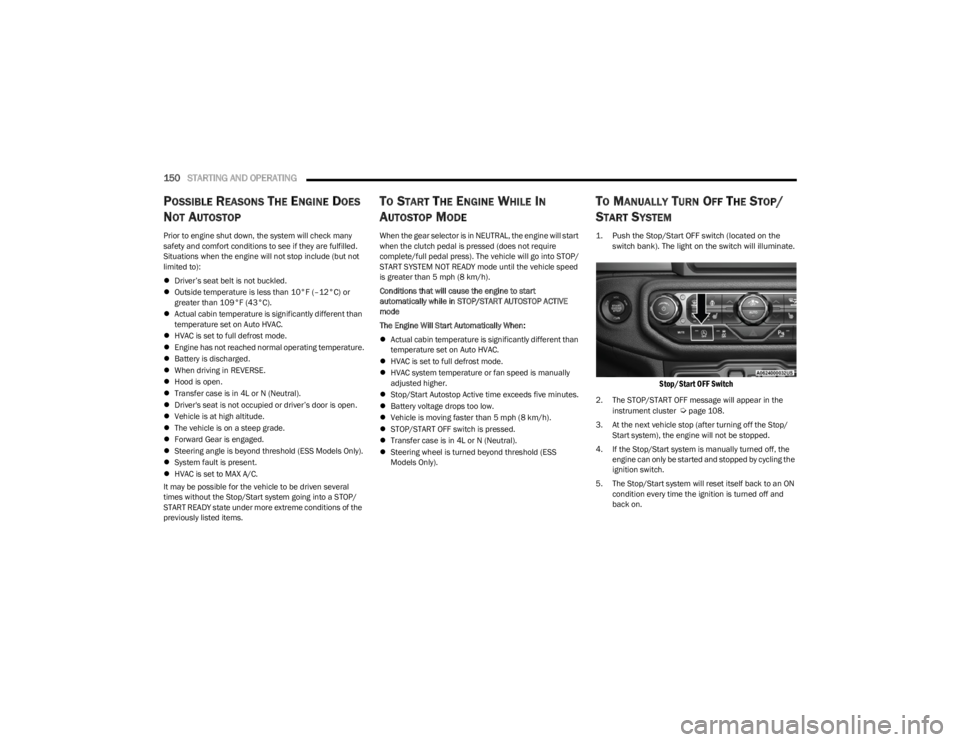
TO MANUALLY TURN OFF THE STOP/
S
TART SYSTEM
1. Push the Stop/Start OFF switch (located on the
switch bank). The light on the switch will illuminate.
Stop/Start OFF Switch
2. The STOP/START OFF message will appear in the
instrument cluster Úpage 108.
3. At the next vehicle stop (after turning off the Stop/ Start system), the engine will not be stopped.
4. If the Stop/Start system is manually turned off, the engine can only be started and stopped by cycling the
ignition switch.
5. The Stop/Start system will reset itself back to an ON condition every time the ignition is turned off and
back on.
23_JL_OM_EN_USC_t.book Page 150
Page 153 of 396
STARTING AND OPERATING151
TO MANUALLY TURN ON THE STOP/
S
TART SYSTEM
Push the Stop/Start OFF switch (located on the switch
bank). The light on the switch will turn off.
SYSTEM MALFUNCTION
If there is a malfunction in the Stop/Start system, the
system will not shut down the engine. A “SERVICE STOP/
START SYSTEM” message and a yellow Stop/Start telltale
will appear in the Instrument Cluster Display
Úpage 108.
If the “SERVICE STOP/START SYSTEM” message appears
in the instrument cluster display, have the system
checked by an authorized dealer.
If a malfunction occurs during an autostop, the vehicle
may not auto start and will need a key start.
CRUISE CONTROL SYSTEMS — IF EQUIPPED
Your vehicle may be equipped with the Cruise Control
system, or the Adaptive Cruise Control (ACC) system:
Cruise Control will keep your vehicle at a constant
preset speed.
Adaptive Cruise Control (ACC) will adjust the vehicle
speed up to the preset speed to maintain a distance
with the vehicle ahead.
NOTE:
In vehicles equipped with ACC, if ACC is not enabled,
Fixed Speed Cruise Control will not detect vehicles
directly ahead of you. Always be aware of the feature
selected.
Only one Cruise Control feature can operate at a time.
For example, if Fixed Speed Cruise Control is enabled,
Adaptive Cruise Control will be unavailable, and vice
versa.
CRUISE CONTROL
When engaged, the Cruise Control takes over accelerator
operations at speeds greater than 20 mph (32 km/h).
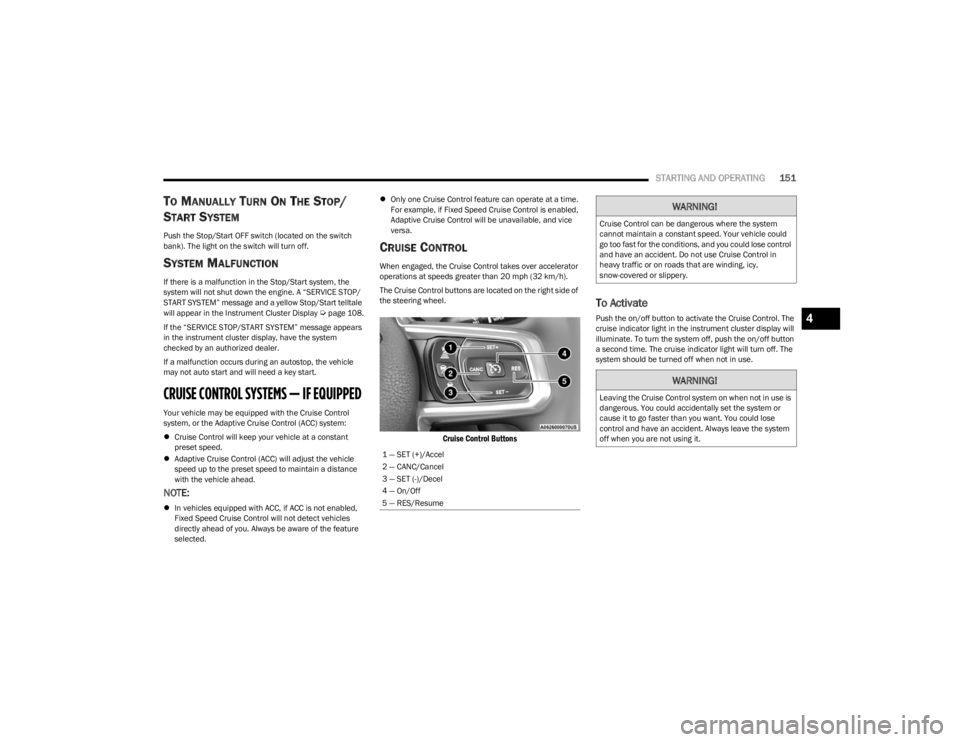
The Cruise Control buttons are located on the right side of
the steering wheel.
Cruise Control Buttons
To Activate
Push the on/off button to activate the Cruise Control. The
cruise indicator light in the instrument cluster display will
illuminate. To turn the system off, push the on/off button
a second time. The cruise indicator light will turn off. The
system should be turned off when not in use.
1 — SET (+)/Accel
2 — CANC/Cancel
3 — SET (-)/Decel
4 — On/Off
5 — RES/Resume
WARNING!
Cruise Control can be dangerous where the system
cannot maintain a constant speed. Your vehicle could
go too fast for the conditions, and you could lose control
and have an accident. Do not use Cruise Control in
heavy traffic or on roads that are winding, icy,
snow-covered or slippery.
WARNING!
Leaving the Cruise Control system on when not in use is
dangerous. You could accidentally set the system or
cause it to go faster than you want. You could lose
control and have an accident. Always leave the system
off when you are not using it.
4
23_JL_OM_EN_USC_t.book Page 151
Page 154 of 396
152STARTING AND OPERATING
To Set A Desired Speed
Turn the Cruise Control on.
NOTE:The vehicle should be traveling at a steady speed and on
level ground before pushing the SET (+) or SET (-) button.
When the vehicle has reached the desired speed, push
the SET (+) or SET (-) button and release. Release the
accelerator and the vehicle will operate at the selected
speed.
To Vary The Speed Setting
To Increase Or Decrease The Set Speed
When the Cruise Control is set, you can increase speed by
pushing the SET (+) button, or decrease speed by pushing
the SET (-) button.
U.S. Speed (mph)
Pushing the SET (+), or SET (-) button once will result in
a 1 mph speed adjustment. Each subsequent tap of
the button results in an adjustment of 1 mph.
If the button is continually pushed, the set speed will
continue to adjust in 5 mph increments until the button
is released, then the new set speed will be established.
Metric Speed (km/h)
Pushing the SET (+), or SET (-) button once will result in
a 1 km/h speed adjustment. Each subsequent tap of
the button results in an adjustment of 1 km/h.
If the button is continually pushed, the set speed will
continue to adjust in 10 km/h increments until the
button is released, then the new set speed will be
established.
To Accelerate For Passing
While the Cruise Control is set, press the accelerator to
pass as you would normally. When the pedal is released,
the vehicle will return to the set speed.
USING CRUISE CONTROL ON HILLS
The transmission may downshift on hills to maintain the
vehicle set speed.
The Cruise Control system maintains speed up and down
hills. A slight speed change on moderate hills is normal.
On steep hills, a greater speed loss or gain may occur so it
may be preferable to drive without Cruise Control.
To Resume Speed
To resume a previously set speed, push the RES button
and release. Resume can be used at any speed above
20 mph (32 km/h).
To Deactivate
A tap on the brake pedal, pushing the CANC (cancel)
button, or normal brake pressure while slowing the vehicle
will deactivate the Cruise Control without erasing the set
speed from memory. The following conditions will also deactivate the Cruise
Control without erasing the set speed from memory:
Vehicle parking brake is applied
Stability event occurs
Gear selector is moved out of DRIVE
Engine overspeed occurs
Clutch pedal is pressed (manual transmission only)
Vehicle is operating at a low RPM (manual transmis -
sion only)
Pushing the on/off button or placing the ignition in the OFF
position erases the set speed from memory.
ADAPTIVE CRUISE CONTROL (ACC)
Adaptive Cruise Control (ACC) increases the driving
convenience provided by Cruise Control while traveling on
highways and major roadways. However, it is not a safety
system and not designed to prevent collisions. The Cruise
Control function performs differently if your vehicle is not
equipped with ACC
Úpage 151.
NOTE:
If the ACC sensor detects a vehicle ahead, ACC will
apply limited braking or accelerate (not to exceed the
original set speed) automatically to maintain a preset
following distance, while matching the speed of the
vehicle ahead.
Any chassis/suspension or tire size modifications to
the vehicle will affect the performance of the Adaptive
Cruise Control and Forward Collision Warning system.
Fixed Speed Cruise Control (ACC not enabled) will not
detect vehicles directly ahead of you. Always be aware
of the feature selected
Úpage 381.
WARNING!
Cruise Control can be dangerous where the system
cannot maintain a constant speed. Your vehicle could
go too fast for the conditions, and you could lose control
and have an accident. Do not use Cruise Control in
heavy traffic or on roads that are winding, icy,
snow-covered or slippery.
23_JL_OM_EN_USC_t.book Page 152
Page 158 of 396
156STARTING AND OPERATING
U.S. Speed (mph)
Pushing the SET (+), or SET (-) button once will result in
a 1 mph speed adjustment. Each subsequent tap of
the button results in an adjustment of 1 mph.
If the button is continually pushed, the set speed will
continue to adjust in 5 mph increments until the button
is released. The new set speed is reflected in the instru -
ment cluster display.
Metric Speed (km/h)
Pushing the SET (+), or SET (-) button once will result in
a 1 km/h speed adjustment. Each subsequent tap of
the button results in an adjustment of 1 km/h.
If the button is continually pushed, the set speed will
continue to adjust in 10 km/h increments until the
button is released. The new set speed is reflected in
the instrument cluster display.
NOTE:When you override and push the SET (+) button or SET (-)
buttons, the new set speed will be the current speed of the
vehicle.
When ACC Is Active
When you use the SET (-) button to decelerate, if the
engine’s braking power does not slow the vehicle suffi -
ciently to reach the set speed, the brake system will
automatically slow the vehicle.
The ACC system applies the brake down to a full stop
when following the vehicle in front. If your vehicle
follows the vehicle in front to a standstill, your vehicle
will release the brakes two seconds after coming to a
full stop.
The ACC system maintains set speed when driving
uphill and downhill. However, a slight speed change on moderate hills is normal. In addition, downshifting may
occur while climbing uphill or descending downhill. This
is normal operation and necessary to maintain set
speed. When driving uphill and downhill, the ACC
system will cancel if the braking temperature exceeds
normal range (overheated).
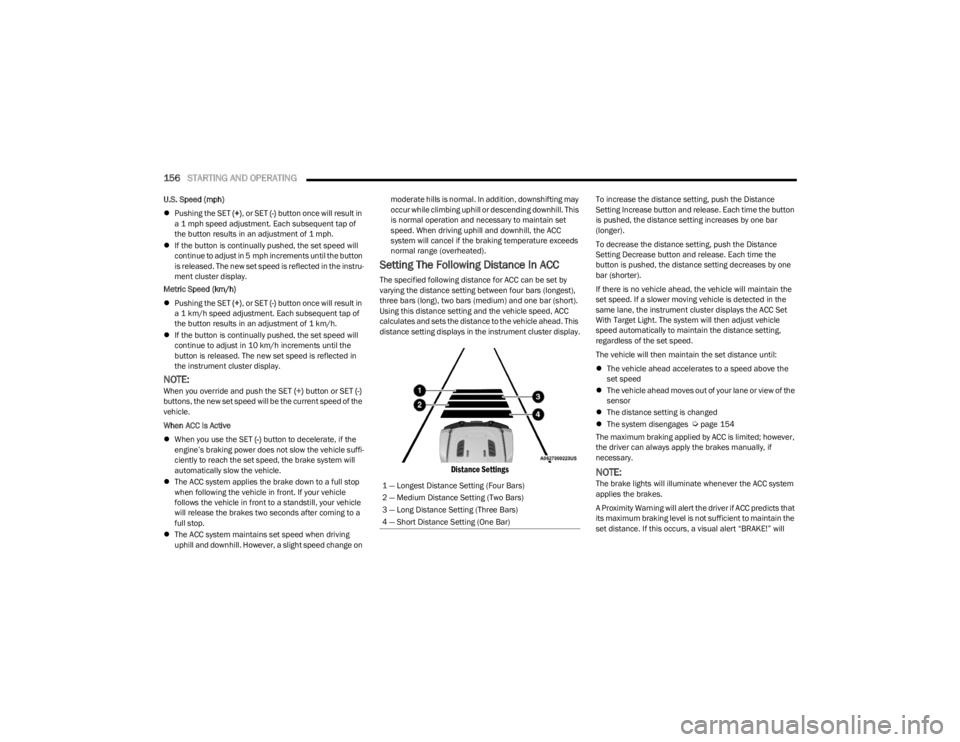
Setting The Following Distance In ACC
The specified following distance for ACC can be set by
varying the distance setting between four bars (longest),
three bars (long), two bars (medium) and one bar (short).
Using this distance setting and the vehicle speed, ACC
calculates and sets the distance to the vehicle ahead. This
distance setting displays in the instrument cluster display.
Distance Settings
To increase the distance setting, push the Distance
Setting Increase button and release. Each time the button
is pushed, the distance setting increases by one bar
(longer).
To decrease the distance setting, push the Distance
Setting Decrease button and release. Each time the
button is pushed, the distance setting decreases by one
bar (shorter).
If there is no vehicle ahead, the vehicle will maintain the
set speed. If a slower moving vehicle is detected in the
same lane, the instrument cluster displays the ACC Set
With Target Light. The system will then adjust vehicle
speed automatically to maintain the distance setting,
regardless of the set speed.
The vehicle will then maintain the set distance until:
The vehicle ahead accelerates to a speed above the
set speed
The vehicle ahead moves out of your lane or view of the
sensor
The distance setting is changed
The system disengages
Úpage 154
The maximum braking applied by ACC is limited; however,
the driver can always apply the brakes manually, if
necessary.
NOTE:The brake lights will illuminate whenever the ACC system
applies the brakes.
A Proximity Warning will alert the driver if ACC predicts that
its maximum braking level is not sufficient to maintain the
set distance. If this occurs, a visual alert “BRAKE!” will
1 — Longest Distance Setting (Four Bars)
2 — Medium Distance Setting (Two Bars)
3 — Long Distance Setting (Three Bars)
4 — Short Distance Setting (One Bar)
23_JL_OM_EN_USC_t.book Page 156
Page 168 of 396
166STARTING AND OPERATING
(Continued)
4. Fill the vehicle with fuel.
NOTE:
When the fuel nozzle “clicks” or shuts off, the fuel
tank is full.
Wait five seconds before removing the fuel nozzle
to allow excess fuel to drain from the nozzle.
5. Remove the fuel nozzle, reinstall fuel cap and close fuel filler door.
NOTE:
When the fuel nozzle “clicks” or shuts off, the fuel tank
is full.
Tighten the fuel filler cap about a quarter turn until you
hear one click. This is an indication that the cap is prop -
erly tightened.
If the fuel filler cap is not tightened properly, the MIL
will come on. Be sure the cap is tightened every time
the vehicle is refueled.
LOOSE FUEL FILLER CAP MESSAGE
After fuel has been added, the vehicle diagnostic system
can determine if the fuel filler cap is possibly loose,
improperly installed, or damaged. If the system detects a
malfunction, the “gASCAP” message will display in the
odometer display. Tighten the gas cap until a "clicking"
sound is heard. This is an indication that the gas cap is
properly tightened. Push the odometer reset button to turn
the message off. If the problem persists, the message will
appear the next time the vehicle is started. This might
indicate a damaged cap. If the problem is detected twice
in a row, the system will turn on the MIL. Resolving the
problem will turn the MIL off.
REFUELING THE VEHICLE — DIESEL ENGINE
(IF EQUIPPED)
The fuel filler cap is located on the driver's side of the
vehicle. If the fuel filler cap is lost or damaged, be sure the
replacement cap is the correct one for this vehicle.
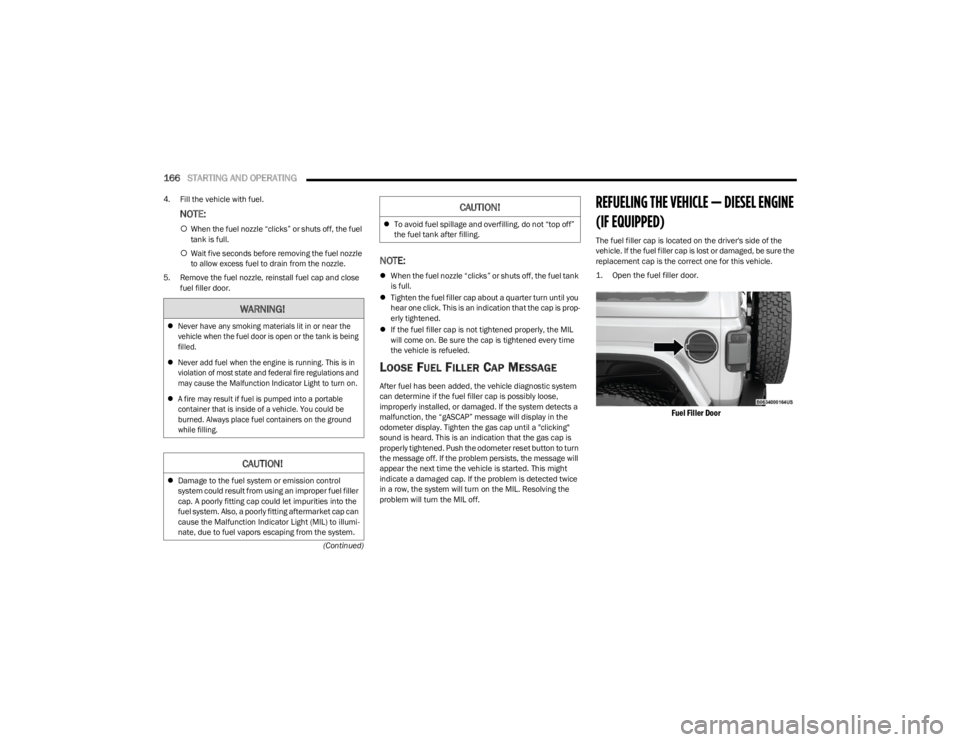
1. Open the fuel filler door.
Fuel Filler Door
WARNING!
Never have any smoking materials lit in or near the
vehicle when the fuel door is open or the tank is being
filled.
Never add fuel when the engine is running. This is in
violation of most state and federal fire regulations and
may cause the Malfunction Indicator Light to turn on.
A fire may result if fuel is pumped into a portable
container that is inside of a vehicle. You could be
burned. Always place fuel containers on the ground
while filling.
CAUTION!
Damage to the fuel system or emission control
system could result from using an improper fuel filler
cap. A poorly fitting cap could let impurities into the
fuel system. Also, a poorly fitting aftermarket cap can
cause the Malfunction Indicator Light (MIL) to illumi -
nate, due to fuel vapors escaping from the system.
To avoid fuel spillage and overfilling, do not “top off”
the fuel tank after filling.
CAUTION!
23_JL_OM_EN_USC_t.book Page 166
Page 174 of 396

172STARTING AND OPERATING
TRAILER HITCH CLASSIFICATION
The following chart provides the industry standard for the maximum trailer weight a given trailer hitch class can tow and should be used to assist you in selecting the correct trailer hitch
for your intended towing condition.
TRAILER TOWING WEIGHTS (MAXIMUM TRAILER WEIGHT RATINGS)
NOTE:The trailer tongue weight must be considered as part of the combined weight of occupants and cargo (i.e., the GVWR), and the GVWR should never exceed the weight referenced on
the Tire And Loading Information Placard Úpage 345.
Trailer Hitch Classification Definitions
Class Max. Trailer Hitch Industry Standards
Class I - Light Duty 2,000 lb (907 kg)
Class II - Medium Duty 3,500 lb (1,587 kg)
Class III - Heavy Duty 6,000 lb (2,721 kg)
Class IV - Extra Heavy Duty 10,000 lb (4,535 kg)
Refer to the “Trailer Towing Weights (Maximum Trailer Weight Ratings)” chart for the Maximum Gross Trailer Weight (GTW) towable for your given drivetrain.
All trailer hitches should be professionally installed on your vehicle.
Engine/Transmission Model GCWRFrontal Area Maximum GTW Maximum Trailer TW
(See Note)
2.0L Two–Door
8,016 lb (3,636 kg) 20 ft2 (1.86 m2) 2,000 lb (907 kg)200 lb (91 kg)
Four–Door 8,117 lb (3,682 kg) 30 ft2 (2.79 m2) 3,500 lb (1,587 kg)350 lb (158 kg)
3.6L Two–Door
8,016 lb (3,636 kg) 20 ft2 (1.86 m2) 2,000 lb (907 kg)200 lb (91 kg)
Four–Door 8,117 lb (3,682 kg) 30 ft2 (2.79 m2) 3,500 lb (1,587 kg)350 lb (158 kg)
3.0L Diesel Four–Door8,427 lb (3,822 kg) 30 ft2 (2.79 m2) 3,500 lb (1,587 kg)350 lb (158 kg)
Refer to local laws for maximum trailer towing speeds.
23_JL_OM_EN_USC_t.book Page 172
Page 176 of 396
174STARTING AND OPERATING
(Continued)
Towing Requirements — Tires
Proper tire inflation pressures are essential to the safe
and satisfactory operation of your vehicle.
Check the trailer tires for proper tire inflation pressures
before trailer usage.
Check for signs of tire wear or visible tire damage
before towing a trailer.
Replacing tires with a higher load carrying capacity will
not increase the vehicle's GVWR and GAWR limits.
For further information
Úpage 345.
Towing Requirements — Trailer Brakes
Do not interconnect the hydraulic brake system or
vacuum system of your vehicle with that of the trailer.
This could cause inadequate braking and possible
personal injury.
An electronically actuated trailer brake controller is
required when towing a trailer with electronically actu -
ated brakes. When towing a trailer equipped with a
hydraulic surge actuated brake system, an electronic
brake controller is not required.
Trailer brakes are recommended for trailers over 1,000
lb (453 kg) and required for trailers in excess of 2,000
lb (907 kg).
Towing Requirements — Trailer Lights And
Wiring
Whenever you pull a trailer, regardless of the trailer size,
stop lights and turn signals on the trailer are required for
motoring safety.
The Trailer Tow Package may include a four- and seven-pin
wiring harness. Use a factory approved trailer harness and
connector.
NOTE:Do not cut or splice wiring into the vehicle’s wiring
harness. The electrical connections are all complete to the vehicle
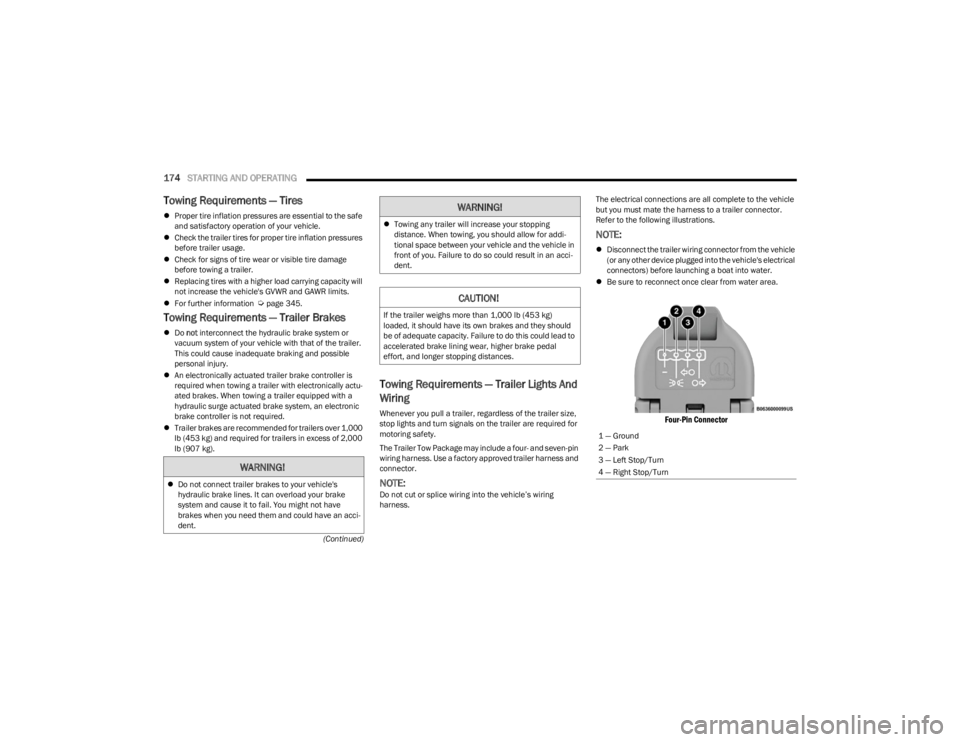
but you must mate the harness to a trailer connector.
Refer to the following illustrations.
NOTE:
Disconnect the trailer wiring connector from the vehicle
(or any other device plugged into the vehicle's electrical
connectors) before launching a boat into water.
Be sure to reconnect once clear from water area.
Four-Pin Connector
WARNING!
Do not connect trailer brakes to your vehicle's
hydraulic brake lines. It can overload your brake
system and cause it to fail. You might not have
brakes when you need them and could have an acci -
dent.
Towing any trailer will increase your stopping
distance. When towing, you should allow for addi -
tional space between your vehicle and the vehicle in
front of you. Failure to do so could result in an acci -
dent.
CAUTION!
If the trailer weighs more than 1,000 lb (453 kg)
loaded, it should have its own brakes and they should
be of adequate capacity. Failure to do this could lead to
accelerated brake lining wear, higher brake pedal
effort, and longer stopping distances.
WARNING!
1 — Ground
2 — Park
3 — Left Stop/Turn
4 — Right Stop/Turn
23_JL_OM_EN_USC_t.book Page 174
Page 177 of 396
STARTING AND OPERATING175
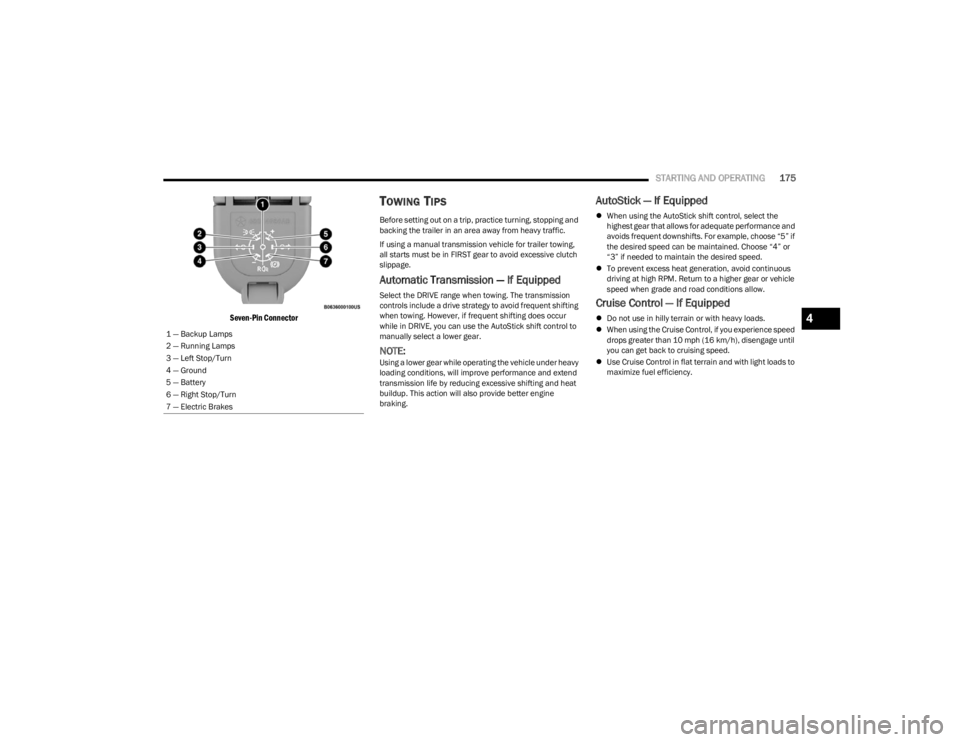
Seven-Pin Connector
TOWING TIPS
Before setting out on a trip, practice turning, stopping and
backing the trailer in an area away from heavy traffic.
If using a manual transmission vehicle for trailer towing,
all starts must be in FIRST gear to avoid excessive clutch
slippage.
Automatic Transmission — If Equipped
Select the DRIVE range when towing. The transmission
controls include a drive strategy to avoid frequent shifting
when towing. However, if frequent shifting does occur
while in DRIVE, you can use the AutoStick shift control to
manually select a lower gear.
NOTE:Using a lower gear while operating the vehicle under heavy
loading conditions, will improve performance and extend
transmission life by reducing excessive shifting and heat
buildup. This action will also provide better engine
braking.
AutoStick — If Equipped
When using the AutoStick shift control, select the
highest gear that allows for adequate performance and
avoids frequent downshifts. For example, choose “5” if
the desired speed can be maintained. Choose “4” or
“3” if needed to maintain the desired speed.
To prevent excess heat generation, avoid continuous
driving at high RPM. Return to a higher gear or vehicle
speed when grade and road conditions allow.
Cruise Control — If Equipped
Do not use in hilly terrain or with heavy loads.
When using the Cruise Control, if you experience speed
drops greater than 10 mph (16 km/h), disengage until
you can get back to cruising speed.
Use Cruise Control in flat terrain and with light loads to
maximize fuel efficiency.
1 — Backup Lamps
2 — Running Lamps
3 — Left Stop/Turn
4 — Ground
5 — Battery
6 — Right Stop/Turn
7 — Electric Brakes4
23_JL_OM_EN_USC_t.book Page 175