flat tire JEEP WRANGLER 2023 Owners Manual
[x] Cancel search | Manufacturer: JEEP, Model Year: 2023, Model line: WRANGLER, Model: JEEP WRANGLER 2023Pages: 396, PDF Size: 25.15 MB
Page 2 of 396
WARNING: Operating, servicing and maintaining a passenger vehicle or off-highway
motor vehicle can expose you to chemicals including engine exhaust, carbon monoxide,
phthalates, and lead, which are known to the State of California to cause cancer and
birth defects or other reproductive harm. To minimize exposure, avoid breathing exhaust,
do not idle the engine except as necessary, service your vehicle in a well-ventilated area
and wear gloves or wash your hands frequently when servicing your vehicle. For more
information go to www.P65Warnings.ca.gov/passenger-vehicle.
The driver’s primary responsibility is the safe operation of the vehicle. Driving while distracted can result in loss of vehicle control, resulting in an accident and personal injury. FCA US LLC strongly recommends that the driver use extreme caution when using any device or feature that may take their attention off the road. Use of any electrical devices, such as cellular telephones, computers, portable radios, vehicle navigation or other devices by the driver while the vehicle is moving is dangerous and could lead to a serious accident. Texting while driving is also dangerous and should never be done while the vehicle is moving. If you find yourself unable to devote your full attention to vehicle operation, pull off the road to a safe location and stop your vehicle. Some states or provinces prohibit the use of cellular telephones or texting while driving. It is always the driver’s responsibility to comply with all local laws.
This Owner’s Manual has been prepared to help you get acquainted with your new Jeep® brand vehicle and to provide a convenient reference source for common questions.
Not all features shown in this manual may apply to your vehicle. For additional information, visit mopar.com/om (USA), owners.mopar.ca (Canada) or your local Jeep® brand dealer.
U.S. Residents: If you are the first registered retail owner of your vehicle, you may obtain a complimentary printed copy of the Warranty Booklet by calling 1-877-426-5337 or by contacting your dealer. Replacement kits can be purchased by visiting www.techauthority.com.
Canadian Residents: If you are the first registered retail owner of your vehicle, you may obtain a complimentary printed copy of the Warranty Booklet or purchase a replacement kit by calling 1-800-387-1143 or by contacting your dealer.
DRIVING AND ALCOHOL
Drunk driving is one of the most frequent causes of accidents. Your driving ability can be seriously impaired with blood alcohol levels far below the legal minimum. If you are drinking, don’t drive. Ride with a designated non-drinking driver, call a cab, a rideshare, a friend or use public transportation.
WARNING
Driving after drinking can lead to an accident. Your perceptions are less sharp, your reflexes are slower and your judgment is impaired when you have been drinking. Never drink and then drive.
This Owner’s Manual illustrates and describes the operation of features and equipment that are either standard or optional on this vehicle. This manual may also include a description of features and equipment that are no longer available or were not ordered on this vehicle. Please disregard any features and equipment described in this manual that are not on this vehicle. FCA US LLC reserves the right to make changes in design and specifications, and/or make additions to or improvements to its products without imposing any obligation upon itself to install them on products previously manufactured.
With respect to any vehicles sold in Canada, the name FCA US LLC shall be deemed to be deleted and the name FCA Canada Inc. used in substitution therefore.
This Owner’s Manual is intended to familiarize you with the important features of your vehicle. Your most up-to-date Owner’s Manual, Navigation/Uconnect manuals and Warranty Booklet can be found by visiting the website on the back cover.
ROADSIDE ASSISTANCE 24 HOURS, 7 DAYS A WEEK AT YOUR SERVICE. CALL 1-800-521-2779 OR VISIT CHRYSLER.RSAHELP.COM (USA) CALL 1-800-363-4869 OR VISIT FCA.ROADSIDEAID.COM (CANADA) SERVICES: Flat Tire Service, Out Of Gas/Fuel Delivery, Battery Jump Assistance, Lockout Service and Towing Service
Please see the Customer Assistance chapter in this Owner’s Manual for further information.
FCA US LLC reserves the right to modify the terms or discontinue the Roadside Assistance Program at any time. The Roadside Assistance Program is subject to restrictions and conditions of use, that are determined solely by FCA US LLC.
Page 123 of 396

GETTING TO KNOW YOUR INSTRUMENT PANEL121
Service Forward Collision Warning (FCW)
Light — If Equipped
This warning light will illuminate to indicate a
fault in the Forward Collision Warning System.
Contact an authorized dealer for service
Úpage 255.
Service Stop/Start System Warning Light —
If Equipped
This warning light will illuminate when the
Stop/Start system is not functioning properly
and service is required. Contact an authorized
dealer for service.
Cruise Control Fault Warning Light
This warning light will illuminate to indicate the
Cruise Control system is not functioning
properly and service is required. Contact an
authorized dealer.
Sway Bar Fault Warning Light
This light will illuminate when there is a fault in
the sway bar disconnect system Úpage 145.
Tire Pressure Monitoring System (TPMS)
Warning Light
The warning light switches on and a message is
displayed to indicate that the tire pressure is
lower than the recommended value and/or
that slow pressure loss is occurring. In these
cases, optimal tire duration and fuel consumption may not
be guaranteed. Should one or more tires be in the condition previously
mentioned, the display will show the indications
corresponding to each tire.
Each tire, including the spare (if provided), should be
checked monthly when cold and inflated to the inflation
pressure recommended by the vehicle manufacturer on
the vehicle placard or tire inflation pressure label. If your
vehicle has tires of a different size than the size indicated
on the vehicle placard or tire inflation pressure label, you
should determine the proper tire inflation pressure for
those tires.
As an added safety feature, your vehicle has been
equipped with a TPMS that illuminates a low tire pressure
telltale when one or more of your tires is significantly
underinflated. Accordingly, when the low tire pressure
telltale illuminates, you should stop and check your tires
as soon as possible, and inflate them to the proper
pressure. Driving on a significantly under inflated tire
causes the tire to overheat and can lead to tire failure.
Underinflation also reduces fuel efficiency and tire tread
life, and may affect the vehicle’s handling and stopping
ability.
Please note that the TPMS is not a substitute for proper
tire maintenance, and it is the driver’s responsibility to
maintain correct tire pressure, even if underinflation has not reached the level to trigger illumination of the TPMS
low tire pressure telltale.
Your vehicle has also been equipped with a TPMS
malfunction indicator to indicate when the system is not
operating properly. The TPMS malfunction indicator is
combined with the low tire pressure telltale. When the
system detects a malfunction, the telltale will flash for
approximately one minute and then remain continuously
illuminated. This sequence will continue upon subsequent
vehicle start-ups as long as the malfunction exists. When
the malfunction indicator is illuminated, the system may
not be able to detect or signal low tire pressure as
intended. TPMS malfunctions may occur for a variety of
reasons, including the installation of replacement or
alternate tires or wheels on the vehicle that prevent the
TPMS from functioning properly. Always check the TPMS
malfunction telltale after replacing one or more tires or
wheels on your vehicle to ensure that the replacement or
alternate tires and wheels allow the TPMS to continue to
function properly.
CAUTION!
Do not continue driving with one or more flat tires as
handling may be compromised. Stop the vehicle, avoid
-
ing sharp braking and steering. If a tire puncture occurs,
repair immediately using the dedicated tire repair kit and
contact an authorized dealer as soon as possible.
CAUTION!
The TPMS has been optimized for the original equip -
ment tires and wheels. TPMS pressures and warning
have been established for the tire size equipped on
your vehicle. Undesirable system operation or sensor
damage may result when using replacement equipment
that is not of the same size, type, and/or style. After -
market wheels can cause sensor damage. Using after -
market tire sealants may cause the Tire Pressure
Monitoring System (TPMS) sensor to become inopera -
ble. After using an aftermarket tire sealant it is recom -
mended that you take your vehicle to an authorized
dealer to have your sensor function checked.
3
23_JL_OM_EN_USC_t.book Page 121
Page 143 of 396
STARTING AND OPERATING141
FOUR-POSITION TRANSFER CASE —
I
F EQUIPPED
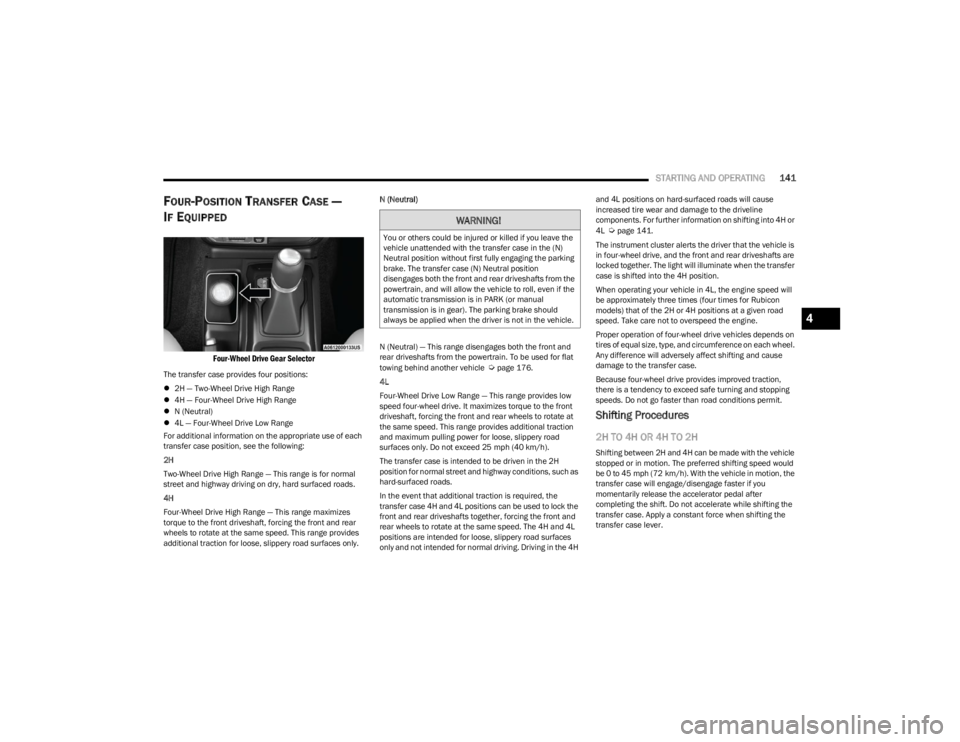
Four-Wheel Drive Gear Selector
The transfer case provides four positions:
2H — Two-Wheel Drive High Range
4H — Four-Wheel Drive High Range
N (Neutral)
4L — Four-Wheel Drive Low Range
For additional information on the appropriate use of each
transfer case position, see the following:
2H
Two-Wheel Drive High Range — This range is for normal
street and highway driving on dry, hard surfaced roads.
4H
Four-Wheel Drive High Range — This range maximizes
torque to the front driveshaft, forcing the front and rear
wheels to rotate at the same speed. This range provides
additional traction for loose, slippery road surfaces only. N (Neutral)
N (Neutral) — This range disengages both the front and
rear driveshafts from the powertrain. To be used for flat
towing behind another vehicle Úpage 176.
4L
Four-Wheel Drive Low Range — This range provides low
speed four-wheel drive. It maximizes torque to the front
driveshaft, forcing the front and rear wheels to rotate at
the same speed. This range provides additional traction
and maximum pulling power for loose, slippery road
surfaces only. Do not exceed 25 mph (40 km/h).
The transfer case is intended to be driven in the 2H
position for normal street and highway conditions, such as
hard-surfaced roads.
In the event that additional traction is required, the
transfer case 4H and 4L positions can be used to lock the
front and rear driveshafts together, forcing the front and
rear wheels to rotate at the same speed. The 4H and 4L
positions are intended for loose, slippery road surfaces
only and not intended for normal driving. Driving in the 4H and 4L positions on hard-surfaced roads will cause
increased tire wear and damage to the driveline
components. For further information on shifting into 4H or
4L
Úpage 141.
The instrument cluster alerts the driver that the vehicle is
in four-wheel drive, and the front and rear driveshafts are
locked together. The light will illuminate when the transfer
case is shifted into the 4H position.
When operating your vehicle in 4L, the engine speed will
be approximately three times (four times for Rubicon
models) that of the 2H or 4H positions at a given road
speed. Take care not to overspeed the engine.
Proper operation of four-wheel drive vehicles depends on
tires of equal size, type, and circumference on each wheel.
Any difference will adversely affect shifting and cause
damage to the transfer case.
Because four-wheel drive provides improved traction,
there is a tendency to exceed safe turning and stopping
speeds. Do not go faster than road conditions permit.
Shifting Procedures
2H TO 4H OR 4H TO 2H
Shifting between 2H and 4H can be made with the vehicle
stopped or in motion. The preferred shifting speed would
be 0 to 45 mph (72 km/h). With the vehicle in motion, the transfer case will engage/disengage faster if you
momentarily release the accelerator pedal after
completing the shift. Do not accelerate while shifting the
transfer case. Apply a constant force when shifting the
transfer case lever.
WARNING!
You or others could be injured or killed if you leave the
vehicle unattended with the transfer case in the (N)
Neutral position without first fully engaging the parking
brake. The transfer case (N) Neutral position
disengages both the front and rear driveshafts from the
powertrain, and will allow the vehicle to roll, even if the
automatic transmission is in PARK (or manual
transmission is in gear). The parking brake should
always be applied when the driver is not in the vehicle.
4
23_JL_OM_EN_USC_t.book Page 141
Page 145 of 396

STARTING AND OPERATING143
N (Neutral)
Neutral — This range disengages both the front and rear
driveshafts from the powertrain. To be used for flat towing
behind another vehicle
Úpage 176.
4L
Four-Wheel Drive Low Range — This range provides low
speed four-wheel drive. It maximizes torque to the front
driveshaft, forcing the front and rear wheels to rotate at
the same speed. This range provides additional traction
and maximum pulling power for loose, slippery road
surfaces only. Do not exceed 25 mph (40 km/h).
This transfer case is designed to be driven in the
two-wheel drive position (2H) or four-wheel drive position
(4H AUTO) for normal street and highway conditions on dry
hard surfaced roads.
For variable driving conditions, the 4H AUTO mode can be
used. In this mode, the front axle is engaged, but the
vehicle's power is sent to the rear wheels. Four-wheel drive
will be automatically engaged when the vehicle senses a loss of traction. Because the front axle is engaged, this
mode will result in lower fuel economy than the 2H mode.
In the event that additional traction is required, the
transfer case 4H and 4L positions can be used to lock the
front and rear driveshafts together, forcing the front and
rear wheels to rotate at the same speed. The 4H and 4L
positions are intended for loose, slippery road surfaces
only and not intended for normal driving. Driving in the 4H
and 4L positions on hard-surfaced roads will cause
increased tire wear and damage to the driveline
components. For further information on shifting into 4H or
4L
Úpage 143.
The instrument cluster alerts the driver that the vehicle is
in four-wheel drive, and the front and rear driveshafts are
locked together. The light will illuminate when the transfer
case is shifted into the 4H position.
When operating your vehicle in 4L, the engine speed will
be approximately three times (four times for Rubicon
models) that of the 2H or 4H positions at a given road
speed. Take care not to overspeed the engine.
Proper operation of four-wheel drive vehicles depends on
tires of equal size, type, and circumference on each wheel.
Any difference will adversely affect shifting and cause
damage to the transfer case.
Because four-wheel drive provides improved traction,
there is a tendency to exceed safe turning and stopping
speeds. Do not go faster than road conditions permit.
Shifting Procedures
2H TO 4H AUTO OR 4H AUTO TO 2H
Shifting between 2H and 4H AUTO can be made with the
vehicle stopped or in motion. The preferred shifting speed would be 0 to 45 mph (72 km/h). With the vehicle in
motion, the transfer case will engage/disengage faster if
you momentarily release the accelerator pedal after
completing the shift. Do not accelerate while shifting the
transfer case. Apply a constant force when shifting the
transfer case lever.
2H/4H AUTO TO 4H PART TIME OR 4H PART
TIME TO 2H/4H AUTO
Shifting between 2H/4H AUTO to 4H PART TIME can be
made with the vehicle stopped or in motion. The preferred
shifting speed would be 0 to 45 mph (72 km/h). With the
vehicle in motion, the transfer case will engage/disengage
faster if you momentarily release the accelerator pedal
after completing the shift. Do not accelerate while shifting
the transfer case. Apply a constant force when shifting the
transfer case lever.
NOTE:
Do not attempt to make a shift while only the front or
rear wheels are spinning. The front and rear driveshaft
speeds must be equal for the shift to take place.
Shifting while only the front or rear wheels are spinning
can cause damage to the transfer case.
Delayed shifts out of four-wheel drive may be experi -
enced due to uneven tire wear, low or uneven tire pres -
sures, excessive vehicle loading, or cold temperatures.
Shifting effort will increase with speed, this is normal.
During cold weather, you may experience increased effort
in shifting until the transfer case fluid warms up. This is
normal.
WARNING!
You or others could be injured or killed if you leave the
vehicle unattended with the transfer case in the (N)
Neutral position without first fully engaging the parking
brake. The transfer case (N) Neutral position
disengages both the front and rear driveshafts from the
powertrain, and will allow the vehicle to roll, even if the
automatic transmission is in PARK (or manual
transmission is in gear). The parking brake should
always be applied when the driver is not in the vehicle.
4
23_JL_OM_EN_USC_t.book Page 143
Page 172 of 396

170STARTING AND OPERATING
Payload
The payload of a vehicle is defined as the allowable load
weight a truck can carry, including the weight of the driver,
all passengers, options and cargo.
Gross Axle Weight Rating (GAWR)
The GAWR is the maximum permissible load on the front
and rear axles. The load must be distributed in the cargo
area so that the GAWR of each axle is not exceeded.
Each axle GAWR is determined by the components in the
system with the lowest load carrying capacity (axle,
springs, tires or wheels). Heavier axles or suspension
components sometimes specified by purchasers for
increased durability do not necessarily increase the
vehicle's GVWR.
Tire Size
The tire size on the Vehicle Certification Label represents
the actual tire size on your vehicle. Replacement tires
must be equal to the load capacity of this tire size.
Rim Size
This is the rim size that is appropriate for the tire size
listed.
Inflation Pressure
This is the cold tire inflation pressure for your vehicle for
all loading conditions up to full GAWR.
Curb Weight
The curb weight of a vehicle is defined as the total weight
of the vehicle with all fluids, including vehicle fuel, at full
capacity conditions, and with no occupants or cargo
loaded into the vehicle. The front and rear curb weight values are determined by weighing your vehicle on a
commercial scale before any occupants or cargo are
added.
Loading
The actual total weight and the weight of the front and rear
of your vehicle at the ground can best be determined by
weighing it when it is loaded and ready for operation.
The entire vehicle should first be weighed on a commercial
scale to ensure that the GVWR has not been exceeded.
The weight on the front and rear of the vehicle should then
be determined separately to be sure that the load is
properly distributed over the front and rear axle. Weighing
the vehicle may show that the GAWR of either the front or
rear axles has been exceeded but the total load is within
the specified GVWR. If so, weight must be shifted from
front to rear or rear to front as appropriate until the
specified weight limitations are met. Store the heavier
items down low and be sure that the weight is distributed
equally. Stow all loose items securely before driving.
Improper weight distributions can have an adverse effect
on the way your vehicle steers and handles and the way
the brakes operate.
TRAILER TOWING
In this section you will find safety tips and information on
limits to the type of towing you can reasonably do with your
vehicle. Before towing a trailer, carefully review this
information to tow your load as efficiently and safely as
possible.
To maintain the New Vehicle Limited Warranty coverage,
follow the requirements and recommendations in this
manual concerning vehicles used for trailer towing.
COMMON TOWING DEFINITIONS
The following trailer towing related definitions will assist
you in understanding the following information:
Gross Vehicle Weight Rating (GVWR)
The GVWR is the total allowable weight of your vehicle.
This includes driver, passengers, cargo and tongue
weight. The total load must be limited so that you do not
exceed the GVWR
Úpage 169.
Gross Trailer Weight (GTW)
The GTW is the weight of the trailer plus the weight of all
cargo, consumables and equipment (permanent or
temporary) loaded in or on the trailer in its "loaded and
ready for operation" condition.
The recommended way to measure GTW is to put your fully
loaded trailer on a vehicle scale. The entire weight of the
trailer must be supported by the scale.
WARNING!
Do not load your vehicle any heavier than the GVWR or
the maximum front and rear GAWR. If you do, parts on
your vehicle can break, or it can change the way your
vehicle handles. This could cause you to lose control.
Overloading can shorten the life of your vehicle.
23_JL_OM_EN_USC_t.book Page 170
Page 176 of 396
174STARTING AND OPERATING
(Continued)
Towing Requirements — Tires
Proper tire inflation pressures are essential to the safe
and satisfactory operation of your vehicle.
Check the trailer tires for proper tire inflation pressures
before trailer usage.
Check for signs of tire wear or visible tire damage
before towing a trailer.
Replacing tires with a higher load carrying capacity will
not increase the vehicle's GVWR and GAWR limits.
For further information
Úpage 345.
Towing Requirements — Trailer Brakes
Do not interconnect the hydraulic brake system or
vacuum system of your vehicle with that of the trailer.
This could cause inadequate braking and possible
personal injury.
An electronically actuated trailer brake controller is
required when towing a trailer with electronically actu -
ated brakes. When towing a trailer equipped with a
hydraulic surge actuated brake system, an electronic
brake controller is not required.
Trailer brakes are recommended for trailers over 1,000
lb (453 kg) and required for trailers in excess of 2,000
lb (907 kg).
Towing Requirements — Trailer Lights And
Wiring
Whenever you pull a trailer, regardless of the trailer size,
stop lights and turn signals on the trailer are required for
motoring safety.
The Trailer Tow Package may include a four- and seven-pin
wiring harness. Use a factory approved trailer harness and
connector.
NOTE:Do not cut or splice wiring into the vehicle’s wiring
harness. The electrical connections are all complete to the vehicle
but you must mate the harness to a trailer connector.
Refer to the following illustrations.
NOTE:
Disconnect the trailer wiring connector from the vehicle
(or any other device plugged into the vehicle's electrical
connectors) before launching a boat into water.
Be sure to reconnect once clear from water area.
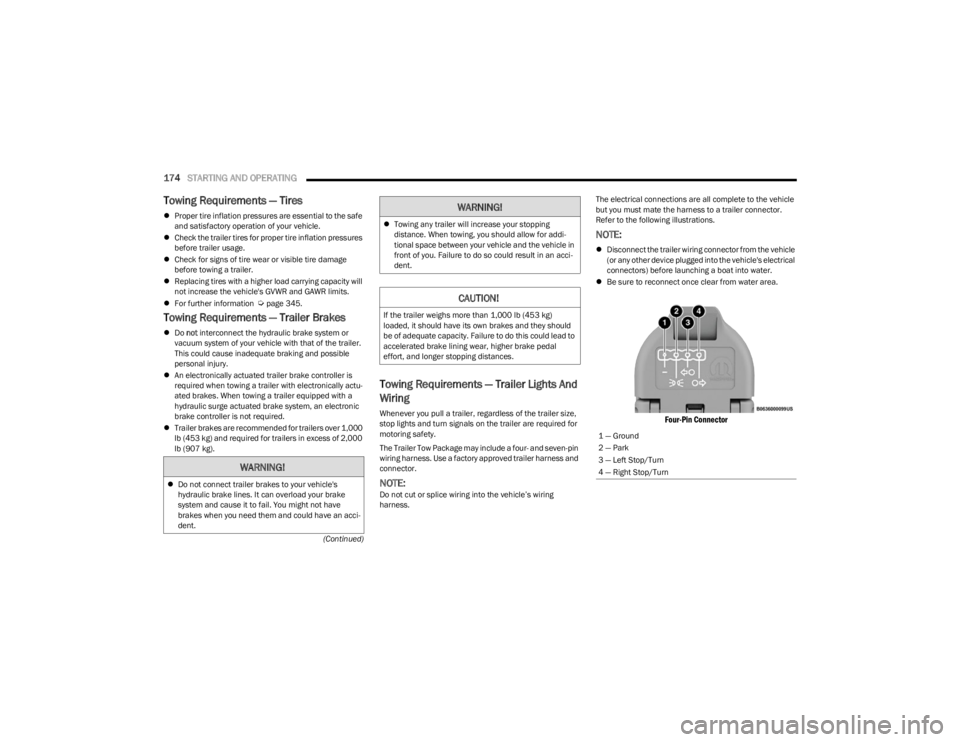
Four-Pin Connector
WARNING!
Do not connect trailer brakes to your vehicle's
hydraulic brake lines. It can overload your brake
system and cause it to fail. You might not have
brakes when you need them and could have an acci -
dent.
Towing any trailer will increase your stopping
distance. When towing, you should allow for addi -
tional space between your vehicle and the vehicle in
front of you. Failure to do so could result in an acci -
dent.
CAUTION!
If the trailer weighs more than 1,000 lb (453 kg)
loaded, it should have its own brakes and they should
be of adequate capacity. Failure to do this could lead to
accelerated brake lining wear, higher brake pedal
effort, and longer stopping distances.
WARNING!
1 — Ground
2 — Park
3 — Left Stop/Turn
4 — Right Stop/Turn
23_JL_OM_EN_USC_t.book Page 174
Page 182 of 396

180STARTING AND OPERATING
SAND
Soft sand is very difficult to travel through with full tire
pressure. When crossing soft, sandy spots in a trail,
maintain your vehicle's momentum and do not stop. The
key to driving in soft sand is using the appropriate tire
pressure, accelerating slowly, avoiding abrupt maneuvers
and maintaining the vehicle's momentum. If you are going
to be driving on large soft sandy areas or dunes, reduce
your tire pressure to a minimum of 15 psi (103 kPa) to
allow for a greater tire surface area. Reduced tire pressure
will drastically improve your traction and handling while
driving on the soft sand, but you must return the tires to
normal air pressure before driving on pavement or other
hard surfaces. Be sure you have a way to reinflate the tires
prior to reducing the pressure.
Crossing Obstacles (Rocks And Other
High Points)
While driving off-road, you will encounter many types of
terrain. These varying types of terrain bring different types
of obstacles. Before proceeding, review the path ahead to
determine the correct approach and your ability to safely
recover the vehicle if something goes wrong. Keeping a
firm grip on the steering wheel, bring the vehicle to a
complete stop and then inch the vehicle forward until it
makes contact with the object. Apply the throttle lightly while holding a light brake pressure and ease the vehicle
up and over the object.
USING A SPOTTER
There are many times where it is hard to see the obstacle
or determine the correct path. Determining the correct
path can be extremely difficult when you are confronting
many obstacles. In these cases have someone guide you
over, through, or around the obstacle. Have the person
stand a safe distance in front of you where they can see
the obstacle, watch your tires and undercarriage, and
guide you through.
CROSSING LARGE ROCKS
When approaching large rocks, choose a path which
ensures you drive over the largest of them with your tires.
This will lift your undercarriage over the obstacle. The
tread of the tire is tougher and thicker than the side wall
and is designed to take the abuse. Always look ahead and
make every effort to cross the large rocks with your tires.
CROSSING A RAVINE, GULLY, DITCH,
WASHOUT OR RUT
When crossing a ravine, gully, ditch, washout or a large rut,
the angled approach is the key to maintaining your
vehicle's mobility. Approach these obstacles at a
45-degree angle and let each tire go through the obstacle
independently. You need to use caution when crossing
large obstacles with steep sides. Do not attempt to cross
any large obstacle with steep sides at an angle great
enough to put the vehicle at risk of a rollover. If you get
caught in a rut, dig a small trench to the right or left at a
45-degree angle ahead of the front tires. Use the removed
dirt to fill the rut ahead of the turnout you just created. You
should now be able to drive out following the trench you
just created at a 45-degree angle.
CROSSING LOGS
To cross a log, approach it at a slight angle (approximately
10 to 15 degrees). This allows one front tire to be on top
of the log while the other just starts to climb the log. While
climbing the log, modulate your brake and accelerator to
avoid spinning the log out from under your tires. Then ease
the vehicle off the log using your brakes.
CAUTION!
Reduced tire pressures may cause tire unseating and
total loss of air pressure. To reduce the risk of tire
unseating, while at a reduced tire pressure, reduce your
speed and avoid sharp turns or abrupt maneuvers.
WARNING!
Crossing obstacles can cause abrupt steering system
loading which could cause you to lose control of your
vehicle.
CAUTION!
Never attempt to straddle a rock that is large enough
to strike your axles or undercarriage.
Never attempt to drive over a rock which is large
enough to contact the door sills.
WARNING!
There is an increased risk of rollover when crossing an
obstacle, at any angle, with steep sides.
23_JL_OM_EN_USC_t.book Page 180
Page 234 of 396

232MULTIMEDIA
Working Vehicle Conditions
The vehicle must be off or in ACC mode.
The vehicle has been started with the key fob within the
last 14 days.
The vehicle must be in PARK or at a standstill.
The vehicle’s security system has been armed and not
triggered since the last vehicle start.
The doors, hood, and trunk/liftgate are closed.
The vehicle’s check engine light must be off.
The vehicle must have at least a quarter tank of fuel,
along with oil and battery power.
The vehicle’s hazard lights must be off.
If equipped, the vehicle must have an automatic trans -
mission.
The vehicle must be in an open area with cell tower
reception.
Your mobile device must have a cellular or Wi-Fi
connection.
If the Panic button has been pressed, the vehicle must
be started at least once after alarming the system.
NOTE:The SiriusXM Guardian™ Customer Care agents are not
authorized for Remote Vehicle Start services. Contact the
Uconnect Care Team for assistance.
Remote Horn & Lights
Description
It is easy to locate a vehicle in a dark, crowded or noisy
parking area by activating the horn and lights. It may also
help if you need to draw attention to your vehicle for any
reason. If you want, you can set up push notifications every time a
command is sent to turn on the horn and lights.
Working Vehicle Conditions
The vehicle must in PARK or at a standstill.
The vehicle must be in an open area with cell tower
reception.
Your mobile device must have a cellular or Wi-Fi
connection.
NOTE:The Remote Horn & Lights feature is designed to be loud
and get noticed. Please keep in mind the surroundings
when using this feature. You are responsible for
compliance with local laws, rules and ordinances in the
location of your vehicle when using Remote Horn & Lights.
Assist — If Equipped
Description
Vehicles equipped with the SiriusXM Guardian™
connected services feature may contain an ASSIST button
in the vehicle. Once your SiriusXM Guardian™ connected
services have been activated, the ASSIST button can
connect you directly to the Customer Care call center (if
equipped). You will be directed to one of the following four
services:
Roadside Assistance — If you get a flat tire or need a
tow, you’ll be connected to someone who can help
anytime.
Connected Services — Contact the SiriusXM
Guardian™ Customer Care call center to activate your
services, renew after your trial has expired, for
in-vehicle support for your SiriusXM Guardian™ connected services, or help answering any general
questions surrounding your connected services.
Uconnect Care — In-vehicle support for all
non-connected Uconnect system features, such as
radio and Bluetooth® connections.
Vehicle Care — Total support for your vehicle.
SiriusXM Guardian™ In-Vehicle Assistance Features —
If Equipped
With SiriusXM Guardian™, your vehicle has onboard
assistance features located on the rearview mirror or
overhead console designed to enhance your driving
experience if you should ever need assistance or support.
How It Works
Simply push the ASSIST button in the vehicle and you will
be presented with your ASSIST options on the
touchscreen. Make your selection by pressing the
touchscreen.
Requirements
This feature is available only on vehicles sold in the US
and Canada.
Vehicle must be properly equipped with the SiriusXM
Guardian™ connected services.
Vehicle must have an operable LTE (voice/data) or 4G
(data) network connection.
Vehicle must be registered with SiriusXM Guardian™
and have an active subscription that includes the appli -
cable feature.
Vehicle must be powered in the ON/RUN or ACC (Acces -
sory) position with a properly functioning electrical
system.
23_JL_OM_EN_USC_t.book Page 232
Page 248 of 396

246SAFETY
(Continued)
NOTE:ERM is disabled any time the ESC is in “Full Off” mode (if
equipped) Úpage 246.
Electronic Stability Control (ESC)
ESC enhances directional control and stability of the
vehicle under various driving conditions. ESC corrects for
oversteering or understeering of the vehicle by applying
the brake of the appropriate wheel(s) to counteract these
conditions. Engine power may also be reduced to help the
vehicle maintain the desired path.
Oversteer — when the vehicle is turning more than
appropriate for the steering wheel position.
Understeer — when the vehicle is turning less than
appropriate for the steering wheel position.
ESC uses sensors in the vehicle to determine the vehicle
path intended by the driver and compares it to the actual
path of the vehicle. When the actual path does not match
the intended path, ESC applies the brake of the
appropriate wheel to assist in counteracting the oversteer
or understeer condition. The ESC Activation/Malfunction Indicator Light located in
the instrument cluster will start to flash as soon as the ESC
system becomes active. The ESC Activation/Malfunction
Indicator Light also flashes when the TCS is active. If the
ESC Activation/Malfunction Indicator Light begins to flash
during acceleration, ease up on the accelerator and apply
as little throttle as possible. Be sure to adapt your speed
and driving to the prevailing road conditions.
ESC Operating Modes
Depending upon model and mode of operation, the ESC
system may have multiple operating modes.
ESC On
“ESC On” is the normal operating mode for the ESC.
Whenever the vehicle is started, the ESC system will be in
this mode. This mode should be used for most driving
conditions. Alternate ESC modes should only be used for
specific reasons as noted in the following paragraphs.
Partial Off
This mode may be useful if the vehicle becomes stuck.
This mode may modify TCS and ESC thresholds for
activation, which allows for more wheel spin than normally
allowed.
WARNING!
Many factors, such as vehicle loading, road conditions
and driving conditions, influence the chance that wheel
lift or rollover may occur. ERM cannot prevent all wheel
lift or rollovers, especially those that involve leaving the
roadway or striking objects or other vehicles. The capa-
bilities of an ERM-equipped vehicle must never be
exploited in a reckless or dangerous manner which
could jeopardize the user's safety or the safety of oth
-
ers.
WARNING!
Electronic Stability Control (ESC) cannot prevent the
natural laws of physics from acting on the vehicle,
nor can it increase the traction afforded by prevailing
road conditions. ESC cannot prevent accidents,
including those resulting from excessive speed in
turns, driving on very slippery surfaces, or hydro -
planing. ESC also cannot prevent accidents resulting
from loss of vehicle control due to inappropriate
driver input for the conditions. Only a safe, attentive,
and skillful driver can prevent accidents. The capabil -
ities of an ESC equipped vehicle must never be
exploited in a reckless or dangerous manner which
could jeopardize the user’s safety or the safety of
others.
Vehicle modifications, or failure to properly maintain
your vehicle, may change the handling characteris -
tics of your vehicle, and may negatively affect the
performance of the ESC system. Changes to the
steering system, suspension, braking system, tire
type and size or wheel size may adversely affect ESC
performance. Improperly inflated and unevenly worn
tires may also degrade ESC performance. Any vehicle
modification or poor vehicle maintenance that
reduces the effectiveness of the ESC system can
increase the risk of loss of vehicle control, vehicle
rollover, personal injury and death.
WARNING!
23_JL_OM_EN_USC_t.book Page 246
Page 259 of 396

SAFETY257
Service FCW Warning
If the system turns off, and the instrument cluster
displays:
ACC/FCW Unavailable Service Required
Cruise/FCW Unavailable Service Required
This indicates there is an internal system fault. Although
the vehicle is still drivable under normal conditions, have
the system checked by an authorized dealer.
TIRE PRESSURE MONITORING SYSTEM
(TPMS)
The Tire Pressure Monitoring System (TPMS) will warn the
driver of a low tire pressure based on the vehicle
recommended cold placard pressure.
NOTE:The alert warning on the cluster will stay on until the tire is
inflated to the placard pressure.
The tire pressure will vary with temperature by
approximately 1 psi (7 kPa) for every 12°F (6.5°C). This
means that when the outside temperature decreases, the
tire pressure will decrease. Tire pressure should always be
set based on cold inflation tire pressure. This is defined as
the tire pressure after the vehicle has not been driven for
at least three hours, or driven less than 1 mile (1.6 km)
after a three hour period. The cold tire inflation pressure
must not exceed the maximum inflation pressure molded
into the tire sidewall. The tire pressure will also increase
as the vehicle is driven. This is normal and there should be
no adjustment for this increased pressure.
See
Úpage 345 on how to properly inflate the vehicle’s
tires. The TPMS will warn the driver of a low tire pressure if the
tire pressure falls below the low-pressure warning limit for
any reason, including low temperature effects and natural
pressure loss through the tire.
The TPMS will continue to warn the driver of low tire
pressure as long as the condition exists, and will not turn
off until the tire pressure is at or above the recommended
cold placard pressure. Once the low tire pressure warning
(Tire Pressure Monitoring System Warning Light)
illuminates, you must increase the tire pressure to the
recommended cold placard pressure in order for the
TPMS Warning Light to turn off.
NOTE:When filling warm tires, the tire pressure may need to be
increased up to an additional 4 psi (28 kPa) above the
recommended cold placard pressure in order to turn the
TPMS Warning Light off.
The system will automatically update and the TPMS
Warning Light will turn off once the system receives the
updated tire pressures. The vehicle may need to be driven
for up to 20 minutes above 15 mph (24 km/h) in order for
the TPMS to receive this information.
For example, your vehicle may have a recommended cold
(parked for more than three hours) placard pressure of
33 psi (227 kPa). If the ambient temperature is 68°F
(20°C) and the measured tire pressure is 28 psi
(193 kPa), a temperature drop to 20°F (-7°C) will
decrease the tire pressure to approximately 24 psi
(165 kPa). This tire pressure is low enough to turn on the
TPMS Warning Light. Driving the vehicle may cause the tire
pressure to rise to approximately 28 psi (193 kPa), but the
TPMS Warning Light will still be on. In this situation, the
TPMS Warning Light will turn off only after the tires are
inflated to the vehicle’s recommended cold placard
pressure value
Úpage 381.
NOTE:When filling warm tires, the tire pressure may need to be
increased up to an additional 4 psi (28 kPa) above the
recommended cold placard pressure in order to turn the
TPMS Warning Light off.
CAUTION!
The TPMS has been optimized for the original equip -
ment tires and wheels. TPMS pressures and warning
have been established for the tire size equipped on
your vehicle. Undesirable system operation or sensor
damage may result when using replacement equip -
ment that is not of the same size, type, and/or style.
The TPMS sensor is not designed for use on after -
market wheels, and may contribute to a poor overall
system performance. Customers are encouraged to
use Original Equipment Manufacturer (OEM) wheels
to ensure TPMS feature operation.
Using aftermarket tire sealants may cause the Tire
Pressure Monitoring System (TPMS) sensor to
become inoperable. After using an aftermarket tire
sealant it is recommended that you take your vehicle
to an authorized dealer to have your sensor function
checked.
After inspecting or adjusting the tire pressure always
reinstall the valve stem cap. This will prevent mois -
ture and dirt from entering the valve stem, which
could damage the TPMS sensor.
6
23_JL_OM_EN_USC_t.book Page 257