fuel JEEP WRANGLER UNLIMITED 2014 Owners Manual
[x] Cancel search | Manufacturer: JEEP, Model Year: 2014, Model line: WRANGLER UNLIMITED, Model: JEEP WRANGLER UNLIMITED 2014Pages: 140, PDF Size: 12.72 MB
Page 10 of 140
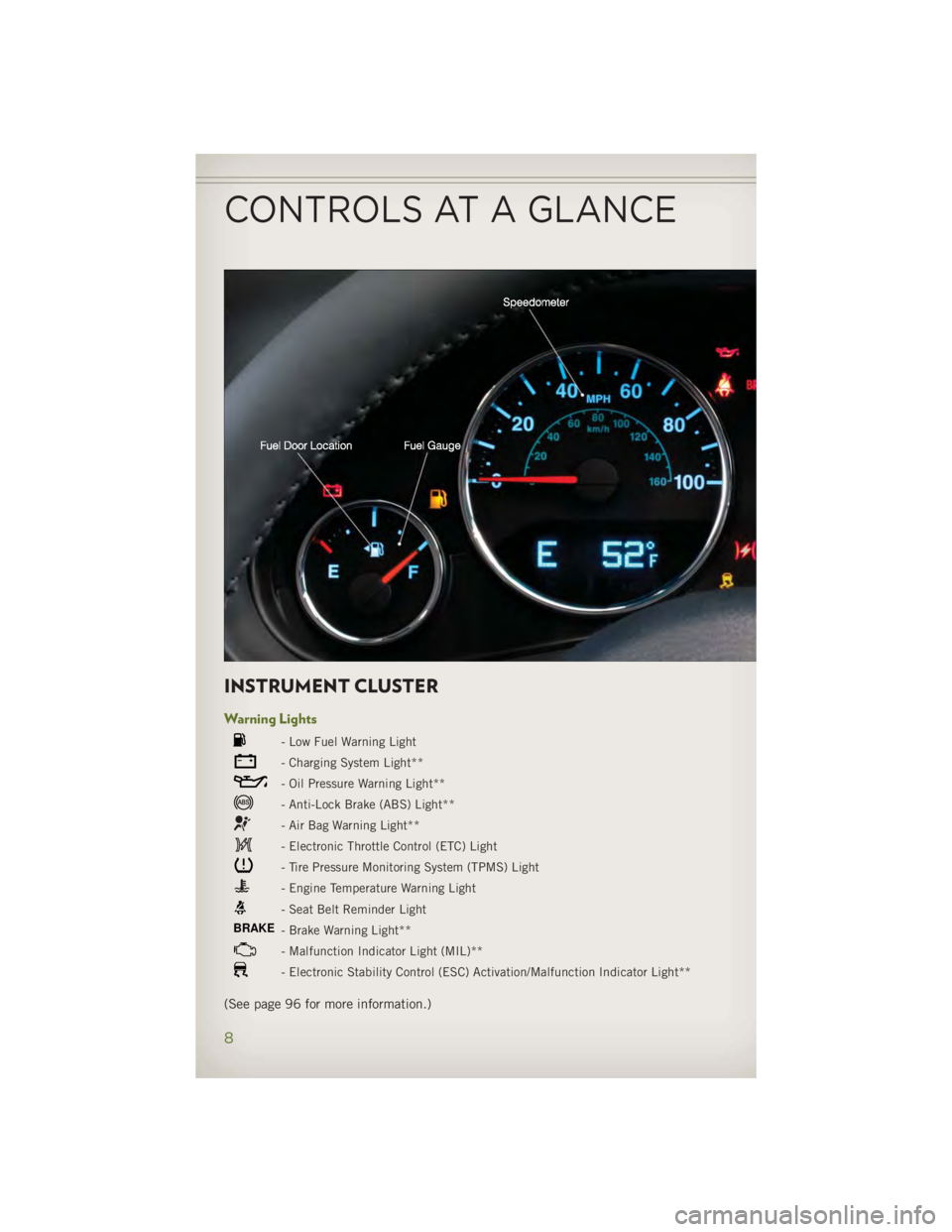
INSTRUMENT CLUSTER Warning Lights - Low Fuel Warning Light
- Charging System Light**
- Oil Pressure Warning Light**
- Anti-Lock Brake (ABS) Light**
- Air Bag Warning Light**
- Electronic Throttle Control (ETC) Light
- Tire Pressure Monitoring System (TPMS) Light
- Engine Temperature Warning Light
- Seat Belt Reminder Light
BRAKE
- Brake Warning Light**
- Malfunction Indicator Light (MIL)**
- Electronic Stability Control (ESC) Activation/Malfunction Indicator Light**
(See page 96 for more information.)CONTROLS AT A GLANCE
8
Page 11 of 140
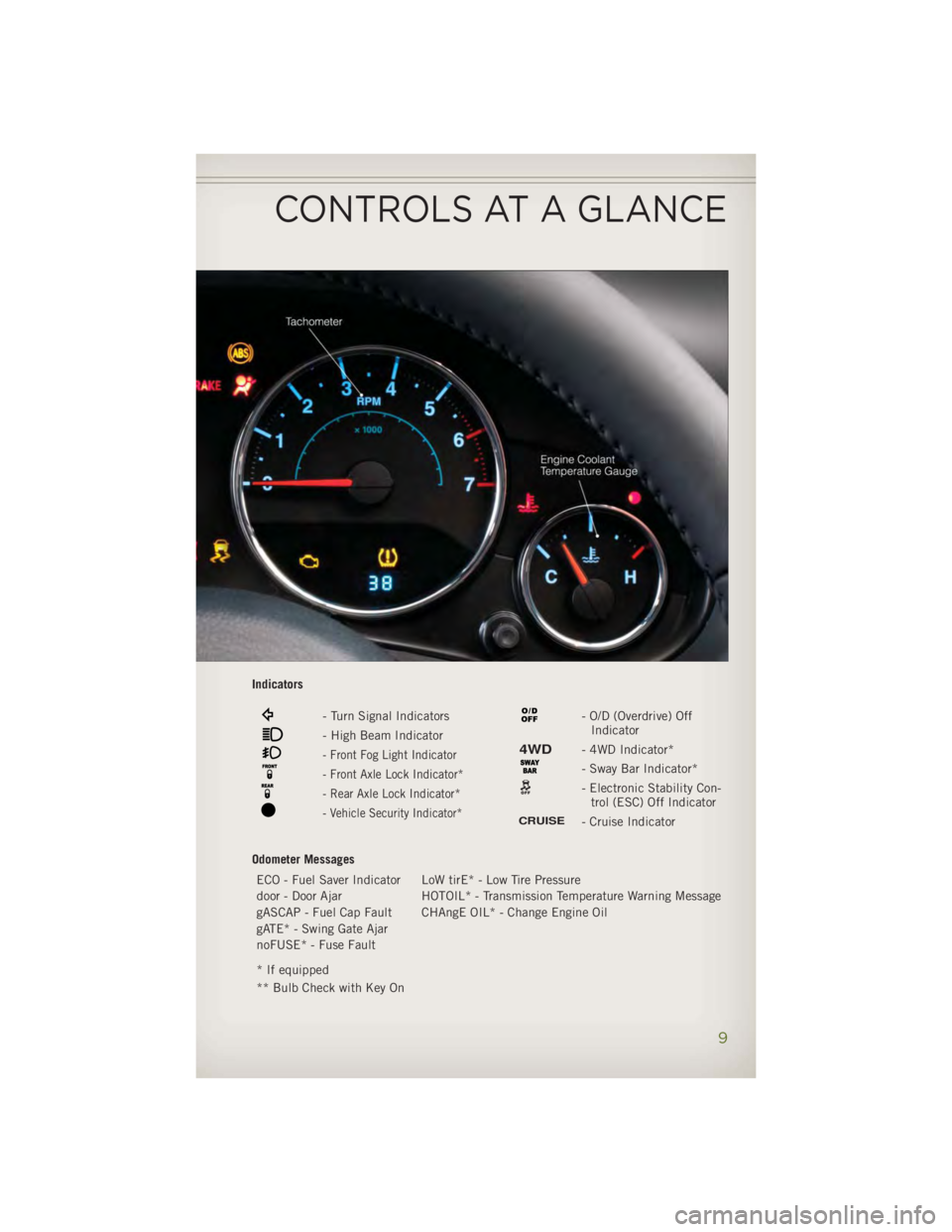
Indicators
- Turn Signal Indicators
- High Beam Indicator
- Front Fog Light Indicator
- Front Axle Lock Indicator*
- Rear Axle Lock Indicator*
- Vehicle Security Indicator* - O/D (Overdrive) Off
Indicator
4WD - 4WD Indicator*
- Sway Bar Indicator*
- Electronic Stability Con-
trol (ESC) Off IndicatorCRUISE
- Cruise Indicator
Odometer Messages
ECO - Fuel Saver Indicator LoW tirE* - Low Tire Pressure
door - Door Ajar HOTOIL* - Transmission Temperature Warning Message
gASCAP - Fuel Cap Fault CHAngE OIL* - Change Engine Oil
gATE* - Swing Gate Ajar
noFUSE* - Fuse Fault
* If equipped
** Bulb Check with Key OnCONTROLS AT A GLANCE
9
Page 78 of 140
SiriusXM Travel Link (Uconnect® 730N & Uconnect® 430N Only) NOTE:
• SiriusXM Travel Link requires a subscription, sold separately after the 1 year trial
subscription included with your vehicle purchase.
• SiriusXM Travel Link is only available in the United States.
• SiriusXM Travel Link brings a wealth of useful information into your vehicle and
right to your fingertips.
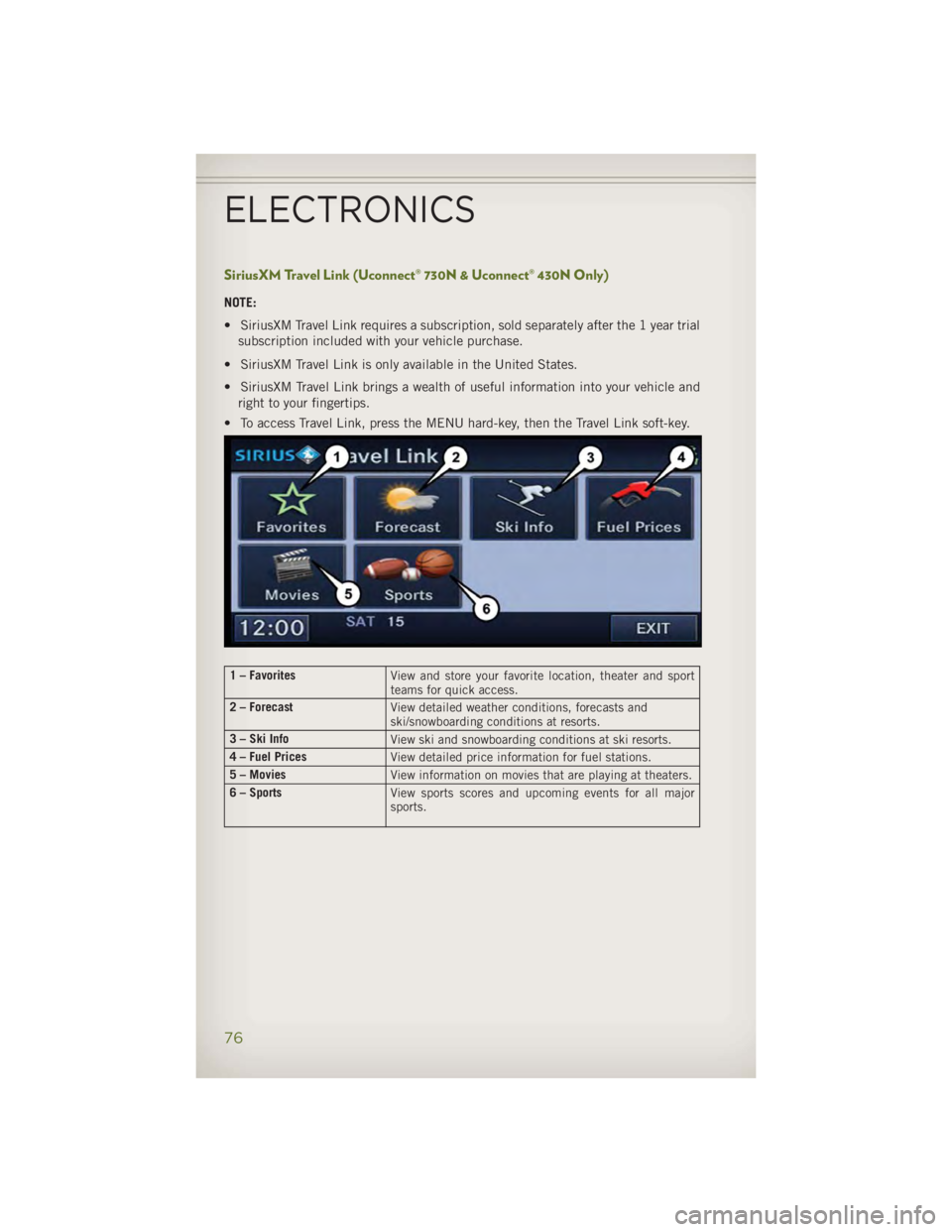
• To access Travel Link, press the MENU hard-key, then the Travel Link soft-key.
1 – Favorites
View and store your favorite location, theater and sport
teams for quick access.
2 – Forecast
View detailed weather conditions, forecasts and
ski/snowboarding conditions at resorts.
3 – Ski Info
View ski and snowboarding conditions at ski resorts.
4 – Fuel Prices
View detailed price information for fuel stations.
5 – Movies
View information on movies that are playing at theaters.
6 – Sports
View sports scores and upcoming events for all major
sports.
ELECTRONICS
76
Page 86 of 140
Bluetooth® STREAMING AUDIO • If equipped with Uconnect ®
Voice Com-
mand, your Bluetooth-equipped iPod ®
devices, cell phones or other media
players, may also be able to stream
music to your vehicles speakers. Your
connected device must be Bluetooth-
compatible, and paired with your radio
(see www.UconnectPhone.com for pair-
ing instructions).
• Non-Touch-Screen Radios: Press the “AUX” button on the radio faceplate until "BT"
or “Audio Streaming” is displayed on the radio screen.
• Touch-Screen-Radios: Press the “RADIO/MEDIA” or “MEDIA” hard-key and then
touch the “AUX” soft-key tab.
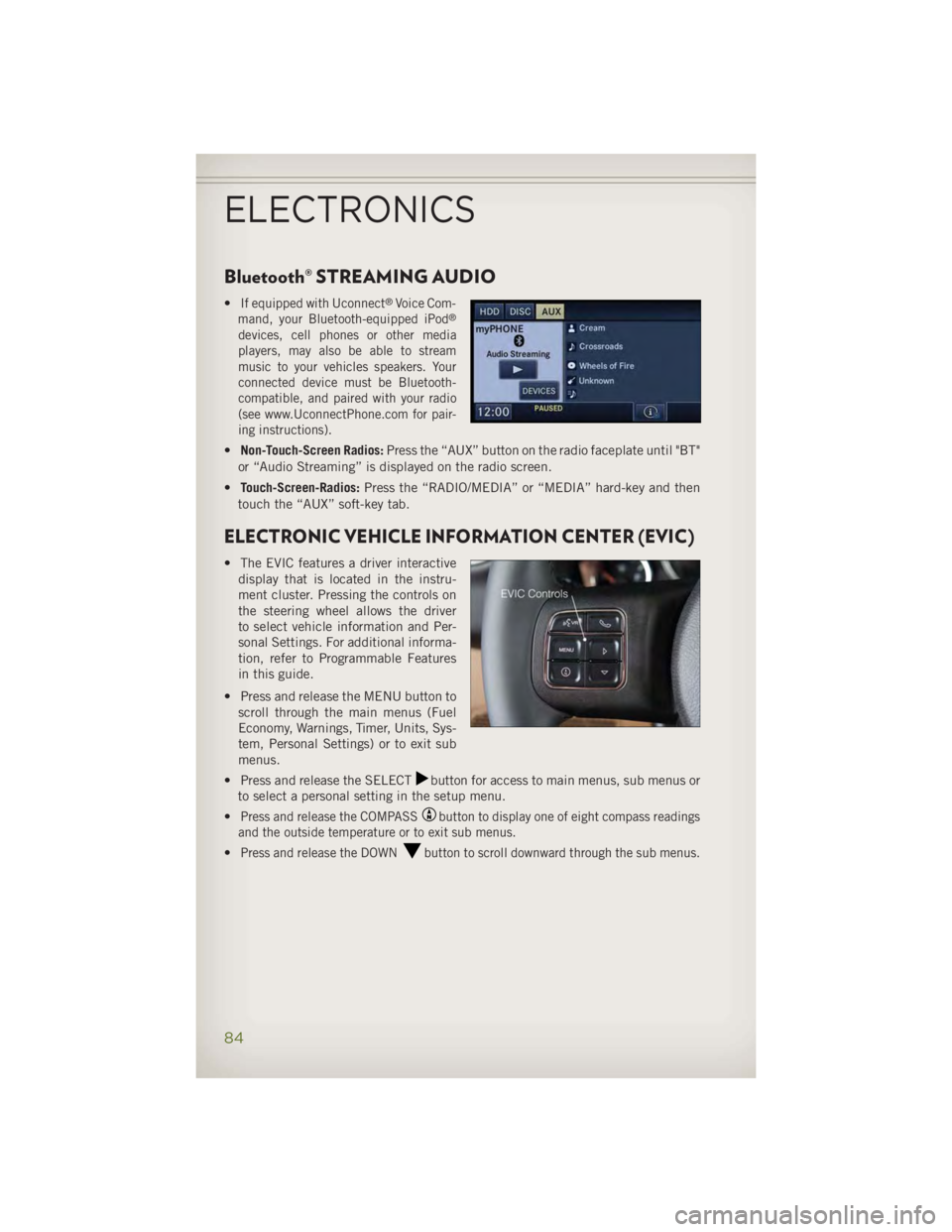
ELECTRONIC VEHICLE INFORMATION CENTER (EVIC) • The EVIC features a driver interactive
display that is located in the instru-
ment cluster. Pressing the controls on
the steering wheel allows the driver
to select vehicle information and Per-
sonal Settings. For additional informa-
tion, refer to Programmable Features
in this guide.
• Press and release the MENU button to
scroll through the main menus (Fuel
Economy, Warnings, Timer, Units, Sys-
tem, Personal Settings) or to exit sub
menus.
• Press and release the SELECT button for access to main menus, sub menus or
to select a personal setting in the setup menu.
• Press and release the COMPASS button to display one of eight compass readings
and the outside temperature or to exit sub menus.
• Press and release the DOWN button to scroll downward through the sub menus.
ELECTRONICS
84
Page 87 of 140
EVIC Main Menu • To step to each main menu feature press and release the MENU button once for
each step. A step from the last item in the list will cause the first item in the
feature list to be displayed. The following features are in the Main menu:
• Compass, Outside Temperature, and ECO display
• Digital Speedometer
• Average Fuel Economy
• Distance to Empty
• Elapsed Time
• Vehicle Information
• Coolant Temp
• Oil Pressure
• Transmission Temp
• Oil Life Remaining (Automatic Oil Change Indicator)
• EVIC Units Selection
• System Status
• Personal Settings
• Tire PSI
Compass Calibration • This compass is self-calibrating, which eliminates the need to set the compass
manually. When the vehicle is new, the compass may appear erratic and the EVIC
will display “CAL” until the compass is calibrated.
• You may also calibrate the compass by completing one or more 360 degree turns
(in an area free from large metal or metallic objects) until the “CAL” message
displayed in the EVIC turns off. The compass will now function normally.
ECO • The ECO message will appear in your EVIC display whenever you are driving in a
fuel efficient manner.
• This feature allows you to monitor when you are driving in a fuel efficient manner,
and it can be used to modify driving habits in order to increase fuel economy.
ELECTRONICS
85
Page 88 of 140
PROGRAMMABLE FEATURES Electronic Vehicle Information Center (EVIC) • The EVIC can be used to program the following Personal Settings. Press and
release the MENU button until Personal Settings displays, then press the DOWN
button to scroll through the settings. Press the SELECT button to change
the setting. • Language • Illumin Approach
• Auto UNLK On Exit • Hill Start Assist (HSA)
• RKE Unlock • Display Units of Measure In
• Sound Horn With RKE Lock • Nav – Turn by Turn
• Flash Lamp With Lock • Display Fuel Saver
• Headlamp Off Delay • Compass Variance
• Headlamps With Wipers • Calibrate Compass
• Key-Off Power Delay
Key Fob Programmable Features
• The following features may also be programmed by using the Key Fob transmitter
or the ignition switch and driver's door lock switch.
NOTE:
Pressing the LOCK button while you are inside the vehicle will activate the Vehicle
Security Alarm. Opening a door with the Vehicle Security Alarm activated will cause
the alarm to sound. Press the UNLOCK button to deactivate the Vehicle Security
Alarm. Flashing Lamps With Lock
• The turn signal lights flashing, when the doors are locked or unlocked, feature can
be turned on or off. To turn this feature on or off:
• Press and hold the UNLOCK button for at least 4 seconds, but no longer than
10 seconds. Then, press and hold the LOCK button while still holding the
UNLOCK button.
• Release both buttons at the same time.
ELECTRONICS
86
Page 98 of 140
ROADSIDE ASSISTANCE • Dial toll-free 1-800-521-2779 for U.S. Residents or 1-800-363-4869 for Cana-
dian Residents.
• Provide your name, vehicle identification number, license plate number, and your
location, including the telephone number from which you are calling.
• Briefly describe the nature of the problem and answer a few simple questions.
• You will be given the name of the service provider and an estimated time of arrival.
If you feel you are in an “unsafe situation”, please let us know. With your consent,
we will contact local police or safety authorities.
INSTRUMENT CLUSTER WARNING LIGHTS - Electronic Stability Control (ESC) Activation/Malfunction Indicator Light• If the “ESC Activation/Malfunction Indicator Light” comes on continuously with
the engine running, a malfunction has been detected in the ESC system. If this
light remains on after several ignition cycles, and the vehicle has been driven
several miles (kilometers) at speeds greater than 30 mph (48 km/h), we recom-
mend you drive to the nearest service center and have the vehicle serviced
immediately.
• The “ESC Activation/Malfunction Indicator Light” starts to flash as soon as the
tires lose traction and the ESC system becomes active. If the light begins to flash
during acceleration, ease up on the accelerator and apply as little throttle as
possible. Be sure to adapt your speed and driving to the prevailing road conditions.
The light also flashes when TCS is active. To improve the vehicle's traction when
starting off in deep snow, sand or gravel, it may be desirable to switch the ESC
system to Partial Off mode by momentarily pressing the ESC Off switch.
- Tire Pressure Monitoring System (TPMS) Light• Each tire, including the spare (if provided), should be checked monthly, when cold
and inflated to the inflation pressure recommended by the vehicle manufacturer
on the vehicle placard or tire inflation pressure label. (If your vehicle has tires of
a different size than the size indicated on the vehicle placard or tire inflation
pressure label, you should determine the proper tire inflation pressure for those
tires.)
• As an added safety feature, your vehicle has been equipped with a Tire Pressure
Monitoring System (TPMS) that illuminates a low tire pressure telltale when one or
more of your tires is significantly under-inflated. Accordingly, when the low tire
pressure telltale illuminates, you should stop and check your tires as soon as
possible, and inflate them to the proper pressure. Driving on a significantly
under-inflated tire causes the tire to overheat and can lead to tire failure.
Under-inflation also reduces fuel efficiency and tire tread life, and may affect the
vehicle’s handling and stopping ability.WHAT TO DO IN EMERGENCIES
96
Page 100 of 140
- Engine Temperature Warning Light• This light warns of an overheated engine condition.
• If the light turns on and a warning chime sounds while driving, safely pull over and
stop the vehicle. If the A/C system is on, turn it off. Also, shift the transmission into
NEUTRAL and idle the vehicle. If the temperature reading does not return to
normal, turn the engine off immediately.
• We recommend that you do not operate the vehicle or engine damage will occur.
Have the vehicle serviced immediately.
WARNING!A hot engine cooling system is dangerous. You or others could be badly burned by
steam or boiling coolant. You may want to call an authorized dealer for service if
your vehicle overheats.
BRAKE
- Brake Warning Light• The Brake Warning light illuminates when there is either a system malfunction or
the parking brake is applied. If the light is on and the parking brake is not applied,
it indicates a possible brake hydraulic malfunction, brake booster problem or an
Anti-Lock Brake System problem.
• Please have your vehicle serviced immediately.
WARNING!Driving a vehicle with the red brake light on is dangerous. Part of the brake system
may have failed. It will take longer to stop the vehicle. You could have a collision.
Have the vehicle checked immediately.
- Malfunction Indicator Light (MIL)• Certain conditions, such as a loose or missing gas cap, poor fuel quality, etc., may
illuminate the MIL after engine start. The vehicle should be serviced if the light
stays on through several typical driving cycles. In most situations, the vehicle will
drive normally and not require towing.
• If the MIL flashes when the engine is running, serious conditions may exist that
could lead to immediate loss of power or severe catalytic converter damage. We
recommend you do not operate the vehicle. Have the vehicle serviced immediately.
Electronic Stability Control (ESC) OFF Activation/Malfunction Warning Light
• If the ESC OFF warning light comes on continuously with the engine running, a
malfunction has been detected.
• If this light remains on after several ignition cycles, and the vehicle has been
driven several miles (kilometers) at speeds greater than 30 mph (48 km/h), we
recommend you drive to the nearest service center and have the vehicle serviced
immediately.WHAT TO DO IN EMERGENCIES
98
Page 101 of 140
- Charging System Light• This light shows the status of the electrical charging system. If the charging
system light remains on, it means that the vehicle is experiencing a problem with
the charging system.
• We recommend you do not continue driving if the charging system light is on. Have
the vehicle serviced immediately.
- Oil Pressure Warning Light• This light indicates low engine oil pressure. If the light turns on while driving, stop
the vehicle and shut off the engine as soon as possible. A chime will sound when
this light turns on.
• We recommend you do not operate the vehicle or engine damage will occur. Have
the vehicle serviced immediately.
- Anti-Lock Brake (ABS) Light• This light monitors the Anti-Lock Brake System (ABS).
• If the light is not on during starting, stays on, or turns on while driving, we
recommend you drive to the nearest authorized dealer immediately and have the
vehicle serviced immediately.
- Electronic Throttle Control (ETC) Indicator Light• This light informs you of a problem with the system.
• If a problem is detected, the light will come on while the engine is running. Cycle
the ignition when the vehicle has completely stopped and the shift lever is placed
in the PARK position; the light should turn off.
• If the light remains lit with the engine running, your vehicle will usually be
drivable; however, see an authorized dealer immediately. If the light is flashing
when the engine is running, immediate service is required and you may experience
reduced performance, an elevated/rough idle or engine stall and your vehicle may
require towing.
- Air Bag Warning Light
• If the light is not on during starting, stays on, or turns on while driving, have the
vehicle serviced by an authorized service center immediately.
Fuel Cap/Loose Gas Cap Message
• If a “gas cap” message (shown as gASCAP) appears, tighten the gas cap until a
“clicking” sound is heard.
• Press the odometer reset button to turn the message off.
• If the message continues to appear for more than three days after tightening the
gas cap, see your authorized service center.WHAT TO DO IN EMERGENCIES
99
Page 109 of 140
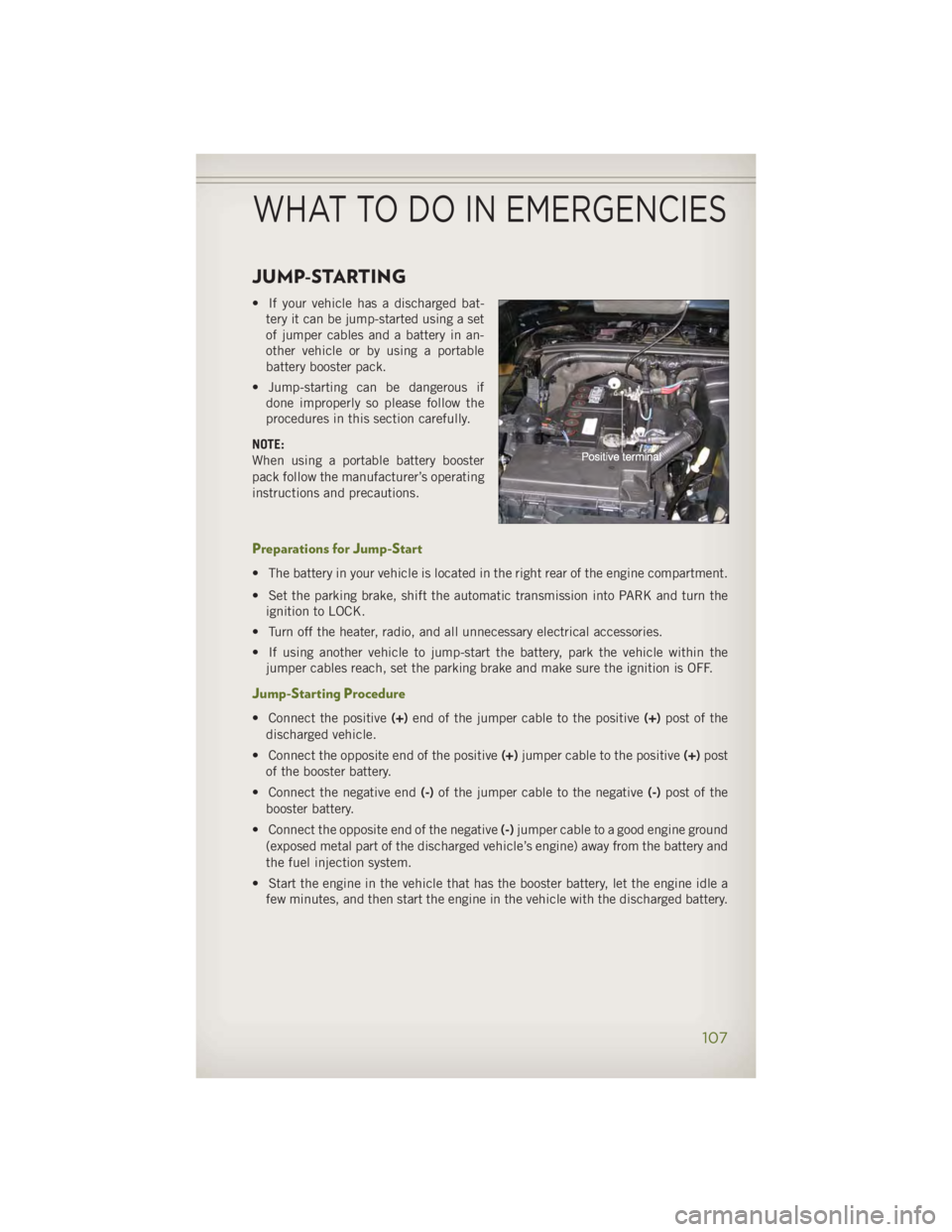
JUMP-STARTING • If your vehicle has a discharged bat-
tery it can be jump-started using a set
of jumper cables and a battery in an-
other vehicle or by using a portable
battery booster pack.
• Jump-starting can be dangerous if
done improperly so please follow the
procedures in this section carefully.
NOTE:
When using a portable battery booster
pack follow the manufacturer’s operating
instructions and precautions.
Preparations for Jump-Start • The battery in your vehicle is located in the right rear of the engine compartment.
• Set the parking brake, shift the automatic transmission into PARK and turn the
ignition to LOCK.
• Turn off the heater, radio, and all unnecessary electrical accessories.
• If using another vehicle to jump-start the battery, park the vehicle within the
jumper cables reach, set the parking brake and make sure the ignition is OFF.
Jump-Starting Procedure • Connect the positive (+) end of the jumper cable to the positive (+) post of the
discharged vehicle.
• Connect the opposite end of the positive (+) jumper cable to the positive (+) post
of the booster battery.
• Connect the negative end (-) of the jumper cable to the negative (-) post of the
booster battery.
• Connect the opposite end of the negative (-) jumper cable to a good engine ground
(exposed metal part of the discharged vehicle’s engine) away from the battery and
the fuel injection system.
• Start the engine in the vehicle that has the booster battery, let the engine idle a
few minutes, and then start the engine in the vehicle with the discharged battery.WHAT TO DO IN EMERGENCIES
107