lights JEEP WRANGLER UNLIMITED 2014 Owners Manual
[x] Cancel search | Manufacturer: JEEP, Model Year: 2014, Model line: WRANGLER UNLIMITED, Model: JEEP WRANGLER UNLIMITED 2014Pages: 140, PDF Size: 12.72 MB
Page 3 of 140
INTRODUCTION/WELCOME WELCOME FROM CHRYSLER
GROUP LLC ................. 89
CONTROLS AT A GLANCE DRIVER COCKPIT ............... 6
INSTRUMENT CLUSTER .......... 8
GETTING STARTED KEYFOB ................... 10
REMOTE START .............. 11
THEFT ALARM ............... 11
SEATBELT .................. 12
SUPPLEMENTAL RESTRAINT SYSTEM
(SRS) — AIR BAGS ............ 13
CHILD RESTRAINTS ............ 14
FRONT SEATS ................ 19
REAR SEATS ................. 20
TILT STEERING COLUMN ......... 21
HEATEDSEATS ............... 22
OPERATING YOUR VEHICLE ENGINE BREAK-IN
RECOMMENDATIONS ........... 23
TURN SIGNAL/LIGHTS LEVER ...... 23
WIPER/WASHER LEVER .......... 25
SPEED CONTROL .............. 26
MANUAL CLIMATE CONTROLS ...... 27
AUTOMATIC TEMPERATURE
CONTROLS (ATC) .............. 28
SUNRIDER ®
AND SOFT TOP ....... 29
HARD TOP AND FREEDOM TOP ®
.... 38
DUAL TOP — IF EQUIPPED ........ 41
WIND BUFFETING ............. 41
ELECTRONICS YOUR VEHICLE'S SOUND SYSTEM . . . 42
Uconnect ®
130 ............... 44
Uconnect ®
130 WITH SiriusXM
SATELLITE RADIO .............. 46
Uconnect ®
230 ............... 49
Uconnect ®
430/430N ........... 52
Uconnect ®
730N .............. 62
SiriusXM SATELLITE RADIO/TRAVEL
LINK ...................... 73
STEERING WHEEL AUDIO
CONTROLS ................. 77 iPod ®
/USB/MP3 CONTROL ........ 77
Uconnect ®
Phone .............. 78
Uconnect ®
VOICE COMMAND ....... 81
Bluetooth ®
STREAMING AUDIO ..... 84
ELECTRONIC VEHICLE INFORMATION
CENTER (EVIC) ............... 84
PROGRAMMABLE FEATURES ....... 86
POWER INVERTER ............. 87
POWER OUTLETS ............. 88
OFF-ROAD CAPABILITIES
(4WD OPERATION) COMMAND-TRAC ®
/ROCK-TRAC ®
..... 89
AXLE LOCK (TRU-LOK ®
) RUBICON
ONLY ...................... 89
ELECTRONIC SWAY BAR DISCONNECT –
RUBICON ONLY ............... 90
UTILITY TRAILER TOWING WEIGHTS (MAXIMUM
TRAILER WEIGHT RATINGS) ....... 91
RECREATIONAL TOWING (BEHIND
MOTORHOME, ETC.) ............ 93
WHAT TO DO IN EMERGENCIES ROADSIDE ASSISTANCE .......... 96
INSTRUMENT CLUSTER WARNING
LIGHTS .................... 96
IF YOUR ENGINE OVERHEATS ..... 101
JACKING AND TIRE CHANGING .... 102
JUMP-STARTING ............. 107
EMERGENCY TOW HOOKS ....... 109
SHIFT LEVER OVERRIDE ........ 109
TOWING A DISABLED VEHICLE .... 110
FREEING A STUCK VEHICLE ...... 110
EVENT DATA RECORDER (EDR) .... 111
MAINTAINING YOUR VEHICLE OPENING THE HOOD .......... 112
ENGINE COMPARTMENT ........ 113
FLUIDS AND CAPACITIES ........ 114
MAINTENANCE SCHEDULE ...... 115
MAINTENANCE RECORD ........ 119
FUSES .................... 120
TIRE PRESSURES ............ 123
WHEEL AND WHEEL TRIM CARE . . . 125
EXTERIOR BULBS ............ 125
TABLE OF CONTENTS
Page 8 of 140
DRIVER COCKPIT 1. Electronic Vehicle Information Center (EVIC) Controls pg. 84
2. Turn Signal/Lights Lever (behind steering wheel) pg. 23
3. Electronic Vehicle Information Center (EVIC) Display
4. Instrument Cluster pg. 8
5. Wiper/Washer Lever (behind steering wheel) pg. 25
6. Audio System pg. 46
7. Power Windows
8. Climate Controls pg. 28
9. SWITCH PANEL
• Heated Seats pg. 22
• Hazard Warning Light
• Electronic Stability Control (ESC) OFF pg. 98CONTROLS AT A GLANCE
6
Page 10 of 140
INSTRUMENT CLUSTER Warning Lights - Low Fuel Warning Light
- Charging System Light**
- Oil Pressure Warning Light**
- Anti-Lock Brake (ABS) Light**
- Air Bag Warning Light**
- Electronic Throttle Control (ETC) Light
- Tire Pressure Monitoring System (TPMS) Light
- Engine Temperature Warning Light
- Seat Belt Reminder Light
BRAKE
- Brake Warning Light**
- Malfunction Indicator Light (MIL)**
- Electronic Stability Control (ESC) Activation/Malfunction Indicator Light**
(See page 96 for more information.)CONTROLS AT A GLANCE
8
Page 14 of 140
To Disarm The System: • Press the Key Fob UNLOCK button or cycle the ignition to the ON/START position.
NOTE:
The driver's door key cylinder button on the RKE transmitter cannot arm or disarm the
Vehicle Security Alarm.
• The Vehicle Security Alarm is designed to protect your vehicle; however, you can
create conditions where the Vehicle Security Alarm will give you a false alarm.
If one of the previously described arming sequences has occurred, the Vehicle
Security Alarm will arm regardless of whether you are in the vehicle or not. If you
remain in the vehicle and open a door, the alarm will sound. If this occurs, disarm
the Vehicle Security Alarm.
• If the Vehicle Security Alarm is armed and the battery becomes disconnected the
Vehicle Security Alarm will remain armed when the battery is reconnected. The
exterior lights will flash, and the horn will sound. If this occurs, disarm the Vehicle
Security Alarm.
SEAT BELT • Be sure everyone in your vehicle is in a seat and using a seat belt properly.
• Position the lap belt across your thighs, below your abdomen. To remove slack in
the lap portion, pull up a bit on the shoulder belt. To loosen the lap belt if it is too
tight, tilt the latch plate and pull on the lap belt. A snug belt reduces the risk of
sliding under the belt in a collision.
• Position the shoulder belt on your chest so that it is comfortable and not resting
on your neck. The retractor will withdraw any slack in the belt.
• A shoulder belt placed behind you will not protect you from injury during a
collision. You are more likely to hit your head in a collision if you do not wear your
shoulder belt. The lap and shoulder belt are meant to be used together.
• A belt that is too loose will not protect you properly. In a sudden stop you could move
too far forward, increasing the possibility of injury. Wear your seat belt snugly.
• A frayed or torn belt could rip apart in a collision and leave you with no protection.
Inspect the belt system periodically, checking for cuts, frays, or loose parts.
Damaged parts must be replaced immediately. Do not disassemble or modify the
system. Seat belt assemblies must be replaced after a collision if they have been
damaged (bent retractor, torn webbing, etc.).
GETTING STARTED
12
Page 25 of 140
ENGINE BREAK-IN RECOMMENDATIONS • A long break-in period is not required for the engine and drivetrain (transmission
and axle) in your vehicle.
• Drive moderately during the first 300 miles (500 km). After the initial 60 miles
(100 km), speeds up to 50 or 55 mph (80 or 90 km/h) are desirable.
• While cruising, brief full-throttle acceleration within the limits of local traffic laws
contributes to a good break-in. Wide-open throttle acceleration in low gear can be
detrimental and should be avoided.
• The engine oil installed in the engine at the factory is a high-quality energy
conserving type lubricant. Oil changes should be consistent with anticipated
climate conditions under which vehicle operations will occur. For the recom-
mended viscosity and quality grades, refer to “Maintaining Your Vehicle”.
NOTE:
A new engine may consume some oil during its first few thousand miles (kilome-
ters) of operation. This should be considered a normal part of the break-in and not
interpreted as an indication to an engine problem or malfunction.
CAUTION!Never use Non-Detergent Oil or Straight Mineral Oil in the engine or damage may
result.
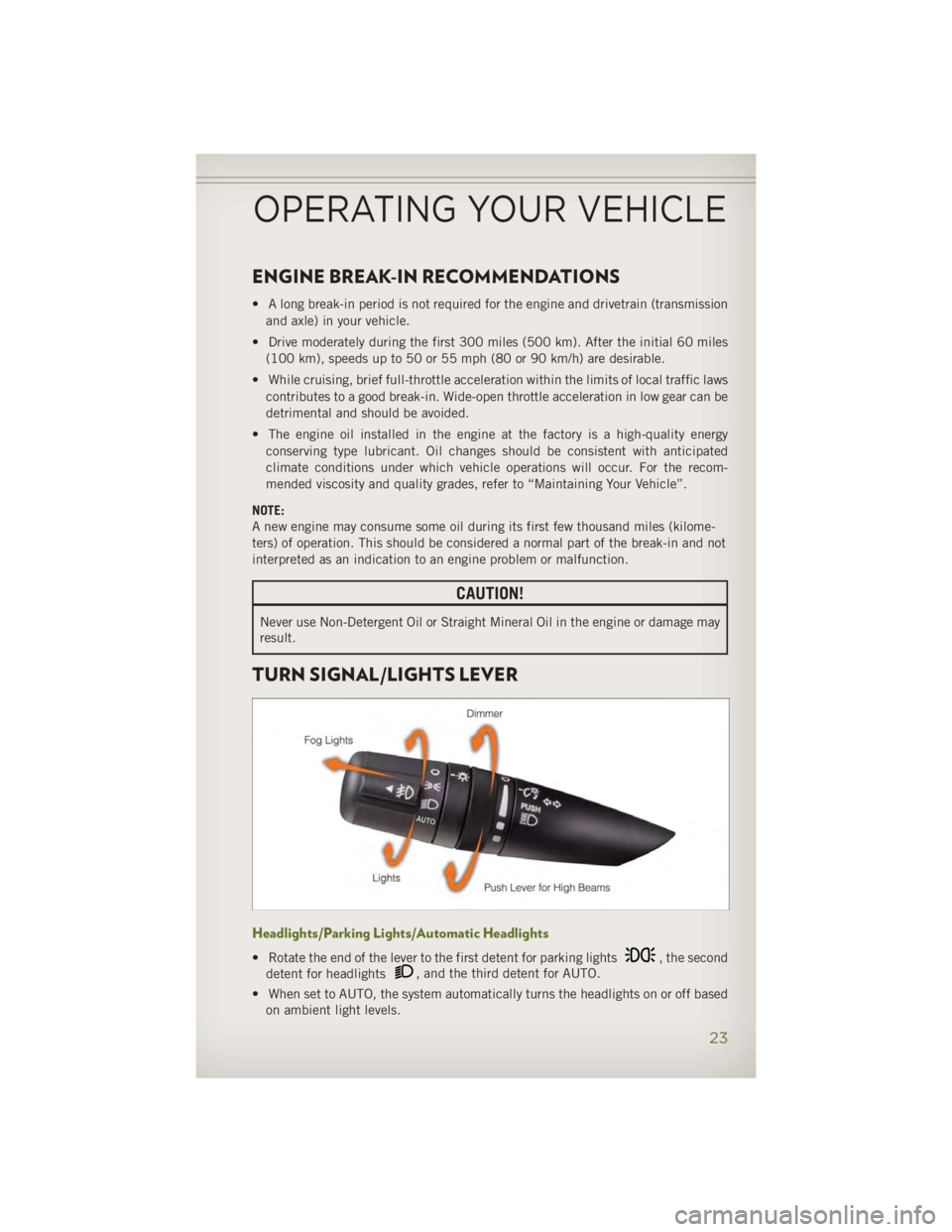
TURN SIGNAL/LIGHTS LEVER
Headlights/Parking Lights/Automatic Headlights
• Rotate the end of the lever to the first detent for parking lights , the second
detent for headlights , and the third detent for AUTO.
• When set to AUTO, the system automatically turns the headlights on or off based
on ambient light levels.OPERATING YOUR VEHICLE
23
Page 26 of 140
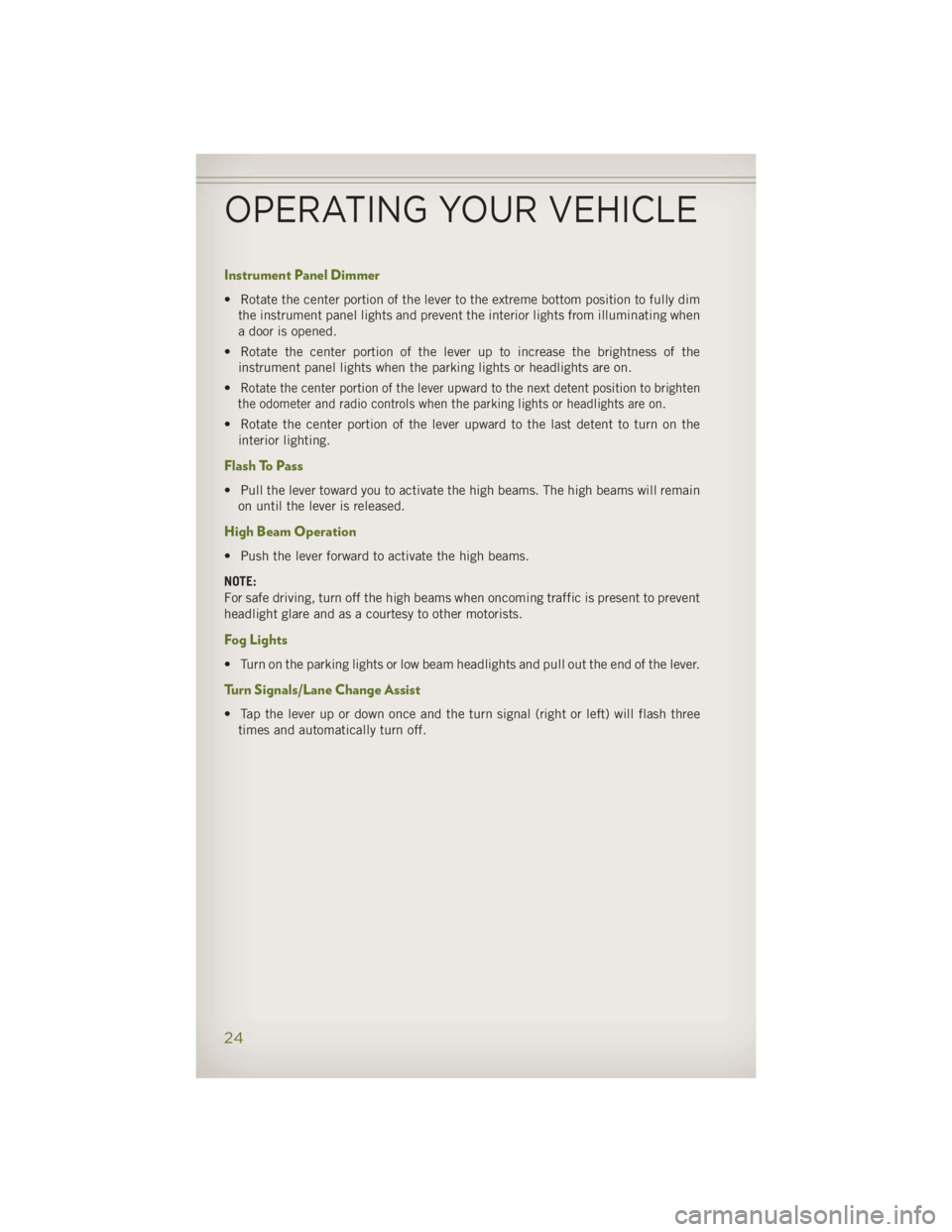
Instrument Panel Dimmer • Rotate the center portion of the lever to the extreme bottom position to fully dim
the instrument panel lights and prevent the interior lights from illuminating when
a door is opened.
• Rotate the center portion of the lever up to increase the brightness of the
instrument panel lights when the parking lights or headlights are on.
• Rotate the center portion of the lever upward to the next detent position to brighten
the odometer and radio controls when the parking lights or headlights are on.
• Rotate the center portion of the lever upward to the last detent to turn on the
interior lighting.
Flash To Pass • Pull the lever toward you to activate the high beams. The high beams will remain
on until the lever is released.
High Beam Operation • Push the lever forward to activate the high beams.
NOTE:
For safe driving, turn off the high beams when oncoming traffic is present to prevent
headlight glare and as a courtesy to other motorists.
Fog Lights • Turn on the parking lights or low beam headlights and pull out the end of the lever.
Turn Signals/Lane Change Assist • Tap the lever up or down once and the turn signal (right or left) will flash three
times and automatically turn off.
OPERATING YOUR VEHICLE
24
Page 88 of 140
PROGRAMMABLE FEATURES Electronic Vehicle Information Center (EVIC) • The EVIC can be used to program the following Personal Settings. Press and
release the MENU button until Personal Settings displays, then press the DOWN
button to scroll through the settings. Press the SELECT button to change
the setting. • Language • Illumin Approach
• Auto UNLK On Exit • Hill Start Assist (HSA)
• RKE Unlock • Display Units of Measure In
• Sound Horn With RKE Lock • Nav – Turn by Turn
• Flash Lamp With Lock • Display Fuel Saver
• Headlamp Off Delay • Compass Variance
• Headlamps With Wipers • Calibrate Compass
• Key-Off Power Delay
Key Fob Programmable Features
• The following features may also be programmed by using the Key Fob transmitter
or the ignition switch and driver's door lock switch.
NOTE:
Pressing the LOCK button while you are inside the vehicle will activate the Vehicle
Security Alarm. Opening a door with the Vehicle Security Alarm activated will cause
the alarm to sound. Press the UNLOCK button to deactivate the Vehicle Security
Alarm. Flashing Lamps With Lock
• The turn signal lights flashing, when the doors are locked or unlocked, feature can
be turned on or off. To turn this feature on or off:
• Press and hold the UNLOCK button for at least 4 seconds, but no longer than
10 seconds. Then, press and hold the LOCK button while still holding the
UNLOCK button.
• Release both buttons at the same time.
ELECTRONICS
86
Page 91 of 140
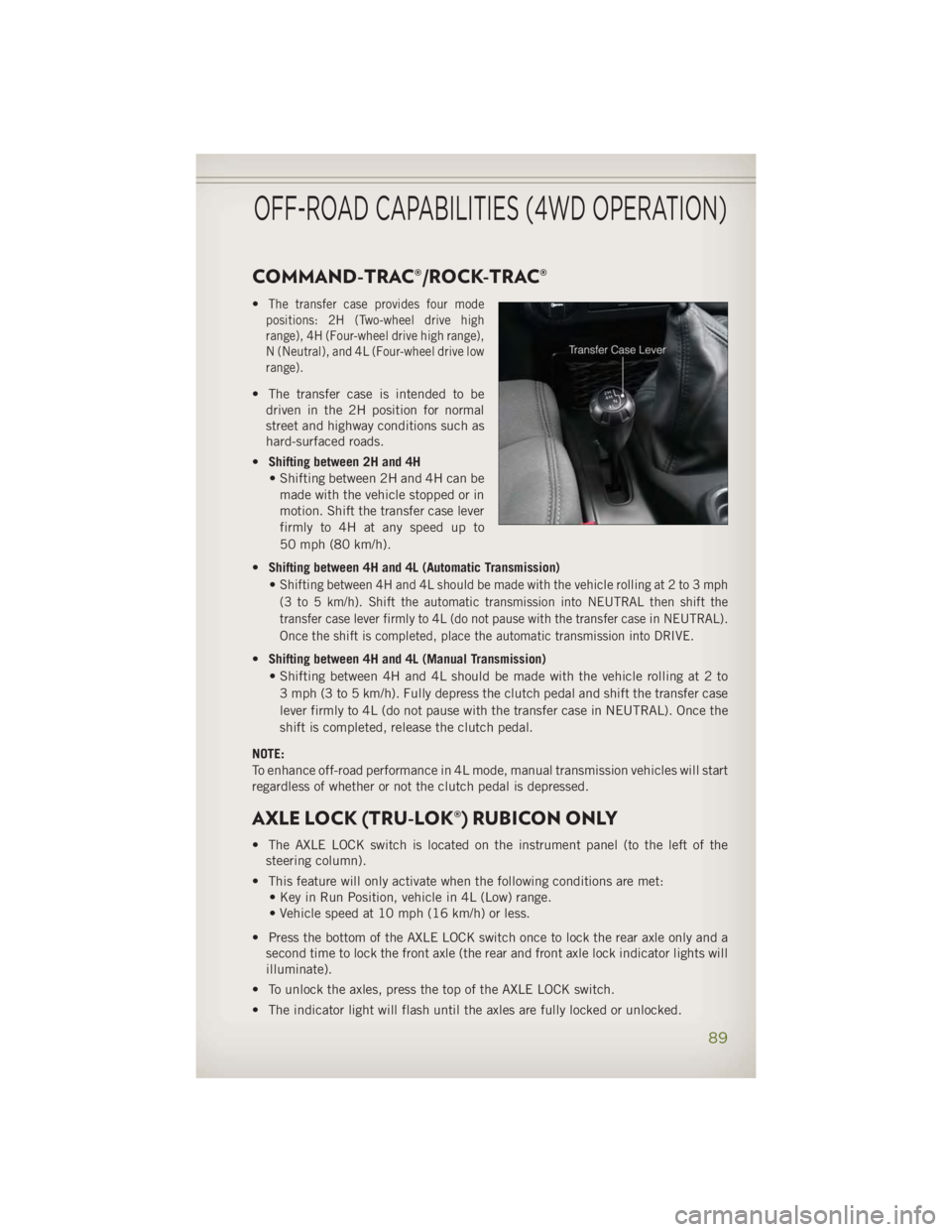
COMMAND-TRAC®/ROCK-TRAC® • The transfer case provides four mode
positions: 2H (Two-wheel drive high
range), 4H (Four-wheel drive high range),
N (Neutral), and 4L (Four-wheel drive low
range).
• The transfer case is intended to be
driven in the 2H position for normal
street and highway conditions such as
hard-surfaced roads.
• Shifting between 2H and 4H
• Shifting between 2H and 4H can be
made with the vehicle stopped or in
motion. Shift the transfer case lever
firmly to 4H at any speed up to
50 mph (80 km/h).
• Shifting between 4H and 4L (Automatic Transmission)
•
Shifting between 4H and 4L should be made with the vehicle rolling at 2 to 3 mph
(3 to 5 km/h). Shift the automatic transmission into NEUTRAL then shift the
transfer case lever firmly to 4L (do not pause with the transfer case in NEUTRAL).
Once the shift is completed, place the automatic transmission into DRIVE.
• Shifting between 4H and 4L (Manual Transmission)
• Shifting between 4H and 4L should be made with the vehicle rolling at 2 to
3 mph (3 to 5 km/h). Fully depress the clutch pedal and shift the transfer case
lever firmly to 4L (do not pause with the transfer case in NEUTRAL). Once the
shift is completed, release the clutch pedal.
NOTE:
To enhance off-road performance in 4L mode, manual transmission vehicles will start
regardless of whether or not the clutch pedal is depressed.
AXLE LOCK (TRU-LOK®) RUBICON ONLY • The AXLE LOCK switch is located on the instrument panel (to the left of the
steering column).
• This feature will only activate when the following conditions are met:
• Key in Run Position, vehicle in 4L (Low) range.
• Vehicle speed at 10 mph (16 km/h) or less.
• Press the bottom of the AXLE LOCK switch once to lock the rear axle only and a
second time to lock the front axle (the rear and front axle lock indicator lights will
illuminate).
• To unlock the axles, press the top of the AXLE LOCK switch.
• The indicator light will flash until the axles are fully locked or unlocked.OFF-ROAD CAPABILITIES (4WD OPERATION)
89
Page 98 of 140
ROADSIDE ASSISTANCE • Dial toll-free 1-800-521-2779 for U.S. Residents or 1-800-363-4869 for Cana-
dian Residents.
• Provide your name, vehicle identification number, license plate number, and your
location, including the telephone number from which you are calling.
• Briefly describe the nature of the problem and answer a few simple questions.
• You will be given the name of the service provider and an estimated time of arrival.
If you feel you are in an “unsafe situation”, please let us know. With your consent,
we will contact local police or safety authorities.
INSTRUMENT CLUSTER WARNING LIGHTS - Electronic Stability Control (ESC) Activation/Malfunction Indicator Light• If the “ESC Activation/Malfunction Indicator Light” comes on continuously with
the engine running, a malfunction has been detected in the ESC system. If this
light remains on after several ignition cycles, and the vehicle has been driven
several miles (kilometers) at speeds greater than 30 mph (48 km/h), we recom-
mend you drive to the nearest service center and have the vehicle serviced
immediately.
• The “ESC Activation/Malfunction Indicator Light” starts to flash as soon as the
tires lose traction and the ESC system becomes active. If the light begins to flash
during acceleration, ease up on the accelerator and apply as little throttle as
possible. Be sure to adapt your speed and driving to the prevailing road conditions.
The light also flashes when TCS is active. To improve the vehicle's traction when
starting off in deep snow, sand or gravel, it may be desirable to switch the ESC
system to Partial Off mode by momentarily pressing the ESC Off switch.
- Tire Pressure Monitoring System (TPMS) Light• Each tire, including the spare (if provided), should be checked monthly, when cold
and inflated to the inflation pressure recommended by the vehicle manufacturer
on the vehicle placard or tire inflation pressure label. (If your vehicle has tires of
a different size than the size indicated on the vehicle placard or tire inflation
pressure label, you should determine the proper tire inflation pressure for those
tires.)
• As an added safety feature, your vehicle has been equipped with a Tire Pressure
Monitoring System (TPMS) that illuminates a low tire pressure telltale when one or
more of your tires is significantly under-inflated. Accordingly, when the low tire
pressure telltale illuminates, you should stop and check your tires as soon as
possible, and inflate them to the proper pressure. Driving on a significantly
under-inflated tire causes the tire to overheat and can lead to tire failure.
Under-inflation also reduces fuel efficiency and tire tread life, and may affect the
vehicle’s handling and stopping ability.WHAT TO DO IN EMERGENCIES
96
Page 118 of 140
On Electronic Vehicle Information Center (EVIC) equipped vehicles, “Oil Change
Required” will be displayed in the EVIC and a single chime will sound, indicating that
an oil change is necessary.
On Non-EVIC equipped vehicles, “Change Oil” will flash in the instrument cluster
odometer and a single chime will sound, indicating that an oil change is necessary.
Your authorized dealer will reset the oil change indicator message after completing
the scheduled oil change. If a scheduled oil change is performed by someone other
than your authorized dealer, the message can be reset by referring to the steps
described under “Electronic Vehicle Information Center (EVIC)/Oil Change Re-
quired” in “Understanding Your Instrument Panel” or under “Instrument Cluster
Description/Odometer/Trip Odometer” in “Understanding Your Instrument Panel” for
further information.
NOTE:
Under no circumstances should oil change intervals exceed 10,000 miles (16,000 km)
or twelve months, whichever comes first.
Once A Month Or Before A Long Trip:
• Check engine oil level
• Check windshield washer fluid level
• Check the tire inflation pressures and look for unusual wear or damage
• Check the fluid levels of the coolant reservoir, brake master cylinder, power
steering and automatic transmission, and fill as needed
• Check function of all interior and exterior lights
Required Maintenance Intervals .
Refer to the maintenance schedules on the following page for the required mainte-
nance intervals. At Every Oil Change Interval As Indicated By Oil Change Indicator System:
•
Change oil and filter
• Rotate the tires. Rotate at the first sign of irregular wear, even if it occurs before the oil
indicator system turns on.
•
Inspect battery and clean and tighten terminals as required
•
Inspect automatic transmission fluid if equipped with dipstick
•
Inspect brake pads, shoes, rotors, drums, hoses and park brake
•
Inspect engine cooling system protection and hoses
•
Inspect exhaust system
•
Inspect engine air cleaner if using in dusty or off-road conditions
•
Inspect all door latches for presence of grease, reapply if necessary.MAINTAINING YOUR VEHICLE
116