phone JEEP WRANGLER UNLIMITED 2014 Owners Manual
[x] Cancel search | Manufacturer: JEEP, Model Year: 2014, Model line: WRANGLER UNLIMITED, Model: JEEP WRANGLER UNLIMITED 2014Pages: 140, PDF Size: 12.72 MB
Page 1 of 140
14JK72-926-AA
Wrangler
First Edition Rev 1
User Guide 2014
Wrangler Includes Wrangler Unlimited
Download a FREE electronic copy
of the Owner’s Manual or Warranty Booklet
by visiting the Owners tab at:
www.Jeep.com (U.S.) or
www.Jeep.ca (Canada)Download a free
Vehicle Information
App
by visiting your
application store,
Keyword (Jeep Vehicle
Info), or scanning the
Microsoft Tag. To put
Microsoft Tags to work
for you, use your mobile phone’s browser
or App store to download a Microsoft Tag
reader, like the free one at www.gettag.mobi .
Then follow the directions to scan the code. G et the f r ee m o bile app f o r y o ur pho ne
http:/ / gettag.mobi U.S. Only
User GuideJeep.com
1571445_14_Wrangler_UG_071713.indd 1 7/17/13 2:03 PM
Page 2 of 140
Driving after drinking can lead to a collision. Your perceptions are
less sharp, your reflexes are slower, and your judgment is impaired
when you have been drinking. Never drink and then drive. WARNING!
Important: This User Guide is intended to familiarize you with the important features
of your vehicle. The DVD enclosed contains your Owner’s Manual,
Navigation/Uconnect ®
Manuals, Warranty Booklets, Tire Warranty
and Roadside Assistance (new vehicles purchased in the U.S.) or
Roadside Assistance (new vehicles purchased in Canada) in electronic
format. We hope you find it useful. Replacement DVD kits may be
purchased by visiting www.techauthority.com. Jeep ®
is a registered
trademark of Chrysler Group LLC. Copyright 2013 Chrysler Group LLC.The driver’s primary responsibility is the safe operation of the vehicle.
Driving while distracted can result in loss of vehicle control, resulting in
a collision and personal injury. Chrysler Group LLC strongly recommends
that the driver use extreme caution when using any device or feature
that may take their attention off the road. Use of any electrical devices
such as cell phones, computers, portable radios, vehicle navigation or
other devices by the driver while the vehicle is moving is dangerous and
could lead to a serious collision. Texting while driving is also dangerous
and should never be done while the vehicle is moving. If you find
yourself unable to devote your full attention to vehicle operation, pull off
the road to a safe location and stop your vehicle. Some States or
Provinces prohibit the use of cellular telephones or texting while driving.
It is always the driver’s responsibility to comply with all local laws.
Driving and Alcohol: Drunken driving is one of the most frequent causes of collisions. Your
driving ability can be seriously impaired with blood alcohol levels far below
the legal minimum. If you are drinking, don’t drive. Ride with a designated
non-drinking driver, call a cab, a friend, or use public transportation.If you are the first registered retail owner of
your vehicle, you may obtain a complimentary
printed copy of the Owner’s Manual, Navigation/
Uconnect ®
Manuals or Warranty Booklet by calling
1-877-426-5337 (U.S.) or 1-800-387-1143 (Canada)
or by contacting your dealer. This guide has been prepared to help you get quickly
acquainted with your new Jeep and to provide a convenient
reference source for common questions. However, it is not a
substitute for your Owner’s Manual.
For complete operational instructions, maintenance
procedures and important safety messages, please consult
your Owner’s Manual, Navigation/Uconnect ®
Manuals and
other Warning Labels in your vehicle.
Not all features shown in this guide may apply to your vehicle.
For additional information on accessories to help personalize
your vehicle, visit www.mopar.com (U.S.), www.mopar.ca
(Canada) or your local Jeep dealer.
1571445_14_Wrangler_UG_071713.indd 2 7/17/13 2:03 PM
Page 3 of 140
INTRODUCTION/WELCOME WELCOME FROM CHRYSLER
GROUP LLC ................. 89
CONTROLS AT A GLANCE DRIVER COCKPIT ............... 6
INSTRUMENT CLUSTER .......... 8
GETTING STARTED KEYFOB ................... 10
REMOTE START .............. 11
THEFT ALARM ............... 11
SEATBELT .................. 12
SUPPLEMENTAL RESTRAINT SYSTEM
(SRS) — AIR BAGS ............ 13
CHILD RESTRAINTS ............ 14
FRONT SEATS ................ 19
REAR SEATS ................. 20
TILT STEERING COLUMN ......... 21
HEATEDSEATS ............... 22
OPERATING YOUR VEHICLE ENGINE BREAK-IN
RECOMMENDATIONS ........... 23
TURN SIGNAL/LIGHTS LEVER ...... 23
WIPER/WASHER LEVER .......... 25
SPEED CONTROL .............. 26
MANUAL CLIMATE CONTROLS ...... 27
AUTOMATIC TEMPERATURE
CONTROLS (ATC) .............. 28
SUNRIDER ®
AND SOFT TOP ....... 29
HARD TOP AND FREEDOM TOP ®
.... 38
DUAL TOP — IF EQUIPPED ........ 41
WIND BUFFETING ............. 41
ELECTRONICS YOUR VEHICLE'S SOUND SYSTEM . . . 42
Uconnect ®
130 ............... 44
Uconnect ®
130 WITH SiriusXM
SATELLITE RADIO .............. 46
Uconnect ®
230 ............... 49
Uconnect ®
430/430N ........... 52
Uconnect ®
730N .............. 62
SiriusXM SATELLITE RADIO/TRAVEL
LINK ...................... 73
STEERING WHEEL AUDIO
CONTROLS ................. 77 iPod ®
/USB/MP3 CONTROL ........ 77
Uconnect ®
Phone .............. 78
Uconnect ®
VOICE COMMAND ....... 81
Bluetooth ®
STREAMING AUDIO ..... 84
ELECTRONIC VEHICLE INFORMATION
CENTER (EVIC) ............... 84
PROGRAMMABLE FEATURES ....... 86
POWER INVERTER ............. 87
POWER OUTLETS ............. 88
OFF-ROAD CAPABILITIES
(4WD OPERATION) COMMAND-TRAC ®
/ROCK-TRAC ®
..... 89
AXLE LOCK (TRU-LOK ®
) RUBICON
ONLY ...................... 89
ELECTRONIC SWAY BAR DISCONNECT –
RUBICON ONLY ............... 90
UTILITY TRAILER TOWING WEIGHTS (MAXIMUM
TRAILER WEIGHT RATINGS) ....... 91
RECREATIONAL TOWING (BEHIND
MOTORHOME, ETC.) ............ 93
WHAT TO DO IN EMERGENCIES ROADSIDE ASSISTANCE .......... 96
INSTRUMENT CLUSTER WARNING
LIGHTS .................... 96
IF YOUR ENGINE OVERHEATS ..... 101
JACKING AND TIRE CHANGING .... 102
JUMP-STARTING ............. 107
EMERGENCY TOW HOOKS ....... 109
SHIFT LEVER OVERRIDE ........ 109
TOWING A DISABLED VEHICLE .... 110
FREEING A STUCK VEHICLE ...... 110
EVENT DATA RECORDER (EDR) .... 111
MAINTAINING YOUR VEHICLE OPENING THE HOOD .......... 112
ENGINE COMPARTMENT ........ 113
FLUIDS AND CAPACITIES ........ 114
MAINTENANCE SCHEDULE ...... 115
MAINTENANCE RECORD ........ 119
FUSES .................... 120
TIRE PRESSURES ............ 123
WHEEL AND WHEEL TRIM CARE . . . 125
EXTERIOR BULBS ............ 125
TABLE OF CONTENTS
Page 7 of 140
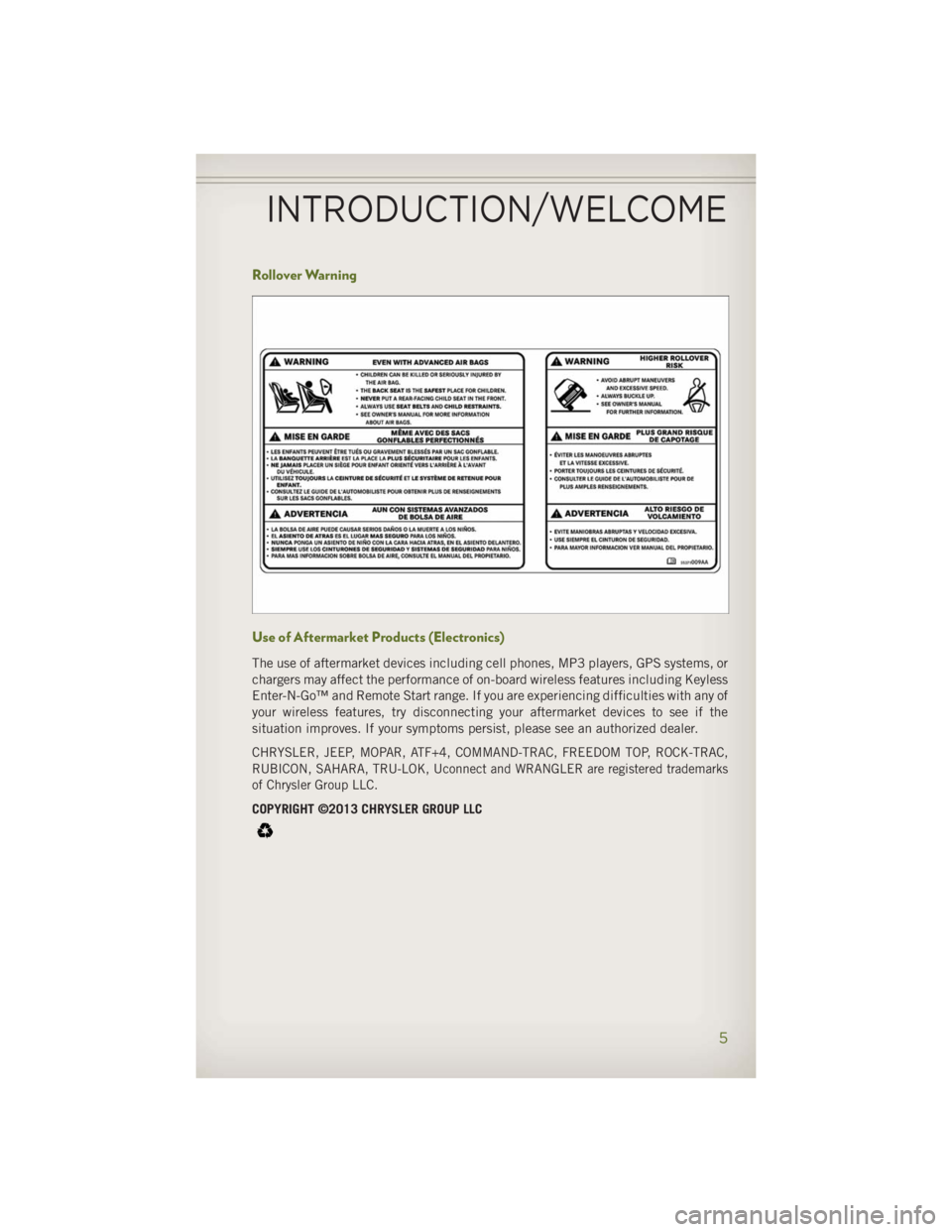
Rollover Warning
Use of Aftermarket Products (Electronics) The use of aftermarket devices including cell phones, MP3 players, GPS systems, or
chargers may affect the performance of on-board wireless features including Keyless
Enter-N-Go™ and Remote Start range. If you are experiencing difficulties with any of
your wireless features, try disconnecting your aftermarket devices to see if the
situation improves. If your symptoms persist, please see an authorized dealer.
CHRYSLER, JEEP, MOPAR, ATF+4, COMMAND-TRAC, FREEDOM TOP, ROCK-TRAC,
RUBICON, SAHARA, TRU-LOK, Uconnect and WRANGLER are registered trademarks
of Chrysler Group LLC.
COPYRIGHT ©2013 CHRYSLER GROUP LLC
INTRODUCTION/WELCOME
5
Page 44 of 140
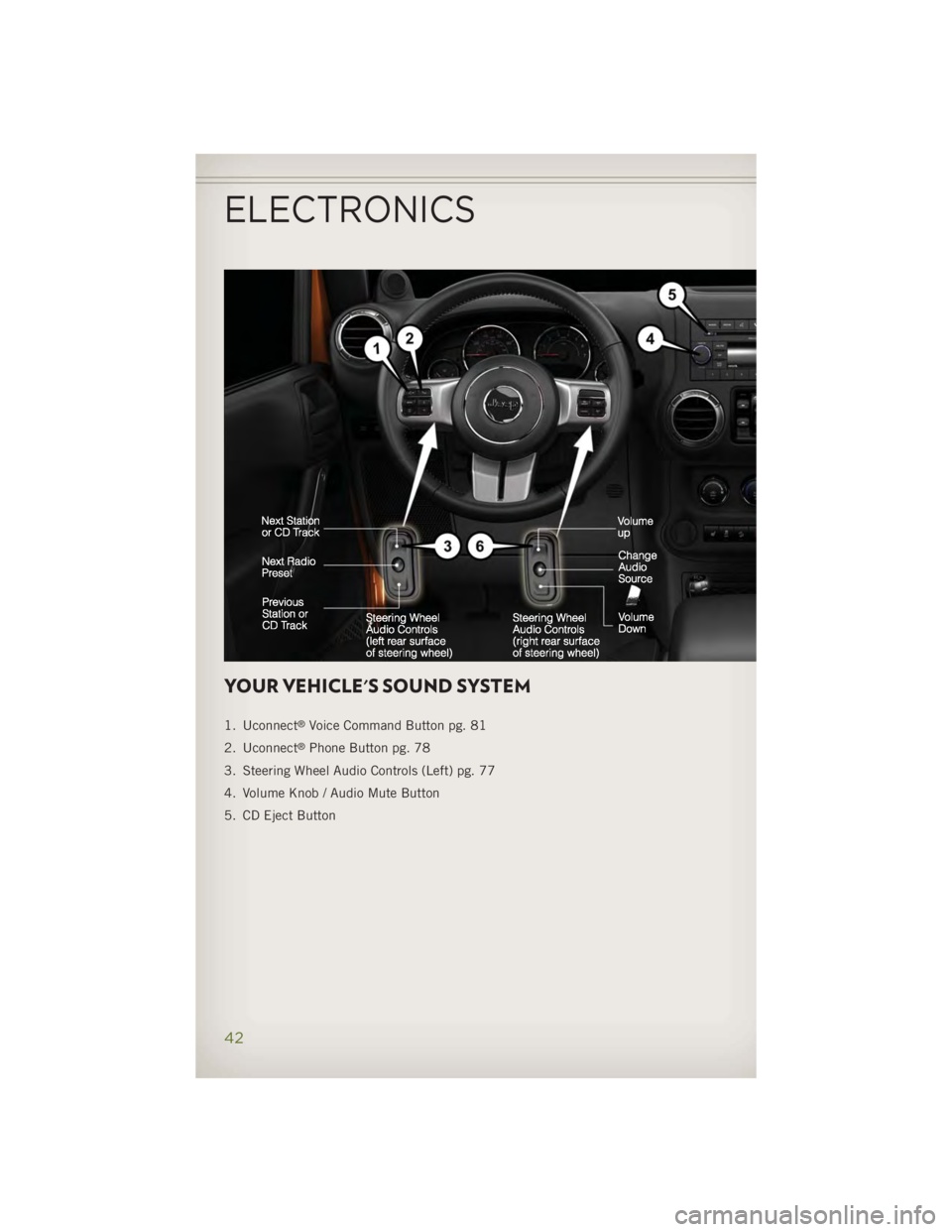
YOUR VEHICLE'S SOUND SYSTEM 1. Uconnect ®
Voice Command Button pg. 81
2. Uconnect ®
Phone Button pg. 78
3. Steering Wheel Audio Controls (Left) pg. 77
4. Volume Knob / Audio Mute Button
5. CD Eject Button
ELECTRONICS
42
Page 48 of 140
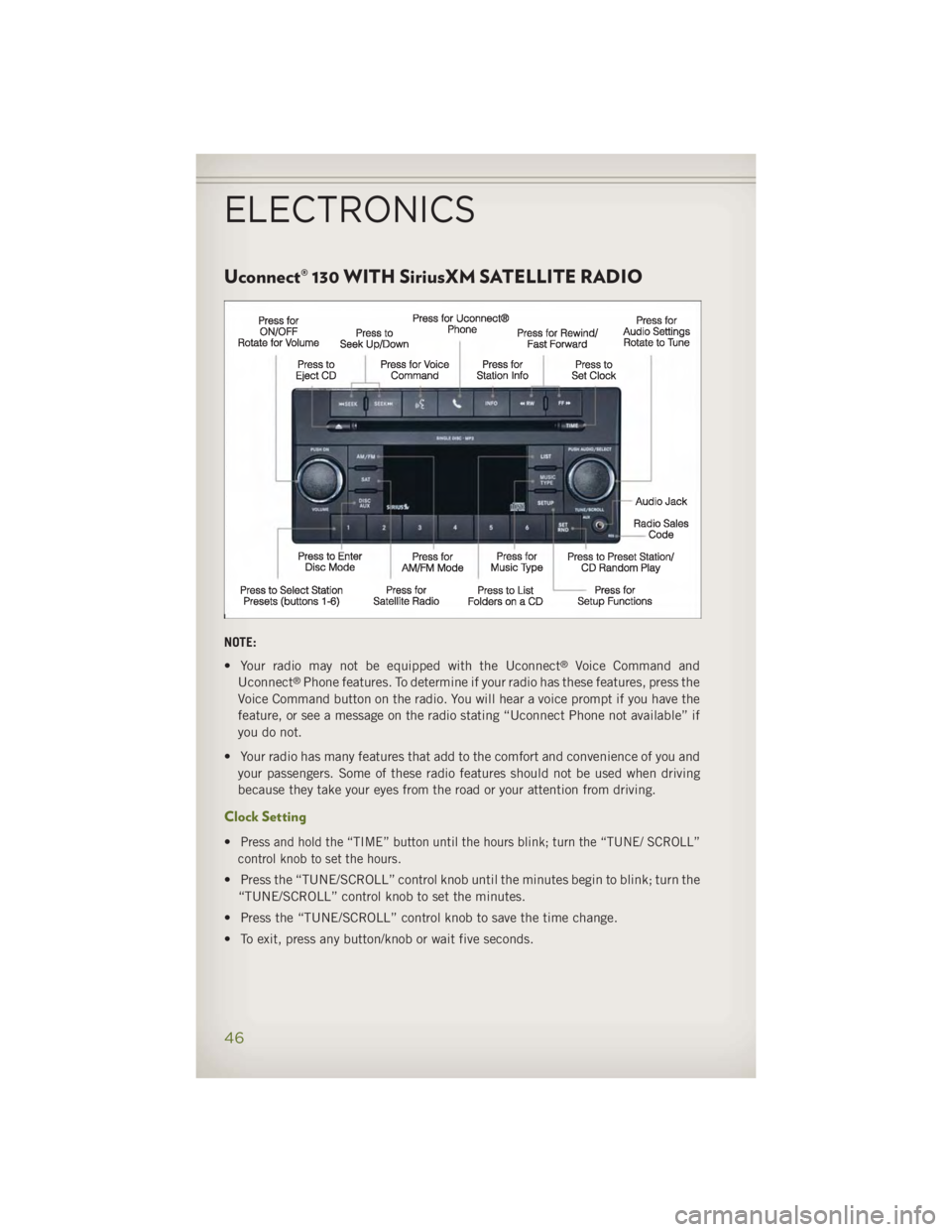
Uconnect® 130 WITH SiriusXM SATELLITE RADIO
NOTE:
• Your radio may not be equipped with the Uconnect ®
Voice Command and
Uconnect ®
Phone features. To determine if your radio has these features, press the
Voice Command button on the radio. You will hear a voice prompt if you have the
feature, or see a message on the radio stating “Uconnect Phone not available” if
you do not.
• Your radio has many features that add to the comfort and convenience of you and
your passengers. Some of these radio features should not be used when driving
because they take your eyes from the road or your attention from driving.
Clock Setting
• Press and hold the “TIME” button until the hours blink; turn the “TUNE/ SCROLL”
control knob to set the hours.
• Press the “TUNE/SCROLL” control knob until the minutes begin to blink; turn the
“TUNE/SCROLL” control knob to set the minutes.
• Press the “TUNE/SCROLL” control knob to save the time change.
• To exit, press any button/knob or wait five seconds.ELECTRONICS
46
Page 51 of 140
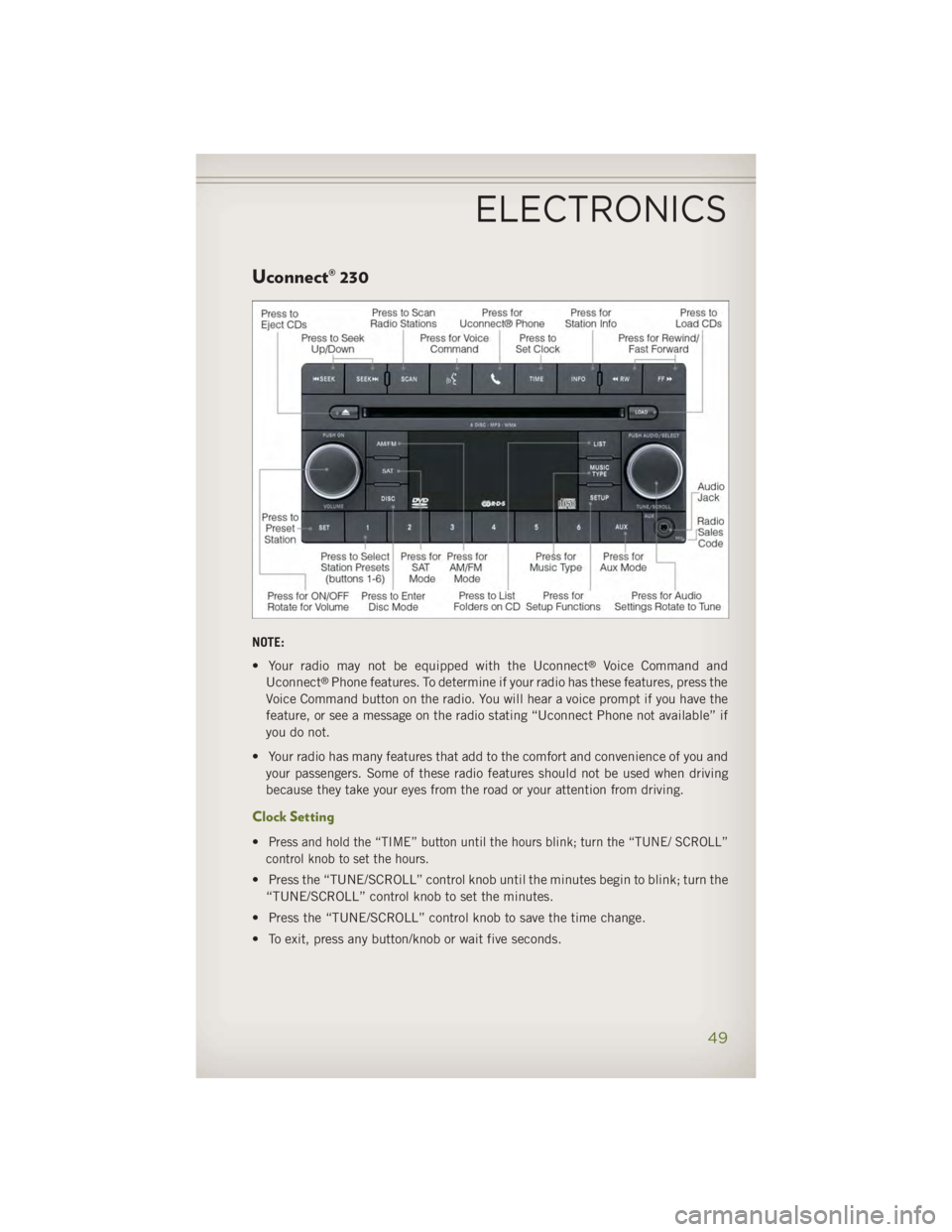
Uconnect® 230
NOTE:
• Your radio may not be equipped with the Uconnect ®
Voice Command and
Uconnect ®
Phone features. To determine if your radio has these features, press the
Voice Command button on the radio. You will hear a voice prompt if you have the
feature, or see a message on the radio stating “Uconnect Phone not available” if
you do not.
• Your radio has many features that add to the comfort and convenience of you and
your passengers. Some of these radio features should not be used when driving
because they take your eyes from the road or your attention from driving.
Clock Setting
• Press and hold the “TIME” button until the hours blink; turn the “TUNE/ SCROLL”
control knob to set the hours.
• Press the “TUNE/SCROLL” control knob until the minutes begin to blink; turn the
“TUNE/SCROLL” control knob to set the minutes.
• Press the “TUNE/SCROLL” control knob to save the time change.
• To exit, press any button/knob or wait five seconds.ELECTRONICS
49
Page 54 of 140
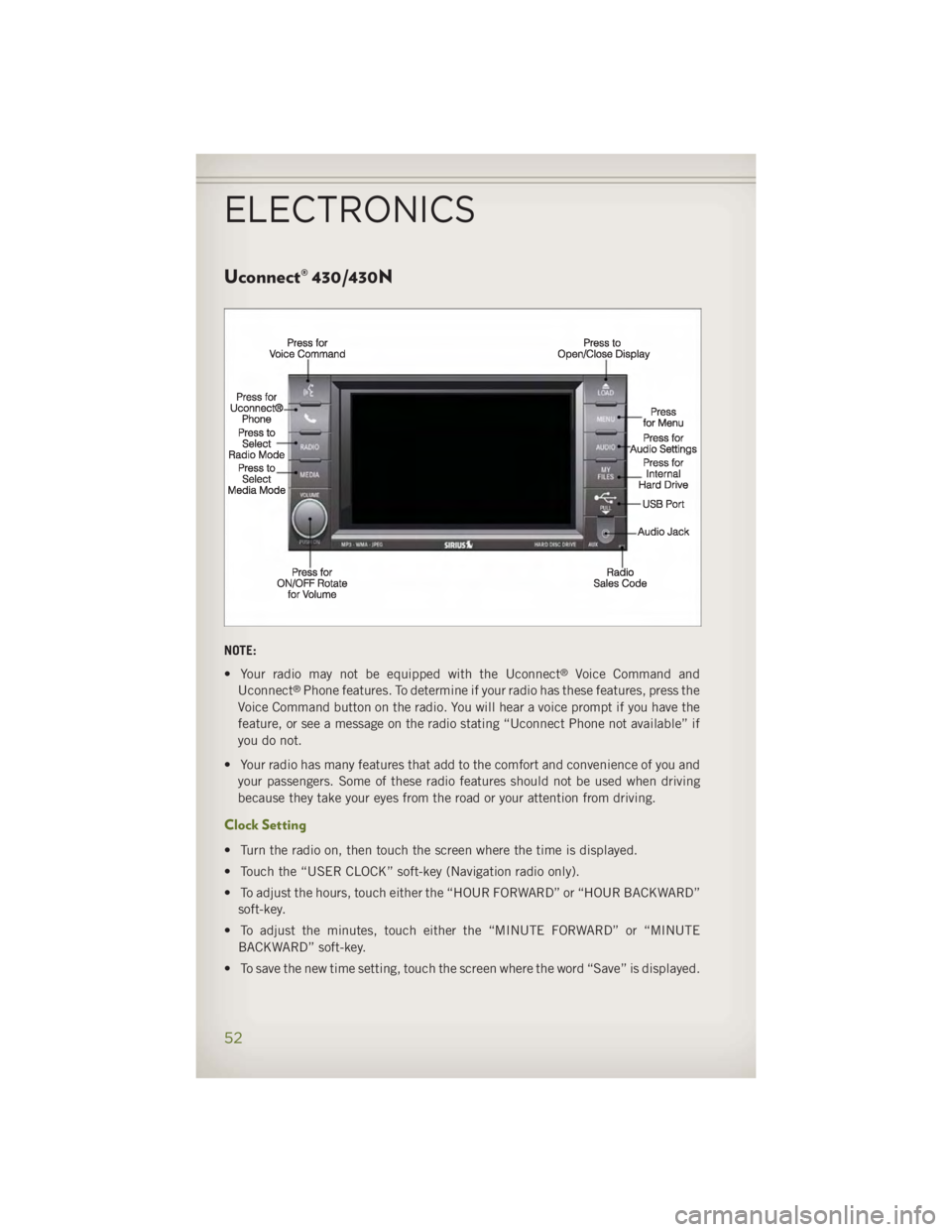
Uconnect® 430/430N
NOTE:
• Your radio may not be equipped with the Uconnect ®
Voice Command and
Uconnect ®
Phone features. To determine if your radio has these features, press the
Voice Command button on the radio. You will hear a voice prompt if you have the
feature, or see a message on the radio stating “Uconnect Phone not available” if
you do not.
• Your radio has many features that add to the comfort and convenience of you and
your passengers. Some of these radio features should not be used when driving
because they take your eyes from the road or your attention from driving.
Clock Setting
• Turn the radio on, then touch the screen where the time is displayed.
• Touch the “USER CLOCK” soft-key (Navigation radio only).
• To adjust the hours, touch either the “HOUR FORWARD” or “HOUR BACKWARD”
soft-key.
• To adjust the minutes, touch either the “MINUTE FORWARD” or “MINUTE
BACKWARD” soft-key.
• To save the new time setting, touch the screen where the word “Save” is displayed.ELECTRONICS
52
Page 80 of 140
NOTE:
The USB port supports certain Mini, Classic, Nano, Touch, and iPhone ®
devices. The
USB port also supports playing music from compatible external USB Mass Storage
Class memory devices. For supported audio file formats, refer to the USB Port section
in the Owner's Manual on the DVD. Refer to www.UconnectPhone.com website for a
list of tested iPod ®
s. Some iPod ®
software versions may not fully support the USB
port features. Please visit Apple’s website for iPod ®
software updates.
WARNING!Do not plug in or remove the iPod ®
or external device while driving. Failure to
follow this warning could result in a collision.
Uconnect® Phone • To determine if your vehicle is equipped with Uconnect ®
Phone, press the
“Uconnect ®
Phone” button located on the radio faceplate. If your vehicle has
this feature, you will hear a voice prompt. If not, you will see a message on the
radio “Uconnect ®
Phone not available.”
• The Uconnect ®
Phone is a voice-activated, hands-free, in-vehicle communica-
tions system with Voice Command Capability (see Voice Command section).
NOTE:
To access the tutorial, press the “Uconnect ®
Phone” button . After the BEEP,
say “tutorial.” Press any hard-key/button or touch the display (Touch-Screen radio) to
cancel the “tutorial.”
• The Uconnect ®
Phone allows you to dial a phone number with your mobile phone
using simple voice commands.
• Refer to your vehicle Owner's Manual on the DVD for further details.
NOTE:
The Uconnect ®
Phone requires a mobile phone equipped with the Bluetooth ®
Hands-Free Profile, Version 1.0 or higher. For Uconnect ®
Customer Support: U.S.
residents - visit www.UconnectPhone.com or call 1–877–855–8400. Canadian
residents - visit www.UconnectPhone.com or call, 1-800-465–2001 (English) or
1-800-387-9983 (French). This site will provide specific instructions based on the
type of mobile phone being paired.
ELECTRONICS
78
Page 81 of 140
Phone Pairing NOTE:
Pairing is a one - time initial setup before using the phone. Prior to starting the
pairing procedure ensure all additional phones within the vehicle have their
Bluetooth ®
disabled.
• Press the “Phone” button to begin.
• Wait for the “ready” prompt and BEEP.
• After the BEEP, say ”setup” or “Uconnect device setup.”
• After the BEEP, say “device pairing.”
• After the BEEP, say “pair a device.”
• Follow the audible prompts.
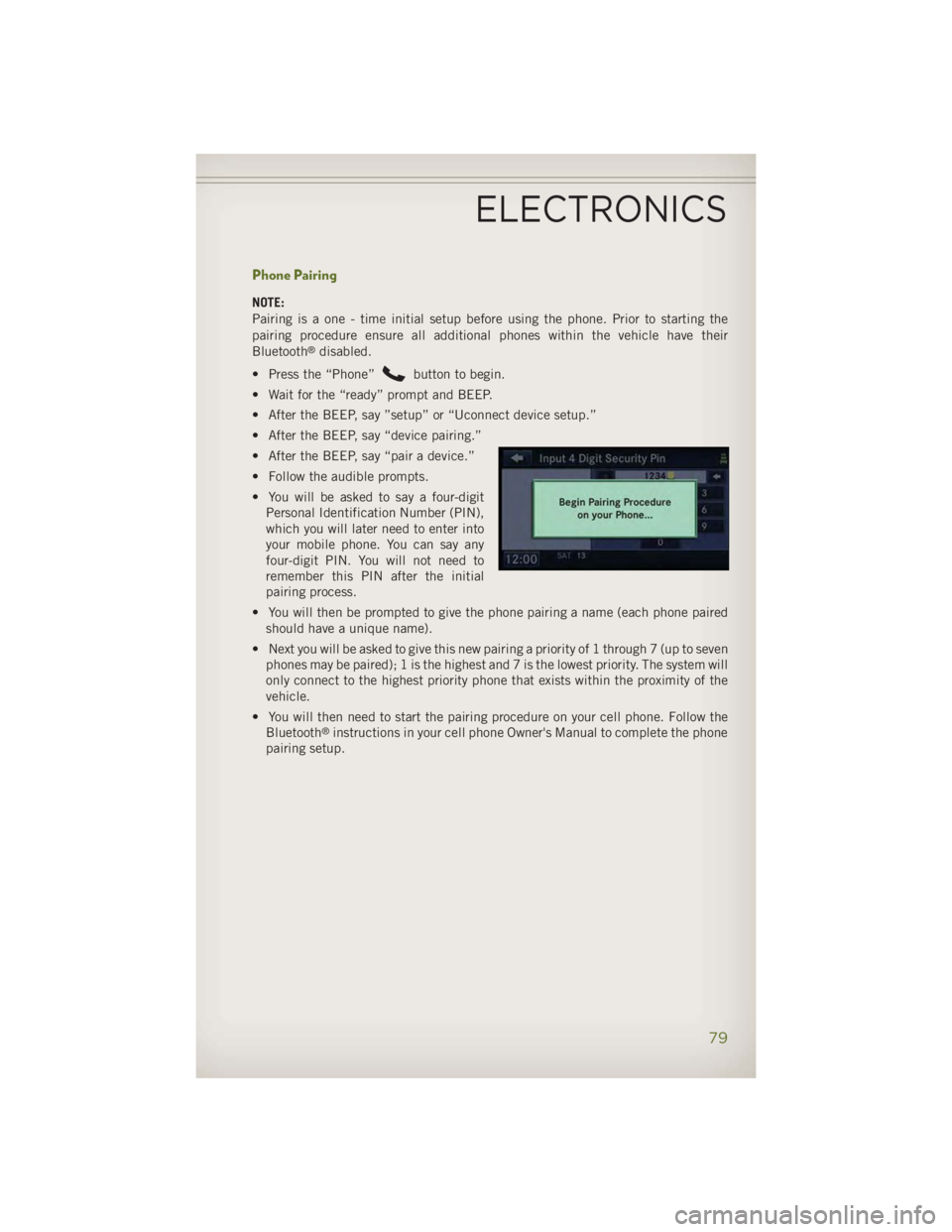
• You will be asked to say a four-digit
Personal Identification Number (PIN),
which you will later need to enter into
your mobile phone. You can say any
four-digit PIN. You will not need to
remember this PIN after the initial
pairing process.
• You will then be prompted to give the phone pairing a name (each phone paired
should have a unique name).
• Next you will be asked to give this new pairing a priority of 1 through 7 (up to seven
phones may be paired); 1 is the highest and 7 is the lowest priority. The system will
only connect to the highest priority phone that exists within the proximity of the
vehicle.
• You will then need to start the pairing procedure on your cell phone. Follow the
Bluetooth ®
instructions in your cell phone Owner's Manual to complete the phone
pairing setup.
ELECTRONICS
79