warning JEEP YJ 1995 Service And Workshop Manual
[x] Cancel search | Manufacturer: JEEP, Model Year: 1995, Model line: YJ, Model: JEEP YJ 1995Pages: 2158, PDF Size: 81.9 MB
Page 286 of 2158
ELECTRICAL
GROUP INDEX
Group Group
AUDIO SYSTEMS........................ 8F
BATTERY/STARTER/GENERATOR SERVICE.... 8B
BATTERY/STARTING/CHARGING SYSTEMS
DIAGNOSTICS......................... 8A
CHIME/BUZZER WARNING SYSTEMS........ 8U
HORNS................................ 8G
IGNITION SYSTEMS...................... 8D
INSTRUMENT PANEL AND GAUGES......... 8E
LAMPS................................ 8L
OVERHEAD CONSOLE.................... 8C
POWER LOCKS.......................... 8P
POWER MIRRORS....................... 8TPOWER SEATS.......................... 8R
POWER WINDOWS....................... 8S
REAR WINDOW DEFOGGER............... 8N
RESTRAINT SYSTEMS................... 8M
TURN SIGNAL AND HAZARD WARNING
SYSTEMS............................. 8J
VEHICLE SPEED CONTROL SYSTEM......... 8H
WIPER AND WASHER SYSTEMS............ 8K
XJ WIRING DIAGRAMS-LEFT HAND DRIVE . . . 8W
XJ WIRING DIAGRAMS-RIGHT HAND DRIVE . 8W
YJ WIRING DIAGRAMS.................. 8W
BATTERY/STARTING/CHARGING SYSTEMS DIAGNOSTICS
CONTENTS
page page
BATTERY............................... 2
CHARGING SYSTEM..................... 17
IGNITION-OFF DRAW.................... 10SPECIFICATIONS........................ 23
STARTING SYSTEM...................... 11
USING ON-BOARD DIAGNOSTIC SYSTEM.... 22
GENERAL INFORMATION
The battery, starting, and charging systems operate
with one another; therefore, they must be tested as a
complete system. In order for the vehicle to start and
charge properly, all of the components involved in
these systems must perform within specifications.
Group 8A covers battery, starting (Fig. 1) and
charging (Fig. 2) system diagnostic procedures. These
procedures include the most basic conventional diag-
nostic methods, to On-Board Diagnostics (OBD) builtinto the Powertrain Control Module (PCM). Use of an
induction milliamp ammeter, volt/ohmmeter, battery
charger, carbon pile rheostat (load tester), and 12-
volt test lamp will be required.
All OBD-sensed systems are monitored by the
PCM. Each monitored circuit is assigned a Diagnos-
tic Trouble Code (DTC). The PCM will store a DTC in
electronic memory for any failure it detects. See Us-
ing On-Board Diagnostic System in this group for
more information.
JELECTRICAL 8A - 1
Page 288 of 2158
charged. However, even with these vents, hydrogen
gas can collect in or around the battery. If hydrogen
gas is exposed to flame or sparks, it can ignite.
If the electrolyte level is low, the battery could arc
internally and explode. If the battery is equipped
with removable cell caps, add distilled water when-
ever the electrolyte level is below the top of the
plates. If the battery cell caps cannot be removed, the
battery must be replaced when the electrolyte level is
low.
WARNING: DO NOT ATTEMPT TO ASSIST BOOST,
CHARGE, OR TEST BATTERY WHEN ELECTRO-
LYTE LEVEL IS BELOW THE TOP OF THE PLATES.
PERSONAL INJURY MAY OCCUR.
BATTERY RATINGS
Currently, there are 2 commonly accepted methods
for rating and comparing battery performance. These
ratings are called Cold Cranking Amperage (CCA),
and Reserve Capacity (RC). Be certain that a replace-
ment battery has CCA and RC ratings that equal or
exceed the original equipment specification for the
vehicle being serviced. See Battery Classifications
and Ratings charts in Specifications at the back of
this group.
COLD CRANKING AMPERAGE
The Cold Cranking Amperage (CCA) rating speci-
fies how much current (in amperes) the battery can
deliver for 30 seconds at -17.7ÉC (0ÉF). Terminal volt-
age must not fall below 7.2 volts during or after the
30 second discharge. The CCA required is generally
higher as engine displacement increases, depending
also upon the starter current draw requirements.
RESERVE CAPACITY
The Reserve Capacity (RC) rating specifies the
time (in minutes) it takes for battery terminal volt-
age to fall below 10.2 volts at a discharge rate of 25
amps. RC is determined with the battery fully-
charged at 26.7ÉC (80ÉF). This rating estimates how
long the battery might last after a charging system
failure, under minimum electrical load.
DIAGNOSIS
The battery must be completely charged and the
top, posts, and terminal clamps should be properly
cleaned before diagnostic procedures are performed.
Refer to Group 8B - Battery/Starter/Generator Ser-
vice for more information.
The condition of a battery is determined by two cri-
teria:
(1)State-Of-ChargeThis can be determined by
viewing the built-in test indicator, by checking spe-
cific gravity of the electrolyte (hydrometer test), or by
checking battery voltage (open circuit voltage test).(2)Cranking CapacityThis can be determined
by performing a battery load test, which measures
the ability of the battery to supply high-amperage
current.
If the battery has a built-in test indicator, use this
test first. If it has no test indicator, but has remov-
able cell caps, perform the hydrometer test first. If
cell caps are not removable, or a hydrometer is not
available, perform the open circuit voltage test first.
The battery must be charged before proceeding
with a load test if:
²the built-in test indicator has a black or dark color
visible
²the temperature corrected specific gravity is less
than 1.235
²the open circuit voltage is less than 12.4 volts.
A battery that will not accept a charge is faulty
and further testing is not required. A battery that is
fully-charged, but does not pass the load test is
faulty and must be replaced.
Completely discharged batteries may take
several hours to accept a charge. See Charging
Completely Discharged Battery.
A battery is fully-charged when:
²all cells are gassing freely during charging
²a green color is visible in the sight glass of the
built-in test indicator
²three corrected specific gravity tests, taken at
1-hour intervals, indicate no increase in specific grav-
ity
²open circuit voltage is 12.4 volts or greater.
ABNORMAL BATTERY DISCHARGING
Any of the following conditions can result in abnor-
mal battery discharging:
(1) Corroded battery posts and terminals.
(2) Loose or worn generator drive belt.
(3) Electrical loads that exceed the output of the
charging system, possibly due to equipment installed
after manufacture or repeated short trip use.
(4) Slow driving speeds (heavy traffic conditions) or
prolonged idling with high-amperage draw systems
in use.
(5) Faulty circuit or component causing excessive
ignition-off draw. See Ignition-Off Draw in this group
for diagnosis.
(6) Faulty charging system.
(7) Faulty or incorrect battery.
BUILT-IN TEST INDICATOR
A test indicator (hydrometer) built into the top of
the battery case, provides visual information for bat-
tery testing (Fig. 1). It is important when using the
test indicator that the battery be level and have a
clean sight glass to see correct indications. Additional
light may be required to view indicator.
JBATTERY/STARTING/CHARGING SYSTEMS DIAGNOSTICS 8A - 3
Page 290 of 2158
WARNING: DO NOT USE OPEN FLAME AS A
SOURCE OF ADDITIONAL LIGHT FOR VIEWING
TEST INDICATOR. EXPLOSIVE HYDROGEN GAS
MAY BE PRESENT IN THE AREA SURROUNDING
BATTERY.
Like a hydrometer, the built-in test indicator mea-
sures the specific gravity of the electrolyte. Specific
gravity will indicate battery state-of-charge. How-
ever, the test indicator will not indicate cranking ca-
pacity of the battery. See Load Test in this group for
more information.
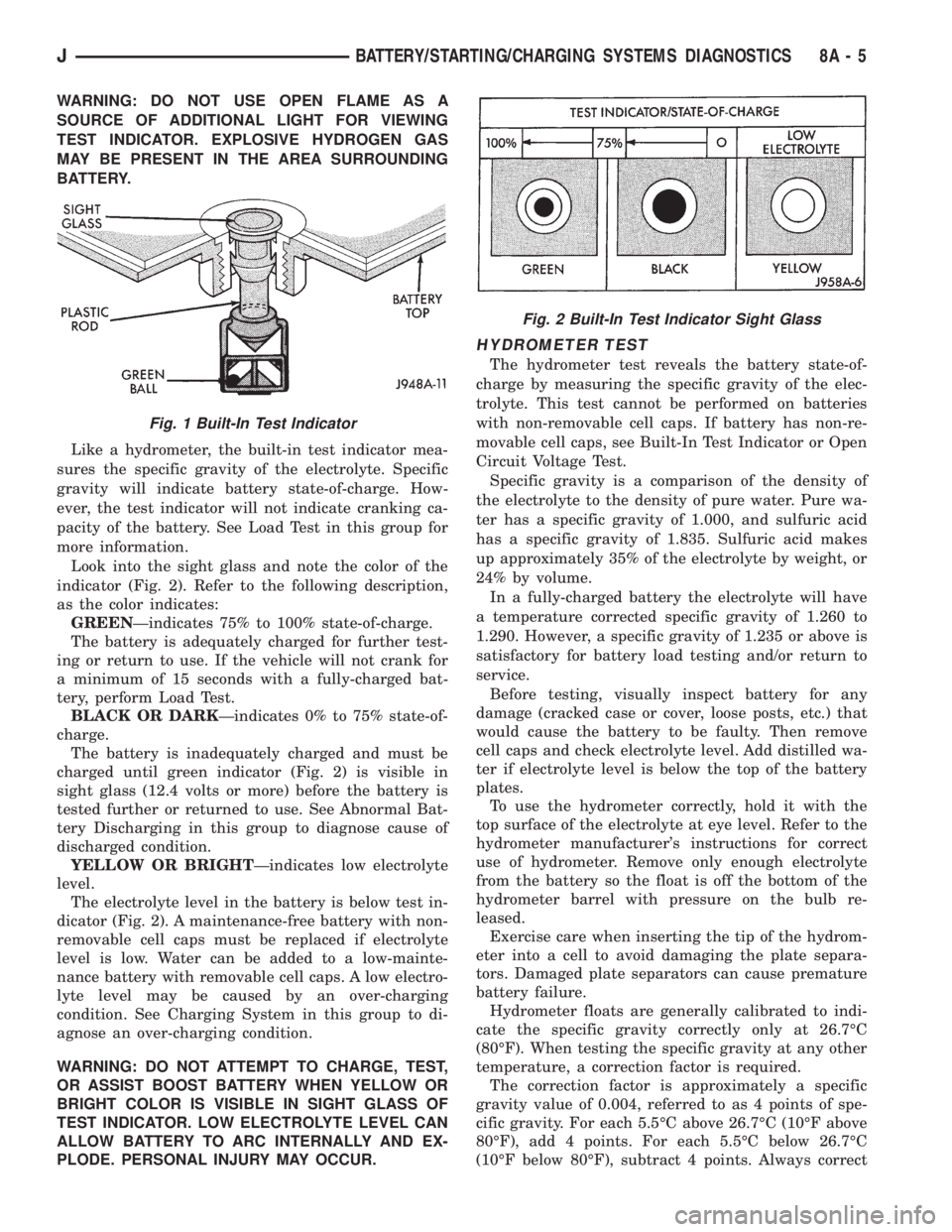
Look into the sight glass and note the color of the
indicator (Fig. 2). Refer to the following description,
as the color indicates:
GREENÐindicates 75% to 100% state-of-charge.
The battery is adequately charged for further test-
ing or return to use. If the vehicle will not crank for
a minimum of 15 seconds with a fully-charged bat-
tery, perform Load Test.
BLACK OR DARKÐindicates 0% to 75% state-of-
charge.
The battery is inadequately charged and must be
charged until green indicator (Fig. 2) is visible in
sight glass (12.4 volts or more) before the battery is
tested further or returned to use. See Abnormal Bat-
tery Discharging in this group to diagnose cause of
discharged condition.
YELLOW OR BRIGHTÐindicates low electrolyte
level.
The electrolyte level in the battery is below test in-
dicator (Fig. 2). A maintenance-free battery with non-
removable cell caps must be replaced if electrolyte
level is low. Water can be added to a low-mainte-
nance battery with removable cell caps. A low electro-
lyte level may be caused by an over-charging
condition. See Charging System in this group to di-
agnose an over-charging condition.
WARNING: DO NOT ATTEMPT TO CHARGE, TEST,
OR ASSIST BOOST BATTERY WHEN YELLOW OR
BRIGHT COLOR IS VISIBLE IN SIGHT GLASS OF
TEST INDICATOR. LOW ELECTROLYTE LEVEL CAN
ALLOW BATTERY TO ARC INTERNALLY AND EX-
PLODE. PERSONAL INJURY MAY OCCUR.
HYDROMETER TEST
The hydrometer test reveals the battery state-of-
charge by measuring the specific gravity of the elec-
trolyte. This test cannot be performed on batteries
with non-removable cell caps. If battery has non-re-
movable cell caps, see Built-In Test Indicator or Open
Circuit Voltage Test.
Specific gravity is a comparison of the density of
the electrolyte to the density of pure water. Pure wa-
ter has a specific gravity of 1.000, and sulfuric acid
has a specific gravity of 1.835. Sulfuric acid makes
up approximately 35% of the electrolyte by weight, or
24% by volume.
In a fully-charged battery the electrolyte will have
a temperature corrected specific gravity of 1.260 to
1.290. However, a specific gravity of 1.235 or above is
satisfactory for battery load testing and/or return to
service.
Before testing, visually inspect battery for any
damage (cracked case or cover, loose posts, etc.) that
would cause the battery to be faulty. Then remove
cell caps and check electrolyte level. Add distilled wa-
ter if electrolyte level is below the top of the battery
plates.
To use the hydrometer correctly, hold it with the
top surface of the electrolyte at eye level. Refer to the
hydrometer manufacturer's instructions for correct
use of hydrometer. Remove only enough electrolyte
from the battery so the float is off the bottom of the
hydrometer barrel with pressure on the bulb re-
leased.
Exercise care when inserting the tip of the hydrom-
eter into a cell to avoid damaging the plate separa-
tors. Damaged plate separators can cause premature
battery failure.
Hydrometer floats are generally calibrated to indi-
cate the specific gravity correctly only at 26.7ÉC
(80ÉF). When testing the specific gravity at any other
temperature, a correction factor is required.
The correction factor is approximately a specific
gravity value of 0.004, referred to as 4 points of spe-
cific gravity. For each 5.5ÉC above 26.7ÉC (10ÉF above
80ÉF), add 4 points. For each 5.5ÉC below 26.7ÉC
(10ÉF below 80ÉF), subtract 4 points. Always correct
Fig. 1 Built-In Test Indicator
Fig. 2 Built-In Test Indicator Sight Glass
JBATTERY/STARTING/CHARGING SYSTEMS DIAGNOSTICS 8A - 5
Page 291 of 2158
the specific gravity for temperature variation. Test
the specific gravity of the electrolyte in each battery
cell.
Example: A battery is tested at -12.2ÉC (10ÉF) and
has a specific gravity of 1.240. Determine the actual
specific gravity as follows:
(1) Determine the number of degrees above or be-
low 26.7ÉC (80ÉF):
26.6ÉC - -12.2ÉC = 38.8ÉC (80ÉF - 10ÉF = 70ÉF)
(2) Divide the result from step 1 by 5.5 (10):
38.8ÉC/5.5 = 7 (70ÉF/10 = 7)
(3) Multiply the result from step 2 by the temper-
ature correction factor (0.004):
7 x 0.004 = 0.028
(4) The temperature at testing was below 26.7ÉC
(80ÉF); therefore, the temperature correction is sub-
tracted:
1.240 - 0.028 = 1.212
The corrected specific gravity of the battery in this
example is 1.212.
If the specific gravity of all cells is above 1.235, but
variation between cells is more than 50 points
(0.050), the battery should be replaced.
If the specific gravity of one or more cells is less
than 1.235, charge the battery at a rate of approxi-
mately 5 amperes. Continue charging until 3 consec-
utive specific gravity tests, taken at 1-hour intervals,
are constant. If the cell specific gravity variation is
more than 50 points (0.050) at the end of the charge
period, replace the battery.
When the specific gravity of all cells is above 1.235,
and cell variation is less than 50 points (0.050), the
battery may be load tested.
OPEN CIRCUIT VOLTAGE TEST
A battery open circuit voltage (no load) test will
show state-of-charge of a battery. This test can be
used in place of the hydrometer test if a hydrometer
is not available, or for maintenance-free batteries
with non-removable cell caps.
Before proceeding with this test or load test,
completely charge battery as described in Bat-
tery Charging in this group.
Test battery open circuit voltage as follows:
(1) Before measuring open circuit voltage the sur-
face charge must be removed from the battery. Turn
headlamps on for 15 seconds, then allow up to 5 min-
utes for voltage to stabilize.
(2) Remove both battery cables, negative first.
(3) Using a voltmeter connected to the battery
posts (refer to instructions provided with voltmeter)
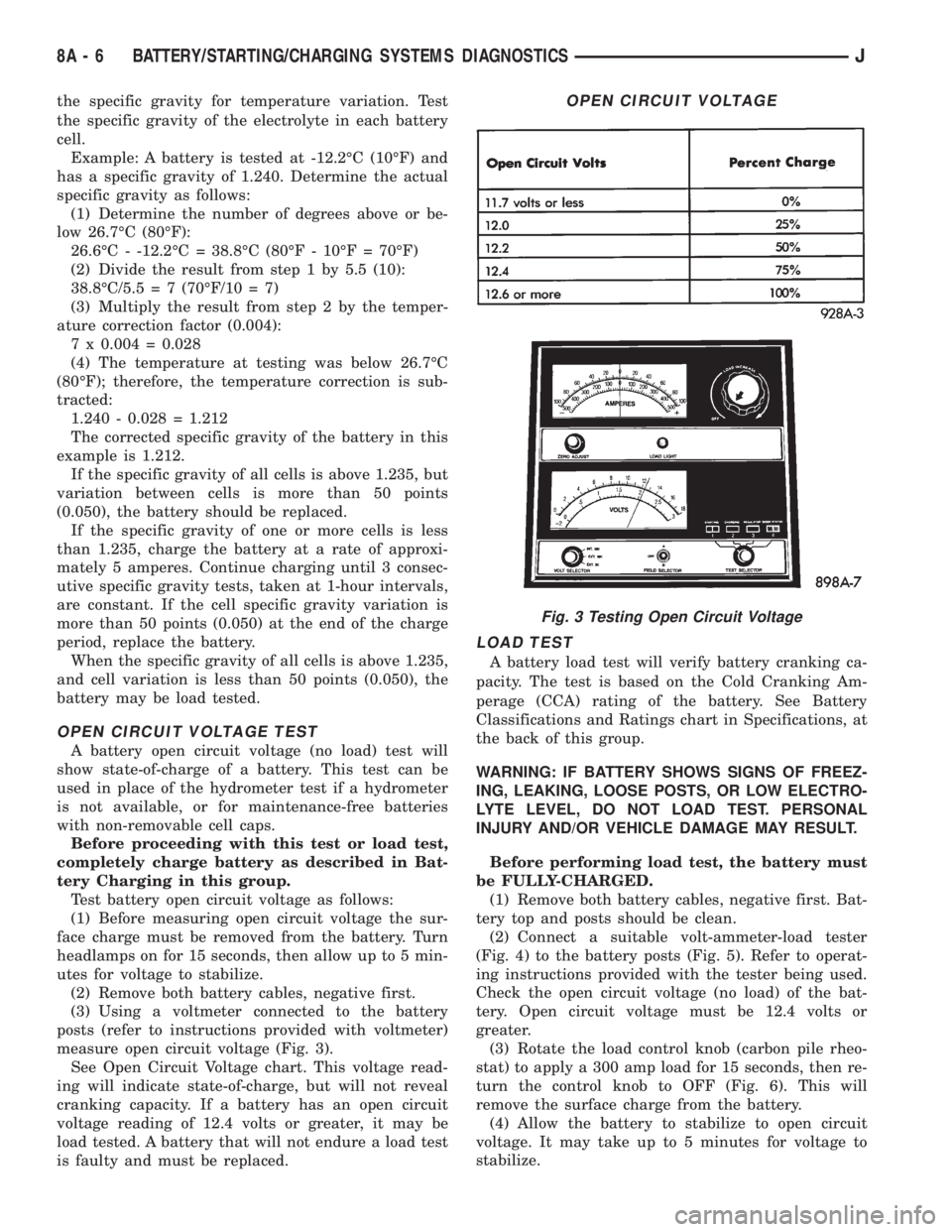
measure open circuit voltage (Fig. 3).
See Open Circuit Voltage chart. This voltage read-
ing will indicate state-of-charge, but will not reveal
cranking capacity. If a battery has an open circuit
voltage reading of 12.4 volts or greater, it may be
load tested. A battery that will not endure a load test
is faulty and must be replaced.
LOAD TEST
A battery load test will verify battery cranking ca-
pacity. The test is based on the Cold Cranking Am-
perage (CCA) rating of the battery. See Battery
Classifications and Ratings chart in Specifications, at
the back of this group.
WARNING: IF BATTERY SHOWS SIGNS OF FREEZ-
ING, LEAKING, LOOSE POSTS, OR LOW ELECTRO-
LYTE LEVEL, DO NOT LOAD TEST. PERSONAL
INJURY AND/OR VEHICLE DAMAGE MAY RESULT.
Before performing load test, the battery must
be FULLY-CHARGED.
(1) Remove both battery cables, negative first. Bat-
tery top and posts should be clean.
(2) Connect a suitable volt-ammeter-load tester
(Fig. 4) to the battery posts (Fig. 5). Refer to operat-
ing instructions provided with the tester being used.
Check the open circuit voltage (no load) of the bat-
tery. Open circuit voltage must be 12.4 volts or
greater.
(3) Rotate the load control knob (carbon pile rheo-
stat) to apply a 300 amp load for 15 seconds, then re-
turn the control knob to OFF (Fig. 6). This will
remove the surface charge from the battery.
(4) Allow the battery to stabilize to open circuit
voltage. It may take up to 5 minutes for voltage to
stabilize.
OPEN CIRCUIT VOLTAGE
Fig. 3 Testing Open Circuit Voltage
8A - 6 BATTERY/STARTING/CHARGING SYSTEMS DIAGNOSTICSJ
Page 292 of 2158
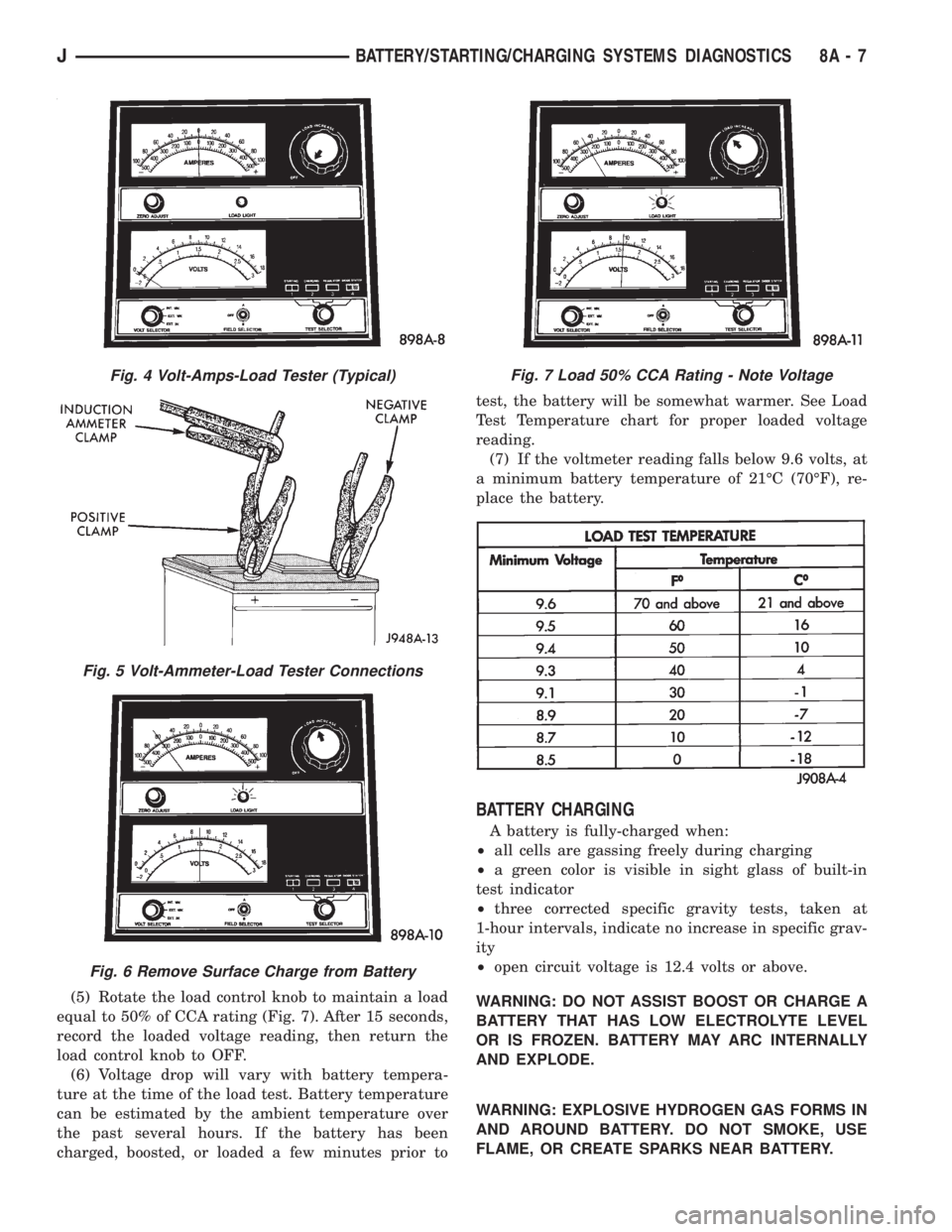
(5) Rotate the load control knob to maintain a load
equal to 50% of CCA rating (Fig. 7). After 15 seconds,
record the loaded voltage reading, then return the
load control knob to OFF.
(6) Voltage drop will vary with battery tempera-
ture at the time of the load test. Battery temperature
can be estimated by the ambient temperature over
the past several hours. If the battery has been
charged, boosted, or loaded a few minutes prior totest, the battery will be somewhat warmer. See Load
Test Temperature chart for proper loaded voltage
reading.
(7) If the voltmeter reading falls below 9.6 volts, at
a minimum battery temperature of 21ÉC (70ÉF), re-
place the battery.
BATTERY CHARGING
A battery is fully-charged when:
²all cells are gassing freely during charging
²a green color is visible in sight glass of built-in
test indicator
²three corrected specific gravity tests, taken at
1-hour intervals, indicate no increase in specific grav-
ity
²open circuit voltage is 12.4 volts or above.
WARNING: DO NOT ASSIST BOOST OR CHARGE A
BATTERY THAT HAS LOW ELECTROLYTE LEVEL
OR IS FROZEN. BATTERY MAY ARC INTERNALLY
AND EXPLODE.
WARNING: EXPLOSIVE HYDROGEN GAS FORMS IN
AND AROUND BATTERY. DO NOT SMOKE, USE
FLAME, OR CREATE SPARKS NEAR BATTERY.
Fig. 4 Volt-Amps-Load Tester (Typical)
Fig. 5 Volt-Ammeter-Load Tester Connections
Fig. 6 Remove Surface Charge from Battery
Fig. 7 Load 50% CCA Rating - Note Voltage
JBATTERY/STARTING/CHARGING SYSTEMS DIAGNOSTICS 8A - 7
Page 293 of 2158
WARNING: POISONOUS AND CAUSTIC. BATTERY
CONTAINS SULFURIC ACID. AVOID CONTACT WITH
SKIN, EYES, OR CLOTHING. IN EVENT OF CON-
TACT, FLUSH WITH WATER AND CALL PHYSICIAN
IMMEDIATELY. KEEP OUT OF REACH OF CHIL-
DREN.
CAUTION: Always disconnect the battery negative
cable before charging battery to avoid damage to
electrical system components. Do not exceed 16.0
volts while charging battery.
Battery electrolyte will bubble inside battery case
during normal battery charging. If the electrolyte
boils, or is discharged from the vent holes while
charging, immediately reduce charging rate or turn
OFF charger and evaluate battery condition.
Battery should not be hot to the touch. If the
battery feels hot to the touch, turn OFF
charger and let battery cool before continuing
charging operation.
Some battery chargers are equipped with polarity
sensing circuitry. This circuitry protects the charger
and/or battery from being damaged if improperly con-
nected.
If the battery state-of-charge is too low for the po-
larity sensing circuitry to detect, the charger will not
operate. This makes it appear that the battery will
not accept charging current. Refer to instructions
provided with the battery charger being used to by-
pass the polarity sensing circuitry.
After the battery has been charged to 12.4 volts or
greater, perform a load test to determine cranking
capacity. If the battery will endure a load test, return
the battery to use. If the battery will not endure a
load test, it must be replaced.
Clean and inspect battery holddowns, tray, termi-
nals, posts, and top before completing service. Refer
to Group 8B - Battery/Starter/Generator Service for
more information.
CHARGING TIME REQUIRED
The time required to charge a battery will vary, de-
pending upon the following factors:(1)Battery CapacityÐA completely discharged
heavy-duty battery requires twice the recharging
time of a small capacity battery.
WARNING: NEVER EXCEED 20 AMPS WHEN
CHARGING A COLD (-1ÉC/30ÉF) BATTERY. PER-
SONAL INJURY MAY RESULT.
(2)TemperatureÐA longer time will be needed to
charge a battery at -18ÉC (0ÉF) than at 27ÉC (80ÉF).
When a fast charger is connected to a cold battery,
current accepted by the battery will be very low at
first. As the battery warms, it will accept a higher
charging current rate.
(3)Charger CapacityÐA charger that supplies
only 5 amperes will require a longer charging time. A
charger that supplies 20 amperes or more requires a
shorter charging time.
(4)State-Of-ChargeÐA completely discharged
battery requires more charging time than a partially
discharged battery. Electrolyte is nearly pure water
in a completely discharged battery. At first, the
charging current (amperage) will be low. As the bat-
tery charges, the specific gravity of the electrolyte
will gradually rise.
CHARGING COMPLETELY DISCHARGED
BATTERY
The following procedure should be used to recharge
a completely discharged battery. Unless this proce-
dure is properly followed, a good battery may be
needlessly replaced.
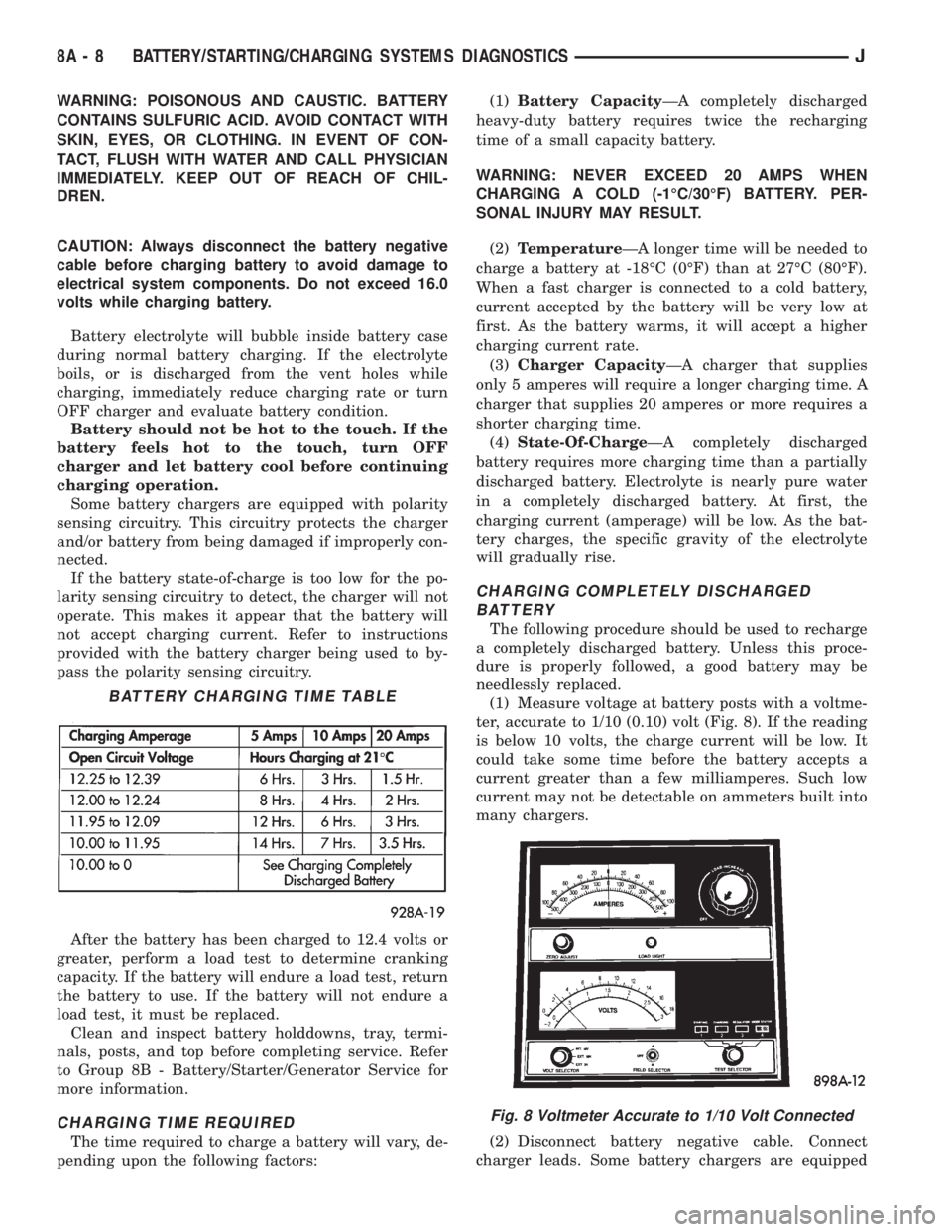
(1) Measure voltage at battery posts with a voltme-
ter, accurate to 1/10 (0.10) volt (Fig. 8). If the reading
is below 10 volts, the charge current will be low. It
could take some time before the battery accepts a
current greater than a few milliamperes. Such low
current may not be detectable on ammeters built into
many chargers.
(2) Disconnect battery negative cable. Connect
charger leads. Some battery chargers are equipped
BATTERY CHARGING TIME TABLE
Fig. 8 Voltmeter Accurate to 1/10 Volt Connected
8A - 8 BATTERY/STARTING/CHARGING SYSTEMS DIAGNOSTICSJ
Page 302 of 2158
CHARGING SYSTEM
GENERAL INFORMATION
The charging system consists of:
²generator
²voltage regulator circuitry (within PCM)
²ignition switch
²battery
²generator warning lamp or voltmeter (depending
on vehicle equipment)
²wiring harness and connections.
Following is a general description of the major
charging system components. Refer to Group 8W -
Wiring Diagrams for complete circuit descriptions
and diagrams.
The charging system is turned on and off with the
ignition switch. When the ignition switch is turned to
the ON position, battery voltage is applied to the
generator rotor through one of the two field termi-
nals to produce a magnetic field. The generator is
driven by the engine through a serpentine belt and
pulley arrangement.
As the energized rotor begins to rotate within the
generator, the spinning magnetic field induces a cur-
rent into the windings of the stator coil. Once the
generator begins producing sufficient current, it also
provides the current needed to energize the rotor.
The wye (Y) type stator winding connections de-
liver the induced AC current to 3 positive and 3 neg-
ative diodes for rectification. From the diodes,
rectified DC current is delivered to the vehicle elec-
trical system through the generator battery and
ground terminals.
The amount of DC current produced by the gener-
ator is controlled by the generator voltage regulator
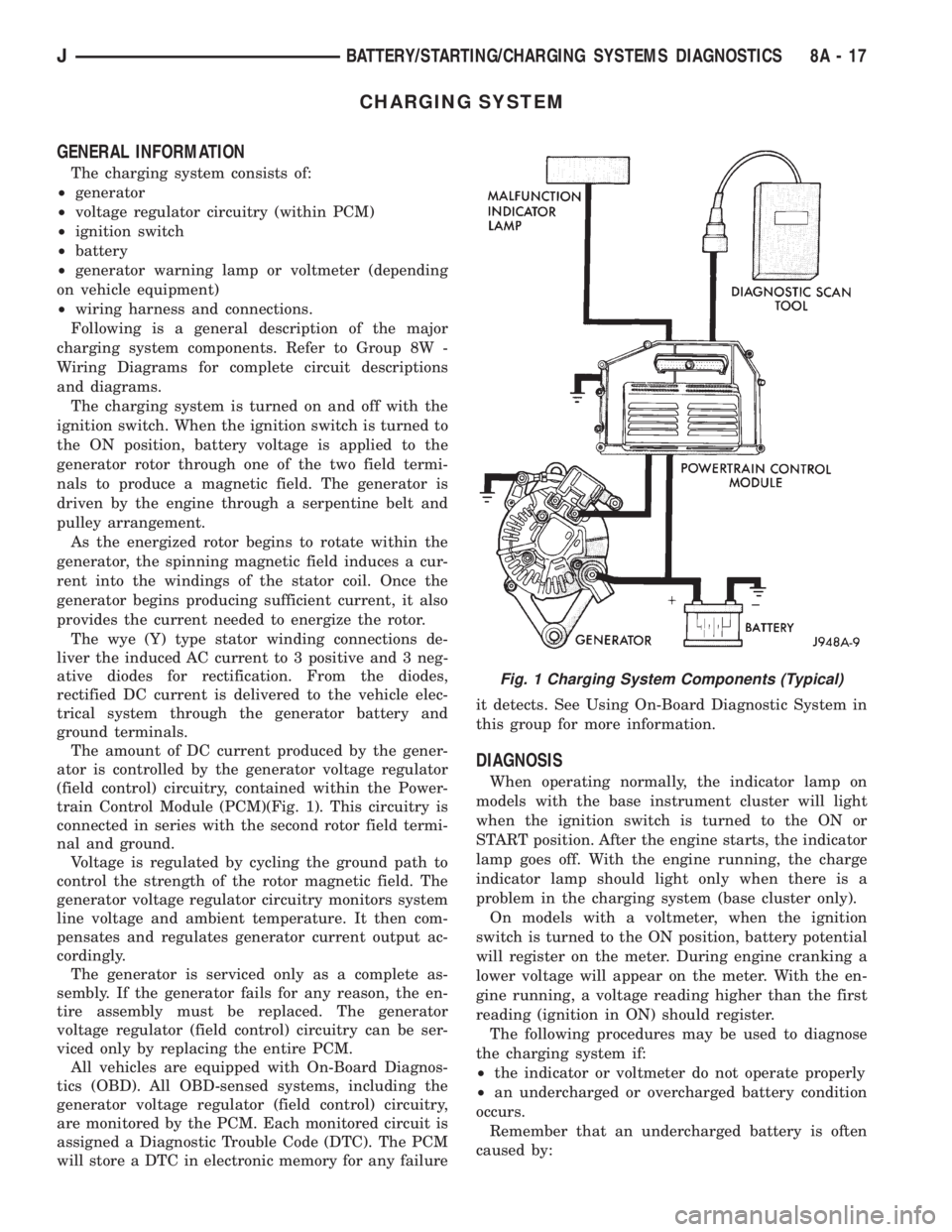
(field control) circuitry, contained within the Power-
train Control Module (PCM)(Fig. 1). This circuitry is
connected in series with the second rotor field termi-
nal and ground.
Voltage is regulated by cycling the ground path to
control the strength of the rotor magnetic field. The
generator voltage regulator circuitry monitors system
line voltage and ambient temperature. It then com-
pensates and regulates generator current output ac-
cordingly.
The generator is serviced only as a complete as-
sembly. If the generator fails for any reason, the en-
tire assembly must be replaced. The generator
voltage regulator (field control) circuitry can be ser-
viced only by replacing the entire PCM.
All vehicles are equipped with On-Board Diagnos-
tics (OBD). All OBD-sensed systems, including the
generator voltage regulator (field control) circuitry,
are monitored by the PCM. Each monitored circuit is
assigned a Diagnostic Trouble Code (DTC). The PCM
will store a DTC in electronic memory for any failureit detects. See Using On-Board Diagnostic System in
this group for more information.
DIAGNOSIS
When operating normally, the indicator lamp on
models with the base instrument cluster will light
when the ignition switch is turned to the ON or
START position. After the engine starts, the indicator
lamp goes off. With the engine running, the charge
indicator lamp should light only when there is a
problem in the charging system (base cluster only).
On models with a voltmeter, when the ignition
switch is turned to the ON position, battery potential
will register on the meter. During engine cranking a
lower voltage will appear on the meter. With the en-
gine running, a voltage reading higher than the first
reading (ignition in ON) should register.
The following procedures may be used to diagnose
the charging system if:
²the indicator or voltmeter do not operate properly
²an undercharged or overcharged battery condition
occurs.
Remember that an undercharged battery is often
caused by:
Fig. 1 Charging System Components (Typical)
JBATTERY/STARTING/CHARGING SYSTEMS DIAGNOSTICS 8A - 17
Page 310 of 2158
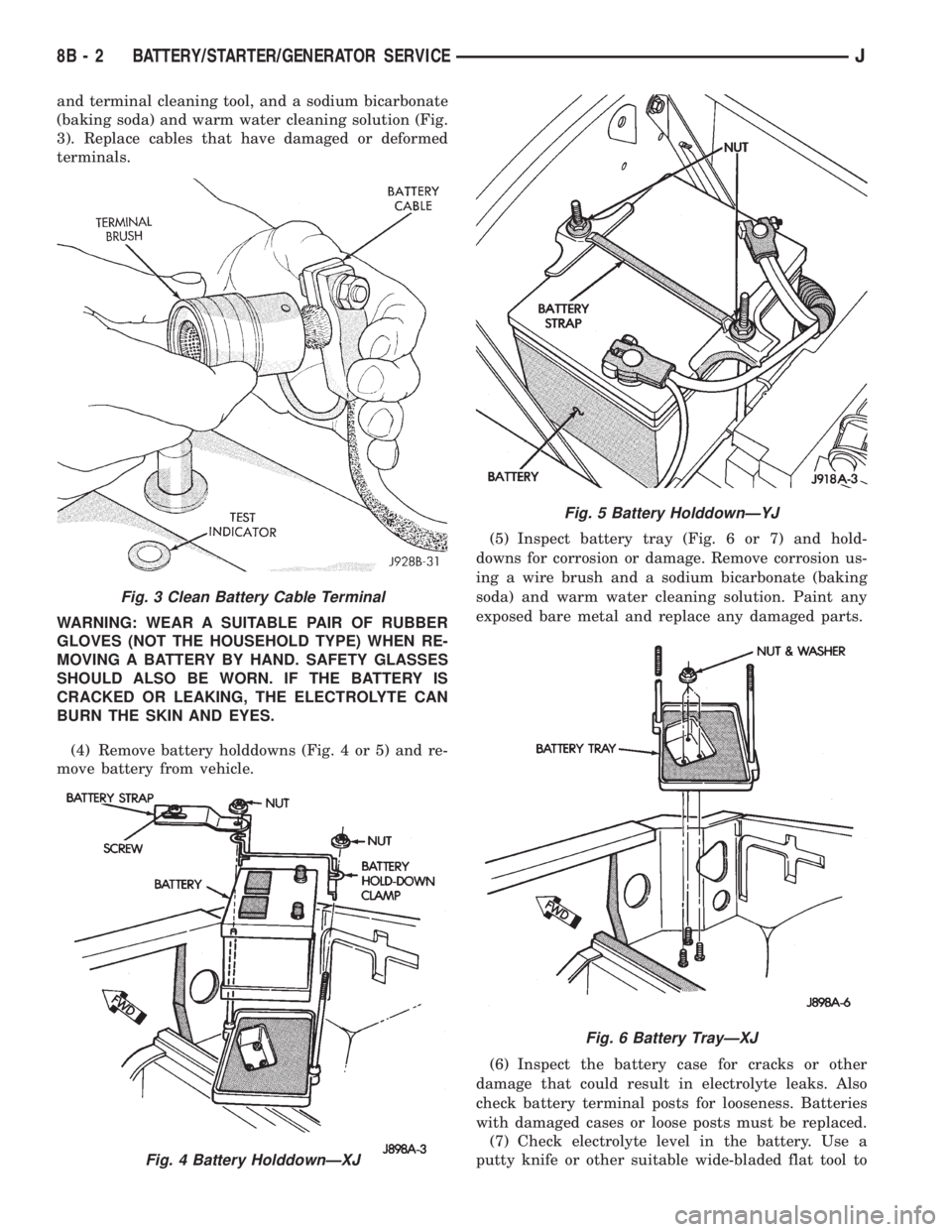
and terminal cleaning tool, and a sodium bicarbonate
(baking soda) and warm water cleaning solution (Fig.
3). Replace cables that have damaged or deformed
terminals.
WARNING: WEAR A SUITABLE PAIR OF RUBBER
GLOVES (NOT THE HOUSEHOLD TYPE) WHEN RE-
MOVING A BATTERY BY HAND. SAFETY GLASSES
SHOULD ALSO BE WORN. IF THE BATTERY IS
CRACKED OR LEAKING, THE ELECTROLYTE CAN
BURN THE SKIN AND EYES.
(4) Remove battery holddowns (Fig. 4 or 5) and re-
move battery from vehicle.(5) Inspect battery tray (Fig. 6 or 7) and hold-
downs for corrosion or damage. Remove corrosion us-
ing a wire brush and a sodium bicarbonate (baking
soda) and warm water cleaning solution. Paint any
exposed bare metal and replace any damaged parts.
(6) Inspect the battery case for cracks or other
damage that could result in electrolyte leaks. Also
check battery terminal posts for looseness. Batteries
with damaged cases or loose posts must be replaced.
(7) Check electrolyte level in the battery. Use a
putty knife or other suitable wide-bladed flat tool to
Fig. 3 Clean Battery Cable Terminal
Fig. 4 Battery HolddownÐXJ
Fig. 5 Battery HolddownÐYJ
Fig. 6 Battery TrayÐXJ
8B - 2 BATTERY/STARTER/GENERATOR SERVICEJ
Page 314 of 2158
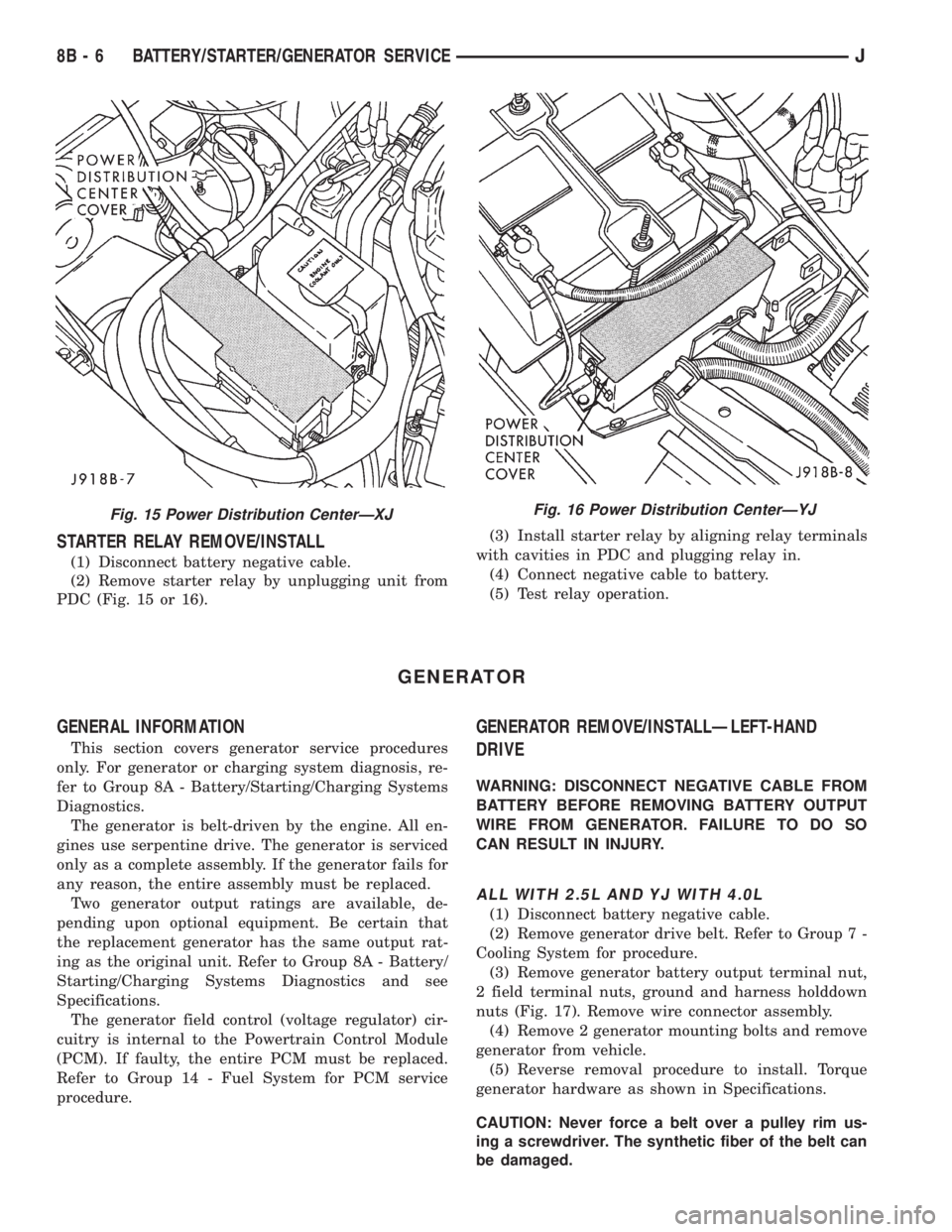
STARTER RELAY REMOVE/INSTALL
(1) Disconnect battery negative cable.
(2) Remove starter relay by unplugging unit from
PDC (Fig. 15 or 16).(3) Install starter relay by aligning relay terminals
with cavities in PDC and plugging relay in.
(4) Connect negative cable to battery.
(5) Test relay operation.
GENERATOR
GENERAL INFORMATION
This section covers generator service procedures
only. For generator or charging system diagnosis, re-
fer to Group 8A - Battery/Starting/Charging Systems
Diagnostics.
The generator is belt-driven by the engine. All en-
gines use serpentine drive. The generator is serviced
only as a complete assembly. If the generator fails for
any reason, the entire assembly must be replaced.
Two generator output ratings are available, de-
pending upon optional equipment. Be certain that
the replacement generator has the same output rat-
ing as the original unit. Refer to Group 8A - Battery/
Starting/Charging Systems Diagnostics and see
Specifications.
The generator field control (voltage regulator) cir-
cuitry is internal to the Powertrain Control Module
(PCM). If faulty, the entire PCM must be replaced.
Refer to Group 14 - Fuel System for PCM service
procedure.
GENERATOR REMOVE/INSTALLÐLEFT-HAND
DRIVE
WARNING: DISCONNECT NEGATIVE CABLE FROM
BATTERY BEFORE REMOVING BATTERY OUTPUT
WIRE FROM GENERATOR. FAILURE TO DO SO
CAN RESULT IN INJURY.
ALL WITH 2.5L AND YJ WITH 4.0L
(1) Disconnect battery negative cable.
(2) Remove generator drive belt. Refer to Group 7 -
Cooling System for procedure.
(3) Remove generator battery output terminal nut,
2 field terminal nuts, ground and harness holddown
nuts (Fig. 17). Remove wire connector assembly.
(4) Remove 2 generator mounting bolts and remove
generator from vehicle.
(5) Reverse removal procedure to install. Torque
generator hardware as shown in Specifications.
CAUTION: Never force a belt over a pulley rim us-
ing a screwdriver. The synthetic fiber of the belt can
be damaged.
Fig. 15 Power Distribution CenterÐXJFig. 16 Power Distribution CenterÐYJ
8B - 6 BATTERY/STARTER/GENERATOR SERVICEJ
Page 315 of 2158
CAUTION: When installing a serpentine accessory
drive belt, the belt MUST be routed correctly. The
water pump will be rotating in the wrong direction if
the belt is installed incorrectly, causing the engine
to overheat. Refer to the belt routing label in engine
compartment, or refer to Belt Schematics in Group
7 - Cooling System.
XJ WITH 4.0L
(1) Disconnect battery negative cable.
(2) Remove generator drive belt. Refer to Group 7 -
Cooling System for procedure.
(3) Raise and support vehicle.
(4) Remove generator battery output terminal nut,
2 field terminal nuts, ground and harness holddown
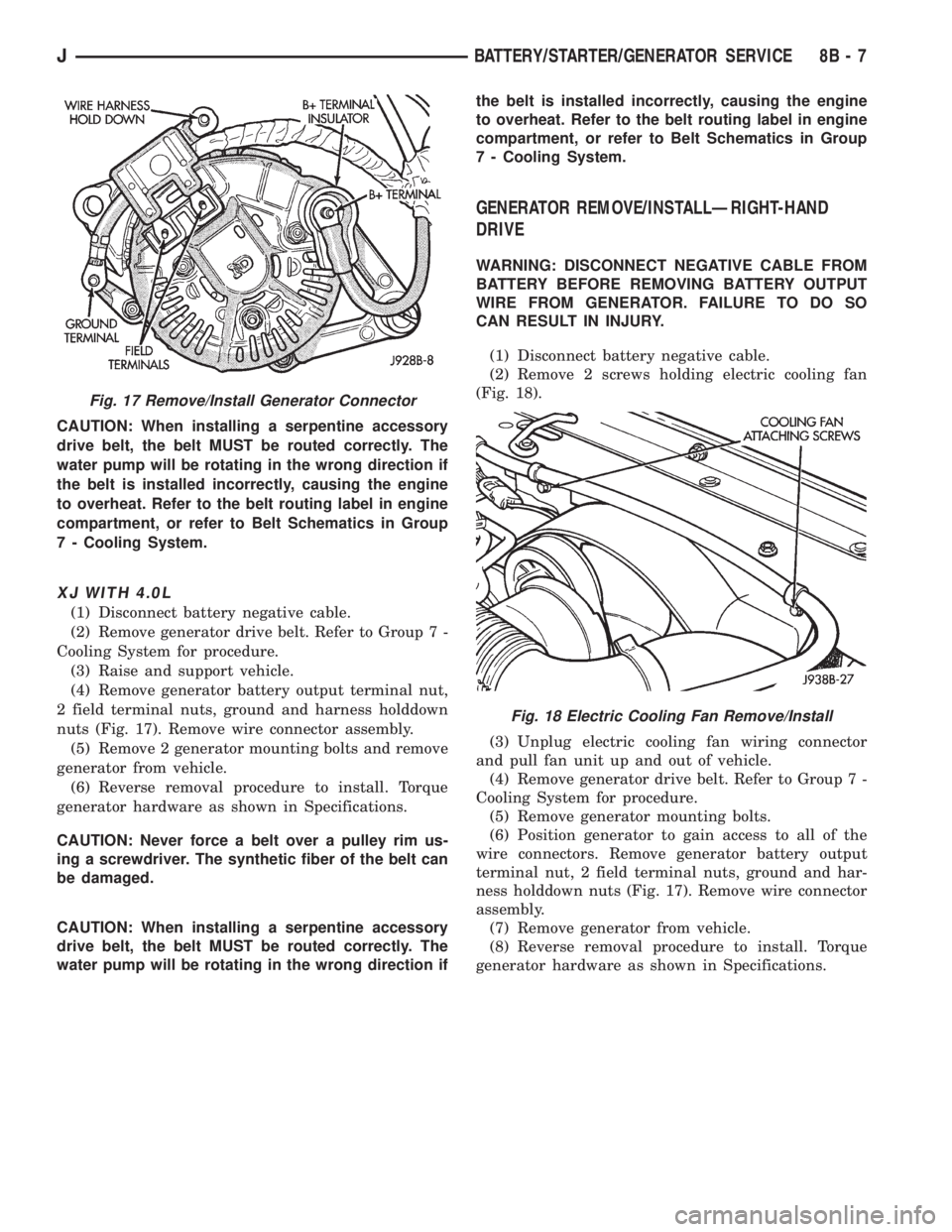
nuts (Fig. 17). Remove wire connector assembly.
(5) Remove 2 generator mounting bolts and remove
generator from vehicle.
(6) Reverse removal procedure to install. Torque
generator hardware as shown in Specifications.
CAUTION: Never force a belt over a pulley rim us-
ing a screwdriver. The synthetic fiber of the belt can
be damaged.
CAUTION: When installing a serpentine accessory
drive belt, the belt MUST be routed correctly. The
water pump will be rotating in the wrong direction ifthe belt is installed incorrectly, causing the engine
to overheat. Refer to the belt routing label in engine
compartment, or refer to Belt Schematics in Group
7 - Cooling System.
GENERATOR REMOVE/INSTALLÐRIGHT-HAND
DRIVE
WARNING: DISCONNECT NEGATIVE CABLE FROM
BATTERY BEFORE REMOVING BATTERY OUTPUT
WIRE FROM GENERATOR. FAILURE TO DO SO
CAN RESULT IN INJURY.
(1) Disconnect battery negative cable.
(2) Remove 2 screws holding electric cooling fan
(Fig. 18).
(3) Unplug electric cooling fan wiring connector
and pull fan unit up and out of vehicle.
(4) Remove generator drive belt. Refer to Group 7 -
Cooling System for procedure.
(5) Remove generator mounting bolts.
(6) Position generator to gain access to all of the
wire connectors. Remove generator battery output
terminal nut, 2 field terminal nuts, ground and har-
ness holddown nuts (Fig. 17). Remove wire connector
assembly.
(7) Remove generator from vehicle.
(8) Reverse removal procedure to install. Torque
generator hardware as shown in Specifications.
Fig. 17 Remove/Install Generator Connector
Fig. 18 Electric Cooling Fan Remove/Install
JBATTERY/STARTER/GENERATOR SERVICE 8B - 7