USB KIA BORREGO 2015 User Guide
[x] Cancel search | Manufacturer: KIA, Model Year: 2015, Model line: BORREGO, Model: KIA BORREGO 2015Pages: 420, PDF Size: 41.56 MB
Page 234 of 420
Features of your vehicle
160
4
A-200HMG_2_USB
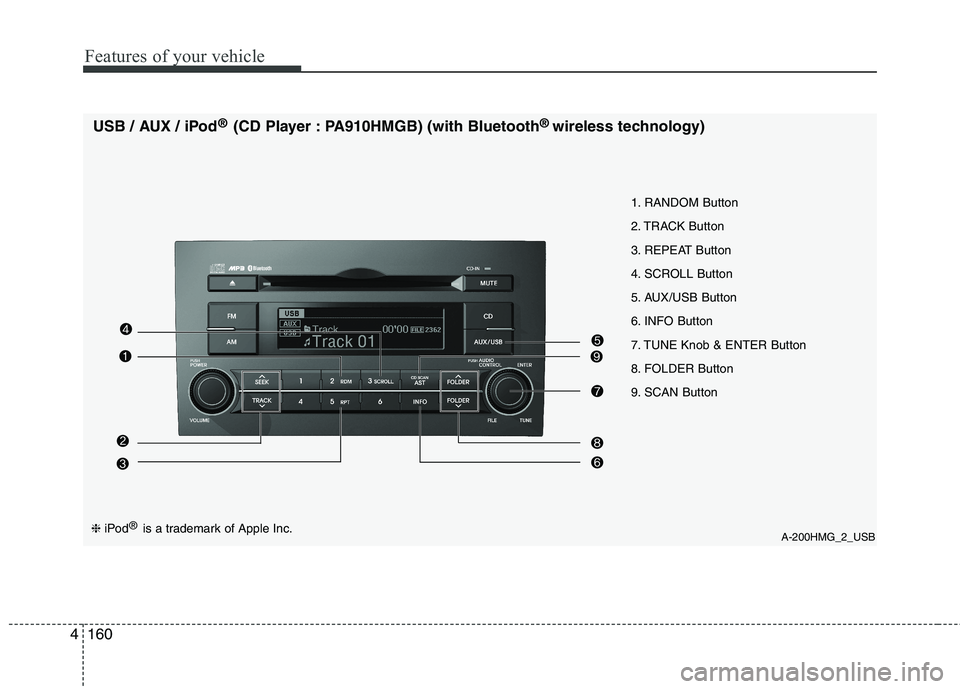
1. RANDOM Button
2. TRACK Button
3. REPEAT Button
4. SCROLL Button
5. AUX/USB Button
6. INFO Button
7. TUNE Knob & ENTER Button
8. FOLDER Button
9. SCAN Button
USB / AUX / iPod
®
(CD Player : PA910HMGB) (with Bluetooth ®
wireless technology)❈ iPod ®
is a trademark of Apple Inc.
Page 235 of 420
4161
Features of your vehicle
A-300HMG_3_USB
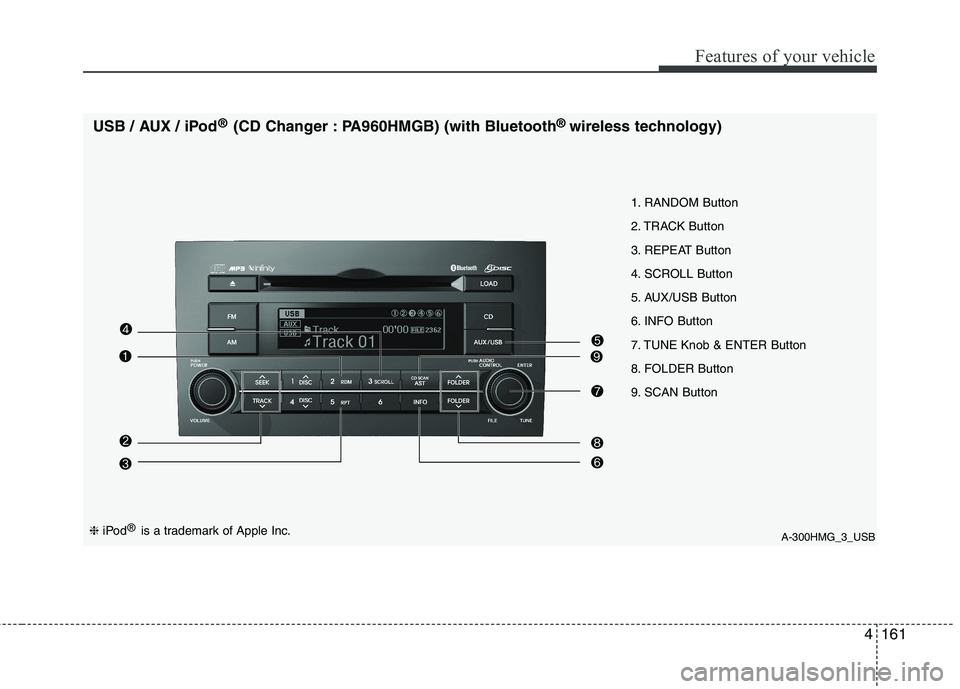
1. RANDOM Button
2. TRACK Button
3. REPEAT Button
4. SCROLL Button
5. AUX/USB Button
6. INFO Button
7. TUNE Knob & ENTER Button
8. FOLDER Button
9. SCAN Button
USB / AUX / iPod
®
(CD Changer : PA960HMGB) (with Bluetooth ®
wireless technology)
❈ iPod ®
is a trademark of Apple Inc.
Page 236 of 420
Features of your vehicle
162
4
Using USB device
1. RANDOM Button
Press this button for less than 0.8 second
to activate 'RDM' mode and more than
0.8 second to activate 'ALL RDM' mode.
RDM : Only files in a folder are played
back in random sequence.
ALL RDM : All files in a USB memory are played back in random sequence.
2. TRACK Button
Press [TRACK ] to return to the beginning of the current file.
Press again within 1 seconds to return
the previous file.
Press and hold [TRACK ] to initiate rewind search.
Press [TRACK ] for less than 0.8 second to advance the next file.
Press and hold [TRACK ] to initiate fast forward search. 3. REPEAT Button
Press this button for less than 0.8 second
to activate 'RPT' mode and more than
0.8 second to activate 'FLD RPT' mode.
RPT : Only a file is played repeatedly.
FLD RPT : Only files in a folder are
played repeatedly.
4. SCROLL Button
File names are scrolled for 5 seconds on
the display.
5. AUX/USB Button
If auxiliary device/USB/ is connected, it turns to USB/AUX mode and toggles
as below when the button is pressed
each time.
AUX/USB : AUX ➟USB ➟AUX...
If no auxiliary device and USB is con- nected, it displays "No Media" for 5
seconds and returns to the previous
mode. 6. INFO(INFORMATION) Button
Displays the information of the current
CD TRACK(FILE) as below when the
button is pressed each time. FILE NAME
➟TITLE ➟ARTIST ➟ALBUM
➟ FOLDER NAME ➟TOTAL FILE...
7. TUNE Knob & ENTER Button
Turn this knob clockwise to display the File name after the current song.
Turn this knob counterclockwise to dis- play the File name before the current song.
To select the displayed song, press the button.
8. FOLDER Button
Folder name/File name(the first song in the folder) is moved up or down from
currently playing folder.
To select the displayed folder, press ENTER(NO.6) button.
9. SCAN Button
Plays back the first 10 seconds of each
song in the USB memory.
Page 237 of 420
4163
Features of your vehicle
Using iPod®
1. RANDOM Button
Press this button for less than 0.8 second
to activate ' ' mode and more than 0.8
second to activate ''mode.
'' : All songs in the current catego-
ry are played in random.
'' : An album in the iPod is selected
in random and is played in the order of
the songs in the album.
2. TRACK Button
Press [TRACK ] to return to the beginning of the current file.
Press again within 1 second to return
the previous file.
Press and hold [TRACK ] to initiate rewind search.
Press [TRACK ] for less than 0.8 second to advance to the next file.
Press and hold [TRACK ] to initiate fast forward search.
3. REPEAT Button
A single song is played repeatedly. 4. SCROLL Button
File names are scrolled for 5 seconds on
the display.
5. AUX/USB Button (iPod)
If iPod is connected, it turns to iPod mode.
6. INFO(INFORMATION) Button
Displays the information of the file cur-
rently played as below when the button is
pressed each time. TITLE
➟
ARTIST ➟ALBUM...
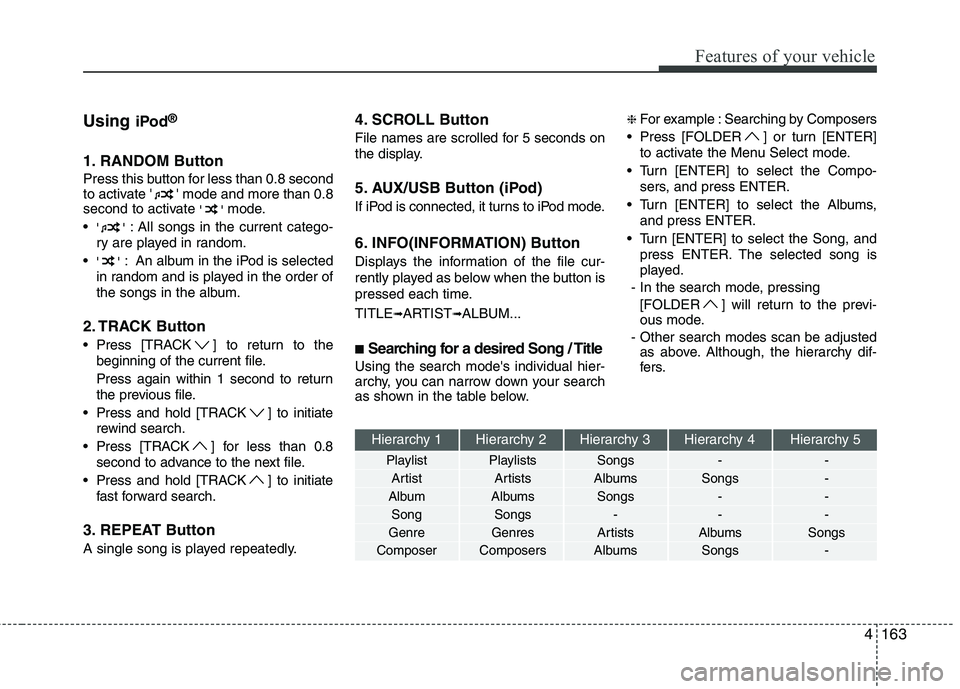
■ Searching for a desired Song / Title
Using the search mode's individual hier-
archy, you can narrow down your search
as shown in the table below. ❈
For example : Searching by Composers
Press [FOLDER ] or turn [ENTER] to activate the Menu Select mode.
Turn [ENTER] to select the Compo- sers, and press ENTER.
Turn [ENTER] to select the Albums, and press ENTER.
Turn [ENTER] to select the Song, and press ENTER. The selected song is
played.
- In the search mode, pressing [FOLDER ] will return to the previ-
ous mode.
- Other search modes scan be adjusted as above. Although, the hierarchy dif-
fers.
Hierarchy 1 Hierarchy 2 Hierarchy 3 Hierarchy 4 Hierarchy 5
Playlist Playlists Songs - -
Artist Artists Albums Songs -
Album Albums Songs - - Song Songs - - -
Genre Genres Artists Albums Songs
Composer Composers Albums Songs -
Page 238 of 420
Features of your vehicle
164
4
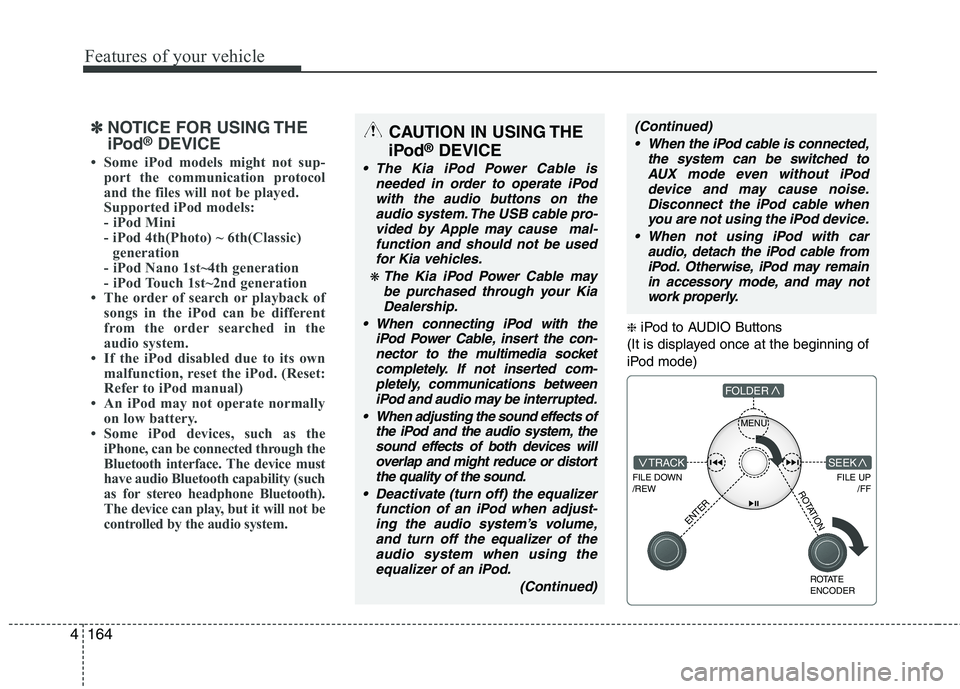
❈ iPod to AUDIO Buttons
(It is displayed once at the beginning of
iPod mode)
MENU
FILE DOWN /REW
FILE UP /FFTRACK
FOLDER
ENTER
ROTATE ENCODER
SEEK
ROTATION
✽✽NOTICE FOR USING THE
iPod ®
DEVICE
Some iPod models might not sup- port the communication protocol
and the files will not be played.
Supported iPod models:
- iPod Mini
- iPod 4th(Photo) ~ 6th(Classic)generation
- iPod Nano 1st~4th generation
- iPod Touch 1st~2nd generation
The order of search or playback of songs in the iPod can be different
from the order searched in the
audio system.
If the iPod disabled due to its own malfunction, reset the iPod. (Reset:
Refer to iPod manual)
An iPod may not operate normally
on low battery.
Some iPod devices, such as the
iPhone, can be connected through the
Bluetooth interface. The device must
have audio Bluetooth capability (such
as for stereo headphone Bluetooth).
The device can play, but it will not be
controlled by the audio system.CAUTION IN USING THE
iPod ®
DEVICE
The Kia iPod Power Cable is
needed in order to operate iPodwith the audio buttons on the audio system. The USB cable pro-vided by Apple may cause mal-
function and should not be usedfor Kia vehicles.
❋ The Kia iPod Power Cable maybe purchased through your KiaDealership.
When connecting iPod with the iPod Power Cable, insert the con-
nector to the multimedia socket completely. If not inserted com-pletely, communications betweeniPod and audio may be interrupted.
When adjusting the sound effects of the iPod and the audio system, thesound effects of both devices willoverlap and might reduce or distort the quality of the sound.
Deactivate (turn off) the equalizer function of an iPod when adjust-ing the audio system’s volume,and turn off the equalizer of the
audio system when using theequalizer of an iPod.
(Continued)
(Continued) When the iPod cable is connected, the system can be switched toAUX mode even without iPoddevice and may cause noise.
Disconnect the iPod cable whenyou are not using the iPod device.
When not using iPod with car audio, detach the iPod cable from
iPod. Otherwise, iPod may remainin accessory mode, and may not work properly.
Page 412 of 420
Index
2
I
Air bags ···········································································3-42
Air bag warning label................................................3-60
Air bag warning light ................................................3-45
Curtain air bag ..........................................................3-52
Driver's and passenger's front air bag ......................3-48
Side impact air bag....................................................3-50
Air cleaner·······································································7-26
Air conditioner compressor label ·····································8-9
Air leveling system (ALS) ··············································5-41
Air ventilation seat ··························································3-10
Alarm system ··································································4-12
All wheel drive (AWD), see four wheel drive (4WD) ···5-18
Antenna ·········································································4-130
Anti-lock brake system (ABS)········································5-31
Appearance care······························································7-62 Exterior care ······························································7-62
Interior care ·······························································7-67
Armrest ···········································································3-16
Ashtray ··········································································4-120
Audio system ································································4-130 Antenna ···································································4-130
Aux, USB and iPod ·················································4-132
Steering wheel audio control ··································4-131
Automatic climate control system ································4-103 Air conditioning ······················································4-110
Automatic heating and air conditioning··················4-105 Manual heating and air conditioning ······················4-106
Automatic transmission ··················································5-12 Shift lock system ·······················································5-15
Sports mode·······························································5-14
Battery ·············································································7-32
Battery saver function ·····················································4-75
Before driving ···································································5-3
Bottle holders, see cup holders ·····································4-121
Brake system ···································································5-28 Anti-lock brake system (ABS) ··································5-31
Downhill brake control (DBC)··································5-37
Electronic stability program (ESP) ···························5-33
Hill-start assist control (HAC) ··································5-36
Parking brake·····························································5-29
Power brakes ·····························································5-28
Brakes fluid ·····································································7-22
Bulb replacement ····························································7-55 Door courtesy lamp bulb replacement ······················7-60
Front fog light bulb replacement ·····················7-55, 7-57
Headlight bulb replacement ·····························7-55, 7-57
High mounted stop light replacement ·······················7-60
Interior light bulb replacement··································7-61
License plate light bulb replacement ························7-60
Position light bulb replacement ·······················7-55, 7-57
Rear combination light bulb replacement ·················7-58
A
B
Page 416 of 420

Index
6
I
Tachometer ·······························································4-50
Trip computer ···························································4-52
Warning and indicators ············································4-55
Instrument panel illumination ········································4-49
Instrument panel overview ···············································2-3
Interior care ····································································7-67
Interior features ····························································4-120 Ashtray ···································································4-120
Aux, USB and iPod ················································4-132
Cargo security screen ··············································4-126
Cigarette lighter ······················································4-120
Clothes hanger·························································4-125
Cup holder ······························································4-121
Digital clock ···························································4-123
Floor mat anchor(s) ················································4-125
Luggage net (holder) ··············································4-126
Outside thermometer ···············································4-124
Power outlet ···························································4-122
Sunvisor ··································································4-122
Interior light ···································································4-85
Interior light bulb replacement ······································7-61
Interior overview ······························································2-2
Jack and tools ···································································6-7
Jump starting ····································································6-4 Key positions ···································································5-4
Keys ·················································································4-3 Label
Air bag warning label ···············································3-60
Air conditioner compressor label ································8-9
Tire sidewall labeling ···············································7-41
Tire specification and pressure label ··························8-8
Vehicle certification label ···········································8-7
Latch system, see ISOFIX system ·································3-39
License plate light bulb replacement ·····························7-60
Light bulbs ·····································································7-55 Door courtesy lamp bulb replacement ······················7-60
Front fog light bulb replacement ·····················7-55, 7-57
Headlight bulb replacement ·····························7-55, 7-57
High mounted stop light replacement ·······················7-60
Interior light bulb replacement··································7-61
License plate light bulb replacement ························7-60
Position light bulb replacement ·······················7-55, 7-57
Rear combination light bulb replacement ·················7-58
Rear fog light bulb replacement································7-60
Side repeater light bulb replacement·························7-57
Turn signal light bulb replacement ···························7-55
L
K
J