light KIA BORREGO 2017 Owners Manual
[x] Cancel search | Manufacturer: KIA, Model Year: 2017, Model line: BORREGO, Model: KIA BORREGO 2017Pages: 548, PDF Size: 36.78 MB
Page 370 of 548

Driving your vehicle
46
6
Check to be sure the parking brake
is not engaged and that the park-
ing brake indicator light is out
before driving away.
Driving through water may get the brakes wet. They can also get wet
when the vehicle is washed. Wet
brakes can be dangerous! Your
vehicle will not stop as quickly if the
brakes are wet. Wet brakes may
cause the vehicle to pull to one side.
To dry the brakes, apply the brakes
lightly until the braking action
returns to normal, taking care to
keep the vehicle under control at
all times. If the braking action does
not return to normal, stop as soon
as it is safe to do so and we rec-
ommend that you call an author-
ized Kia dealer. Do not coast down hills with the
vehicle out of gear. This is extreme-
ly hazardous. Keep the vehicle in
gear at all times, use the brakes to
slow down, then shift to a lower
gear so that engine braking will
help you maintain a safe speed.
Do not "ride" the brake pedal. Resting your foot on the brake
pedal while driving can be danger-ous because it can result in the
brakes overheating and losing their
effectiveness. It also increases the
wear of the brake components.
If a tire goes flat while you are driv- ing, apply the brakes gently and
keep the vehicle pointed straight
ahead while you slow down. When
you are moving slowly enough for it
to be safe to do so, pull off the road
and stop in a safe place. If your vehicle is equipped with an
automatic transaxle, do not let your
vehicle creep forward. To avoid
creeping forward, keep your foot
firmly on the brake pedal when the
vehicle is stopped.
Be cautious when parking on a hill. Firmly engage the parking brake
and place the shift lever in P
(Park). If your vehicle is facing
downhill, turn the front wheels into
the curb to help keep the vehiclefrom rolling.
If your vehicle is facing uphill, turn
the front wheels away from the
curb to help keep the vehicle from
rolling. If there is no curb or if it is
required by other conditions to
keep the vehicle from rolling, block
the wheels.
Page 372 of 548
Driving your vehicle
48
6
A locking differential, if equipped, is
for the rear wheel differential only.
The features of this locking differen-
tial are described below:
Just as with a conventional differen-
tial, the wheel on one side is allowed
to turn at a different speed from thewheel on the other side when the
vehicle is cornering. The difference
between the locking differential and a
conventional differential is that if the
wheel on one side of the vehicle
loses traction, a greater amount oftorque is applied to the rear wheel on
the other side to improve traction.
✽✽
NOTICE
In a stationary position, the LD
(Locking Differential) will operate
when the difference of the revolution
speed between the rear right wheel
and the rear left wheel occurs.
The following procedures can be
used to confirm that the locking dif-
ferential is functioning properly:
1. Position the vehicle so that one wheel is on a dry paved surface
and the other on ice, snow, mud,
etc. Drive the vehicle, and observe
the operation of the locking differ-
ential. The vehicle should not
become stuck if the differential is
functioning properly.
2. Depress the accelerator pedal gradually, and then when traction
is good, depress it forcefully. If the
vehicle accelerates well, the differ-
ential is functioning properly.
✽✽ NOTICE
Usually a locking differential will
operate and release automatically
but occasionally it may not release
automatically.
At this time you will feel the tire is
dragged when you are driving or
cornering. You can release it manu-
ally by slightly turning the steering
wheel right and left while the vehicle
is moving slowly.
LOCKING DIFFERENTIAL (IF EQUIPPED)
CAUTION
Never start the engine with the gearshift lever placed in theforward or reverse while one of the rear wheels is jacked upand the other in contact withthe ground; doing so may cause the vehicle to jump for-ward.
If one of the rear wheels begins to spin in mud, snow,etc., the vehicle can some- times be driven out bydepressing the acceleratorpedal further; however, avoid running the engine continu-ously at high rpm becausedoing so could damage the locking differential.
Page 376 of 548
Driving your vehicle
52
6
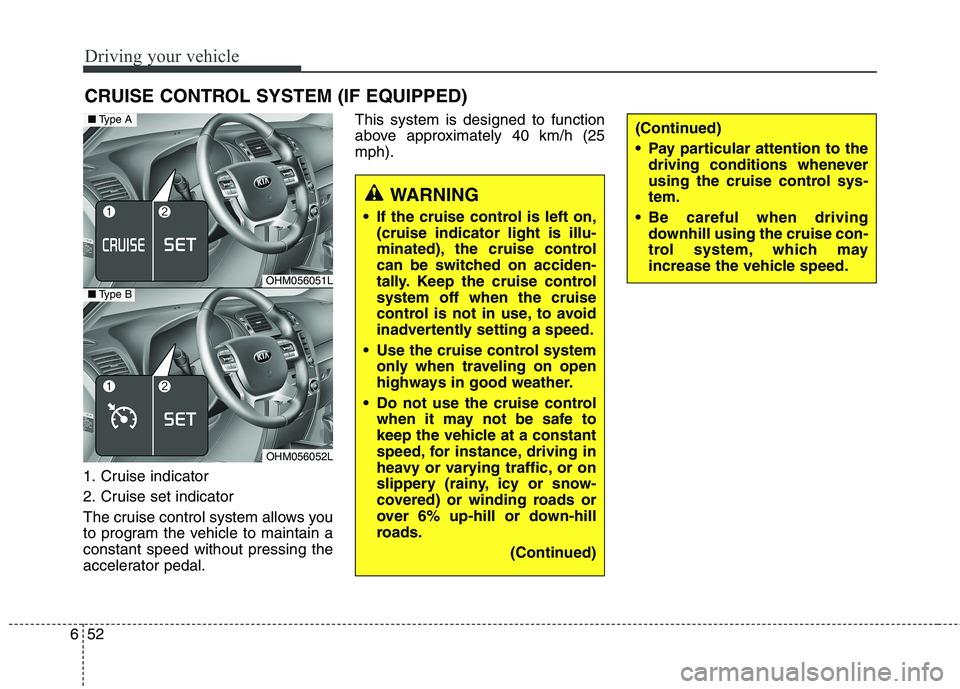
1. Cruise indicator
2. Cruise set indicator
The cruise control system allows you
to program the vehicle to maintain aconstant speed without pressing the
accelerator pedal. This system is designed to function
above approximately 40 km/h (25mph).
CRUISE CONTROL SYSTEM (IF EQUIPPED)
OHM056051L
OHM056052L
■
Type A
■Type B
WARNING
If the cruise control is left on, (cruise indicator light is illu-
minated), the cruise control
can be switched on acciden-
tally. Keep the cruise controlsystem off when the cruise
control is not in use, to avoid
inadvertently setting a speed.
Use the cruise control system only when traveling on open
highways in good weather.
Do not use the cruise control when it may not be safe to
keep the vehicle at a constant
speed, for instance, driving in
heavy or varying traffic, or on
slippery (rainy, icy or snow-
covered) or winding roads or
over 6% up-hill or down-hill
roads.
(Continued)
(Continued)
Pay particular attention to thedriving conditions whenever
using the cruise control sys-tem.
Be careful when driving downhill using the cruise con-
trol system, which may
increase the vehicle speed.
Page 377 of 548

653
Driving your vehicle
✽✽NOTICE
During normal cruise control oper- ation, when the SET switch is acti-
vated or reactivated after applying
the brakes, the cruise control will
energize after approximately 3 sec-
onds. This delay is normal.
To activate cruise control, depress the brake pedal at least once after
turning the ignition switch to the ON
position or starting the engine. This
is to check if the brake switch which
is important part to cancel cruise
control is in normal condition.Cruise control switch
CANCEL/O : Cancels cruise control operation.
CRUISE / : Turns cruise control system on or off.
RES+ : Resumes or increases cruise
control speed.
SET- : Sets or decreases cruise con- trol speed. To set cruise control speed:
1. Press the CRUISE / button on
the steering wheel, to turn the sys-
tem on. The cruise indicator light
will illuminate.
2. Accelerate to the desired speed, which must be more than approxi- mately 40 km/h (25 mph).
OHM056055L
OHM056054L
■Type A
■Type BOHM056053L
■Type A
■Type B
Page 378 of 548
Driving your vehicle
54
6
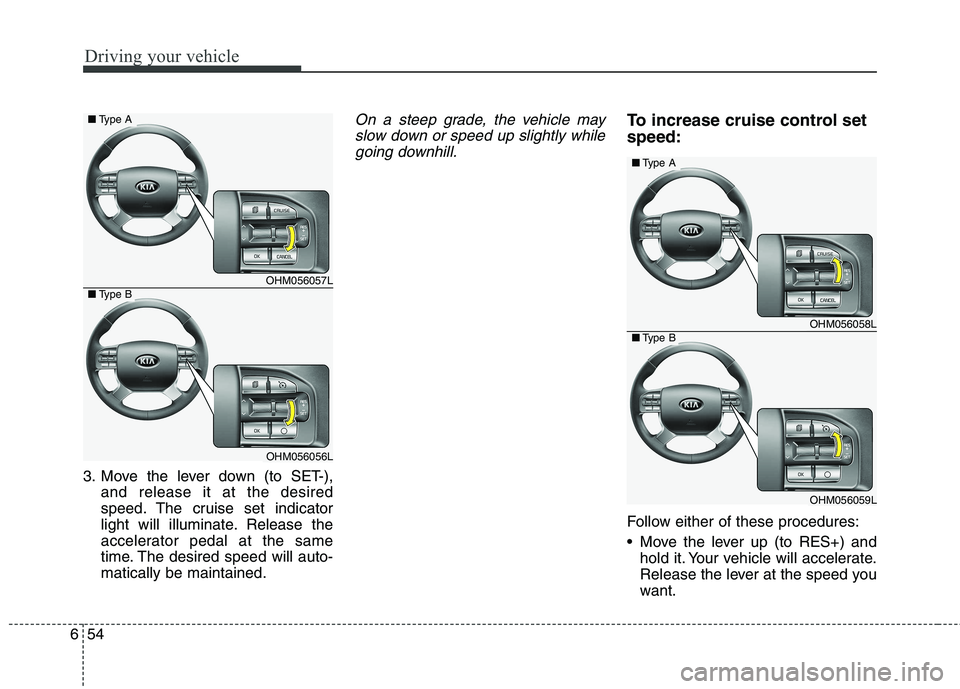
3. Move the lever down (to SET-),
and release it at the desired
speed. The cruise set indicator
light will illuminate. Release the
accelerator pedal at the same
time. The desired speed will auto-matically be maintained.
On a steep grade, the vehicle may
slow down or speed up slightly whilegoing downhill.To increase cruise control set speed:
Follow either of these procedures:
Move the lever up (to RES+) and hold it. Your vehicle will accelerate.
Release the lever at the speed you
want.
OHM056058L
OHM056059L
■Type A
■Type B
OHM056057L
OHM056056L
■ Type A
■Type B
Page 380 of 548
Driving your vehicle
56
6
To temporarily accelerate with
the cruise control on:
If you want to speed up temporarily
when the cruise control is on,
depress the accelerator pedal.
Increased speed will not interfere
with cruise control operation orchange the set speed.
To return to the set speed, take your
foot off the accelerator pedal. To cancel cruise control, do
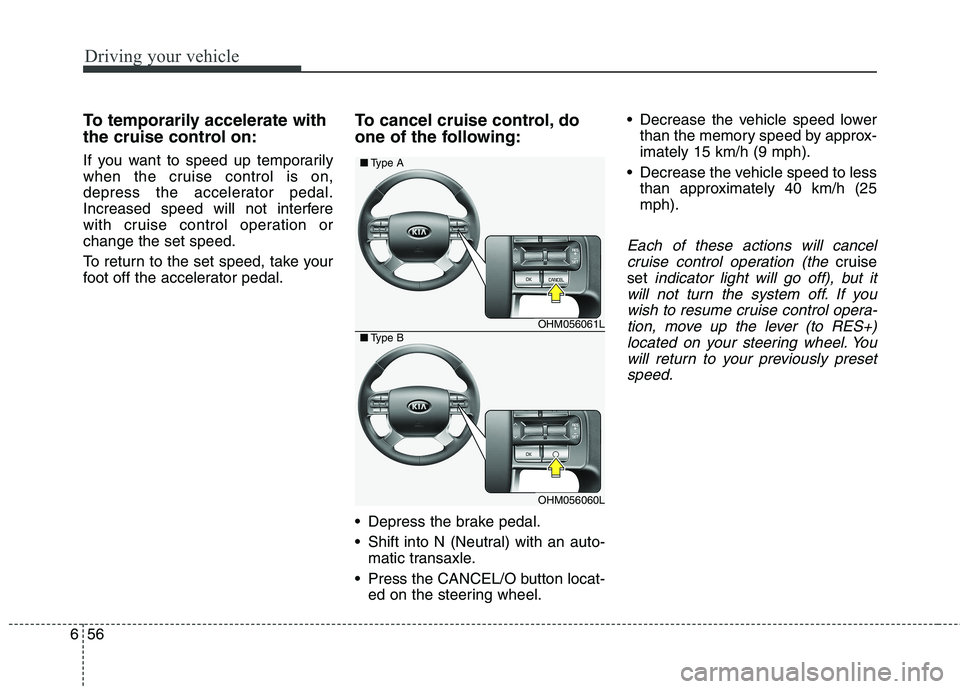
one of the following:
Depress the brake pedal.
Shift into N (Neutral) with an auto-
matic transaxle.
Press the CANCEL/O button locat- ed on the steering wheel. Decrease the vehicle speed lower
than the memory speed by approx- imately 15 km/h (9 mph).
Decrease the vehicle speed to less than approximately 40 km/h (25mph).
Each of these actions will cancel
cruise control operation (the
cruise
set
indicator light will go off), but it
will not turn the system off. If you wish to resume cruise control opera-tion, move up the lever (to RES+)located on your steering wheel. You will return to your previously presetspeed.
OHM056061L
OHM056060L
■ Type A
■Type B
Page 381 of 548
657
Driving your vehicle
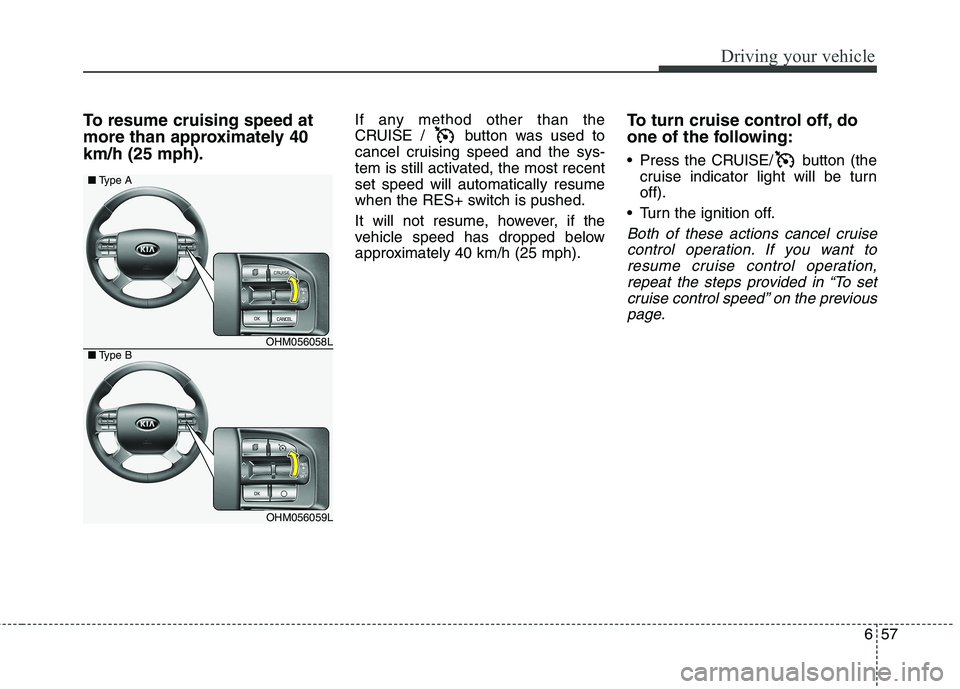
To resume cruising speed at
more than approximately 40km/h (25 mph).If any method other than the
CRUISE / button was used to
cancel cruising speed and the sys-
tem is still activated, the most recentset speed will automatically resume
when the RES+ switch is pushed.
It will not resume, however, if the
vehicle speed has dropped below
approximately 40 km/h (25 mph).To turn cruise control off, do
one of the following:
Press the CRUISE/ button (the
cruise indicator light will be turn off).
Turn the ignition off.
Both of these actions cancel cruise control operation. If you want toresume cruise control operation,repeat the steps provided in “To set cruise control speed” on the previouspage.
OHM056058L
OHM056059L
■ Type A
■Type B
Page 382 of 548
Driving your vehicle
58
6
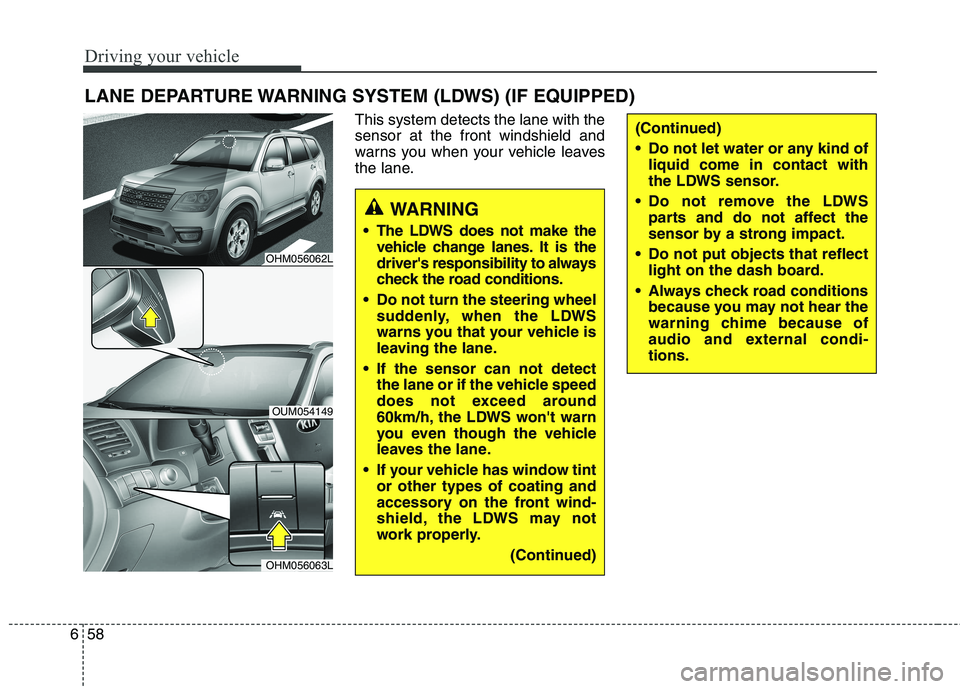
This system detects the lane with the sensor at the front windshield and
warns you when your vehicle leaves
the lane.
LANE DEPARTURE WARNING SYSTEM (LDWS) (IF EQUIPPED)
WARNING
The LDWS does not make the vehicle change lanes. It is the
driver's responsibility to always
check the road conditions.
Do not turn the steering wheel suddenly, when the LDWS
warns you that your vehicle is
leaving the lane.
If the sensor can not detect the lane or if the vehicle speed
does not exceed around
60km/h, the LDWS won't warn
you even though the vehicle
leaves the lane.
If your vehicle has window tint or other types of coating and
accessory on the front wind-
shield, the LDWS may not
work properly.
(Continued)
(Continued)
Do not let water or any kind ofliquid come in contact with
the LDWS sensor.
Do not remove the LDWS parts and do not affect the
sensor by a strong impact.
Do not put objects that reflect light on the dash board.
Always check road conditions because you may not hear the
warning chime because of
audio and external condi-tions.
OHM056062L
OUM054149
OHM056063L
Page 384 of 548
Driving your vehicle
60
6
2. Auditory warning
If you leave the lane, the warning
sound operates for maximum 3 sec-
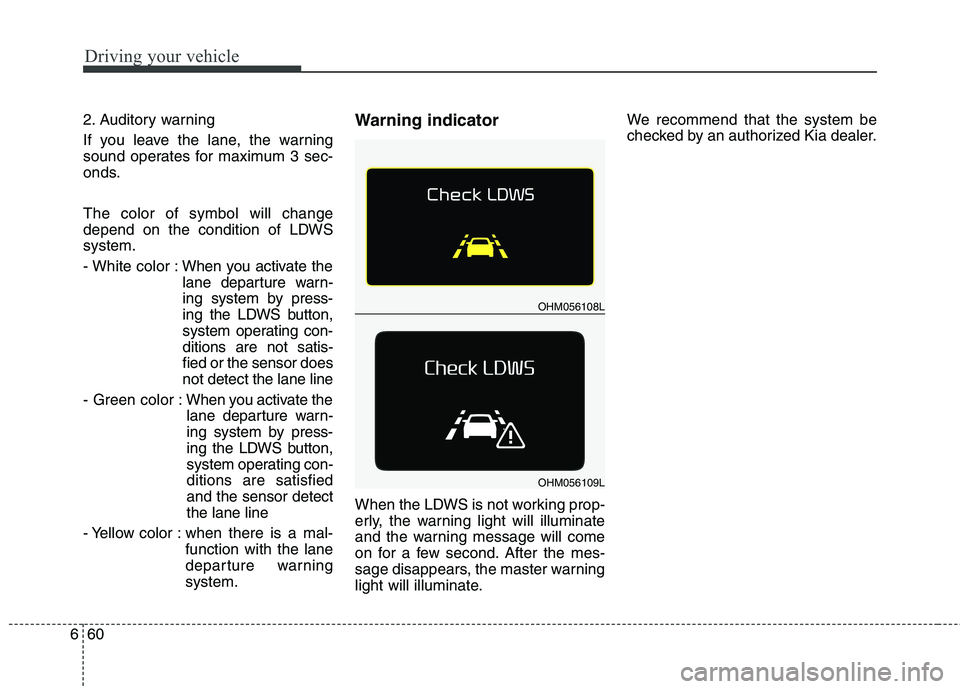
onds. The color of symbol will change
depend on the condition of LDWSsystem.
- White color : When you activate the
lane departure warn-
ing system by press-
ing the LDWS button,
system operating con-ditions are not satis-fied or the sensor doesnot detect the lane line
- Green color : When you activate the
lane departure warn-
ing system by press-
ing the LDWS button,
system operating con-ditions are satisfiedand the sensor detectthe lane line
- Yellow color : when there is a mal- function with the lane
departure warningsystem. Warning indicator
When the LDWS is not working prop-
erly, the warning light will illuminate
and the warning message will come
on for a few second. After the mes-
sage disappears, the master warning
light will illuminate. We recommend that the system be
checked by an authorized Kia dealer.
OHM056108L
OHM056109L
Page 385 of 548
661
Driving your vehicle
The LDWS does not operate when:
The driver turns on the turn signalor the hazard warning flasher to
change lane.
Driving on the lane line.
✽✽ NOTICE
To change lanes, operate the turn
signal switch, then change the lane.
The LDWS may not warn you
even if the vehicle leaves the
lane, or may warn you even if
the vehicle does not leave thelane when:
The lane is not visible due to snow, rain, stain, a puddle or many other
things.
The brightness of the outside changes suddenly.
The headlights are off at night or in a tunnel.
The color of the lane marking from the road is difficult to distinguish.
Driving on a steep grade or a curve.
Light reflects from the water on the road.
The lens or windshield is stained with foreign matter.
The sensor can not detect the lane because of fog, heavy rain or
heavy snow.
The surrounding temperature of the inside rear view mirror is high
due to a direct ray of light. The lane is very wide or narrow.
The lane line is damaged or indis-
tinct.
The shadow is on the lane line by a median strip.
There is a mark similar to a lane line.
There is a boundary structure.
The distance from vehicle ahead is very short or the vehicle ahead
hides the lane line.
The vehicle shakes heavily.
The lane number increases or decreases or the lane lines are
crossing complicatedly.
Putting something on the dash- board.
Driving with the sun in front of you.
Driving in areas under construction.
The lane line is more than two in either side (Left/Right).
The windshield is fogged by humid air in the vehicle.