audio KIA BORREGO 2017 Owner's Manual
[x] Cancel search | Manufacturer: KIA, Model Year: 2017, Model line: BORREGO, Model: KIA BORREGO 2017Pages: 548, PDF Size: 36.78 MB
Page 258 of 548
Audio system
516
✽✽NOTICE - Using the
Bluetooth®Wireless
Technology Audio Mode
Bluetooth ®
Wireless Technology
Audio Mode can be used only
when a Bluetooth®
Wireless
Technology phone has been con-
nected.
Bluetooth ®
Wireless Technology
Audio Mode will not be available
when connecting mobile phones
that do not support this feature.
If a Bluetooth ®
Wireless Technology
Phone is being used to play music
and receives an incoming or out-
going phone call, then the music
will stop.
Moving the Track up/down while playing Bluetooth®
Wireless
Technology audio mode may
result in pop noises with some
mobile phones.
Bluetooth ®
Wireless Technology
streaming audio may not be sup-
ported in some mobile phones. (Continued)(Continued)
When returning to
Bluetooth®
Wireless Technology Audio mode
after ending a call, the mode may
not automatically restart in some
mobile phones.
Receiving an incoming call or making an outgoing call while
playing Bluetooth®
Wireless
Technology Audio may result in
audio interference. ✽
✽
NOTICE - Using the
Bluetooth®Wireless
Technology Cellular Phone
Bluetooth ®
Wireless Technology
Handsfree refers to a device which
allows the user to conveniently
make phone calls with Bluetooth®
Wireless Technology mobile
phones through the audio system.
Bluetooth ®
Wireless Technology
allows devices to be connected in a
short distance, including hands-
free devices, stereo headsets, wire-
less remote controllers, etc. For
more information, visit the
Bluetooth ®
Wireless Technology
website at www
.Bluetooth.com.
Before using Bluetooth®
Wireless
Technology audio features.
The Bluetooth ®
word mark and
logos are registered trademarks
owned by Bluetooth ®
SIG, Inc. and
any use of such marks by Kia is
under license. Other trademarks
and trade names are those of their
respective owners. A Bluetooth ®
enabled cell phone is required to use
Bluetooth ®
Wireless Technology.
(Continued)
Page 259 of 548
Audio system
17
5
(Continued)
Bluetooth ®
Wireless Technology
features supported within the
vehicle are as follows. Some fea-
tures may not be supported
depending on your Bluetooth®
Wireless Technology device.
- Answering and placing Bluetooth ®
Wireless Technology
Handsfree calls
- Menu operation during call (Switch to Private, Switch to call
waiting, Outgoing volume)
- Download Call History
- Download Mobile Phone book
- Phone book/Call History Auto Download
- Bluetooth ®
Wireless Technology
device auto connection
- Bluetooth ®
Wireless Technology
Audio
Before using Bluetooth®
Wireless
Technology related features of the
audio system, refer your phone’s
User’s Manual for phone-side
Bluetooth ®
Wireless Technology
operations. (Continued)(Continued)
The phone must be paired to the
audio system to use Bluetooth®
Wireless Technology related fea-
tures.
Pairing and connecting a Bluetooth ®
Wireless Technology
enabled mobile phone will work
only when the Bluetooth®
Wireless
Technology option within your
mobile phone has been turned on.
(Methods of turning on the
Bluetooth ®
Wireless Technology
enabled feature may differ
depending on the mobile phone.)
Do not use a cellular phone or per- form Bluetooth ®
Wireless
Technology settings (e.g. pairing a
phone) while driving.
Even if the phone supports Bluetooth ®
Wireless Technology,
the phone will not be found during
device searches if the phone has
been set to hidden state or the
Bluetooth ®
Wireless Technology
has been deactivated. Disable the
hidden state or activate the
Bluetooth ®
Wireless Technology
prior to searching/connecting with
the car audio system. (Continued)(Continued)
You will not be able to use the
hands-free feature when your
phone (in the car) is outside of the
cellular service area. (e.g. in a tun-
nel, in an underground area, in a
mountainous area, etc.)
If the cellular phone signal is poor or the vehicles interior noise is too
loud, it may be difficult to hear the
other person’s voice during a call.
Do not place the phone near or inside metallic objects, otherwise
communications with Bluetooth®
Wireless Technology system or cel-
lular service stations can be dis-
turbed.
Placing the audio system within an electromagnetic environment may
result in noise interference.
Some cellular phones or other devices may cause interference
noise or malfunction to the audio
system. In this case, storing the
device in a different location may
resolve the condition. (Continued)
Page 260 of 548
Audio system
518
(Continued)
While a phone is connectedthrough Bluetooth®
Wireless
Technology your phone may dis-
charge quicker than usual for
additional Bluetooth®
Wireless
Technology-related operations.
If Priority is set upon vehicle igni- tion (IGN/ACC ON), the
Bluetooth ®
Wireless Technology
phone will be automatically con-
nected. Even if you are outside, the
Bluetooth ®
Wireless Technology
phone will be automatically con-
nected once you are in the vicinity
of the vehicle. If you do not want
to automatically connect your
Bluetooth ®
Wireless Technology
phone, try the following.
1) Turn off the Bluetooth®
Wireless
Technology feature in your
mobile phone.
2) Turn off the Bluetooth®
Wireless
Technology feature in your car
audio system. (Continued)(Continued)
- To turn off the Bluetooth®
Wireless Technology feature in
your car audio system, go to
[SETUP]> [Phone] and [turn
off] the Bluetooth®
Wireless
Technology feature.
Bluetooth ®
Wireless Technology
connection may become intermit-
tently disconnected in some
mobile phones. Follow these steps
to try again.
1) Turn the Bluetooth®
Wireless
Technology function within the
mobile phone off/on and try
again.
2) Turn the mobile phone power Off/On and try again.
3) Completely remove the mobile phone battery, reboot, and then
try again.
4) Reboot the audio system and try again.
5) Delete all paired devices, pair and try again.
It is possible to pair up to five Bluetooth ®
Wireless Technology
devices to the car system. (Continued)(Continued)
Phone contact names should be
saved in English or they may not
be displayed correctly.
The Handsfree call volume and quality may differ depending on
the mobile phone.
Only one Bluetooth®
Wireless
Technology device can be connect-
ed at a time.
In some mobile phones, starting the ignition while talking through
Bluetooth ®
Wireless Technology
enabled handsfree call will result
in the call becoming disconnected.
(Switch the call back to your
mobile phone when starting the
ignition.)
If the mobile phone is not paired or connected, it is not possible to
enter Phone mode. Once a phone
is paired or connected, the guid-
ance screen will be displayed.
Page 261 of 548
Audio system
19
5
✽✽
NOTICE - Usingthe Voice
Recognition (if equipped)
When using the voice recognition feature, only commands listed with-
in the user's manual are supported.
Be aware that during the opera- tion of the voice recognition sys-
tem, pressing any button other
than the button or touching the
screen will terminate voice recog-
nition mode.
For superior voice recognition performance, position the micro-
phone used for voice recognition
above the head of the driver’s seat
and maintain a proper position
when saying commands.
Within the following situations, voice recognition may not function
properly due to external sound.
- When the windows and sunroof
are open
- When the wind of the cooling/heat- ing device is strong
- When entering and passing through tunnels
- When driving on rugged and uneven roads. (Continued)(Continued)
- During severe rain (heavy rains,windstorms)
Phone related voice commands can be used only when a Bluetooth®
Wireless Technology device is con-
nected.
When making calls by stating a name, the corresponding contact
must be downloaded and stored
within the audio system.
After downloading the Bluetooth®
Wireless Technology phone book,
it takes some time to convert the
phone book data into voice infor-
mation. During this time, voice
recognition may not properly
operate.
Pronounce the voice commands naturally and clearly as if in a nor-
mal conversation.CAUTION
Bluetooth®Wireless Technology
Handsfree is a feature that enables drivers to practicesafe driving. Connecting the car audio system with aBluetooth
®Wireless Technology
phone allows the user to con- veniently make calls, receivecalls, and manage the phone book. Before using theBluetooth
®Wireless Technology,
carefully read the contents of this user’s manual.
Excessive use or operations while driving may lead to neg-ligent driving practices and bethe cause of accidents.
Do not operate the device excessively while driving.
Viewing the screen for pro- longed periods of time whiledriving is dangerous and may lead to accidents.
When driving, view the screen only for short periods of time.
Page 262 of 548
Audio system
520Radio Mode
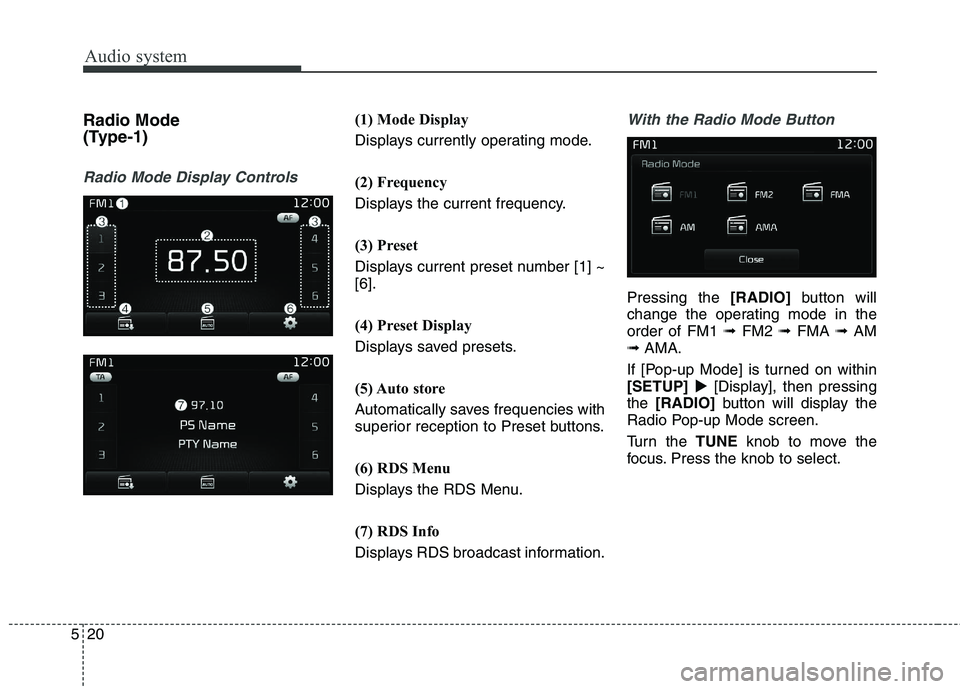
(Type-1)
Radio Mode Display Controls
(1) Mode Display
Displays currently operating mode.
(2) Frequency
Displays the current frequency.
(3) Preset
Displays current preset number [1] ~ [6].
(4) Preset Display
Displays saved presets.
(5) Auto store
Automatically saves frequencies with
superior reception to Preset buttons.
(6) RDS Menu
Displays the RDS Menu.
(7) RDS Info
Displays RDS broadcast information.With the Radio Mode Button
Pressing the
[RADIO]button will
change the operating mode in the order of FM1 ➟FM2 ➟FMA ➟AM
➟ AMA.
If [Pop-up Mode] is turned on within[SETUP] [Display], then pressing
the [RADIO] button will display the
Radio Pop-up Mode screen.
Turn the TUNEknob to move the
focus. Press the knob to select.
Page 263 of 548
![KIA BORREGO 2017 Owners Manual Audio system
21
5
Seek Press the [SEEK TRACK] button to
play the previous/next frequency.
Tu n e
Turn the TUNEknob to select the
desired frequency.
Selecting/Saving Presets
Press the [1] ~ [6] but](/img/2/57934/w960_57934-262.png "KIA BORREGO 2017 Owners Manual Audio system
21
5
Seek Press the [SEEK TRACK] button to
play the previous/next frequency.
Tu n e
Turn the TUNEknob to select the
desired frequency.
Selecting/Saving Presets
Press the [1] ~ [6] but")
Audio system
21
5
Seek Press the [SEEK TRACK] button to
play the previous/next frequency.
Tu n e
Turn the TUNEknob to select the
desired frequency.
Selecting/Saving Presets
Press the [1] ~ [6] buttons to play the desired preset.
Press the [Preset] button to display
the broadcast information for the fre-
quency saved to each button.While listening to a frequency you
want to save as a preset, press and
hold one of the [1] ~ [6] preset but-
tons to save the current frequency tothe selected preset.
Auto Store
Press the [Auto store] button to auto-
matically save receivable frequen-
cies to Preset buttons.
While Auto Store is operating, press-
ing the [Auto store] button again will
cancel Auto Store and restore the
previous frequency.
Page 264 of 548
![KIA BORREGO 2017 Owners Manual Audio system
522RDS Menu
Press the [RDS Menu] button to set
the AF (Alternative Frequency),
Region and News features.
The RDS Menu is not supported
within AM or AMA mode.
Scan Press the
[TA/SCAN]](/img/2/57934/w960_57934-263.png "KIA BORREGO 2017 Owners Manual Audio system
522RDS Menu
Press the [RDS Menu] button to set
the AF (Alternative Frequency),
Region and News features.
The RDS Menu is not supported
within AM or AMA mode.
Scan Press the
[TA/SCAN]")
Audio system
522RDS Menu
Press the [RDS Menu] button to set
the AF (Alternative Frequency),
Region and News features.
The RDS Menu is not supported
within AM or AMA mode.
Scan Press the
[TA/SCAN] button :
Previews each broadcast for 5 sec- onds each
Once scan is complete, the previous frequency will be restored.
While Scan is operating, pressing and holding the [TA/SCAN]button
will cancel scanning. TA (Traffic Announcement) Press the
[TA/SCAN] button to turn
the TA (Traffic Announcement) feature
On/Off.
Page 265 of 548
Audio system
23
5
Radio Mode
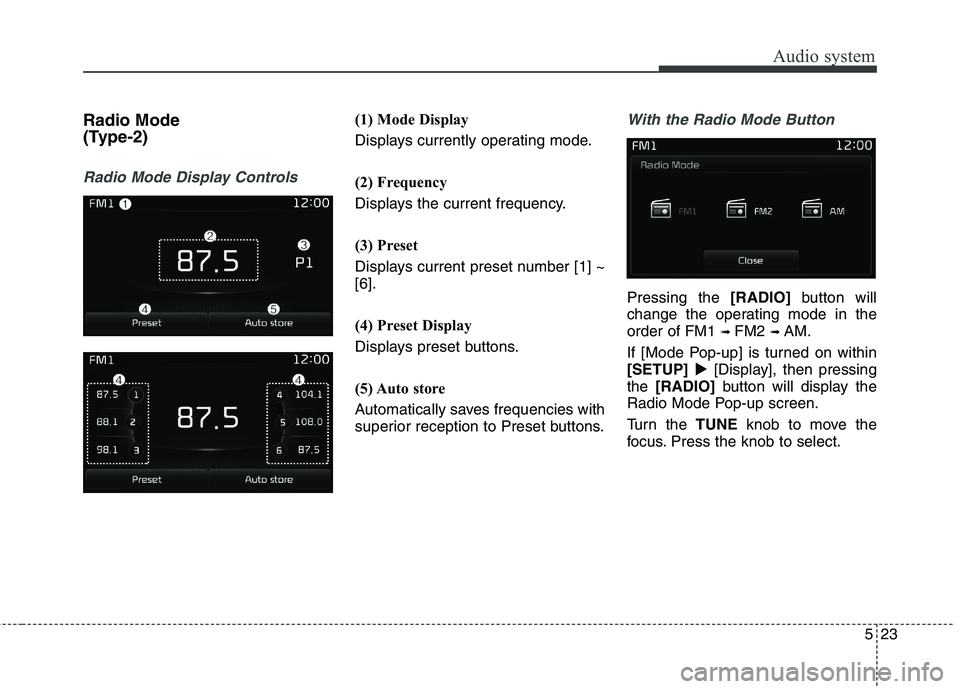
(Type-2)
Radio Mode Display Controls
(1) Mode Display
Displays currently operating mode.
(2) Frequency
Displays the current frequency.
(3) Preset
Displays current preset number [1] ~ [6].
(4) Preset Display
Displays preset buttons.
(5) Auto store
Automatically saves frequencies with
superior reception to Preset buttons.With the Radio Mode Button
Pressing the [RADIO]button will
change the operating mode in the order of FM1 ➟ FM2 ➟ AM.
If [Mode Pop-up] is turned on within[SETUP] [Display], then pressing
the [RADIO] button will display the
Radio Mode Pop-up screen.
Turn the TUNEknob to move the
focus. Press the knob to select.
Page 266 of 548
![KIA BORREGO 2017 Owners Manual Audio system
524Seek Press the
[SEEK TRACK] button to
play the previous/next frequency.
Tu n e
Turn the TUNEknob to select the
desired frequency.
Selecting /Saving Presets
Press the [Preset] butto](/img/2/57934/w960_57934-265.png "KIA BORREGO 2017 Owners Manual Audio system
524Seek Press the
[SEEK TRACK] button to
play the previous/next frequency.
Tu n e
Turn the TUNEknob to select the
desired frequency.
Selecting /Saving Presets
Press the [Preset] butto")
Audio system
524Seek Press the
[SEEK TRACK] button to
play the previous/next frequency.
Tu n e
Turn the TUNEknob to select the
desired frequency.
Selecting /Saving Presets
Press the [Preset] button to display
the broadcast information for the fre-
quency saved to each button.
Press the [1] ~ [6] buttons to play the desired preset.
While listening to a frequency you
want to save as a preset, press and
hold one of the [1] ~ [6] preset but-
tons to save the current frequency tothe selected preset.Auto Store
Press the [Auto store] button to auto-
matically save receivable frequen-
cies to Preset buttons.
Scan Press the
[SCAN]button to preview
frequencies with superior reception
for 5 seconds each. Press and hold the [SCAN]button to
preview presets for 5 seconds each.
Once scan is complete, the previous frequency will be restored.
While Scan is operating, pressing the [SCAN] button will cancel scan-
ning.
Page 267 of 548
![KIA BORREGO 2017 Owners Manual Audio system
25
5
Media Mode
Media Mode Screen
Pressing the [MEDIA]buttonwill
change the operating mode in the order of CD ➟ USB(iPod ®
) ➟ AUX ➟
My Music ➟BT Audio.
If [Pop-up Mode]/[M](/img/2/57934/w960_57934-266.png "KIA BORREGO 2017 Owners Manual Audio system
25
5
Media Mode
Media Mode Screen
Pressing the [MEDIA]buttonwill
change the operating mode in the order of CD ➟ USB(iPod ®
) ➟ AUX ➟
My Music ➟BT Audio.
If [Pop-up Mode]/[M")
Audio system
25
5
Media Mode
Media Mode Screen
Pressing the [MEDIA]buttonwill
change the operating mode in the order of CD ➟ USB(iPod ®
) ➟ AUX ➟
My Music ➟BT Audio.
If [Pop-up Mode]/[Mode Pop-up] is
turned on within [SETUP]
[Display], then pressing the [MEDIA]
button will display the Media Pop-up
Mode screen.
Turn the TUNEknob to move the
focus. Press the knob to select.The media mode pop up screen can
be displayed only when there are two
or more media modes turned on.
Mode Display on the Status Bar
When a Bluetooth®Wireless
Technology, iPod ®
, USB or AUX
device is connected or a CD is
inserted, the corresponding mode
icon will be displayed.
IconTitle
Bluetooth®Wireless Technology
CD
USB (iPod ®
)
AUX