key KIA BORREGO 2017 Owner's Manual
[x] Cancel search | Manufacturer: KIA, Model Year: 2017, Model line: BORREGO, Model: KIA BORREGO 2017Pages: 548, PDF Size: 36.78 MB
Page 109 of 548
Features of your vehicle
20
4
Door lock/unlock features
Impact sensing door unlock system
All doors will automatically unlock when an impact causes the air bags
to deploy.
However, automatic door unlock will
not operate if the side airbag is notequipped.
✽✽
NOTICE
An authorized Kia dealer can acti-
vate or deactivate some auto door
lock/unlock features as follows;
Auto door unlock by using the dri- ver's door lock button
Speed sensing auto door lock
Auto door lock/unlock by shifting the transmission shift lever out of
P (Park) or into P (Park
Auto door unlock when the igni- tion key is removed from the igni-
tion switch (for smart key, when
the ENGINE START/STOP button
is changed to the OFF position)
If you want to activate or deactivate
some door lock/unlock feature, we
recommend that you consult an
authorized Kia dealer.
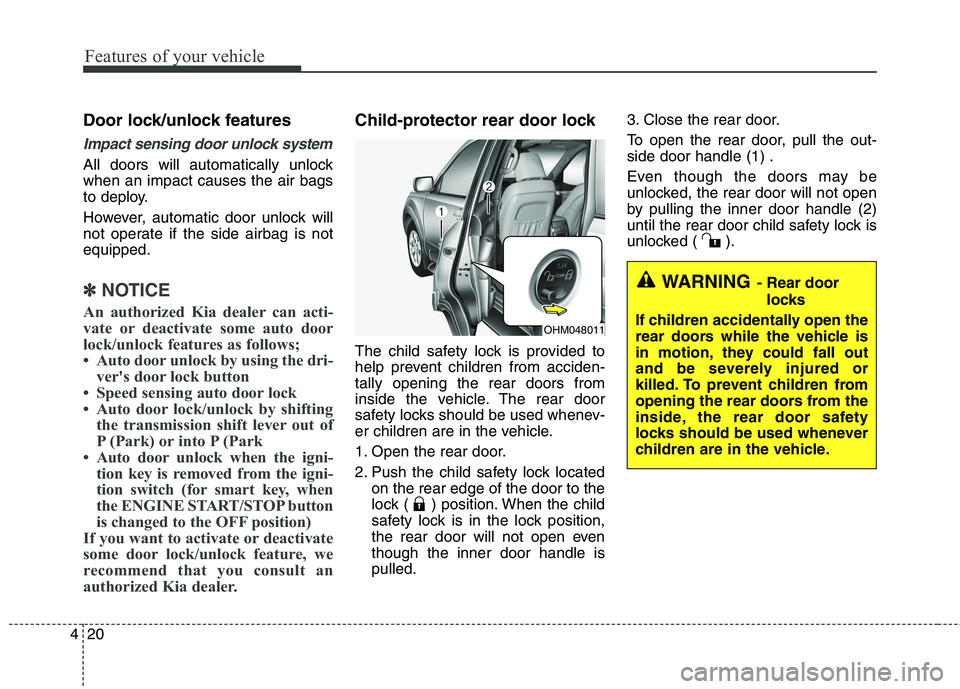
Child-protector rear door lock
The child safety lock is provided to
help prevent children from acciden-tally opening the rear doors from
inside the vehicle. The rear door
safety locks should be used whenev-
er children are in the vehicle.
1. Open the rear door.
2. Push the child safety lock located on the rear edge of the door to the
lock ( ) position. When the child
safety lock is in the lock position,
the rear door will not open eventhough the inner door handle ispulled. 3. Close the rear door.
To open the rear door, pull the out- side door handle (1) .
Even though the doors may be
unlocked, the rear door will not open
by pulling the inner door handle (2)
until the rear door child safety lock is
unlocked ( ).
OHM048011
WARNING
- Rear door
locks
If children accidentally open the
rear doors while the vehicle is
in motion, they could fall out
and be severely injured or
killed. To prevent children from
opening the rear doors from the
inside, the rear door safety
locks should be used whenever
children are in the vehicle.
Page 110 of 548
421
Features of your vehicle
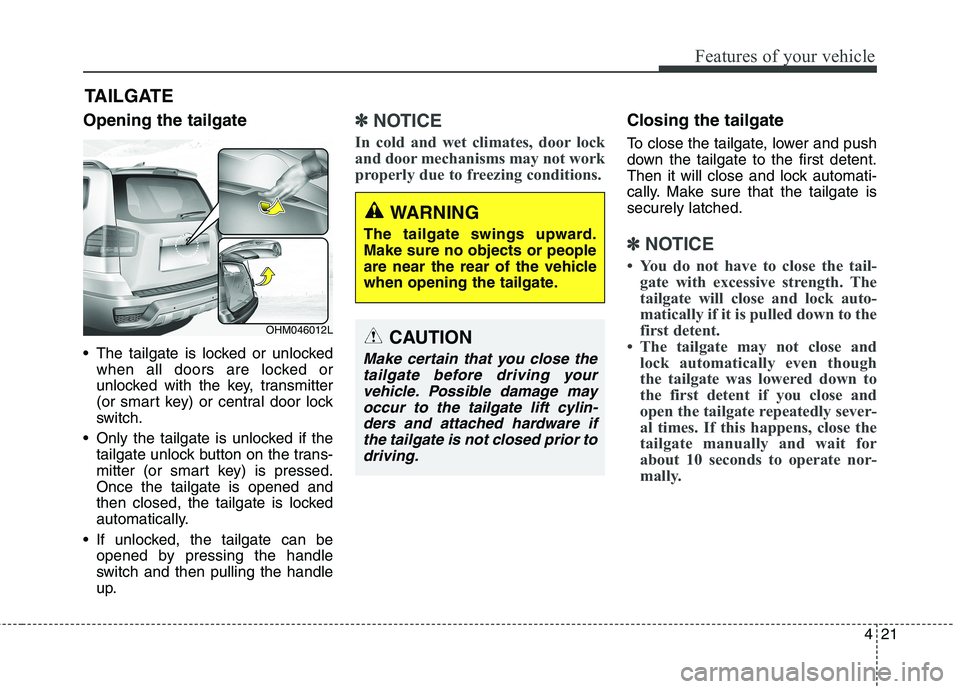
Opening the tailgate
The tailgate is locked or unlockedwhen all doors are locked or
unlocked with the key, transmitter
(or smart key) or central door lock
switch.
Only the tailgate is unlocked if the tailgate unlock button on the trans-
mitter (or smart key) is pressed.Once the tailgate is opened and
then closed, the tailgate is locked
automatically.
If unlocked, the tailgate can be opened by pressing the handle
switch and then pulling the handle
up.✽✽ NOTICE
In cold and wet climates, door lock
and door mechanisms may not work
properly due to freezing conditions.Closing the tailgate
To close the tailgate, lower and push
down the tailgate to the first detent.
Then it will close and lock automati-
cally. Make sure that the tailgate issecurely latched.
✽✽ NOTICE
You do not have to close the tail- gate with excessive strength. The
tailgate will close and lock auto-
matically if it is pulled down to the
first detent.
The tailgate may not close and lock automatically even though
the tailgate was lowered down to
the first detent if you close and
open the tailgate repeatedly sever-
al times. If this happens, close the
tailgate manually and wait for
about 10 seconds to operate nor-
mally.
TAILGATE
OHM046012L
WARNING
The tailgate swings upward. Make sure no objects or people
are near the rear of the vehicle
when opening the tailgate.
CAUTION
Make certain that you close the tailgate before driving yourvehicle. Possible damage may occur to the tailgate lift cylin-ders and attached hardware ifthe tailgate is not closed prior todriving.
Page 114 of 548
425
Features of your vehicle
Power windows
The ignition switch must be in the ON
position for power windows to oper-
ate.
Each door has a power window
switch that controls the door's win-
dow. The driver has a power window
lock button which can block the oper-
ation of passenger windows. The
power windows can be operated for
approximately 30 seconds after the
ignition key is removed or turned to
the ACC or LOCK position. However,if the front doors are opened, the
power windows cannot be operated
even within the 30 second period.
The driver’s door has a master power
window switch that controls all the
windows in the vehicle.✽✽NOTICE
While driving with the rear windows
down or with the sunroof (if
equipped) in an open (or partially
open position), your vehicle may
demonstrate a wind buffeting or
pulsation noise. This noise is a nor-
mal occurrence and can be reduced
or eliminated by taking the follow-
ing actions. If the noise occurs with
one or both of the rear windows
down, partially lower both front
windows approximately one inch.
If you experience the noise with the
sunroof open, slightly reduce the
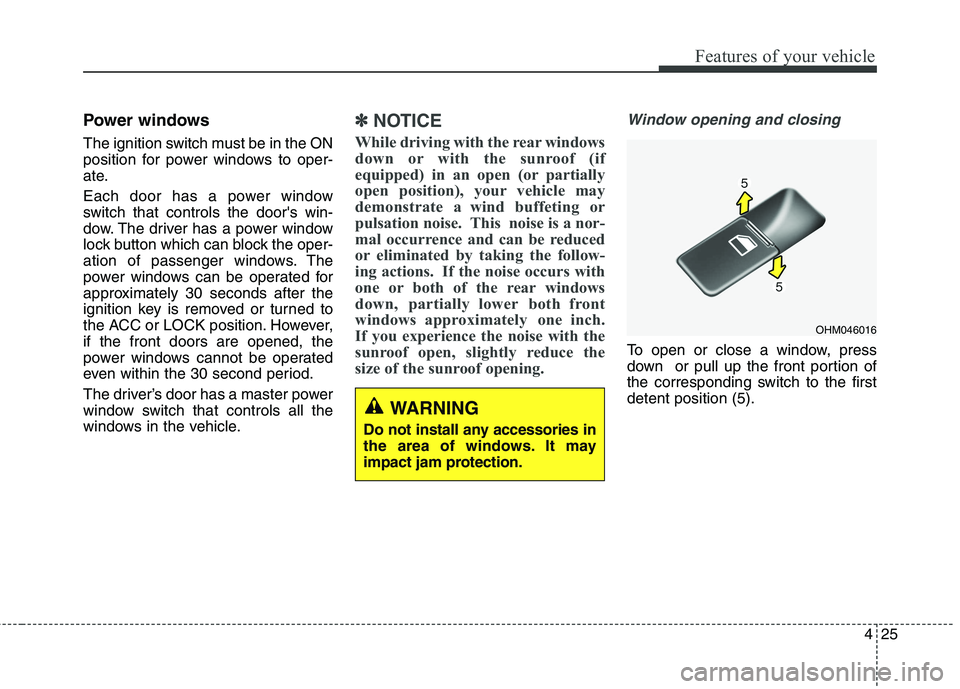
size of the sunroof opening. Window opening and closing
To open or close a window, press
down or pull up the front portion of
the corresponding switch to the firstdetent position (5).
OHM046016
WARNING
Do not install any accessories in
the area of windows. It may
impact jam protection.
Page 117 of 548
Features of your vehicle
28
4
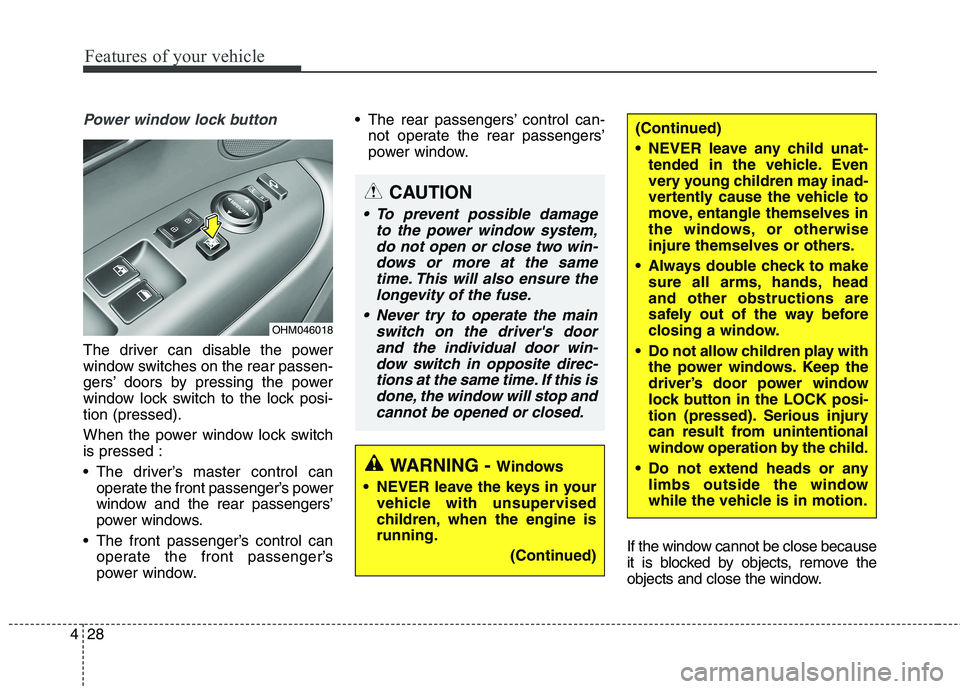
Power window lock button
The driver can disable the power
window switches on the rear passen-
gers’ doors by pressing the power
window lock switch to the lock posi-tion (pressed).
When the power window lock switch is pressed :
The driver’s master control can
operate the front passenger’s power
window and the rear passengers’
power windows.
The front passenger’s control can operate the front passenger’s
power window. The rear passengers’ control can-
not operate the rear passengers’
power window.
If the window cannot be close because
it is blocked by objects, remove the
objects and close the window.
CAUTION
To prevent possible damageto the power window system,do not open or close two win- dows or more at the sametime. This will also ensure thelongevity of the fuse.
Never try to operate the main switch on the driver's doorand the individual door win-dow switch in opposite direc-tions at the same time. If this is done, the window will stop andcannot be opened or closed.
(Continued)
NEVER leave any child unat- tended in the vehicle. Even
very young children may inad-
vertently cause the vehicle to
move, entangle themselves in
the windows, or otherwise
injure themselves or others.
Always double check to make sure all arms, hands, headand other obstructions are
safely out of the way before
closing a window.
Do not allow children play with the power windows. Keep the
driver’s door power window
lock button in the LOCK posi-
tion (pressed). Serious injury
can result from unintentional
window operation by the child.
Do not extend heads or any limbs outside the window
while the vehicle is in motion.
WARNING - Windows
NEVER leave the keys in your vehicle with unsupervised
children, when the engine isrunning.
(Continued)
OHM046018
Page 152 of 548
463
Features of your vehicle
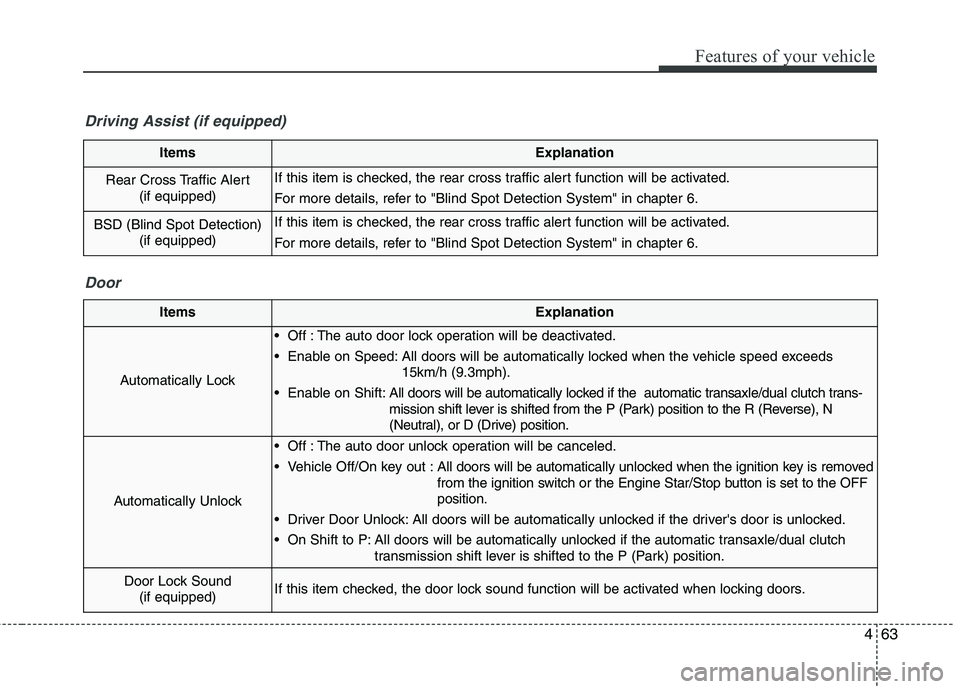
ItemsExplanation
Rear Cross Traffic Alert (if equipped)If this item is checked, the rear cross traffic alert function will be activated.
For more details, refer to "Blind Spot Detection System" in chapter 6.
BSD (Blind Spot Detection)
(if equipped)If this item is checked, the rear cross traffic alert function will be activated.
For more details, refer to "Blind Spot Detection System" in chapter 6.
Driving Assist (if equipped)
Door
ItemsExplanation
Automatically Lock
Off : The auto door lock operation will be deactivated.
Enable on Speed: All doors will be automatically locked when the vehicle speed exceeds 15km/h (9.3mph).
Enable on Shift: All doors will be automatically locked if the automatic transaxle/dual clutch trans-
mission shift lever is shifted from the P (Park) position to the R (Reverse), N
(Neutral), or D (Drive) position.
Automatically Unlock
Off : The auto door unlock operation will be canceled.
Vehicle Off/On key out : All doors will be automatically unlocked when the ignition key is removed
from the ignition switch or the Engine Star/Stop button is set to the OFFposition.
Driver Door Unlock: All doors will be automatically unlocked if the driver's door is unlocked.
On Shift to P: All doors will be automatically unlocked if the automatic transaxle/dual clutch transmission shift lever is shifted to the P (Park) position.
Door Lock Sound(if equipped)If this item checked, the door lock sound function will be activated when locking doors.
Page 156 of 548
467
Features of your vehicle
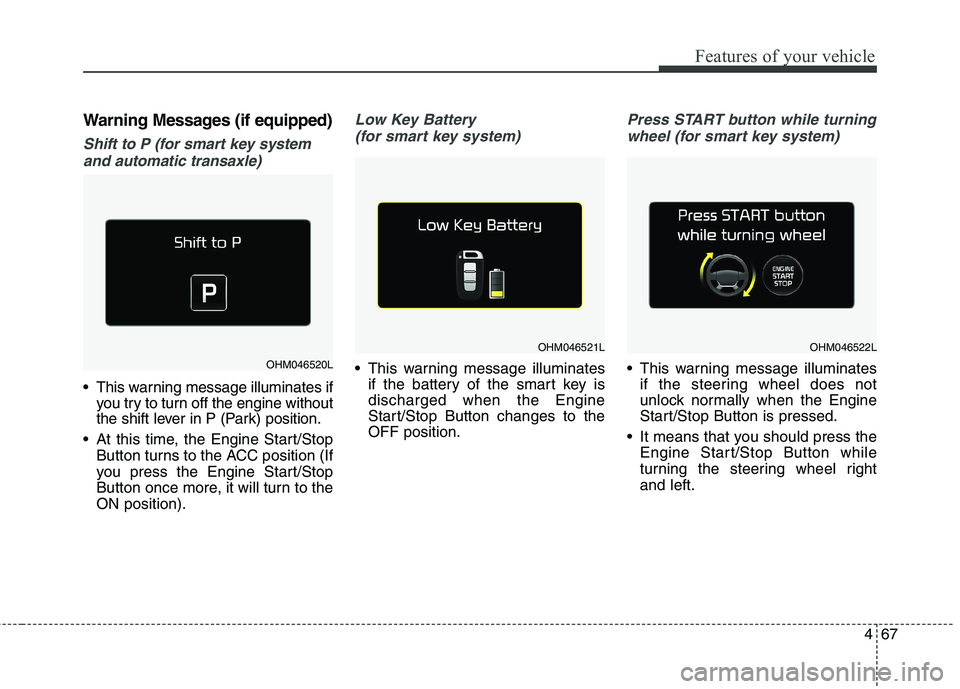
Warning Messages (if equipped)
Shift to P (for smart key systemand automatic transaxle)
This warning message illuminates if you try to turn off the engine without
the shift lever in P (Park) position.
At this time, the Engine Start/Stop Button turns to the ACC position (If
you press the Engine Start/Stop
Button once more, it will turn to theON position).
Low Key Battery
(for smart key system)
This warning message illuminates if the battery of the smart key is discharged when the Engine
Start/Stop Button changes to theOFF position.
Press START button while turning
wheel (for smart key system)
This warning message illuminates if the steering wheel does not
unlock normally when the Engine
Start/Stop Button is pressed.
It means that you should press the Engine Start/Stop Button while
turning the steering wheel rightand left.OHM046520L
OHM046521LOHM046522L
Page 157 of 548
Features of your vehicle
68
4
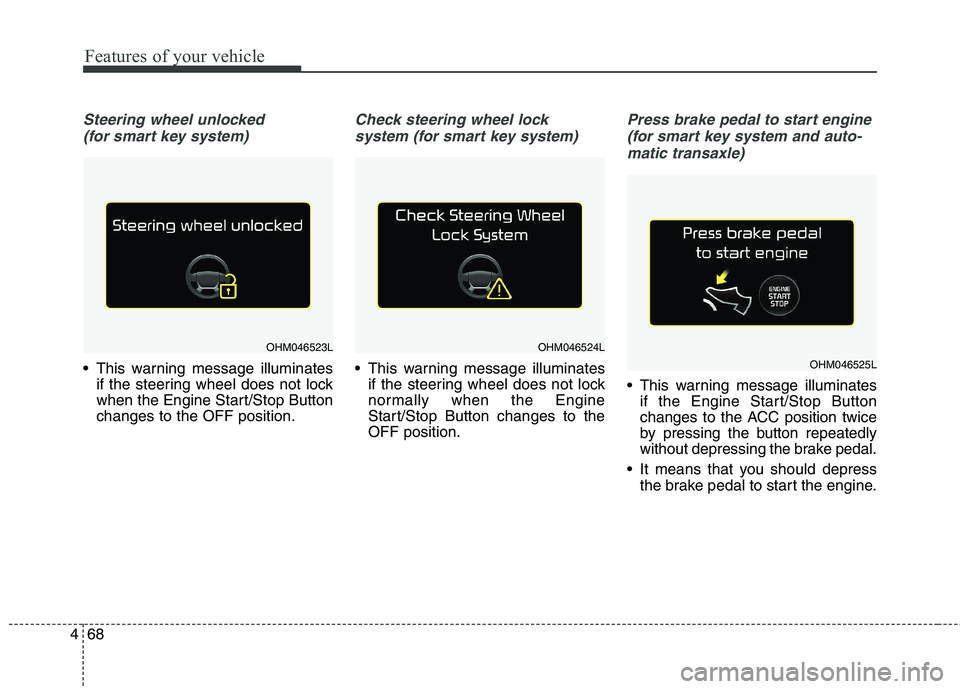
Steering wheel unlocked
(for smart key system)
This warning message illuminates if the steering wheel does not lock
when the Engine Start/Stop Buttonchanges to the OFF position.
Check steering wheel lock
system (for smart key system)
This warning message illuminates if the steering wheel does not lock
normally when the Engine
Start/Stop Button changes to theOFF position.
Press brake pedal to start engine
(for smart key system and auto- matic transaxle)
This warning message illuminates if the Engine Start/Stop Button
changes to the ACC position twice
by pressing the button repeatedly
without depressing the brake pedal.
It means that you should depress the brake pedal to start the engine.
OHM046523LOHM046524L
OHM046525L
Page 158 of 548
469
Features of your vehicle
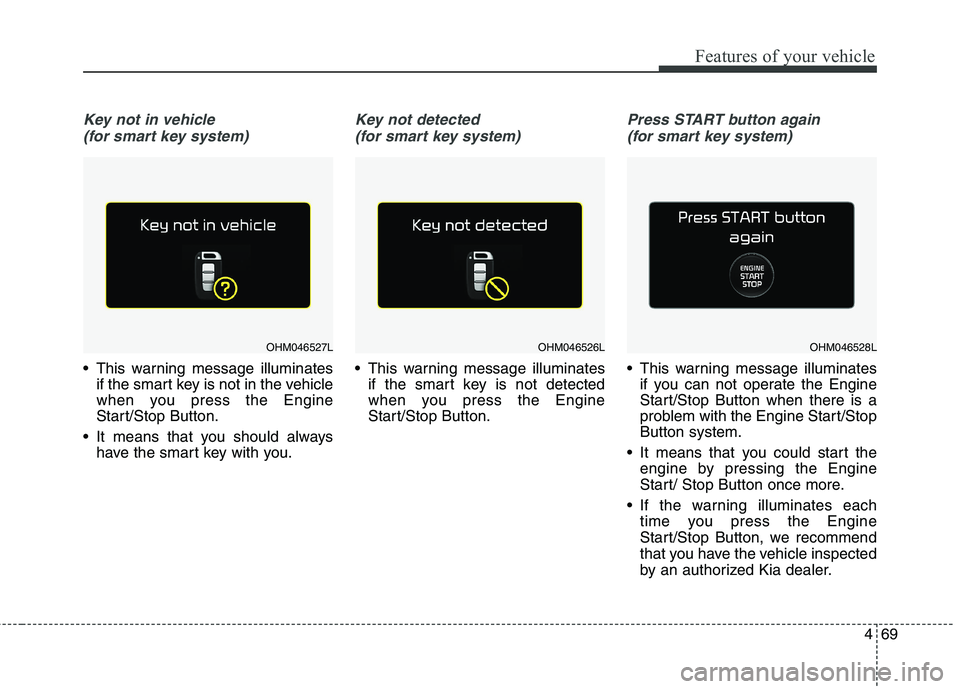
Key not in vehicle (for smart key system)
This warning message illuminates if the smart key is not in the vehicle
when you press the Engine
Start/Stop Button.
It means that you should always have the smart key with you.
Key not detected
(for smart key system)
This warning message illuminates if the smart key is not detected
when you press the Engine
Start/Stop Button.
Press START button again
(for smart key system)
This warning message illuminates if you can not operate the Engine
Start/Stop Button when there is a
problem with the Engine Start/StopButton system.
It means that you could start the engine by pressing the Engine
Start/ Stop Button once more.
If the warning illuminates each time you press the Engine
Start/Stop Button, we recommend
that you have the vehicle inspected
by an authorized Kia dealer.
OHM046527LOHM046526LOHM046528L
Page 159 of 548

Features of your vehicle
70
4
Press START button with key
(for smart key system)
This warning message illuminates if you press the Engine Start/Stop
Button while the warning message
“Key not detected” is illuminating.
At this time, the immobilizer indica- tor light blinks.
Check BRAKE SWITCH fuse
(for smart key system and auto- matic transaxle)
This warning message illuminates if the brake switch fuse is discon- nected.
It means that you should replace the fuse with a new one. If that is
not possible, you can start the
engine by pressing the Engine
Start/Stop Button for 10 seconds in
the ACC position.
Shift to P or N to start engine
(for smart key system and auto- matic transaxle)
This warning message illuminates if you try to start the engine with
the shift lever not in the P (Park) or
N (Neutral) position.
✽✽ NOTICE
You can start the engine with the
shift lever in the N (Neutral) position.
But, for your safety, we recommend
that you start the engine with the
shift lever in the P (Park) position.
OHM046529L
OHM046530LOHM046531L
Page 171 of 548
Features of your vehicle
82
4
Immobilizer Indicator
Light (Without Smart Key) (if equipped)
This indicator light illuminates:
When the vehicle detects the immobilizer in your key properly
while the ignition switch is ON.
- At this time, you can start theengine.
- The indicator light goes off after starting the engine.
This indicator light blinks:
When there is a malfunction with the immobilizer system.
In this case, we recommend that
you have the vehicle inspected by
an authorized Kia dealer.
Immobilizer Indicator
Light (With Smart Key) (if equipped)
This indicator light illuminates for up
to 30 seconds:
When the vehicle detects the smart key in the vehicle properly
while the Engine Start/Stop Button
is ACC or ON.
- At this time, you can start theengine.
- The indicator light goes off after starting the engine.
This indicator light blinks for a few
seconds:
When the smart key is not in the vehicle.
- At this time, you can not start theengine. This indicator light illuminates for 2
seconds and goes off:
When the vehicle can not detect
the smart key which is in the vehi-
cle while the Engine Start/StopButton is ON.
In this case, we recommend that
you have the vehicle inspected by
an authorized Kia dealer.
This indicator light blinks:
When the battery of the smart key is weak.
- At this time, you can not start theengine. However, you can start the
engine if you press the Engine
Start/Stop Button with the smart
key. (For more details, refer to
“Starting the Engine” in chapter 6).
When there is a malfunction with the immobilizer system.
In this case, we recommend that
you have the vehicle inspected by
an authorized Kia dealer.