reset KIA BORREGO 2017 Owner's Manual
[x] Cancel search | Manufacturer: KIA, Model Year: 2017, Model line: BORREGO, Model: KIA BORREGO 2017Pages: 548, PDF Size: 36.78 MB
Page 305 of 548
![KIA BORREGO 2017 Owners Manual Audio system
63
5
Setup Mode
(Type-1) Press the [SETUP]button to display
the Setup screen.
You can select and control options
related to [Display], [Sound], [Clock/
Day], [Phone] and [System].With](/img/2/57934/w960_57934-304.png "KIA BORREGO 2017 Owners Manual Audio system
63
5
Setup Mode
(Type-1) Press the [SETUP]button to display
the Setup screen.
You can select and control options
related to [Display], [Sound], [Clock/
Day], [Phone] and [System].With")
Audio system
63
5
Setup Mode
(Type-1) Press the [SETUP]button to display
the Setup screen.
You can select and control options
related to [Display], [Sound], [Clock/
Day], [Phone] and [System].With the Display Button
Press the [SETUP]button
Select
[Display]
You can select and control options
related to [Brightness], [Pop-up
Mode], [Scroll text] and [Song Info].
Adjusting the Brightness
Use the [Left/Right] buttons to adjust
the screen brightness or set the
Brightness on Automatic, Day or
Night mode.
Press the [Default] button to reset.
Automatic : Adjusts the brightnessautomatically.
Day : Always maintains the bright- ness on high.
Night : Always maintains the bright- ness on low.
Page 307 of 548
![KIA BORREGO 2017 Owners Manual Audio system
65
5
With the Sound Button
Press the [SETUP]button
Select
[Sound]
You can select and control options
related to [Audio Settings], [Speed
Dependent Vol.], [Volume Dialogue]
and [Touch](/img/2/57934/w960_57934-306.png "KIA BORREGO 2017 Owners Manual Audio system
65
5
With the Sound Button
Press the [SETUP]button
Select
[Sound]
You can select and control options
related to [Audio Settings], [Speed
Dependent Vol.], [Volume Dialogue]
and [Touch")
Audio system
65
5
With the Sound Button
Press the [SETUP]button
Select
[Sound]
You can select and control options
related to [Audio Settings], [Speed
Dependent Vol.], [Volume Dialogue]
and [Touch Screen Beep].
Audio Settings
Use the [Up/Down/Left/Right] but-
tons to adjust the Fader/Balance set-
tings.
Use the [Left/Right] buttons to adjust
the Bass/Middle/Treble settings.
Press the [Default] button to reset.SDVC (Speed Dependent Volume
Control)
The volume level is controlled auto-
matically according to the vehicle
speed. SDVC can be set by selecting
from On/Off.
Page 314 of 548
![KIA BORREGO 2017 Owners Manual Audio system
572Setup Mode
(Type-2) Press the
[SETUP]button to display
the Setup screen.
You can select and control options
related to [Display], [Sound],
[Clock/Calendar], [Phone] and[System].
Wi](/img/2/57934/w960_57934-313.png "KIA BORREGO 2017 Owners Manual Audio system
572Setup Mode
(Type-2) Press the
[SETUP]button to display
the Setup screen.
You can select and control options
related to [Display], [Sound],
[Clock/Calendar], [Phone] and[System].
Wi")
Audio system
572Setup Mode
(Type-2) Press the
[SETUP]button to display
the Setup screen.
You can select and control options
related to [Display], [Sound],
[Clock/Calendar], [Phone] and[System].
With the Display Button
Press the [SETUP]button
Select
[Display]
You can select and control options
related to [Brightness], [Mode Pop
up], [Text Scroll] and [Media Display].
Adjusting the Brightness
Use the [Left/Right] buttons to adjust
the screen brightness or set the
Brightness on Automatic, Day or
Night mode.
Press the [Default] button to reset.
Automatic : Adjusts the brightnessautomatically.
Day : Always maintains the bright- ness on high.
Night : Always maintains the bright- ness on low.
Page 316 of 548
![KIA BORREGO 2017 Owners Manual Audio system
574
With the Sound Button
Press the [SETUP]button
Select
[Sound]
You can select and control options related to [Sound Setting], [Speed
Dependent Vol.] and [Touch ScreenBeep].
Sound Set](/img/2/57934/w960_57934-315.png "KIA BORREGO 2017 Owners Manual Audio system
574
With the Sound Button
Press the [SETUP]button
Select
[Sound]
You can select and control options related to [Sound Setting], [Speed
Dependent Vol.] and [Touch ScreenBeep].
Sound Set")
Audio system
574
With the Sound Button
Press the [SETUP]button
Select
[Sound]
You can select and control options related to [Sound Setting], [Speed
Dependent Vol.] and [Touch ScreenBeep].
Sound Setting
Use the [Up/Down/Left/Right] but-
tons to adjust the Fader/Balance set-
tings.
Use the [Left/Right] buttons to adjust
the Bass/Middle/Treble settings.
Press the [Default] button to reset.SDVC (Speed Dependent Volume
Control)
The volume level is controlled auto-
matically according to the vehicle
speed. SDVC can be set by selecting
from On/Off.
Touch Screen Beep
This feature is used to turn the touch
screen beep on/off.
Page 380 of 548
Driving your vehicle
56
6
To temporarily accelerate with
the cruise control on:
If you want to speed up temporarily
when the cruise control is on,
depress the accelerator pedal.
Increased speed will not interfere
with cruise control operation orchange the set speed.
To return to the set speed, take your
foot off the accelerator pedal. To cancel cruise control, do
one of the following:
Depress the brake pedal.
Shift into N (Neutral) with an auto-
matic transaxle.
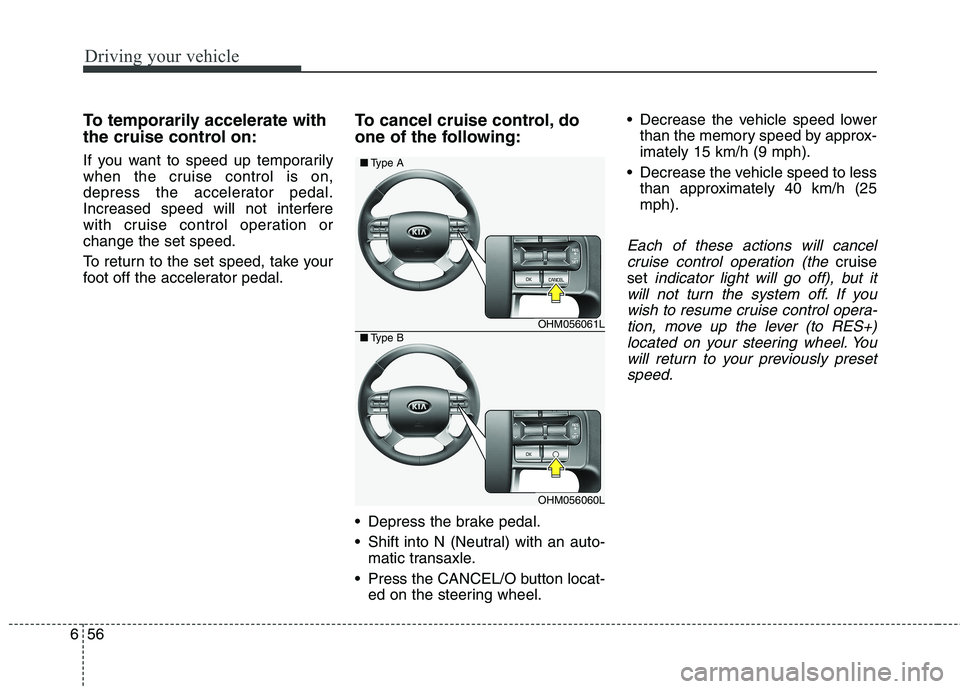
Press the CANCEL/O button locat- ed on the steering wheel. Decrease the vehicle speed lower
than the memory speed by approx- imately 15 km/h (9 mph).
Decrease the vehicle speed to less than approximately 40 km/h (25mph).
Each of these actions will cancel
cruise control operation (the
cruise
set
indicator light will go off), but it
will not turn the system off. If you wish to resume cruise control opera-tion, move up the lever (to RES+)located on your steering wheel. You will return to your previously presetspeed.
OHM056061L
OHM056060L
■ Type A
■Type B
Page 477 of 548
841
Maintenance
Reset items Items should be reset after the bat-
tery has been discharged or the bat-
tery has been disconnected.
Driver position memory system(See chapter 3)
Auto up/down window (See chapter 4)
Sunroof (See chapter 4)
Trip computer (See chapter 4)
Climate control system (See chapter 4)
Audio (See chapter 5)WARNING
Before performing mainte- nance or recharging the bat-
tery, turn off all accessories
and stop the engine.
The negative battery cable must be removed first and
installed last when the batteryis disconnected.(Continued)
Disconnect the battery charg-er in the following order.
1. Turn off the battery charger main switch.
2. Unhook the negative clamp from the negative battery ter- minal.
3. Unhook the positive clamp from the positive battery ter-minal.
Page 481 of 548
845
Maintenance
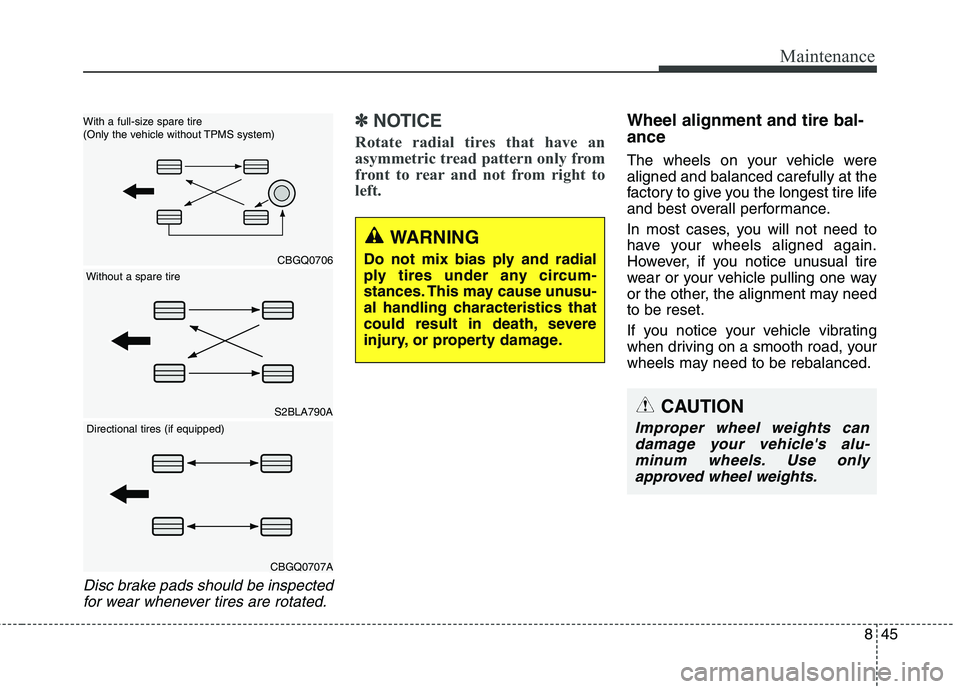
Disc brake pads should be inspectedfor wear whenever tires are rotated.
✽✽ NOTICE
Rotate radial tires that have an
asymmetric tread pattern only from
front to rear and not from right to
left.Wheel alignment and tire bal- ance
The wheels on your vehicle were aligned and balanced carefully at the
factory to give you the longest tire life
and best overall performance.
In most cases, you will not need to
have your wheels aligned again.
However, if you notice unusual tire
wear or your vehicle pulling one way
or the other, the alignment may needto be reset.
If you notice your vehicle vibrating
when driving on a smooth road, your
wheels may need to be rebalanced.
WARNING
Do not mix bias ply and radial
ply tires under any circum-
stances. This may cause unusu-
al handling characteristics that
could result in death, severe
injury, or property damage.
S2BLA790A
CBGQ0706
With a full-size spare tire
(Only the vehicle without TPMS system)
Directional tires (if equipped)
Without a spare tire
CBGQ0707A
CAUTION
Improper wheel weights can damage your vehicle's alu-minum wheels. Use onlyapproved wheel weights.
Page 492 of 548
Maintenance
56
8
Memory fuse (SHUNT connector)
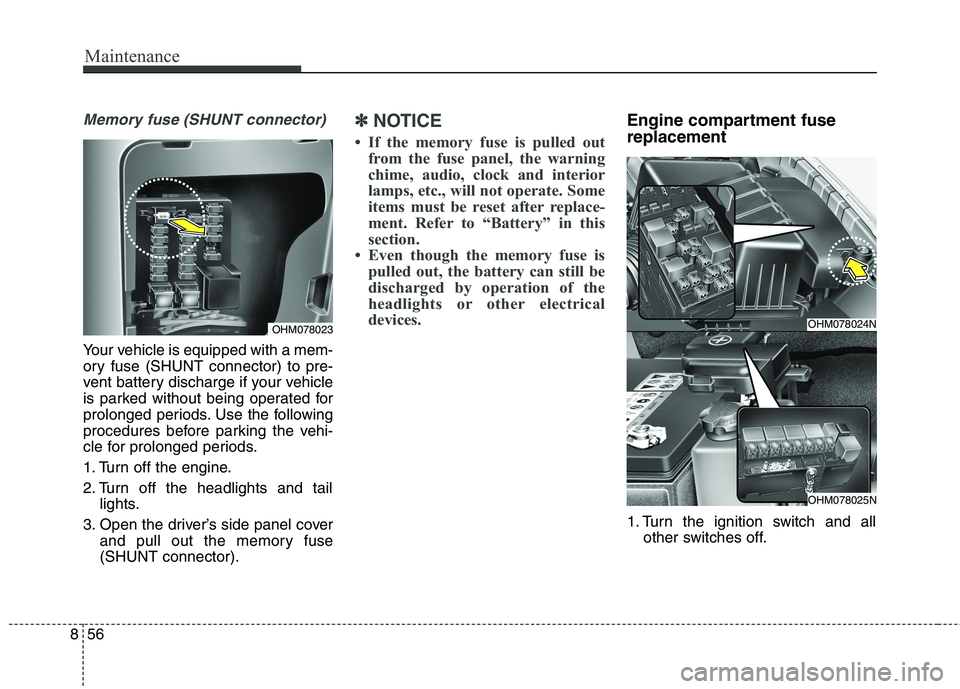
Your vehicle is equipped with a mem-
ory fuse (SHUNT connector) to pre-
vent battery discharge if your vehicle
is parked without being operated for
prolonged periods. Use the following
procedures before parking the vehi-
cle for prolonged periods.
1. Turn off the engine.
2. Turn off the headlights and tail
lights.
3. Open the driver’s side panel cover and pull out the memory fuse (SHUNT connector).
✽✽ NOTICE
If the memory fuse is pulled out from the fuse panel, the warning
chime, audio, clock and interior
lamps, etc., will not operate. Some
items must be reset after replace-
ment. Refer to “Battery” in this
section.
Even though the memory fuse is pulled out, the battery can still be
discharged by operation of the
headlights or other electrical
devices.Engine compartment fuse replacement
1. Turn the ignition switch and all other switches off.
OHM078023OHM078024N
OHM078025N
Page 538 of 548
I3
Index
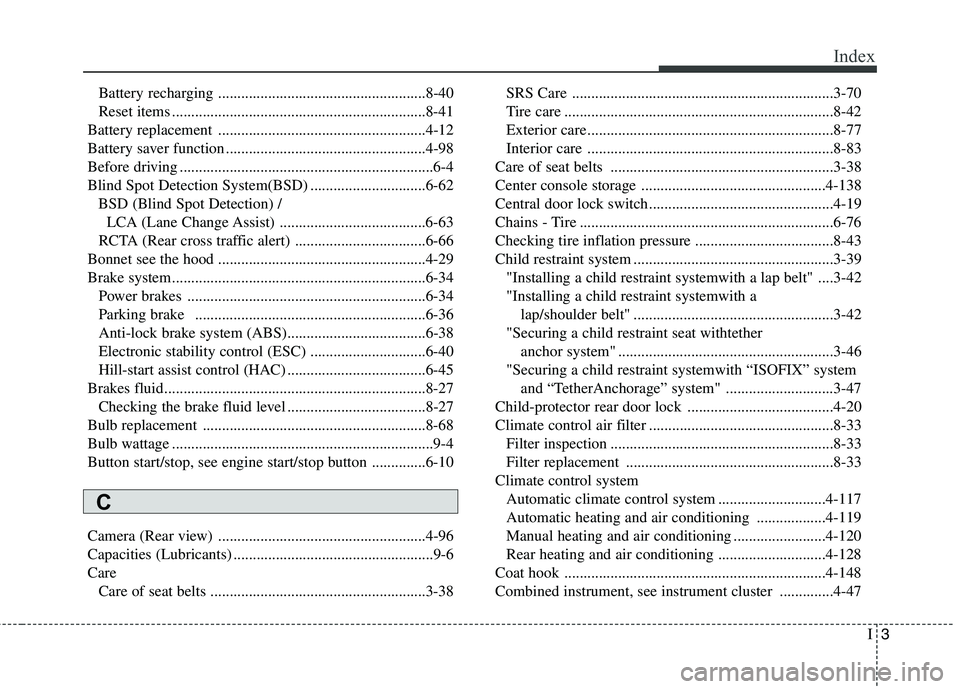
Battery recharging ......................................................8-40
Reset items ..................................................................8-41
Battery replacement ......................................................4-12
Battery saver function ....................................................4-98
Before driving ..................................................................6-4
Blind Spot Detection System(BSD) ..............................6-62 BSD (Blind Spot Detection) /LCA (Lane Change Assist) ......................................6-63
RCTA (Rear cross traffic alert) ..................................6-66
Bonnet see the hood ......................................................4-29
Brake system..................................................................6-34 Power brakes ..............................................................6-34
Parking brake ............................................................6-36
Anti-lock brake system (ABS)....................................6-38
Electronic stability control (ESC) ..............................6-40
Hill-start assist control (HAC) ....................................6-45
Brakes fluid....................................................................8-27 Checking the brake fluid level ....................................8-27
Bulb replacement ..........................................................8-68
Bulb wattage ....................................................................9-4
Button start/stop, see engine start/stop button ..............6-10
Camera (Rear view) ......................................................4-96
Capacities (Lubricants) ....................................................9-6Care Care of seat belts ........................................................3-38 SRS Care ....................................................................3-70
Tire care ......................................................................8-42
Exterior care ................................................................8-77
Interior care ................................................................8-83
Care of seat belts ..........................................................3-38
Center console storage ................................................4-138
Central door lock switch................................................4-19
Chains - Tire ..................................................................6-76
Checking tire inflation pressure ....................................8-43
Child restraint system ....................................................3-39 "Installing a child restraint systemwith a lap belt" ....3-42"Installing a child restraint systemwith a lap/shoulder belt" ....................................................3-42
"Securing a child restraint seat withtether anchor system" ........................................................3-46
"Securing a child restraint systemwith “ISOFIX” system and “TetherAnchorage” system" ............................3-47
Child-protector rear door lock ......................................4-20
Climate control air filter ................................................8-33 Filter inspection ..........................................................8-33
Filter replacement ......................................................8-33
Climate control system Automatic climate control system ............................4-117
Automatic heating and air conditioning ..................4-119
Manual heating and air conditioning ........................4-120
Rear heating and air conditioning ............................4-128
Coat hook ....................................................................4-148
Combined instrument, see instrument cluster ..............4-47
C
Page 546 of 548
I11
Index
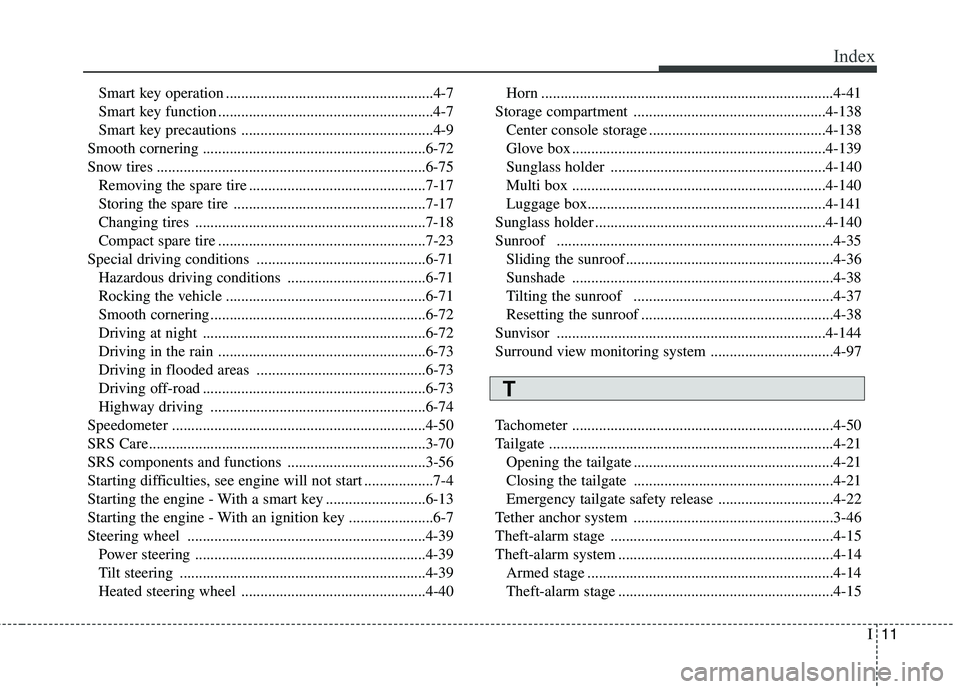
Smart key operation ......................................................4-7
Smart key function ........................................................4-7
Smart key precautions ..................................................4-9
Smooth cornering ..........................................................6-72
Snow tires ......................................................................6-75 Removing the spare tire ..............................................7-17
Storing the spare tire ..................................................7-17
Changing tires ............................................................7-18
Compact spare tire ......................................................7-23
Special driving conditions ............................................6-71 Hazardous driving conditions ....................................6-71
Rocking the vehicle ....................................................6-71
Smooth cornering ........................................................6-72
Driving at night ..........................................................6-72
Driving in the rain ......................................................6-73
Driving in flooded areas ............................................6-73
Driving off-road ..........................................................6-73
Highway driving ........................................................6-74
Speedometer ..................................................................4-50
SRS Care........................................................................3-70
SRS components and functions ....................................3-56
Starting difficulties, see engine will not start ..................7-4
Starting the engine - With a smart key ..........................6-13
Starting the engine - With an ignition key ......................6-7
Steering wheel ..............................................................4-39 Power steering ............................................................4-39
Tilt steering ................................................................4-39
Heated steering wheel ................................................4-40 Horn ............................................................................4-41
Storage compartment ..................................................4-138 Center console storage ..............................................4-138
Glove box ..................................................................4-139
Sunglass holder ........................................................4-140
Multi box ..................................................................4-140Luggage box..............................................................4-141
Sunglass holder ............................................................4-140Sunroof ........................................................................4-35 Sliding the sunroof ......................................................4-36Sunshade ....................................................................4-38
Tilting the sunroof ....................................................4-37
Resetting the sunroof ..................................................4-38
Sunvisor ......................................................................4-144
Surround view monitoring system ................................4-97
Tachometer ....................................................................4-50
Tailgate ..........................................................................4-21 Opening the tailgate ....................................................4-21
Closing the tailgate ....................................................4-21
Emergency tailgate safety release ..............................4-22
Tether anchor system ....................................................3-46
Theft-alarm stage ..........................................................4-15
Theft-alarm system ........................................................4-14 Armed stage ................................................................4-14
Theft-alarm stage ........................................................4-15
T