wheel KIA BORREGO 2017 Owner's Manual
[x] Cancel search | Manufacturer: KIA, Model Year: 2017, Model line: BORREGO, Model: KIA BORREGO 2017Pages: 548, PDF Size: 36.78 MB
Page 130 of 548
441
Features of your vehicle
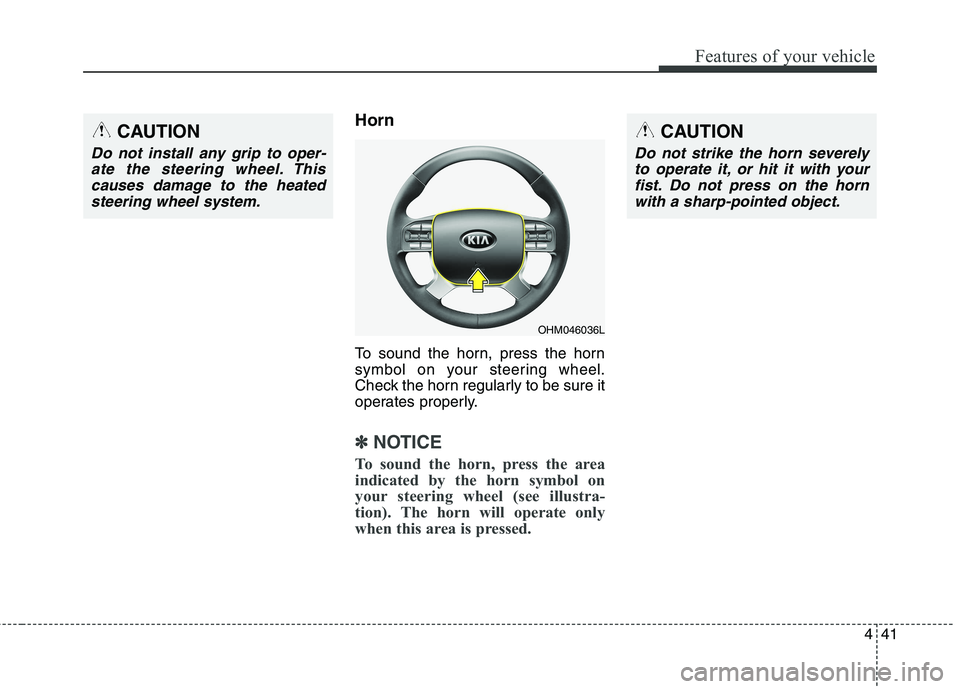
Horn
To sound the horn, press the horn
symbol on your steering wheel.
Check the horn regularly to be sure it
operates properly.
✽✽NOTICE
To sound the horn, press the area
indicated by the horn symbol on
your steering wheel (see illustra-
tion). The horn will operate only
when this area is pressed.
OHM046036L
CAUTION
Do not strike the horn severely to operate it, or hit it with yourfist. Do not press on the horn with a sharp-pointed object.
CAUTION
Do not install any grip to oper-ate the steering wheel. Thiscauses damage to the heated steering wheel system.
Page 138 of 548
449
Features of your vehicle
Instrument Cluster Control
Adjusting Instrument ClusterIllumination (if equipped)
The brightness of the instrument
panel illumination is changed byrotating the control knob when the
ignition switch or Engine Start/Stop
button is ON, or the tail lights are
turned on. LCD Display Control
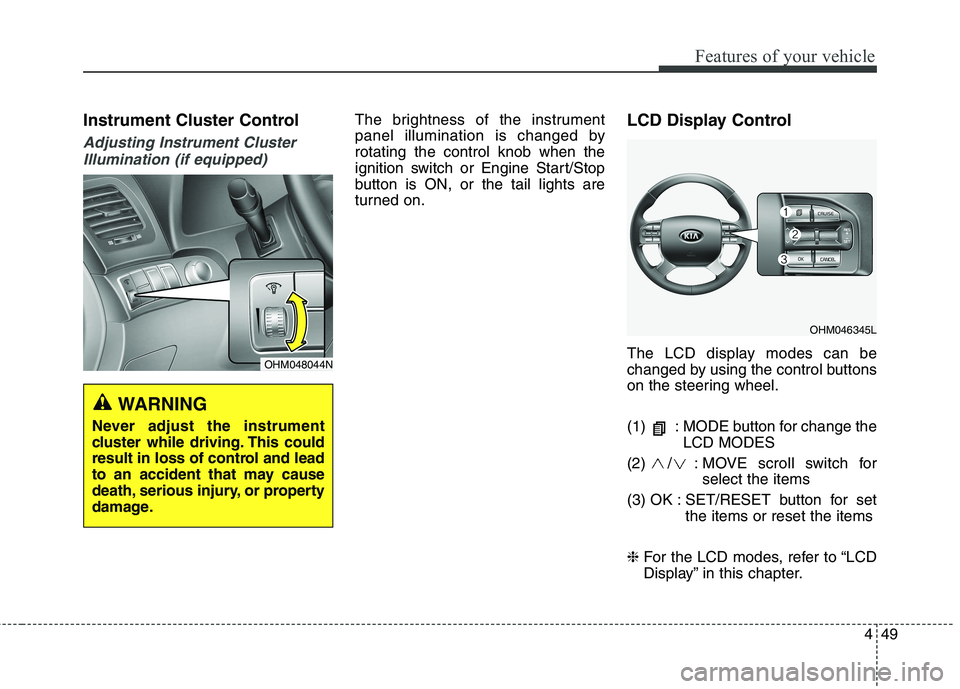
The LCD display modes can be
changed by using the control buttons
on the steering wheel.
(1) : MODE button for change the
LCD MODES
(2) / : MOVE scroll switch for select the items
(3) OK : SET/RESET button for set the items or reset the items
❈ For the LCD modes, refer to “LCD
Display” in this chapter.
OHM048044N
WARNING
Never adjust the instrument
cluster while driving. This could
result in loss of control and lead
to an accident that may cause
death, serious injury, or property
damage.
OHM046345L
Page 145 of 548
Features of your vehicle
56
4
Distance To Empty (1)
The distance to empty is the esti-
mated distance the vehicle can be
driven with the remaining fuel.
- Distance range: 1~9,999 km or1~9,999 mi.
If the estimated distance is below 1 km (1 mi.), the trip computer will dis-
play "---" as distance to empty.
✽✽ NOTICE
If the vehicle is not on level ground or the battery power has been
interrupted, the distance to empty
function may not operate correctly.
The distance to empty may differ from the actual driving distance as
it is an estimate of the available
driving distance.
The trip computer may not regis- ter additional fuel if less than 6
liters (1.6 gallons) of fuel are
added to the vehicle.
The fuel economy and distance to empty may vary significantly based
on driving conditions, driving
habits, and condition of the vehicle.
Average Fuel Economy (2)
The average fuel economy is calcu-lated by the total driving distance and fuel consumption since the last
average fuel economy reset.
- Fuel economy range: 0.0 ~ 99.9L/100km or MPG
The average fuel economy can be reset both manually and automati-
cally.
Manual reset
To clear the average fuel economy
manually, press the OK button
(reset) on the steering wheel for
more than 1 second when the aver-
age fuel economy is displayed. Automatic reset
To make the average fuel economy
be reset automatically whenever
refueling, select the "Fuel economyauto reset" mode in User Setting
menu of the LCD display (Refer to
"LCD Display").
OFF - You may set to default manu-
ally by using the trip switch reset but- ton.
When driving - The vehicle will auto- matically set to default once 4 hours
pass after the Ignition is in OFF.
When refueling - After refueling more than 6 liters and driving over
1km/h, the vehicle will reset to
default automatically.
✽✽ NOTICE
The average fuel economy is not dis-
played for more accurate calculation
if the vehicle does not drive more than
10 seconds or 50 meters (0.03 miles)
since the ignition switch or Engine
Start/Stop button is turned to ON.
Page 146 of 548
457
Features of your vehicle
Instant Fuel Economy (3)
This mode displays the instant fueleconomy during the last few sec-
onds when the vehicle speed ismore than 10 km/h (6.2 MPH).
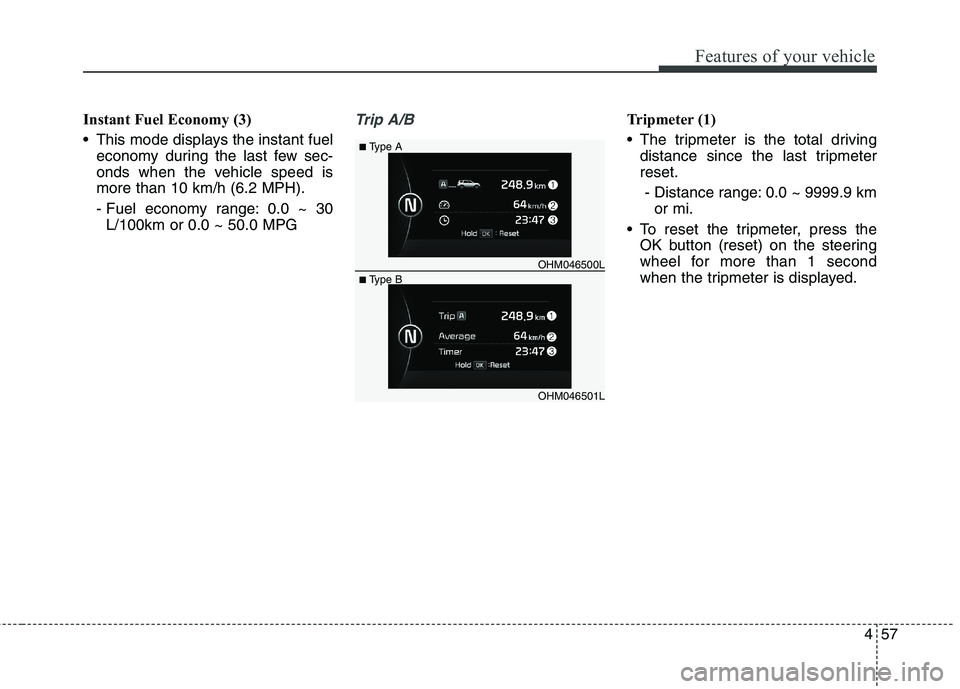
- Fuel economy range: 0.0 ~ 30L/100km or 0.0 ~ 50.0 MPGTrip A/BTripmeter (1)
The tripmeter is the total driving distance since the last tripmeter reset.
- Distance range: 0.0 ~ 9999.9 km or mi.
To reset the tripmeter, press the OK button (reset) on the steering
wheel for more than 1 second
when the tripmeter is displayed.
OHM046501L
■
Type A
■ Type B OHM046500L
Page 147 of 548
Features of your vehicle
58
4
Average Vehicle Speed (2)
The average vehicle speed is cal-
culated by the total driving dis-
tance and driving time since the
last average vehicle speed reset.
- Speed range: 0 ~ 999 km/h orMPH
To reset the average vehicle speed, press the OK button (reset) on the
steering wheel for more than 1 sec-
ond when the average vehicle
speed is displayed.
✽✽ NOTICE
The average vehicle speed is not displayed if the driving distance
has been less than 300 meters (0.19
miles) or the driving time has been
less than 10 seconds since the igni-
tion switch or Engine Start/Stop
button was turned to ON.
Even if the vehicle is not in motion, the average vehicle speed keeps
going while the engine is running.
Elapsed Time (3)
The elapsed time is the total driv-ing time since the last elapsed time reset.
- Time range (hh:mm): 00:00 ~ 99:59
To reset the elapsed time, press the OK button (reset) on the steering
wheel for more than 1 second when
the elapsed time is displayed.
✽✽ NOTICE
Even if the vehicle is not in motion,
the elapsed time keeps going while
the engine is running.
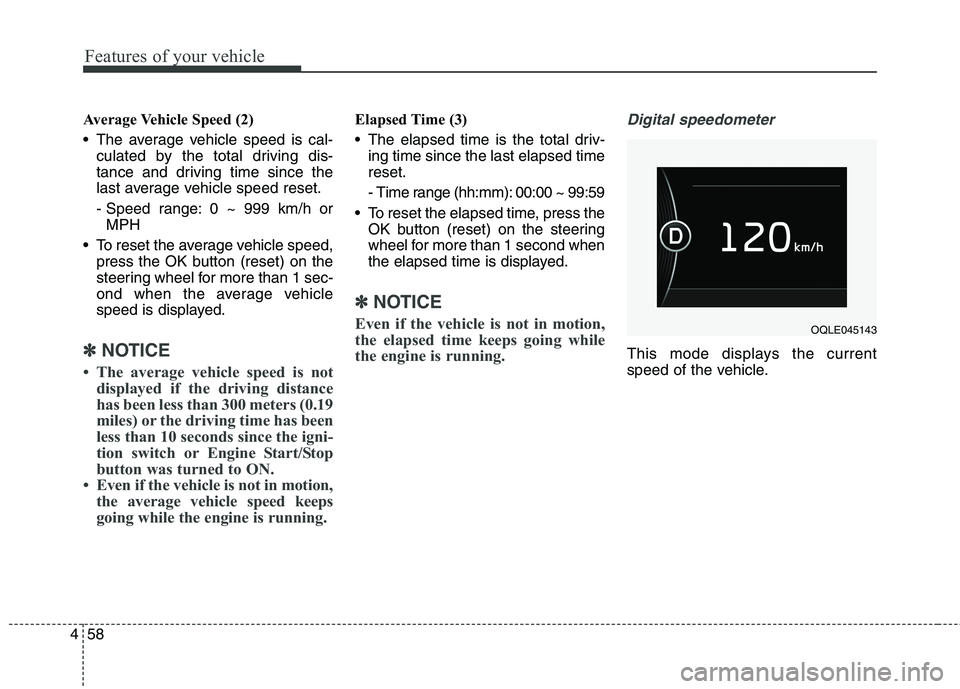
Digital speedometer
This mode displays the current
speed of the vehicle.
OQLE045143
Page 154 of 548
465
Features of your vehicle
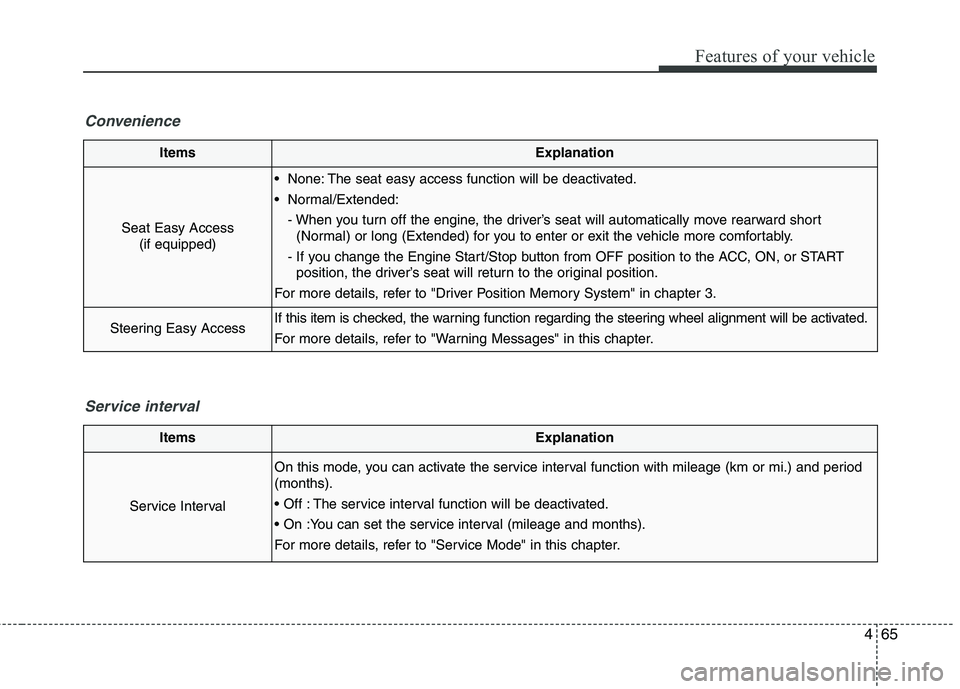
ItemsExplanation
Seat Easy Access(if equipped)
None: The seat easy access function will be deactivated.
Normal/Extended:
- When you turn off the engine, the driver’s seat will automatically move rearward short(Normal) or long (Extended) for you to enter or exit the vehicle more comfortably.
- If you change the Engine Start/Stop button from OFF position to the ACC, ON, or START position, the driver’s seat will return to the original position.
For more details, refer to "Driver Position Memory System" in chapter 3.
Steering Easy AccessIf this item is checked, the warning function regarding the steering wheel alignment will be activated.
For more details, refer to "Warning Messages" in this chapter.
Convenience
ItemsExplanation
Service Interval
On this mode, you can activate the service interval function with mileage (km or mi.) and period (months).
The service interval function will be deactivated.
For more details, refer to "Service Mode" in this chapter.
Service interval
Page 156 of 548
467
Features of your vehicle
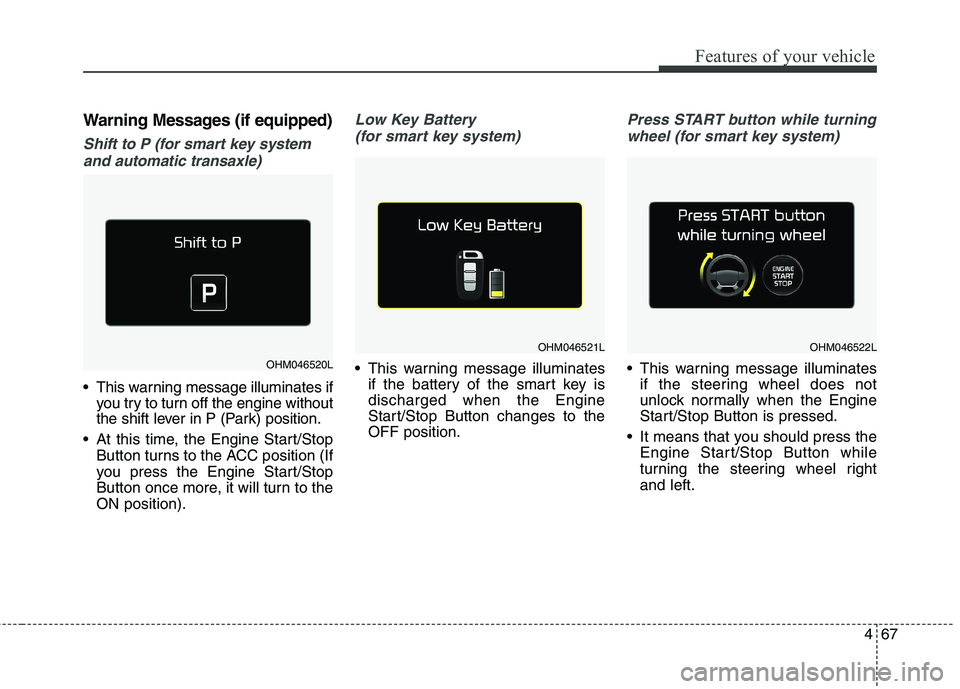
Warning Messages (if equipped)
Shift to P (for smart key systemand automatic transaxle)
This warning message illuminates if you try to turn off the engine without
the shift lever in P (Park) position.
At this time, the Engine Start/Stop Button turns to the ACC position (If
you press the Engine Start/Stop
Button once more, it will turn to theON position).
Low Key Battery
(for smart key system)
This warning message illuminates if the battery of the smart key is discharged when the Engine
Start/Stop Button changes to theOFF position.
Press START button while turning
wheel (for smart key system)
This warning message illuminates if the steering wheel does not
unlock normally when the Engine
Start/Stop Button is pressed.
It means that you should press the Engine Start/Stop Button while
turning the steering wheel rightand left.OHM046520L
OHM046521LOHM046522L
Page 157 of 548
Features of your vehicle
68
4
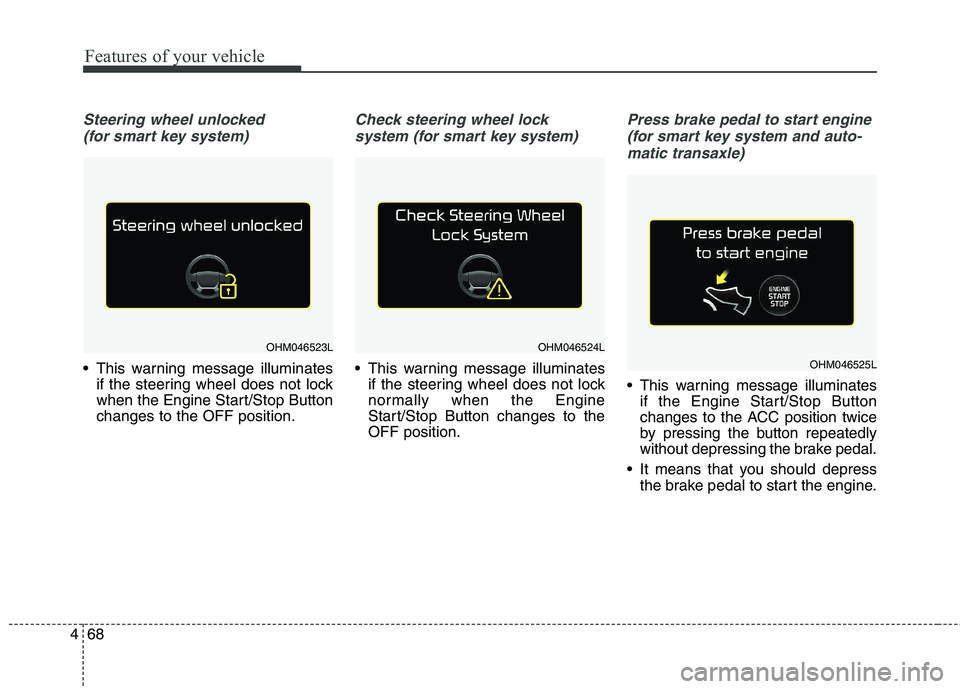
Steering wheel unlocked
(for smart key system)
This warning message illuminates if the steering wheel does not lock
when the Engine Start/Stop Buttonchanges to the OFF position.
Check steering wheel lock
system (for smart key system)
This warning message illuminates if the steering wheel does not lock
normally when the Engine
Start/Stop Button changes to theOFF position.
Press brake pedal to start engine
(for smart key system and auto- matic transaxle)
This warning message illuminates if the Engine Start/Stop Button
changes to the ACC position twice
by pressing the button repeatedly
without depressing the brake pedal.
It means that you should depress the brake pedal to start the engine.
OHM046523LOHM046524L
OHM046525L
Page 163 of 548

Features of your vehicle
74
4
Parking Brake & Brake
Fluid Warning Light
This warning light illuminates:
Once you set the ignition switch or Engine Start/Stop Button to the ON position.
- It illuminates for approximately 3seconds
- It remains on if the parking brake is applied.
When the parking brake is applied.
When the brake fluid level in the reservoir is low.
- If the warning light illuminateswith the parking brake released, it
indicates the brake fluid level in
reservoir is low. If the brake fluid level in the reservoir
is low:
1. Drive carefully to the nearest safe
location and stop your vehicle.
2. With the engine stopped, check the brake fluid level immediately
and add fluid as required (For
more details, refer to “Brake Fluid”
in chapter 8). Then check all brake
components for fluid leaks. If any
leak on the brake system is still
found, the warning light remains
on, or the brakes do not operate
properly, do not drive the vehicle.
In this case, we recommend that
you have the vehicle towed to an
authorized Kia dealer and inspect-ed. Dual-diagonal braking system
Your vehicle is equipped with dual-
diagonal braking systems. This
means you still have braking on two
wheels even if one of the dual sys-
tems should fail. With only one of the dual systems
working, more than normal pedal
travel and greater pedal pressure are
required to stop the vehicle.
Also, the vehicle will not stop in as
short a distance with only a portion
of the brake system working.
If the brakes fail while you are driv-
ing, shift to a lower gear for addition-
al engine braking and stop the vehi-
cle as soon as it is safe to do so.
Page 174 of 548
![KIA BORREGO 2017 Owners Manual 485
Features of your vehicle
Lane Departure WarningSystem (LDWS) Indicator Light (if equipped)
This indicator light illuminates:
[White] When the lane departure warning system does not detect
the l](/img/2/57934/w960_57934-173.png "KIA BORREGO 2017 Owners Manual 485
Features of your vehicle
Lane Departure WarningSystem (LDWS) Indicator Light (if equipped)
This indicator light illuminates:
[White] When the lane departure warning system does not detect
the l")
485
Features of your vehicle
Lane Departure WarningSystem (LDWS) Indicator Light (if equipped)
This indicator light illuminates:
[White] When the lane departure warning system does not detect
the lane line.
[Green] When you activate the lane departure warning system by
pressing the LDWS button.
When blinking in Green, LDWS is
in warning condition.
[Yellow] When there is a malfunc- tion with the lane departure warn-ing system.
In this case, we recommend that you
have the vehicle inspected by an
authorized Kia dealer. ❈ For more details, refer to “Lane
Departure Warning System
(LDWS)” in chapter 6.
4WD LOW indicator
(if equipped)
When the ignition switch is turned to
the ON position, the 4WD LOW indi-cator will illuminate and then go off in
a few seconds. The 4WD LOW indi-
cator illuminates when the transfer
shift knob is set to the 4L(Low-speed
4-wheel drive) position. ❈ For more details, refer to “Four
wheel drive (4WD)” in chapter 6.
4WD HI indicator
(if equipped)
When the ignition switch is turned to the ON position, the 4WD HI indica-tor will illuminate and then go off in a
few seconds. The 4WD HI indicator
illuminates when the transfer shiftknob is set to the 4H(High-speed 4-
wheel drive) position. ❈ For more details, refer to “Four
wheel drive (4WD)” in chapter 6.
4WD
LOW4WD HI