wheel KIA BORREGO 2017 Repair Manual
[x] Cancel search | Manufacturer: KIA, Model Year: 2017, Model line: BORREGO, Model: KIA BORREGO 2017Pages: 548, PDF Size: 36.78 MB
Page 362 of 548
Driving your vehicle
38
6
Anti-lock brake system (ABS) The ABS continuously senses the
speed of the wheels. If the wheels
are going to lock, the ABS system
repeatedly modulates the hydraulic
brake pressure to the wheels.
When you apply your brakes under
conditions which may lock the wheels,
you may hear a “tik-tik’’ sound from the
brakes, or feel a corresponding sensa-
tion in the brake pedal. This is normal
and it means your ABS is active.
In order to obtain the maximum ben-
efit from your ABS in an emergencysituation, do not attempt to modulate
your brake pressure and do not try to
pump your brakes. Press your brake
pedal as hard as possible or as hard
as the situation warrants and allow
the ABS to control the force being
delivered to the brakes.
✽✽
NOTICE
A click sound may be heard in the
engine compartment when the vehi-
cle begins to move after the engine is
started. These conditions are normal
and indicate that the anti-lock brake
system is functioning properly.
(Continued)
On roads where the road sur- face is pitted or has different surface height.
The safety features of an ABS
(or ESC) equipped vehicle
should not be tested by high
speed driving or cornering. This
could endanger the safety of
yourself or others.
WARNING
ABS (or ESC) will not prevent
accidents due to improper or
dangerous driving maneuvers.
Even though vehicle control is
improved during emergency
braking, always maintain a safe
distance between you and
objects ahead. Vehicle speeds
should always be reduced dur-
ing extreme road conditions.
The braking distance for vehicle
equipped with an anti-lock brak-
ing system (or Electronic
Stability Control) may be longer
than for those without it in the
following road conditions. During these conditions the
vehicle should be driven atreduced speeds:
Rough, gravel or snow-cov- ered roads.
With tire chains installed. (Continued)
Page 364 of 548

Driving your vehicle
40
6
✽✽
NOTICE
When you jump start your vehicle
because of a drained battery, the
engine may not run as smoothly and
the ABS warning light may turn on
at the same time. This happens
because of the low battery voltage. It
does not mean your ABS is malfunc-
tioning.
Do not pump your brakes!
Have the battery recharged before driving the vehicle.Electronic stability control (ESC) (if equipped) The Electronic Stability Control (ESC) system is designed to stabi-
lize the vehicle during cornering
maneuvers. ESC checks where you
are steering and where the vehicle is
actually going. ESC applies the
brakes at individual wheels and inter-
venes with engine management sys-
tem to stabilize the vehicle.CAUTION
When you drive on a road hav-
ing poor traction, such as anicy road, and operate yourbrakes continuously, the ABSwill be active continuously and the ABS warning lightmay illuminate. Pull your vehi-cle over to a safe place andstop the engine.
Restart the engine. If the ABS warning light is off, then yourABS system is normal.Otherwise, you may have aproblem with the ABS. We rec- ommend that you contact anauthorized Kia dealer.
OHM056023L
Page 365 of 548
641
Driving your vehicle
The Electronic stability control (ESC) system is an electronic system
designed to help the driver maintain
vehicle control under adverse condi-
tions. It is not a substitute for safe
driving practices. Factors including
speed, road conditions and driver
steering input can all affect whether
ESC will be effective in preventing a
loss of control. It is still your respon-
sibility to drive and corner at reason-
able speeds and to leave a sufficient
margin of safety.
When you apply your brakes under
conditions which may lock the
wheels, you may hear a “tik-tik’’
sound from the brakes, or feel a cor-
responding sensation in the brake
pedal. This is normal and it means
your ESC is active.✽✽NOTICE
A click sound may be heard in the
engine compartment when the vehi-
cle begins to move after the engine is
started. These conditions are normal
and indicate that the Electronic sta-
bility control (ESC) System is func-
tioning properly. WARNING
Never drive too fast for the road
conditions or too quickly when
cornering. Electronic stability
control (ESC) will not prevent
accidents. Excessive speed in
turns, abrupt maneuvers and
hydroplaning on wet surfacescan still result in serious acci-
dents. Only a safe and attentive
driver can prevent accidents by
avoiding maneuvers that cause
the vehicle to lose traction.
Even with ESC installed, always
follow all the normal precau-
tions for driving - including driv-
ing at safe speeds for the condi-tions.
Page 368 of 548

Driving your vehicle
44
6
ESC OFF usage
When driving
ESC should be turned on for daily
driving whenever possible.
To turn ESC off while driving, press the ESC OFF button while driving
on a flat road surface.
✽✽ NOTICE
When operating the vehicle on a dynamometer, ensure that the ESC
is turned off by pressing the ESC
OFF button for more than 3 sec-
onds (ESC OFF light illuminated).
If the ESC is left on, it may prevent
the vehicle speed from increasing,
and result in false diagnosis.
Turning the ESC off does not affect ABS or brake system operation.
WARNING
Never press the ESC OFF but- ton while ESC is operating (ESC
indicator light blinks). If ESC is turned off while ESC is
operating, the vehicle may slip
out of control.
CAUTION
Driving with varying tire or wheel sizes may cause the ESC systemto malfunction. When replacing tires, make sure they are thesame size as your original tires.
WARNING
The Electronic Stability Control
system is only a driving aid; use
precautions for safe driving by
slowing down on curved,
snowy, or icy roads. Drive slow-
ly and don’t attempt to acceler-
ate whenever the ESC indicator
light is blinking, or when the
road surface is slippery.
Page 370 of 548

Driving your vehicle
46
6
Check to be sure the parking brake
is not engaged and that the park-
ing brake indicator light is out
before driving away.
Driving through water may get the brakes wet. They can also get wet
when the vehicle is washed. Wet
brakes can be dangerous! Your
vehicle will not stop as quickly if the
brakes are wet. Wet brakes may
cause the vehicle to pull to one side.
To dry the brakes, apply the brakes
lightly until the braking action
returns to normal, taking care to
keep the vehicle under control at
all times. If the braking action does
not return to normal, stop as soon
as it is safe to do so and we rec-
ommend that you call an author-
ized Kia dealer. Do not coast down hills with the
vehicle out of gear. This is extreme-
ly hazardous. Keep the vehicle in
gear at all times, use the brakes to
slow down, then shift to a lower
gear so that engine braking will
help you maintain a safe speed.
Do not "ride" the brake pedal. Resting your foot on the brake
pedal while driving can be danger-ous because it can result in the
brakes overheating and losing their
effectiveness. It also increases the
wear of the brake components.
If a tire goes flat while you are driv- ing, apply the brakes gently and
keep the vehicle pointed straight
ahead while you slow down. When
you are moving slowly enough for it
to be safe to do so, pull off the road
and stop in a safe place. If your vehicle is equipped with an
automatic transaxle, do not let your
vehicle creep forward. To avoid
creeping forward, keep your foot
firmly on the brake pedal when the
vehicle is stopped.
Be cautious when parking on a hill. Firmly engage the parking brake
and place the shift lever in P
(Park). If your vehicle is facing
downhill, turn the front wheels into
the curb to help keep the vehiclefrom rolling.
If your vehicle is facing uphill, turn
the front wheels away from the
curb to help keep the vehicle from
rolling. If there is no curb or if it is
required by other conditions to
keep the vehicle from rolling, block
the wheels.
Page 371 of 548
647
Driving your vehicle
Under some conditions your park-ing brake can freeze in the engaged
position. This is most likely to hap-
pen when there is an accumulation
of snow or ice around or near the
rear brakes or if the brakes are wet.
If there is a risk that the parking
brake may freeze, apply it only tem-
porarily while you put the shift lever
in P(Park) and block the rear
wheels so the vehicle cannot roll.
Then release the parking brake.
Do not hold the vehicle on the upgrade with the accelerator
pedal. This can cause the transaxle
to overheat. Always use the brake
pedal or parking brake.
Page 372 of 548
Driving your vehicle
48
6
A locking differential, if equipped, is
for the rear wheel differential only.
The features of this locking differen-
tial are described below:
Just as with a conventional differen-
tial, the wheel on one side is allowed
to turn at a different speed from thewheel on the other side when the
vehicle is cornering. The difference
between the locking differential and a
conventional differential is that if the
wheel on one side of the vehicle
loses traction, a greater amount oftorque is applied to the rear wheel on
the other side to improve traction.
✽✽
NOTICE
In a stationary position, the LD
(Locking Differential) will operate
when the difference of the revolution
speed between the rear right wheel
and the rear left wheel occurs.
The following procedures can be
used to confirm that the locking dif-
ferential is functioning properly:
1. Position the vehicle so that one wheel is on a dry paved surface
and the other on ice, snow, mud,
etc. Drive the vehicle, and observe
the operation of the locking differ-
ential. The vehicle should not
become stuck if the differential is
functioning properly.
2. Depress the accelerator pedal gradually, and then when traction
is good, depress it forcefully. If the
vehicle accelerates well, the differ-
ential is functioning properly.
✽✽ NOTICE
Usually a locking differential will
operate and release automatically
but occasionally it may not release
automatically.
At this time you will feel the tire is
dragged when you are driving or
cornering. You can release it manu-
ally by slightly turning the steering
wheel right and left while the vehicle
is moving slowly.
LOCKING DIFFERENTIAL (IF EQUIPPED)
CAUTION
Never start the engine with the gearshift lever placed in theforward or reverse while one of the rear wheels is jacked upand the other in contact withthe ground; doing so may cause the vehicle to jump for-ward.
If one of the rear wheels begins to spin in mud, snow,etc., the vehicle can some- times be driven out bydepressing the acceleratorpedal further; however, avoid running the engine continu-ously at high rpm becausedoing so could damage the locking differential.
Page 375 of 548
651
Driving your vehicle
CAUTION
Always check if there is any-thing under the rear part of thevehicle before adjusting theALS.
There may be noise heard while the ALS is adjusting theheight to a mode.
Do not turn off the engine or press the switch to anothermode while the ALS is adjust-ing to the mode selected.
Do not activate the ALS when the air filter of the compressorhas been submerged.
Inspect or replace the ALS air filter and air spring accordingto the maintenance schedule.
Do not drive the vehicle when the air spring is damaged orairless. Have the vehicle towed with all the wheels liftedfrom the ground.
Page 377 of 548

653
Driving your vehicle
✽✽NOTICE
During normal cruise control oper- ation, when the SET switch is acti-
vated or reactivated after applying
the brakes, the cruise control will
energize after approximately 3 sec-
onds. This delay is normal.
To activate cruise control, depress the brake pedal at least once after
turning the ignition switch to the ON
position or starting the engine. This
is to check if the brake switch which
is important part to cancel cruise
control is in normal condition.Cruise control switch
CANCEL/O : Cancels cruise control operation.
CRUISE / : Turns cruise control system on or off.
RES+ : Resumes or increases cruise
control speed.
SET- : Sets or decreases cruise con- trol speed. To set cruise control speed:
1. Press the CRUISE / button on
the steering wheel, to turn the sys-
tem on. The cruise indicator light
will illuminate.
2. Accelerate to the desired speed, which must be more than approxi- mately 40 km/h (25 mph).
OHM056055L
OHM056054L
■Type A
■Type BOHM056053L
■Type A
■Type B
Page 380 of 548
Driving your vehicle
56
6
To temporarily accelerate with
the cruise control on:
If you want to speed up temporarily
when the cruise control is on,
depress the accelerator pedal.
Increased speed will not interfere
with cruise control operation orchange the set speed.
To return to the set speed, take your
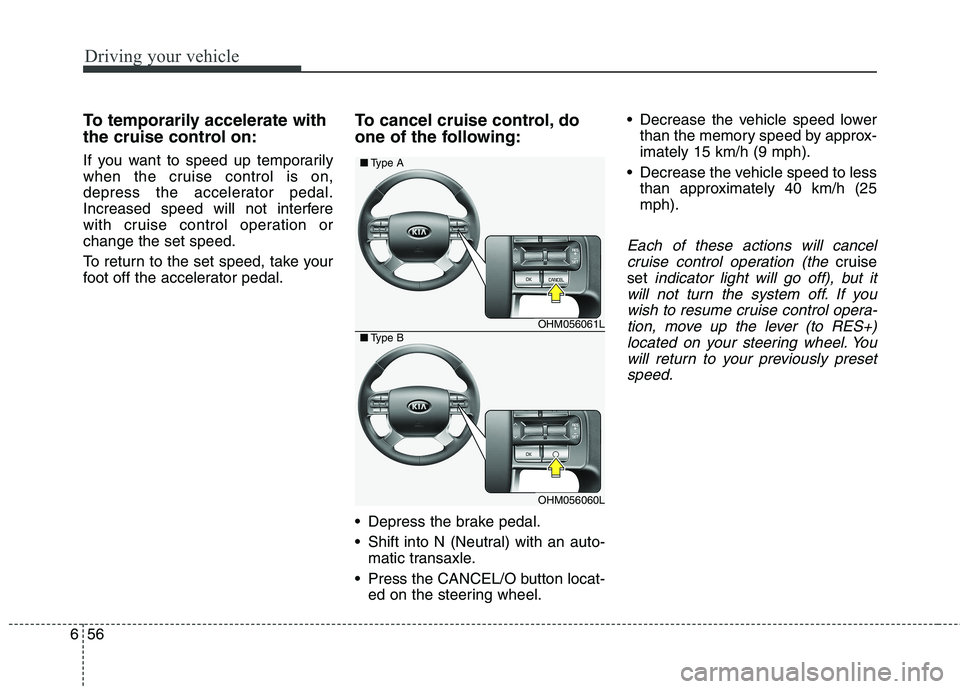
foot off the accelerator pedal. To cancel cruise control, do
one of the following:
Depress the brake pedal.
Shift into N (Neutral) with an auto-
matic transaxle.
Press the CANCEL/O button locat- ed on the steering wheel. Decrease the vehicle speed lower
than the memory speed by approx- imately 15 km/h (9 mph).
Decrease the vehicle speed to less than approximately 40 km/h (25mph).
Each of these actions will cancel
cruise control operation (the
cruise
set
indicator light will go off), but it
will not turn the system off. If you wish to resume cruise control opera-tion, move up the lever (to RES+)located on your steering wheel. You will return to your previously presetspeed.
OHM056061L
OHM056060L
■ Type A
■Type B