ignition KIA BORREGO 2017 Manual PDF
[x] Cancel search | Manufacturer: KIA, Model Year: 2017, Model line: BORREGO, Model: KIA BORREGO 2017Pages: 548, PDF Size: 36.78 MB
Page 255 of 548
Audio system
13
5
✽✽
NOTICE - Usingthe USB
Devices
Connect the USB device after turning on the engine. The USB
device may become damaged if it
is already connected when the
ignition is turned on. The USB
device may not operate properly if
the car ignition is turned on or off
with the USB device connected.
Be careful for static electricity when connecting/disconnecting
USB devices.
Encoded MP3 Players will not be recognized when connected as an
external device.
When connecting an external USB device, the vehicle's audio system
may not recognize the USB
depending on what firmware is
used by USB device or what files
are on the USB.
Only products formatted with byte/sectors under 64Kbyte will be
recognized.
This device recognizes USB devices formatted in FAT 12/16/32
file formats. This device does not
recognize files in NTFS file for-mat. (Continued)(Continued)
Some USB devices may not be sup-
ported due to compatibility issues.
Avoid contact between the USB connector and bodily parts or for-
eign objects.
Repeated connecting/disconnect- ing of USB devices within short
periods of time may result in prod-
uct malfunction.
A strange noise may occur when disconnecting the USB.
Make sure to connect/disconnect external USB devices with the
audio power turned off.
The amount of time required to recognize the USB device may dif-
fer depending on the type, size or
file formats stored on the USB.
Such differences in time are not
indications of malfunctions.
The vehicle audio system only sup- ports USB devices designed to
play music files.
USB images and videos are not supported. (Continued)(Continued)
Do not use the USB I/F to charge
batteries or USB accessories that
generate heat. Doing so may lead
to worsened performance or dam-
age to the audio system.
The audio system may not recog- nize the USB device if separately
purchased USB hubs and exten-
sion cables are being used.
Connect the USB device directly
with the USB port of the vehicle.
When using mass storage USB devices with separate logical
drives, only files saved to the root
drive can be played.
Files may not properly operate if application programs are installed
on the USBs.
The audio system may not operate normally if MP3 Players, cellular
phones, digital cameras, or other
electronic devices (USB devices
not recognized as portable disk
drives) are connected with the
audio system. (Continued)
Page 256 of 548
Audio system
514
(Continued)
Charging through the USB maynot work for some mobile devices.
The device may not support nor- mal operation when using an atyp-
ical USB memory device (minia-
ture, keychain, etc.). For best
results, use a typical USB device
that has a metal case.
The device may not support nor- mal operation when using formats
such as HDD Type, CF, or SD
Memory.
The device will not support files locked by DRM (Digital Rights
Management.)
USB memory sticks used by con- necting an Adaptor (SD Type or
CF Type) may not be properly rec-
ognized.
The device may not operate prop- erly when using USB HDDs or
USBs subject to connection fail-
ures caused by vehicle vibrations.
(e.g. i-stick type) (Continued)(Continued)
Avoid use of USB
memory products that
can also be used as key
chains or mobile phone
accessories. Use of such products
may cause damage to the USB
jack.
Connecting an MP3 device or phone through various channels,
such as AUX/BT or Audio/USB
mode may result in pop noises or
abnormal operation. ✽✽
NOTICE - Using an iPod ®
iPod ®
is a registered trademark of
Apple Inc.
In order to use the iPod ®
with
your vehicle’s audio system, you
must use a dedicated iPod ®
cable.
(the cable that is supplied when
purchasing iPod ®
/iPhone ®
prod-
ucts)
If the iPod ®
is connected to the
vehicle while it is playing, a high
pitch sound could occur for
approximately 1-2 seconds imme-
diately after connecting. If possi-
ble, connect the iPod ®
to the vehi-
cle with the iPod ®
stopped/paused.
When the vehicle ignition is set to ACC or ON, connecting the iPod ®
through the iPod ®
cable will
charge the iPod ®
through the car
audio system.
When connecting with the iPod ®
cable, make sure to fully insert the
jack to prevent communication
interference. (Continued)
Page 260 of 548
Audio system
518
(Continued)
While a phone is connectedthrough Bluetooth®
Wireless
Technology your phone may dis-
charge quicker than usual for
additional Bluetooth®
Wireless
Technology-related operations.
If Priority is set upon vehicle igni- tion (IGN/ACC ON), the
Bluetooth ®
Wireless Technology
phone will be automatically con-
nected. Even if you are outside, the
Bluetooth ®
Wireless Technology
phone will be automatically con-
nected once you are in the vicinity
of the vehicle. If you do not want
to automatically connect your
Bluetooth ®
Wireless Technology
phone, try the following.
1) Turn off the Bluetooth®
Wireless
Technology feature in your
mobile phone.
2) Turn off the Bluetooth®
Wireless
Technology feature in your car
audio system. (Continued)(Continued)
- To turn off the Bluetooth®
Wireless Technology feature in
your car audio system, go to
[SETUP]> [Phone] and [turn
off] the Bluetooth®
Wireless
Technology feature.
Bluetooth ®
Wireless Technology
connection may become intermit-
tently disconnected in some
mobile phones. Follow these steps
to try again.
1) Turn the Bluetooth®
Wireless
Technology function within the
mobile phone off/on and try
again.
2) Turn the mobile phone power Off/On and try again.
3) Completely remove the mobile phone battery, reboot, and then
try again.
4) Reboot the audio system and try again.
5) Delete all paired devices, pair and try again.
It is possible to pair up to five Bluetooth ®
Wireless Technology
devices to the car system. (Continued)(Continued)
Phone contact names should be
saved in English or they may not
be displayed correctly.
The Handsfree call volume and quality may differ depending on
the mobile phone.
Only one Bluetooth®
Wireless
Technology device can be connect-
ed at a time.
In some mobile phones, starting the ignition while talking through
Bluetooth ®
Wireless Technology
enabled handsfree call will result
in the call becoming disconnected.
(Switch the call back to your
mobile phone when starting the
ignition.)
If the mobile phone is not paired or connected, it is not possible to
enter Phone mode. Once a phone
is paired or connected, the guid-
ance screen will be displayed.
Page 328 of 548
Driving your vehicle
4
6
Before entering vehicle
• Be sure that all windows, outside
mirror(s), and outside lights are clean.
Check the condition of the tires.
Check under the vehicle for any sign of leaks.
Be sure there are no obstacles behind you if you intend to back up. Necessary inspections
Fluid levels, such as engine oil,
engine coolant, brake fluid, and
washer fluid should be checked on a
regular basis, with the exact interval
depending on the fluid. Further
details are provided in chapter 8,“Maintenance”.
Before starting
Close and lock all doors.
Position the seat so that all con-
trols are easily reached.
Adjust the inside and outside rearview mirrors.
Be sure that all lights work.
Check all gauges.
Check the operation of warning lights when the ignition switch is
turned to the ON position.
Release the parking brake and make sure the brake warning lightgoes out.
For safe operation, be sure you are
familiar with your vehicle and itsequipment.
BEFORE DRIVING
WARNING
Driving while distracted can
result in a loss of vehicle con-
trol, that may lead to an acci-
dent, severe personal injury,
and death. The driver’s primary
responsibility is in the safe and
legal operation of a vehicle, and
use of any handheld devices,
other equipment, or vehicle sys-
tems which take the driver’s
eyes, attention and focus away
from the safe operation of a
vehicle or which are not permis-
sible by law should never beused during operation of the
vehicle.
Page 330 of 548
Driving your vehicle
6
6
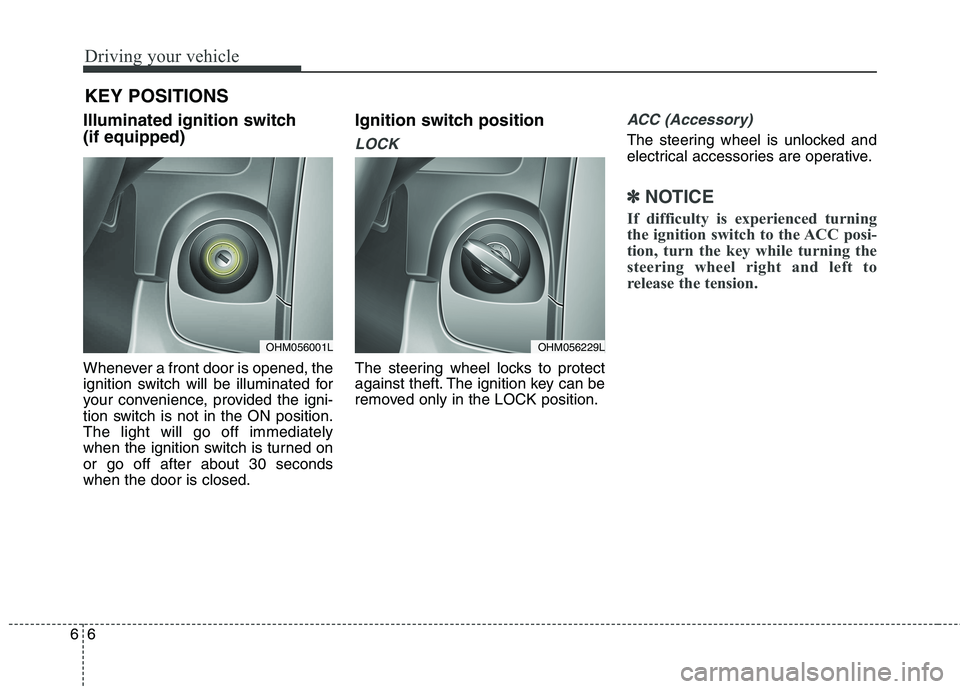
Illuminated ignition switch (if equipped)
Whenever a front door is opened, the
ignition switch will be illuminated for
your convenience, provided the igni-
tion switch is not in the ON position.The light will go off immediately
when the ignition switch is turned onor go off after about 30 secondswhen the door is closed. Ignition switch position
LOCK
The steering wheel locks to protect
against theft. The ignition key can be
removed only in the LOCK position.
ACC (Accessory)
The steering wheel is unlocked and
electrical accessories are operative.
✽✽
NOTICE
If difficulty is experienced turning
the ignition switch to the ACC posi-
tion, turn the key while turning the
steering wheel right and left to
release the tension.
KEY POSITIONS
OHM056001LOHM056229L
Page 331 of 548

67
Driving your vehicle
ON
The warning lights can be checked
before the engine is started. This is
the normal running position after the
engine is started.
Do not leave the ignition switch ON ifthe engine is not running to preventbattery discharge.
START
Turn the ignition key to the START
position to start the engine. The
engine will crank until you release
the key; then it returns to the ON
position. The brake warning lamp
can be checked in this position. Starting the engine
WARNING
- Ignition key
Never turn the ignition switch to LOCK or ACC while the vehi-
cle is moving. This would result
in loss of directional control
and braking function, whichcould cause an accident.
(Continued)
(Continued)
The anti-theft steering columnlock (if equipped) is not a sub-
stitute for the parking brake.
Before leaving the driver’s seat,
always make sure the shift
lever is engaged in P (Park), set
the parking brake fully and shut
the engine off. Unexpected and
sudden vehicle movement mayoccur if these precautions arenot taken.
Never reach for the ignition switch, or any other controls
through the steering wheel
while the vehicle is in motion.
The presence of your hand orarm in this area could cause a
loss of vehicle control, an
accident and serious bodily
injury or death.
Do not place any movable objects around the driver’s
seat as they may move while
driving, interfere with the driv-er and lead to an accident.
WARNING
Always wear appropriate shoes when operating your
vehicle. Unsuitable shoes
(high heels, ski boots,etc.)
may interfere with your abilityto use the brake and accelera-tor pedal.
Do not start the vehicle with the accelerator pedal
depressed. The vehicle can
move and lead to an accident.
Wait until the engine rpm is nor- mal. The vehicle may suddenly
move if the brake padel isreleased when the rpm is high.
Page 332 of 548
Driving your vehicle
8
6
Starting the gasoline engine
1. Make sure the parking brake is
applied.
2. Place the transaxle shift lever in P (Park). Depress the brake pedal
fully.
You can also start the engine
when the shift lever is in the N(Neutral) position.
3. Turn the ignition switch to START and hold it there until the engine
starts (a maximum of 10 sec-
onds), then release the key.
It should be started without
depressing the accelerator pedal.
4. Do not wait for the engine to warm up while the vehicle remains sta-
tionary.
Start driving at moderate engine
speeds. (Steep accelerating and
decelerating should be avoided.)
CAUTION
If the engine stalls while you are
in motion, do not attempt tomove the shift lever to the P (Park) position. If traffic androad conditions permit, you mayput the shift lever in the N(Neutral) position while the vehicle is still moving and turnthe ignition switch to the STARTposition in an attempt to restart the engine.
CAUTION
Do not engage the starter for more than 10 seconds. If theengine stalls or fails to start, wait 5 to 10 seconds before re-engaging the starter. Improperuse of the starter may damage it.
Do not turn the ignition switch to the START position with theengine running. It may dam-age the starter.
Page 333 of 548

69
Driving your vehicle
Starting the diesel engine
To start the diesel engine when the engine is cold, it has to be pre-heat-
ed before starting the engine and
then have to be warmed up before
starting to drive.
1. Make sure the parking brake isapplied.
2. Place the transaxle shift lever in P(park). Depress the brake pedal
fully.
You can also start the engine
when the shift lever is in theN(neutral) position.3. Turn the ignition switch to the ON position to pre-heat the engine.
Then the glow indicator light will
illuminate.
4. If the glow indicator light goes out, turn the ignition switch to the STARTposition and hold it there until the
engine starts (a maximum of 10
seconds), then release the key.
✽✽ NOTICE
If the engine does not start within 10
seconds after the preheating is com-
pleted, turn the ignition key once
more to the LOCK position for 10
seconds, and then to the ON posi-
tion, in order to preheat again.
Starting and stopping the engine for
turbocharger intercooler
1. Do not race or accelerate the engine immediately after starting.
If the engine is cold, idle for sever-
al seconds before sufficient lubri-cation is ensured in the tur-bocharger unit.
2. After high speed or extended driv- ing, requiring a heavy engine load,
run the engine on idle condition
about 1 minute before turning it off.
This idle time will allow the tur- bocharger to cool prior to shutting
the engine off.
W-60
Glow indicator light
CAUTION
Do not turn off the engine imme-
diately after it has been subject-ed to a heavy load. Doing somay cause severe damage to the engine or turbo charger unit.
Page 341 of 548

617
Driving your vehicle
For smooth operation, depress thebrake pedal when shifting from N(Neutral) to a forward or reverse gear.
Transaxle ranges
The indicator lights in the instrument
cluster displays the shift lever posi-
tion when the ignition switch is in theON position.
P (Park)
Always come to a complete stop
before shifting into P (Park). This
position locks the transaxle and pre-
vents the front wheels from rotating. R (Reverse)
Use this position to drive the vehicle
backward.
WARNING
- Automatic
transaxle
Always check the surrounding areas near your vehicle for
people, especially children,
before shifting a vehicle into
D (Drive) or R (Reverse).
Before leaving the driver’s seat, always make sure the
shift lever is in the P (Park)
position; then set the parking
brake fully and shut the
engine off. Unexpected and
sudden vehicle movementcan occur if these precautions
are not followed in the orderidentified.
Do not use the engine brake (shifting from a high gear to
lower gear) rapidly on slip-
pery roads.
The vehicle may slip causing an accident.
CAUTION
To avoid damage to your
transaxle, do not acceleratethe engine in R (Reverse) orany forward gear position withthe brakes on.
When stopped on an upgrade, do not hold the vehicle sta-tionary with engine power.Use the service brake or theparking brake.
Do not shift from N (Neutral) or P (Park) into D (Drive), or R(Reverse) when the engine isabove idle speed.
WARNING
Shifting into P (Park) while the vehicle is in motion will cause
the drive wheels to lock which
will cause you to lose control
of the vehicle.
Do not use the P (Park) posi- tion in place of the parking
brake. Always make sure the
shift lever is latched in the P
(Park) position and set the
parking brake fully.
Never leave a child unattend- ed in a vehicle.
CAUTION
The transaxle may be damaged
if you shift into P (Park) whilethe vehicle is in motion.
Page 342 of 548
Driving your vehicle
18
6
N (Neutral)
The wheels and transaxle are not
engaged. The vehicle will roll freely
even on the slightest incline unless
the parking brake or service brakesare applied. - Parking in N (Neutral) gear
Follow below steps when parking
and you want the vehicle to movewhen pushed.
1.After parking your vehicle, step on
the brake pedal and move the shift
lever to [P] with the ignition button
in [ON] or while the engine is run-ning.
2.If the parking brake is applied unlock the parking brake.
3.While pressing the brake pedal, turn the ignition button [OFF].
- For smart key equipped vehicles,the ignition switch can be moved
to [OFF] only when the shift leveris in [P].
4.Change the gear shift lever to [N] (Neutral) while pressing the brakepedal and pushing [SHIFT LOCK
RELEASE] button or inserting,
pressing down a tool (e.g. flathead
screw-driver) into the [SHIFTLOCK RELEASE] access hole at
the same time. Then, the vehicle
will move when external force isapplied.
CAUTION
Always come to a complete stop
before shifting into or out of R(Reverse); you may damage the transaxle if you shift into R(Reverse) while the vehicle is inmotion, except as explained in “Rocking the vehicle”, in thismanual.
CAUTION
With the exception of parking in neutral gear, always park thevehicle in [P] (Park) for safety and engage the parking brake.
Before parking in [N] (Neutral) gear, first make sure the park-ing ground is level and flat. Donot park in [N] gear on any slopes or gradients.
If parked and left in [N], thevehicle may move and causeserious damage and injury.
WARNING
Do not drive with the shift lever in N (Neutral).
The engine brake will not work and lead to an accident.