audio KIA CADENZA 2011 Owners Manual
[x] Cancel search | Manufacturer: KIA, Model Year: 2011, Model line: CADENZA, Model: KIA CADENZA 2011Pages: 352, PDF Size: 28.17 MB
Page 11 of 352
23
Your vehicle at a glance
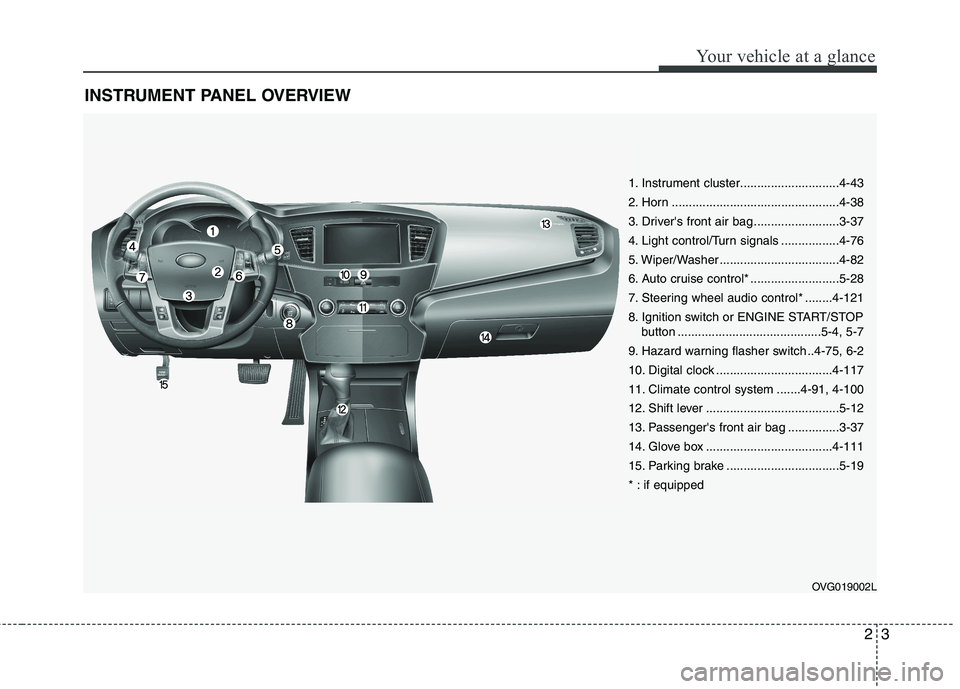
INSTRUMENT PANEL OVERVIEW
OVG019002L
1. Instrument cluster.............................4-43
2. Horn .................................................4-38
3. Driver's front air bag .........................3-37
4. Light control/Turn signals .................4-76
5. Wiper/Washer ...................................4-82
6. Auto cruise control* ..........................5-28
7. Steering wheel audio control* ........4-121
8. Ignition switch or ENGINE START/STOPbutton ..........................................5-4, 5-7
9. Hazard warning flasher switch ..4-75, 6-2
10. Digital clock ..................................4-117
11. Climate control system .......4-91, 4-100
12. Shift lever .......................................5-12
13. Passenger's front air bag ...............3-37
14. Glove box .....................................4-111
15. Parking brake .................................5-19
* : if equipped
Page 63 of 352
Manual climate control system / 4-91
Automatic climate control system / 4-100
Windshield defrosting and defogging / 4-107 Storage compartments / 4-111Interior features / 4-113Audio system / 4-120
Features of your vehicle4
Page 176 of 352
4115
Features of your vehicle
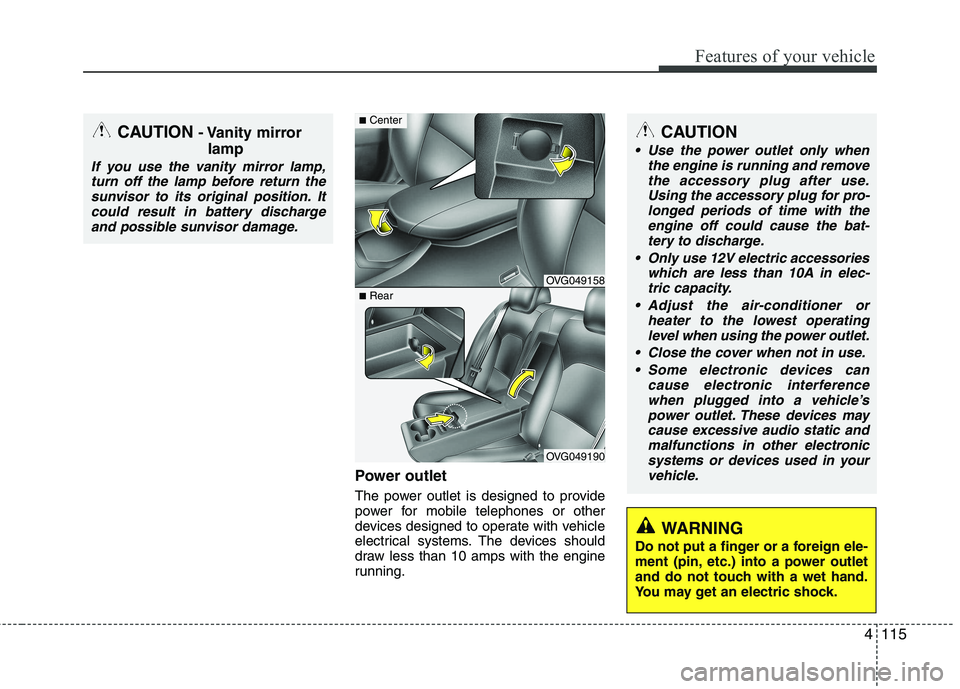
Power outlet
The power outlet is designed to provide
power for mobile telephones or other
devices designed to operate with vehicle
electrical systems. The devices should
draw less than 10 amps with the engine
running.
CAUTION
Use the power outlet only whenthe engine is running and remove
the accessory plug after use. Using the accessory plug for pro-longed periods of time with theengine off could cause the bat-
tery to discharge.
Only use 12V electric accessories which are less than 10A in elec-tric capacity.
Adjust the air-conditioner or heater to the lowest operatinglevel when using the power outlet.
Close the cover when not in use. Some electronic devices can cause electronic interference
when plugged into a vehicle’s power outlet. These devices maycause excessive audio static and malfunctions in other electronic
systems or devices used in yourvehicle.
WARNING
Do not put a finger or a foreign ele-
ment (pin, etc.) into a power outlet
and do not touch with a wet hand.
You may get an electric shock.
CAUTION - Vanity mirror
lamp
If you use the vanity mirror lamp,turn off the lamp before return the
sunvisor to its original position. Itcould result in battery dischargeand possible sunvisor damage.
OVG049158
OVG049190
■ Center
■Rear
Page 177 of 352
Features of your vehicle
116
4
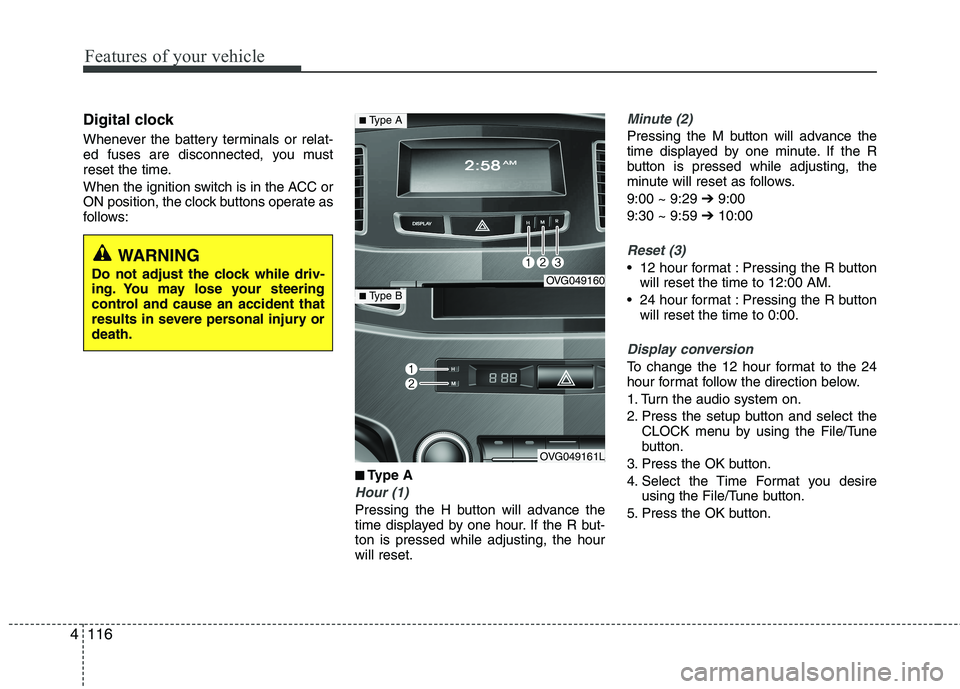
Digital clock
Whenever the battery terminals or relat-
ed fuses are disconnected, you must
reset the time.
When the ignition switch is in the ACC or
ON position, the clock buttons operate as
follows:
■
■Type A
Hour (1)
Pressing the H button will advance the
time displayed by one hour. If the R but-ton is pressed while adjusting, the hourwill reset.
Minute (2)
Pressing the M button will advance the
time displayed by one minute. If the R
button is pressed while adjusting, the
minute will reset as follows. 9:00 ~ 9:29 ➔9:00
9:30 ~ 9:59 ➔10:00
Reset (3)
12 hour format : Pressing the R button
will reset the time to 12:00 AM.
24 hour format : Pressing the R button will reset the time to 0:00.
Display conversion
To change the 12 hour format to the 24
hour format follow the direction below.
1. Turn the audio system on.
2. Press the setup button and select the CLOCK menu by using the File/Tune
button.
3. Press the OK button.
4. Select the Time Format you desire using the File/Tune button.
5. Press the OK button.
WARNING
Do not adjust the clock while driv-
ing. You may lose your steering
control and cause an accident that
results in severe personal injury ordeath.
OVG049160
OVG049161L
■ Type A
■Type B
Page 178 of 352
4117
Features of your vehicle
■■
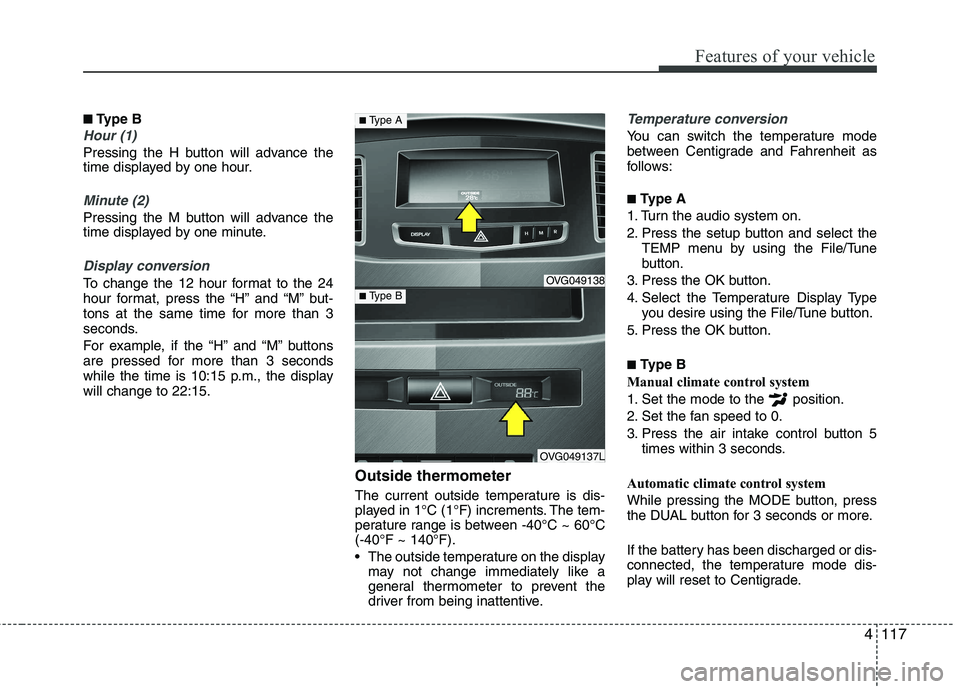
Type B
Hour (1)
Pressing the H button will advance the
time displayed by one hour.
Minute (2)
Pressing the M button will advance the
time displayed by one minute.
Display conversion
To change the 12 hour format to the 24
hour format, press the “H” and “M” but-
tons at the same time for more than 3
seconds.
For example, if the “H” and “M” buttons
are pressed for more than 3 seconds
while the time is 10:15 p.m., the displaywill change to 22:15.
Outside thermometer
The current outside temperature is dis-
played in 1°C (1°F) increments. The tem-
perature range is between -40°C ~ 60°C(-40°F ~ 140°F).
The outside temperature on the displaymay not change immediately like a
general thermometer to prevent the
driver from being inattentive.
Temperature conversion
You can switch the temperature mode
between Centigrade and Fahrenheit as
follows: ■ Type A
1. Turn the audio system on.
2. Press the setup button and select the TEMP menu by using the File/Tune
button.
3. Press the OK button.
4. Select the Temperature Display Type you desire using the File/Tune button.
5. Press the OK button. ■ Type B
Manual climate control system
1. Set the mode to the position.
2. Set the fan speed to 0.
3. Press the air intake control button 5 times within 3 seconds.
Automatic climate control system
While pressing the MODE button, press
the DUAL button for 3 seconds or more.
If the battery has been discharged or dis-
connected, the temperature mode dis-
play will reset to Centigrade.
OVG049138
OVG049137L
■ Type A
■Type B
Page 181 of 352
Features of your vehicle
120
4
✽✽
NOTICE
If you install an aftermarket HID head
lamp, your vehicle’s audio and electron-
ic device may malfunction.
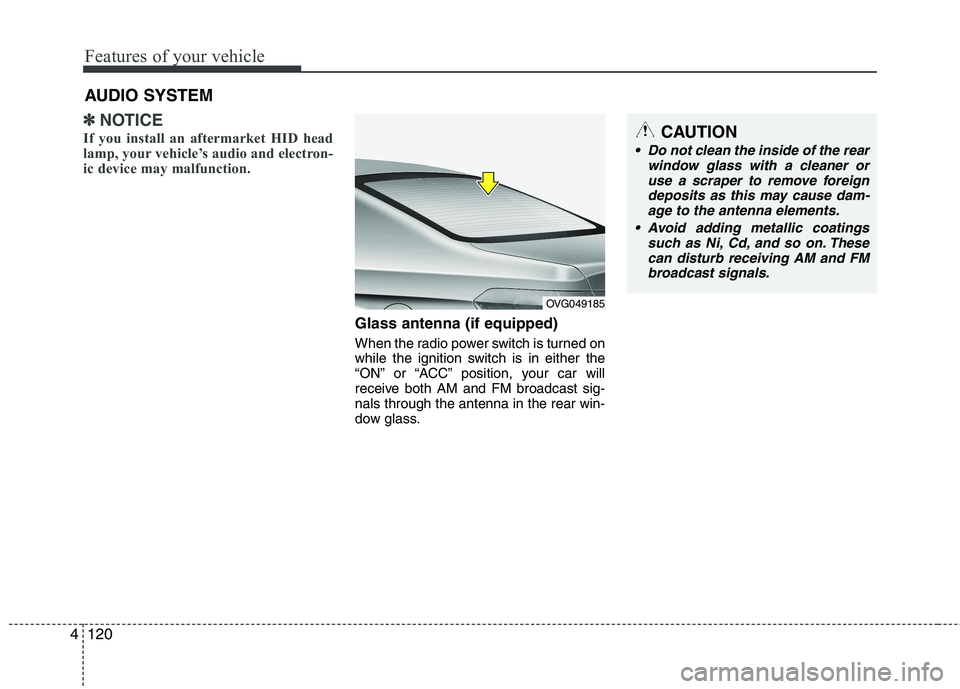
Glass antenna (if equipped)
When the radio power switch is turned on
while the ignition switch is in either the
“ON” or “ACC” position, your car will
receive both AM and FM broadcast sig-nals through the antenna in the rear win-
dow glass.
AUDIO SYSTEM
OVG049185
CAUTION
• Do not clean the inside of the rear
window glass with a cleaner or
use a scraper to remove foreign deposits as this may cause dam-age to the antenna elements.
Avoid adding metallic coatings such as Ni, Cd, and so on. Thesecan disturb receiving AM and FMbroadcast signals.
Page 182 of 352
4121
Features of your vehicle
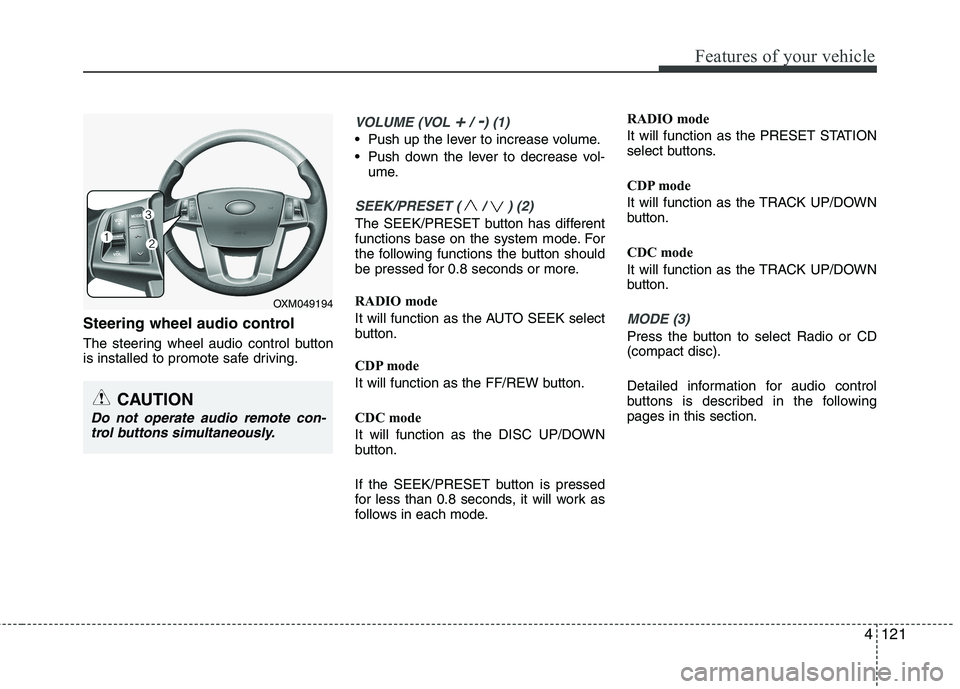
Steering wheel audio control
The steering wheel audio control button
is installed to promote safe driving.
VOLUME (VOL +/ -) (1)
Push up the lever to increase volume.
Push down the lever to decrease vol-ume.
SEEK/PRESET ( / ) (2)
The SEEK/PRESET button has different
functions base on the system mode. For
the following functions the button should
be pressed for 0.8 seconds or more.
RADIO mode
It will function as the AUTO SEEK select
button.
CDP mode
It will function as the FF/REW button.
CDC mode
It will function as the DISC UP/DOWN
button.
If the SEEK/PRESET button is pressed
for less than 0.8 seconds, it will work as
follows in each mode. RADIO mode
It will function as the PRESET STATION
select buttons.
CDP mode
It will function as the TRACK UP/DOWN
button.
CDC mode
It will function as the TRACK UP/DOWN
button.
MODE (3)
Press the button to select Radio or CD (compact disc).
Detailed information for audio control
buttons is described in the followingpages in this section.
CAUTION
Do not operate audio remote con-
trol buttons simultaneously.
OXM049194
Page 183 of 352
Features of your vehicle
122
4
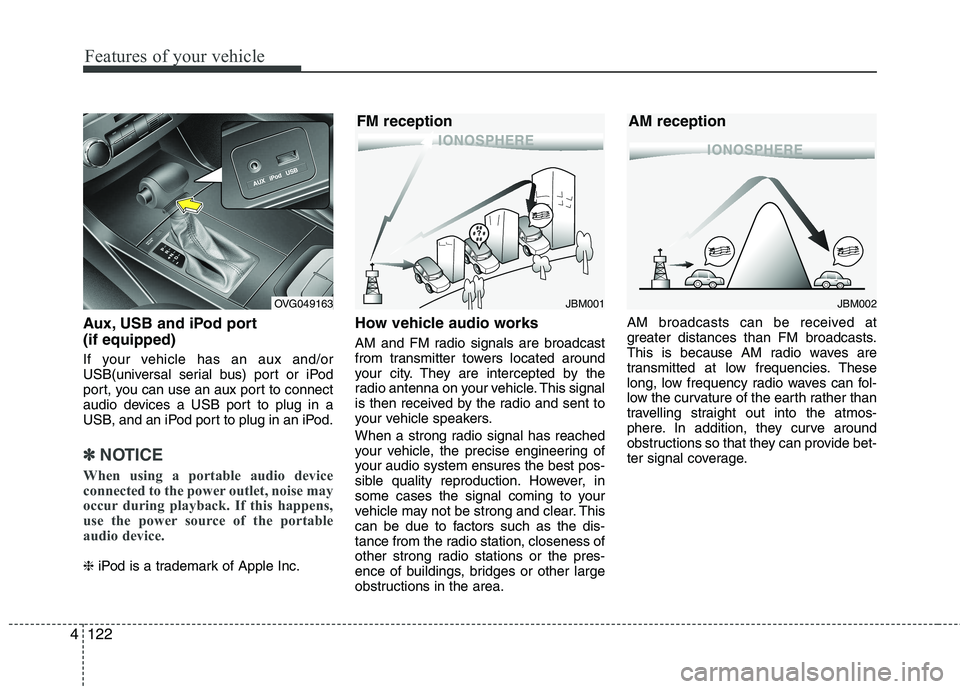
Aux, USB and iPod port (if equipped)
If your vehicle has an aux and/or
USB(universal serial bus) port or iPod
port, you can use an aux port to connect
audio devices a USB port to plug in a
USB, and an iPod port to plug in an iPod.
✽✽
NOTICE
When using a portable audio device
connected to the power outlet, noise may
occur during playback. If this happens,
use the power source of the portable
audio device.
❈ iPod is a trademark of Apple Inc. How vehicle audio works
AM and FM radio signals are broadcast
from transmitter towers located around
your city. They are intercepted by the
radio antenna on your vehicle. This signal
is then received by the radio and sent to
your vehicle speakers.
When a strong radio signal has reached
your vehicle, the precise engineering of
your audio system ensures the best pos-
sible quality reproduction. However, in
some cases the signal coming to your
vehicle may not be strong and clear. This
can be due to factors such as the dis-
tance from the radio station, closeness of
other strong radio stations or the pres-
ence of buildings, bridges or other large
obstructions in the area. AM broadcasts can be received at
greater distances than FM broadcasts.
This is because AM radio waves are
transmitted at low frequencies. These
long, low frequency radio waves can fol-
low the curvature of the earth rather than
travelling straight out into the atmos-
phere. In addition, they curve around
obstructions so that they can provide bet-
ter signal coverage.
JBM002
AM receptionJBM001
FM receptionOVG049163
Page 185 of 352
Features of your vehicle
124
4
Using a cellular phone or a two-way
radio
When a cellular phone is used inside the
vehicle, noise may be produced from the
audio equipment. This does not meanthat something is wrong with the audio
equipment. In such a case, use the cellu-
lar phone at a place as far as possiblefrom the audio equipment. Care of discs
If the temperature inside the vehicle is
too high, open the vehicle windows for
ventilation before using your vehicle
audio.
It is illegal to copy and use MP3/WMA files without permission. Use CDs that
are created only by lawful means.
Do not apply volatile agents such as benzene and thinner, normal cleaners
and magnetic sprays made for ana-
logue disc onto CDs.
To prevent the disc surface from get- ting damaged. Hold and carry CDs bythe edges or the edges of the center
hole only.
Clean the disc surface with a piece of soft cloth before playback (wipe it fromthe center to the outside edge).
Do not damage the disc surface or attach pieces of sticky tape or paperonto it.
Make sure objects other than CDs are not inserted into the CD player (Do not
insert more than one CD at a time). Keep CDs in their cases after use to
protect them from scratches or dirt.
Depending on the type of CD-R/CD- RW CDs, certain CDs may not operate
normally according to manufacturingcompanies or making and recording
methods. In such circumstances, if you
still continue to use those CDs, they
may cause the malfunction of your
vehicle audio system.
✽✽ NOTICE - Playing an
Incompatible Copy
Protected Audio CD
Some copy protected CDs, which do not
comply with the international audio CD
standards (Red Book), may not play on
your vehicle audio. Please note that if
you try to play copy protected CDs and
the CD player does not perform correct-
ly the CDs maybe defective, not the CD
player.
WARNING
Do not use a cellular phone while
driving. Stop at a safe location to
use a cellular phone.
CAUTION
When using a communication sys- tem such a cellular phone or a radioset inside the vehicle, a separate
external antenna must be fitted.When a cellular phone or a radio setis used with an internal antennaalone, it may interfere with the vehi-
cle's electrical system and adverse-ly affect safe operation of the vehi- cle.
Page 186 of 352
4125
Features of your vehicle
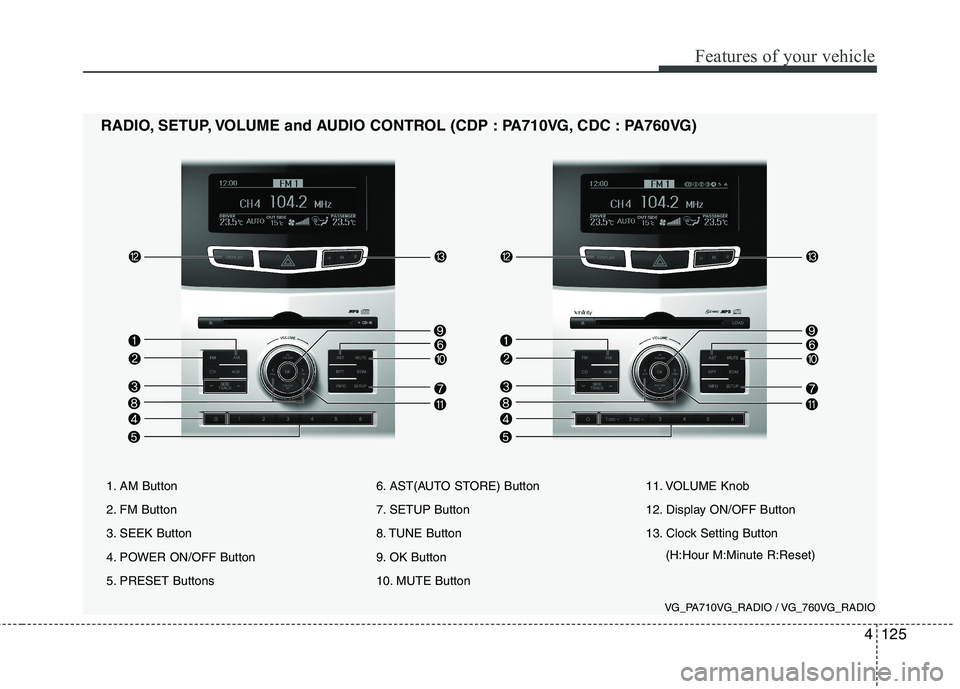
1. AM Button
2. FM Button
3. SEEK Button
4. POWER ON/OFF Button
5. PRESET Buttons6. AST(AUTO STORE) Button
7. SETUP Button
8. TUNE Button
9. OK Button
10. MUTE Button11. VOLUME Knob
12. Display ON/OFF Button
13. Clock Setting Button
(H:Hour M:Minute R:Reset)
RADIO, SETUP, VOLUME and AUDIO CONTROL (CDP : PA710VG, CDC : PA760VG)
VG_PA710VG_RADIO / VG_760VG_RADIO